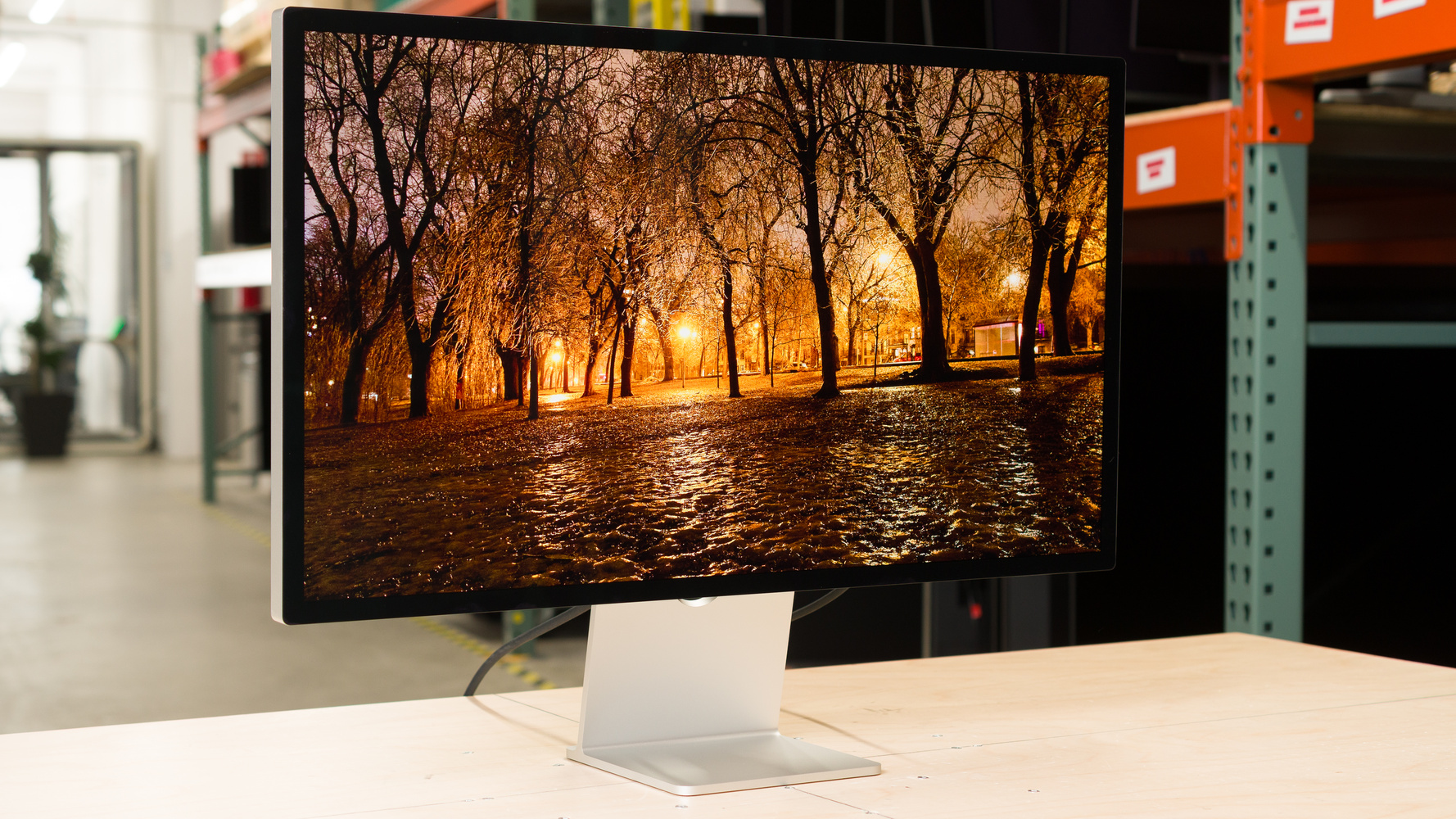
The Apple Studio Display 2026 is a 5k, 27-inch monitor. It's an updated version of the Apple Studio Display 2022 and sits below the Apple Studio Display XDR, which has a higher refresh rate, HDR, and Mini LED backlighting. This monitor is geared towards people who use Mac computers and want to complete their Apple ecosystem. It has Thunderbolt 5 to take advantage of the latest MacBooks, Mac minis, and Mac Studios, and unlike the previous version of this model, it has an additional Thunderbolt port for daisy-chaining a second screen. It has perks many monitors don't have, like six-speaker Spatial Audio that supports Dolby Atmos, and a built-in webcam and mic. You can also choose the configuration you want to get it in, as it's available with a standard glossy coating or the matte Nano-texture finish. It comes with a tilt-only stand, and you can upgrade to a tilt- and height-adjustable stand or get it with a VESA mount adapter if you prefer.
Our Verdict
The Apple Studio Display is bad for PC gaming. It has a limited 60Hz refresh rate, doesn't support VRR, and has blurry motion. The main benefit for gaming specifically is that it has low input lag for a responsive feel. Unfortunately, it has limited picture quality due to its low contrast ratio and doesn't support HDR at all.
Input lag is low.
Blur with fast-moving objects.
Limited 60Hz refresh rate and no VRR.
No HDR support.
Low contrast ratio.
The Apple Studio Display isn't suitable for console gaming because it doesn't have any HDMI ports. Even with a HDMI to USB-C adapter, it doesn't work with modern gaming consoles, like a PS5 or Xbox Series X|S.
Lack of HDMI ports, and doesn't work with an adapter.
The Apple Studio Display is great for work. Its high 5k resolution helps result in sharp text. It also gets bright enough to fight glare, but the standard glossy coating has mirror-like reflections in well-lit rooms. While its wide viewing angle helps if you need to share the screen with someone next to you, its tilt-only stand has limited ergonomics. You would need to get the variant without a stand if you want to use it with a more ergonomic third-party mount. On the plus side, its Thunderbolt 5 support with 96W of power delivery is great if you want to quickly connect a Thunderbolt laptop, like a MacBook.
Very sharp text clarity.
Wide viewing angle.
Thunderbolt 5 with daisy chaining.
Gets very bright in SDR.
Glossy coating has mirror-like reflections.
Tilt-only stand has limited ergonomics.
The Apple Studio Display is good for editing. Its dedicated sRGB mode is extremely accurate before any sort of calibration, without any noticeable issues. However, it locks the brightness, so you need to calibrate another mode if you want to adjust the brightness. It gets very bright if you do, but it has distracting mirror-like reflections in a sunny room. Unfortunately, it has a low contrast ratio and doesn't support HDR at all, which is disappointing if you work with HDR content.
Very sharp text clarity.
Wide viewing angle.
Thunderbolt 5 with daisy chaining.
Extremely accurate sRGB mode.
Gets very bright in SDR.
Displays wide range of colors.
No HDR support.
Glossy coating has mirror-like reflections.
Tilt-only stand has limited ergonomics.
Needs calibration for a bright screen.
The Apple 27 Studio Display gets very bright in SDR, enough to fight glare in most well-lit rooms. It doesn't support HDR at all, though.
Gets very bright in SDR.
The Apple Studio Display has a bad response time. There's noticeable blur with any fast-moving object.
Blur with fast-moving objects.
The Apple Studio Display doesn't support HDR.
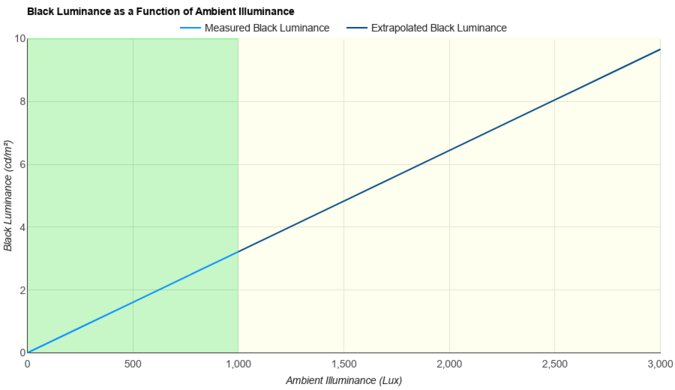
The Apple Studio Display 27 has good SDR picture quality. It displays a wide range of colors, but its biggest downside is that blacks look gray.
Displays wide range of colors.
Low contrast ratio.
The Apple Studio Display has remarkable color accuracy. Its dedicated sRGB mode has minimal issues. As it locks the brightness, you need to calibrate it if you want a brighter screen while maintaining accuracy.
Extremely accurate sRGB mode.
Needs calibration for a bright screen.
Performance Usages
Changelog
-
Updated Jun 18, 2026:
We added that the ASUS ROG Strix 5K XG27JCG is another 5k option with better motion handling.
-
Updated May 06, 2026:
We added that the BenQ MA270S is an alternative with extra USB ports.
-
Updated Apr 14, 2026:
We clarified the differences with the higher-end Apple Studio Display XDR. We also confirmed that an adapter doesn't work with a console.
- Updated Apr 01, 2026: Review published.
Check Price
Differences Between Sizes And Variants
We bought and tested the 27-inch Apple Studio Display, model year 2026, which is the only size available. We bought the standard glass with the tilt-adjustable stand. Besides Ergonomics and Reflections, the results are also valid if you buy a different stand or the Nano-texture screen finish. You can see the differences with the higher-end Apple Studio Display XDR, which also has a 27-inch, 5k screen, below.
| Model | Panel Type | Refresh Rate | HDR | Coatings | Stands |
|---|---|---|---|---|---|
| Studio Display | IPS | 60Hz | No |
Standard glossy Nano-texture |
Tilt only Tilt and height VESA adapter |
| Studio Display XDR | IPS (Mini LED) |
120Hz | Yes | Standard glossy Nano-texture |
Tilt and height VESA adapter |
There's no label on this monitor. We tested it on firmware Version 26.4 (Build 23EF246). You can only update the firmware with a Mac computer.
Popular Monitor Comparisons
The Apple Studio Display 2026 is Apple's entry-level 27-inch, 5k monitor, sitting below the higher-end Apple Studio Display XDR. Geared towards Mac users, it's meant as a lower-cost alternative to the higher-end model for those who don't need HDR support or a fast refresh rate. It pairs perfectly with a Mac, giving you access to features like its accurate sRGB mode. You can also get it in different variants, including the glossy standard coating or the matte Nano-texture coating. It shares many of the same features as the older Apple Studio Display 2022, with one main difference: it now supports daisy chaining and Thunderbolt 5.
As it targets a niche audience, it doesn't compete well against the rest of the monitor market. Its lack of HDR and limited picture quality are disappointing if you're a content creator, and it's really meant for people who want to complete their Apple ecosystem. While it's a solid option if that's the case, you can save money or get better versatility with other options, like the Dell U2725QE, if you're not a Mac user.
Also see our recommendations for the best monitors for the MacBook Pro and MacBook Air, the best monitors for the Mac mini, and the best monitors for Mac Studio.
The BenQ MA270S and the Apple Studio Display 2026 are competing 5k monitors. The Apple monitor has higher bandwidth Thunderbolt 5, and it's available in different variants, including if you want to get it with a glossy or matte coating. On the other hand, the BenQ is only available with a glossy coating. They both display a wide range of colors in SDR, with the Apple monitor having better accuracy, but the BenQ supports HDR. The BenQ is also more versatile for different uses, including console gaming due to its HDMI 2.1 ports, and it has a KVM switch, which is something the Apple monitor doesn't have.
The Apple Studio Display 2026 and the BenQ PD3225U are both productivity monitors with a few differences. With a smaller screen and higher resolution, the Apple monitor has higher pixel density and sharper text. The Apple also supports Thunderbolt 5 with extra power delivery compared to the Thunderbolt 3 support on the BenQ. Even though they both have sRGB modes, the Apple is much more accurate before calibration, but the BenQ supports HDR. Plus, the glossy coating of the Apple monitor has clearer images.
Despite sharing design similarities, the Apple Studio Display 2026 and the Samsung Smart Monitor M80D S32DM80 are fairly different. The Apple has a higher resolution and sharper text clarity, and it's better for content creators thanks to its better accuracy. The Apple also supports Thunderbolt 5 to take advantage of the latest MacBooks, which the Samsung doesn't support. The Samsung has advantages in other ways, as it has a built-in smart system to stream content without a PC. The Samsung also has the slight advantage for console gamers because it has HDMI ports, which the Apple doesn't have.
The Apple Studio Display 2026 and the Dell U4025QW are different types of 5k monitors. The Dell is a 40-inch ultrawide with more screen space, making it the better choice for multitasking. The Dell also has many extra features, like a bigger USB hub, a faster refresh rate, HDMI 2.1 bandwidth, and HDR support. On the other hand, the Apple has higher pixel density, resulting in sharper text. You can also get the Apple monitor with a glossy coating, resulting in clearer images. Plus, the Apple monitor supports Thunderbolt 5, as opposed to Thunderbolt 4 on the Dell.

We buy and test more than 30 monitors each year, all of which we purchase ourselves, without cherry-picked units or samples. We put a lot into each unbiased, straight-to-the-point review, and there's a whole process from purchasing to publishing, involving multiple teams and people. We do more than just use the monitor for a week; we use specialized, custom tools to measure various aspects and deliver objective, data-driven results. We also consider multiple factors before making any recommendations, including the monitor's cost, its performance compared to the competition, and whether it's easy to find.
Test Results






for pictures & test results






for pictures & test results

for pictures & test results

for pictures & test results

for pictures & test results

for pictures & test results

for pictures & test results



for videos & test results

for pictures & test results

for pictures & test results

for pictures & test results








for pictures & test results














for pictures & test results

