Samsung Smart Monitor M80D S32DM80  Monitor Review

Reviewed Jan 15, 2025 at 09:17am
Tested using Methodology v2.1 
Samsung Smart Monitor M80D S32DM80
6.5
PC Gaming 
4.9
Console Gaming 
8.3
Office 
7.7
Editing 
7.6
Brightness 
5.4
Response Time 
6.0
HDR Picture 
8.3
SDR Picture 
 5

The Samsung M80D is a 32-inch 4k smart monitor. A replacement for the Samsung Smart Monitor M8/M80C S32CM80, it's similar to the lower-end Samsung M70D and competes against other smart monitors such as the LG MyView Smart Monitor (32SR85U) and the ASUS ZenScreen Smart Monitor MS27UC. Like other smart monitors, it includes a remote with voice control, a smart OS like you'd normally find on a TV, and integrated speakers. It also has some extra features, such as Picture-in-Picture/Picture-by-Picture mode for displaying multiple inputs at the same time, as well as some gaming features, such as Virtual Aim Point and Minimap Zoom.

How We Test Monitors

We buy and test more than 30 monitors each year, with units that we buy completely on our own, without any cherry-picked units or samples. We put a lot into each unbiased, straight-to-the-point review, and there's a whole process from purchasing to publishing, involving multiple teams and people. We do more than just use the monitor for a week; we use specialized and custom tools to measure various aspects with objective data-based results. We also consider multiple factors before making any recommendations, including the monitor's cost, its performance against the competition, and whether or not it's easy to find.

Our Verdict

6.5
PC Gaming 

The Samsung M80D is okay for PC gaming. Fast-moving objects look quite blurry, so it's not a good choice for games with a lot of motion. While it displays HDR colors decently, it doesn't have local dimming and doesn't get bright enough for highlights to pop, though it's bright enough to overcome glare. Though it's not a monitor to buy for gaming, it works decently for slower, text-heavy games like turn-based strategy games, thanks to its superb text clarity.

Pros
  • High native contrast ratio.

Cons
  • Disappointing motion handling.

  • 60Hz refresh rate and no VRR.

  • No local dimming feature.

  • Highlights don't pop against the rest of the image.

4.9
Console Gaming 

The Samsung M80D is disappointing for console gaming. It's limited to a 60Hz refresh rate, and fast-moving objects look blurry. As a result, it's not a good choice for FPS and action RPG games. However, while it doesn't get bright enough for highlights to pop, it's bright enough to overcome glare. Additionally, it has sharp text, so it works decently if you plan on playing turn-based strategy or other slower games.

Pros
  • Low input lag.

  • High native contrast ratio.

Cons
  • Disappointing motion handling.

  • 60Hz refresh rate and no VRR.

  • Limited support for console features.

  • No local dimming feature.

  • HDMI 2.0 Bandwidth.

  • Highlights don't pop against the rest of the image.

8.3
Office 

The Samsung M80D is great for office use. Its large 32-inch screen makes it easy to multitask, and its 4k resolution ensures sharp text. It also gets bright enough to overcome glare, but reflections are distracting in a well-lit room. While it has good ergonomics that make it easy to adjust for individual use, without swivel adjustments and wide viewing angles, it's difficult to share the screen with someone sitting next to you.

Pros
  • Fantastic text clarity.

  • Bright enough to fight glare.

  • Good individual ergonomics.

Cons
  • No swivel adjustments.

  • Narrow viewing angles.

  • Distracting reflections in bright rooms.

7.7
Editing 

The Samsung M80D is good for content creation. It has accurate colors before calibration, but calibrating it still provides the best accuracy. On the plus side, its large 32-inch screen is big enough for multitasking, and its high resolution and high pixel density ensure a sharp image. It also has good ergonomics, but it doesn't offer swivel adjustments, and because it has narrow viewing angles, it's difficult to share your screen with a coworker or client.

Pros
  • Fantastic text clarity.

  • Bright enough to fight glare.

  • High native contrast ratio.

  • Good individual ergonomics.

Cons
  • No swivel adjustments.

  • Narrow viewing angles.

7.6
Brightness 

The Samsung M80D has good brightness, as it gets bright enough to fight glare in well-lit rooms. While it still gets bright in HDR, highlights don't pop against dark backgrounds.

Pros
  • Bright enough to fight glare.

Cons
  • Highlights don't pop against the rest of the image.

5.4
Response Time 

The Samsung M80D has a poor response time, and there's noticeable smearing and motion blur with fast-moving objects.

Pros
None
Cons
  • Disappointing motion handling.

6.0
HDR Picture 

The Samsung M80D has acceptable HDR picture quality. HDR colors look decently vivid, and it displays darker colors fairly well. It also has excellent contrast and fairly deep blacks are visible in a dark room. However, it doesn't have local dimming to improve this performance.

Pros
  • High native contrast ratio.

Cons
  • No local dimming feature.

8.3
SDR Picture 

The Samsung M80D has great SDR picture quality. It displays a wide range of colors, and it displays fairly deep blacks next to bright highlights.

Pros
  • High native contrast ratio.

  • Displays wide range of colors.

Cons
None
8.3
Color Accuracy 

The Samsung M80D has great color accuracy. Colors are quite accurate even before calibration, but you still need to calibrate it for the best accuracy.

Pros
  • Accurate colors before calibration.

Cons
  • Full calibration required for best accuracy.

  • 6.5
    PC Gaming
  • 4.9
    Console Gaming
  • 8.3
    Office
  • 7.7
    Editing

  • Performance Usages

  • 7.6
    Brightness
  • 5.4
    Response Time
  • 6.0
    HDR Picture
  • 8.3
    SDR Picture
  • 8.3
    Color Accuracy
  • Changelog

    1.  Updated Aug 19, 2025: 

      We updated text throughout to match the new and updated tests with Test Bench 2.1, including in the Verdict section.

    2.  Updated Aug 07, 2025: 

      Added that the Dell S3225QS is a similar monitor that has HDMI 2.1 bandwidth.

    3.  Updated Jul 24, 2025: We've converted this review to Test Bench 2.1. This includes new tests for Direct Reflections, Ambient Black Level Raise, and Total Reflected Light. You can see all the changes in the changelog.
    4.  Updated Feb 21, 2025: We've converted this review to Test Bench 2.0.1. This includes a new test result for DisplayPort 2.1 Transmission Bandwidth.

    Check Price

    32"LS32DM801UNXZA
    SEE PRICE
    Samsung.com
    32"LS32DM801UNXZA
    SEE PRICE
    Amazon.com
    32"LS32DM801UNXZA
    SEE PRICE
    BestBuy.com
    32"LS32DM801UNXZA
    SEE PRICE
    Walmart.com
    32"LS32DM801UNXZA
    B&H

    Differences Between Sizes And Variants

    We tested the 32-inch Samsung M80D, which is the only size available. It replaces the Samsung Smart Monitor M8/M80C S32CM80 and sits above the Samsung Smart Monitor M7/M70D, which is available in 32 and 43-inch sizes but doesn't come with all the M80D's features, such as a webcam. The M80D is only available in one color. You can see how these monitors differ below:

    Model Colors Available Size Webcam Included
    M80D White 32" Yes
    M70D Black 32" and 43" No

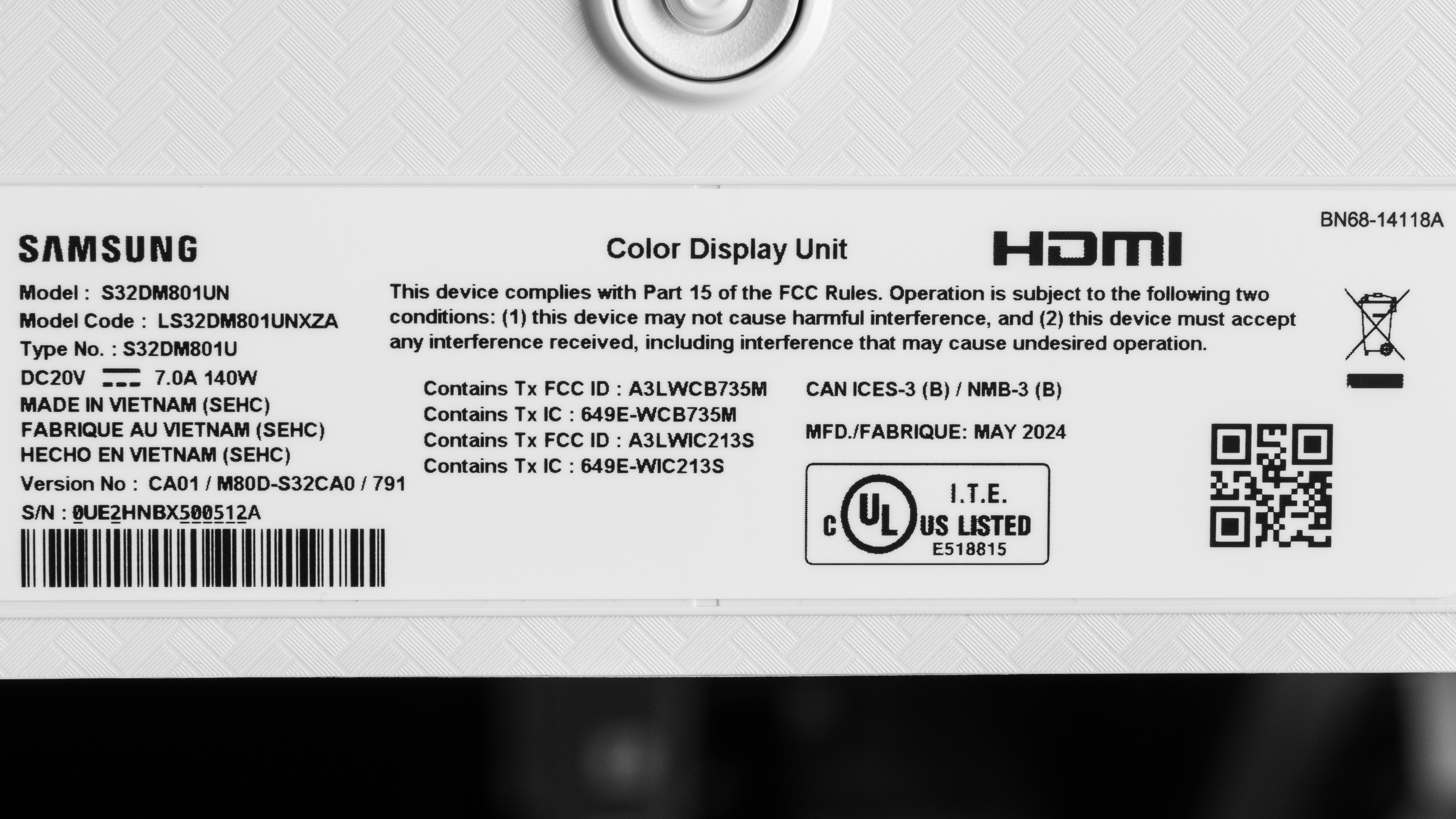
    Our unit's label indicates it was manufactured in May 2024. We tested it with firmware 1110.

    Popular Monitor Comparisons

    The Samsung M80D is a 4k, 60Hz smart monitor. It's ideally suited to people who don't have room for a full TV but still want a smart TV experience, including integrated apps, a remote with voice control, and even a bundled webcam. If you're looking for an all-in-one solution with a large screen and sharp text and plan to use the monitor mostly for doing work and watching content, it's a great choice at its sale price. However, it's not a great choice if you plan to game, as it's limited to a 60Hz refresh rate, and fast-moving objects look blurry. Additionally, while it's decent for watching content, its highlights don't get bright enough to pop in HDR. If you don't need a webcam and are looking for something a bit cheaper with similar performance, the Samsung Smart Monitor M7/M70C S32CM70 is a great option. Additionally, if the M80D isn't on sale and you don't need a smart system or remote, the Acer Nitro XV275K P3biipruzx is an outstanding alternative with far better picture quality, brighter highlights, and superior gaming performance.

    See our recommendations for the best 32-inch monitors, the best multimedia monitors, and, if you're interested, the best budget TVs.

    Samsung Smart Monitor M7/M70C S32CM70

    The Samsung Smart Monitor M7/M70C S32CM70 and the Samsung Smart Monitor M80D S32DM80 are similar 32-inch smart monitors. For most people, the M80D is a better option, as it gets brighter in HDR, includes a webcam, and was released more recently and may receive smart OS updates longer. However, if you don't need a webcam you may prefer the M70C's lower cost.

    Dell S3225QS

    The Samsung Smart Monitor M80D S32DM80 and the Dell S3225QS are both 4k, 32-inch monitors. They share similar specs, but the main differences between them come down to their features. The Samsung comes with a built-in smart system, so you can watch content even without a PC, and it has a USB hub, which the Dell doesn't have. On the other hand, the Dell can take advantage of gaming consoles because it has a higher 120Hz refresh rate, and it has HDMI 2.1 bandwidth, which the Samsung doesn't have.

    Samsung Smart Monitor M80B S32BM80

    The Samsung Smart Monitor M80B S32BM80 and the Samsung Smart Monitor M80D S32DM80 are similar 32-inch smart monitors. The M80D is the better option for most people, as it gets brighter in HDR, has more accurate colors, and was released more recently, and therefore may receive updates to its smart OS for longer. However, the M8 generally has similar performance, and you may prefer it if you can find it for less.

    Samsung Smart Monitor M80C S32CM80

    The Samsung Smart Monitor M80C S32CM80 and the Samsung Smart Monitor M80D S32DM80 are extremely similar 32-inch smart monitors. The M80D was released more recently and may receive smart OS updates longer. Given their similarities, you may prefer to choose whichever one costs less.

    Show more 

    Test Results

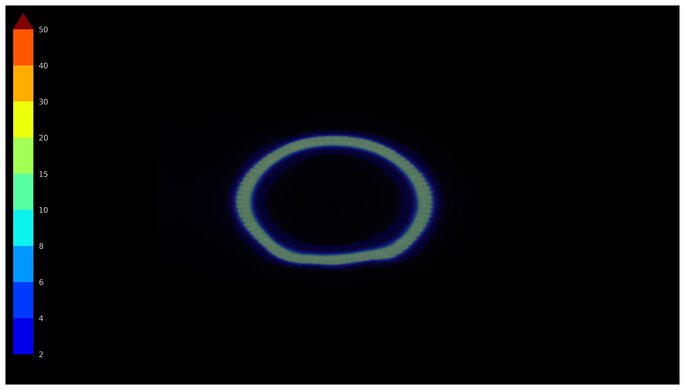
    perceptual testing image
    Sort:
    RATINGS
    Category:
    All
    Design
    Style
    Curved
    No
    Curve Radius
    Not Curved

    The Samsung M80D has a simple design with thin bezels on three sides and a flat, square-based stand. It has a sensor for the remote on the bottom right side, and it comes with a camera that attaches to the back. One thing to note is that its body color is more of an off-white than a pure white.

    7.0
    Build Quality

    The build quality is decent. While the monitor looks very nice, the plastic feels cheap, and the back of the monitor flexes a bit if you hold the monitor and adjust its height.

    7.6
    Ergonomics
    Min Height To Top Of Panel
    19.0" (48.3 cm)
    Height Adjustment
    4.7" (12.0 cm)
    Tilt Range
    -5° to 12.5°
    Rotate Portrait/Landscape
    Yes, Both Ways
    Swivel Range
    No swivel
    Wall Mount
    VESA 100x100

    The ergonomics are good. Though it adjusts well for individual use, it doesn't swivel, so it's not as easy to share your screen with someone else. The stand features a cutout for cable management.

    Stand
    Base Width
    7.9" (20.1 cm)
    Base Depth
    8.0" (20.2 cm)
    Thickness (With Display)
    5.2" (13.2 cm)
    Weight (With Display)
    17.4 lbs (7.9 kg)

    The base of the stand is flat, so you can put things on top of it. While the stand is fairly stable overall, the screen wobbles when bumped.

    Display
    Size
    32"
    Housing Width
    28.1" (71.3 cm)
    Housing Height
    16.7" (42.4 cm)
    Thickness (Without Stand)
    1.0" (2.5 cm)
    Weight (Without Stand)
    9.1 lbs (4.1 kg)
    Borders Size (Bezels)
    0.3" (0.7 cm)
    Controls

    The Samsung M80D has a remote that makes navigating through the Tizen smart interface easy. It has quick-access buttons to popular streaming services and a mic that works with Alexa and Bixby voice assistants. There's also a power button at the back of the monitor.

    In The Box
    Power Supply
    External Brick

    • HDMI cable
    • USB-C cable
    • Remote
    • Power cable and supply
    • USB-A female-to-male cable
    • Webcam with attachments (including camera blocker)
    • User documentation
    Picture Quality
    8.6
    Contrast
    Native Contrast
    4,660 : 1
    Contrast With Local Dimming
    N/A

    The contrast is excellent. It displays deep blacks next to bright highlights, but doesn't have a local dimming feature to improve the contrast further.

    0.0
    Local Dimming
    Local Dimming
    No
    Backlight
    Edge

    Though this monitor doesn't have local dimming, we still film these videos so you can compare the backlight performance with a monitor that has local dimming.

    8.4
    SDR Brightness
    Real Scene
    440 cd/m²
    Peak 2% Window
    466 cd/m²
    Peak 10% Window
    466 cd/m²
    Peak 25% Window
    465 cd/m²
    Peak 50% Window
    464 cd/m²
    Peak 100% Window
    464 cd/m²
    Sustained 2% Window
    466 cd/m²
    Sustained 10% Window
    465 cd/m²
    Sustained 25% Window
    464 cd/m²
    Sustained 50% Window
    464 cd/m²
    Sustained 100% Window
    462 cd/m²
    Automatic Brightness Limiting (ABL)
    0.000
    Minimum Brightness
    71 cd/m²

    Settings:

    • Game Mode: On
    • Game Genre: Original
    • Brightness: 50 (max)

    The SDR brightness is great. It easily gets bright enough to fight glare and maintains the same brightness across different content. However, its minimum brightness is high if you want to use it in the dark and are sensitive to bright lights.

    7.0
    HDR Brightness
    VESA DisplayHDR Certification
    No Certification
    Real Scene
    453 cd/m²
    Peak 2% Window
    460 cd/m²
    Peak 10% Window
    462 cd/m²
    Peak 25% Window
    462 cd/m²
    Peak 50% Window
    463 cd/m²
    Peak 100% Window
    462 cd/m²
    Sustained 2% Window
    460 cd/m²
    Sustained 10% Window
    462 cd/m²
    Sustained 25% Window
    462 cd/m²
    Sustained 50% Window
    462 cd/m²
    Sustained 100% Window
    462 cd/m²
    Automatic Brightness Limiting (ABL)
    0.001

    Settings:

    • PC Mode: Enabled
    • Game HDR: Off
    • Picture Mode: Original
    • Brightness: Max

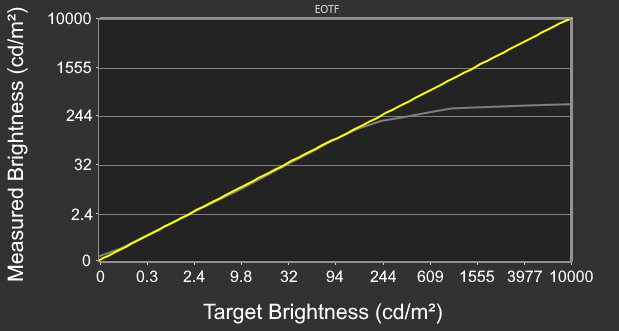
    The HDR brightness is decent. While it gets bright enough to overcome glare, highlights don't pop. Its PQ EOTF tracking also has a slow roll-off near its peak brightness, so highlights don't get as bright as they could with Windows. However, this roll-off is helpful when using the TV's smart OS apps, as in that situation, it preserves detail in very bright scenes.

    When PC Mode is off, the brightness varies depending on the Picture Mode you choose, as you can see below:

    Picture Mode Real Scene
    Dynamic 323 cd/m²
    Standard 338 cd/m²
    Movie 452 cd/m²
    5.1
    Horizontal Viewing Angle
    Color Washout From Left
    22°
    Color Washout From Right
    22°
    Color Shift From Left
    21°
    Color Shift From Right
    22°
    Brightness Loss From Left
    32°
    Brightness Loss From Right
    32°
    Black Level Raise From Left
    17°
    Black Level Raise From Right
    17°
    Gamma Shift From Left
    16°
    Gamma Shift From Right
    13°

    The horizontal viewing angle is disappointing. The image quickly washes out when viewing it from off-center, such as if someone sitting next to you is looking at the screen.

    4.6
    Vertical Viewing Angle
    Color Washout From Below
    20°
    Color Washout From Above
    18°
    Color Shift From Below
    16°
    Color Shift From Above
    14°
    Brightness Loss From Below
    31°
    Brightness Loss From Above
    29°
    Black Level Raise From Below
    13°
    Black Level Raise From Above
    11°
    Gamma Shift From Below
    14°
    Gamma Shift From Above

    The vertical viewing angle is poor. The image washes out as you view it from below or above.

    7.7
    Gray Uniformity
    50% Std. Dev.
    3.635%
    50% DSE
    0.152%

    The gray uniformity is good. The screen looks uniform in the center, but the sides are darker.

    7.8
    Black Uniformity
    Native Std. Dev.
    0.912%
    Std. Dev. w/ L.D.
    0.912%

    The black uniformity is good. The screen is quite uniform, and while it doesn't have a local dimming feature to deepen blacks, there's minimal backlight bleed.

    8.1
    Color Accuracy (Pre-Calibration)
    Picture Mode
    Original
    sRGB Gamut Area xy
    95.1%
    White Balance dE (Avg.)
    3.39
    Color Temperature (Avg.)
    7,167 K
    Gamma (Avg.)
    2.19
    Color dE (Avg.)
    2.76
    Contrast Setting
    50
    RGB Settings
    Gain (0,0,0), Offset (0,0,0)
    Gamma Setting
    2.2
    Brightness Setting
    50
    Measured Brightness
    458 cd/m²
    Brightness Locked
    No

    The accuracy before calibration is great. That said, while there are minimal issues with color, its white balance is only decent, and its color temperature is too cool, resulting in a blue tint. Additionally, gamma doesn't follow the target sRGB curve, as dark parts of scenes are too dark and brighter parts of scenes are too bright. While there isn't a dedicated sRGB mode, setting Color Space to 'Auto' locks colors to the sRGB color space.

    9.3
    Color Accuracy (Post-Calibration)
    Picture Mode
    Original
    sRGB Gamut Area xy
    96.4%
    White Balance dE (Avg.)
    0.59
    Color Temperature (Avg.)
    6,536 K
    Gamma (Avg.)
    2.19
    Color dE (Avg.)
    1.05
    Contrast Setting
    50
    RGB Settings
    Gain (7,5,-2) Offset (0,0,0)
    Gamma Setting
    2.2
    Brightness Setting
    3
    Measured Brightness
    104 cd/m²
    ICC Profile
    Download

    The accuracy after calibration is fantastic. It fixes most issues but still isn't perfect.

    8.7
    SDR Color Gamut
    sRGB Coverage xy
    96.4%
    sRGB Picture Mode
    Original
    Adobe RGB Coverage xy
    74.2%
    Adobe RGB Picture Mode
    Original

    The SDR color gamut is excellent. It covers most of the common sRGB color space and has acceptable coverage of the Adobe RGB color space used in content creation. However, it undersaturates green in Adobe RGB.

    7.3
    HDR Color Gamut
    Wide Color Gamut
    Yes
    DCI-P3 Coverage xy
    85.5%
    DCI-P3 Picture Mode
    Original
    Rec. 2020 Coverage xy
    61.9%
    Rec. 2020 Picture Mode
    Original

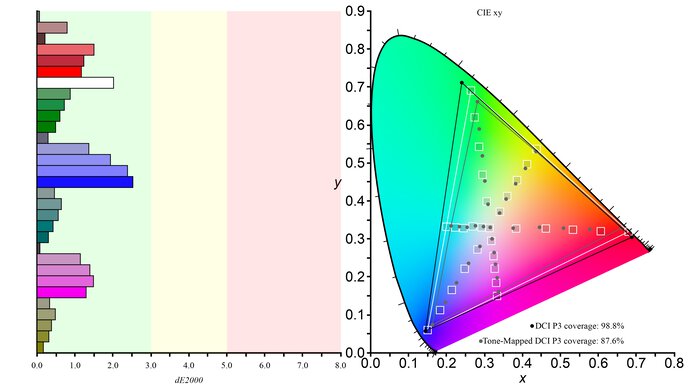
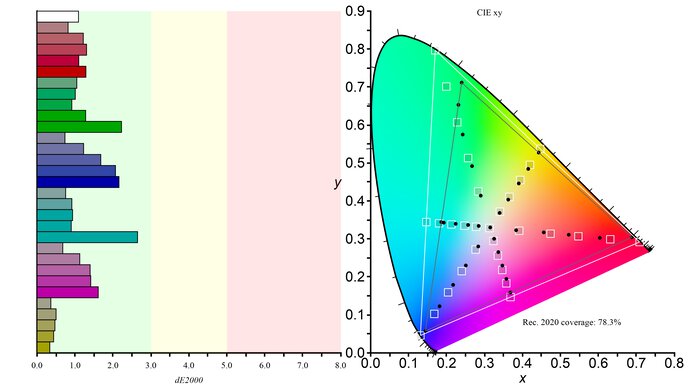
    The HDR color gamut is decent. It displays a good range of colors in the commonly used DCI-P3 color space, and while white is inaccurate, there are minimal inaccuracies otherwise. However, its coverage of the wider Rec. 2020 color space is limited, and it has worse tone mapping.

    7.2
    HDR Color Volume
    1,000 cd/m² DCI-P3 Coverage ICtCp
    63.6%
    DCI-P3 Picture Mode
    Original
    10,000 cd/m² Rec. 2020 Coverage ICtCp
    27.5%
    Rec. 2020 Picture Mode
    Original

    The HDR color volume is decent. It displays dark colors well, particularly in the DCI-P3 color space, but vivid colors aren't very bright.

    9.0
    Text Clarity
    Pixel Type
    VA
    Subpixel Layout
    RGB

    The text clarity is fantastic. Enabling Windows ClearType (top photo) helps improve the boldness of letters and makes them easier to read. These photos are in Windows 10, and you can also see them in Windows 11 with ClearType on and with ClearType off.

    6.4
    Direct Reflections
    See details on graph tool
    Peak Direct Reflection Intensity
    32.6%
    Screen Finish
    Matte

    The direct reflection handling is okay. While the matte coating spreads light out, it still has some mirror-like reflections that could be distracting in a bright room.

    8.8
    Ambient Black Level Raise
    See details on graph tool
    Black Luminance @ 0 lx
    0.08 cd/m²
    Black Luminance @ 1000 lx
    0.54 cd/m²

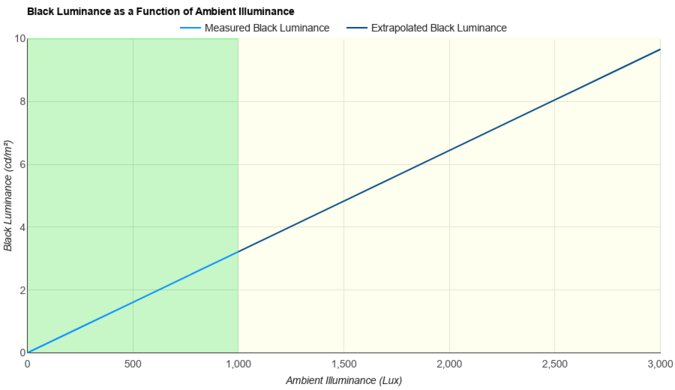
    The black levels remain low in a bright room on this monitor. Although they still rise a bit, it's minimal.

    5.5
    Total Reflected Light
    Total Reflected Light Intensity
    37,568% ⋅ pixel
    Diffraction Artifacts
    No

    There's a ton of light reflected off the screen in a bright room. This makes the screen hard to properly see, especially if you have it in a sunny room.

    9.6
    Gradient
    Color Depth
    10 Bit

    The gradient handling is fantastic. There's minimal banding between shades of similar colors.

    Motion
    6.0
    Refresh Rate
    Native Refresh Rate
    60 Hz
    Max Refresh Rate
    60 Hz
    Max Refresh Rate Over DP
    N/A
    Max Refresh Rate Over HDMI
    60 Hz
    Max Refresh Rate Over DP @ 10-bit
    N/A
    Max Refresh Rate Over HDMI @ 10-Bit
    30 Hz
    DSC Toggle
    No
    DSC Off Max Refresh Rate Over DP
    N/A
    DSC Off Max Refresh Rate Over HDMI
    N/A
    Variable Refresh Rate (VRR)
    Variable Refresh Rate
    No
    FreeSync
    No
    G-SYNC
    No
    VRR Maximum
    N/A
    VRR Minimum
    No VRR
    VRR Supported Connectors
    No VRR

    This monitor doesn't support variable refresh rate technology.

    6.0
    VRR Motion Performance
    See details on graph tool
    Recommended VRR OD Setting
    No VRR
    Variable Overdrive Advertised
    No
    Avg. CAD
    320
    Best CAD
    320
    Worst CAD
    320

    Although this monitor doesn't support VRR technology, we still measure the CAD 60Hz, so you can compare it to a monitor with VRR support.

    4.8
    Refresh Rate Compliance
    See details on graph tool
    See details on graph tool
    Compliance @ Max Hz
    70%
    Compliance @ 120 FPS
    N/A
    Compliance @ 60 FPS
    70%

    The refresh rate compliance is bad, as its response time sometimes isn't fast enough to make full color transitions before the monitor draws the next frame.

    5.3
    CAD @ Max Refresh Rate
    OD Transition Max Refresh Rate
    od-transition-max-refresh-rate-extreme-0-31
    OD extreme
    0 to 31
    Recommended Overdrive Setting
    Standard
    Avg. CAD
    320
    Best 10% CAD
    127
    Worst 10% CAD
    588

    Overdrive Mode CAD Heatmap RT Chart Pursuit Photo
    Standard Heatmap Chart Photo
    Faster Heatmap Chart Photo
    Extreme Heatmap Chart Photo

    The CAD at the max refresh rate of 60Hz is poor. There's noticeable blur and smearing with fast-moving objects, and using the 'Faster' overdrive setting results in inverse ghosting.

    Some transitions take so long that they exceed the limits of our chart. You can see alternate charts below:

    Response Time @ Max Refresh Rate
    Recommended Overdrive Setting
    Standard
    First Response Time
    12.2 ms
    Total Response Time
    13.1 ms
    RGB Overshoot
    1 RGB
    Worst 10% First Response Time
    22.1 ms
    Worst 10% Total Response Time
    23.3 ms
    Worst 10% RGB Overshoot
    6 RGB

    Overdrive Mode First Response Heatmap Total Response Heatmap RGB Overshoot Heatmap
    Standard Heatmap Heatmap Heatmap
    Faster Heatmap Heatmap Heatmap
    Extreme Heatmap Heatmap Heatmap

    0.0
    CAD @ 120Hz
    OD Transition 120Hz
    N/A
    Recommended Overdrive Setting
    No 120Hz Refresh Rate
    Avg. CAD
    N/A
    Best 10% CAD
    N/A
    Worst 10% CAD
    N/A

    This monitor doesn't support a 120Hz signal.

    Response Time @ 120Hz
    Recommended Overdrive Setting
    No 120Hz Refresh Rate
    First Response Time
    N/A
    Total Response Time
    N/A
    RGB Overshoot
    N/A
    Worst 10% First Response Time
    N/A
    Worst 10% Total Response Time
    N/A
    Worst 10% RGB Overshoot
    N/A
    5.3
    CAD @ 60Hz
    OD Transition 60Hz
    od-transition-60-extreme-0-31
    OD extreme
    0 to 31
    Recommended Overdrive Setting
    Standard
    Avg. CAD
    320
    Best 10% CAD
    127
    Worst 10% CAD
    588

    Overdrive Mode CAD Heatmap RT Chart Pursuit Photo
    Standard Heatmap Chart Photo
    Faster Heatmap Chart Photo
    Extreme Heatmap Chart Photo

    The CAD at 60Hz is poor. There's noticeable blur and smearing with fast-moving objects, and using the 'Faster' overdrive setting results in inverse ghosting.

    Some transitions take so long that they exceed the limits of our chart. You can see alternate charts below:

    Response Time @ 60Hz
    Recommended Overdrive Setting
    Standard
    First Response Time
    12.2 ms
    Total Response Time
    13.1 ms
    RGB Overshoot
    1 RGB
    Worst 10% First Response Time
    22.1 ms
    Worst 10% Total Response Time
    23.3 ms
    Worst 10% RGB Overshoot
    6 RGB

    Overdrive Mode CAD Heatmap RT Chart Pursuit Photo
    Standard Heatmap Chart Photo
    Faster Heatmap Chart Photo
    Extreme Heatmap Chart Photo

    Backlight Strobing (BFI)
    Backlight Strobing (BFI)
    No BFI
    Maximum Frequency
    N/A
    Minimum Frequency
    N/A
    Longest Pulse Width Brightness
    N/A
    Shortest Pulse Width Brightness
    N/A
    Pulse Width Control
    No BFI
    Pulse Phase Control
    No BFI
    Pulse Amplitude Control
    No BFI
    VRR At The Same Time
    No BFI

    This monitor doesn't have a backlight strobing feature to reduce persistence blur.

    0.0
    VRR Flicker
    Dark Gray Flicker
    N/A
    Middle Gray Flicker
    N/A
    Light Gray Flicker
    N/A

    This monitor doesn't support VRR, so there's no VRR flicker.

    10
    Image Flicker
    Flicker-Free
    Yes
    PWM Dimming Frequency
    0 Hz

    The backlight is completely flicker-free, which helps reduce eye strain if you're sensitive to it.

    Inputs
    8.2
    Input Lag
    Native Resolution @ Max Hz
    9.3 ms
    Native Resolution @ 120Hz
    N/A
    Native Resolution @ 60Hz
    9.3 ms
    Backlight Strobing (BFI)
    N/A

    Settings

    • Input: PC
    • Game Mode: On

    The input lag is low for a responsive feel, as long as you have Game Mode enabled. When Game Mode is off input lag is about 60 ms.

    8.5
    Resolution
    Native Resolution
    3840 x 2160
    Aspect Ratio
    16:9
    Megapixels
    8.3 MP
    Pixel Density
    138 PPI
    2.9
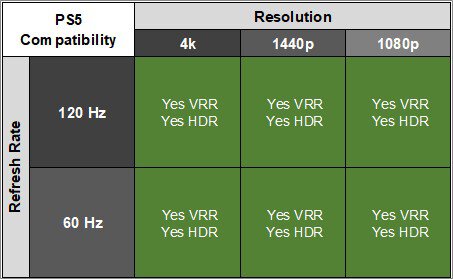
    PS5 Compatibility
    4k @ 120Hz
    No
    4k @ 60Hz
    Yes
    1440p @ 120Hz
    No
    1440p @ 60Hz
    Yes
    1080p @ 120Hz
    No
    1080p @ 60Hz
    Yes

    The Samsung M80D has limited compatibility with the PS5 as it only supports 60Hz signals. However, it knows when you connect it and switches the input label to 'Playstation 5'.

    2.9
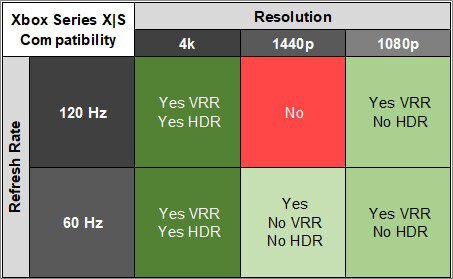
    Xbox Series X|S Compatibility
    4k @ 120Hz
    No
    4k @ 60Hz
    Yes
    1440p @ 120Hz
    No
    1440p @ 60Hz
    Yes
    1080p @ 120Hz
    No
    1080p @ 60Hz
    Yes

    This monitor has limited compatibility with the Xbox Series X|S as it only supports 60Hz signals. However, it knows when you connect it and switches the input label to 'Xbox Series X/S.'

    Inputs
    DisplayPort
    No
    DisplayPort Transmission Bandwidth
    No DisplayPort 2.1
    Mini DisplayPort
    No
    HDMI
    1 (HDMI 2.0)
    HDMI 2.1 Bandwidth
    No HDMI 2.1
    Daisy Chaining
    No
    3.5mm Audio Out
    No
    Ethernet
    No
    HDR10
    Yes
    Dolby Vision
    No

    If you want a similar monitor with HDMI 2.1 bandwidth, look into the Dell S3225QS instead.

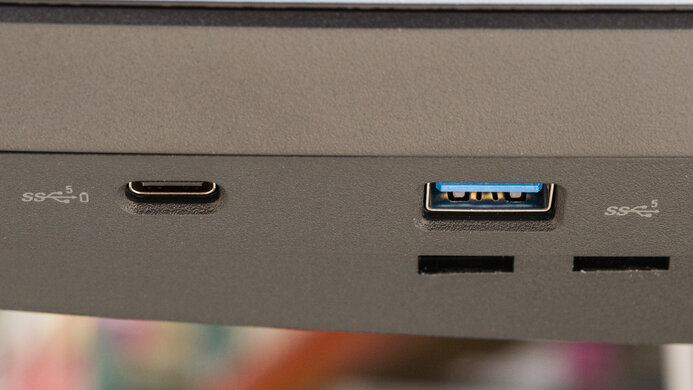
    USB
    USB-A Ports
    2
    USB-A Rated Speed
    480Mbps (USB 2.0)
    USB-B Upstream Port
    No
    USB-C Ports
    1
    USB-C Upstream
    Yes
    USB-C Rated Speed
    5Gbps (USB 3.2 Gen 1)
    USB-C Power Delivery
    65W
    USB-C DisplayPort Alt Mode
    Yes
    Thunderbolt
    No

    The USB-C port supports DisplayPort Alt Mode, letting you connect a compatible device to display an image from it and charge it using a single cable. The 65W of power is enough for most small laptops but not enough to charge power-hungry ones. You can use the USB-A ports to connect devices directly to the monitor, but you'll need to use the USB-C upstream to use those connected devices with an external PC.

    macOS Compatibility

    Connection HDMI 2.0 HDMI 2.1 USB-C
    Max Refresh Rate 60Hz N/A 60Hz
    VRR Range N/A N/A N/A
    HDR Yes N/A Yes

    The Samsung M80D works well with macOS. There aren't any issues, and if you're using a MacBook, windows move to the screen when you close the lid, and they return to their original position when reopening the lid or waking the laptop up from sleep. HDR looked normal on HDMI and DisplayPort.

    Features
    Additional Features
    Speakers
    Yes
    RGB Illumination
    No
    Multiple Input Display
    PIP + PBP
    KVM Switch
    No
    Smart OS
    Yes

    As a smart monitor, the Samsung M80D has many extra features related to its Tizen OS smart platform. The interface is user-friendly and has a number of apps you can download. It's the same platform as on their TVs, which you can read more about here. As mentioned in Controls, the remote gives you access to Bixby and Alexa voice assistants, and you can also control other smart devices in your house. 

    It has a number of other features beyond its smart platform functionality. Its Multi View feature lets you view images from two external sources simultaneously, though you need to be signed in to a Samsung account to do this. It also comes with a webcam with decent video quality. Additionally, it comes with built-in speakers.

    Besides the features you get with the smart platform, it has a few extra gaming features, like Virtual Aim Point for a virtual crosshair and Minimap Zoom, so you can zoom in on specific areas of your screen during gaming. Additionally, this monitor has Game Motion Plus, which helps improve motion in games with lower frame rates.

    On-Screen Display (OSD)