LG 27UK650-W  Monitor Review

Review updated Apr 17, 2020 at 03:04pm
Retest Jan 20, 2021 at 02:53pm
Tested using Methodology v1.1 
LG 27UK650-W
7.9
Mixed Usage 
8.1
Office 
7.9
Gaming 
7.9
Multimedia 
8.1
Media Creation 
6.9
HDR Gaming 
 4
The LG 27UK650-W is a very good 27 inch, 4k IPS monitor with a low input lag for gaming and great SDR peak brightness. It has very good color accuracy, wide viewing angles, and a great resolution that will display every little detail. Although the monitor supports HDR, it doesn't add much as it can't display a wide color gamut. It's more suitable for average-lit environments where it can handle glare well, and in dark rooms, blacks appear gray.
How We Test Monitors

We buy and test more than 30 monitors each year, with units that we buy completely on our own, without any cherry-picked units or samples. We put a lot into each unbiased, straight-to-the-point review, and there's a whole process from purchasing to publishing, involving multiple teams and people. We do more than just use the monitor for a week; we use specialized and custom tools to measure various aspects with objective data-based results. We also consider multiple factors before making any recommendations, including the monitor's cost, its performance against the competition, and whether or not it's easy to find.

Our Verdict

7.9
Mixed Usage 

The LG 27UK650-W is a good monitor and will please you in most usages. It has wide viewing angles and the large screen gives you more space to work on. Also, the high resolution allows you to see small details. The monitor has HDR support but it fails to display a wide color gamut.

Pros
  • Excellent resolution and size allow for multitasking.
  • Input lag is very low.
  • Wide viewing angles.
Cons
  • Lacking HDR performance.
  • No local dimming support.
8.1
Office 

The 27UK650-W is a very good monitor for office use. The 27 inch screen offers plenty of space for multitasking, and the 4k resolution allows you to see images clearly. It has great viewing angles, so the image will appear accurate when viewed from the side. Unfortunately, it has disappointing ergonomics, and you'll need to move the entire monitor if you want to adjust your screen to the side.

7.9
Gaming 

Good monitor for gaming. The 27UK650-W has an excellent low input lag and a fast response time. It comes equipped with FreeSync variable refresh rate technology to help reduce tearing in games, but it doesn't include a black frame insertion feature to reduce motion blur.

7.9
Multimedia 

The LG 27UK650-W is a good monitor for multimedia usage. Its high resolution and large size give you more than enough screen space and will display small details. It can get very bright so you can enjoy streaming in brighter rooms, but you should avoid very dark rooms as the mediocre contrast makes blacks appear gray. Finally, it has great viewing angles, which are good if multiple people are watching.

8.1
Media Creation 

This is a very good monitor for media creation. The large screen and high resolution make it easy to open multiple windows. It has very accurate and vivid colors, but the Adobe RGB color space coverage is limited, and this might affect those who want to use it for photo editing.

6.9
HDR Gaming 

Decent monitor for HDR gaming. The 27UK650-W can't display a wide color gamut and fails to bring out highlights. On the upside, it has a very low input lag and fast-moving images look clear. Unfortunately, the contrast ratio makes blacks look gray and the 60Hz refresh rate might disappoint some hardcore gamers.

  • 7.9
    Mixed Usage
  • 8.1
    Office
  • 7.9
    Gaming
  • 7.9
    Multimedia
  • 8.1
    Media Creation
  • 6.9
    HDR Gaming
  • Changelog

    1.  Updated Jan 20, 2021: For consistency, we've changed the swivel adjustment from N/A to 'No'. The score remains unchanged.
    2.  Updated Feb 17, 2020: Converted to Test Bench 1.1.
    3.  Updated Jan 17, 2019: We tested the monitor's compatibility with NVIDIA's new FreeSync driver. See our full investigation into NVIDIA's FreeSync Drivers here.
    4.  Updated Aug 17, 2018: Review published.

    Check Price

    27"27UK650-W
    SEE PRICE
    Amazon.com
    27"27UK650-W
    SEE PRICE
    Walmart.com
    27"27UK650-W
    B&H
    27"27UK650-W
    BestBuy.com
    27"27UK650-W
    LG.com

    Differences Between Sizes And Variants

    We tested the white variant of the 27 inch model (27UK650-W). The model we reviewed was manufactured in April 2018 and you can see the label here.

    In some regions, LG sells the 27UK600 instead of the 27UK650. We don't know for sure what differences there are, but it appears to offer very similar performance to the 27UK650, but with a fixed stand that can only tilt.

    If someone comes across a different type of panel or if their 27UK650 doesn't correspond to our review, let us know and we will update the review. Note that some tests such as the gray uniformity may vary between individual units.

    Model Size Refresh rate Notes
    24UD58-B 24" 60Hz  
    27UD58-B 27" 60Hz  
    27UD68P-B 27" 60Hz Black variant
    27UD68P-W 27" 60Hz White variant
    27UK650-W 27" 60Hz White variant
    27UK600-W 27" 60Hz White variant

    Popular Monitor Comparisons

    Comparison picture

    Left: Samsung CHG70. Middle: LG 27UK650. Right: Acer Predator X27.

    The LG 27UK650 is a 4K monitor with an IPS screen and FreeSync support, and one of the best 4k monitors we've tested so far. See also our recommendations for the best monitors for dual setup, the best gaming monitors and the best 4k HDR monitors.

    LG UltraFine 4k

    The LG 27UK650-W is much better than the LG UltraFine 4k. The 27UK650 has better ergonomics, better reflection handling, a flicker-free backlight, and it supports HDR. The 27UK650 also has better gaming performance, with less input lag and support for FreeSync variable refresh rate technology.

    LG 27UD68-B

    The LG 27UK650-W is better than the LG 27UD68P-B. The LG 27UK650 supports HDR, although it doesn't benefit much from it. The LG 27UK650-W also has a faster pixel response time, resulting in a smaller blur trail when you play fast action games. In most other areas, the two monitors offer similar performance.

    LG 32UL500-W

    The LG 32UL500-W and the LG 27UK650-W are both 4k monitors with a 60Hz panel, but the 32UL500-W has a 32-inch VA panel while the 27UK650-W has a 27-inch IPS panel. The 27UK650-W is better overall because it has wide viewing angles, better ergonomics, and gets much brighter to combat glare. It also has a better response time if you want to game. However, the 32UL500-W provides more screen real estate, and content creators might prefer its wider Adobe RGB and DCI P3 coverage.

    Dell S2721QS

    Overall, the Dell S2721QS is a bit better than the LG 27UK650-W. The Dell has better ergonomics, wider viewing angles, and better reflection handling. On the other hand, the LG has better out-of-the-box color accuracy.

    LG 27UD58-B

    The LG 27UK650-W is much better than the LG 27UD58-B. The LG 27UK650 has better ergonomics, making it easier to place it comfortably. The LG 27UK650 has marginally better vertical viewing angles and marginally better SDR peak brightness, which are important for office use. Finally, the LG 27UK650 supports HDR content and has better black uniformity, which make it a better choice for multimedia watching.

    Dell UltraSharp U2721DE

    The LG 27UK650-W is much better than the Dell UltraSharp U2721DE. The LG has a higher native resolution, which delivers clearer text and a better multitasking experience. The LG also has much better gradients, and it supports HDR. On the other hand, the Dell has better ergonomics, and a better selection of inputs, with a built-in USB-C hub and an Ethernet port.

    Dell U2719D

    The LG 27UK650-W is much better than the Dell U2719D. The LG 27UK650-W can deliver much more uniform blacks, which is great for a dark room and supports HDR. The LG can display more content on the screen thanks to the native 4k resolution, and supports FreeSync to please gamers. The Dell U2719D has better ergonomics and is easier to place in a comfortable position.

    Acer Predator XB271HU Bmiprz

    The LG 27UK650-W is a bit better than the Acer Predator XB271HU Bmiprz. The LG 27UK650-W is a 4k monitor that supports HDR. It supports FreeSync VRR, can get brighter than the Acer, and has better reflection handling. The Acer Predator, on the other hand, has better ergonomics and is easier to place comfortably. It has a lower input lag, supports G-SYNC VRR over a wider range of frequencies, and can offer you a tear-free gaming experience.

    LG 32UD59-B

    These two monitors have different panel types, each with its advantages and disadvantages. The LG 32UD59-B is larger and has a VA panel with a higher contrast ratio that delivers deep blacks in a dark room. The LG 27UK650-W has an IPS panel with wider viewing angles, which is great for sharing your work. It has better ergonomics, so you can position it comfortably with ease, and it supports HDR.

    LG 27GN950-B

    The LG 27GN950-B is slightly better overall than the LG 27UK650-W, mainly due to the extra gaming features. The 27GN950-B has a max 144Hz refresh rate, gets brighter, has a much quicker response time, and has a lower input lag. However, the 27UK650-W delivers clearer text and has better reflection handling.

    Dell S3221QS

    The LG 27UK650-W is better than the Dell S3221QS. The 27UK650-W has much better ergonomics, wider viewing angles, and gets a lot brighter. It also has significantly faster response time, making it a better choice for gaming. However, the Dell S3221QS's VA panel is better for dark rooms, and its 32 inch screen provides much more screen real estate for multitasking.

    Lenovo Q27q-10

    The LG 27UK650-W is much better than the Lenovo Q27q-10. The higher native resolution on the LG results in much sharper text, making it a better choice for office use. Despite the lower native refresh rate, the LG has a much faster response time, making it a better choice for gaming as well. On the other hand, the Lenovo has better reflection handling, so it might be a slightly better choice for users in a bright office setting.

    Acer Predator X27 bmiphzx

    The Acer Predator X27 bmiphzx is slightly better than the LG 27UK650-W. The Acer Predator X27 supports local dimming and has better HDR performance, thanks to its wider color gamut and higher HDR peak brightness. The LG 27UK650-W has slightly lower input lag and feels more responsive, which is great for gaming.

    Dell UltraSharp U2720Q

    The Dell U2720Q and the LG 27UK650-W have very similar performance overall. The LG has a faster response time, better color accuracy, and it supports FreeSync. The LG also has better gradient handling. On the other hand, the Dell has a better build quality, better ergonomics, and it gets much brighter in HDR content.

    Acer G257HU Smidpx

    The Acer G257HU Smidpx is slightly better than the LG 27UK650-W. The Acer supports local dimming and has better HDR performance thanks to its wider color gamut and higher HDR peak brightness. The LG has slightly lower input lag and feels more responsive, and this is excellent for gaming.

    Philips Momentum 436M6VBPAB

    Despite the difference in panel technologies, the LG 27UK650-W is much better than the Philips 436M6VBPAB. The 27UK650-W uses an IPS panel, which has much better viewing angles and much better gray uniformity. The 27UK650-W also has a more versatile stand with better ergonomics. The Philips uses a VA panel, so it looks much better in a dark room and delivers a better HDR experience than the 27UK650-W.

    ASUS VG279Q

    The ASUS VG279Q and LG 27UK650-W have very similar overall performance but are very different. The ASUS has a faster refresh rate and a lower input lag, which is better for gaming. Also, the ASUS has much better ergonomics to allow you to place it in a comfortable position with ease. The LG, on the other hand, has a higher resolution and supports HDR.

    Gigabyte AORUS AD27QD

    The Gigabyte AORUS AD27QD is marginally better than the LG 27UK650-W. The Gigabyte has a lower input lag and a much higher refresh rate, which will please most gamers. The AORUS also supports a black frame insertion feature that can make the image crisper. The LG has a full 4k resolution and allows you to see more details on your screen.

    ASUS PB277Q

    The ASUS PB277Q and the LG 27UK650-W are very different monitors. The ASUS is a 1440p TN monitor, while the LG is a 4k IPS monitor. For the most part, the LG performs better because it has a higher resolution, better contrast ratio, and wider viewing angles. Also, it supports VRR and HDR, whereas the ASUS doesn't. That said, the ASUS has a 75Hz refresh rate compared to the LG's 60Hz, and its response time is much faster, resulting in clearer motion.

    Dell S2719DGF

    These are two different types of monitors, each with their advantages and disadvantages. The LG 27UK650-W, however, performs better in most uses except gaming. The LG has wider viewing angles, supports HDR, and has better dark room performance, although it still isn't too great. The Dell S2719DGF, on the other hand, has a TN panel with an extremely fast response time, and in conjunction with the lower input lag, it's a better choice if gaming is your primary use and you sit straight in front.

    LG 32UL950-W

    The LG 27UK650-W and the LG 32UL950 deliver very similar performance overall. The 27UK650-W has a flicker-free backlight, which is great, and it's more accurate out of the box. The 32UL950 has a larger screen, and it can display a wide color gamut, great for HDR content. The 32UL950 has better connectivity, thanks to the additional Thunderbolt ports and USB hub.

    ASUS ROG Swift PG279QZ

    Overall, the ASUS ROG Swift PG279QZ and the LG 27UK650-W are very similar, but the PG279QZ is a much better gaming monitor. The PG279QZ has a faster refresh rate, resulting in much clearer motion, and it has an optional black frame insertion feature to further clear up any blur. The LG 27UK650-W, on the other hand, has a higher native resolution and is slightly better for multitasking.

    BenQ EL2870U

    The LG 27UK650-W is significantly better than the BenQ EL2870U. The two monitors have different panel types, but very similar motion handling and equally low input lag. However, the LG is better overall as it has better picture quality, with wider viewing angles, better uniformity, and you can position it comfortably with ease. Finally, the LG has a better HDR performance as it can get brighter and display a wider gamut of colors.

    BenQ EW3270U

    These are two different types of monitors, so if you've got a bright room with wide seating, then the IPS LG 27UK650-W with wider viewing angles is a better choice. However, for a dark room with seating directly in front, then the BenQ EW3270U with the VA panel might be better. Also, the LG 27UK650-W has better ergonomics that allow you to easily position it comfortably. The BenQ EW3270U has better HDR color volume that delivers more saturated colors in HDR.

    LG 32UD99-W

    The LG 32UD99-W has very similar performance to the LG 27UK650-W. The LG 32UD99-W has a larger 32" screen that some people might find more comfortable to work on. The 32UD99-W also has a built-in USB hub and a USB-C port that supports power delivery and DisplayPort Alt Mode.

    Dell U2718Q

    The Dell U2718Q and the LG 27UK650-W both have very similar performance. They're both very good monitors for gaming. The Dell U2718Q has slightly better ergonomics, which makes it easier to place the monitor comfortably while gaming, whereas the LG 27UK650 has a marginally better refresh rate since it includes the FreeSync implementation of the variable refresh rate to eliminate tearing. It's also flicker-free.

    Samsung CHG70

    If you've got a bright office and work closely with others, the LG 27UK650-W is a better choice, but if you play games in a dark room sitting directly in front, then the Samsung CHG70 is a better choice. The LG 27UK650-W has better resolution and much better vertical and horizontal viewing angle, which makes it better for office use. On the other hand, the Samsung CHG70 has better refresh rate and input lag which makes it better for gaming. The Samsung CHG70 also has better blacks.

    Dell U2717D

    The LG 27UK650-W is significantly better than the Dell U2717D. The LG 27UK650-W has a much lower input lag and supports FreeSync VRR, which is great if you play games. The LG supports HDR content and has a higher native resolution that allows you to see more detail on your screen. The Dell U2717D, on the other hand, has better ergonomics and you can easily position it to your liking.

    Dell U2515H

    The LG 27UK650-W is better than the Dell U2515H. The Dell U2515H has better ergonomics that easily allow you to place it comfortably. On the other hand, the LG 27UK650-W has a slightly higher refresh rate, larger size, and a marginally better vertical viewing angle that makes it more suitable for almost every use. Finally, the LG 27UK650-W offers HDR support, albeit not great.

    ASUS ROG Swift PG279Q

    The ASUS ROG Swift PG279Q is marginally better than the LG 27UK650-W. The ASUS has better ergonomics, supports G-SYNC, and has a lower input lag, which is great for demanding gamers. On the other hand, the LG is a 4k monitor with HDR support that also supports FreeSync to please gamers.

    Test Results

    Sort:
    RATINGS
    Category:
    All
    Design
    Style
    Size27"
    CurvedNo
    Curve RadiusNot Curved
    Weight (without stand)
    9.9 lbs (4.5 kg)
    Weight (with stand)
    13.4 lbs (6.1 kg)

    The 27UK650-W has a modern style with a white back and a very wide stand. It fits right into any office environment.

    Stand
    Width
    17.9" (45.5 cm)
    Depth
    9.1" (23.1 cm)

    The stand is plastic and curved. It looks stylish and supports the monitor well, but will wobble a little if you knock it. It has a wide footprint so you can place things in front of it.

    5.9
    Ergonomics
    Height Adjustment
    4.3" (10.9 cm)
    Switch Portrait/LandscapeYes, Clockwise
    Swivel RangeNo swivel
    Tilt Range-17.5° to 2.5°

    Update 01/20/2021: For consistency, we've changed the swivel adjustment from N/A to 'No'. The score remains unchanged.

    Disappointing ergonomics. You can adjust its tilt, but since it can't swivel, you'll need to move the whole monitor. However, you can place it in portrait mode, but it only rotates clockwise, so that means the inputs will be on top, which isn't ideal if you have short wires for whatever you need to insert into the monitor. If you need a monitor that has better ergonomics, take a look at the Dell UltraSharp U2720Q.

    Back
    Wall MountVESA 100x100

    The back of the monitor is very plain and there is only basic cable management through a ring attached to the main stand.

    Borders
    Borders
    0.3" (0.8 cm)

    The borders are very thin and elegant.

    Thickness
    Thickness (with stand)
    5.6" (14.2 cm)
    Thickness (without stand)
    1.7" (4.3 cm)

    The monitor has an average thickness when it's on its stand. If you choose to VESA mount it, then it will look significantly thinner and won't protrude.

    6.5
    Build Quality

    Note 01/07/2020: We've seen a few reports of increasing light bleed from the corners over time. Some people have seen this start even 1-2 years after receiving their unit. We haven't noticed this on ours.

    The build quality is decent. There are no gaps and you shouldn't have any issues with this monitor. On the other hand, it's plastic and doesn't have a premium construction feel to it.

    Picture Quality
    6.3
    Contrast
    Native Contrast
    1,196 : 1
    Contrast With Local Dimming
    N/A

    The contrast ratio is mediocre, as is the case with most IPS monitors. In darker rooms, blacks will appear gray. If you want a 4k monitor with better dark room performance, check out the Dell S3221QS.

    0.0
    Local Dimming
    Local Dimming
    No
    Backlight
    Direct

    The LG 27UK650-W doesn't have a local dimming feature. The video above is for reference only.

    8.0
    SDR Peak Brightness
    SDR Real Scene
    352 cd/m²
    SDR Peak 2% Window
    351 cd/m²
    SDR Peak 10% Window
    352 cd/m²
    SDR Peak 25% Window
    352 cd/m²
    SDR Peak 50% Window
    352 cd/m²
    SDR Peak 100% Window
    351 cd/m²
    SDR Sustained 2% Window
    350 cd/m²
    SDR Sustained 10% Window
    351 cd/m²
    SDR Sustained 25% Window
    351 cd/m²
    SDR Sustained 50% Window
    351 cd/m²
    SDR Sustained 100% Window
    350 cd/m²
    SDR ABL
    0.000

    Great SDR peak brightness. The brightness is consistent across varied content and it can get bright enough to combat glare in most rooms.

    6.6
    HDR Peak Brightness
    HDR Real Scene
    385 cd/m²
    HDR Peak 2% Window
    360 cd/m²
    HDR Peak 10% Window
    361 cd/m²
    HDR Peak 25% Window
    361 cd/m²
    HDR Peak 50% Window
    361 cd/m²
    HDR Peak 100% Window
    377 cd/m²
    HDR Sustained 2% Window
    357 cd/m²
    HDR Sustained 10% Window
    359 cd/m²
    HDR Sustained 25% Window
    360 cd/m²
    HDR Sustained 50% Window
    360 cd/m²
    HDR Sustained 100% Window
    361 cd/m²
    HDR ABL
    0.001

    Okay HDR peak brightness. It doesn't get bright enough to bring out highlights, but it remains fairly consistent across different content.

    8.1
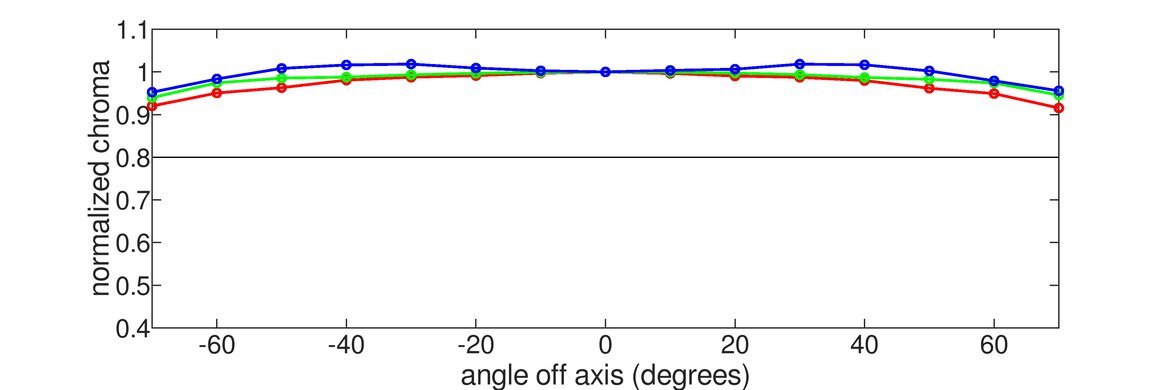
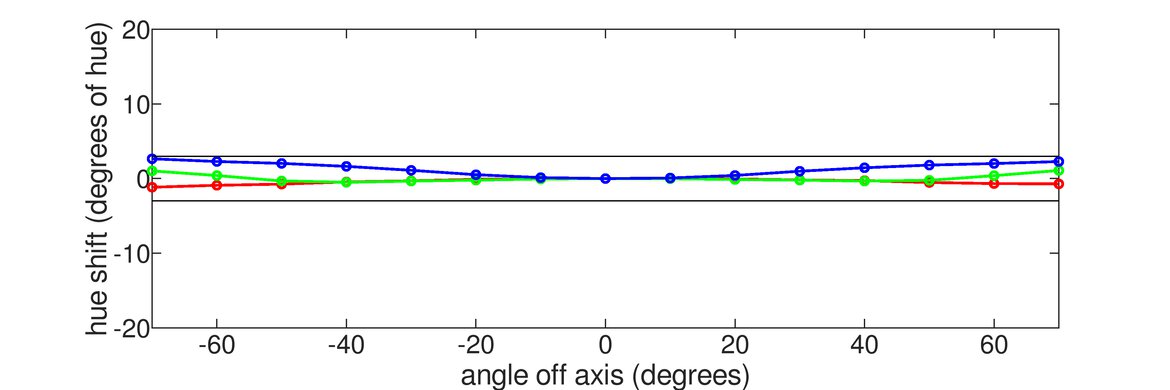
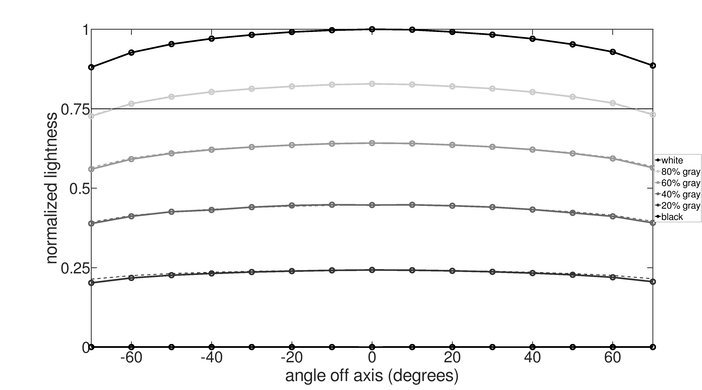
    Horizontal Viewing Angle
    Color Washout From Left
    43°
    Color Washout From Right
    42°
    Color Shift From Left
    58°
    Color Shift From Right
    60°
    Brightness Loss From Left
    48°
    Brightness Loss From Right
    48°
    Black Level Raise From Left
    70°
    Black Level Raise From Right
    70°
    Gamma Shift From Left
    42°
    Gamma Shift From Right
    41°

    The horizontal viewing angles of the LG 27UK650-W are great. This is typical for IPS monitors, which is ideal for sharing your screen with others.

    7.6
    Vertical Viewing Angle
    Color Washout From Below
    34°
    Color Washout From Above
    36°
    Color Shift From Below
    49°
    Color Shift From Above
    49°
    Brightness Loss From Below
    34°
    Brightness Loss From Above
    36°
    Black Level Raise From Below
    70°
    Black Level Raise From Above
    70°
    Gamma Shift From Below
    44°
    Gamma Shift From Above
    55°

    The vertical viewing angles of the LG 27UK650-W are good, very similar to Dell U2718Q. The edges of the screen might appear slightly darker if you sit close to the screen, but this shouldn't be a problem for most people.

    8.7
    Gray Uniformity
    50% Std. Dev.
    3.070%
    50% DSE
    0.109%
    5% Std. Dev.
    0.352%
    5% DSE
    0.070%

    Excellent gray uniformity for the LG 27UK650. There's very little dirty screen effect and you shouldn't notice any darkening when browsing websites with large white areas. The edges of the screen, however, are noticeably darker than the rest.

    6.0
    Black Uniformity
    Native Std. Dev.
    2.002%
    Std. Dev. w/ L.D.
    N/A

    Note 01/07/2020: We've seen a few reports of increasing light bleed from the corners over time. Some people have seen this start even 1-2 years after receiving their unit. We haven't noticed this on ours.

    The overall black uniformity of this monitor is mediocre. There's visible clouding across the screen.

    8.1
    Pre Calibration
    Picture Mode
    SMPTE-C
    Luminance
    227 cd/m²
    Luminance Settings
    50
    Contrast Setting
    70
    RGB Controls
    N/A
    Gamma Setting
    No Gamma Setting
    Color Temperature
    6,746 K
    White Balance dE
    2.17
    Color dE
    2.65
    Gamma
    2.16

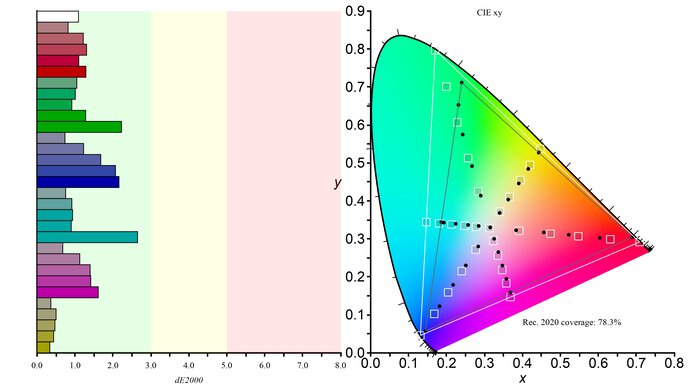
    The 27UK650-W has very good out-of-the-box color accuracy. Most colors are fairly accurate, although the color temperature is colder than our target of 6500K, so colors may have a blue tint to them. The gamma curve follows the target well, but dark scenes will appear darker than they should, and bright scenes will be brighter.

    9.5
    Post Calibration
    Picture Mode
    Custom
    Luminance
    102 cd/m²
    Luminance Settings
    17
    Contrast Setting
    71
    RGB Controls
    46-50-48
    Gamma Setting
    Mode 4
    Color Temperature
    6,435 K
    White Balance dE
    0.71
    Color dE
    0.68
    Gamma
    2.18

    Outstanding post-calibration color accuracy. There are minimal inaccuracies in most colors and the color temperature is much closer to the target. The gamma curve follows the target almost perfectly, although some scenes may appear brighter than they should.

    You can download our ICC profile calibration here. This is provided for reference only and should not be used, as the calibration values vary per individual unit even for the same model due to manufacturing tolerances.

    8.8
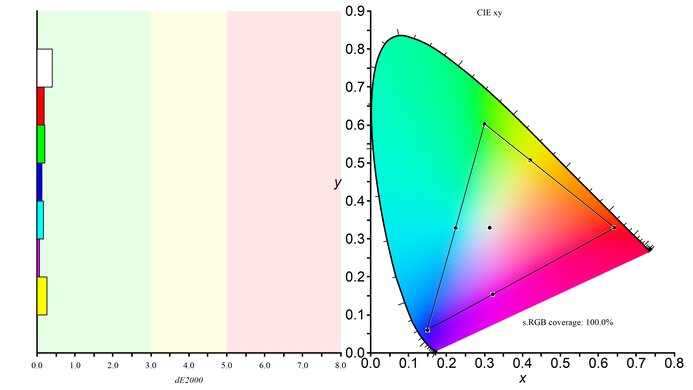
    SDR Color Gamut
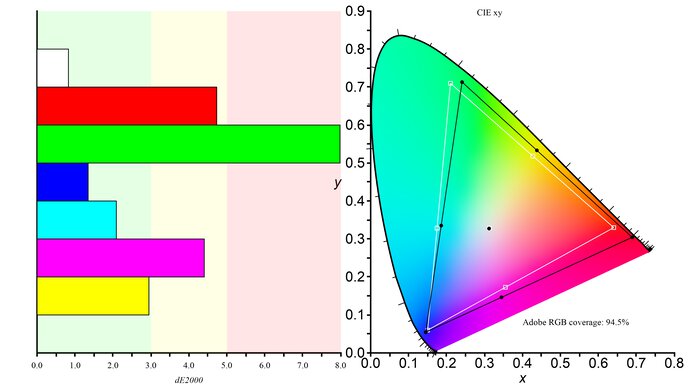
    sRGB xy
    98.5%
    Adobe RGB xy
    76.4%
    sRGB Picture Mode
    Custom
    Adobe RGB Picture Mode
    Photo

    The color gamut of the LG 27UK650-W is excellent as it covers almost all of the common sRGB colorspace. On the other hand, photo editors might find the coverage of the Adobe RGB color space limiting for their standards.

    9.0
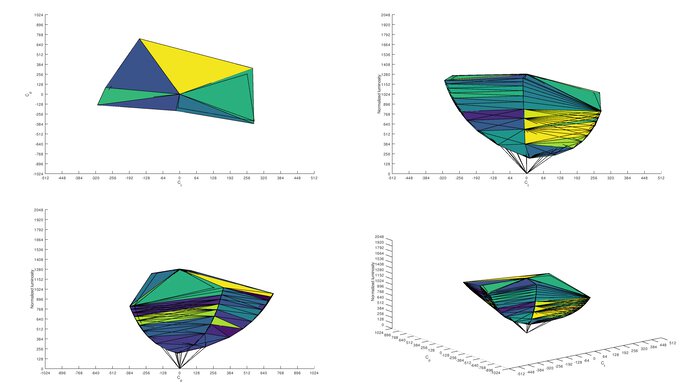
    SDR Color Volume
    sRGB In ICtCp
    98.9%
    Adobe RGB In ICtCp
    81.2%
    sRGB Picture Mode
    Custom
    Adobe RGB Picture Mode
    Photo

    Excellent SDR color volume. It can display a wide range of shades, although it can't display darker shades due to the low contrast ratio. This might be an issue with those who want to use it for photo editing and need it to display colors across the entire brightness range.

    6.9
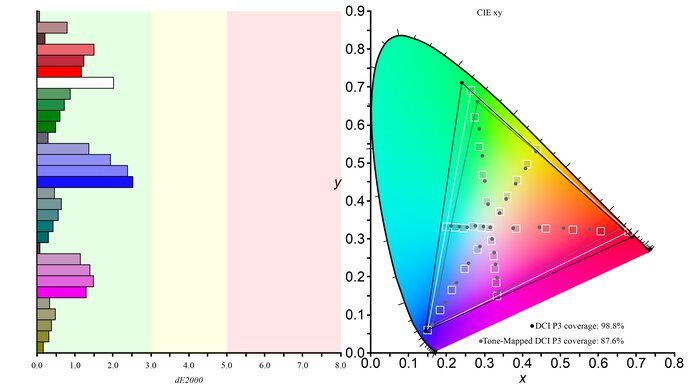
    HDR Color Gamut
    Wide Color Gamut
    No
    DCI P3 xy
    78.8%
    Rec. 2020 xy
    57.5%
    DCI P3 Picture Mode
    HDR Standard
    Rec. 2020 Picture Mode
    HDR Standard

    The 27UK650-W fails to display a wide color gamut in HDR. It has good coverage of the DCI P3 color space used in most content, but it can't produce most colors in the wider Rec.2020 color space. If you want a similar monitor that can display a wide color gamut, check out the Dell S2721QS.

    5.9
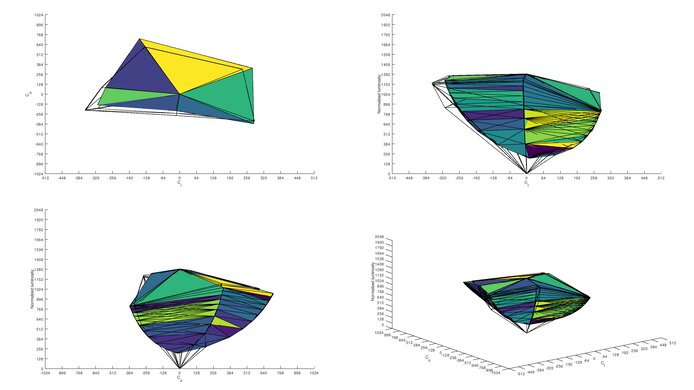
    HDR Color Volume
    DCI-P3 In ICtCp
    68.4%
    Rec. 2020 In ICtCp
    49.1%
    DCI P3 Picture Mode
    HDR Standard
    Rec. 2020 Picture Mode
    HDR Standard

    Disappointing HDR color volume. The monitor can't display a wide range of colors mostly due to the lack of a wide color gamut and a low contrast ratio.

    9.3
    Image Retention
    IR After 0 Min Recovery
    0.26%
    IR After 2 Min Recovery
    0.00%
    IR After 4 Min Recovery
    0.00%
    IR After 6 Min Recovery
    0.00%
    IR After 8 Min Recovery
    0.00%
    IR After 10 Min Recovery
    0.00%

    Outstanding image retention performance. However, some slight signs of image retention are present immediately after the exposure of our test image. This is unlikely to be noticeable in most content.

    9.9
    Gradient
    Color Depth
    10 Bit

    The LG 27UK650-W has an excellent gradient performance, and banding isn't visible.

    10
    Color Bleed
    Pixel Row Error
    0.000%
    Pixel Column Error
    0.000%

    There's no visible sign of color bleed on the 27UK650-W.

    7.3
    Reflections
    Screen Finish
    Matte
    Total Reflections
    5.6%
    Indirect Reflections
    3.0%
    Calculated Direct Reflections
    2.6%

    The reflection handling is decent. The semi-gloss finish diffuses reflections across the screen, but it may be a problem in a bright room, as the entire screen glares.

    9.5
    Text Clarity
    Pixel Type
    IPS
    Sub-Pixel Layout
    RGB

    The 4k resolution on this monitor produces clear text. Enabling ClearType (top photo) can make text easier to read.

    Motion
    8.3
    Response Time @ Max Refresh Rate
    Best Overdrive Setting
    Normal
    Rise / Fall Time
    6.8 ms
    Total Response Time
    13.5 ms
    Overshoot Error
    1.3%
    Dark Rise / Fall Time
    7.4 ms
    Dark Total Response Time
    14.7 ms
    Dark Overshoot Error
    2.8%

    Overdrive Setting Response Time Chart Response Time Tables Motion Blur Photo
    Off Chart Table Photo
    Normal Chart Table Photo
    Fast Chart Table Photo
    Faster Chart Table Photo

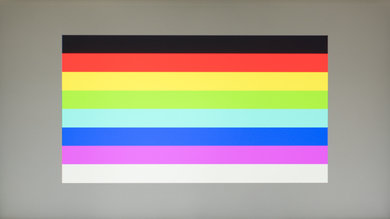
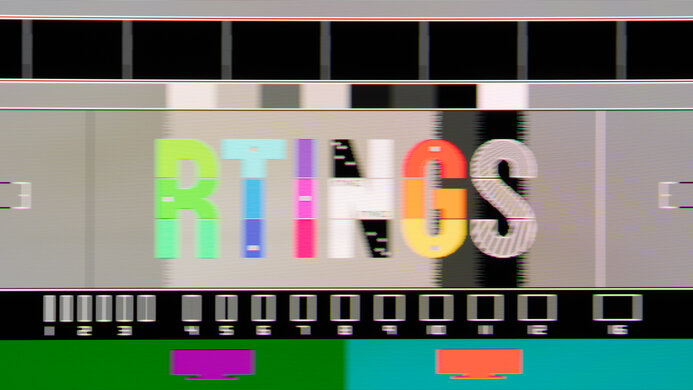
    Very good response time on the 27UK650-W. Motion looks the most clear with the Response Time set to 'Normal.' There's a bit of overshoot in some darker transitions in this setting, but there's less overshoot than on the other settings, and it looks the clearest.

    8.3
    Response Time @ 60Hz
    Best Overdrive Setting
    Normal
    Rise / Fall Time
    6.8 ms
    Total Response Time
    13.5 ms
    Overshoot Error
    1.3%
    Dark Rise / Fall Time
    7.4 ms
    Dark Total Response Time
    14.7 ms
    Dark Overshoot Error
    2.8%

    Overdrive Setting Response Time Chart Response Time Tables Motion Blur Photo
    Off Chart Table Photo
    Normal Chart Table Photo
    Fast Chart Table Photo
    Faster Chart Table Photo

    Since the 27UK650-W has a max refresh rate of 60Hz, the best overdrive setting is also 'Normal' and motion looks clear.

    10
    Image Flicker
    Flicker-FreeYes
    PWM Dimming Frequency
    0 Hz

    This monitor's backlight is flicker-free, which helps reduce eye strain.

    We did notice some unusual behavior of this monitor. After testing the input lag, we noticed some significant panel flicker where our test patterns were situated. This flicker ghosting persisted for about 15 minutes after completing our test, but the issue went away more quickly when the monitor was displaying moving content as opposed to static content. You can see the flicker when displaying a 50% gray image here filmed with a high-speed camera.

    It's only temporary and it's highly unlikely that most people will experience this during normal usage. We don't know if this flicker retention is caused by a defect in our unit, or if it's a built-in issue.

    0.0
    Black Frame Insertion (BFI)
    Black Frame Insertion (BFI)
    No BFI
    BFI Maximum Frequency
    N/A
    BFI Minimum Frequency
    N/A

    This monitor doesn't have a black frame insertion feature to help reduce motion blur.

    7.4
    Refresh Rate
    Variable Refresh Rate
    FreeSync
    Native
    60 Hz
    Max Refresh Rate
    60 Hz
    Variable Refresh Rate
    Yes
    FreeSync
    Yes
    G-SYNC
    Partially Compatible
    VRR Maximum
    60 Hz
    VRR Minimum
    40 Hz
    VRR Supported ConnectorsDisplayPort, HDMI

    The refresh rate of the 27UK650-W is okay. The 60Hz max refresh rate can go as low as 40Hz with FreeSync VRR technology, which might not be enough for some gamers. If you want a 4k monitor with a higher refresh rate, check out the LG 27GN950-B.

    With NVIDIA's new FreeSync drivers, the 'Extended' mode didn't work properly, with constant tearing. However, the 'Basic' mode works perfectly and can be used up until 60Hz.

    Inputs
    9.0
    Input Lag
    Native Resolution
    8.8 ms
    Native Resolution @ 60Hz
    8.8 ms
    Variable Refresh Rate
    9.2 ms
    Variable Refresh Rate @ 60Hz
    9.4 ms
    10 Bit HDR
    8.9 ms
    Black Frame Insertion (BFI)
    N/A

    Note: HDR input lag was measured using the HDMI port unlike the other measurements, which used a DisplayPort connection.

    Great low input lag on the LG 27UK650-W, particularly for a 60Hz monitor. The FreeSync input lag is roughly the same as the native refresh rate input lag, which is great.

    9.2
    Resolution And Size
    Native Resolution3840 x 2160
    Aspect Ratio16:9
    Megapixels8.3 MP
    Pixel Density
    164 PPI
    Screen Diagonal26.9"
    Screen Area310 in²

    The LG 27UK650-W has a very high 4k resolution and a large 27 inch size, which gives it incredible pixel density and detail while having plenty of screen space to work on.

    Inputs
    Total Inputs
    DisplayPort1 (DP 1.2)
    Mini DisplayPortNo
    HDMI2 (HDMI 2.0)
    DVINo
    VGANo
    DisplayPort OutNo
    USBNo
    USB CNo
    Analog Audio Out 3.5mm1
    Microphone In 3.5mmNo
    Digital Optical Audio OutNo
    Analog Audio Out RCANo
    Power SupplyExternal Brick

    Even though HDR support started with DP 1.4, HDR works over the DP 1.2 port.

    To allow full HDMI 2.0 bandwidth, the HDMI Ultra HD Deep Color setting must be enabled.

    Features
    Additional Features
    RGB Illumination
    No
    Speakers
    No
    HDR10Yes
    Multiple Input Display
    No

    The LG 27UK650-W has the same additional features found on other LG monitors:

    • Super Resolution+: an upscaling function that tries to sharpen upscaled video.
    • Black Stabilizer: an option to affect the gamma of dark shades while not affecting light shades.
    • Automatic Standby: It turns the monitor off automatically after a period of no activity.
    On-Screen Display (OSD)
    Controls

    The on-screen display is controlled by a small joystick nub under the center of the monitor.

    In The Box

    • Manuals and driver
    • Power cable
    • HDMI cable
    • DisplayPort cable
    • Hook for cable management