The LG SM8600 is a decent overall 4k TV that uses an IPS panel. It has fairly wide viewing angles, but that comes at the cost of a low contrast ratio, and it has poor black uniformity and a bad local dimming feature, so its dark room performance isn't good. However, most gamers should be pleased with the quick response time, low input lag, and black frame insertion feature to improve the appearance of motion. It's able to remove judder from most sources, like Blu-ray players or native apps, and it upscales lower resolution content well, with no visible artifacts. Unfortunately, it doesn't get bright and fails to make highlights pop in HDR. Luckily, its interface is easy to use and LG's Content Store has a large selection of apps available.
Our Verdict
The LG SM8600 is a decent TV for mixed usage. It's a good choice for gaming, watching TV shows, or sports. It has a low input lag and a quick response time, resulting in minimal motion blur. It also has excellent reflection handling and fairly wide viewing angles. It's not a good choice for watching movies in dark rooms since it has mediocre native contrast, poor black uniformity, and its local dimming feature doesn't further deepen any blacks. It's also a great choice to use as a PC monitor since it doesn't have any risk of permanent burn-in.
- Excellent low input lag.
- Image remains accurate when viewed from the side.
- Sub-par dark room performance.
- HDR doesn't add much.
The LG SM8600 is mediocre for watching movies. It doesn't have good dark room performance as it has a low contrast ratio, poor black uniformity, and a bad local dimming feature. However, it upscales 1080p well and it's able to remove judder from most sources, like a Blu-ray player or native apps.
Good for TV shows. The LG SM8600 has fairly wide viewing angles if you want to watch your favorite show with the entire family. It also upscales 720p content, like from cable boxes, well with no issues. Unfortunately, it doesn't get very bright, but it has excellent reflection handling, so you shouldn't have any issues placing this in fairly bright rooms.
The LG SM8600 is good for sports. It has wide viewing angles, so you can watch the game with a few friends, and it has excellent reflection handling. Unfortunately, it doesn't get very bright and it has some uniformity issues, which could get distracting during sports. Luckily, it has a great response time, so fast-moving content has minimal motion blur.
The LG SM8600 is a good choice for video games. It has a low input lag, a great response time, and a black frame insertion feature to help improve the appearance of motion. It has an Auto Low Latency mode that automatically switches the TV to 'Game' mode so you save some time instead of doing it yourself. Unfortunately, it doesn't support any variable refresh rate technology and it's not good for dark room gaming as it has a low contrast ratio and poor black uniformity.
Mediocre for HDR movies. Even though the LG SM8600 displays a wide color gamut for HDR content, it doesn't get bright enough to bring out highlights in this mode. It also doesn't have good dark room performance as it has a low contrast ratio, poor black uniformity, and the local dimming feature is bad. Luckily, it removes judder from most sources and it has excellent gradient handling.
The LG SM8600 is decent for HDR gaming, mainly due to its good gaming performance. It has a low input lag and quick response time, and it has a black frame insertion feature to improve the appearance of motion. Unfortunately, it doesn't get bright enough in HDR to bring out highlights and blacks appear closer to gray due to its low contrast ratio.
The LG SM8600 is great to use as a PC monitor. It has a low input lag, resulting in a responsive desktop experience. It's able to display proper chroma 4:4:4, which is important for reading text, and it has fairly wide viewing angles. Unfortunately, it doesn't get very bright, but it has excellent reflection handling. Like any LED TV, you won't have to worry about permanent burn-in with static displays.
Changelog
- Updated May 21, 2020: Converted to Test Bench 1.5.
- Updated Feb 21, 2020: Converted to Test Bench 1.4.
- Updated May 29, 2019: Review published.
- Updated May 27, 2019: Our testers have started testing this product.
Check Price
Differences Between Sizes And Variants
We tested the 55" LG SM8600 (55SM8600). For the most part, we expect our review to be valid for the 49" model (49SM8600), 65" model (65SM8600), and the 75" (75SM8670) model.
There is a European only variant, the SM8500, which has a slightly different design, but we expect its performance to be almost identical.
If someone comes across a different type of panel or if their LG SM8600 doesn't correspond to our review, let us know and we will update the review.
| Size | US | Canada | UK |
| 49" | 49SM8600PUA | 49SM8600AUE | 49SM8600PLA |
| 55" | 55SM8600PUA | 55SM8600AUE | 55SM8600PLA |
| 65" | 65SM8600PUA | 65SM8600AUE | 65SM8600PLA |
| 75" | 75SM8670PUA | 75SM8670PUA | 75SM8610PLA |
The 55SM8600 we reviewed was manufactured in March 2019.
Popular TV Comparisons

The LG SM8600 is a decent TV with good gaming performance. See our recommendations for the best TVs, the best 4k TVs, and the best HDR gaming TVs.
The LG B8 OLED and the LG SM8600 use different panel technologies, each with their strengths and weaknesses. The B8 uses an OLED panel, which delivers outstanding dark room performance and crystal-clear motion, thanks to the nearly-instantaneous response time. Unfortunately, the B8 also has a chance of permanent burn-in, which is not an issue on the LG SM8600.
The LG SM8600 and the LG NANO81 are similarly performing TVs and have a similar design with a center-mounted stand. The SM8600 has a 120Hz refresh rate, a much quicker response time, a BFI feature, and it removes judder from any source except 24p via 60i. However, the NANO81 has wider viewing angles, better reflection handling, and it has a lower input lag.
The LG NANO85 2020 is a bit better TV than its predecessor, the LG SM8600. The NANO85 2020 gets much brighter, the viewing angles are improved, it has better out-of-the-box color accuracy, it's able to remove judder from any source, and the built-in speakers are better. On the other hand, the SM8600 has a better overall style due to its sleeker, center-mounted stand.
The LG SM8600 and the Samsung TU8000 perform similarly but each is better suited to different uses. The LG uses an IPS panel which gives it much better viewing angles, good if your couch is to an angle to your TV, or if you watch a lot of sports games with a large group of people. On the other hand, the Samsung uses a VA panel which gives you much deeper and uniform blacks, making it better for dark room viewing, but also has narrow viewing angles so the image looks washed out from the side.

We buy and test dozens of TVs yearly, taking an objective, data-driven approach to deliver results you can trust. Our testing process is complex, with hundreds of individual tests that take over a week to complete. Most of our tests use specially designed test patterns that mimic real content, but we also use the same sources you have at home to ensure our results match the real-world experience. We use two main tools for our testing: a Colorimetry Research CR-100 colorimeter and a CR-250 spectroradiometer.
Test Results
Older Test Bench: We tested this product using an older TV test methodology before a major update. Some of the test results below aren't directly comparable with other TVs. Learn more
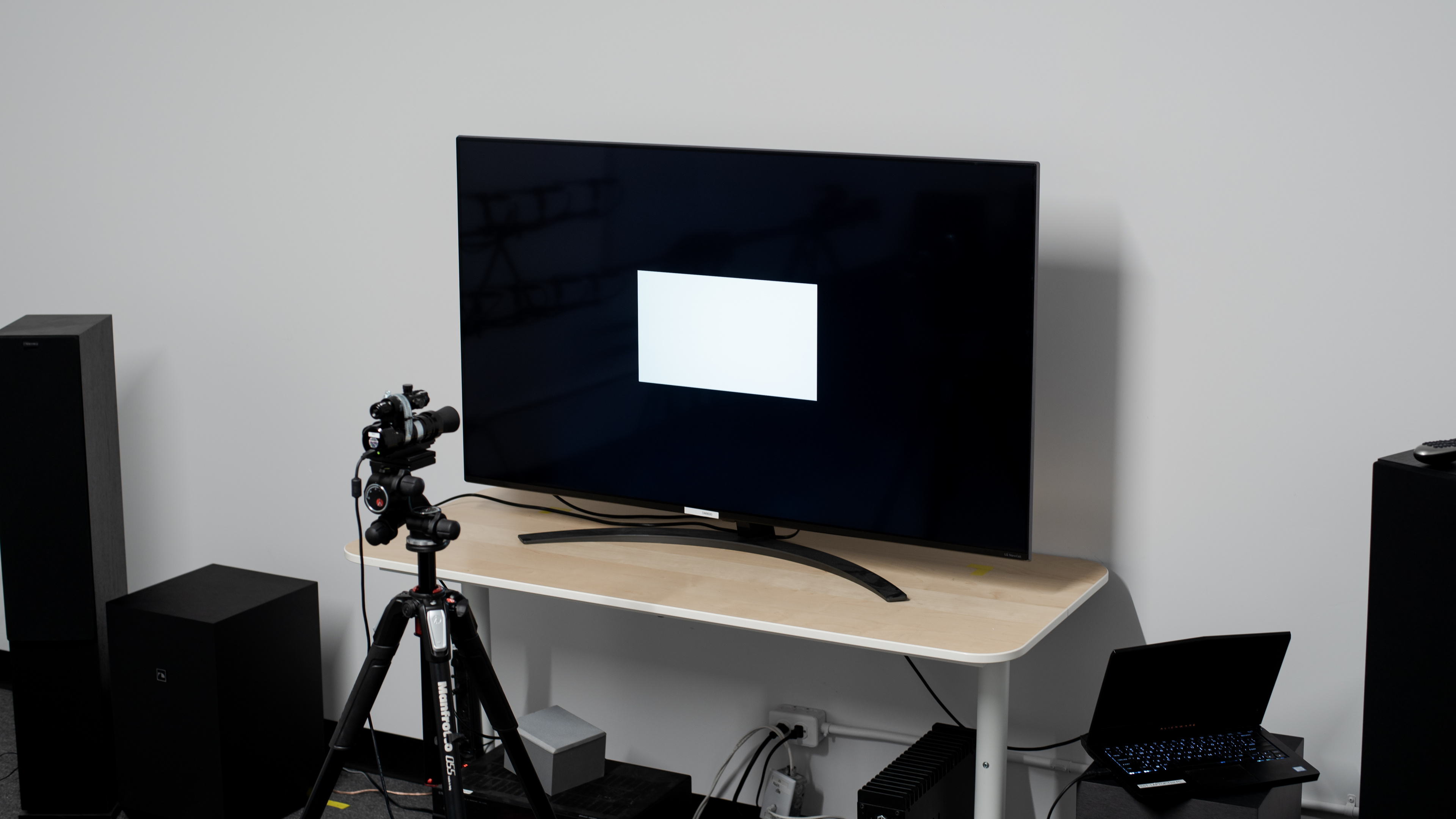
The LG SM8600 is a 2019 mid-range UHD TV in LG's NanoCell series. It's the replacement of the LG SK8000 in LG's lineup and its direct competitors are other mid-range LED TVs like the Sony X850F the Samsung RU8000, or the Vizio M Series 2018.
for pictures & test results

The LG SM8600 has an excellent design. The stand is made of plastic and supports the TV well. However, the TV wobbles significantly if you nudge it. The back of the TV is made of thin metal and has a mild brushed texture. The TV is thin and won't stick out much if wall-mounted. Finally, the build quality is decent and we don't expect you to have any issues with it.

for pictures & test results

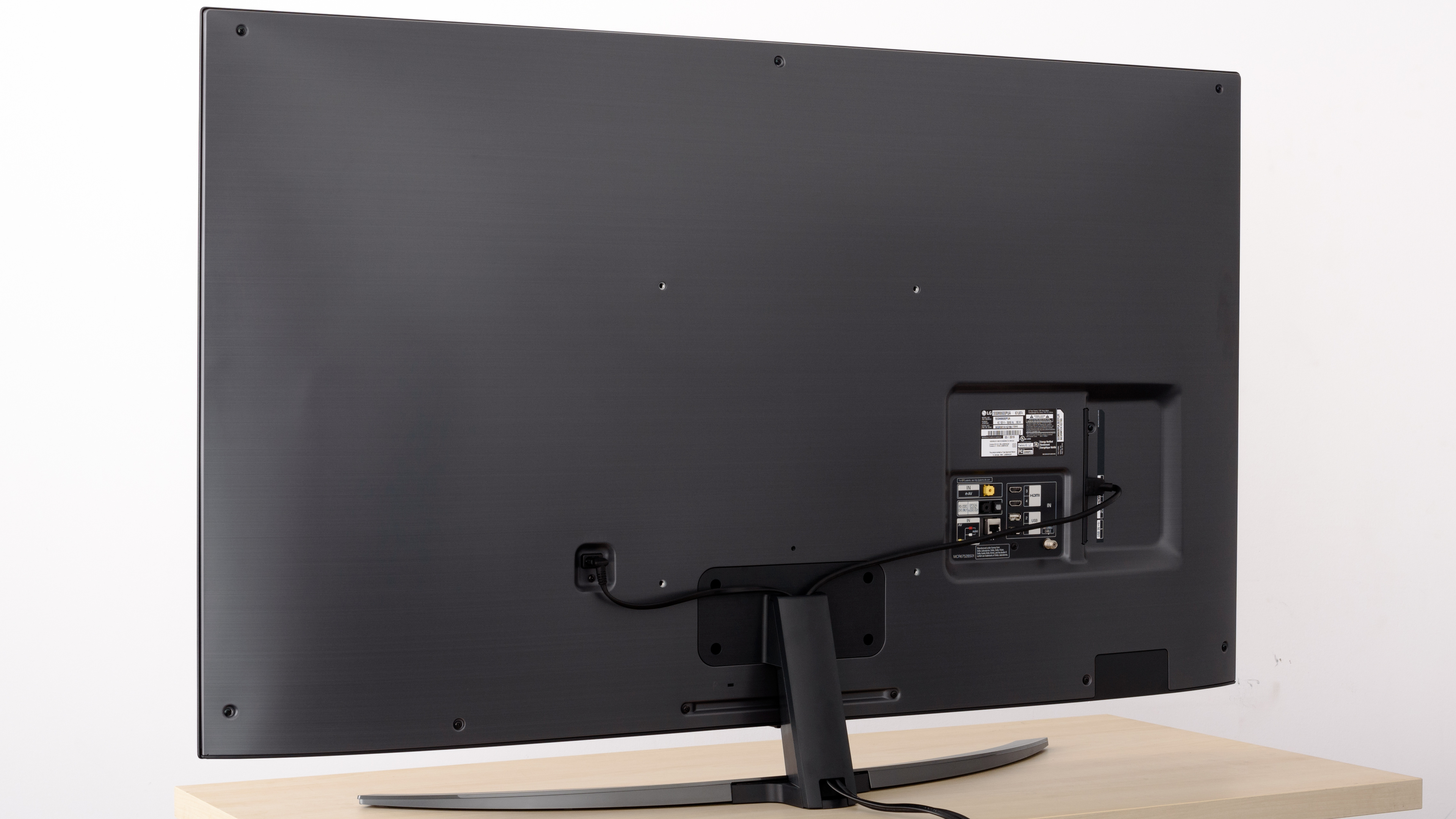
The back of the TV is plain with a mild brushed texture. It's made of a metal sheet that flexes easily if you gently push it inwards. The stand's neck has a removable cover and you can guide the cables through for cable management.
for pictures & test results

The borders are thin and made of metal. They look good and give the TV a premium feel.

for pictures & test results

The SM8600 has a decent build quality. It has a metal back which has a little flex, and the stand allows more wobbling than the LG SK8000. However, the TV feels solid, and the border finish gives it a more premium feel. You shouldn't have any issues with it.
for pictures & test results

Like most IPS panel TVs, the SM8600 has a mediocre contrast ratio. Blacks appear closer to gray, and enabling the local dimming feature doesn't deepen blacks all that much. If you want a TV with a much better contrast ratio, check out the TCL 6 Series 2018 or the Vizio P Series 2018.
for videos & test results

The LG SM8600 has bad local dimming. It's an edge-lit TV and has vertical local dimming zones which can cause issues with local dimming performance. With LED Local Dimming set to 'High,' in certain scenes, the TV reacts to brightness changes in small areas of the screen by brightening/dimming entire vertical columns, which causes significant blooming and this is very distracting.
Setting LED Local Dimming to 'Medium' makes this issue a lot milder, although many people may still find this vertical blooming distracting. We recommend you to set the LED Local Dimming to 'Medium,' as seen in the video above.
The local dimming performance is very similar to the LG SK8000, but the SM8600 has a less aggressive performance when LED Local Dimming is set to 'Medium.'
The SDR peak brightness is disappointing. It's slightly brighter than 2018's LG SK8000 and it's suitable for dim or moderate-lit rooms.
We measured the peak brightness after calibration, using 'ISF Expert (Dark Room)' Picture Mode, with Backlight set to '100,' LED Local Dimming set to 'Medium,' and Color Temperature set to 'Warm2.'
If you don't care about image accuracy, you can obtain higher brightness levels. We were able to reach 487 nits with the 10% window using the default settings of the 'Vivid' Picture Mode and LED Local Dimming set to 'Medium.'
The HDR peak brightness is disappointing. Small highlights get really bright, but overall, it can't get bright enough to bring out highlights in HDR.
We measured the peak brightness before calibration, using 'Cinema' Picture Mode, with BackLight set to '100,' LED Local Dimming set to 'Medium,' and Color Temperature set to 'Warm2.'
If you don't care about image accuracy, you can obtain higher brightness levels. We were able to reach 455 nits with the 10% window using default settings of the 'Vivid' Picture Mode.
for pictures & test results

for pictures & test results

The LG 55SM8600PUA has decent gray uniformity. The edges of the screen are a little darker than the rest and there's some minor dirty screen effect in the center. In darker scenes, the uniformity is better and you hardly notice any distracting blooming.
for videos & test results

for pictures & test results

for pictures & test results

for pictures & test results

Despite having an IPS panel, which are known to have wide viewing angles, this TV only has okay viewing angles. Overall, the image remains fairly accurate when viewing from the side, but you start losing some image accuracy at large viewing angles. This TV's successor, the LG NANO85 2020, has wider viewing angles.
for pictures & test results

for pictures & test results

The LG 55SM8600PUA has disappointing black uniformity, which is expected on IPS panel TVs. When local dimming is disabled, there's visible backlight bleed and blooming. With local dimming enabled and set to 'Medium,' the edges are a little darker but a significant area around the center cross remains lit. The overall black uniformity performance is better than the LG SK8000.
for pictures & test results

for pictures & test results

for pictures & test results

The reflection handling is excellent. The semi-gloss filter diffuses reflections, reducing their overall intensity so you won't be distracted if your room has a few lights. If you prefer a newer TV with even better reflection handling, check out the LG NANO81.
for pictures & test results

for pictures & test results

for pictures & test results

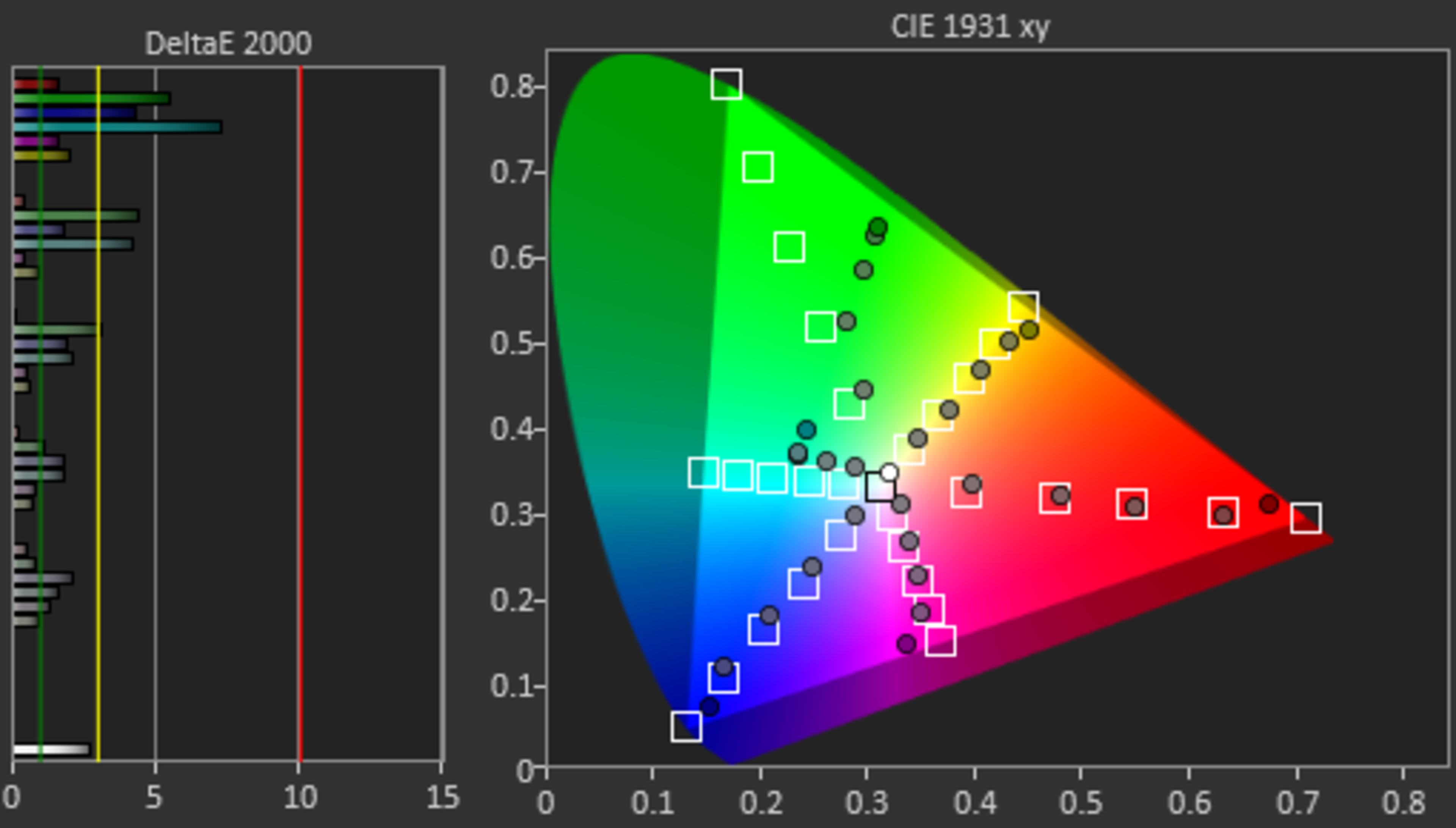
The LG SM8600 has mediocre accuracy with our pre-calibration settings. There are significant inaccuracies that most people might notice both in the shades of gray and in the colors. The gamma doesn't track the target very well and thus most scenes are a bit brighter than they should be. The color temperature is significantly warmer than the target of 6500K, and the image has a red-yellowish tint.
Its successor, the LG NANO85 2020, has much better out-of-the-box color accuracy.
for pictures & test results

for pictures & test results

for pictures & test results

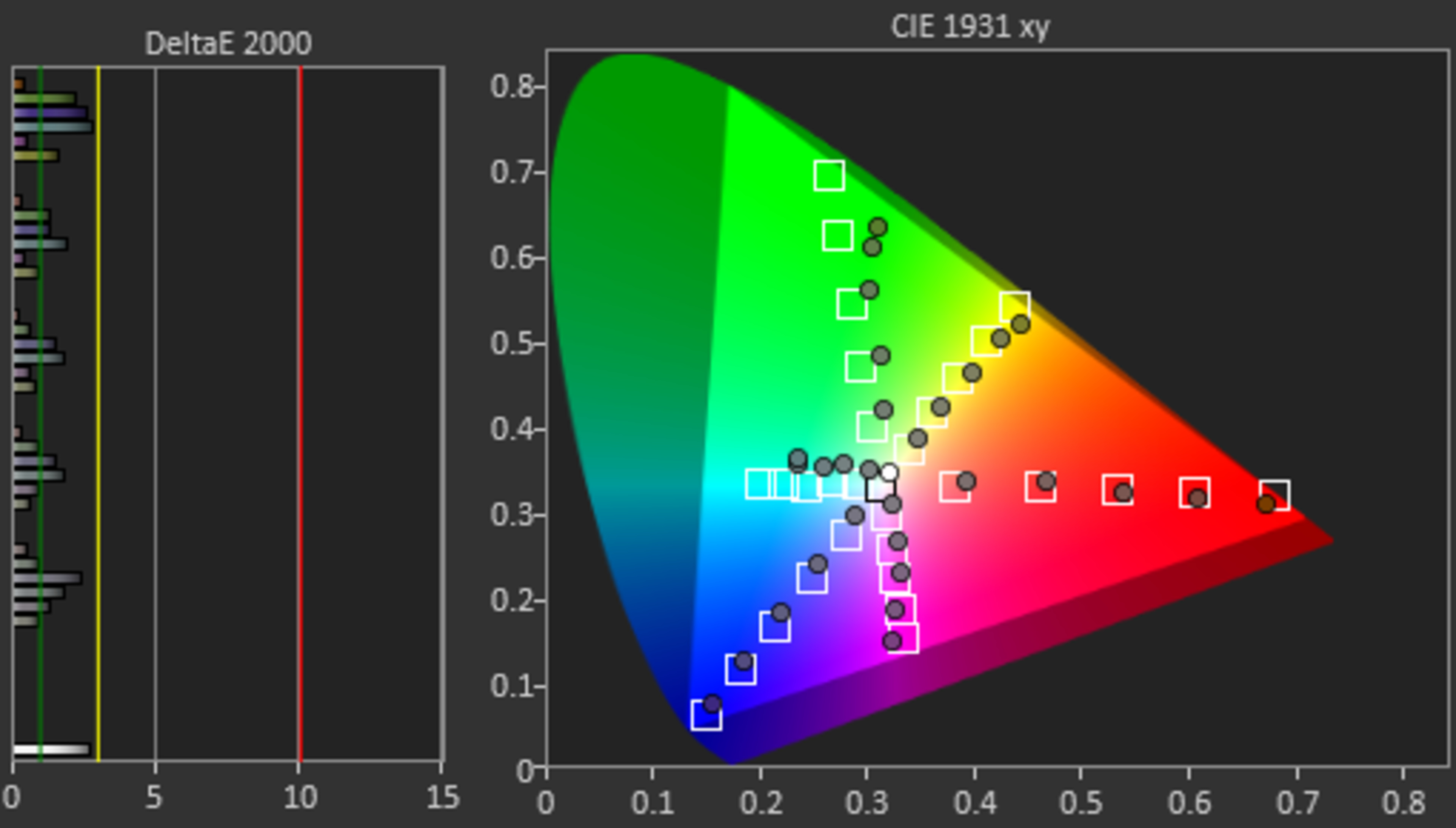
After calibration, the SM8600 has excellent color accuracy. Most colors are very accurate, but the gamma doesn't follow the target well and dark scenes aren't as dark as they should be.
The TV features an auto-calibration feature which still requires the use of colorimeter.
You can see our recommended settings here.
for pictures & test results

The LG 55SM8600PUA upscales 480p content, like DVDs, well without any obvious upscaling artifacts.
for pictures & test results

720p content, like cable TV, is upscaled well, with no strange artifacts.
for pictures & test results

Blu-rays and 1080p content look almost as good as native 4k content.


for pictures & test results

for pictures & test results

for pictures & test results

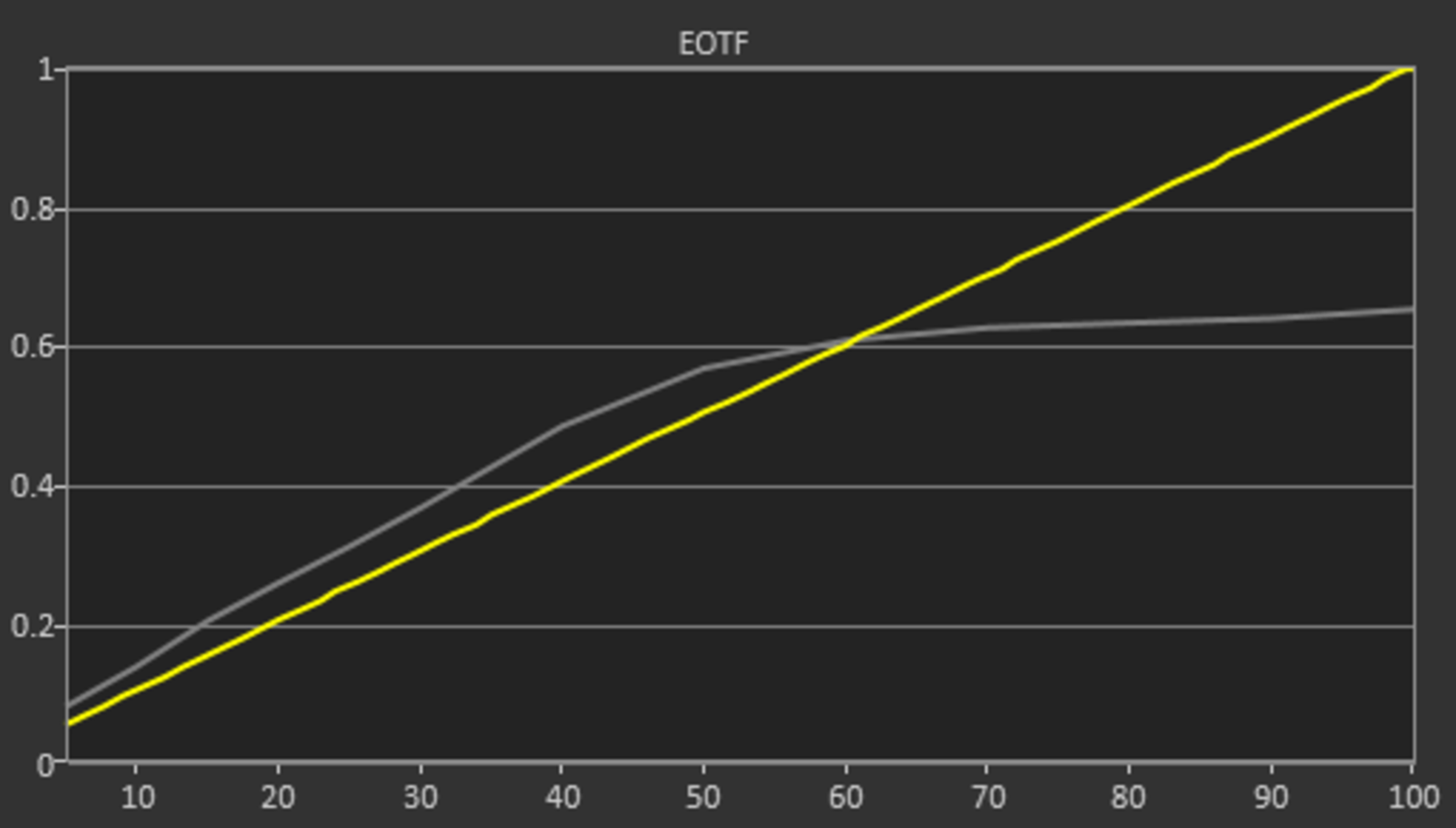
The SM8600 has a good wide color gamut. The EOTF is slightly over-brightening some very dark scenes, but, in general, it follows the input stimulus well until it starts a sharp roll off towards the TV's peak brightness. The 'Game' mode EOTF is almost identical as you can see here.
If you find HDR too dim, check out our recommendations here. With these settings, the SM8600 is a little brighter in HDR, as shown in this EOTF.
We also measured the tone mapping at 50% stimulus to check if the TV is prioritizing brightness over color accuracy. As we can see from the results for the Rec. 2020 color space, and the results for the DCI-P3 color space, the tone mapping is much better at the 50% stimulus. This means that the TV has better color accuracy at lower brightness levels since the tone mapping is better.
for pictures & test results

for pictures & test results

The SM8600 has decent color volume. However, the TV is unable to produce deep, dark colors mainly due to its mediocre contrast ratio.
for pictures & test results

The LG SM8600 has excellent gradient handling, similar to the LG SK8000. In most real-life content gradients are excellent but there are cases, like the pattern in the photo above, where banding is visible throughout most of the colors and shades. Our test is not run on the picture shown above. It's designed to measure gradient performance in situations that resemble more real-life content, and this is depicted in the results.
If you wish to smooth out gradients, you can enable the Smooth Gradation setting. This setting seems to work well with real-life content but doesn't do anything in our test pattern photo. Enabling Smooth Gradation might cause some loss of fine detail.
for pictures & test results

There's some very minor temporary image retention, but it disappears quickly and shouldn't bother most people.
While some IPS panels can have some temporary image retention, this doesn't seem to be permanent as the IPS panel in our long-term test appears to be immune.


for pictures & test results

The LG 55SM8600PUA uses Pulse Width Modulation (PWM) to dim its backlight. The flicker frequency can be as high as 240Hz, such as some of the TV's picture modes that are primarily aimed at movies ('Cinema,' 'ISF Expert (Dark Room),' etc). However, when TruMotion is enabled, the flicker switches to 120Hz in these modes.
The other picture modes like 'Game,' 'Standard,' 'Sports,' etc always have 120Hz flicker.
for pictures & test results

for pictures & test results

The LG SM8600 has an optional black frame insertion feature that can lower the flicker frequency and help reduce motion blur.
To activate this option, enable TruMotion to 'User' and this immediately makes the flicker frequency 120Hz no matter the picture mode. If you set Motion Pro to 'On' then the flicker frequency becomes 60Hz.
Unfortunately, this decreases the picture brightness, and 60Hz flicker can be bothersome to some people.
When you are in 'Game' mode the flicker frequency is always 120Hz. To lower the frequency to 60Hz, you must follow the same procedure as before.
for pictures & test results

for pictures & test results

The LG SM8600 can interpolate lower frame-rate content up to 120fps. The TV stops interpolating in very fast scenes to avoid creating too many artifacts. When this happens, the sudden change in frame rate can be noticeable as a sudden "jerk" in motion. To enable motion interpolation, enable the TruMotion setting.
See here for the settings that control the SM8600's motion interpolation feature.
Note that just enabling TruMotion changes the backlight flicker to 120Hz.
The SM8600 has a fast response time, which makes the image appear to stutter in movies or other lower frame rate content. If stutter bothers you, motion interpolation or the optional black frame insertion feature can help.
The SM8600 is able to remove judder from most sources. Unfortunately, during our test, the TV was unable to completely remove 24p judder from 60i signals. To remove judder, the Real Cinema option must be enabled in the Picture Option Settings menu.
The LG 55SM8600PUA has a native refresh rate of 120Hz. Unfortunately, it doesn't appear to support any of the variable refresh rate technologies, including FreeSync or the HDMI 2.1 VRR format. We tested this with an Xbox One S, which did support HDMI-Forum VRR on the C9. Although we can't be sure it won't work from an HDMI 2.1 source, we don't expect it to.
The SM8600 has a very low input lag which is great news for gamers. To get the lowest input lag you must set the TV in 'Game' mode. To get low input lag and proper chroma 4:4:4 just change the input icon to PC. The picture mode does not matter.
The TV supports an Auto Low Latency mode that LG calls 'Instant Game Response,' but it only works with compatible devices like the Xbox One. When 'Instant Game Response' detects that you're playing a game, it switches to 'Game' mode. After that, if you switch to another picture mode, you're still getting low input lag and the only available settings are the 'Game' mode ones. This means that all picture modes can have the same low input lag when 'Instant Game Response' is activated.
See our recommended gaming settings here.
The LG 55SM8600PUA supports the majority of most common resolutions including 1440p.
All supported resolutions can display proper chroma 4:4:4 as long as PC mode is enabled, except the 1080p @ 120Hz which doesn't.
Some of the high bandwidth resolutions, like 4k @ 60Hz + HDR, require the HDMI ULTRA HD Deep Color setting to be enabled for the port in use.


It's unclear if the LG 55SM8600PUA supports HDMI 2.1 or not. We couldn't confirm this either way, as we had no way of sending an HDMI 2.1 signal.
Like the 2018 LG OLEDs, the LG SM8600 supports DTS and Dolby Digital passthrough to a standard ARC receiver. It doesn't support eARC as the LG C9 OLED does.
for pictures & test results

The frequency response is poor. The bass of this TV won't have any thump or rumble, and lacks quite a bit of punch too. The frequency response above the low-frequency extension (LFE) point is decent and relatively well-balanced so it produces clear dialog. This TV doesn't get loud and doesn't have a room correction system.
for pictures & test results

The distortion performance is mediocre. The overall amount of produced THD is a bit elevated, but it doesn't reach a point where distracting artifacts are audible.
for pictures & test results

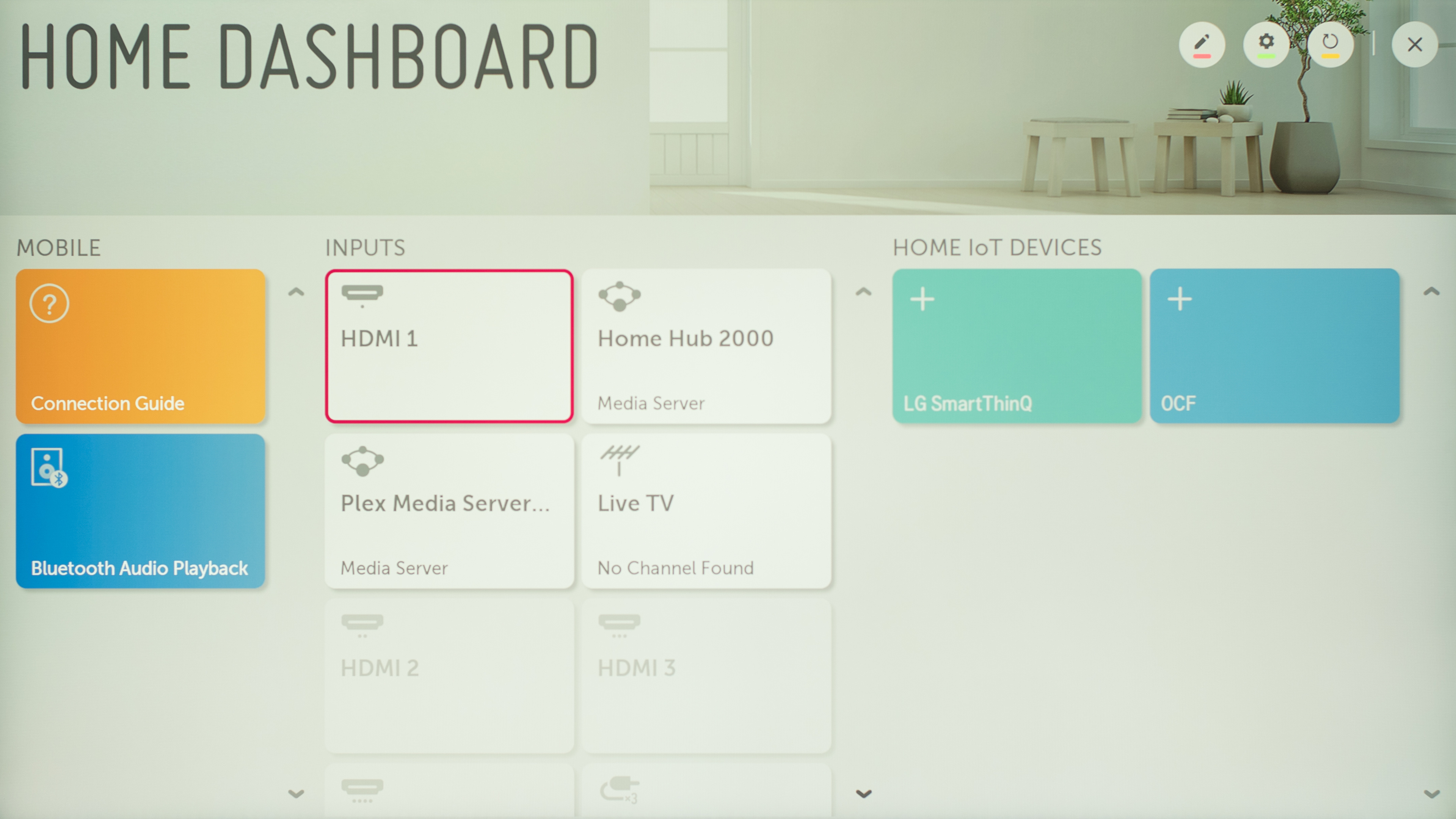
The LG 55SM8600PUA has an excellent interface that is easy to use. It is relatively smooth, and we didn't have any serious issues with it.
The interface has a few new functions in 2019. The Home Dashboard appears to be the most significant change and it's very similar to Samsung's Smart Things.
We have not found ads on this TV, but LG TVs have ads and suggested content. You can see it in this photo of the UM7300, where 'LG Nanocell' TVs are advertised. Unfortunately, you can't completely opt-out, but there's a menu option called 'Home Promotion' which lets you turn off the square on the home bar.
for pictures & test results

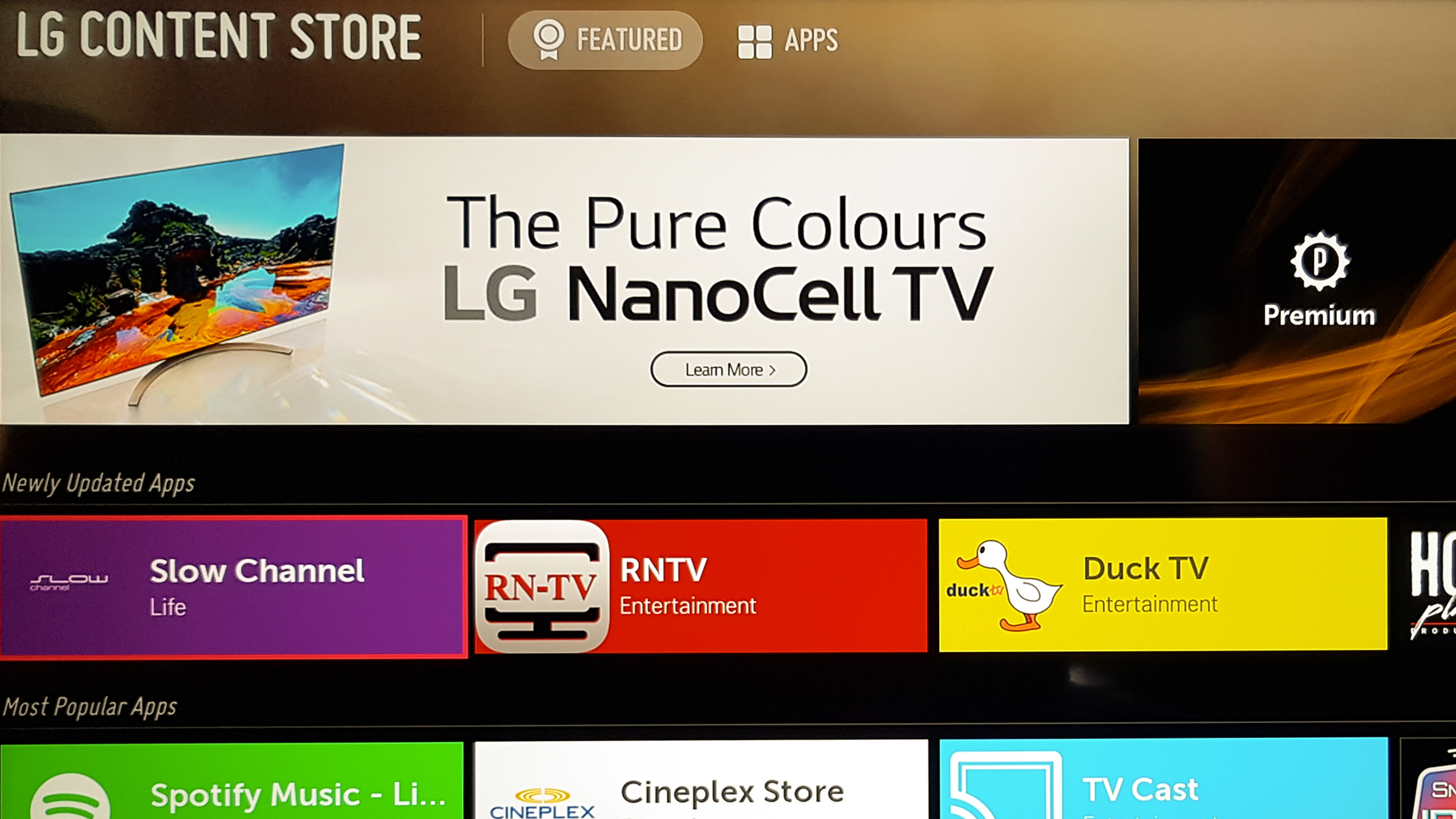
The SM8600 has a great selection of built-in apps, just like most LG TVs. LG's Content Store hosts one of the largest selections of apps available. If there's a specific app you want us to check for, let us know in the discussions down below!
for pictures & test results

The remote is identical to the LG C9 OLED remote and has similar functionalities. It's also similar to the LG SK8000 but has a few added features. You can now program the remote to work as a universal remote with other devices over IR, and this is great if HDMI-CEC is not supported. This is similar to Samsung's One Remote feature.
Like with past LG TVs, the remote can be used as a mouse pointer, but you can also navigate the interface using the directional buttons. The remote has a built-in mic that allows you to perform certain functions and searches with your voice.
for pictures & test results

The controls are in the center of the TV. It's a single button that allows you to turn the TV on/off, adjust the volume, or change channels.
for pictures & test results

- Basic user manual
- Remote
- Cable management strap
- Composite breakout adapter
- Batteries
- Not Shown: Power cable