Note that this is a different TV to the 2017 QLED Q7F. The 2018 Q7FN is also called Q7F or Q7.
Our Verdict
Great TV for mixed usage. Picture quality is great, but less than ideal viewing experience in a perfectly dark room due to the ineffective local dimming feature. It has an excellent color reproduction and it is very bright, great for HDR content. The TV has an excellent low input lag, which is perfect for use as a PC monitor or for gaming.
- Exceptionally wide color gamut
- Can get very bright to overcome glare
- Excellent low input lag
- Picture quality degrades at an angle
Good for watching movies. The Samsung Q7F has an excellent native contrast ratio, but the ineffective local dimming feature isn't able to boost black levels. It is able to effectively remove judder from most sources and the TV has great motion handling, perfect for fast action movies.
Great for watching TV shows in a bright room. It has excellent reflection handling, and is bright enough to overcome most glare. It doesn't have a very wide viewing angle, typical of VA panels. The smart interface works well and has a good selection of streaming apps available.
Great for watching sports in a bright room. It has excellent reflection handling and an excellent response time. The viewing angle isn't very wide, which could be problematic for some people for game day parties. It has great gray uniformity, with little dirty screen effect.
Excellent TV for playing console or PC games. It has excellent low input lag across all supported resolutions and can interpolate low frame rate games without adding much lag. Motion handling is great, and fast-moving objects look clear, but the viewing angle is limited so split-screen couch co-op isn't the best.
Good TV for watching movies in HDR in a dark room. It has an excellent native contrast ratio, but the local dimming feature is limited and can't boost the black levels. It has the widest color gamut we have measured, and excellent color volume, so movies look closest to what the content creator intended. Bright highlights in some scenes are able to get very bright.
Great TV for gaming in HDR on a PS4 or Xbox One S or X. It has excepetionally low input lag, and a fast response time, so games respond quickly to every button press and motion looks smooth. Games look amazing thanks to the wide color gamut. It doesn't have a very effective local dimming feature so late night gaming isn't as great as it could be.
Great TV for use as a PC Monitor. The Samsung Q7 supports chroma 4:4:4 so text looks as sharp as it can. It has a limited viewing angle, so it is best when seating directly in front, but if too close, the edges can appear non-uniform. Motion handling and response time are great, so there isn't much mouse lag.
Changelog
- Updated May 21, 2020: Converted to Test Bench 1.5.
- Updated Feb 21, 2020: Converted to Test Bench 1.4.
- Updated Feb 28, 2019: Converted to Test Bench 1.3.
- Updated Jun 11, 2018: 1440p @ 120 Hz input lag has decreased as of firmware 1103. The review has been updated.
Check Price
Differences Between Sizes And Variants
We tested the 55" (QN55Q7FN) version AA01. For the most part, we expect our review to be valid for the 65" version (QN65Q7FN) and 75" version (QN75Q7FN).
The warehouse variant of the 2018 Q7F is known as the Q75FN. The stand is black instead of chrome, and depending on the specific warehouse model it might have a simpler remote. We don't expect any other differences and our review should still be valid.
If someone comes across a different type of panel or if their Samsung Q7FN doesn't correspond to our review, let us know and we will update the review.
| Size | Model | Model Short | US | Warehouse Model | Canada | UK |
| 55" | QN55Q7FN | QN55Q7 | QN55Q7FNAFXZA | QN55Q75FNFXZA | QN55Q7FNAFXZC | QE55Q7FNATXXU |
| 65" | QN65Q7FN | QN65Q7 | QN65Q7FNAFXZA | QN65Q75FNFXZA | QN65Q7FNAFXZC | QE65Q7FNATXXU |
| 75" | QN75Q7FN | QN75Q7 | QN75Q7FNAFXZA | QN75Q75FNFXZA | QN75Q7FNAFXZC | QE75Q7FNATXXU |
Popular TV Comparisons

The Samsung Q7FN is a powerful, versatile TV with great performance for pretty much everyone, but at a very premium price. While it is a great TV, there are some better alternatives depending on your needs. See our recommendations for the best TVs and the best smart TVs.
The Samsung Q9FN/Q9/Q9F QLED 2018 is better than the Samsung Q7FN/Q7/Q7F QLED 2018. The Samsung Q9FN has much better local dimming performance and a higher contrast ratio and black uniformity that improve picture quality. This becomes more apparent when you watch movies in a dark room. The Samsung Q7FN has better gray uniformity, which is great if you watch sports.
The Samsung Q8FN/Q8/Q8F QLED 2018 is a bit better than the Samsung Q7FN/Q7/Q7F QLED 2018 for most users, unless you want a cleaner wall mount installation with the One Connect box. The two TVs offer nearly identical picture quality, but the Samsung Q8FN has a better local dimming feature.
The Samsung Q7FN/Q7/Q7F QLED 2018 is better than the Samsung Q7F/Q7 QLED 2017. The Q7FN is a lot brighter than the Q7F with all types of content, and the Q7FN has better black uniformity, good for dark room viewing. The Q7FN supports some new gaming-oriented technologies, including auto low latency mode and a variable refresh rate.
The Sony X900F is slightly better than the Samsung Q7FN/Q7/Q7F QLED 2018. The X900F has a much better full-array local dimming feature that improves dark room performance. The Samsung Q7FN has less input lag for gaming, and supports new gaming features like auto low latency mode and has a variable refresh rate when connected with a supported device.

We buy and test dozens of TVs yearly, taking an objective, data-driven approach to deliver results you can trust. Our testing process is complex, with hundreds of individual tests that take over a week to complete. Most of our tests use specially designed test patterns that mimic real content, but we also use the same sources you have at home to ensure our results match the real-world experience. We use two main tools for our testing: a Colorimetry Research CR-100 colorimeter and a CR-250 spectroradiometer.
Test Results
Older Test Bench: We tested this product using an older TV test methodology before a major update. Some of the test results below aren't directly comparable with other TVs. Learn more
for pictures & test results

The design of the Samsung Q7FN is excellent and up to par with last year's Q7F. It comes along with the OneConnect box incorporating some improvements over last year's design. The cable that connects the box to the TV is very long (195") and it also provides power thus eliminating the need for an extra power cord.
for pictures & test results

The stand is quite stylish and sturdy and resembles last years Q7F. Although the TV wobbles a little bit as with most center stands, it is well balanced and should please most people.
Footprint of the 55" TV stand: 33.5" x 11.4"
for pictures & test results

The back is plastic with small grooves and a matte finish. It looks very much like last years' Q7F. There is practically no need for cable management channels due to the OneConnect box, here.
This also facilitates wall mounting, but at the same time requires planning for the placement of the OneConnect box.
for pictures & test results

The borders of the Samsung QN55Q7FN are very thin with a metal finish. They look nice and are very similar to the 2017 Q7F.
for pictures & test results

The TV is remarkably thin. The OneConnect Box removes the need for an inputs cabinet, thus enabling the TV design to be thinner
for pictures & test results

The build quality of the TV is great. There are no obvious gaps in the unit. It is mostly plastic, with some metal parts, including the stand and the borders, which contribute to its solid feel.
for pictures & test results

The contrast on the Samsung Q7FN is superb. It's about 20% higher that the 2017 Q7F. When set in a dark room, the Q7FN can produce deep black scenes.
When measured with local dimming activated, there is almost no change due to poor performance of local dimming.
for videos & test results

The local dimming feature on the TV is bad. Performance is very similar to the NU8000. It focuses on the moving highlights, but the rest of the screen is hardly dimmed. It was a bit noticeable when the highlights were at one edge of the screen.
The TV has excellent SDR brightness and outperforms both the Q9FN and the Q8FN, but still falls behind last year's Sonys X930E and Z9D. Edge lighting is more efficient than full array used in both the Q9FN and the Q8FN. We assume that this extra power budget is what makes the Q7FN brighter.
The high brightness values on the 2% and 10% windows will make small highlights stand out in dark scenes.
The great performance in this category makes it a great candidate for anyone looking for a TV for a bright room.
Just like in the SDR brightness, the performance of Samsung Q7FN in HDR is remarkable and certainly better than last year's Q7F. Bright highlights in HDR content will be shown quite bright, and at times within the 1000-4000 cd/m² level they're intended to be.
for pictures & test results

for pictures & test results

The gray uniformity of the Samsung Q7F is good. The borders are darker than the rest of the screen, but the center remains relatively clear. This avoids any disturbing dirty screen effects and sport viewing and game playing should not have any issues.
Dark scene uniformity is very good. It is hard to notice any cloudiness.
for videos & test results

for pictures & test results

for pictures & test results

for pictures & test results

The viewing angle is disappointing but typical for a VA panel. It is worse than the 2017 Q7F, but it doesn't differ a lot from the 2018 Samsung family, even though it presents a slight improvement in the black levels
for pictures & test results

for pictures & test results

The black uniformity of the Q7FN is remarkable and certainly a major improvement over last year's Q7F. There is very little clouding around the test cross that is hardly noticeable.
The standard deviation is higher when local dimming is set to high and clouding is a little more obvious. This happens because of the way local dimming works. We must set the backlight to higher levels to reach a luminance of 100 at the center of the test cross. This causes more blooming in general, and explains the higher measurement than the native black uniformity.
for pictures & test results

for pictures & test results

for pictures & test results

The Samsung Q7 handles reflections in the same excellent way the Q7F does. The glossy screen finish along with the anti-reflection coating work well in diffusing most of reflections. The TV is a good choice for a bright room.
for pictures & test results

for pictures & test results

for pictures & test results

Out of the box, colors are good with the 'Movie' picture mode and most people won't notice the difference. White balance is high, gamma is very high and doesn't track our target.
Update 04/12/2019: This TV was incorrectly measured with Brightness +2, instead of at 0. This only has a small impact on the results (slightly dimmer dark scenes below about 30 IRE) and so we don't plan to retest it.
for pictures & test results

for pictures & test results

for pictures & test results

The color management system wasn't very effective at correcting color accuracy. Most of the corrections were done on the white balance, which in turn corrected some of the color accuracy. After calibration, the gamma follows our target 2.2 almost perfectly, and white balance is almost perfect.
Calibration had to be done with a 100% window, as the local dimming feature was interfering with our calibration.
For most people, setting the gamma to +2 with the 'warm 2' color temperature will be good enough.
See our recommended settings here.
for pictures & test results

Lower resolution 480p content like DVDs is upscaled well, with no obvious artifacts or quality issues.

for pictures & test results

1080p content including Blu-rays and non-4k console games is displayed well, and looks almost as good as native 4k content.
for pictures & test results

Native 4k content is displayed perfectly without any issues. The artifacts seen in the 2017 Q7F are no longer present thanks to the new sub-pixel structure.
for pictures & test results

The pixel structure is quite different between the 2017 Q7F and this year's model. This is good as last year's model had some artifacts due to the strange blue sub-pixel structure. This is also a different pixel structure to the other 2018 QLEDs we've tested (Q8FN and Q9FN).
for pictures & test results

for pictures & test results

for pictures & test results

The 2018 Q7F has an impressive color gamut. It covers practically the entire P3 color space, and has the best Rec 2020 coverage of any TV we have reviewed. HDR content will look very close to what the creator intended.
The color gamut is even wider than the Q8FN. This is not due to panel variance as the two are definitely not the same panel, as shown by the difference in the Q7FN and Q8FN pixel photos.
The EOTF curve follows our input stimulus nearly perfectly, and it has a slightly smoother roll off at the TV's peak brightness, so there will be less clipping in bright scenes. The PC and Game EOTFs approximately follow our input stimulus, which is good.
for pictures & test results

for pictures & test results

The Samsung Q7 has excellent color volume. It can create outstanding bright colors but can't produce deep, dark colors. The color volume is very similar to the Q8FN and is a noticeable improvement over the 2017 Q7F/C.
for pictures & test results

Decent gradient quality. There is some faint banding visible almost everywhere. Dark green and blue gradients have major banding. These results aren't horrible, most people won't notice this much.
for pictures & test results

There was no temporary image retention on the 2018 Q7FN.
We don't expect VA panels to experience permanent image retention, as the VA panel in our long-term test appears immune.
for pictures & test results

for pictures & test results

The 2018 Q7 has an excellent response time. There is a bit of overshoot in the 0-20%,0-80% and 20-80% transitions, but this shouldn't cause any issues. It is a bit worse than last year's Q7F but nearly identical to the Q8FN. There is very little blur due to response time, most of the blur in the photo is due to persistence.
for pictures & test results

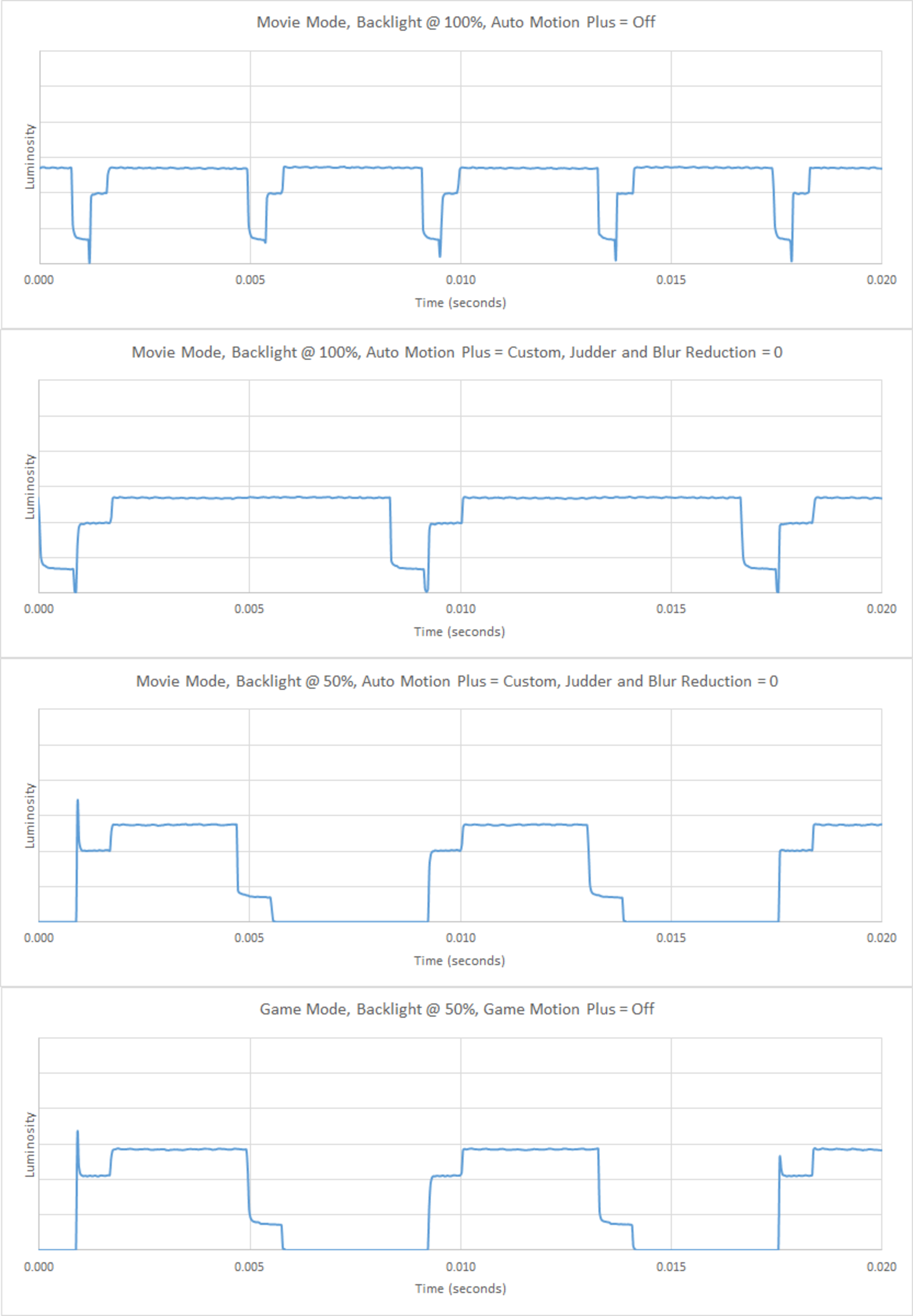
The Samsung Q7FN uses PWM to dim the backlight. There is visible flicker at all backlight settings. At low backlight settings the flicker becomes more apparent.
The 2018 model has a 240Hz flicker, which is a marked improvement over the 120Hz backlight on the 2017 version. People sensitive to flicker could consider the Q8FN instead which has a much less noticeable 480Hz flicker.
The backlight changes depending on the motion processing options enabled, as shown here.
for pictures & test results

for pictures & test results

The Q7FN has an optional black BFI mode. This is enabled by setting Auto Motion Plus to Custom, and enabling LED Clear Motion. This changes the backlight to a 60 Hz flicker, even in game mode. Changing the flicker frequency will help reduce stutter but people sensitive to flicker might notice it more.
The backlight changes depending on the motion processing options enabled, as shown here.
for pictures & test results

for pictures & test results

The QN55Q7FN is able to interpolate lower frame rate content up to 120Hz. The Samsung Q7F does a good job interpolating with few artifacts, but the accuracy does decrease with medium amounts of motion, and the TV stops interpolating in scenes with heavy motion.
The backlight changes depending on the motion processing options enabled, as shown here.
There is some stutter on the Q7FN, due to the fast response time. This is especially noticeable with 24p Blu-ray movies. If this bothers you, motion interpolation or BFI can help reduce the perceived stutter.
The Samsung Q7FN is able to remove 24p judder from most sources. It is inconsistent with 24p content played at 60i from a cable box.
To enable the judder removal on the Q7FN for 24p content played from a Blu-ray, set 'Auto Motion Plus' to Custom with both sliders set to '0'.
The backlight changes depending on the motion processing options enabled, as shown here.
The TV does not yet support any of the Variable Refresh Rate technologies like AMD's Freesync 2. This was tested with an Xbox One S and on a PC with a Radeon RX 580.
Update 05/23/2018: Firmware version 1103 has added Freesync support. We are currently testing it and will update the review shortly.
Update 06/08/2018: FreeSync has been tested and the score has been updated. FreeSync was supported from our Xbox One S and our Radeon RX 580 GPU, in 1080p, 1440p and 4k resolutions. FreeSync is activated by enabling the TV's Game mode and FreeSync settings; PC mode is not required. We tested in Ultimate mode because it has the widest range, and we only recommend Basic mode when you experience problems with Ultimate.
1440p @ 120 Hz: 10.0 ms
Excellent low input lag across all resolutions and refresh rates, as long as Game Mode is activated. Outside of Game Mode, input lag is high, but not terrible.
High-end 2018 Samsung TVs like the Q7FN and NU8000 can interpolate lower frame rate games up to 60 Hz or 120Hz without adding much input lag. When interpolating up to 60Hz (With the 'Judder' slider set to 10 and the 'Blur' slider at 0, input lag is 21.7 ms, which is still very low. When interpolating up to 120 Hz (with both sliders at 10), input lag is 27.5 ms.
The Q7FN supports the new Auto Low Latency Mode. When connected to a supported device (like the Xbox One or PS4), the TV will automatically switch to game mode when a game is detected.
Update 06/08/2018: The input lag with VRR has been tested and added to the review.
Update 06/11/2018: 1440p @ 120 Hz performance has improved as of firmware version 1103. The 1440p @ 120 Hz input lag is now 10.0 ms, down from 24.8 ms.
The 2018 Q7F QLED TV supports most common resolutions without issue.
For use as a PC monitor, it is necessary to enable HDMI UHD Color from the External Device Manager for the port used, and the input label must be set to PC. This is required for the TV to support chroma 4:4:4.
In 1440p @ 120 Hz, chroma 4:4:4 is displayed but the colors are not displayed properly, same as the Q8FN.


For the audio return channel to work correctly, Anynet+ (HDMI-CEC) must be enabled.
Like other Samsung TVs we have tested this year, DTS passthrough is not supported on the Audio Return Channel or through optical.
for pictures & test results

The frequency response is decent. LFE (low-frequency extension) is at 70Hz, which is above-average. This means this TV won't produce any low rumbling sounds or thumps, but will have a decent punch to its bass. The response above the TV's LFE is quite well-balanced, suggesting clear and intelligible dialogs. However, since the TV doesn't have a room correction system, it wasn't able to remove the modes of our test room around 200Hz. Additionally, this TV gets moderately loud, but may not be loud enough for large and noisy environments.
for pictures & test results

The distortion performance is good. The overall amount of harmonic distortion produce throughout the range is within good limits. There is not a noticeable change in THD under maximum volume either, however, this TV doesn't get very loud.
for pictures & test results

The interface of the QN55Q7FN is intuitive and easy to navigate. The TV is slightly slower than last year's model, with frequent dropped frames.
Like all Samsung TVs, the Samsung Q7FN has ads across the main interface bar, as well as suggested content in the content store. They are not always there, but they can't be completely disabled.
During our testing the ads displayed intermittently so we were unable to photograph them, but they look like the ones on the Q8FN. The ads we saw were targeted, while watching a car show we were shown Mitsubishi ads.
for pictures & test results

The TV has a good assortment of pre-installed apps, and the app store has an excellent selection of available apps.
The 2018 QLEDs have a new feature called Ambient Mode. When enabled, the TV can display a variety of content when in sleep mode, including the time, weather, music, and photos.
for pictures & test results

The remote is the same as the one included with the Q8FN and NU8000. It doesn't have a lot of buttons, for most things the remote has to be used to navigate the menu or use the Bixby Voice Assistant.
The new Bixby assistant works well. It can change inputs, open apps, and answer basic questions, for example, "How's the weather for the next week?". It is more limited than the LG voice assistant, and it can't search within apps or do wider searches across a variety of sources.
for pictures & test results

There is a cluster of 5 buttons under the center of the TV, nearly identical to the Q9FN. There is a directional pad which can be used to quickly access most settings when not in an app. This is an improvement over the 2017 Q7F, which only had a power button.
for pictures & test results

- Manual
- Remote
- VESA Spacers
- Batteries
- OneConnect Cable Dust Covers
- OneConnect Cable Corner Guide
- Quick Setup Guide
- One Connect Box
- 195" One Connect Cable
- 61.5" Power Cable