Our Verdict
This TV is very good for mixed usage. It has decent reflection handling and can get bright enough to be placed in average lit rooms. It has deep blacks that enhance the good picture quality, but the viewing angles are poor and those viewing from the side will be disappointed.
- Deep and uniform dark scenes
- Excellent motion handling
- Supports a wide color gamut
- Mediocre HDR peak brightness
- Image degrades when viewed at an angle
The Sony XBR60X830F is decent for watching movies. The picture quality is very good and blacks are deep and uniform. However in dark scenes in dark rooms, the absence of local dimming support might annoy some movie enthusiasts.
Very good performance for this Sony X830F on TV shows. Good handling of reflection and great brightness allow you to place in a bright environment like a kitchen. Motion handling is excellent and will please the soap opera effect fans. Viewing angles are poor so you should avoid watching from the side.
The Sony X830F is very good for sports watching. It can get very bright and can handle reflections well so it can be placed in a bright room. Response time is excellent, so you will enjoy the fast-moving action. Some people might notice a little dirty screen effect, but this won't be visible to most.
The Sony X830F is very good for playing video games. It has an excellent low input lag and a very fast response time that make it very responsive. It can handle most common resolution and will keep gamers happy.
The performance when watching HDR movies is mediocre. It has nice deep and uniform blacks but the lack of local dimming support and the mediocre brightness in HDR do not allow highlights to pop and the creator's content is not presented as intended.
Playing HDR games on this Sony XBR-60X830F is very good as it has very low input lag at the 4k @ 60Hz + HDR resolution. The fast response time and the excellent motion handling make the gaming exciting. Unfortunately, when displaying HDR content it does not deliver the content as intended.
The Sony X830F is great for use as a PC monitor. It has very low input lag and excellent motion handling. It is very responsive and will display clear and crisp text as it supports 4:4:4 chroma subsampling. Finally, as it is a VA panel, you do not have to worry about temporary or permanent image retention.
Changelog
- Updated May 21, 2020: Converted to Test Bench 1.5.
- Updated Feb 21, 2020: Converted to Test Bench 1.4.
- Updated Feb 28, 2019: Converted to Test Bench 1.3.
- Updated Jul 17, 2018: Review published.
Check Price
Differences Between Sizes And Variants
We tested the 60" (XBR60X830F). For the most part, we expect our review to be valid for the 70" (XBR70X830F).
The European variant of the TV is known as the XF8305.
If someone comes across a different type of panel or if their Sony X830F doesn't correspond to our review, let us know and we will update the review. Note that some tests such as the gray uniformity may vary between individual units.
| Size | US Model | Alternative Name | UK Model | VESA Mount Size |
| 60" | XBR60X830F | XBR-60X830F | KD-60XF8305 | 300x300 |
| 70" | XBR70X830F | XBR-70X830F | KD-70XF8305 | 400x300 |
Popular TV Comparisons

The Sony X830F is a good pick for both a bright room or a dark room, but the image loses accuracy when viewed at an angle. See our picks below for how it compares to the competition.
The Sony X850E is slightly better than the Sony X830F. The Sony X850E has marginally better reflection handling when placed in a room with many lights and a slightly better native contrast ratio which is good for movies in a dark room. The Sony X830F has a faster response time that leaves a smaller blur trail in fast action.
The Sony X900F is much better than the Sony X830F. The Sony X900F supports local dimming and has a better native contrast ratio which produces deep blacks and thus a better SDR and HDR movie watching experience in a dark room. The Sony X900F also has better peak brightness and better reflection handling which make it more suitable for a bright room. It's also better for gaming as it has marginally better input lag.
If you've got a bright room with wide seating, then the Sony X850F is a better choice due to the IPS panel and the good viewing angles. But for a dark room with seating directly in front, the Sony X830F is better because of the higher native contrast ratio the VA panel has. The Sony X850F also has a lower input lag for those who play video games and somewhat better reflection handling if you place it in a room with many lights. The Sony X830F, on the other hand, has a slightly faster response time, and thus displays less blur on fast-moving content like sports.
The Samsung NU8000 is a bit better than the Sony X830F. The Samsung NU8000 has better native contrast ratio and local dimming support, which produce deep blacks in a dim room and offer you a very good movie and HDR movie experience. The Samsung can also get brighter and can handle reflections slightly better, so it's more suitable than the Sony for a brighter room. Finally, the Samsung NU8000 is better for gaming due to the lower input lag and FreeSync support. The Sony X830F has a faster response time and will leave a smaller blur trail in fast-moving content like sports.

We buy and test dozens of TVs yearly, taking an objective, data-driven approach to deliver results you can trust. Our testing process is complex, with hundreds of individual tests that take over a week to complete. Most of our tests use specially designed test patterns that mimic real content, but we also use the same sources you have at home to ensure our results match the real-world experience. We use two main tools for our testing: a Colorimetry Research CR-100 colorimeter and a CR-250 spectroradiometer.
Test Results
Older Test Bench: We tested this product using an older TV test methodology before a major update. Some of the test results below aren't directly comparable with other TVs. Learn more
for pictures & test results

The design of the Sony X830F is very good. It has many similarities to the X850F. It has a sturdy and wide stand that allows space for placing a soundbar in front of it. The rear part of the stand also provides some basic cable management as it allows you to pass the cables through the legs. The TV runs fairly cool and looks slightly thick when viewed from the side. The built quality is good and you should have no issues with this TV.

for pictures & test results

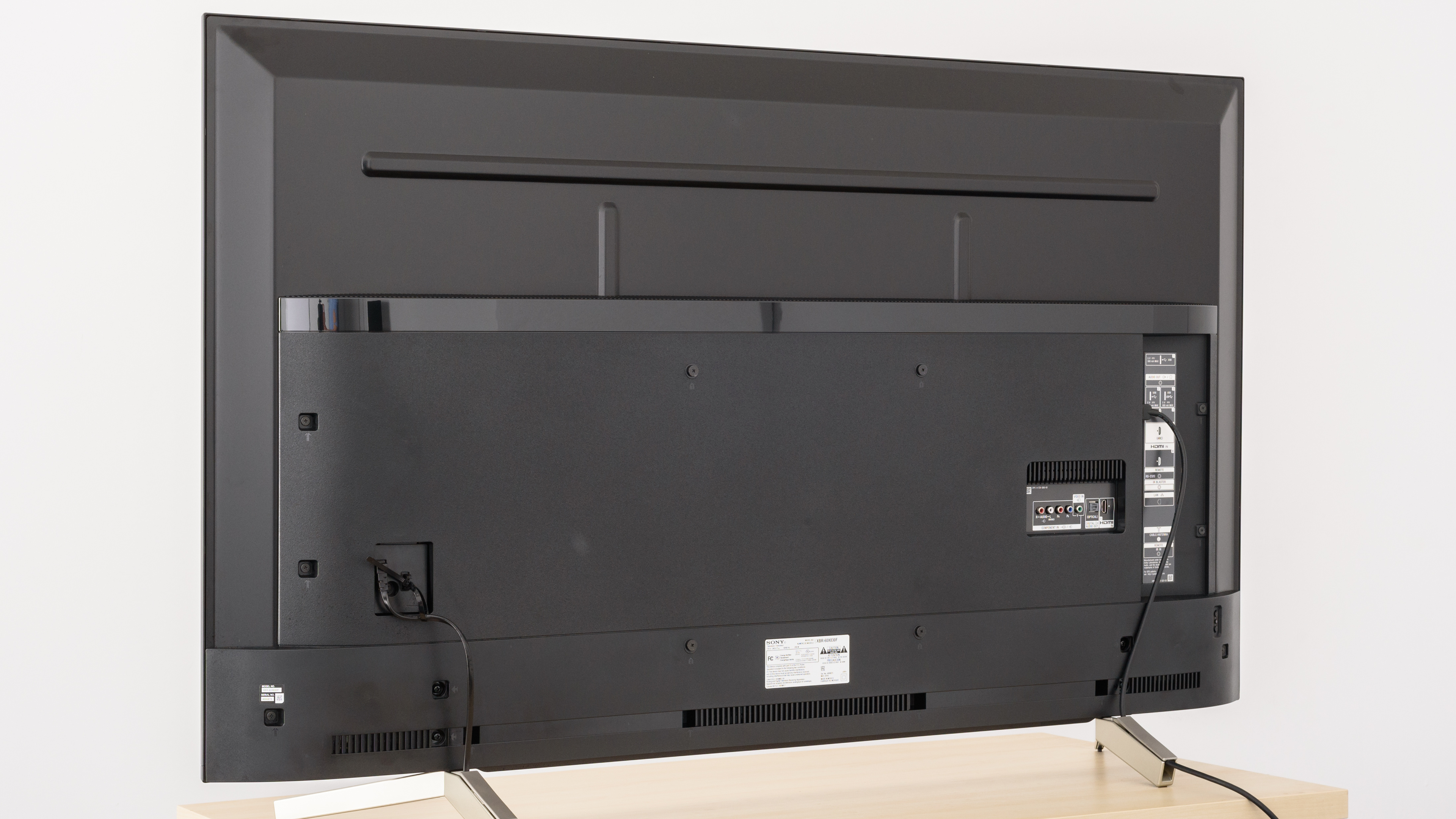
The back of the TV is plastic and there is not much provision for cable management.
for pictures & test results

The borders are thin and look elegant. They are almost identical to the borders of other Sony TVs.

for pictures & test results

The built quality is good. There are no visible gaps or loose ends and you should not have a problem with it.
for pictures & test results

The native contrast ratio is very good. When placed in a dark room, blacks will appear deep which improves picture quality.

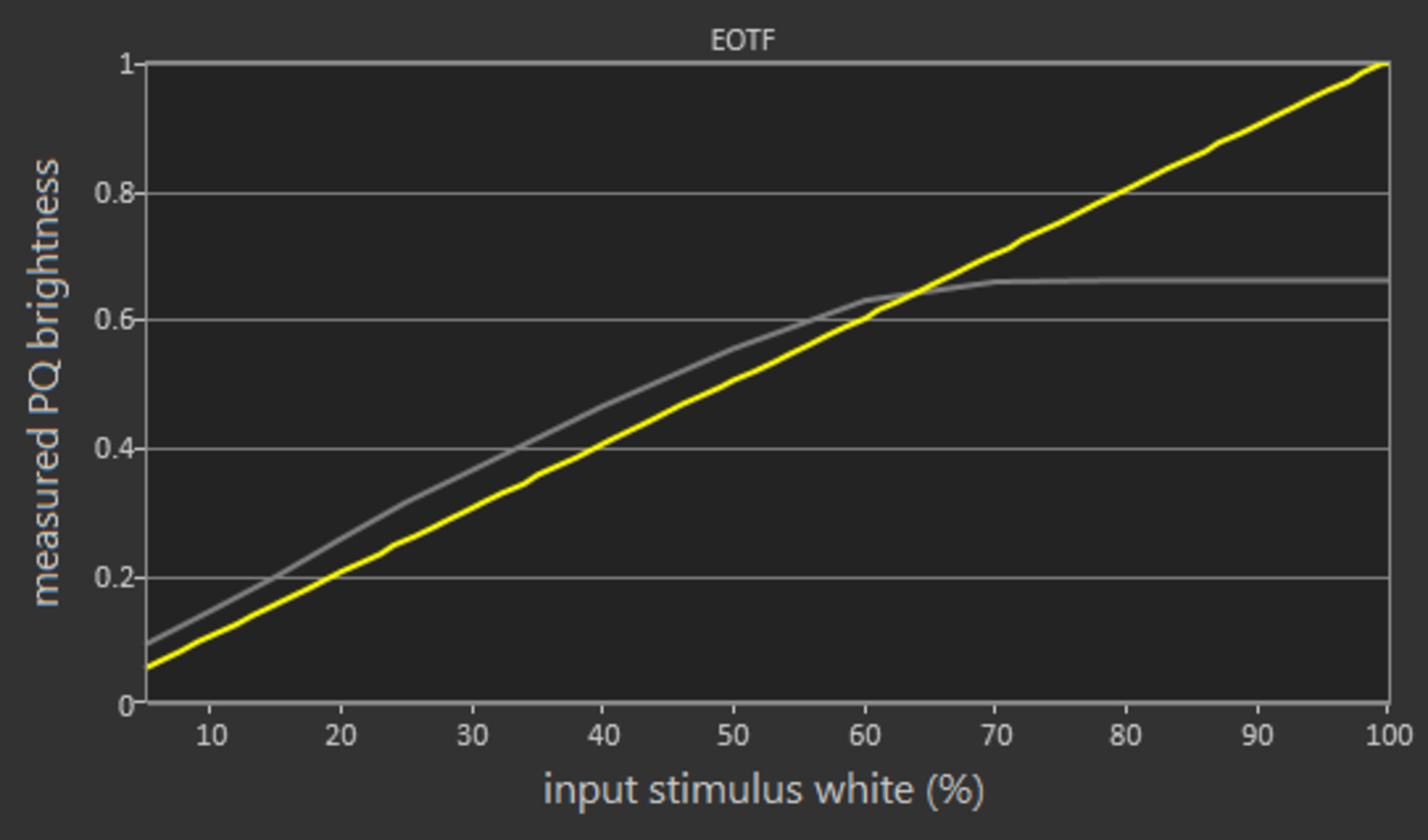
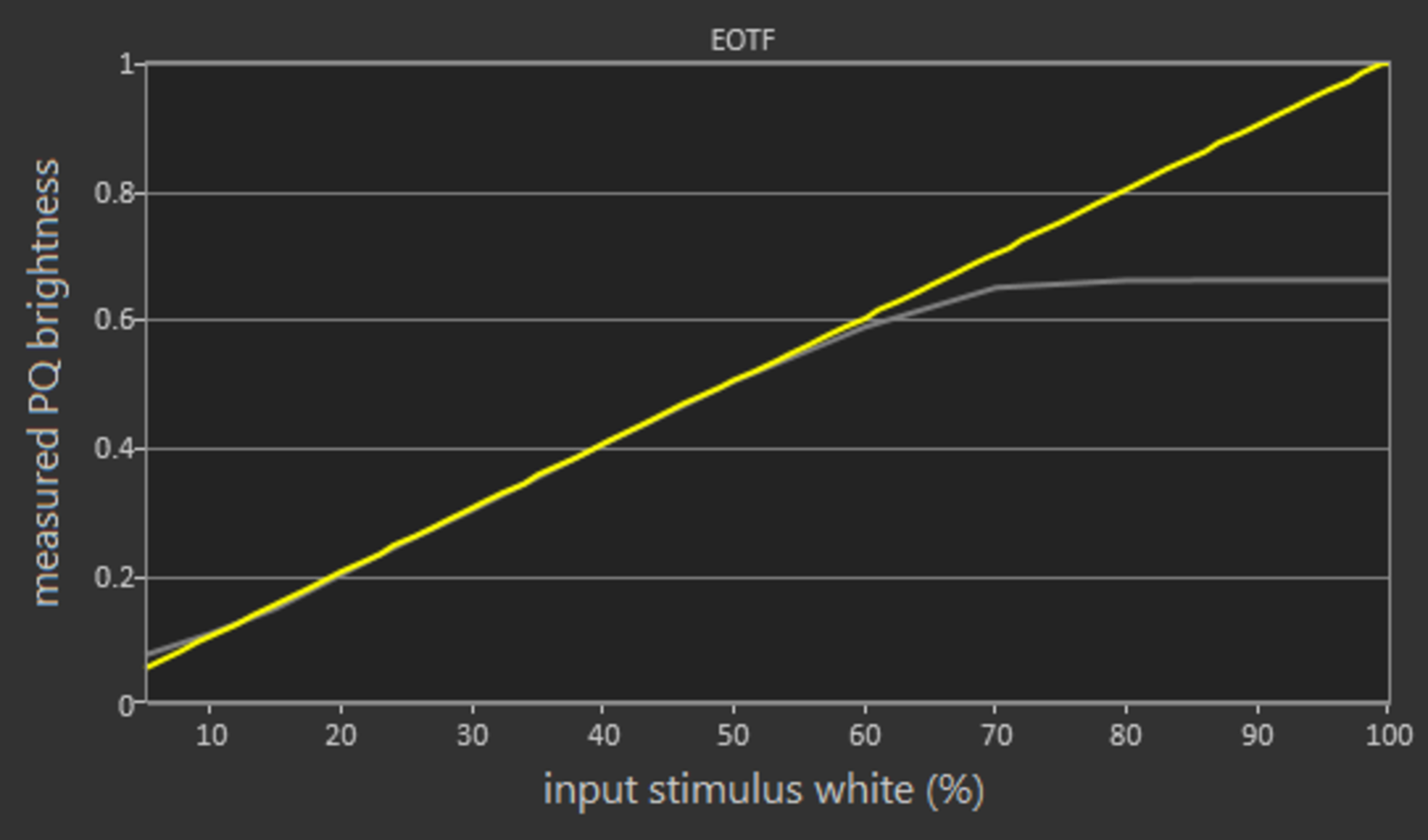
The HDR peak brightness is decent. Again not as a bright as the X900F, but not far from the X850F. The level remains constant as the window size increases and this is great.
If you find HDR content too dim, see our recommended settings.
for pictures & test results

for pictures & test results

The gray uniformity of the Sony X830F is decent. Some clouding will be visible especially in panning shots and this might annoy sports fans.
In darker scenes (5% gray) things are better but the most meticulous ones might still be able to spot minor clouding.
for videos & test results

for pictures & test results

for pictures & test results

for pictures & test results

The Sony X830F, like all VA panels, has disappointing viewing angles. Blacks wash out and colors shift with small movements from the center axis. Brightness is performing slightly better as fading is bad after the 45 degrees angle.
For those who often watch at an angle, a TV with an IPS panel like the X850F is a better choice
for pictures & test results

The Sony X830F has excellent black uniformity. There is almost no clouding even in the area around the test cross.



for pictures & test results

for pictures & test results

for pictures & test results

Very good out-of-the-box color accuracy for this X830F, better than the X850F but not as good as the X900F. The best results are obtained when the Picture Mode is set to Custom. The white balance dE and the color dE are both below our threshold of 3 and the Gamma is almost at our target of 2.2. The colors are a little warm and thus you might notice some reddish or yellowish tone.
for pictures & test results

for pictures & test results

for pictures & test results

The color accuracy after calibration is excellent. The results are close to what we managed to achieve with the X900F and even slightly better than the X850F. In fact, calibration only has options for 2-point or 10-point white balance calibration. There is no color space management, so the correction from 2.4 to 1.89 in color dE is due only to the white balance correction.
The color temperature was almost on our target of 6500K and Gamma remained at 2.21.
You can see our recommended settings here.
for pictures & test results

Upscaling of low-quality 480p content such as DVDs is good.

for pictures & test results

Upscaling of 1080p content like Blu-rays looks good. The image is sharp and there are no obvious issues.


for pictures & test results

for pictures & test results

for pictures & test results

The Sony XBR60X830F has a wide color gamut. It covers almost all of the DCI P3 space and about 3/4 of the Rec 2020. This is better than competitive TVs like the Samsung NU7100 and slightly better than the TCL R617.
The EOTF in the Cinema Pro HDR picture mode follows the target PQ curve nearly perfectly up until it rolls off at the TV's peak brightness. If you find HDR content too dim, setting the Gamma setting to Max and Contrast to 100 raises the EOTF and brightens most HDR scenes. The EOTFs in the Game and Graphics picture modes are nearly identical to that of Cinema Pro, which is great.
for pictures & test results

for pictures & test results

The color volume of this Sony XBR-60X830F is decent. The TV has a wide color gamut and can show vivid bright colors, but unlike the X900F, it cannot show well very dark colors as it lacks local dimming. It performs slightly worse than the Vizio P Series 2018 but better than the Sony X850F.
for pictures & test results

The banding of the Sony X830F is great. As with most Sonys the grey is excellent, but the other colors have moderate banding.
The "smooth gradation" feature works really well, it's almost perfect afterwards.
for pictures & test results

There is no measurable temporary image retention on the X830F, even immediately after the burn-in scene, as expected for a TV with a VA panel. This is great, especially for gamers or those who want to use the TV as a PC monitor.
We don't expect VA panels to experience permanent image retention, as the VA panel in our long-term test appears immune.
for pictures & test results

for pictures & test results

Excellent response time for this Sony XBR60X830F and this is good news for sports, gaming and fast-moving content in general. There is a little overshooting on the 0-20% transition, and some might notice a little bright ghosting in dark scenes during fast motion, but nothing too serious.
for pictures & test results

The TV has no visible flicker in its backlight as it dims, which is great.
We did measure some flicker with our photodiode tool, but this will not be visible in person. This lack of visible flicker makes motion look smoother, and is an improvement over most competing TVs like the Samsung NU7100 (240 Hz flicker) and TCL R617 (480 Hz flicker).
for pictures & test results

for pictures & test results

The Sony XBR-60X830F has a mediocre black frame insertion implementation. To activate BFI: Set Motionflow to Custom and increase the Clearness slider. The minimum flicker is 120Hz.
Just like the X850F, when BFI is enabled brightness decreases, as the X830F doesn't have the new X-Motion Clarity feature of the X900F.
for pictures & test results

for pictures & test results

The Sony X830F has excellent motion interpolation and can interpolate lower frame rate content up to 120 fps. The interpolation is nearly perfect during slow-moving shots, and it stops when there is too much motion.
To enable motion interpolation, set MotionFlow to Custom, increase the Smoothness slider and set Cinemotion to High.
If you find the artifacts caused by interpolation bothersome, you can lower the smoothness setting. This makes motion less smooth, but it reduces the amount of visible artifacts as the interpolation algorithm becomes more conservative.
The Sony X830F has some stutter, especially in low fps content. This is a result of the fast response time. If you are bothered by stutter you can use motion interpolation to clear it.
The Sony XBR-60X830F can remove judder from any source. You do not need to change any settings to remove 24p judder. However to remove 24p judder that is in 60p, 60i or when present in native apps you must set MotionFlow to True Cinema and set Cinemotion to High.
This TV does not support any variable refresh rate features.
The X830F has a very good low input lag in most resolutions. This makes it very responsive and a good choice for gamers or those who want the TV for use as a PC monitor
4:4:4 chroma subsampling is only properly shown in the Game and Graphics picture modes; both these picture modes also have the same low input lag.
All common resolutions are supported.
To properly display chroma 4:4:4, the Picture mode must be set to Graphics or Game. When the TV is sent a 1080p signal in Graphics mode, the upscaling changes to the jagged nearest-neighbor upscaling type, seen here on the X900E, that some people prefer for PC use.
This TV can receive 120 Hz video from the Xbox One X and Xbox One S, but only when some settings are tweaked on the Xbox; for more information see the Additional Review Notes of the X900F.
Only HDMI ports 2 and 3 support HDMI full bandwidth, so 4k @ 60Hz @ 4:4:4 or 4:2:2 is only possible on these two ports and only when Enhanced format is enabled on the TV.
Sharpness 50 (default) means no added sharpness in Graphics mode.


Only HDMI ports 2 and 3 support full bandwidth i.e HDMI2.0, just like all other Sony TVs we have reviewed. However, HDMI 3 is also the audio return channel(ARC). Therefore, if you have a receiver that supports ARC and more than 1 device which requires the full bandwidth of HDMI then you might have some issues connecting all of your devices. In this case, it may be best to connect your receiver using an optical (Toslink) cable.
for pictures & test results

The frequency response is mediocre. LFE (low-frequency extension) is at 113Hz, which is below average. This means the bass of this TV won't have any thump or punch to it. The response above the LFE point is above-average so dialogue will be clear and intelligible. This TV also gets pretty loud but shows some compression and pumping artifacts under loud volumes. Additionally, this TV doesn't have a digital room correction system and wasn't able to remove the modes of our test room around 200Hz.
for pictures & test results

The distortion performance of the Sony X830F is sub-par. The amount of THD produced at 80dB SPL is decent but there are spikes around 1KHz and 6KHz, which could make the sound of those frequencies a bit harsh and impure. However, at maximum volume, there is a big jump in their THD. This is typical of most Sony TVs and won't be noticeable to most people in real life situations.
for pictures & test results

The Sony XBR-60X830F comes equipped with the Android TV interface which is not as easy to use as some other smart platforms. It has a long home screen, and sometimes you must scroll a lot to reach your desired menu item. It also has a very inconsistent behavior that sometimes is fast, but other times lags and animations are choppy. The responsiveness of the home menu is unusually slow, and this is unfortunate considering how often you need to use it. Fortunately, the remote has plenty of buttons to get quickly where you want and a voice control feature that can also help.
Like the other 2018 Sony TVs we tested, the X830F does not have ads. The first row of the Home menu is suggested content by default, but this can be disabled in the TV's Home settings.
for pictures & test results

This Sony X830F runs the Android TV OS which gives it access to all the Google Play Store that has thousands of apps.
for pictures & test results

This TV includes the same remote as the X850F. It has a multitude of buttons and is pretty large, but with good usability. Buttons are easy to find and you can access most basic functions of the TV with ease.
The included voice button works well to access Google Assistant, but the remote must be connected to the TV via Bluetooth for this to work. Google Assistant can perform most basic actions on the TV, such as changing inputs or opening apps or even searching Netflix. However, although you can navigate to certain menus, you cannot change picture settings with your voice.
for pictures & test results

Like most Sony TVs, there are only three small buttons on the back edge. These buttons provide basic access to turn the TV on and off or to change channels, inputs, and volume.
for pictures & test results

- Manual
- IR Blaster
- Remote
- Batteries
- 61" Power Cable