The Samsung Q9F is the brand's highest-end QLED LCD TV and offers excellent performance for mixed usage. In dark rooms, the high native contrast ratio and great local dimming result in deep dark scenes, and in bright rooms, the excellent anti-reflective coating and high peak brightness help to overcome glare. Unfortunately, when watching sports, some dirty screen effect is noticeable due to nonuniform areas of the screen and the image loses accuracy when viewed at an angle.
Note that this is a different TV to the 2017 QLED Q9F. The 2018 Q9FN is also called the Q9F or Q9.
Our Verdict
Excellent TV for a range of different usages. The Samsung Q9F is a great fit for both bright and dark rooms. It can get bright to overcome glare and has excellent reflection handling. The TV can produce deep and detailed dark scenes due to the high native contrast ratio and great local dimming. Also, it has low input lag for gaming and PC use, but unfortunately, the narrow viewing angle means the image degrades when viewed at an angle.
- Very bright in both SDR and HDR
- Very low input lag, even with interpolation
- Great motion handling
- Image loses accuracy when viewed at an angle
Excellent TV for movie lover in a dark room. It has a high native contrast ratio combined with great local dimming results in deep dark scenes. The black uniformity is also excellent and movies from most sources are displayed without any judder or cadence issues.
Great TV for watching TV shows in a bright room. It can get bright to overcome glare, and reflection handling is excellent even for a very bright room. The smart platform works well for casual TV watching, along with voice control to search for content from popular platforms. Unfortunately, the narrow viewing angle means the best picture is reserved for those directly in-front of the TV.
Great TV for watching sports. Motion handling is great due to the excellent response time, so only a short trail can be seen behind fast-moving objects. The Samsung Q9F can get bright to overcome glare, and reflection handling is excellent even for bright sunny rooms. Unfortunately, the viewing angle is narrow so the image loses accuracy when viewed at an angle.
Excellent TV for gamers. The TV feels very responsive due to low input lag, even with motion interpolation ('Game Motion Plus') for added smoothness. Motion handling is also great, as the TV can flicker the backlight to clear up fast motion and only a short trail can be seen behind fast-moving content.
Excellent performance for HDR movies. The picture quality is great due to high native contrast ratio and great local dimming. Black uniformity is also excellent for dark scenes. The TV can produce a very wide color gamut and excellent HDR peak brightness for bright and vivid highlights.
HDR gaming performance is excellent. Motion handling is great, and the TV feels very responsive due to low input lag and fast response time. Even when interpolating content through the 'Game Motion Plus' option for a smoother image, the input lag is very low which is excellent. Picture quality is great, and HDR content can really stand out due to the high peak brightness and ability to produce vivid highlights.
Great TV for monitor use. The Samsung Q9 supports chroma 4:4:4 for clear text across all backgrounds. Also, the TV feels responsive due to great motion handling and low input lag. Unfortunately, the sides of the screen look a bit non-uniform due to the narrow viewing angles.
Changelog
- Updated May 21, 2020: Converted to Test Bench 1.5.
- Updated Feb 21, 2020: Converted to Test Bench 1.4.
- Updated Feb 28, 2019: Converted to Test Bench 1.3.
- Updated Jun 11, 2018: 1440p @ 120 Hz input lag has decreased as of firmware 1103. The review has been updated.
Check Price
Differences Between Sizes And Variants
We tested the 65" (QN65Q9FNA) version FA02. For the most part, we expect our review to be valid for the 75" version (QN75Q9FNA).
If someone comes across a different type of panel or if their Samsung Q9FN doesn't correspond to our review, let us know and we will update the review.
| Size | Model | Model Short | US | Canada | UK |
| 55" | QN55Q9FN | QN55Q9 | N/A | N/A | QE55Q9FNATXXU |
| 65" | QN65Q9FN | QN65Q9 | QN65Q9FNAFXZA | QN65Q9FNAFXZC | QE65Q9FNATXXU |
| 75" | QN75Q9FN | QN75Q9 | QN75Q9FNAFXZA | QN75Q9FNAFXZC | QE75Q9FNATXXU |
Popular TV Comparisons

The Samsung Q9FN is a versatile TV that is excellent for a wide range of usages. It has some great features, but comes at a very high price. See some of our comparisons below for how it compares to other TVs on the market. See also our recommendations for the best smart TVs and the LED TVs.
The Samsung Q9FN/Q9/Q9F QLED 2018 is better than the Samsung Q7FN/Q7/Q7F QLED 2018. The Samsung Q9FN has much better local dimming performance and a higher contrast ratio and black uniformity that improve picture quality. This becomes more apparent when you watch movies in a dark room. The Samsung Q7FN has better gray uniformity, which is great if you watch sports.
The Samsung Q90/Q90R QLED performs very similarly to the Samsung Q9FN/Q9/Q9F QLED 2018. The Samsung Q90R has wider viewing angles thanks to the 'Ultra Viewing Angle' technology and has a faster response time that delivers fast-moving content with less blur trail. The Samsung Q9FN, on the other hand, has a higher contrast ratio that can deliver deeper blacks.
The LG B8 OLED is better than the Samsung Q9FN/Q9/Q9F QLED 2018 for mixed usage. If you like watching movies in a dark room, the LG delivers a much better experience due to its true blacks. Also, for those who love sports, the B8 is a better option due to its faster response time, better viewing angles, and very good gray uniformity. The Samsung Q9FN can get much brighter, which makes it suitable for brighter environments, and it doesn't have a risk of burn-in.
The Samsung Q80R is marginally better than the Samsung Q9FN/Q9/Q9F QLED 2018. The Samsung Q80R encompasses the 'Ultra Viewing Angle' technology that improves viewing angles at the expense of lower contrast ratio. The contrast ratio on the Q9FN is better, but the overall dark room performance between the two TVs is almost on par. The Q80R has marginally better gray uniformity, which is essential when watching sports, and a somewhat lower input lag, which is great for serious gamers. The Samsung Q9FN handles reflections marginally better thanks to the lack of viewing angle layer.

We buy and test dozens of TVs yearly, taking an objective, data-driven approach to deliver results you can trust. Our testing process is complex, with hundreds of individual tests that take over a week to complete. Most of our tests use specially designed test patterns that mimic real content, but we also use the same sources you have at home to ensure our results match the real-world experience. We use two main tools for our testing: a Colorimetry Research CR-100 colorimeter and a CR-250 spectroradiometer.
Test Results
Older Test Bench: We tested this product using an older TV test methodology before a major update. Some of the test results below aren't directly comparable with other TVs. Learn more
for pictures & test results

The design of the Samsung 2018 Q9FN QLED TV is excellent. It has a modern, simplistic design that will fit well in any decor. The One Connect box is bigger than last year's, but the cable now provides power as well, so when wall-mounted, the TV only has one very thin cable running to it that can be easily hidden. There are also two alternative stands available if you are looking for something more stylish.
for pictures & test results

The stand of the QN65Q9FNAFXZA is solid and well built. The design does not allow for a soundbar to be placed directly in front, but is designed for the One Connect box to fit neatly behind the TV. The TV is also compatible with replacement stands from Samsung if you are looking for something more stylish, like the Gravity Stand or the Studio Stand.
Footprint of the 65" TV stand: 18.7" x 14.4"
The One Connect box measures 15.4" x 5.2" x 2.6".
for pictures & test results

The back of the TV is very simple. There is only the One Connect cable running into the back. There is some flex in the back panel but this shouldn't cause any issues. There is a removable panel to install one of the alternative stands or for the Samsung No Gap Wall Mount.
for pictures & test results

The borders of the TV are thin and look good. There is a small gap between the inside edge of the border and the panel.
for pictures & test results

The Samsung Q9F is thin, it can sit flush with the wall when mounted. It is thinner than the Q8FN.
for pictures & test results

Excellent build quality. There is a lot of plastic, but the border and stand are metal. Like the Q8FN, there is some flex in the back panel but not enough for there to be any issues.
for pictures & test results

Excellent native contrast ratio, and the local dimming feature helps to create even deeper dark scenes.
As with all Samsung TVs that support local dimming, it is not possible to disable local dimming in the menus. We used the hidden service menu to disable it for our tests.
for videos & test results

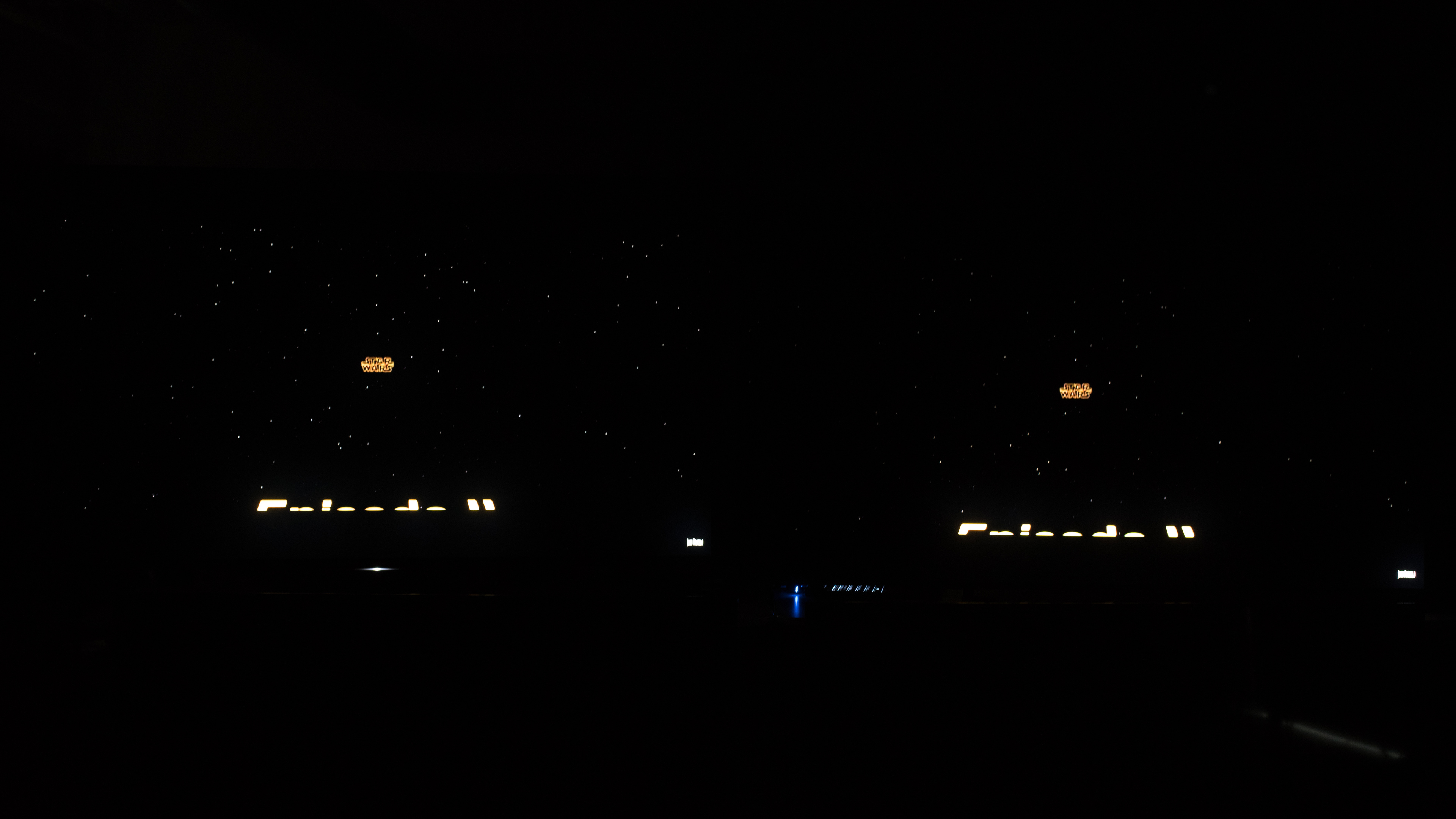
Great local dimming on the 65" Q9FN. The algorithm is very aggressive at reducing blooming, which creates excellent deep blacks, but some detail may be lost in very dark scenes.
Here is a side-by-side with the Sony Z9D on the left, the Q9FN on the right. The local dimming on the Q9FN is very aggressive even when set to low, so small details in the stars are lost. Those who like the deepest dark scenes may prefer the local dimming algorithm of the Q9FN, but those who are weary about losing dark scene details will prefer less aggressive algorithms.
Excellent brightness for SDR content. While brightness in our real scene test is not as bright as the Sony X930E or Z9D, it is a significant improvement of the 2017 Q9. Small highlights in dim scenes are extremely bright as shown by our 2%, 10% and 25% windows. The Q9FN is an excellent choice even for very bright rooms as the whole screen can get bright as seen in the 100% white window.
Excellent peak brightness in HDR. The Samsung Q9F is one of the brightest TVs we have tested. The TV's local dimming is very effective at producing extremely bright small highlights in dark scenes as shown by the 2% and 10% window brightness.
The Z9D, X930E and X940E are brighter in our real scene test, but small highlights on test patterns are not as bright as the Q9FN.
With the 'Dynamic' picture mode displaying our 10% window, the Q9FN is able to briefly (<5s) spike the brightness as high as 3392 cd/m², the highest brightness level we have ever measured.
for pictures & test results

for pictures & test results

Decent gray uniformity of our QN65Q9FN. There is some dirty screen effect in the center which will be noticeable when watching anything with large areas of similar color, like hockey or football. The 5% test screen is much more uniform, which is good when watching dark scenes in sci-fi or horror movies.
for videos & test results

for pictures & test results

for pictures & test results

for pictures & test results

The Samsung Q9F has a poor viewing angle, like other VA panels we've tested. Black levels shift significantly when viewed off angle, and the picture dims quite a bit. Colors shift when viewed off-axis, but the shift is not as noticeable. IPS-type LCD TVs like the SK9000 and OLED TVs like the C8 are superior in this regard.
for pictures & test results

for pictures & test results

Excellent black uniformity on the Samsung Q9FN 2018. There is very slight clouding around our test cross, but it shouldn't be noticeable and dark room viewing is excellent.
Note that the local dimming can't be disabled through the regular settings menu, so we disabled it through the service menu in order to evaluate the overall panel's native black uniformity.
for pictures & test results

for pictures & test results

for pictures & test results

The Samsung Q9 2018 has excellent reflection handling. The screen finish reduces the intensity of reflections significantly, even in a bright room with lots of direct light.
for pictures & test results

for pictures & test results

for pictures & test results

Out of the box color accuracy is poor. Greens and yellows especially are inaccurate. We took our readings with a 100% window, as the local dimming is very aggressive with our regular 18% window and cannot be disabled.
The overall color temperature is not too bad, and gamma is following a curve closer to 2.4 than our target 2.2.Update 04/12/2019: This TV was incorrectly measured with Brightness +2, instead of at 0. This only has a small impact on the results (slightly dimmer dark scenes below about 30 IRE) and so we don't plan to retest it.
for pictures & test results

for pictures & test results

for pictures & test results

Calibration is done with a 100% window instead of our standard 18% window, as the local dimming causes inconsistent readings of smaller windows. Post calibration the color temperature is very close to our target, and gamma follows our target almost exactly.
You can see our recommended settings here.
for pictures & test results

Upscaling of DVDs or other 480p content is good, with no obvious artifacts or over-sharpening.
for pictures & test results

Upscaling of 720p content such as cable TV or older game consoles looks good.
for pictures & test results

Upscaling of 1080p content such as Blu-rays or game consoles looks good. The image is sharp and there are no obvious issues.
for pictures & test results

The Samsung Q9 displays native 4k content without any issues.

for pictures & test results

for pictures & test results

for pictures & test results

The Samsung Q9F has an excellent color gamut, covering almost all of the SDR color space. HDR coverage is very good, the Q9FN displays a wide color gamut, but it is unable to reproduce some of the new green tones in the Rec.2020 color space, very few TVs can. The performance is almost the same as the Q8FN, and we expect that the differences are due to small panel variances.
The Game Mode and PC Mode EOTFs also follow the input stimulus well, which is good.
Update 05/24/2018: HDTVTest has shown that for lower brightness HDR infoframes (such as 1000 nits) the TV produces scenes which are brighter than intended (see his video here). You can see more about this in the Additional review notes.
for pictures & test results

for pictures & test results

The Q9FN has great color volume. It is able to produce very bright and very dark colors, across its entire color gamut. It is much similar to the 2017 QLEDs, and much better than the LG C7, B7A and C8.
The color volume on the Q9FN is very similar to that of the Q8FN. The difference should not be noticeable and is likely due to unit variance.
for pictures & test results

The Q9FN QLED is able to display color gradients without much banding. Some issues are visible in darker colors, such as <10% green but overall the result is great.
for pictures & test results

There is no temporary image retention on the Samsung Q9F.
We don't expect VA panels to experience permanent image retention. The VA panel in our long-term test appears immune.
If you do experience burn-in, Samsung guarantees their QLED screens against burn-in for 10 years.
for pictures & test results

for pictures & test results

The Samsung Q9FN has an excellent response time. The blur in the photo is due to persistence, there is almost no motion trail.
The response time results were obtained with the 'Standard' picture mode, because 'Movie' mode had a bug with our 20% gray slide (see our Additional Review Notes); however the TV's picture mode should not have any impact on response time.
for pictures & test results

The Samsung Q9 uses PWM to dim the backlight, and it flickers regardless of backlight setting. Similar to the Q8FN, the backlight flicker changes depending on settings. In 'Movie' mode it flickers at 480 Hz which should not be noticeable to most people and doesn't cause any motion duplication.
When in 'Game' or 'Standard' mode, or when 'Auto Motion Plus' is enabled, the backlight changes to a more noticeable 120 Hz flicker.
for pictures & test results

for pictures & test results

The Samsung Q9FN has an optional BFI mode called 'LED Clear motion', that adjusts the backlight flicker to 60Hz to help motion appear more fluid.
For 120fps content, 'Auto Motion Plus' should be turned 'On' with 'LED Clear Motion' disabled.
for pictures & test results

for pictures & test results

The Samsung Q9FN can interpolate lower frame rate content up to 120 Hz to help reduce stutter. This function is commonly known as the 'Soap Opera Effect'. Some people find the effect strange, and in scenes with lots of motion there are artifacts. When motion gets too intense the Q9FN, like all Samsung TVs, will stop interpolating, preferring accuracy.
Interpolation is activated by setting 'Auto Motion Plus' to 'Custom'. The 'Judder Reduction' can be adjusted for low frame rate content, and the 'Blur Reduction' slider can be adjusted to help clear up motion on 60 fps content. When interpolation is enabled, the backlight changes to a 120 Hz flicker as seen on the Q8FN here.
There is very little stutter with 24 fps content. This is one advantage of the QLED over OLED TVs, the frame is not held on the screen as long so there is less visible stutter, especially on wide-panning shots.
The Q9FN is nearly judder free. When playing 24p content through a 60i source, like from a cable box, the Q9FN was inconsistent in removing judder. In a 24 frame test, there is judder in only 2 of the frames. This probably won't be noticeable to most people. Like other Samsungs we have tested recently, this result is unexpected and we will retest this with future firmware updates.
The Samsung Q9F does not currently support a variable refresh rate. We tested with the Freesync 2 on the Xbox One S and with a PC with a Radeon RX 580 GPU.
Update 05/23/2018: Firmware version 1103 has added Freesync support. We are currently testing it and will update the review shortly.
Update 06/08/2018: FreeSync has been tested and the score has been updated. FreeSync was supported from our Xbox One S and our Radeon RX 580 GPU, in 1080p, 1440p and 4k resolutions. FreeSync is activated by enabling the TV's Game mode and FreeSync settings; PC mode is not required. We tested in Ultimate mode because it has the widest range, and we only recommend Basic mode when you experience problems with Ultimate.
1440p @ 120 Hz: 10.8 ms
Excellent low input lag on the 2018 Q9FN across all input resolutions, as long as Game Mode is activated. Excellent low input lag at 120Hz, which is great for gaming.
With Game Motion Plus enabled, input lag is 21.0 ms with 60 Hz interpolation, and 27.3 ms with 120 Hz interpolation.
Update 06/05/2018: Input lag of 1440p @ 120 Hz: 25.2 ms. This input lag was tested at the same time as the others, but was omitted from the review by mistake.
Update 06/11/2018: 1440p @ 120 Hz performance has improved as of firmware version 1103. The 1440p @ 120 Hz input lag is now 10.8 ms, down from 25.2 ms.
Update 01/07/2019: Firmware 1103 also added VRR support (see the VRR box), but we were unable to test the VRR input lag because the TV's backlight flicker caused problems with our input lag tool. We expect the Q9FN's VRR input lag to be very similar to that of the Q8FN, as all the other 2018 QLED models had similar VRR input lag.
Most of the common resolutions and refresh rates are supported, including 1440p@120 Hz, which is new this year. When in that mode, colors are not displayed properly in chroma 4:4:4.


Like all Samsung TVs we have tested this year, DTS passthrough is not supported on the Audio Return Channel or through optical. This should not be an issue since most media supports both.
for pictures & test results

The frequency response of the Samsung Q9FN is about average. Low-frequency extension (LEF) is at 113Hz, which is mediocre, especially since the LFE worsens as the TV is put under more load. This results in a bass that's lacking considerable amount of punch/kick, and has no thump/rumble. However, the response above the TV's LFE is quite well-balanced, but since it doesn't have a room correction system, it wasn't able to remove out test room's modes around 200Hz. Also, this TV gets loud-enough for most use cases too, but there will be pumping and compression artifacts present as the TV approaches its limits.
for pictures & test results

The distortion performance of the Q9FN is above-average. The overall amount of harmonic distortion is rather elevated at 80dB SPL. However, compared to 80dB SPL, there is not a big jump in THD under maximum load, which is good.
for pictures & test results

The interface of the Samsung Q9F is well laid out and easy to use. Unfortunately the interface's animations drop frames intermittently, and the current firmware version (1056) has a few bugs, such as freezing occasionally for three seconds (see our Additional Review Notes).
for pictures & test results

Like all Samsung TVs, the interface has ads throughout the home menu as well as suggested content in the content store. There is no option to disable them.
for pictures & test results

Samsung has one of the widest assortment of apps available, second only to the Google Play Store on Sony TVs.
The Samsung QLEDs feature a new 'Ambient Mode', where the TV can display pictures, clocks, weather, etc... while in standby mode. It is one of the best TVs for streaming that we've tested in 2018.
for pictures & test results

The remote included with the Q9FN is identical to last year's model. It is very good quality, comfortable to hold with a metal finish.
The remote uses bluetooth for most functions but requires line of sight to turn it on.
The voice commands work well, allowing you to change inputs, open apps, and ask basic questions such as 'How is the weather in Montreal?'. It is unable to perform context sensitive searches, or search within apps.
for pictures & test results

Samsung has improved the physical controls on the Q9FN. The D-Pad works similar to the LG controls, it works as a directional pad when in an app, and provides quick access to most settings when not inside an app.
for pictures & test results

- Manual
- Batteries
- Remote
- Wall Mount Spacers
Not shown:
- One Connect Box
- 61.5" Power Cable for One Connect Box
- 193" One Connect Cable