
Our Verdict
Good TV for mixed usage. the X800E provides a decent picture quality that is well retained at an angle, while also having good motion and input lag. Unfortunately though, deficiencies in the blacks are quite apparent when used in a darker setting.
- Can be enjoyed even from the sides
- Gradients are smooth and without stepping
- Great handling of motion.
- Contrast is low, making blacks less deep
- Blacks are blotchy
Sub-par choice for movies. Blacks are not very deep and look gray and spotty in a darker room. Flashlighting in black bars is noticeable and can be quite distracting.
The X800E does well well with TV shows. It gets sufficiently bright for use in the daytime, and the wide viewing angle is useful for wider living rooms. Unfortunately though, it's not the best at dealing with reflections.
Very good TV for watching sports. Motion is handled very well and uniformity of grays and colors is better than average.
Great TV for video games. Fast motion has very little trail and input lag is low with both 1080p and 4k inputs.
Decent HDR performance. Important features such as wide color gamut, 10-bit color, and decently high peak brightness are present, but the overall picture quality of the TV is quite underwhelming.
Good HDR gaming TV. Gaming capabilities are well translated to HDR games, but the low contrast reduces the impact of HDR.
Good TV to use as a PC monitor. Wide viewing angles render it usable from a close range without having the edges of the screen darken. Input lag is decently low, and the necessary resolutions are supported.
Changelog
- Updated Mar 12, 2018: Converted to Test Bench 1.2.
- Updated Dec 11, 2017: Google Assistant has now been added to Android TV on Sony TVs, and it brings a lot of new features to the voice control. The remote score has been increased to reflect the new fuctionality.
- Updated Nov 10, 2017: Retested input lag with the latest firmware (PKG6.2669.0070NAA); there was no significant change.
- Updated Sep 12, 2017: The Remote App box has been updated, replacing Google's app with Sony's better one.
Check Price
Differences Between Sizes And Variants
We tested the 43" (XBR43X800E). For the most part, we expect our review to be valid for the 49"(XBR49X800E) and 55" (XBR55X800E)
If someone comes across a different type of panel or if their Sony XBR-43X800E doesn't correspond to our review, let us know and we will update the review. Note that some tests such as the gray uniformity may vary between individual units.
| Size | Model | Alternative Name | UK Model |
| 43" | XBR43X800E | XBR-43X800E | KD-43XE8004 |
| 49" | XBR49X800E | XBR-49X800E | KD-49XE8004 |
| 55" | XBR55X800E | XBR-55X800E | N/A |
Popular TV Comparisons

The X800E is a good LED TV, but it's a bit too expensive for the performance it delivers. See our recommendations for the best 4k TVs and the best TVs.
If you have a wide seating arrangement in an average lit room, the Sony X800E is a more suitable choice because of its better viewing angles. On the other hand, the Sony X900E has significantly better local dimming, much better contrast ratio and a bit better black uniformity that make blacks look great and improve picture quality in a dark room when you watch movies or HDR movies. The Sony X900E has slightly better motion handling features like motion interpolation and 24p judder removal that will please movie enthusiasts. Finally, the X900E has better reflection handling and this is good news for those who watch TV shows in brighter rooms.
If wide viewing angles are important to you, then the Sony X800E is a better choice. Apart from this, the Samsung MU8000 is a better choice. The Samsung MU8000 has significantly better contrast and better local dimming and can deliver great blacks that lead to better picture quality in movies. The Samsung MU8000 also has a bit better motion handling capabilities to improve your movie-watching experience further. Finally, the Samsung MU8000 has a bit better input lag and slightly better response time, which is good if you play video games.
The Sony X800E is a better choice if you have a bright room with wide seating due to its better viewing angles. On the other hand, the Samsung MU7000 has a much better contrast ratio with deeper and more uniform blacks that you'll appreciate while watching movies in a dark room. Also, it has better input lag and marginally better Black Frame Insertion to make the image crispier while gaming.
The Sony X720E is slightly better than the Sony X800E. The Sony X720E has better input lag, and this is great for gaming or for use as a PC monitor. Also, the Sony X720E has slightly better gray uniformity which is great if you watch a lot of sports. The Sony X800E has better smart features and reflections that you will appreciate if you watch TV shows in a brighter room.

We buy and test dozens of TVs yearly, taking an objective, data-driven approach to deliver results you can trust. Our testing process is complex, with hundreds of individual tests that take over a week to complete. Most of our tests use specially designed test patterns that mimic real content, but we also use the same sources you have at home to ensure our results match the real-world experience. We use two main tools for our testing: a Colorimetry Research CR-100 colorimeter and a CR-250 spectroradiometer.
Test Results
Older Test Bench: We tested this product using an older TV test methodology before a major update. Some of the test results below aren't directly comparable with other TVs. Learn more
for pictures & test results

The design of the X800E is similar to most other Sony TVs, including the X800D from 2016. It does have less of a premium feel to it when compared to the older model, and some of the inputs can be a bit more difficult to access if close to a wall. It also has an external power brick.

for pictures & test results

The rear of the TV is quite basic and made of plastic. Some of the inputs may be difficult to access if placed close to a wall as they go directly out the back of the TV. Note that there is an external power brick which may make the TV a bit more difficult to mount.
for pictures & test results

The border of the TV have an average thickness but look quite good. The edges are metallic.
for pictures & test results

The TV is a bit thicker than average when viewed from the side. If wall mounted it may stick out a little bit.
for pictures & test results
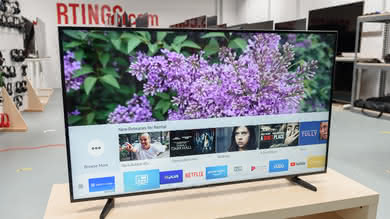
The main body of the TV is fairly cool, only getting slightly warm along the bottom where the LEDs are for the backlight. Its power brick on the other hand does get warm to the touch, reaching 40 °C.
for pictures & test results

The build quality of the X800E is decent. Most of the TV is plastic, but screws around the edges hold the TV together well. The remote also feels quite low quality, especially when compared to higher end Sony TVs.
for pictures & test results

The Sony X800E has a disappointing contrast ratio of only 961:1. This is mostly due to the IPS panel used in this 2017 model. This results in a quarter of the contrast ratio when compared to the 2016 X800D, which is a big disappointment. When viewed in a dark room, dark scenes in movies look washed-out and blacks aren't as deep as on other TVs with VA panel.
for videos & test results

The Sony X800E doesn't have a local dimming feature. The video is for reference only.
Great SDR peak brightness. The TV stays consistently bright no matter the content played, and should appear bright even in a moderately lit room; however it's not as bright as most high end TVs. The TV is a little brighter than last year's X800D but less bright than the X700D.
A plot of brightness over time is shown here.
Decent HDR peak brightness. The TV is consistently bright when watching any content, however its lack of local dimming prevents it from making small highlights as bright as intended. The TV is a little brighter than the X800D from last year but less bright than the X700D.
A plot of brightness over time is shown here.
for pictures & test results

for pictures & test results

The overall gray uniformity of the X800E is decent, and there is not too much visible dirty screen effect as most of the issues are situated on the edges of the screen. Both sides are particularly darker than the middle of the screen leaving the center of the screen pretty even. Dirty screen effect is not really a problem.
Nothing too bad stands out looking at the 5% gray test picture and this reflects what the TV looks like in person, which is a good thing.
for videos & test results

for pictures & test results
for pictures & test results
for pictures & test results
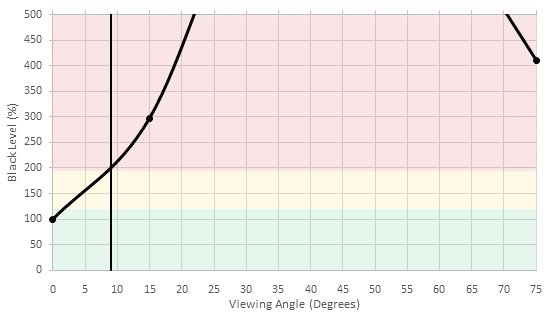
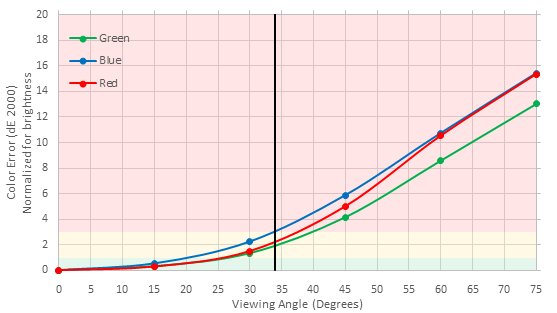
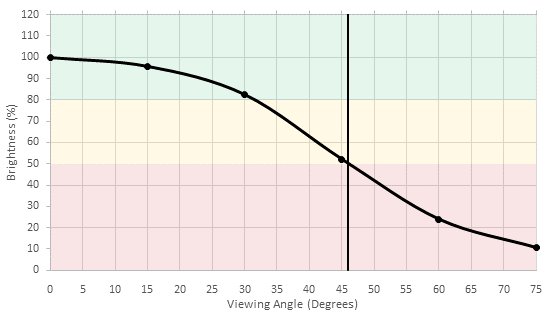
Decent viewing angle. The TV's black level does not change much at an angle, however its colors wash out rapidly and its brightness decreases steadily when viewed on an angle. People sitting to the side of the TV will still have okay picture quality, better than with many VA TVs such as the X800D, but not as good as with OLEDs or some other IPS TVs.
for pictures & test results

The black uniformity is bad on the 2017 X800E. Some flashlighting can be seen in both top corners and clouding is present on most of the screen, but a lot of it is due to the fact that this model is using a IPS panel which usually performs worse than TVs with VA panels. In any case, dark scenes will not look optimal on this TV, especially when the TV is set in a dark room.
for pictures & test results

for pictures & test results

for pictures & test results

The X800E is a bit more reflective than most other TVs. This is fine for a dark room, but for a bright room rainbows can be seen around reflections and the semi-gloss finish diffuses them across the screen.
for pictures & test results

for pictures & test results

for pictures & test results

Great performance out of the box for the Sony X800E. The white balance is a bit on the warmer side than we usually aim for, but it is not far off and the gamma is tracking our 2.2 target pretty closely. Looking at the color dE, overall it is a great score, where all color tracks relatively well, with only the blues being a bit less accurate. In the end, this is a good result and for personal use, this TV could be used as it is without any problems.
for pictures & test results

for pictures & test results

for pictures & test results

After calibration, the X800E is very accurate. The white balance dE was brought down to only 0.27, which is a great result and calibration is relatively easy. As a result of this, the gamma was able to track closely to our 2.2 target.
When it come to the Color dE, as with other Sony TVs, the X800E does not have a 'Color Management System' and the only correction possible here is done via the white balance. Even without a 'CMS', the color dE was brought down to 1.99, which is still better than what we had out of the box, with only the blues being a bit more off than the rest of the other colors.
You can see our recommended settings here.
for pictures & test results

Upscaling of low quality content such as DVDs is good. Very few artifacts can be seen and edges are smoothed without reducing the sharpness.
for pictures & test results

720p content such as cable TV is upscaled quite well. Details are preserved and the image isn't too soft.


for pictures & test results

for pictures & test results

for pictures & test results

Wide color gamut, though not as wide as on the X800D. Deep colors in HDR content will be fairly well represented. The TV struggles with showing deep greens, like most other TVs, but also can't show fully saturated blue.
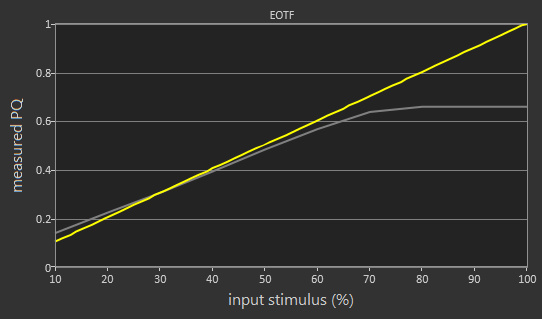
The TV's EOTF follows the PQ curve fairly closely, but at higher brightness it rolls off then clips at its maximum brightness. This EOTF was measured in the Custom picture mode using our recommended settings; the EOTF in the Cinema Pro picture mode shown here is nearly identical unlike other Sony TVs we've measured.
for pictures & test results

for pictures & test results

Poor color volume. The TV has a wide color gamut when showing bright colors, but its gamut narrows significantly when showing very dark colors. It also can't make dark colors dark enough due to its low contrast ratio. The TV performs frame dimming when shown our black-with-border slide, but even this doesn't make the black point very dim.
for pictures & test results

The X800E performs very well on our gradient test. As you can see in our test picture, the gradient looks very smooth and is almost perfect, without any major visible banding from any colors and even in the grayscale.
for pictures & test results

The X800E as an excellent result on our image retention test. If you look very closely to our test picture, you will see a really faint remnant of the top Rtings logos but it was not enough to trigger a response from our test. Looking at the TV in person when the pictures were taken, it was not possible to see any retention. For an IPS TV, this is a very good performance, especially if you compare with the 2016 Sony X700D IPS TV.
Although some IPS panels can suffer from temporary image retention, this doesn't appear to be permanent as seen in our long-term test.
for pictures & test results

The chevron shape of the IPS pixels can be seen.


for pictures & test results

Like many Sony TVs, the backlight doesn't flicker by default. This results in smoother motion without duplications.
for pictures & test results

for pictures & test results

It is possible to flicker the backlight with the 'Motionflow' setting. Increasing the 'Clearness' slider causes the backlight to flicker at 120Hz which clears up motion blur a bit, but not as good as the 60Hz flicker available on the X720E.
for pictures & test results

The X800E has a 60Hz panel which can interpolate lower frame rate content. To do so adjust the 'MotionFlow' to 'Custom' and increase the 'Smoothness' slider. Note that any motion interpolation does introduce some artifacts.
The Sony X800E is great at displaying content smoothly. For 24 fps content such as movies the transition is approximately 1/3 of the frame time, which doesn't produce much stutter. 60 fps content is also very smooth.
This TV can only display 24p movies without judder from 24p sources (DVDs, Blu-rays). 24p movies playing from 60p/60i sources like cable or satellite boxes do present some minor judder and the TV can't remove even with 'CineMotion' set to 'Auto'.
This is the same result as last year models (X800D) and people who are sensitive to judder may notice it when watching movie from cable/satellite boxes.
This TV has a 60Hz panel and doesn't support any variable refresh rate features.
Consistent low input lag of ~34 ms when in the Game or Graphics picture modes. This should be good enough for most gamers but may disappoint very competitive gamers. The input lag with motion interpolation enabled is much better than on most TVs, but at 49.5 ms it's still a little high for gaming. Overall the input lag is very similar to that of the X800D.
Update 07/18/2017: The TV has been tested with the newest firmware update (PKG6.2648.0065NAA). The input lag remains the same.
Update 11/10/2017: Retested input lag with the latest firmware (PKG6.2669.0070NAA); there was no significant change.
All the common input resolutions are supported, except 120 Hz input because this TV has a 60 Hz panel. To receive 4k @ 60 Hz @ 4:2:2 or 4:4:4 color, HDMI inputs 2 or 3 must be used and 'HDMI Enhanced Format' must be enabled. 4:4:4 color is displayed properly in the Game or Graphics picture modes. When using the TV as a PC monitor 1080p is listed as the default resolution.


There are two composite inputs on the rear of the TV, but one of them is shared with the component input. The other composite input is in for the form of a 3.5mm jack and requires an adapter (not included) such as this.
for pictures & test results

Passable frequency response. The sound coming from the X800E's speakers is a bit dark, mostly from the relatively strong recession in the higher frequencies. Compression and pumping artifacts are also present at higher volumes.
for pictures & test results

Poor distortion. The results are a bit higher than average at standard volumes, but skyrocket when levels are closer to maximum, rendering volume settings past the 85 mark virtually unusable.
for pictures & test results

The Android TV interface isn't quite as easy to use as many other smart platforms, and on this TV it sometimes has lag and choppy animations. The 'Action Menu' button on the remote helps to alleviate this by giving quick access to common functions.
The TV has no ads in its main interface, though apps can have ads. It's possible to opt out of personalized advertising for these ads.
The first row of the TV's home screen is filled with suggested content. In the 'Home' section of the TV's settings there is an option to disable sources of suggested content. If all these sources are disabled the first row of the home screen just contains a line saying "No recommendations available at this time".
for pictures & test results

The TV comes preloaded with all the popular apps such as Netflix, YouTube and Amazon Video. Many more apps can be downloaded from the included Google Play store, which has a larger selection of apps than many other smart platforms.
for pictures & test results

The X800E's remote is very large with a dizzying array of buttons. Fortunately most of the commonly used buttons are clustered within easy reach around the direction pad, though the power and inputs buttons at the top of the remote are difficult to reach. The remote has a built in microphone for voice search, which can quickly bring up content within apps to watch or buy, but lacks the advanced voice command features of some other platforms such as Samsung's Tizen OS.
The remote is identical to that of the X850E (same model number), but not as good as those of the X900E and X800D, due to each button being a separate chunk of rubber rather than the continuous surface of the other remotes.
Update 12/11/2017: Google Assistant has now been added to Android TV on Sony TVs, and it brings a lot of new features to the voice control: commands like 'open Netflix', 'switch to HDMI 1', 'pause video', 'how's the weather' and 'turn off TV' all work well, though commands to change picture settings like 'set the brightness to 20' and 'switch to Game mode' don't work. The remote score has been increased to reflect the new fuctionality.
for pictures & test results
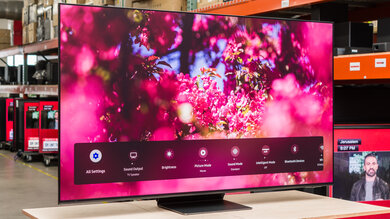
The Android TV remote app doesn't have as many features as the apps of some other smart platforms, but it can still be useful.
Update 09/12/2017: Sony has an app called 'Video & TV SideView' that's better than the Android TV app in most ways. It adds a few features like launching both apps and inputs, and has three different remote modes, one being a mouse cursor on the TV. The score and data fields have been updated to reflect the Sony app.
Update 07/11/2018: Sony's Video & TV SideView remote app has been retested on version 5.5.0. The remote app can now stream video files and can only directly launch apps. The data fields have been updated.
Update 10/12/2018: The remote app can directly launch both apps and inputs, even on version 5.5.0; "Apps Only" was a mistake. The value has been corrected to "Both".
for pictures & test results

The TV has three physical buttons: the center button switches between different functions such as input, volume and channel, while the (+) and (-) buttons increment the function. The center button also serves as the TV's power button.
for pictures & test results

- Manual
- Batteries
- Remote
- External power brick
- IR Blaster
- Cable management tie