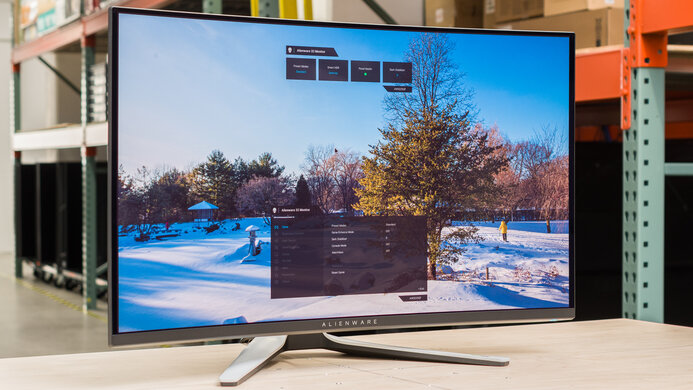
Acer Predator X27 bmiphzx  Monitor Review

Review updated Apr 09, 2020 at 03:47pm
Tested using Methodology v1.1 
Acer Predator X27 bmiphzx
8.1
Mixed Usage 
8.2
Office 
8.1
Gaming 
8.1
Multimedia 
8.2
Media Creation 
7.5
HDR Gaming 
 3
The Acer Predator X27 is a very good, versatile monitor that performs best in a bright room. It delivers a great gaming experience overall, with excellent response time and great gaming features, including NVIDIA G-SYNC support, but it has strangely high input lag, which might disappoint serious gamers. Unfortunately, it has poor dark room performance due to its low contrast ratio even with local dimming, and bad black uniformity.
How We Test Monitors

We buy and test more than 30 monitors each year, with units that we buy completely on our own, without any cherry-picked units or samples. We put a lot into each unbiased, straight-to-the-point review, and there's a whole process from purchasing to publishing, involving multiple teams and people. We do more than just use the monitor for a week; we use specialized and custom tools to measure various aspects with objective data-based results. We also consider multiple factors before making any recommendations, including the monitor's cost, its performance against the competition, and whether or not it's easy to find.

Our Verdict

8.1
Mixed Usage 

The Acer Predator X27 is a very good monitor for most uses. It's well-suited for a brighter office setting but has limited ergonomic options. It has some excellent gaming features, like support for NVIDIA's G-SYNC technology, but is limited by the relatively high input lag. It's a great monitor for media creation, thanks to the outstanding color gamut.

Pros
  • Excellent wide color gamut.
  • Excellent HDR brightness.
  • Image remains accurate at an angle.
Cons
  • Performs poorly in a dark room.
8.2
Office 

The Acer Predator X27 is a good monitor for office use. It has outstanding text clarity, and the 4k screen is great for multitasking. It has wide viewing angles and decent reflection handling, and it's bright enough for most viewing environments. Unfortunately, it has limited ergonomic options and might be more difficult to place in an ideal position.

8.1
Gaming 

This is a great monitor for gaming. The Acer X27 has some excellent gaming features, including support for NVIDIA's G-SYNC technology. Input lag is high compared to most other gaming monitors, which might disappoint serious gamers. Unfortunately, it's not well-suited for late-night gaming in a dark room due to the poor contrast ratio and bad black uniformity.

8.1
Multimedia 

The Acer X27 is a very good monitor for watching movies or streaming internet video. The large screen and 4k resolution produce very detailed, crisp images that allow you to see every detail. The wide color gamut and good color volume make sure you see every detail in your videos. Small highlights are very bright in HDR, and the local dimming feature enhances the experience, but there's some haloing around bright highlights in dark scenes.

8.2
Media Creation 

The Acer Predator X27 is an impressive monitor for media creation, especially for print and media creation thanks to the complete coverage of the wider Adobe sRGB color space. The high-resolution screen makes it easier to see every detail and get more done.

7.5
HDR Gaming 

The Acer Predator X27 delivers the best HDR experience we've seen so far on a monitor, with incredible peak brightness and a great HDR color gamut. Unfortunately, it's a bit limited by its low contrast ratio and bad black uniformity. It also has unusually high input lag for gaming, which might disappoint serious gamers.

  • 8.1
    Mixed Usage
  • 8.2
    Office
  • 8.1
    Gaming
  • 8.1
    Multimedia
  • 8.2
    Media Creation
  • 7.5
    HDR Gaming
  • Changelog

    1.  Updated Aug 17, 2020: We've retested the SDR and HDR peak brightness, as well as the HDR color gamut and HDR color volume with local dimming enabled.
    2.  Updated Feb 17, 2020: Converted to Test Bench 1.1.
    3.  Updated Aug 16, 2018: Review published.
    4.  Updated Aug 14, 2018: Our testers have started testing this product.

    Check Price

    27"Predator X27
    SEE PRICE
    Amazon.com
    27"Predator X27
    SEE PRICE
    BestBuy.com
    27"Predator X27
    SEE PRICE
    Walmart.com
    27"Predator X27
    B&H

    Differences Between Sizes And Variants

    We've tested the 27" Acer Predator X27, version bmiphzx.

    If someone comes across a different type of panel or if their Predator X27 doesn't correspond to our review, let us know and we will update the review. Note that some tests such as the gray uniformity may vary between individual units.

    Model Version Size Panel Type Curved Resolution Native Refresh Notes
    X27 bmiphzx 27" IPS No 4k 120Hz G-SYNC only
    X27 Pbmiphzx 27" IPS No 4k 120Hz G-SYNC + Adaptive Sync
    XB273K Pbmiphzx 27" IPS No 4k 120Hz G-SYNC
    XB271HU bmiprz 27" IPS No 1440p 144Hz G-SYNC
    X34 bmiphz 34" IPS Yes 3440x1440 120Hz G-SYNC

    Update 01/06/2020: Acer has released an updated version of the X27, which can be identified by the version number 'Pbmiphzx'. As far as we know, this model is identical to the one we've tested but supports Adaptive Sync over HDMI as well.

    The X27 we reviewed was manufactured in May 2018.

    Popular Monitor Comparisons

    Comparison picture

    Left: Samsung CHG70. Middle: Acer Predator X27 Right: LG 27UK650.

    The Acer Predator is a very good HDR gaming monitor, and one of the best 4k monitors for HDR we've tested, but it comes at a very premium price. See our recommendations for the best gaming monitors.

    Acer Predator XB273K Pbmiphzx

    The Acer Predator X27 bmiphzx is a bit better than the Acer Predator XB273K Pbmiphzx. The X27 has wider viewing angles and a local dimming feature that helps dark room performance. The X27 has also wider coverage of the Adobe RGB space, which is important for those in the media and publishing business. The XB273K Pbmiphzx has a lower input lag, which is great for gamers. 

    Acer Predator X27U bmiipruzx

    Although they share similar names, the Acer Predator X27 bmiphzx and the Acer Predator X27U bmiipruzx are different types of monitors. The X27 is a 4k, 144Hz monitor with native G-SYNC support, while the X27U is a 1440p, 240Hz monitor, so they're aimed at different types of gamers: the X27 is better for playing detailed games with NVIDIA graphics card, and the X27U is better for high refresh rate gaming. On top of that, they deliver different picture quality as the X27 is LED-backlit, allowing it to get brighter, while the X27U has an OLED panel, so it displays deeper blacks.

    Acer Predator XB271HU Bmiprz

    The Acer Predator X27 bmiphzx is better than the Acer Predator XB271HU Bmiprz. The X27 has a higher native resolution, so you can see more details, and it supports HDR. It displays a wider color gamut, which is great for professional users in print and marketing. The XB271HU has lower native input lag, which is great for gamers, and has an optional black frame insertion feature that can clear up motion.

    ASUS ROG Swift PG279Q

    The Acer Predator X27 bmiphzx and ASUS ROG PG279Q offer very similar performance overall. The Acer X27 has a higher native resolution, at 4k, that allows you to see more details or multitask easier. The X27 supports HDR and has a wider color gamut. The ROG PG279Q has better motion handling, including an optional black frame insertion feature, and has less input lag for gaming.

    Samsung CHG70

    The Acer Predator X27 bmiphzx is a bit better than the Samsung CHG70 unless dark room performance is an important factor. The Predator X27 is much brighter than the CHG70 and has wider viewing angles. The X27 offers a better HDR experience, highlights stand out more in some scenes, and colors are more saturated and vibrant. The VA panel in the CHG70 delivers deeper blacks, and better black uniformity, but worse viewing angles. The CHG70 also has better low input lag.

    Dell U2718Q

    The Acer Predator X27 bmiphzx is slightly better than the Dell U2718Q. The X27 is brighter and offers a much better HDR experience, as it's brighter and can produce brighter highlights, as well as the added full array local dimming feature. The X27 has a much wider color gamut, suitable for professional use for print and marketing. The Dell U2718Q has more ergonomic options and is easier to adjust to an optimal viewing position.

    LG 27UK650-W

    The Acer Predator X27 bmiphzx is slightly better than the LG 27UK650-W. The Acer Predator X27 supports local dimming and has better HDR performance, thanks to its wider color gamut and higher HDR peak brightness. The LG 27UK650-W has slightly lower input lag and feels more responsive, which is great for gaming.

    Gigabyte AORUS AD27QD

    The Gigabyte AORUS AD27QD and the Acer Predator X27 bmiphzx both have very similar performance. The Gigabyte has a lower input lag, which is great for gaming, and better ergonomics to help you position it to your liking with ease. The Acer Predator X27, on the other hand, has better resolution and allows you to see more of your work on the screen. The X27 also supports local dimming and delivers better HDR performance.

    Philips Momentum 436M6VBPAB

    Although they use different panel technologies, the Acer Predator X27 bmiphzx is significantly better than the Philips 436M6VBPAB for most uses. The X27 uses an IPS panel, and the image remains accurate when viewed at an angle. The X27 also has a faster refresh rate, great for gaming, and has a more versatile stand with better ergonomics. The Acer X27 also has a much better local dimming feature with hundreds of local dimming zones, compared to a few dozen on the Philips. The Philips 436M6VBPAB has a VA panel, and looks much better in a dark room thanks to the much better contrast ratio.

    Dell Alienware AW3420DW

    The Acer Predator X27 bmiphzx is much better than the Dell Alienware AW3420DW in most uses. Although the Acer has a smaller screen and a 16:9 aspect ratio, it has a much sharper 4k resolution, a higher refresh rate, and it supports HDR. The Acer also has significantly better viewing angles and peak brightness, but the Dell has a better build quality, much better color accuracy, as well as a lower input lag.

    Dell UltraSharp U2720Q

    For most uses, the Acer Predator X27 bmiphzx performs better than the Dell U2720Q. While they both have the same screen size and resolution, the Acer has a much higher refresh rate of 144Hz and it supports G-SYNC to reduce screen tearing when gaming. In addition, the Acer has a faster response time, a higher HDR peak brightness, and it handles reflections better. However, the Dell has much better ergonomics and it comes with two USB-C ports, which the Acer doesn't have.

    LG 27GN950-B

    The Acer Predator X27 bmiphzx is slightly better than the LG 27GN950-B. The Acer has native G-SYNC support, better ergonomics, it gets significantly brighter in HDR, and has better reflection handling. However, the LG has a quicker response time, lower input lag, and it gets brighter in SDR.

    Acer Predator X25 bmiiprzx

    The Acer Predator X27 bmiphzx and the Acer Predator X25 bmiiprzx are part of Acer's Predator gaming lineup. However, they offer different benefits. The X27 is slightly larger and has a 4k resolution for the sharpest image, while the X25 is limited to 1080p but has a higher 360Hz refresh rate. While the 144Hz refresh rate of the X27 is still great, it has slower response times and a surprisingly high input lag for a gaming monitor. The X25 is a bit better for gaming, but if you want a sharper image and larger screen, as well as an exceptional HDR experience, the X27 is a great choice.

    Acer Nitro XV282K KVbmiipruzx

    The Acer Nitro XV282K KVbmiipruzx and the Acer Predator X27 bmiphzx are both great 4k monitors. They each have a 144Hz refresh rate, but the main difference is that the XV282K has HDMI 2.1 inputs, allowing it to reach its full refresh rate over HDMI, while the X27 is limited to 60Hz over HDMI. The XV282K has native FreeSync support and is G-SYNC compatible, while the X27 only has native G-SYNC support. The X27 is better for HDR because it gets significantly brighter and has a full-array local dimming feature, while the XV282K has an edge-lit one, but blacks still look gray on the X27 because of the low contrast.

    Test Results

    perceptual testing image
    Sort:
    RATINGS
    Category:
    All
    Design
    Style
    Size27"
    CurvedNo
    Curve RadiusNot Curved
    Weight (without stand)
    14.3 lbs (6.5 kg)
    Weight (with stand)
    17.4 lbs (7.9 kg)

    The Acer Predator X27 has a simple design. The 'V' shaped stand is thin but wide. The display has thin bezels and comes with blinders to help reduce glare. The stand has a limited range of ergonomics and very little cable management.

    Stand
    Width
    18.7" (47.5 cm)
    Depth
    11.3" (28.7 cm)

    The stand has a very sleek design. The legs are very thin, but they support the monitor well.

    6.5
    Ergonomics
    Height Adjustment
    5.1" (13.0 cm)
    Switch Portrait/LandscapeNo
    Swivel Range-20° to 20°
    Tilt Range-22.5° to 5°

    Mediocre ergonomic options. The swivel range is limited compared to similar monitors, like the ASUS ROG PG279Q, and it can't be rotated to portrait orientation.

    Back
    Wall MountVESA 100x100

    The back is clean, but not much thought was given to cable management. The Acer X27 can be VESA mounted, but it requires a special adapter that is included in the box. There's a fan on the back of the monitor to help with heat dissipation. It's always running, but is extremely quiet.

    Borders
    Borders
    0.6" (1.5 cm)

    The borders, as measured without the side blinders installed, are thin on three sides. They look nearly identical to the Acer Predator XB273K.

    Thickness
    Thickness (with stand)
    10.0" (25.4 cm)
    Thickness (without stand)
    3.1" (7.9 cm)

    With the stand, the Acer X27 is very thick and can't be easily placed against a wall. Without the stand, it's still thick but won't stick out too much when wall mounted.

    8.0
    Build Quality

    Great build quality with no major issues. There's a slight gap between the front and back covers, but this shouldn't cause any issues.

    Picture Quality
    5.8
    Contrast
    Native Contrast
    815 : 1
    Contrast With Local Dimming
    1,339 : 1

    Like most IPS monitors, the native contrast ratio is low, resulting in blacks that look gray in a dark room. The local dimming feature is effective at boosting the contrast ratio, but it still falls short of VA monitor.

    4.5
    Local Dimming
    Local Dimming
    Yes
    Backlight
    Full-Array

    The monitor has a Backlight Response setting with three options: 'Gaming', 'Desktop' and 'Hybrid'. 'Gaming' makes the local dimming react almost instantly when the monitor's screen changes; 'Desktop' makes the monitor react to changes with a very slow fade (~5 seconds), and prioritizes maintaining bright parts of the screen rather than making adjacent dark areas darker; this makes the local dimming less distracting for desktop use. 'Hybrid' is a blend of the 'Gaming' and 'Desktop' behaviors. We recommend setting Backlight Response to 'Gaming' to start, then if you find the local dimming distracting you can select 'Hybrid', then 'Desktop' as needed.

    Local dimming is available in SDR as well as HDR. In SDR, the SDR Variable Backlight option must be enabled. In SDR the peak brightness is limited to 300 cd/m², so the impact of local dimming is less noticeable.

    7.2
    SDR Peak Brightness
    SDR Real Scene
    251 cd/m²
    SDR Peak 2% Window
    326 cd/m²
    SDR Peak 10% Window
    324 cd/m²
    SDR Peak 25% Window
    324 cd/m²
    SDR Peak 50% Window
    323 cd/m²
    SDR Peak 100% Window
    324 cd/m²
    SDR Sustained 2% Window
    326 cd/m²
    SDR Sustained 10% Window
    324 cd/m²
    SDR Sustained 25% Window
    324 cd/m²
    SDR Sustained 50% Window
    323 cd/m²
    SDR Sustained 100% Window
    324 cd/m²
    SDR ABL
    0.001

    Update 08/17/2020: We've retested the SDR peak brightness to ensure that it's measured with local dimming enabled, as per our methodology. The results are slightly higher than what we had originally measured, an increase of roughly 25 cd/m². The score has been adjusted accordingly. We also retested 7 other monitors, and some results changed.

    Decent peak brightness with SDR content. There's very little fluctuation in brightness with different content. The Acer X27 is bright enough for most rooms but may have difficulty overcoming glare in a brightly lit room.

    9.1
    HDR Peak Brightness
    HDR Real Scene
    1,312 cd/m²
    HDR Peak 2% Window
    1,202 cd/m²
    HDR Peak 10% Window
    1,265 cd/m²
    HDR Peak 25% Window
    978 cd/m²
    HDR Peak 50% Window
    804 cd/m²
    HDR Peak 100% Window
    728 cd/m²
    HDR Sustained 2% Window
    1,074 cd/m²
    HDR Sustained 10% Window
    1,068 cd/m²
    HDR Sustained 25% Window
    957 cd/m²
    HDR Sustained 50% Window
    797 cd/m²
    HDR Sustained 100% Window
    716 cd/m²
    HDR ABL
    0.024

    Update 08/17/2020: We've retested the HDR peak brightness to ensure that it's measured with local dimming enabled, as per our methodology. The results have changed significantly, but not all in the same direction, as it depends on the content. The HDR real scene value increased from 1127 cd/m² to 1312 cd/m². The score has been adjusted accordingly. We also retested 7 other monitors, and some results changed.

    Outstanding peak brightness in HDR, better even than most TVs. Small highlights in games stand out, but there's some noticeable haloing around bright objects in dark scenes.

    7.8
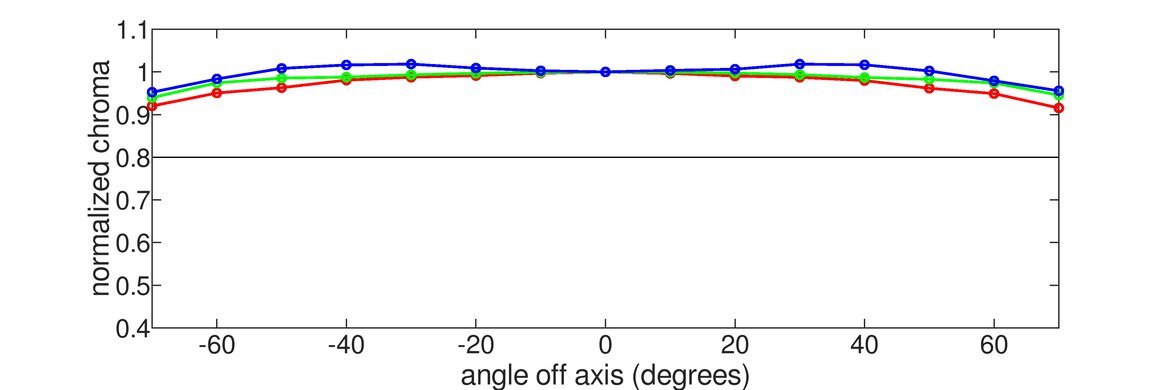
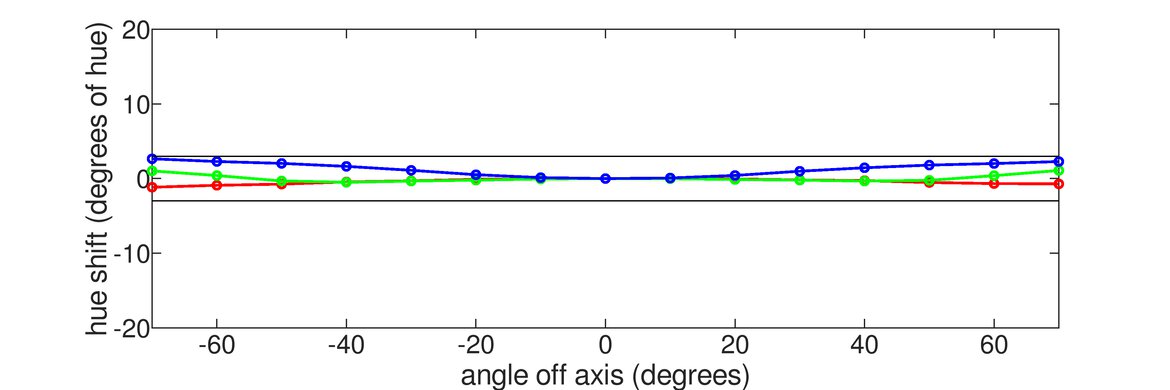
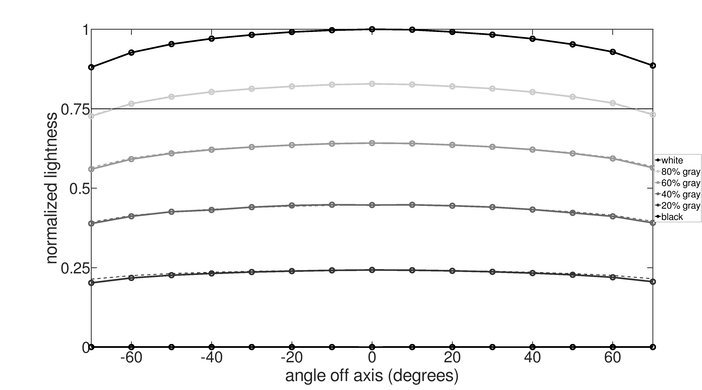
    Horizontal Viewing Angle
    Color Washout From Left
    40°
    Color Washout From Right
    40°
    Color Shift From Left
    67°
    Color Shift From Right
    64°
    Brightness Loss From Left
    50°
    Brightness Loss From Right
    47°
    Black Level Raise From Left
    30°
    Black Level Raise From Right
    70°
    Gamma Shift From Left
    40°
    Gamma Shift From Right
    43°

    Very good horizontal viewing angles. The sides of the screen remain uniform even when sitting up close.

    8.5
    Vertical Viewing Angle
    Color Washout From Below
    36°
    Color Washout From Above
    35°
    Color Shift From Below
    70°
    Color Shift From Above
    70°
    Brightness Loss From Below
    38°
    Brightness Loss From Above
    36°
    Black Level Raise From Below
    70°
    Black Level Raise From Above
    70°
    Gamma Shift From Below
    69°
    Gamma Shift From Above
    68°

    Like most IPS monitors, this monitor has excellent vertical viewing angles.

    8.8
    Gray Uniformity
    50% Std. Dev.
    2.887%
    50% DSE
    0.102%
    5% Std. Dev.
    0.413%
    5% DSE
    0.061%

    Excellent gray uniformity. There's very little dirty screen effect and almost no visible banding. The corners of the screen are slightly darker than the rest, which can be noticeable when browsing the web in a dark room, but this shouldn't be a problem for most people. In near-dark scenes, there are no noticeable issues with the gray uniformity.

    4.0
    Black Uniformity
    Native Std. Dev.
    3.046%
    Std. Dev. w/ L.D.
    4.982%

    The Acer Predator X27 has bad black uniformity. There's severe clouding throughout the screen, and the backlight is bleeding through in a few spots along the bottom edge. With local dimming enabled, the darker areas of the screen are dimmed properly, but there's significant clouding around the test cross due to the size of the dimming zones.

    5.9
    Pre Calibration
    Picture Mode
    Standard
    Luminance
    276 cd/m²
    Luminance Settings
    240
    Contrast Setting
    50
    RGB Controls
    50-50-50
    Gamma Setting
    Default
    Color Temperature
    6,042 K
    White Balance dE
    5.16
    Color dE
    3.46
    Gamma
    2.18

    Disappointing accuracy out of the box. The white balance is far from our target, giving whites a yellow tint, and there are some noticeable inaccuracies in certain colors. On the other hand, the gamma follows the sRGB target curve nearly perfectly, so most scenes are displayed at the correct brightness levels.

    9.6
    Post Calibration
    Picture Mode
    User
    Luminance
    100 cd/m²
    Luminance Settings
    98
    Contrast Setting
    50
    RGB Controls
    39-37-50
    Gamma Setting
    Default
    Color Temperature
    6,497 K
    White Balance dE
    0.51
    Color dE
    0.54
    Gamma
    2.18

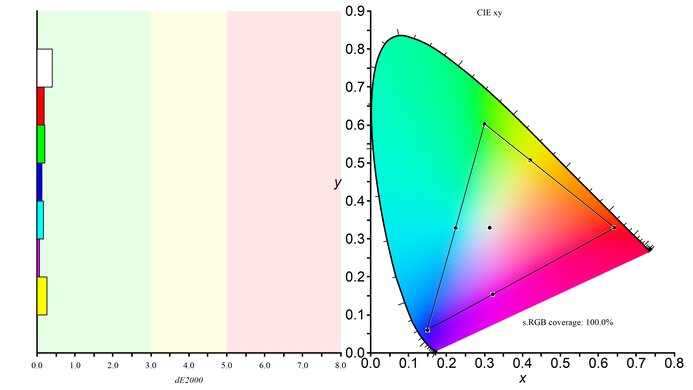
    Calibration was able to effectively eliminate all color inaccuracies. The Acer Predator X27 still tracks our gamma curve nearly perfectly. White and color balance is nearly perfect and most people won't be able to see any errors. The color temperature after calibration is nearly perfect for our target of 6500 K.

    You can download our ICC profile calibration here. This is provided for reference only and shouldn't be used, as the calibration values vary per individual unit even for the same model due to manufacturing tolerances.

    9.7
    SDR Color Gamut
    sRGB xy
    95.5%
    Adobe RGB xy
    98.1%
    sRGB Picture Mode
    User (SDR Colors sRGB = On)
    Adobe RGB Picture Mode
    User (SDR Colors sRGB = Off)

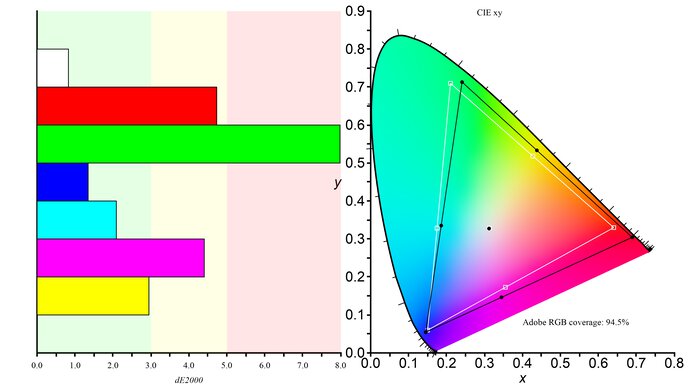
    The Acer Predator X27 has an outstanding SDR color gamut. It can essentially display the entire sRGB and Adobe RGB color space, making it a great choice for professional photo and video editing.

    9.8
    SDR Color Volume
    sRGB In ICtCp
    97.4%
    Adobe RGB In ICtCp
    99.2%
    sRGB Picture Mode
    User (SDR Colors sRGB = On)
    Adobe RGB Picture Mode
    User (SDR Colors sRGB = Off)

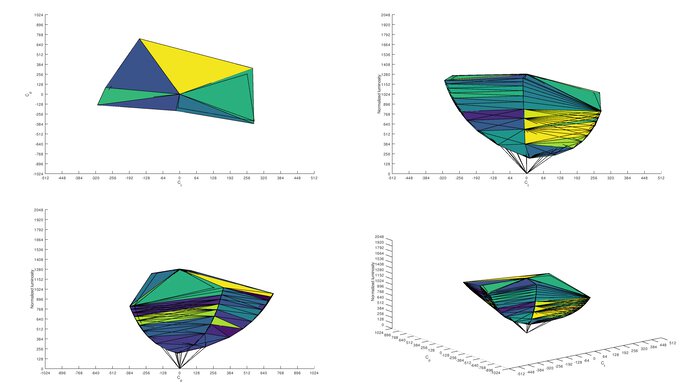
    Outstanding SDR color volume. It can display almost the entire volume, but can't produce dark, saturated colors very well, due to the low contrast ratio.

    8.0
    HDR Color Gamut
    Wide Color Gamut
    Yes
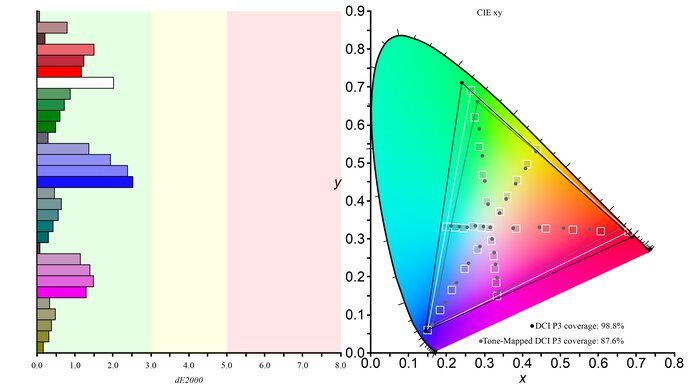
    DCI P3 xy
    77.0%
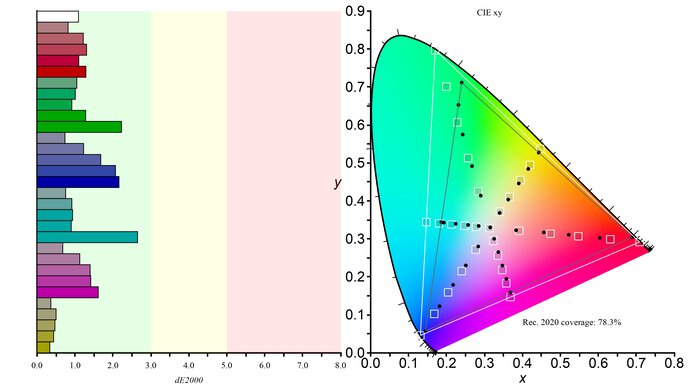
    Rec. 2020 xy
    82.6%
    DCI P3 Picture Mode
    User (SDR Colors sRGB = Off)
    Rec. 2020 Picture Mode
    User (SDR Colors sRGB = Off)

    Update 08/17/2020: We've retested the HDR color gamut to ensure that it's measured with local dimming enabled, as per our methodology. The DCI P3 coverage has decreased from 85.8% to 77.0%; however, it tracks the color space better. The Rec. 2020 coverage has increased from 78.2% to 82.6%. The score has been adjusted accordingly. We also retested 7 other monitors, and some results changed.

    This monitor has a great HDR color gamut. It has excellent coverage of the DCI P3 color space used by most of today's HDR content. It also has very good coverage of the wider Rec. 2020 space, better than most TVs even.

    7.7
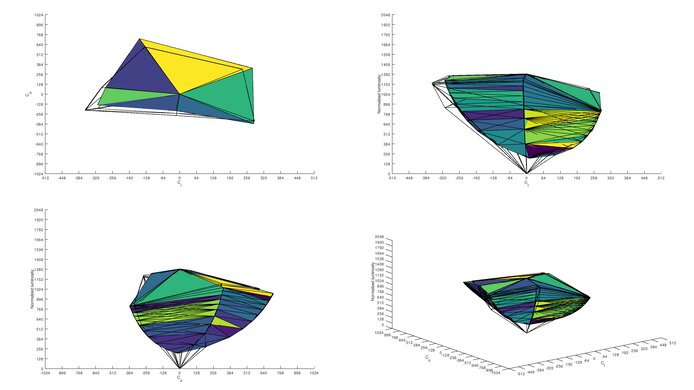
    HDR Color Volume
    DCI-P3 In ICtCp
    73.3%
    Rec. 2020 In ICtCp
    80.3%
    DCI P3 Picture Mode
    User (SDR Colors sRGB = Off)
    Rec. 2020 Picture Mode
    User (SDR Colors sRGB = Off)

    Update 08/17/2020: We've retested the HDR color volume to ensure that it's measured with local dimming enabled, as per our methodology. The P3 color volume has decreased from 80.8% to 73.3%, while the Rec. 2020 color volume has increased from 73% to 80.3%. The score has been adjusted accordingly. We also retested 7 other monitors, and some results changed.

    Very good HDR color volume, but it can't produce colors that are as bright as pure white, and due to the low contrast ratio it can't display dark saturated colors very well. The newer Acer Predator XB273K has slightly better volume in DCI P3.

    10
    Image Retention
    IR After 0 Min Recovery
    0.00%
    IR After 2 Min Recovery
    0.00%
    IR After 4 Min Recovery
    0.00%
    IR After 6 Min Recovery
    0.00%
    IR After 8 Min Recovery
    0.00%
    IR After 10 Min Recovery
    0.00%

    There are no signs of temporary image retention.

    9.8
    Gradient
    Color Depth
    10 Bit

    Excellent gradient handling on the Acer Predator X27. Gradients are displayed nearly perfectly without banding.

    10
    Color Bleed
    Pixel Row Error
    0.000%
    Pixel Column Error
    0.001%

    There's no color bleed on the Acer Predator X27.

    7.2
    Reflections
    Screen Finish
    Matte
    Total Reflections
    5.7%
    Indirect Reflections
    3.1%
    Calculated Direct Reflections
    2.6%

    Decent reflection handling, but it doesn't diffuse reflections across the screen very well. The included blinders can help to reduce glare from side sources.

    9.5
    Text Clarity
    Pixel Type
    IPS
    Sub-Pixel Layout
    RGB

    The Acer Predator X27 has outstanding text clarity out of the box (bottom picture). It's not necessary to run the ClearType settings for clear text on a PC, but if you do, text is incredibly clear (top).

    Motion
    8.5
    Response Time @ Max Refresh Rate
    Best Overdrive Setting
    Off
    Rise / Fall Time
    6.9 ms
    Total Response Time
    12.2 ms
    Overshoot Error
    0.0%
    Dark Rise / Fall Time
    7.2 ms
    Dark Total Response Time
    12.7 ms
    Dark Overshoot Error
    0.0%

    Overdrive Setting Response Time Chart Motion Blur Photo Response Time Table
    Off Chart Photo Tables
    Normal Chart Photo Tables
    Extreme Chart Photo Tables

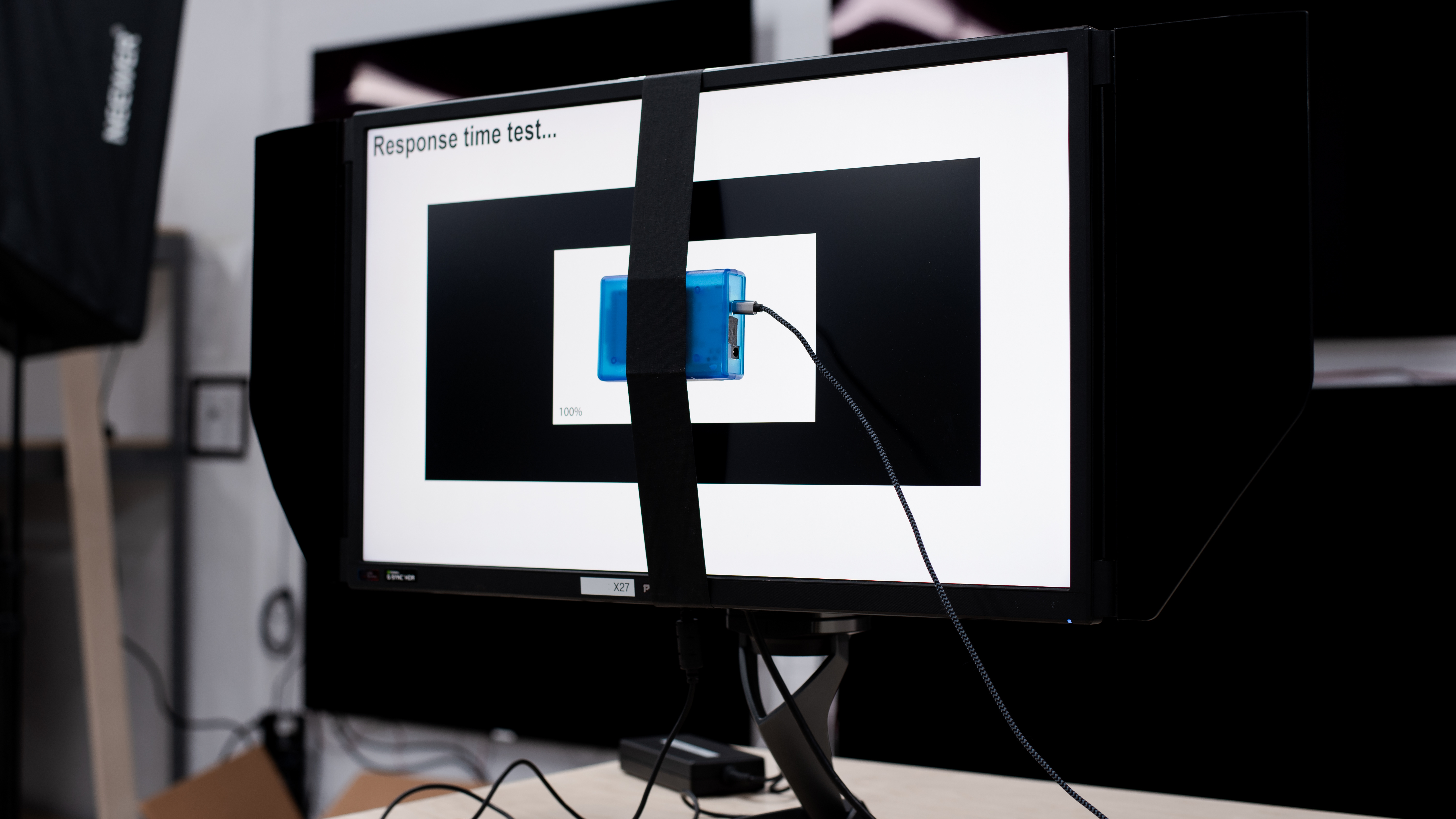
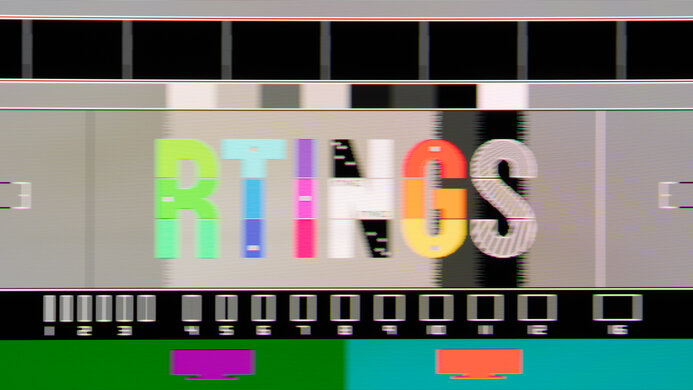
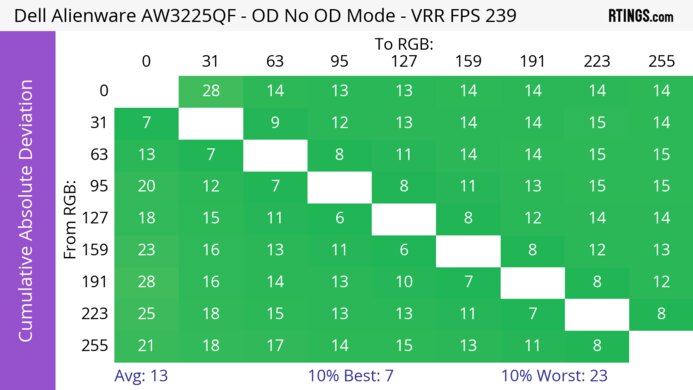
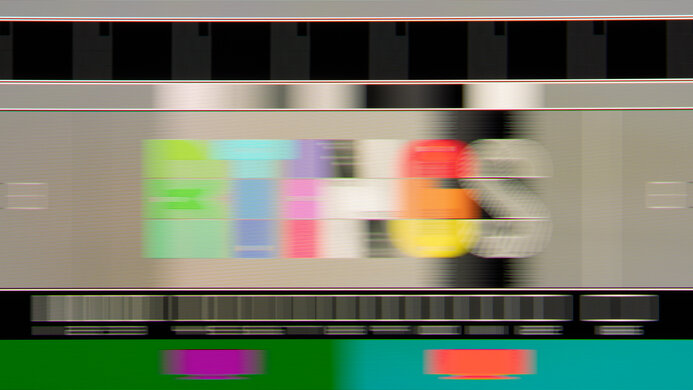
    The Acer Predator X27 has an excellent response time at the max refresh rate. The 'Off' overdrive setting delivers the best overall results, with a short blur trail behind fast-moving objects and no overshoot. 'Normal' is quite a bit faster, but there's significant overshoot. If you prefer something with a much quicker response time, then check out the LG 27GN950-B.

    9.0
    Response Time @ 60Hz
    Best Overdrive Setting
    Normal
    Rise / Fall Time
    5.5 ms
    Total Response Time
    9.6 ms
    Overshoot Error
    0.8%
    Dark Rise / Fall Time
    6.1 ms
    Dark Total Response Time
    11.6 ms
    Dark Overshoot Error
    0.0%

    Response Time Chart Response Time Table Motion Blur Photo
    Off Off Off
    Normal Normal Normal
    Extreme Extreme Extreme

    When gaming at 60Hz, the response time of this monitor is outstanding with the 'Normal' overdrive setting. There's very little blur behind fast-moving objects, and no noticeable overshoot at all.

    10
    Image Flicker
    Flicker-FreeYes
    PWM Dimming Frequency
    0 Hz

    The Acer Predator X27 is completely flicker-free.

    0.0
    Black Frame Insertion (BFI)
    Black Frame Insertion (BFI)
    No BFI
    BFI Maximum Frequency
    N/A
    BFI Minimum Frequency
    N/A

    Unlike many G-SYNC monitors, the Acer Predator X27 doesn't have an optional Black Frame Insertion feature.

    9.0
    Refresh Rate
    Variable Refresh Rate
    G-SYNC
    Native
    120 Hz
    Max Refresh Rate
    144 Hz
    Variable Refresh Rate
    Yes
    FreeSync
    No
    G-SYNC
    Yes (Native)
    VRR Maximum
    144 Hz
    VRR Minimum
    < 20 Hz
    VRR Supported ConnectorsDisplayPort

    This is one of the only 4k, high refresh rate monitors on the market. The maximum refresh rate is only available with chroma subsampling or a lower color depth. If you need a monitor with FreeSync support, check out the ASUS ROG Strix XG27UQ.

    Inputs
    8.5
    Input Lag
    Native Resolution
    10.9 ms
    Native Resolution @ 60Hz
    20.3 ms
    Variable Refresh Rate
    14.5 ms
    Variable Refresh Rate @ 60Hz
    22.6 ms
    10 Bit HDR
    12.7 ms
    Black Frame Insertion (BFI)
    N/A

    The Acer Predator X27 has more input lag than usual for a 144Hz monitor. Although it's great overall, it may disappoint more serious gamers. If you want a gaming monitor with less input lag, check out the Acer Predator X25 bmiiprzx.

    9.2
    Resolution And Size
    Native Resolution3840 x 2160
    Aspect Ratio16:9
    Megapixels8.3 MP
    Pixel Density
    164 PPI
    Screen Diagonal26.9"
    Screen Area310 in²

    The Acer X27 has a large 27" screen and a native 4k resolution. Even if you are sitting extremely close to the monitor you will still be able to see very fine details without seeing the individual pixels.

    Inputs
    Total Inputs
    DisplayPort1 (DP 1.4)
    Mini DisplayPortNo
    HDMI1 (HDMI 2.0)
    DVINo
    VGANo
    DisplayPort OutNo
    USB4 (USB 3.0)
    USB CNo
    Analog Audio Out 3.5mm1
    Microphone In 3.5mmNo
    Digital Optical Audio OutNo
    Analog Audio Out RCANo
    Power SupplyExternal Brick
    Features
    Additional Features
    RGB Illumination
    Controllable
    Speakers
    Yes
    HDR10Yes
    Multiple Input Display
    No

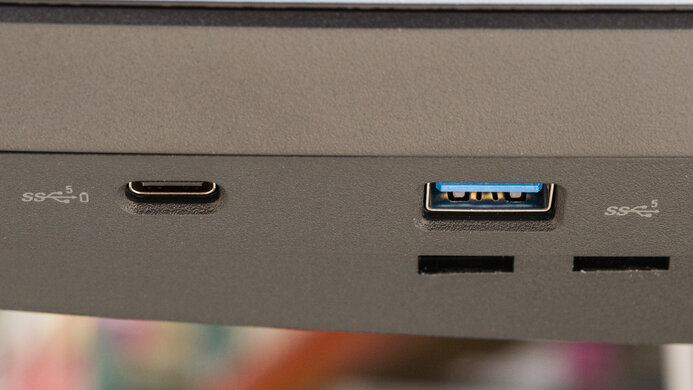
    One of the USB ports on the side of the monitor supports quick charging. There is also a Dark Boost feature that adjusts the black levels to make dark details easier to see.

    Like many gaming monitors, there are options for a few different overlays, including a frame counter, and the Aim Point feature that has multiple crosshair overlay options, as shown here and here.

    There is an ambient light feature that shines light from the backlight onto the surface beneath the monitor. It can also change colors dynamically depending on the average color of the screen.

    On-Screen Display (OSD)
    Controls

    The controls are located behind the monitor on the right side. The menus are very easy to navigate thanks to the joystick control, very similar to LG monitors.

    When the blinders are installed, the controls can be difficult to reach.

    In The Box

    • Manual
    • HDMI cable
    • DisplayPort cable
    • USB cable
    • Vesa mount adapter
    • Top blinder (as shown here)