Samsung Odyssey G65D S32BG65D  Monitor Review

Reviewed Oct 22, 2024 at 10:26am
Tested using Methodology v2.0.1 
Samsung Odyssey G65D S32BG65D
7.8
PC Gaming 
7.1
Console Gaming 
7.6
Office 
7.7
Editing 
7.9
Brightness 
7.9
Response Time 
6.7
HDR Picture 
7.9
SDR Picture 
 8
  1. Recommended in:
  2. Samsung

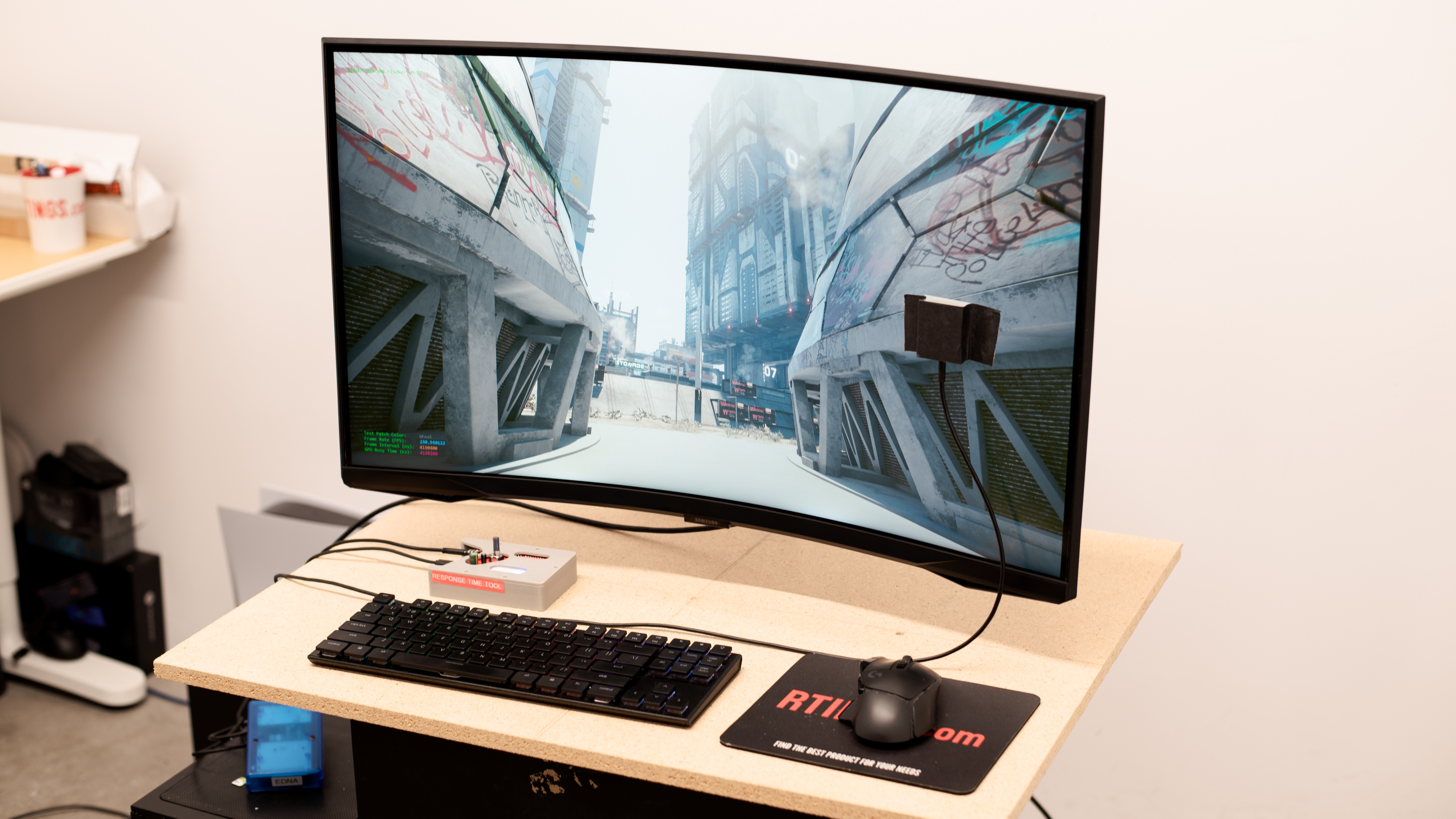
The Samsung Odyssey G6/G65D S32BG65D is a mid-range 32-inch, curved gaming monitor. It's a Best Buy-exclusive and updated version of the Samsung Odyssey G6 S32BG65, with the same specs and features, like the 4k resolution and 240Hz refresh rate. It mainly competes with other 240Hz, 1440p gaming monitors, like the LG 27GR83Q-B or the Gigabyte AORUS FI32Q X. It has features you'd expect to find in a gaming monitor, like HDMI 2.1 bandwidth, VRR support, and RGB lighting on the back. It also supports the Tizen smart platform, so you can stream content without using your PC, and it comes with a remote that supports voice control.

How We Test Monitors

We buy and test more than 30 monitors each year, with units that we buy completely on our own, without any cherry-picked units or samples. We put a lot into each unbiased, straight-to-the-point review, and there's a whole process from purchasing to publishing, involving multiple teams and people. We do more than just use the monitor for a week; we use specialized and custom tools to measure various aspects with objective data-based results. We also consider multiple factors before making any recommendations, including the monitor's cost, its performance against the competition, and whether or not it's easy to find.

Our Verdict

7.8
PC Gaming 

The Samsung Odyssey G65D is good for PC gaming. It has a high 240Hz refresh rate that's great for competitive gaming, and it supports all common VRR formats to reduce screen tearing. It even has HDMI 2.1 bandwidth to take full advantage of modern graphics cards. Gaming feels responsive thanks to its low input lag, and it has sharp motion for the most part, but there's more inverse ghosting and smearing at lower refresh rates. Unfortunately, it has distracting VRR flicker with changing frame rates. On the plus side, it has good picture quality as it displays deep blacks and gets bright, but highlights don't pop in HDR.

Pros
  • HDMI 2.1 bandwidth.

  • Sharp motion across VRR range.

  • Low input lag.

  • High native contrast ratio.

  • 240Hz refresh rate.

  • Bright enough to fight glare.

Cons
  • Terrible local dimming feature.

  • Noticeable VRR flicker.

  • More blur and smearing at low refresh rates.

  • Highlights don't pop in HDR.

7.1
Console Gaming 

The Samsung Odyssey G65D is decent for console gaming. It has low input lag for a responsive feel, and it supports most signals from the PS5 and Xbox Series X|S but doesn't support downscaled 4k signals at the same time as VRR. Unfortunately, there's smearing with fast-moving objects with 60Hz and 120Hz signals. Luckily, it has a great contrast ratio that helps it display deep blacks, and it gets bright enough to fight glare in well-lit rooms, but highlights don't pop against dark backgrounds.

Pros
  • Low input lag.

  • High native contrast ratio.

  • Bright enough to fight glare.

Cons
  • Terrible local dimming feature.

  • More blur and smearing at low refresh rates.

  • Doesn't support all signals from consoles.

  • Highlights don't pop in HDR.

7.6
Office 

The Samsung Odyssey G65D is good for office use. It has good text clarity, and its large screen provides enough space for multitasking. It even gets bright enough to fight glare in a well-lit room, and has decent reflection handling. While its excellent ergonomics are useful for adjusting the screen, its narrow viewing angles are less ideal for sharing your screen with someone else. Plus, it has an aggressively curved screen that may take some time getting used to if you've never used a curved screen before.

Pros
  • Bright enough to fight glare.

  • Good text clarity.

  • Decent reflection handling.

  • Excellent ergonomics.

Cons
  • Aggressively curved screen.

  • Narrow viewing angles.

7.7
Editing 

The Samsung Odyssey G65D is good for content creation. It has accurate colors before calibration, but calibrating it still provides the best accuracy. It even displays deep blacks next to bright highlights, but with a terrible local dimming feature, highlights don't pop. On the plus side, it gets bright enough to fight glare in a well-lit room and has decent reflection handling. Its excellent ergonomics make it easy to adjust, but it has narrow viewing angles, so the image looks washed out from the sides. Unfortunately, with a curved screen, straight lines look curved, and it may take some time to get used to.

Pros
  • High native contrast ratio.

  • Bright enough to fight glare.

  • Excellent ergonomics.

  • Accurate colors before calibration.

Cons
  • Highlights don't pop in HDR.

  • Aggressively curved screen.

  • Narrow viewing angles.

  • Full calibration provides best accuracy.

7.9
Brightness 

The Samsung Odyssey G65D has very good brightness as it gets bright enough to fight glare in well-lit rooms. While it still gets bright in HDR, highlights don't pop against dark backgrounds.

Pros
  • Bright enough to fight glare.

Cons
  • Highlights don't pop in HDR.

7.9
Response Time 

The Samsung Odyssey G65D has a good response time. It performs well across its refresh rate range with VRR enabled. That said, there's still smearing and inverse ghosting, and motion looks worse with lower refresh rate signals.

Pros
  • Sharp motion across VRR range.

Cons
  • More blur and smearing at low refresh rates.

6.7
HDR Picture 

The Samsung Odyssey G65D has okay HDR picture quality. Although it has a great contrast ratio, its local dimming feature performs terribly and fails to improve the picture quality in dark scenes. It displays a wide range of colors, but vivid colors aren't bright.

Pros
  • High native contrast ratio.

Cons
  • Terrible local dimming feature.

7.9
SDR Picture 

The Samsung Odyssey G65D has good SDR picture quality. It has a wide range of colors, and it displays deep blacks next to bright highlights.

Pros
  • High native contrast ratio.

  • Displays wide range of colors.

Cons
None
9.0
Color Accuracy 

The Samsung Odyssey G65D has fantastic color accuracy. Colors are accurate even before calibration, but you still need to calibrate it for the best accuracy.

Pros
  • Accurate colors before calibration.

Cons
  • Full calibration provides best accuracy.

  • 7.8
    PC Gaming
  • 7.1
    Console Gaming
  • 7.6
    Office
  • 7.7
    Editing

  • Performance Usages

  • 7.9
    Brightness
  • 7.9
    Response Time
  • 6.7
    HDR Picture
  • 7.9
    SDR Picture
  • 9.0
    Color Accuracy
  • Changelog

    1.  Updated Feb 21, 2025: We've converted this review to Test Bench 2.0.1. This includes a new test result for DisplayPort 2.1 Transmission Bandwidth.
    2.  Updated Jan 24, 2025: 

      Added that the Sony INZONE M9 II has better local dimming.

    3.  Updated Oct 25, 2024: 

      Added the VRR Flicker video with VRR Control on.

    4.  Updated Oct 22, 2024: Review published.

    Check Price

    32"LS32BG65DENXGO
    Amazon.com
    32"LS32BG65DENXGO
    B&H
    32"LS32BG65DENXGO
    BestBuy.com
    32"LS32BG65DENXGO
    Samsung.com
    32"LS32BG65DENXGO
    Walmart.com

    Differences Between Sizes And Variants

    We tested the 32-inch Samsung Odyssey G65D, which is only the size available, and it's only available at Best Buy in the US. It's an updated version of the Samsung Odyssey G6 S32BG65, which has the same specs but is also available in a 27-inch screen size. You can see the differences between the different Odyssey G6 models below. Note that the full model code may vary between regions and retailers.

    Size US Model Code Release Year Notes
    32" LS32BG65DENXGO 2024 Best Buy Exclusive
    27" LS27BG652ENXGO 2022 -
    32" LS32BG652ENXGO 2022 -

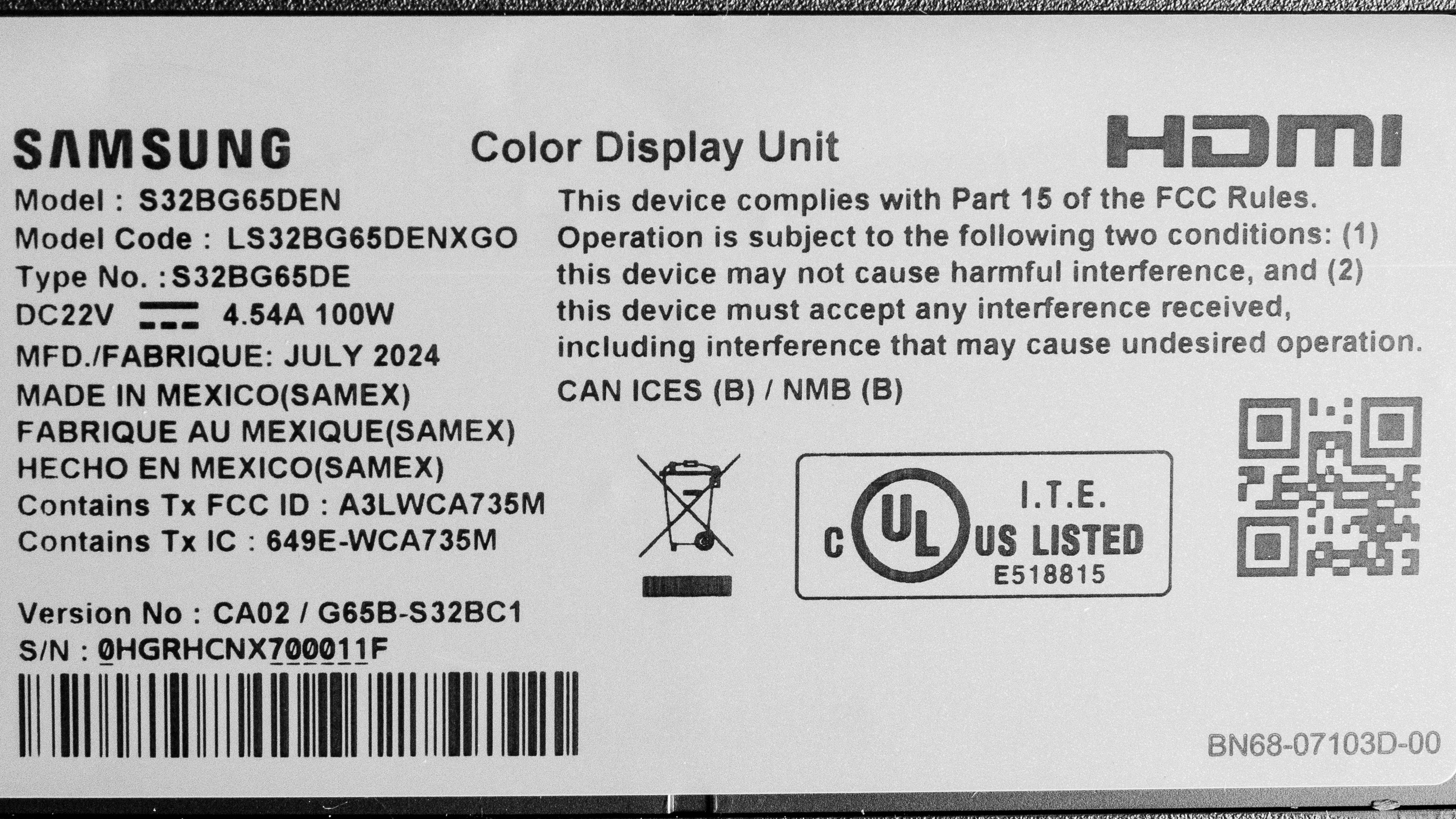
    Our unit's label indicates it was manufactured in July 2024. We tested it with firmware 1651.

    Popular Monitor Comparisons

    The Samsung Odyssey G6/G65D S32BG65D is a 1440p, 240Hz gaming monitor. It's a Best Buy-exclusive and newer model of the Samsung Odyssey G6 S32BG65. It competes against other 1440p, 240Hz monitors, like the Dell Alienware AW2725DF and the LG 27GR83Q-B, and it's a good alternative to those models if you want something bigger with a higher contrast ratio. That said, there are some downsides to it, as it has worse motion handling at low refresh rates, and distracting VRR flicker with changing frame rates.

    Also, make sure to check out our recommendations for the best 240Hz monitors, the best 1440p gaming monitors, and the best Samsung monitors.

    Samsung Odyssey G70D S32DG70

    The Samsung Odyssey G70D S32DG70 is higher-end than the Samsung Odyssey G65D S32BG65D, but that doesn't mean that the G70D is the better choice for everyone. The higher resolution on the G70D makes it a better choice for console gaming or if you play detailed games. The G70D also has wider viewing angles that make it a better choice for co-op gaming. On the other hand, the higher refresh rate on the G65D means it's better for competitive gaming, and it has a higher contrast ratio that helps it display deeper blacks in dark rooms. The G65D is also better for bright rooms thanks to its higher brightness.

    Samsung Odyssey G65B S32BG65

    The Samsung Odyssey G65D S32BG65D is a newer model than the Samsung Odyssey G65B S32BG65, but they perform very similarly. The main difference is that the S32BG65D is a Best Buy-exclusive model, so choosing one over the other depends on which retailer you want to get your monitor from.

    Samsung Odyssey G7 C32G75T

    The Samsung Odyssey G7 C32G75T and the Samsung Odyssey G65D S32BG65D are both 1440p, 240Hz gaming monitors, with a few differences. The S32BG65D has HDMI 2.1 bandwidth that you can use to take full advantage of modern graphics cards. The S32BG65D is also the better choice for use in a bright environment, and it supports Tizen OS, which makes it easy to stream content. That said, the C32G75T provides better motion handling at any refresh rate, which is ideal if your PC can't maintain consistently high frame rates.

    Dell Alienware AW2725DF

    The Dell Alienware AW2725DF and the Samsung Odyssey G65D S32BG65D are different types of 1440p gaming monitors. The Dell is the better choice for most gamers, thanks to its superior motion handling and higher refresh rate. The Dell also delivers better picture quality, particularly for HDR gaming, as it has more vivid colors and brighter highlights. The main advantage of getting the Samsung is that it gets brighter, making it better to use in well-lit rooms, and it doesn't risk burn-in like the OLED panel on the

    Show more 

    Video

    Test Results

    perceptual testing image
    Sort:
    RATINGS
    Category:
    All
    Design
    Style
    Curved
    Yes
    Curve Radius
    1000R

    The Samsung Odyssey G65D has a gaming-oriented design with an aggressively curved screen. It's made entirely of black plastic, and there are some etched designs on the back. It also features RGB lighting below the bottom bezel and on the ring where the stand attaches to the screen.

    7.5
    Build Quality

    The build quality is good. It's well made without any obvious issues, but the biggest downside is that it wobbles easily.

    8.5
    Ergonomics
    Min Height To Top Of Panel
    18.3" (46.6 cm)
    Height Adjustment
    4.7" (12.0 cm)
    Tilt Range
    -12.5° to 10°
    Rotate Portrait/Landscape
    Yes, Both Ways
    Swivel Range
    -15° to 15°
    Wall Mount
    VESA 100x100

    The ergonomics are excellent. You can easily adjust it in a number of ways, which is useful if you want to share your screen with someone next to you. The stand also has a clip for cable management.

    Stand
    Base Width
    22.2" (56.4 cm)
    Base Depth
    1.2" (3.0 cm)
    Thickness (With Display)
    12.6" (32.0 cm)
    Weight (With Display)
    16.0 lbs (7.2 kg)

    The tripod stand features wide-set feet, but there's enough space to put your keyboard and mouse between them. The thickness measurement is from the sides of the screen to the back of the screen, and the thickness from the center to the back is 10.8 inches (27.5 cm).

    Display
    Size
    32"
    Housing Width
    28.1" (71.5 cm)
    Housing Height
    17.1" (43.5 cm)
    Thickness (Without Stand)
    4.9" (12.5 cm)
    Weight (Without Stand)
    12.0 lbs (5.4 kg)
    Borders Size (Bezels)
    0.2" (0.6 cm)

    The thickness measurement is from the sides of the screen to the back, and the thickness from the center to the back is 3.5 inches (9.0 cm).

    Controls

    The Samsung Odyssey G65D comes with a remote to navigate the Tizen smart platform, and it has a mic for voice control. There's also a directional pad below bottom bezel to change settings and turn the monitor on/off.

    In The Box
    Power Supply
    External Brick

    • HDMI cable
    • DisplayPort cable
    • USB-B to USB-A cable
    • Power cable and brick
    • VESA mounting adapter
    • Remote
    • User guides
    Picture Quality
    8.3
    Contrast
    Native Contrast
    3,865 : 1
    Contrast With Local Dimming
    3,988 : 1

    The contrast is great. It displays deep blacks next to bright highlights, and while it has a local dimming feature, it doesn't significantly improve the contrast.

    2.0
    Local Dimming
    Local Dimming
    Yes
    Backlight
    Edge

    The local dimming feature is terrible. It's edge-lit with only eight zones, and it fails to improve the picture quality. Any bright object against a dark background causes an entire zone to light up, which results in distracting blooming. However, most content keeps all the zones on, making the feature ineffective. The video is with Local Dimming on 'High'. If you're looking for a monitor with much better local dimming, check out the Sony INZONE M9 II.

    8.5
    SDR Brightness
    Real Scene
    469 cd/m²
    Peak 2% Window
    814 cd/m²
    Peak 10% Window
    847 cd/m²
    Peak 25% Window
    750 cd/m²
    Peak 50% Window
    591 cd/m²
    Peak 100% Window
    502 cd/m²
    Sustained 2% Window
    802 cd/m²
    Sustained 10% Window
    836 cd/m²
    Sustained 25% Window
    745 cd/m²
    Sustained 50% Window
    590 cd/m²
    Sustained 100% Window
    502 cd/m²
    Automatic Brightness Limiting (ABL)
    0.031
    Minimum Brightness
    38 cd/m²

    Settings:

    • Game Picture Mode: Custom (after calibration)
    • Game Mode: On
    • Brightness: 50 (max)
    • Local Dimming: High

    The SDR brightness is excellent. It easily gets bright enough to fight glare, and while there are some changes in brightness across different content, it isn't distracting.

    7.5
    HDR Brightness
    VESA DisplayHDR Certification
    DisplayHDR 600
    Real Scene
    497 cd/m²
    Peak 2% Window
    768 cd/m²
    Peak 10% Window
    793 cd/m²
    Peak 25% Window
    762 cd/m²
    Peak 50% Window
    588 cd/m²
    Peak 100% Window
    472 cd/m²
    Sustained 2% Window
    758 cd/m²
    Sustained 10% Window
    782 cd/m²
    Sustained 25% Window
    752 cd/m²
    Sustained 50% Window
    587 cd/m²
    Sustained 100% Window
    472 cd/m²
    Automatic Brightness Limiting (ABL)
    0.030

    Settings:

    • Game Picture Mode: Custom
    • Game HDR: On
    • Game Mode: On
    • Brightness: 50 (max)
    • Local Dimming: High

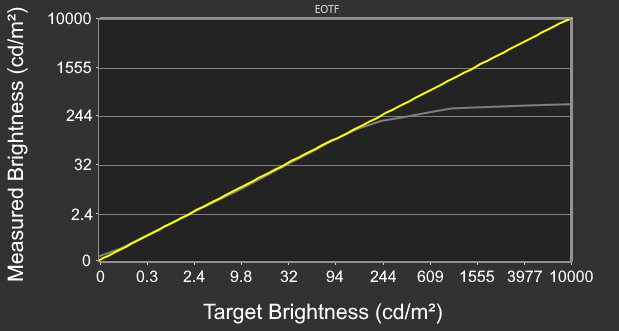
    The HDR brightness is good. It gets bright, which is great if you want to use it in a well-lit room. While it gets brightest with small highlights, the local dimming feature fails to make them pop against the rest of the image. Although most scenes are slightly overbrightened, the PQ EOTF tracking is good until there's a sharp cut-off at the peak brightness, meaning it lets highlights get the brightest they could.

    The EOTF tracking is worse with Game HDR off, which you can see below:

    Local Dimming PQ EOTF
    Off Graph
    Low Graph
    Standard Graph
    High Graph
    5.5
    Horizontal Viewing Angle
    Color Washout From Left
    32°
    Color Washout From Right
    30°
    Color Shift From Left
    38°
    Color Shift From Right
    37°
    Brightness Loss From Left
    33°
    Brightness Loss From Right
    31°
    Black Level Raise From Left
    13°
    Black Level Raise From Right
    12°
    Gamma Shift From Left
    16°
    Gamma Shift From Right
    14°

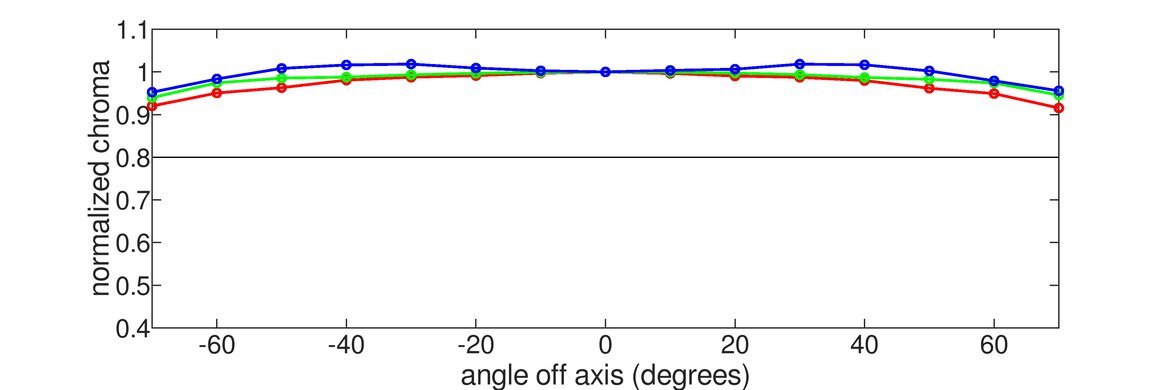
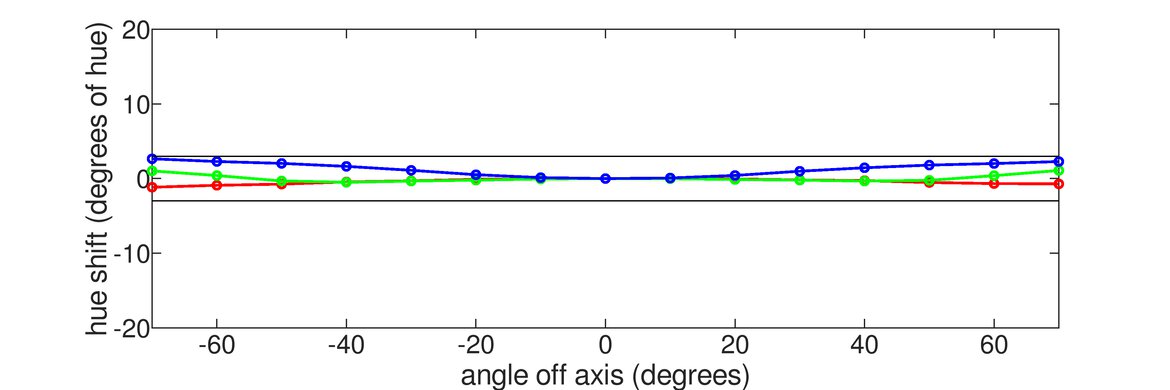
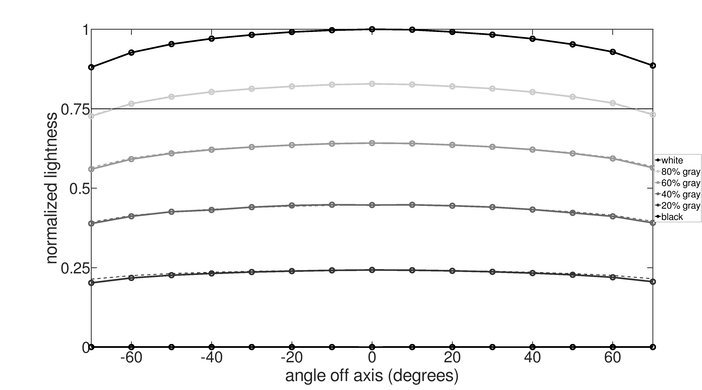
    The horizontal viewing angle is disappointing. The image quickly washes out when viewing it from off center, like if someone sitting next to you is looking at the screen. The curved screen brings the edges closer to your field of vision, so they don't look washed out if you're sitting in front of the monitor.

    5.2
    Vertical Viewing Angle
    Color Washout From Below
    29°
    Color Washout From Above
    29°
    Color Shift From Below
    29°
    Color Shift From Above
    36°
    Brightness Loss From Below
    31°
    Brightness Loss From Above
    32°
    Black Level Raise From Below
    Black Level Raise From Above
    Gamma Shift From Below
    14°
    Gamma Shift From Above
    13°

    The vertical viewing angle is poor. The image washes out as you view it from below or above.

    7.8
    Gray Uniformity
    50% Std. Dev.
    2.083%
    50% DSE
    0.172%

    The gray uniformity is good. The screen looks uniform in the center, but there's noticeable backlight bleed at the bottom edge, and the sides are darker.

    7.0
    Black Uniformity
    Native Std. Dev.
    1.146%
    Std. Dev. w/ L.D.
    2.248%

    The black uniformity is decent. While the screen is uniform for the most part, the biggest downside is that there's backlight bleed along the top and bottom edges, and the local dimming feature doesn't improve it.

    9.1
    Color Accuracy (Pre-Calibration)
    Picture Mode
    Game (Custom)
    sRGB Gamut Area xy
    101.6%
    White Balance dE (Avg.)
    1.95
    Color Temperature (Avg.)
    6,871 K
    Gamma (Avg.)
    2.26
    Color dE (Avg.)
    1.47
    Contrast Setting
    50
    RGB Settings
    Default
    Gamma Setting
    2.2
    Brightness Setting
    22
    Measured Brightness
    232 cd/m²
    Brightness Locked
    No

    The accuracy before calibration is fantastic. There are minimal issues with the white balance, colors, and color temperature, but it isn't perfect. Gamma is a bit high, particularly in dark content, so it looks too dark. This monitor doesn't have a dedicated sRGB mode, but if you set Color Space Settings to 'Auto,' it locks colors to the sRGB color space and doesn't disable other settings.

    9.5
    Color Accuracy (Post-Calibration)
    Picture Mode
    Game (Custom)
    sRGB Gamut Area xy
    96.6%
    White Balance dE (Avg.)
    0.63
    Color Temperature (Avg.)
    6,435 K
    Gamma (Avg.)
    2.18
    Color dE (Avg.)
    0.75
    Contrast Setting
    50
    RGB Settings
    Gain (4,-1,-3), Offset (-1,2,0)
    Gamma Setting
    2.2
    Brightness Setting
    9
    Measured Brightness
    102 cd/m²
    ICC Profile
    Download

    The accuracy after calibration is fantastic. It fixes most issues, but still isn't perfect.

    9.0
    SDR Color Gamut
    sRGB Coverage xy
    96.6%
    sRGB Picture Mode
    Game (Custom)
    Adobe RGB Coverage xy
    84.7%
    Adobe RGB Picture Mode
    Game (Custom)

    The SDR color gamut is fantastic. It covers most of the common sRGB color space and has good coverage of the Adobe RGB color space used in content creation. However, it oversaturates red and magenta and undersaturates green and cyan in Adobe RGB.

    8.2
    HDR Color Gamut
    Wide Color Gamut
    Yes
    DCI-P3 Coverage xy
    91.4%
    DCI-P3 Picture Mode
    Game (Custom)
    Rec. 2020 Coverage xy
    66.8%
    Rec. 2020 Picture Mode
    Game (Custom)

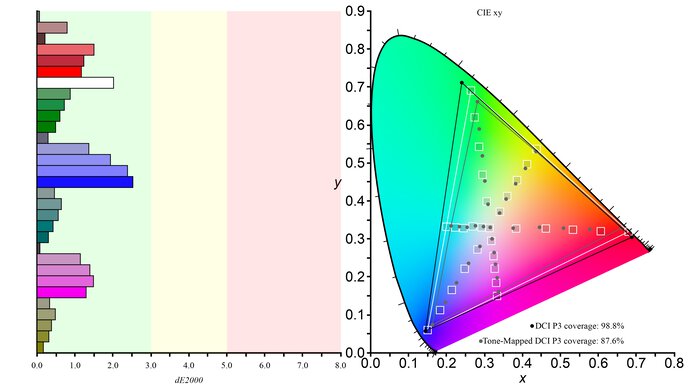
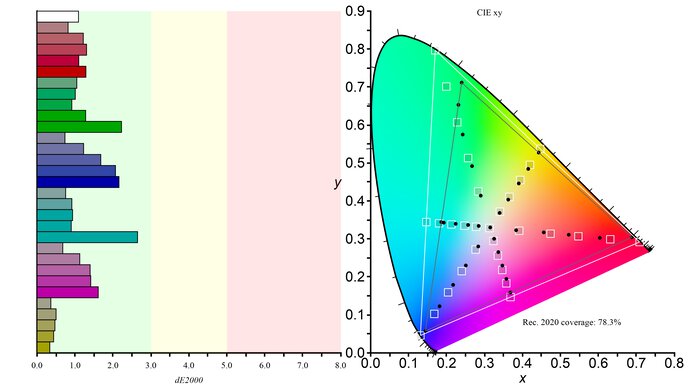
    The HDR color gamut is great. It displays a wide range of colors in the DCI-P3 color space that's used in most HDR content, and there are minimal inaccuracies. However, its coverage of the wider Rec. 2020 color space is more limited, and it has worse tone mapping.

    8.1
    HDR Color Volume
    1,000 cd/m² DCI-P3 Coverage ICtCp
    83.1%
    DCI-P3 Picture Mode
    Game (Custom)
    10,000 cd/m² Rec. 2020 Coverage ICtCp
    36.5%
    Rec. 2020 Picture Mode
    Game (Custom)

    The HDR color volume is great. It displays dark colors well, particularly in the DCI-P3 color space, but vivid colors aren't very bright.

    7.5
    Text Clarity
    Pixel Type
    VA
    Subpixel Layout
    RGB

    The text clarity is good. Using Windows ClearType (top photo) helps improve the boldness of letters and makes them easier to read. These photos are in Windows 10, and you can also see them in Windows 11 with ClearType on and with ClearType off.

    7.1
    Reflections
    Screen Finish
    Matte
    Total Reflections
    6.1%
    Indirect Reflections
    3.4%
    Calculated Direct Reflections
    2.7%

    The reflection handling is decent. The matte screen coating diffuses light fairly well, but reflections are distracting if you place it in very bright environment, like opposite a sunny window.

    9.8
    Gradient
    Color Depth
    10 Bit

    The gradient handling is fantastic. There's minimal banding between shades of similar colors.

    Motion
    8.0
    Refresh Rate
    Native Refresh Rate
    240 Hz
    Max Refresh Rate
    240 Hz
    Max Refresh Rate Over DP
    240 Hz
    Max Refresh Rate Over HDMI
    240 Hz
    Max Refresh Rate Over DP @ 10-bit
    240 Hz
    Max Refresh Rate Over HDMI @ 10-Bit
    240 Hz

    You can reach the max refresh rate with any connection type, but your graphics card needs to use Display Stream Compression (DSC) to reach its max refresh rate with 10-bit signals over DisplayPort.

    Variable Refresh Rate (VRR)
    Variable Refresh Rate
    Yes
    FreeSync
    Yes
    G-SYNC
    Compatible (Tested)
    VRR Maximum
    240 Hz
    VRR Minimum
    < 20 Hz
    VRR Supported Connectors
    DisplayPort, HDMI

    NVIDIA VRR Min VRR Max
    DisplayPort <20Hz 240Hz
    HDMI <20Hz 240Hz
    AMD VRR Min VRR Max
    DisplayPort <20Hz 240Hz
    HDMI <20Hz 240Hz

    On top of supporting FreeSync VRR and G-SYNC compatibility, this monitor also supports HDMI Forum VRR.

    8.2
    VRR Motion Performance
    See details on graph tool
    Recommended VRR OD Setting
    Faster
    Variable Overdrive Advertised
    No
    Avg. CAD
    141
    Best CAD
    129
    Worst CAD
    164

    Frame Rate CAD Heatmap RT Chart Pursuit Photo
    239 Heatmap Chart Photo
    165 Heatmap Chart Photo
    144 Heatmap Chart Photo
    120 Heatmap Chart Photo
    100 Heatmap Chart Photo
    80 Heatmap Chart Photo
    60 Heatmap Chart Photo

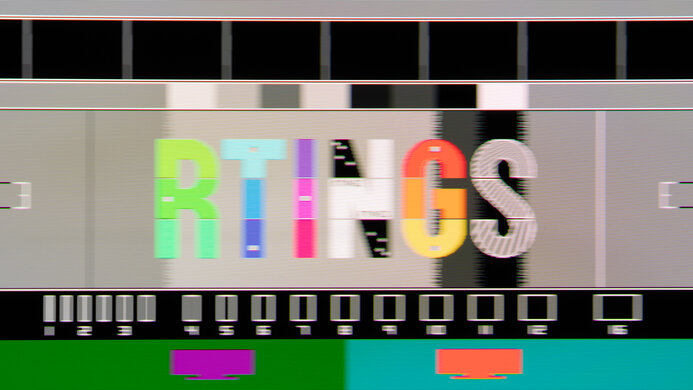
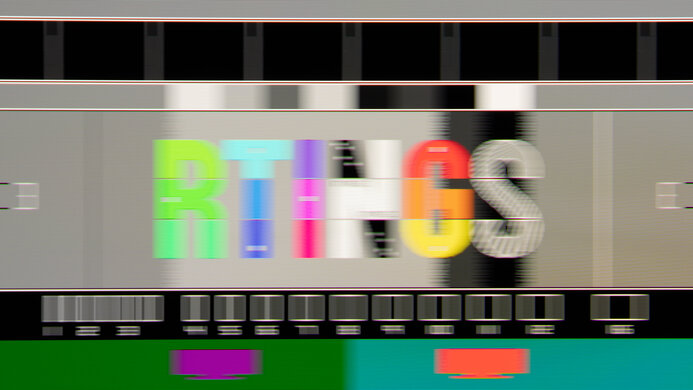
    The Samsung Odyssey G65D has great motion handling across its VRR range. The three Response Time overdrive settings perform fairly similarly, but 'Faster' provides the best performance across the VRR range. Motion looks sharp, but there's still smearing, and it has some inverse ghosting as the refresh rate drops.

    8.0
    Refresh Rate Compliance
    See details on graph tool
    See details on graph tool
    Compliance @ Max Hz
    51%
    Compliance @ 120 FPS
    67%
    Compliance @ 60 FPS
    82%

    The refresh rate compliance is great. Although its response time isn't fast enough to make full color transitions before the monitor draws the next frame at the max refresh rate, it's much better at lower refresh rates.

    8.2
    CAD @ Max Refresh Rate
    OD Transition Max Refresh Rate
    od-transition-max-refresh-rate-extreme-0-31
    OD extreme
    0 to 31
    Recommended Overdrive Setting
    Extreme
    Avg. CAD
    125
    Best 10% CAD
    42
    Worst 10% CAD
    226

    Overdrive Mode CAD Heatmap RT Chart Pursuit Photo
    Standard Heatmap Chart Photo
    Faster Heatmap Chart Photo
    Extreme Heatmap Chart Photo

    The CAD at the max refresh rate of 240Hz is great. The recommended Response Time setting is 'Extreme' because it has the least amount of motion blur, but there's still smearing and some inverse ghosting.

    Response Time @ Max Refresh Rate
    Recommended Overdrive Setting
    Extreme
    First Response Time
    2.9 ms
    Total Response Time
    6.2 ms
    RGB Overshoot
    8 RGB
    Worst 10% First Response Time
    8.6 ms
    Worst 10% Total Response Time
    12.3 ms
    Worst 10% RGB Overshoot
    23 RGB

    Overdrive Mode First Response Heatmap Total Response Heatmap RGB Overshoot Heatmap
    Standard Heatmap Heatmap Heatmap
    Faster Heatmap Heatmap Heatmap
    Extreme Heatmap Heatmap Heatmap

    7.3
    CAD @ 120Hz
    OD Transition 120Hz
    od-transition-120-extreme-0-31
    OD extreme
    0 to 31
    Recommended Overdrive Setting
    Standard
    Avg. CAD
    183
    Best 10% CAD
    58
    Worst 10% CAD
    328

    Overdrive Mode CAD Heatmap RT Chart Pursuit Photo
    Standard Heatmap Chart Photo
    Faster Heatmap Chart Photo
    Extreme Heatmap Chart Photo

    The CAD at 120Hz is decent. Unlike at the max refresh rate, the three overdrive settings perform nearly exactly the same, and there's blur and smearing. They're like this if you start gaming at 120Hz because they perform differently if you start at a higher refresh rate and use VRR to go down to 120Hz, as you can see in VRR Motion Performance.

    Response Time @ 120Hz
    Recommended Overdrive Setting
    Standard
    First Response Time
    8.2 ms
    Total Response Time
    8.8 ms
    RGB Overshoot
    1 RGB
    Worst 10% First Response Time
    16.2 ms
    Worst 10% Total Response Time
    16.2 ms
    Worst 10% RGB Overshoot
    8 RGB

    Overdrive Mode First Response Heatmap Total Response Heatmap RGB Overshoot Heatmap
    Standard Heatmap Heatmap Heatmap
    Faster Heatmap Heatmap Heatmap
    Extreme Heatmap Heatmap Heatmap

    6.9
    CAD @ 60Hz
    OD Transition 60Hz
    od-transition-60-extreme-0-31
    OD extreme
    0 to 31
    Recommended Overdrive Setting
    Standard
    Avg. CAD
    209
    Best 10% CAD
    57
    Worst 10% CAD
    398

    Overdrive Mode CAD Heatmap RT Chart Pursuit Photo
    Standard Heatmap Chart Photo
    Faster Heatmap Chart Photo
    Extreme Heatmap Chart Photo

    The CAD at 60Hz is okay. Like at 120Hz, the three Response Time settings perform similarly, as they all have motion blur and smearing with fast-moving objects.

    Response Time @ 60Hz
    Recommended Overdrive Setting
    Standard
    First Response Time
    10.4 ms
    Total Response Time
    13.0 ms
    RGB Overshoot
    2 RGB
    Worst 10% First Response Time
    17.6 ms
    Worst 10% Total Response Time
    17.9 ms
    Worst 10% RGB Overshoot
    11 RGB

    Overdrive Mode First Response Heatmap Total Response Heatmap RGB Overshoot Heatmap
    Standard Heatmap Heatmap Heatmap
    Faster Heatmap Heatmap Heatmap
    Extreme Heatmap Heatmap Heatmap

    Backlight Strobing (BFI)
    Backlight Strobing (BFI)
    Yes
    Maximum Frequency
    60 Hz
    Minimum Frequency
    60 Hz
    Longest Pulse Width Brightness
    421 cd/m²
    Shortest Pulse Width Brightness
    421 cd/m²
    Pulse Width Control
    No
    Pulse Phase Control
    No
    Pulse Amplitude Control
    Yes
    VRR At The Same Time
    No

    Settings Input Label Game Mode Pursuit
    Photo
    Backlight
    Graph
    Picture Clarity Settings Blu-ray Off Photo Graph
    Game Motion Plus Settings Game Console On Photo Graph

    The Samsung Odyssey G65D has an optional backlight strobing feature to reduce persistence blur, but it's limited in how you can use it. It only flickers at 60Hz and causes image duplication. 

    There are two ways to enable the setting. You can enable it through the Picture Clarity Settings as long as you have VRR off and Game Mode disabled with the input label on 'Blu-ray,' which increases the input lag. If you want to use it in Game Mode with VRR enabled, you can enable the feature through the Game Motion Plus Settings instead, and you need to change the input label to 'Game Console.'

    2.0
    VRR Flicker
    Dark Gray Flicker
    5.0 RGB
    Middle Gray Flicker
    7.2 RGB
    Light Gray Flicker
    6.1 RGB

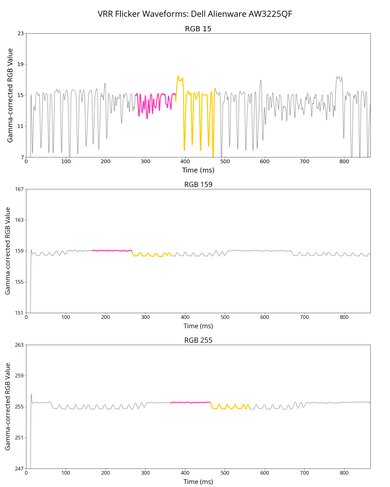
    The Samsung Odyssey G65D has terrible VRR flicker with changing frame rates. It's mostly distracting in dark scenes and dark parts of brighter scenes. There's a VRR Control setting that eliminates the VRR flicker, but it introduces stutter and increases the input lag instead. You can see the results for it below:

    10
    Image Flicker
    Flicker-Free
    Yes
    PWM Dimming Frequency
    0 Hz

    The backlight is completely flicker-free, which helps reduce eye strain if you're sensitive to it.

    Inputs

    8.9
    Input Lag
    Native Resolution @ Max Hz
    3.1 ms

    Native Resolution @ 120Hz
    5.5 ms
    Native Resolution @ 60Hz
    10.3 ms
    Backlight Strobing (BFI)
    14.4 ms

    Settings:

    • Game Mode: On

    The input lag is low for a responsive feel, as long as you have Game Mode enabled. Using VRR Control adds a full frame of input lag, and disabling Game Mode increases the input lag significantly.

    6.9
    Resolution
    Native Resolution
    2560 x 1440
    Aspect Ratio
    16:9
    Megapixels
    3.7 MP
    Pixel Density
    93 PPI
    6.6
    PS5 Compatibility
    4k @ 120Hz
    No
    4k @ 60Hz
    Yes
    1440p @ 120Hz
    Yes
    1440p @ 60Hz
    Yes
    1080p @ 120Hz
    Yes
    1080p @ 60Hz
    Yes

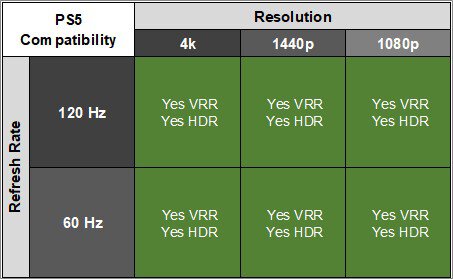
    This monitor works well with the PS5. It supports most signals without issue, but you can only get downscaled 4k @ 60Hz signals by disabling Game Mode, which turns off VRR and increases the input lag.

    6.6
    Xbox Series X|S Compatibility
    4k @ 120Hz
    No
    4k @ 60Hz
    Yes
    1440p @ 120Hz
    Yes
    1440p @ 60Hz
    Yes
    1080p @ 120Hz
    Yes
    1080p @ 60Hz
    Yes

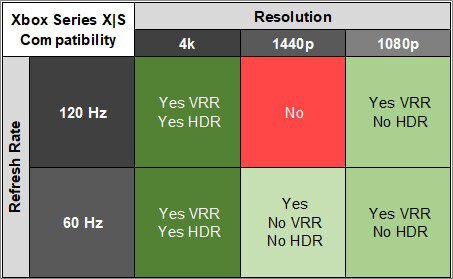
    This monitor works well with the Xbox Series X|S. You can get a downscaled 4k @ 60Hz signal by disabling Game Mode, which turns VRR off and increases the input lag. However, because the Xbox only supports HDR with 4k signals, this is the only way to use HDR on the monitor.

    Inputs Photos
    Video And Audio Ports
    DisplayPort
    1 (DP 1.4)
    DisplayPort Transmission Bandwidth
    No DisplayPort 2.1
    Mini DisplayPort
    No
    HDMI
    2 (HDMI 2.1)
    HDMI 2.1 Bandwidth
    40Gbps (FRL 10x4)
    DVI
    No
    VGA
    No
    Daisy Chaining
    No
    3.5mm Audio Out
    1
    3.5mm Audio In
    No
    3.5mm Microphone In
    No

    The monitor has an RJ45 Ethernet port that's useful if your computer doesn't have one, or if you want a wired connection to stream content from Tizen OS.

    USB
    USB-A Ports
    2
    USB-A Rated Speed
    5Gbps (USB 3.2 Gen 1)
    USB-B Upstream Port
    Yes
    USB-C Ports
    0
    USB-C Upstream
    No USB-C Ports
    USB-C Rated Speed
    No USB-C Ports
    USB-C Power Delivery
    No USB-C Ports
    USB-C DisplayPort Alt Mode
    No USB-C Ports
    Thunderbolt
    No
    macOS Compatibility

    Connection HDMI 2.0 HDMI 2.1 USB-C to DP
    Max Refresh Rate 120Hz 240Hz 240Hz
    VRR Range N/A 48-240Hz 60-240Hz
    HDR Yes Yes Yes

    The Samsung Odyssey G65D works well with macOS. There aren't any issues, and if you're using a MacBook, windows move to the screen when you close the lid, and they return to their original position when reopening the lid or waking the laptop up from sleep.

    Features
    Additional Features
    HDR10
    Yes
    Speakers
    Yes
    RGB Illumination
    Controllable
    Multiple Input Display
    No
    KVM Switch
    No

    The Samsung Odyssey G65D has a few extra features, like Tizen OS, so you can stream content without a PC. It has a Multi-View feature, but it isn't a true Picture-in-Picture/Picture-by-Picture mode because you can't view two external sources at once. Rather, you can view an image from one external source and one built-in app.

    There are other gaming-oriented features, including:

    • Core Lighting: Controls the RGB lighting.
    • Eye Saver Mode: Decreases blue light to help reduce eye strain.
    • Game Mode: Provides the lowest input lag.
    • Ultrawide Game View: Simulates a 21:9 aspect ratio, which adds black bars to the top and bottom of the screen.
    • Virtual Aim Point: Adds a virtual crosshair on the screen.
    On-Screen Display (OSD)