
Our Verdict
Very good TV for a wide range of usages. The TV is best suited for bright rooms with wide seating, as it can get bright to combat glare and has great reflection handling. Image remains accurate when viewed at an angle which is great. Picture quality in a dark room is sub-par as the full-array local dimming isn't enough to make up for the low native contrast ratio. Input lag is very low and motion handling is good, so the TV feels responsive for gaming or PC use.
- Image remains accurate when viewed at an angle
- Feels very responsive for gaming
- Can produce bright highlights
- Blacks appear gray in a dark room
Decent for watching movies in a dark room. Full-array local dimming helps to alleviate the poor native contrast ratio but blacks still appear gray or details are crushed in dark scenes. The TV can display 24p movies from most sources without judder which is great.
Great for watching TV shows in a bright room. The LG SK 9000 can get bright in SDR to combat glare, and reflection handling is great. Image also remains accurate when viewed from an angle, which is good for those with wide seating. The smart platform works well for casual browsing or finding content on Netflix and YouTube.
Great for watching sports in a bright room. Image remains accurate when viewed at an angle which is great for gatherings for an important game. The response time is fast, which is great for displaying fast motion without much of a trail. The screen can get bright to overcome glare, and anti-reflective coating works great.
Great for gamers. Input lag is very low, so games feel responsive. The response time is excellent, resulting in only a short blur trail behind fast-paced content. The LG SK9000 can also flicker the image to clear up fast motion, and the picture quality is good in a room with some light.
Decent choice for watching HDR movies in a dark room. Contrast ratio is low so blacks appear gray, even with full-array local dimming. The TV can produce bright and saturated highlights. It supports both HDR10 and Dolby Vision.
Great for HDR gaming. Picture quality is good, but low contrast ratio results in dark scenes that appear gray or washed out in a dark room. Input lag is low and response time is excellent so the TV feels very responsive even in fast action sequences. The TV can produce bright and saturated highlights in HDR.
Great for use as a monitor. The colors remain accurate at an angle, which is great for viewing the sides of the screen from up close. Supports chroma 4:4:4 for clear text across all backgrounds. Input lag and fast response time are low, so the TV feels responsive and movement is clear.
Changelog
- Updated May 21, 2020: Converted to Test Bench 1.5.
- Updated Feb 21, 2020: Converted to Test Bench 1.4.
- Updated Feb 28, 2019: Converted to Test Bench 1.3.
- Updated Apr 20, 2018: Review published.
Check Price
Differences Between Sizes And Variants
We tested the 55" SK9000 (55SK9000PUA). In the U.S. the SK8500 has been renamed to the SK9000, but in other regions, it is still known as the SK8500. We expect our results to be valid for both model numbers (LG 55SK9000PUA and LG 65SK9000PUA) and for the 49" model that is not available in the U.S.
If someone comes across a different type of panel or their LG SK9000 doesn't correspond to our review, let us know and we will update the review.
| Size | US Model | Alternative Name | EU Model |
| 49" | N/A | 49SK8500PLA | |
| 55" | 55SK9000PUA | 55SK9000 | 55SK8500PLA |
| 65" | 65SK9000PUA | 65SK9000 | 65SK8500PLA |
Popular TV Comparisons

The LG SK9000 offers good performance for most viewing habits but is especially suited for bright rooms. See our recommendations for the best 4k TVs and the best TVs.
The LG SK9000 is a better choice if you're going to watch TV from the side, as it has better viewing angles. The Sony X900F is better for directly in front seating arrangements. The LG SK9000 has better input lag and better black frame insertion (BFI), which make it slightly better for gaming and can be attractive to gamers. The Sony X900F has better contrast and local dimming, and much better black uniformity so it can display deeper blacks that improve picture quality in a dark room and make it a much better TV for movies. The Sony also has a faster response time and better gray uniformity that make it a marginally better choice for sports fans.
If you've got a room with wide seating and several light sources, then the LG SK9000 is a better choice as it has better viewing angles and better reflection handling. Although its local dimming algorithm is better than the Samsung's, it can't display deep blacks in a dark room due to the IPS panel. So for a dark room with seating directly in front, the Samsung NU8000 is a better choice. The better contrast ratio and black uniformity allow for deeper blacks and offer a better movie experience. Also, the Samsung NU8000 is equipped with the FreeSync variable refresh rate technology to eliminate tearing when you play video games.
These two TVs have different types of panels. The LG SK9000 has an IPS panel and is a better choice if you're going to watch TV from the side, as it has wider viewing angles. If you'll be sitting straight in front, the Samsung Q7FN/Q7/Q7F QLED 2018 can get brighter to fight bright room glare and can display deeper and more uniform blacks in a dark room, thanks to the higher contrast ratio and better black uniformity. The Q7FN has better gray uniformity, and it's a little better for watching sports.
The LG SK9000 is better than the LG SK8000. The LG SK9000 can get brighter, so it's more suitable if you have a bright room, but also has better local dimming and better black uniformity which make it a slightly better option for darker rooms too. The SK9000 has better performance when displaying HDR content. On the other hand, the LG SK8000 has a better response time and better gray uniformity which make it a slightly better choice if you're a sports fan.

We buy and test dozens of TVs yearly, taking an objective, data-driven approach to deliver results you can trust. Our testing process is complex, with hundreds of individual tests that take over a week to complete. Most of our tests use specially designed test patterns that mimic real content, but we also use the same sources you have at home to ensure our results match the real-world experience. We use two main tools for our testing: a Colorimetry Research CR-100 colorimeter and a CR-250 spectroradiometer.
Test Results
Older Test Bench: We tested this product using an older TV test methodology before a major update. Some of the test results below aren't directly comparable with other TVs. Learn more
for pictures & test results

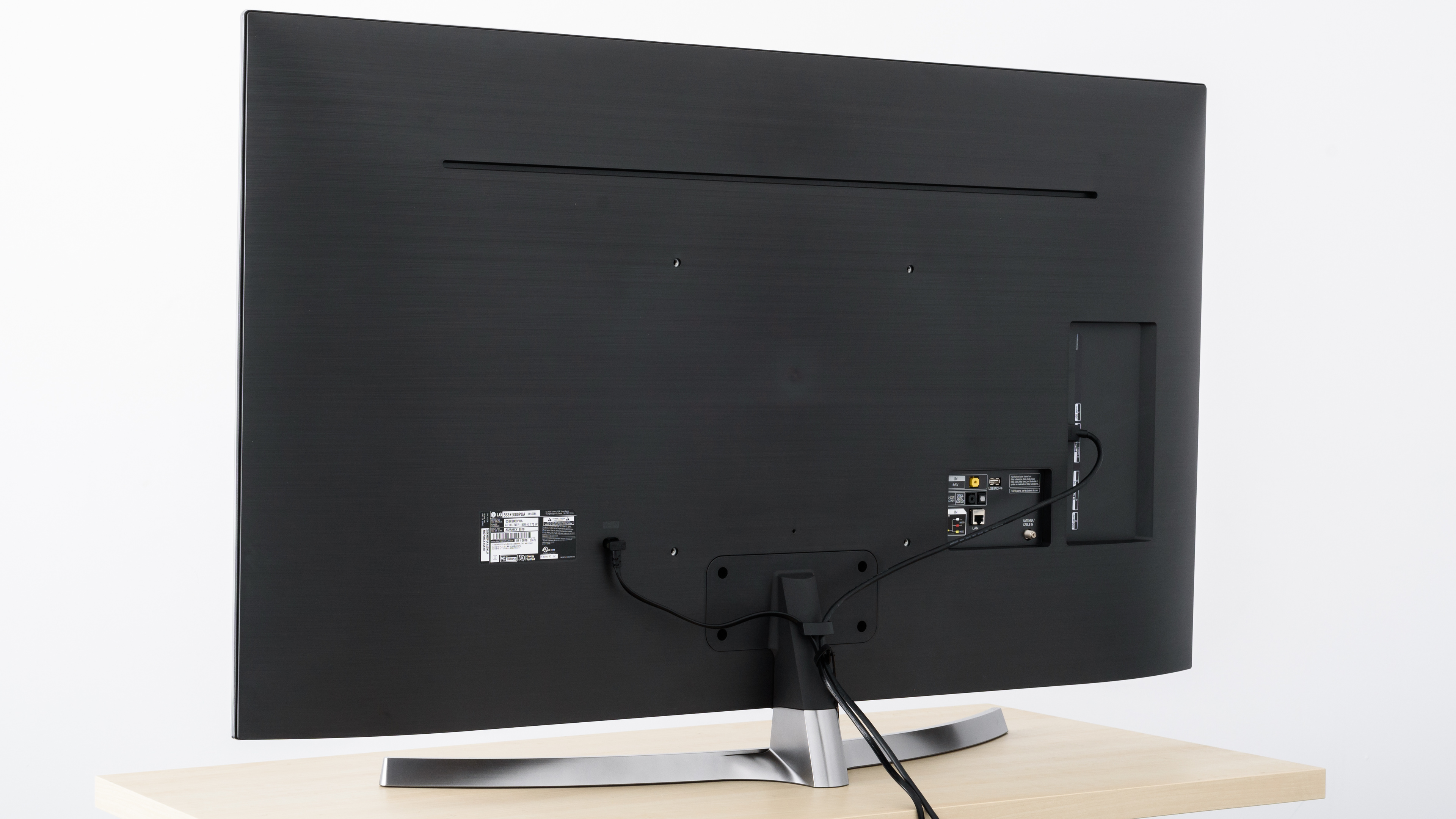
The design of the LG SK9000 is very similar to last year's SJ8500. It has the same familiar curved stand, although it is a bit thinner this year and there is a bit more flex to the stand. The color of the frame is more uniform, with a black back instead of the white back of last year's model. There are some practical limitations as there is only very basic cable management and the stand does not allow you to place a soundbar directly in front of the TV.


for pictures & test results

The borders of the TV are thin, and look great. Similar to the SJ9500, the bezel does not surround the LCD panel. The panel is attached on top of the frame and could be damaged if knocked on the side. Care should be taken when moving the TV, as it could be damaged if knocked, similar to what happened to our SJ8500.
for pictures & test results

The TV has an average thickness but appears thin when viewed from the side due to the gentle angles of the back. It does not stick out when wall mounted.

for pictures & test results

The native contrast ratio on the SK9000PUA is decent, as is typical of IPS panels. When in a dark room, blacks will look more gray than black. This is less noticeable when in a brightly lit room.
The local dimming feature is ineffective at increasing the contrast ratio.
for videos & test results

The local dimming feature on the SK9000 is not responsive enough. It reacts too slowly to moving highlights, and the dimming zones turn on and off too late. It is very similar to the Vizio M Series 2017. We do not recommend using the 'High' setting. 'Medium' or 'Low' work best depending on personal preference.
Very good SDR peak brightness, bright enough for most rooms. Highlights appear dim, this is due to the poor local dimming feature. If you find highlights too dim, set the 'Local Dimming' setting to Low or Off.
This test was done with the 'Contrast' set to '90', which is our recommended value to get the brightest TV possible without causing white crush.
Decent peak HDR brightness. Very small highlights are only noticeable in the sense that they are dimmer than the rest, again a symptom of the poor local dimming. Real scenes are bright enough for most rooms, although still far from the target 1000 cd/m² to fully appreciate HDR content.
for pictures & test results

for pictures & test results

Decent overall gray uniformity on the LG SK 9000. The sides of the screen are darker than the rest, but this is not as noticeable as when it is darker in the center. There is noticeable dirty screen effect in the center; this will be especially noticeable when watching sports.
for videos & test results

for pictures & test results

for pictures & test results

for pictures & test results

Mediocre viewing angle on the SK9000, far better than most TVs with VA panels, but far worse than TVs with OLED panels. Colors and brightness shift when viewing off angle, making this TV an okay, but less than ideal choice for a room where people will frequently be watching from the side of the TV.
for pictures & test results

for pictures & test results

Poor black uniformity on the SK9000. When local dimming is off, there is noticeable backlight bleed across most of the screen.
With local dimming set to 'High', there is visible blooming around the image. The full array local dimming on the SK9000 is turning the zones off, but the results are much worse than other FALD TVs like the Sony X900F.
for pictures & test results

for pictures & test results

for pictures & test results

Decent reflection handling on the SK 9000, identical to the SJ8500. The semi-gloss finish diffuses reflections a bit, reducing their intensity. These results should be fine for most rooms.
for pictures & test results

for pictures & test results

for pictures & test results

The most accurate results out of the box were obtained with the 'Expert (Dark Room)' picture mode. Color and White Balance dE were good, but the color temperature was cold, giving everything a slightly blue tint. The color and white balance delta is low enough that most people won't notice.
for pictures & test results

for pictures & test results

for pictures & test results

Excellent white balance after calibration. Color dE was still a bit high, as the Color Management System in the SK9000 was not very effective at correcting the blue errors. Gamma is very close to our target, shifting a little off target at the low and high end of our inputs.
You can see our recommended settings here.
for pictures & test results

There were no obvious issues upscaling older 480p content like DVDs on the LG SK9000.
for pictures & test results

720p content is scaled well on the SK 9000 with no obvious over softening or artifacts.



for pictures & test results

for pictures & test results

for pictures & test results

Good coverage of the P3 color space, the TV is able to display a wide color gamut.
The HDR EOTF in the 'Technicolor Expert' picture mode is too bright for most of our PQ curve, and rolls of gradually at the peak brightness of the TV. The 'PC' and 'Game' EOTF curves are very similar to that of 'Technicolor Expert', which is good.
When displaying HDR content in 'PC Mode', the SK9000 does not properly detect the wide color gamut so colors appear washed. This is the same as the C8.
for pictures & test results

for pictures & test results

Decent color volume, but the LG 55SK9000 is unable to produce deep, dark blacks due to its poor contrast ratio and ineffective local dimming. It is also inconsistent in producing bright saturated colors. Color volume is worse than last year's SJ8500.
for pictures & test results

There were some issues with the SK9000's gradient handling that are not reflected in our testing score. Large areas of near-uniform color showed large areas of banding, worse than the C8. This can be reduced by enabling the TV's 'MPEG Noise Reduction' feature, which enables the gradient smoothing feature of the SK 9000. This helps reduce banding but also causes a loss of detail.
for pictures & test results

The TV does show some signs of image retention. Only a faint outline of the logo is visible, and it is completely gone before 2 minutes recovery. It is an improvement over the SJ8500, and there is not enough persistence for it to be an issue for most people.
While IPS panels can have some temporary image retention, there doesn't appear to be any risk of permanent burn-in as seen in our long-term test.
for pictures & test results

for pictures & test results

Excellent response time on the LG 55SK9000PUA, great for watching sports or fast paced movies. Most of the blur visible in the photo is caused by 60 fps persistence when there is no flicker, but there is a small motion blur trail behind the logo. There is some overshoot on the 100% transitions but it is minor and should not cause any ghosting. Only a short trail can be seen following fast-moving objects.
for pictures & test results

The SK9000PUA uses PWM to dim the backlight, which helps to clear up motion slightly, but results in some duplications following fast-moving objects, as can be seen in the motion blur box photo. This causes the backlight to flicker, starting at any backlight setting other than '100'. It uses a different type of PWM dimming than the SJ8500, so it is a bit less noticeable. People sensistive to flicker should consider a nearly flicker-free alternative, like the Sony X900F.
for pictures & test results

for pictures & test results

When 'Motion Pro' is enabled, the backlight flickers to match the refresh rate of the content on the screen to reduce persistence blur. With 120 Hz content the natural refresh rate of the backlight is better, so Motion Pro' must be set to Off.
for pictures & test results

for pictures & test results

The SK 9000 has a native 120hz panel and can interpolate lower frame rate content up to 120 fps. Motion interpolation can look very strange to people, and in scenes with fast motion, there are some artifacts.
To enable motion interpolation (also called the Soap Opera Effect) set 'TruMotion' to 'User'. For a 30fps source increase the 'De-Judder' slider, and for a 60fps source increase the 'De-Blur' slider.
The LG SK9000PUA displays 60 and 24 fps content without stutter. The response time of the LCD results in smooth motion even in long panning shots.
The SK9000PUA is able to consistently remove judder from 24 fps content, but is inconsistent in its handling of 60 fps content.
To enable this feature, for any content, the 'Real Cinema' option must be turned on.
Update 05/02/2018: We retested 24p judder over 60p on the SK9000 and it correctly passed the test.
The SK 9000 does not support any of the variable refresh rates technologies such as G-Sync, FreeSync, or the native VRR which will be available in HDMI 2.1.
Excellent low input lag on the SK 9000. Strangely, the input lag is slightly higher on 4k content with HDR enabled (this is the case with the C8 too), but it is still low enough that HDR games will be responsive for most games.
There were no issues with most common resolutions. The LG 55SK9000 does not support 1440p resolution. When in PC Mode with HDR enabled, the TV does not properly support 4:4:4 color and colors appear washed out. In PC Mode a sharpness setting of '0' is the true 0 level.


The SK9000 does not have a component input. It supports composite input via the included adapter.
The TV does not have an analog audio output. To connect a wireless headphone you will need a digital to analog converter like this one.
Update 02/27/2019: While the TV doesn't support Atmos passthrough via a Dolby TrueHD carrier signal (common in Blu-ray disks), it is advertised as supporting Atmos passthrough via Dolby Digital Plus, which is the Atmos format used by some sources like Netflix; our testing confirmed this passthrough on the LG C8. We expect this to be true for the LG SK9000.
for pictures & test results

Decent frequency response for a TV. It can get very loud, but there is some dynamic range compression as the volume is increased. The low frequency extension is good, much better than most TVs, so it can produce a decent amount of bass. However, the room correction system (Magic Sound Tuning) wasn't able to correct the modes of our test room (the bumps between 200Hz and 300Hz).
for pictures & test results

The harmonic distortion of the TV is slightly better than average. It is contained at lower volumes, and even at maximum it isn't too bad. The sharp distortion peaks at around 2k and 7k can make the sound of these frequencies a bit harsh.
for pictures & test results

The webOS interface is very similar to last year's model, with the inclusion of the improved search functionality. The menu is very fast and responsive, although the less powerful α7 processor in the SK9000 means slightly more lag than the C8 with its more powerful α9.
There were no ads displayed during our testing of the SK 9000, but like the C8, the menu still mentions advertising cookies so the TV may have ads at some point or in some regions.
If anyone notices any ads in their TV, let us know and we'll update the review.
Update 7/12/2018: We have found ads on other 2018 LG TVs as shown here, so we assume all 2018 LG TVs have ads. The score has been updated to reflect this.
for pictures & test results

The SK9000 comes with most of the popular apps preloaded, including Netflix, Amazon Video, Hulu and YouTube.
for pictures & test results

The remote is identical to the one found in this year's OLED C8. It provides quick access to most common functions. When pointed at the screen the remote functions as a pointer, making navigating the menus or entering text a breeze.
The remote also provides quick access to the powerful ThinQ AI voice search/smart assistant. The voice control feature allows you to perform searches across all of the installed video providers, control almost TV functions (including setting a sleep timer). The TV can even interact with other ThinQ compatible devices, including dishwashers, laundry machines, ovens, etc... It will also be able to interact with Google Home and Amazon Alexa compatible devices.



for pictures & test results

- Manual
- Cable Management Tie
- Remote
- Batteries
- Composite Adapter
- 61" Power cable(not shown)