Our Verdict
The N5300 is a mediocre TV for mixed usage with a decent picture quality. Dark room performance is poor due to the low native contrast ratio, so it is not a good choice for watching movies or HDR content. It has good reflection handling, but the brightness is not enough to fight bright room glare. The small size and decent viewing angles make it a good choice for watching TV shows or sports in places like a kitchen, where you also do other work.
- Image remains accurate when viewed at an angle
- The screen has good uniformity
- Poor HDR performance
- Input lag is higher than most modern TVs
- Poor dark scene performance
The Samsung N5300 is not a good choice if you plan to watch movies on it. The native contrast ratio is low and blacks look gray in dark room and the lack of local dimming cannot help improve this. The TV has a 1080p resolution and you won't be able to enjoy 4k content in its native resolution. The N5300 is also lacking motion handling features like the 24p judder removal that can make older movies look better.
It is decent for watching TV shows. It has good reflection handling, and it can get bright enough for an average lit room. The viewing angles are decent, and this is great if you want to do some housework while you watch TV. The TV has a native 1080p resolution and displays cable content well. Finally, the TV has a good smart platform and access to many apps to satisfy everyone's needs.
The Samsung UN32N5300 is good for watching sports. It has good reflection handling that allows you to place it a room with many light sources, like a kitchen. The pixel response time is fast and there is a small blur trail following fast-moving content which makes motion look smooth. The gray uniformity is good and the viewing angles are decent so you do not have to sit straight in front. Unfortunately, the TV cannot fight the glare of a bright room so you will need to place it in an average lit room for better results.
The N5300 is decent for playing video games. It has a low input lag which is good for casual gamers, but not low enough for anyone who enjoys more competitive gaming. If you play fast action games you will notice a little motion blur due to the fast response time. Unfortunately, the only way to make the image crisper is to lower the level of the backlight. The PWM dimming flicker will do the job, but at the same time, your screen will not be as bright.
This TV has a poor performance in HDR movies. Although the TV supports HDR it cannot get bright enough to deliver the creator's intent. Furthermore, it has poor dark room performance where HDR is meant to be viewed, Finally, the color gamut is ok for SDR but you will not be seeing rich and saturated colors in HDR content.
This TV is not good for HDR gaming. It cannot display 4k content and although it supports HDR you will not benefit much from using it in this mode. The input lag is decent but not at par with most modern TVs. The response time is good with a small blur trail, but the contrast is low so blacks do not look good in a dark room, where you would be playing HDR games. Furthermore, the N5300 cannot display rich, saturated colors in HDR content.
The N5300 is decent for use as a PC monitor. The input lag is decent, but not as low as most modern TVs and you will notice a lag in the TV's responsiveness, especially when moving the mouse around. The pixel response time is fast and you will notice a blur trail following your mouse. This helps make the motion look smooth but not crisp. The TV can display proper chroma 4:4:4, which is good. Finally, due to the decent viewing angles, you are not likely to spot any uniformity issues at the sides of the screen when you sit close to the TV.
Changelog
- Updated May 21, 2020: Converted to Test Bench 1.5.
- Updated Feb 21, 2020: Converted to Test Bench 1.4.
- Updated Feb 28, 2019: Converted to Test Bench 1.3.
- Updated Nov 05, 2018: Review published.
Check Price
Differences Between Sizes And Variants
We tested the 32 inch Samsung N5300 which is the only available model in the US. There is a 43-inch model available which also has a 1080p resolution.
If someone comes across a different type of panel or if their Samsung N5300 doesn't correspond to our review, let us know and we will update the review. Note that some tests such as the gray uniformity may vary between individual units.
| Size | US Model | Full Model Code | Panel Type | Refresh Rate | Notes |
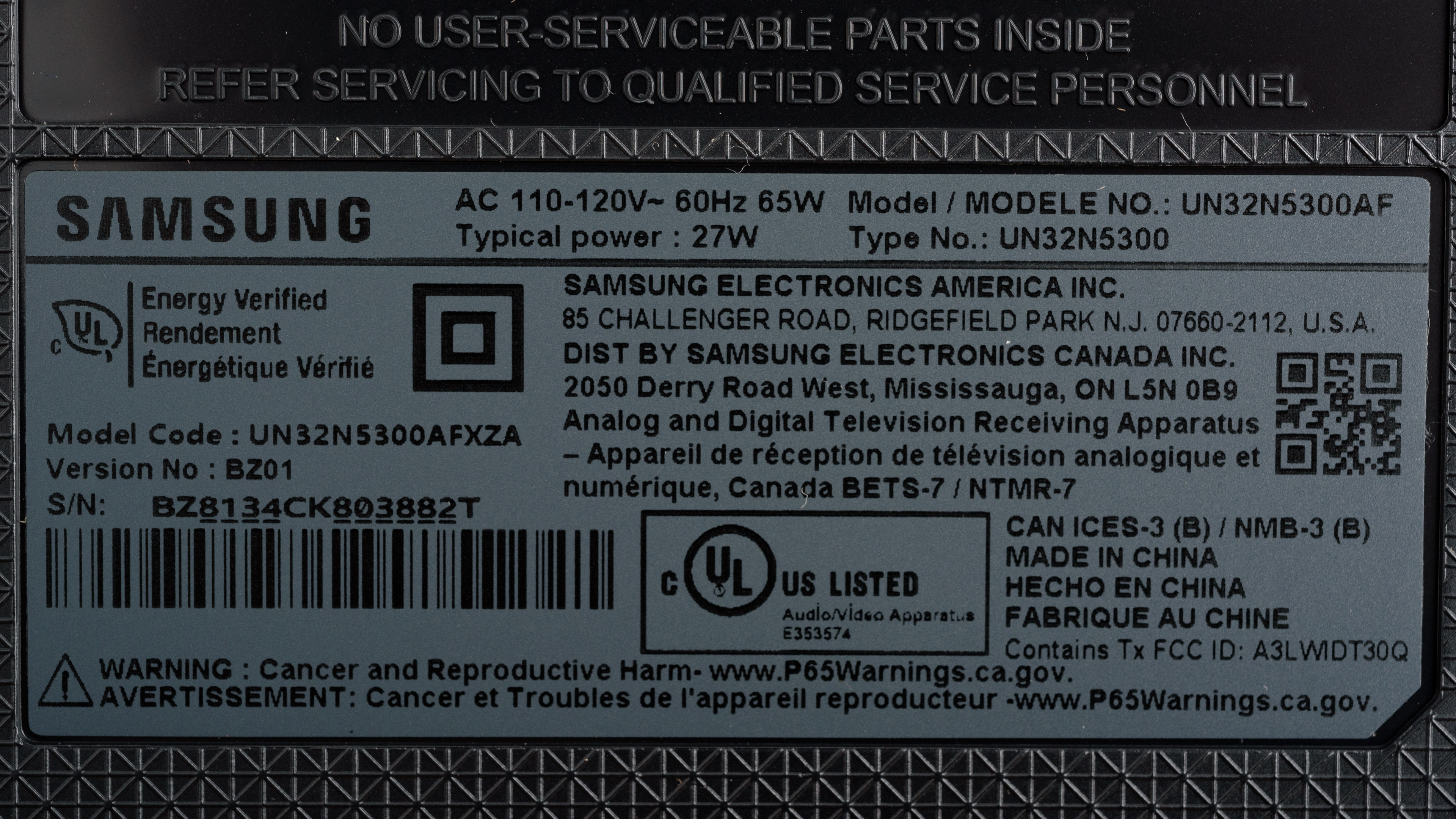
| 32'' | UN32N5300 | UN32N5300AFXZA | IPS | 60Hz | |
| 43" | UN43N5300 | UN43N5300AFXZA | IPS | 60Hz |
You can see the label of the specific model we tested here.
Popular TV Comparisons

The Samsung UN32N5300 is a budget TV that is designed for use in smaller rooms. See our recommendations for the best TVs under $300 and the best cheap TVs.
The Samsung N5300 is somewhat better than the Vizio D Series 1080p 2017. The Samsung N5300 is brighter and has better reflection handling, so it's more suitable for a brighter room. It also has a better smart platform. The Vizio D Series 1080p 2017 has a lower input lag which is great if you play games and can remove 24p judder from older content.
The Samsung M5300 is marginally better than the Samsung N5300. The M5300 has a lower input lag that is great if you play games and a motion interpolation feature for the soap opera effect fans. On the other hand, the N5300 has better SDR peak brightness which is great if your TV room is slightly brighter and also a better gray uniformity, so you can enjoy watching sports without dirty screen effect.
The Samsung N5300 is marginally better than the TCL 1 Series/D100. The Samsung N5300 has a good smart platform, whereas the TCL D100 is a plain TV. The Samsung also has better viewing angles due to its IPS panel, and better reflection handling, which makes it a better choice if your room has many small light sources. The TCL D100 has better dark room performance due to the high contrast ratio of its VA panel, and a lower input lag to please those who play video games.
The TCL S Series/S305 2018 and the Samsung N5300 both have very similar performance. The TCL S305 has a higher native contrast ratio that delivers better dark room performance. The S305 also has a lower input lag that will please gamers. The Samsung N5300 can display proper chroma 4:4:4, which is great if you plan to use it as a PC monitor, it can get slightly brighter, and it has better viewing angles due to its IPS panel.

We buy and test dozens of TVs yearly, taking an objective, data-driven approach to deliver results you can trust. Our testing process is complex, with hundreds of individual tests that take over a week to complete. Most of our tests use specially designed test patterns that mimic real content, but we also use the same sources you have at home to ensure our results match the real-world experience. We use two main tools for our testing: a Colorimetry Research CR-100 colorimeter and a CR-250 spectroradiometer.
Test Results
Older Test Bench: We tested this product using an older TV test methodology before a major update. Some of the test results below aren't directly comparable with other TVs. Learn more
for pictures & test results

The design of the N5300 is decent. The TV is made out of a combination of plastic and metal. The build quality is decent with no obvious issues. This year's model has no power brick, but the overall design resembles last year's M5300 a lot. The stand is plastic and supports the TV well, whereas the back is metallic. The TV looks slightly thick from the side and will stick out a little if wall mounted.
for pictures & test results

The stand is plastic and almost as wide as the TV. It supports the TV well and there is almost no wobble if the TV is gently knocked.
Footprint of the 32" TV stand: 26.8" x 6.4"
for pictures & test results

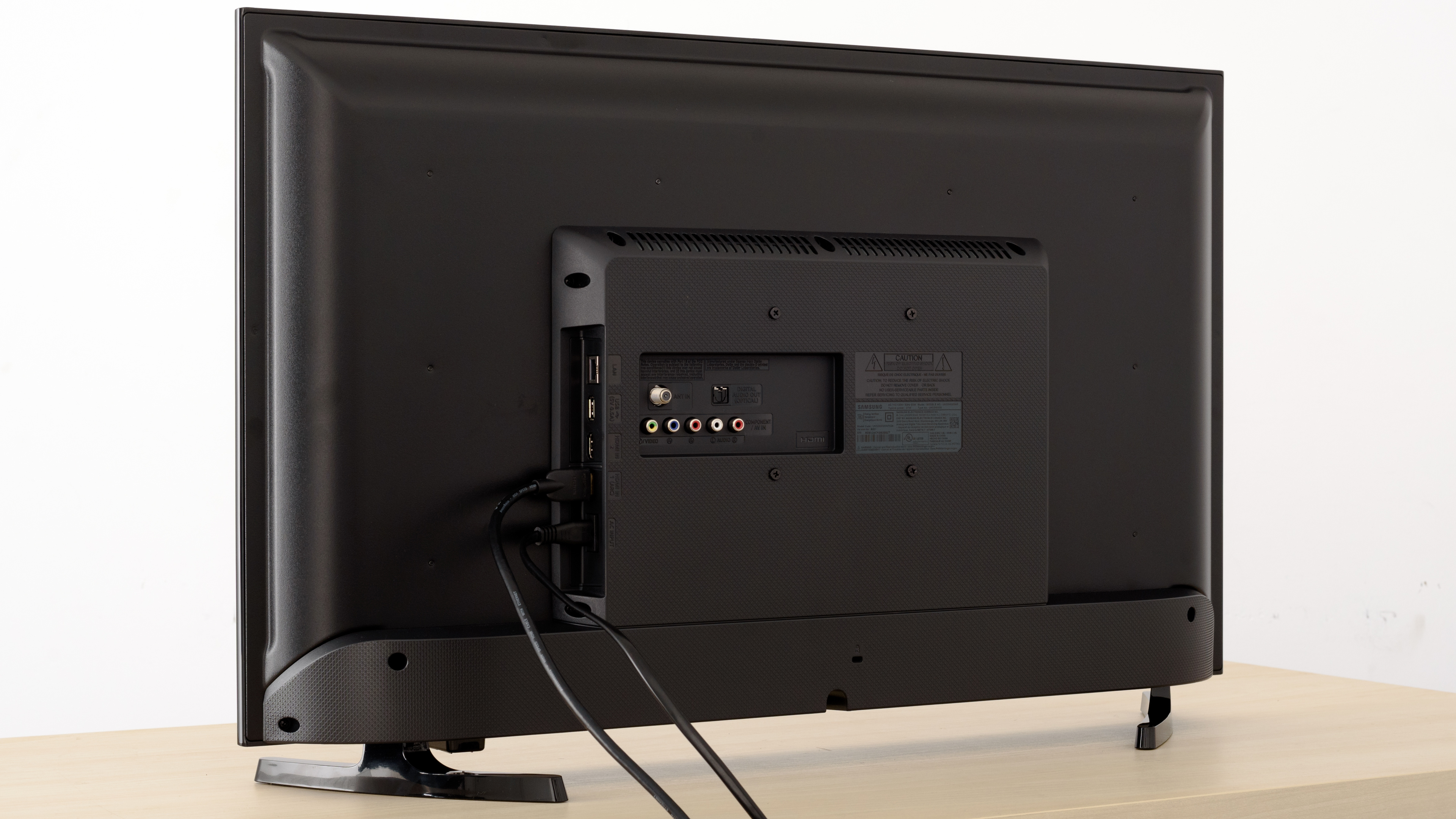
The back of the TV is plain and made out of metal. The electronics compartment is located at the center of the back. If the TV is VESA mounted, some inputs might be hard to reach. There is no cable management on this TV.
for pictures & test results

The borders are plastic and have average thickness.
for pictures & test results

The TV looks thick when you look at it from the side. If you decide to wall-mount it, it will protrude a little.
for pictures & test results

The build quality is decent. The TV is made of metal and plastic and there are no gaps or loose ends. It is very basic, but you should have no issues with the built quality.
for pictures & test results

Disappointing native contrast ratio for the N5300. Blacks in a dark room look more like gray and this diminishes the picture quality. Although low contrast ratios are expected in IPS TVs, this result is a little worse than last year's model M5300. If you're looking for something with better contrast, the Vizio D3 Series 2021 is a similar TV but with a VA panel and much better contrast.
for videos & test results

The Samsung N5300 does not support local dimming. The above video is for reference only.
The N5300 has decent brightness, better than last year's M5300. It can get bright enough for an average lit room, but it cannot fight the glare of a bright room. When the TV displays very dark scenes, like our 2% window, the CE dimming dims the entire screen in an effort to display better blacks and this results in crushed highlights. In less dark scenes, like most normal content, the brightness levels remain relatively constant.
The menu option that controls the brightness is Backlight.
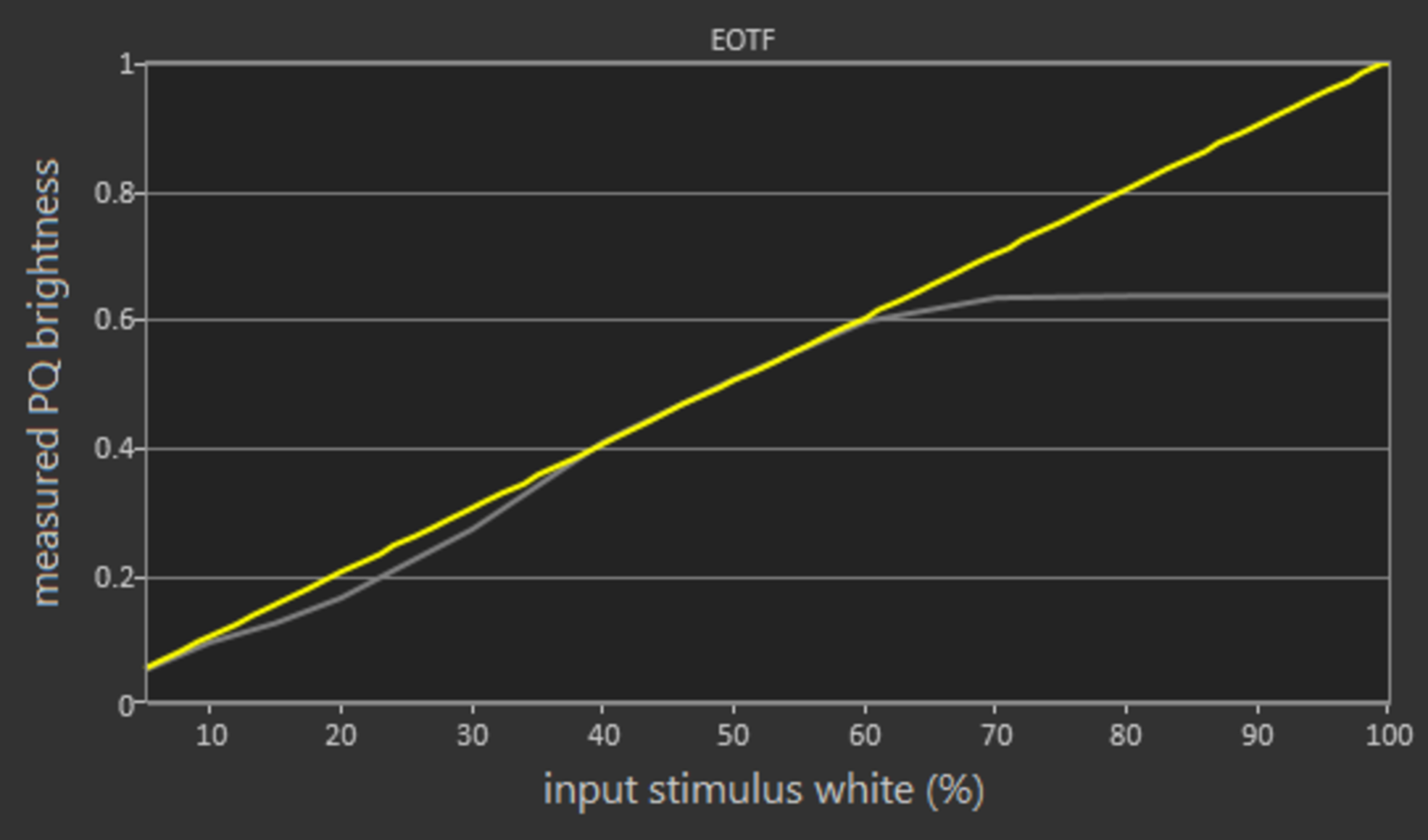
Although HDR is supported, the TV cannot get bright enough to display HDR content well. Just like in SDR, the brightness level is relatively constant in all windows sizes, except in very dark scenes where the screen dims.
for pictures & test results

for pictures & test results

The Samsung N5300 has good gray uniformity. Some clouding is visible and the corners do look a little darker. Sports fans will notice some dirty screen effect in panning shots of the game field. In darker scenes, the uniformity improves and not much clouding or DSE can be noticed.
Overall, this is an improvement over the M5300, and the best score we've measured in the 32-inch category so far, better than the TCL S305.
for videos & test results

for pictures & test results

for pictures & test results

for pictures & test results

Decent viewing angles. The intensity of blacks remains good no matter what angle you look at the screen. Brightness, however, deteriorates as you look from the side, and it loses half of its intensity at about 45 degrees. Finally, colors shift and the inaccuracies become noticeable when looking from the side at an angle of about 30 degrees or more.
for pictures & test results

Decent black uniformity for the Samsung N5300 and a great improvement over last year's M5300. In our picture, there is some backlight bleed, but in person, this isn't as noticeable, as, for the purposes of our test, we overexpose the image to highlight any uniformity issues. Similar performance to the TCL S305.
for pictures & test results

for pictures & test results

for pictures & test results

Great reflection handing. The screen has a semi-gloss coating that allows it to diffuse reflections and reduce their intensity. You will not have any issues with reflections except in very bright rooms. This is a similar performance to last year's M5300.
for pictures & test results

for pictures & test results

for pictures & test results

The out of the box color accuracy is mediocre. The most accurate picture mode was 'Movie'. The White Balance dE and the Color dE are above our threshold of 3, and thus we expect that most people will notice the inaccuracies. The color temperature is a little warm, and although the average gamma is close to the 2.2 target, it does not follow the target curve, so some scenes are too dim while others are brighter.
for pictures & test results

for pictures & test results

for pictures & test results

The post calibration color accuracy is excellent. Although there are only 10 points available for adjusting the white balance and no color space management, the results in both the white balance dE and the color dE were great. They were both diminished to levels where most people won't be able to spot any inaccuracies. The calibration was done in the 'Movie' picture mode and did not take long to complete. To make the calibration process easier and to avoid the TV's CE dimming from interfering with the process, we performed calibration using a 100% window size instead of the usual 18%. The gamma was corrected to closely follow the target curve and the color temperature was adjusted right on the 6500K target.
You can see our recommended settings here.
for pictures & test results

Lower resolution 480p content looks good and is displayed without any obvious issues.

for pictures & test results

The Samsung UN32N5300 displays the native 1080p content without any issues.

for pictures & test results

for pictures & test results

for pictures & test results

Decent color gamut for this Samsung N5300. Just like last year's M5300, the TVs color gamut is ok for SDR content, but not good for HDR content.
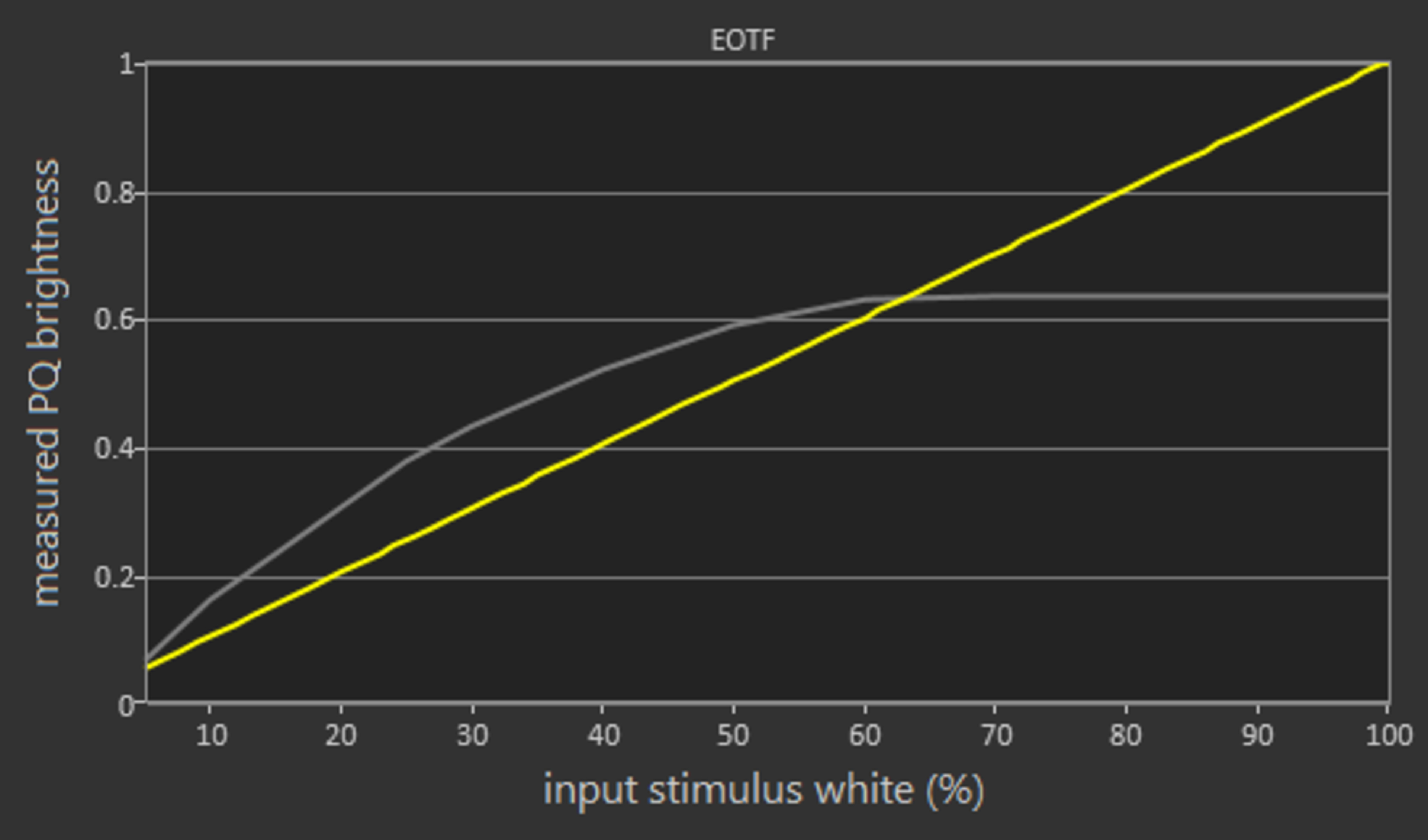
The 'Movie' picture mode EOTF follows our curve fairly well, and the brightness clips where the TV reaches its peak brightness.
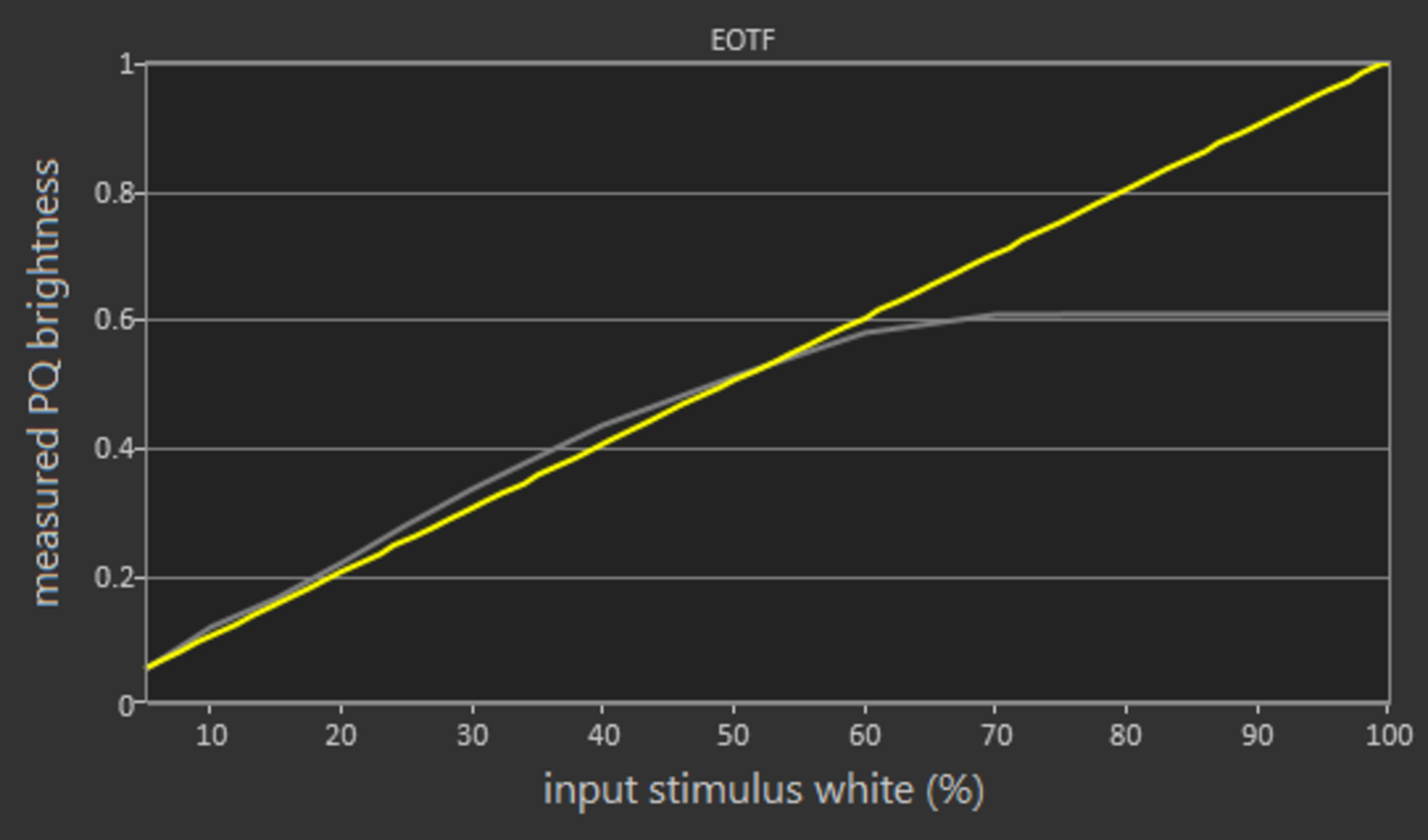
The PC EOTF is identical to the 'Movie', whereas the Game EOTF is slightly brighter until the point where it also clips at the TV's peak brightness.
If you find HDR too dark you can enable the Contrast Enhancer and set Gamma at 'plus 3' which will brighten the entire screen as you can see here
for pictures & test results

for pictures & test results

The color volume coverage is limited by the low contrast ratio and the limited color gamut. Unfortunately, this TV cannot display rich and saturated colors.
for pictures & test results

The performance in our gradient test is decent. There is a little banding visible in almost all colors but it is more apparent in the gray and green shades.
for pictures & test results

The Samsung UN32N5300 shows no signs of temporary image retention.
We don't expect IPS panels to experience permanent image retention, as the IPS panel in our long-term test appears immune.
for pictures & test results

for pictures & test results

The response time is good. There is a short blur trail that is visible in fast-moving content, and it makes motion look smooth. There is only a slight overshoot that is not very visible. If you prefer a small TV with a quicker response time, look into the TCL 3 Series 2020.
for pictures & test results

The TV uses PWM dimming to lower the backlight. Unfortunately, the flicker frequency is low and this might bother some people.
The Samsung UN32N5300 does not support Black Frame Insertion. The score in this test is not '0' since the TV has inherent flicker through the PWM backlight dimming mechanism, which clears motion blur slightly and makes the image crisper. The TV scores the same as last year's M5300 which had a BFI option. This is because last year's BFI option was just capping the TVs peak backlight level. To achieve similar results in this year's model, just lower your backlight level.
Unlike last year's M5300, the new N5300 does not have a motion interpolation feature.
The Samsung N5300 is good at displaying content without stutter. This is because the response time is not too fast and the blur that is present helps smooth out the transition from one frame to the next. You should have no issues with stutter in older content.
Unfortunately, the TV cannot remove 24p judder from movies no matter the source. Some people might find this annoying. If this bothers you, the Vizio D3 Series 2021 is a similar TV overall, but it can remove judder from all 24p sources and the native apps.
The TV has a menu option called Flim mode that is available when the TV receives a 480i, 720i or 1080i signal and it is supposed to help remove 24p judder. However, during our test, we were not able to remove 24p judder by enabling Film mode in these resolutions.
The Samsung N5300 does not support any variable refresh rate implementation.
The input lag in the 'PC' picture mode is 51.3ms.
The input lag of the N53000 is just decent. The TV takes some time to respond to your actions. Unfortunately, the input lag in Game mode is not much lower than that of other modes. If you plan to use it for serious gaming you will be disappointed. It is worse than last year's M5300.
The Samsung UN32N5300 supports only the basic resolutions. The TV can only display properly the 1080p@60Hz resolution. It can accept 1080p@120Hz, but unfortunately only 50% of the frame shows. To properly display chroma 4:4:4 the TV has to be in the 'PC' picture mode.


Unlike last year's model M5300, this N5300 does not support DTS passthrough.
The TV is capable of playing a UHD HDR movie in 1080p@24 HDR.
for pictures & test results

The frequency response of the N5300 is sub-par. LFE (low-frequency extension) is at 190Hz, which is poor. This means this TV doesn't produce any thump or rumble, and doesn't have a body to its bass either. However, the response above the LFE point is decent which is important for the clear and intelligible production of dialog. Additionally, this TV doesn't get very loud and produces some compression and pumping artifacts under heavy loads.
for pictures & test results

The distortion performance is decent. The overall amount of harmonic distortion produced is within decent limits throughout the range. There is not a big rise in THD at max volume either, but this TV doesn't get very loud.
for pictures & test results

The interface is easy to use and intuitive for most new users. Unfortunately, it is not very smooth as the animations can get stuttery. It has a large selection of apps to choose from and it is not as fast as the interface the higher end models have.
for pictures & test results

Just like other 2018 Samsung models the N5300 displays ads and suggested content. Unfortunately, there is no option to remove them.
for pictures & test results

The Samsung's App Store has an abundance of apps to cover any need. The most common apps like Netflix, Youtube, Amazon Video etc. are preinstalled, but you can download many more. It is worth noting that HDR in Amazon Video was not available in this model, as it was in other 2018 models.
for pictures & test results

The N5300 has a basic remote control without voice support, but with CEC support that allows you to have basic control of other Samsung devices.
for pictures & test results

There is a single button that allows you to perform very basic actions on the TV, through a combination of short and long presses.
for pictures & test results

- Batteries
- Remote Control
- User Manual
- 63" Power Cable