The Samsung Q70/Q70T QLED is a good all-around 4k TV from Samsung's 2020 QLED lineup. It delivers good performance for most uses and comes with some extra features like variable refresh rate (VRR) support to reduce screen tearing in games. The TV has a high 120Hz refresh rate and an okay response time. There's a Black Frame Insertion feature to help reduce motion blur. It also has an incredibly low input lag, making for a responsive gaming experience. The TV uses a VA panel with a fantastic contrast ratio and remarkable black uniformity, producing deep inky blacks even though it lacks a local dimming feature. Unfortunately, it has poor viewing angles, so the image looks washed out from the side, but this is typical of TVs with VA panels. While it gets bright enough to combat glare and has decent reflection handling for well-lit rooms, it can't get bright enough to deliver a truly satisfying HDR experience.
Our Verdict
The Samsung Q70T is a decent TV for a variety of uses. Its high contrast ratio and remarkable black uniformity deliver good dark room performance, whether using it to watch movies or play video games. It's not ideal for watch TV or sports with large groups because it has poor viewing angles, but it gets bright enough to overcome glare in well-lit rooms. Sadly, its HDR experience is a little underwhelming because it can't get bright enough to make highlights pop.
- Exceptional contrast ratio.
- Decent reflection handling.
- High refresh rate.
- Poor viewing angles.
- No local dimming.
The Samsung Q70T is decent for watching movies. Its high contrast ratio and remarkable black uniformity produce deep, inky blacks, which is ideal for watching movies in the dark. Unfortunately, it lacks local dimming to further improve black levels. That said, it upscales Blu-rays and lower-resolution content without issue.
- Exceptional contrast ratio.
- Upscales lower-resolution content without issue.
- Poor viewing angles.
- No local dimming.
The Samsung Q70T is good for watching TV shows. It performs well in well-lit rooms thanks to its high peak brightness and decent reflection handling. It also does a good job of upscaling lower-resolution content like cable TV. Unfortunately, it has poor viewing angles, so it's not well-suited to wide seating arrangements since the image looks washed out from the side.
- Decent reflection handling.
- Upscales lower-resolution content without issue.
- Poor viewing angles.
The Samsung Q70T is decent for watching sports. Although its response time is only okay, it has a Black Frame Insertion feature to reduce motion blur. It provides good visibility in bright rooms, as it has decent reflection handling and gets bright enough to overcome glare. Unfortunately, its VA panel has poor viewing angles, so it's less suited for watching with a big group of people.
- Decent reflection handling.
- Bright enough to overcome glare.
- Poor viewing angles.
- Response time is a bit slow.
The Samsung Q70T is a good TV for video games. It has a remarkably low input lag that makes gaming feel responsive, and it has an okay response time. If you like gaming in the dark, its high contrast ratio makes blacks look deep and inky, but it lacks a local dimming feature to further improve the contrast. It also supports FreeSync to reduce screen tearing.
- FreeSync support.
- Low input lag.
- High refresh rate.
- No local dimming.
- Response time is a bit slow.
The Samsung Q70T is decent for watching HDR movies. It performs well in the dark, thanks to its fantastic contrast ratio and remarkable black uniformity. However, it doesn't have local dimming to further improve blacks. Unfortunately, while it has a wide color gamut, it can't get bright enough to make HDR content pop as it should.
- Exceptional contrast ratio.
- Remarkable black uniformity.
- No local dimming.
- Doesn't get bright enough for HDR.
The Samsung Q70T is good for HDR gaming, mostly due to its great gaming performance. It has an exceptionally low input lag with HDR and an okay response time. It also includes VRR support to reduce screen tearing, and its high contrast ratio is great for gaming in the dark. That said, it doesn't get bright enough to make HDR content really pop.
- FreeSync support.
- Low input lag.
- High refresh rate.
- Doesn't get bright enough for HDR.
- Response time is a bit slow.
The Samsung Q70T is very good for use as a PC monitor. It can display proper chroma 4:4:4, so text looks clear and legible. It also has a remarkably low input lag, which makes for a responsive desktop experience. However, its VA panel has poor viewing angles, which means the image looks washed out at the edges when sitting up close.
- Low input lag.
- Decent reflection handling.
- Supports most resolutions and chroma 4:4:4.
- Poor viewing angles.
- Response time is a bit slow.
Changelog
- Updated Sep 26, 2025: We uploaded the latest brightness measurements and uniformity photos for the Accelerated Longevity Test.
- Updated Jul 08, 2025: We uploaded the latest brightness measurements and uniformity photos for the Accelerated Longevity Test.
- Updated Apr 17, 2025: We uploaded the latest brightness measurements and uniformity photos for the Accelerated Longevity Test.
- Updated Feb 11, 2025: We uploaded the latest brightness measurements and uniformity photos for the Accelerated Longevity Test.
Check Price
Differences Between Sizes And Variants
We tested the 55" (QN55Q70T) variant, and for the most part, we expect our review to be valid for the 65" (QN65Q70T), the 75" (QN75Q70T), the 82" (QN82Q70T), and the 85" variant (QN85Q70T). There's a warehouse variant known as the Samsung Q7DT. Note that the European model has a different stand; it resembles the one on the NU8000.
| Size | US | Canada | UK | Warehouse Variant | Refresh Rate | FreeSync |
|---|---|---|---|---|---|---|
| 55" | QN55Q70TAFXZA | QN55Q70TAFXZC | QE55Q70TATXXU | QN55Q7DTAFXZA | 120Hz | Yes |
| 65" | QN65Q70TAFXZA | QN65Q70TAFXZC | QE55Q70TATXXU | QN65Q7DTAFXZA | 120Hz | Yes |
| 75" | QN75Q70TAFXZA | QN75Q70TAFXZC | QE55Q70TATXXU | QN75Q7DTAFXZA | 120Hz | Yes |
| 82" | QN82Q70TAFXZA | QN82Q70TAFXZC | QE55Q70TATXXU | - | 120Hz | Yes |
| 85" | QN85Q70TAFXZA | QN85Q70TAFXZC | QE55Q70TATXXU | - | 120Hz | Yes |
If someone comes across a different type of panel or if their Samsung Q70T doesn't correspond to our review, let us know and we will update the review. Note that some tests, like gray uniformity, can vary between individual units.
Our unit of the QN55Q70T was manufactured in February 2020; you can see the label here.
Popular TV Comparisons

The Samsung Q70T is a good TV for most uses, but it doesn't perform as well as the Samsung Q70/Q70R QLED. It lacks a local dimming feature and has a lower peak brightness. Its response time is also slower, but on the upside, it comes with eARC support. For other options, check out our recommendations for the best TVs, the best HDR gaming TVs, and the best smart TVs.
The Samsung Q70T directly replaces the Samsung Q70R from 2019. The Q70T is a bit of a step down, as it doesn't perform as well and lacks a local dimming feature, which the Q70R has. The Q70T also has a slower response time, leading to more motion blur, and it has a significantly lower peak brightness. The Q70T doesn't feel as well-built as the Q70R, but you get eARC support on the Q70T, and it has a lower input lag.
The Samsung Q70T and the Samsung Q60T are very similar TVs in many respects. The main difference is that the Q70T has a faster response time and a higher refresh rate, so motion looks smoother. Also, the Q60T can't remove judder from every source, and it doesn't support VRR. Gradient handling on the Q60T isn't as good, but it has better color accuracy, which is great if you don't plan on calibrating your TV.
The Samsung Q80T is better than the Samsung Q70T for most uses. The Q80T has a full-array local dimming feature, can get brighter in HDR, and has much wider viewing angles. The Q80T also has better color accuracy and a faster response time, but due to its 'Ultra Viewing Angle' layer, its contrast ratio is much lower than the Q70T, making blacks look a bit more grayish.
The Samsung Q70A is the successor to the Samsung Q70T, and while it offers a couple of improvements, it's not as big a step up as you might expect. The biggest improvement is its response time. The Q70T has an okay response time but is likely not good enough for more competitive gamers, whereas the Q70A is significantly faster, resulting in less motion blur. The Q70A also gets a bit brighter in HDR, resulting in a better overall HDR experience, and its backlight flickers at a much higher frequency than the Q70T's, which is good news for those who are sensitive to flicker.

We buy and test dozens of TVs yearly, taking an objective, data-driven approach to deliver results you can trust. Our testing process is complex, with hundreds of individual tests that take over a week to complete. Most of our tests use specially designed test patterns that mimic real content, but we also use the same sources you have at home to ensure our results match the real-world experience. We use two main tools for our testing: a Colorimetry Research CR-100 colorimeter and a CR-250 spectroradiometer.
Test Results
Older Test Bench: We tested this product using an older TV test methodology before a major update. Some of the test results below aren't directly comparable with other TVs. Learn more
for pictures & test results

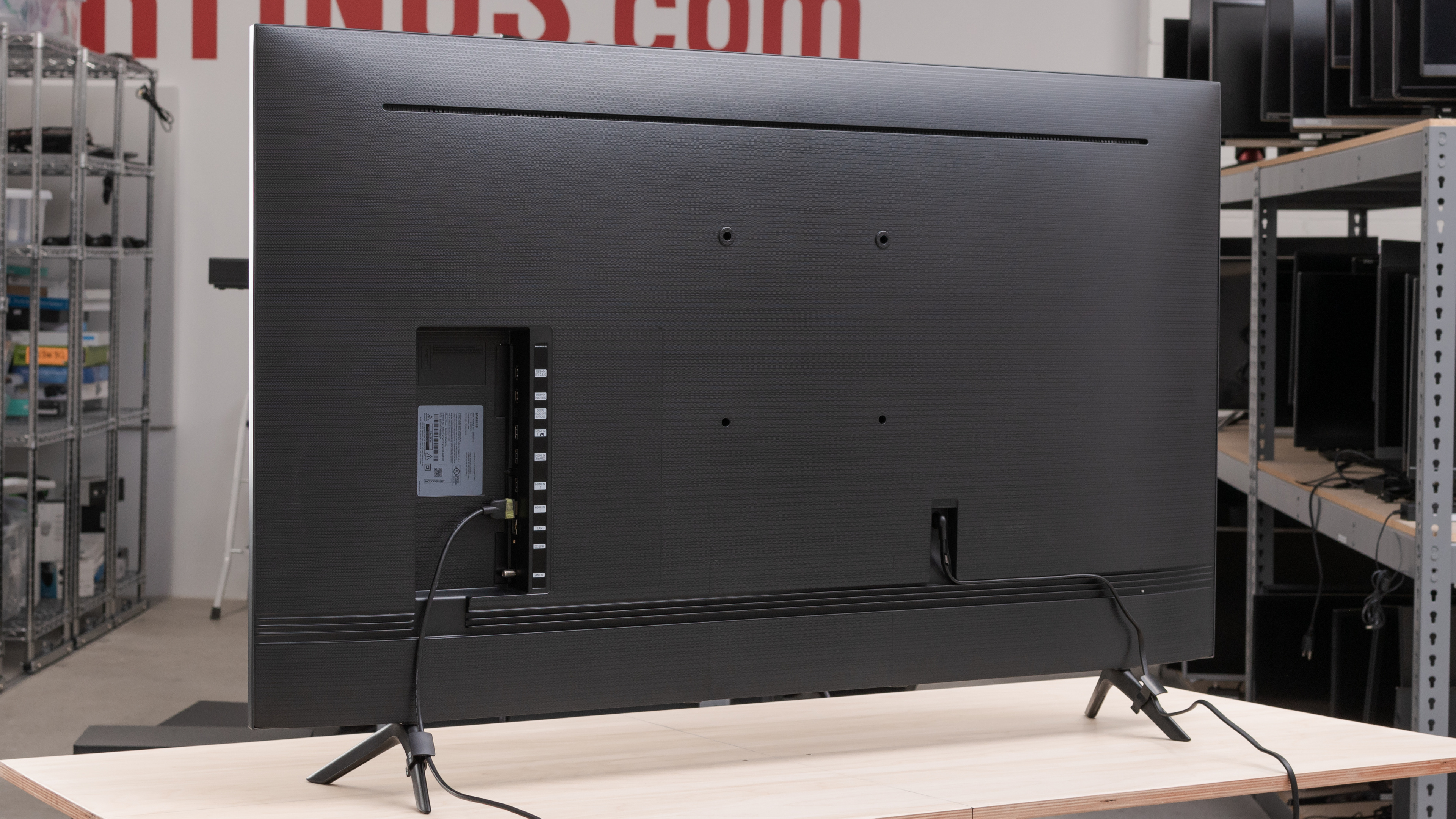
The Samsung Q70T has an excellent design that's very similar to the Samsung Q70/Q70R QLED, as well as its smaller sibling, the Samsung Q60/Q60T QLED. It's minimalist, with very thin bezels and wide-set feet, and it comes with clips for cable management.
for pictures & test results

The stand is simple and supports the TV well, but there's still a bit of wobble when nudged. The feet are wide-set and point outwards, so it requires a fairly large table to put it on if you don't plan on wall-mounting it. They no longer need to be screwed in, as you only need to slide them into place, making the setup process much easier. Unfortunately, they're not reversible.
Footprint of the 55 inch stand: 40.3" x 9.5".
for pictures & test results

The back of the TV is fully plastic and has a horizontal dotted pattern etched into it. All the inputs are side-facing, making them easy to access even when the TV is wall-mounted. There are clips to attach the cables to the back of the stand for cable management.

for pictures & test results

The TV is thin and shouldn't stick out much when wall-mounted.
for pictures & test results

The TV feels decently built. Despite its all-plastic construction, there are no obvious gaps, and you shouldn't have issues with it. However, the TV still wobbles a bit.
for pictures & test results

The Samsung Q70T has an outstanding contrast ratio, capable of producing deep blacks. Unfortunately, it doesn't have a local dimming feature to further improve it. Note that the contrast ratio can vary between individual units.
Update 07/13/2021: We retested the peak brightness with the latest firmware (2014.1). Some scenes are a bit brighter than before, but overall it's within the same ballpark.
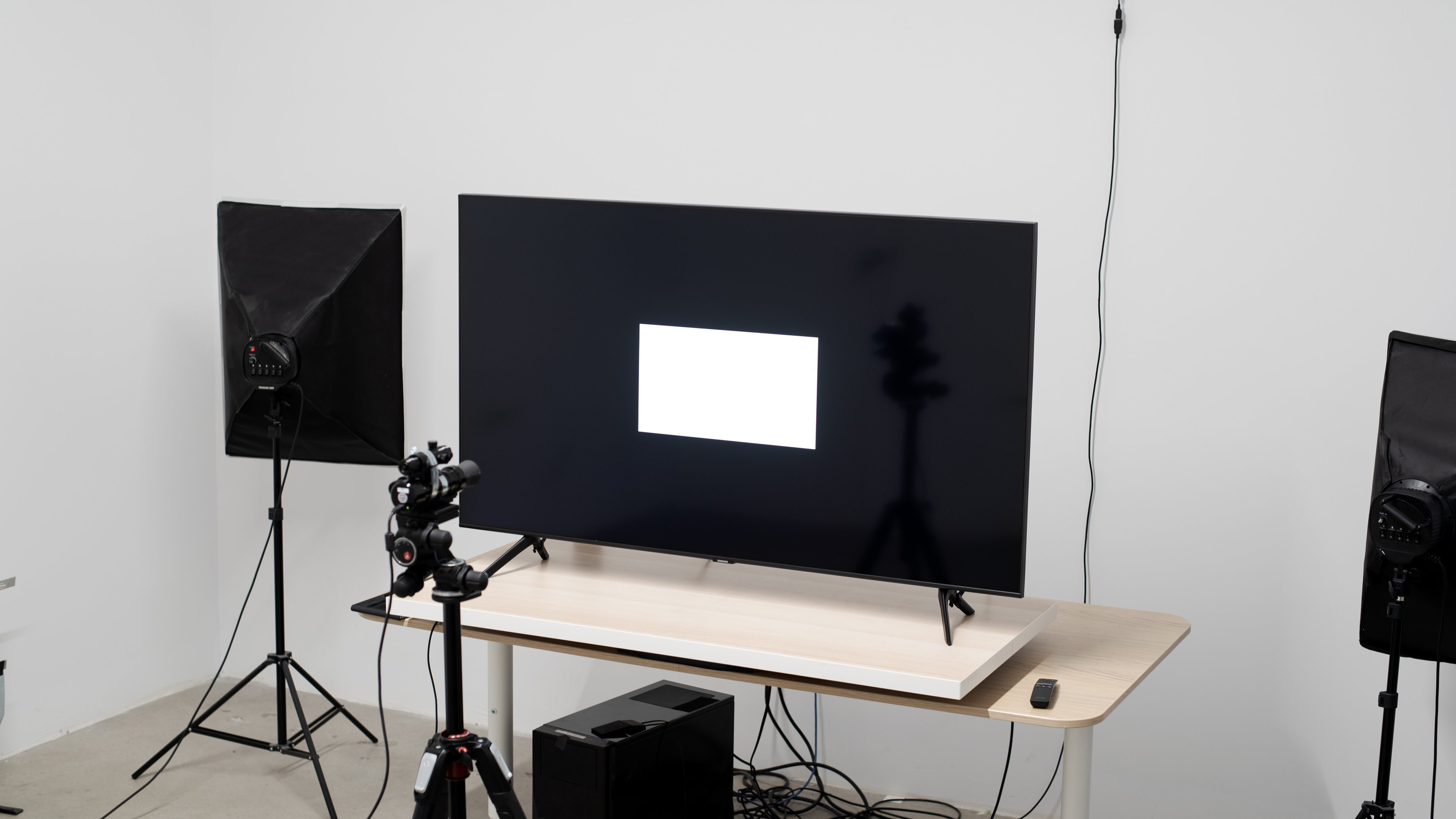
Great SDR peak brightness. It can get bright enough to fight glare in most rooms and is fairly consistent when displaying different content. The 2% window is significantly darker due to the TV's CE (frame) dimming, which can't be disabled and may make dark scenes appear darker than they should.
We measured the SDR peak brightness after calibration in the 'Movie' Picture Mode, with Brightness set to maximum, Gamma set to '2.2', Contrast at its default value, and Contrast Enhancer set to 'Medium'.
If you don't mind losing image accuracy, you can get a brighter image by setting the Picture Mode to 'Vivid', with Brightness and Contrast set to max, and Contrast Enhancer set to 'Medium'. These settings allowed us to achieve 515 cd/m² in the 10% window.
for videos & test results

for videos & test results

for videos & test results

Update 07/13/2021: We've added two new videos demonstrating the backlight behavior with real content.
The Samsung Q70T doesn't have a local dimming feature. The video above is provided for reference only.
for videos & test results

for videos & test results

for videos & test results

Update 07/13/2021: We've added two new videos demonstrating the backlight behavior with real content.
The Samsung Q70T doesn't have a local dimming feature. The video above is provided for reference only.
for pictures & test results

Mediocre HDR peak brightness. Again, except for the darker 2% window caused by the TV's CE dimming, the brightness doesn't vary much when displaying different content. It can deliver an okay HDR experience in a dark room, but it doesn't look significantly different from SDR content in brighter environments.
We measured the HDR peak brightness in the 'Movie HDR' Picture Mode, with Brightness and Contrast set to maximum.
If you want a brighter image in HDR and don't mind losing a bit of accuracy, set the Picture Mode to 'Movie HDR', with Brightness and Contrast set to max, and Contrast Enhancer set to 'Medium'. These settings allowed us to achieve 524 cd/m² in the 10% window.
If you want a TV that can get brighter to deliver a better HDR experience, take a look at the Vizio P Series Quantum 2020.
for pictures & test results
for pictures & test results

for pictures & test results

Gray uniformity is good, but this can vary between individual units. It's slightly darker around the sides of the screen, but thankfully, there's very little dirty screen effect, and uniformity is much better in darker scenes.
for pictures & test results

Black uniformity is remarkable. There's a bit of backlight bleed around the top corners of the screen, as well as some minor clouding and blooming around the test cross, but the rest of the screen is very uniform. Note that black uniformity can vary between units.
for videos & test results

for pictures & test results

for pictures & test results

for pictures & test results

Like most TVs with VA panels, the Samsung Q70T has poor viewing angles. Images look washed out from the side, making it less suited to large rooms and wide seating arrangements.
for pictures & test results

for pictures & test results

for pictures & test results

Update 03/01/2021: We remeasured the total reflections because there was a mistake with our original testing. The final scoring hasn't changed.
The Samsung Q70T has decent reflection handling. It's similar to the Samsung Q70/Q70R QLED, except that it's slightly better at reducing the intensity of reflected light. Visibility should be fine in most rooms, but it may be an issue in rooms with a lot of windows.
for pictures & test results

for pictures & test results

for pictures & test results

Out of the box, the Samsung Q70T has great color accuracy, but accuracy can vary between units. There are minor inaccuracies with several colors and with shades of gray, although they may be difficult to notice. Gamma doesn't follow the 2.2 target at all, resulting in most scenes appearing brighter than they should. The color temperature is on the warm side, giving the image a slight reddish tint.
for pictures & test results

for pictures & test results

for pictures & test results

Update 09/30/2020: We've changed the status of the Auto-Calibration function from 'Untested' to 'Undetermined', as the Q70T isn't yet listed as being compatible with CalMAN.
After calibration, color accuracy is outstanding. White balance and gamma are near perfect, and the color temperature is very close to our target of 6500K. However, there are still some inaccuracies with a few colors. This is because when we tried to change any color settings, it made it significantly worse and introduced clipping. That said, most of these inaccuracies are very difficult to notice without the aid of a colorimeter.
You can see our recommended settings here.
for pictures & test results

480p content, like DVDs, is upscaled without any obvious artifacts.
for pictures & test results

There are no issues with the upscaling of 720p content.
for pictures & test results

1080p content is handled well, with no obvious upscaling artifacts.
for pictures & test results

The Samsung Q70T has no issues displaying native 4k content.

for pictures & test results

for pictures & test results

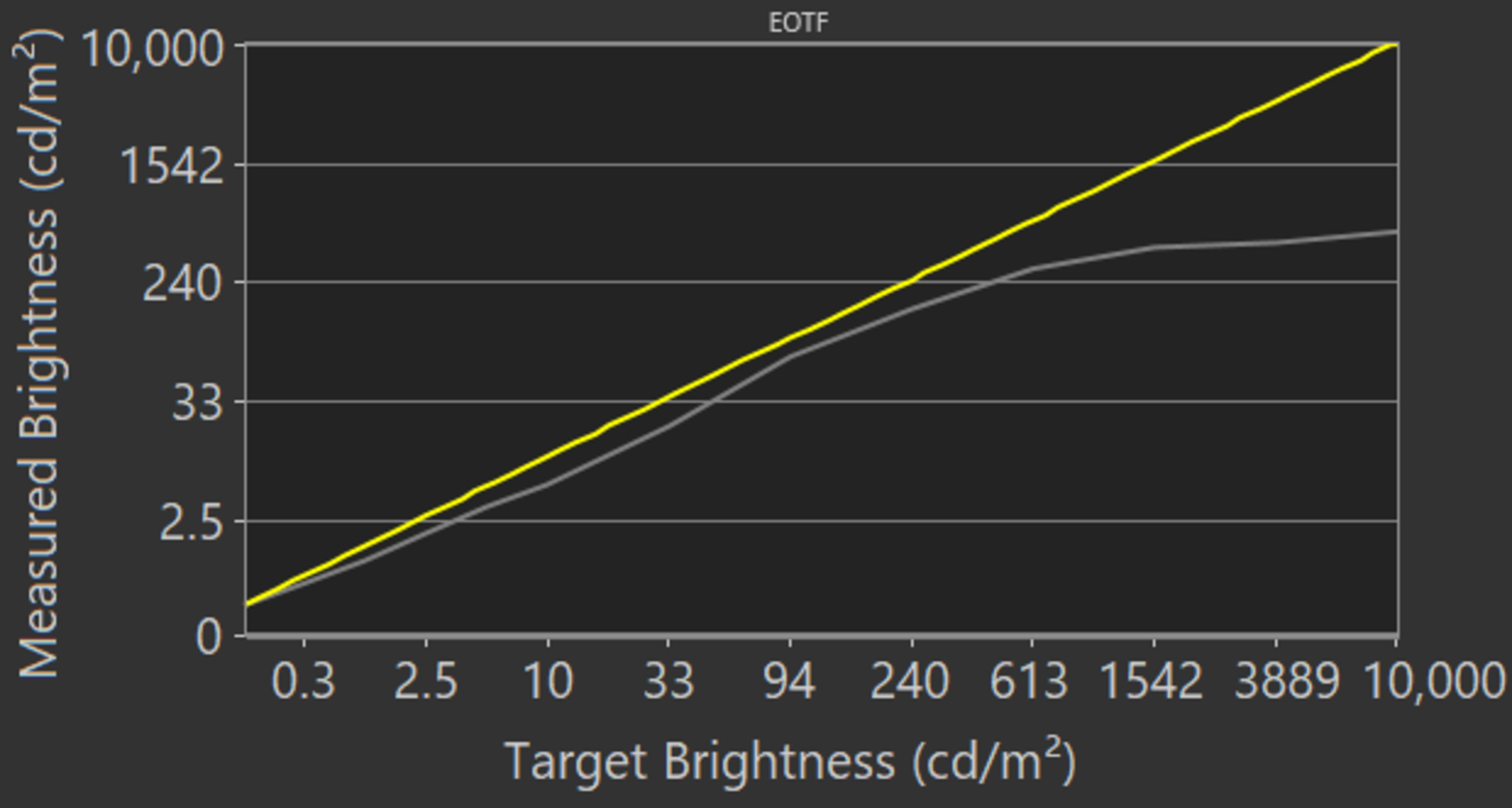
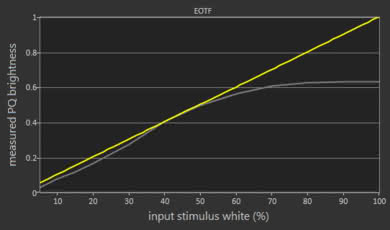
The Samsung Q70T has a good HDR color gamut. It has excellent coverage of the widely used DCI P3 color space, but its coverage of the wider Rec. 2020 is mediocre. The 'Movie' EOTF follows the target curve fairly well until the roll-off, although 'Game' mode appears darker in general, as you can see here.
If you find HDR too dim, you can make it brighter by setting Brightness and Contrast to maximum, set ST.2084 to maximum, and set Contrast Enhancer to medium.
You can also check out our recommended settings here.
for pictures & test results

for pictures & test results

The Samsung Q70T has okay color volume but not as good as the Samsung Q70/Q70R QLED. It can produce dark colors well due to its high contrast ratio, but like most LED TVs, it doesn't display very bright blues well.
for pictures & test results

Great gradient performance. There's some very minor banding in darker shades, although it shouldn't be noticeable in most content. If banding bothers you, enabling Noise Reduction can help a bit but at the cost of some fine details in some scenes.
for pictures & test results

Like most VA panels, the Samsung Q70T shows no signs of temporary image retention, although this can vary between individual units.
We don't expect VA panels to experience burn-in, as the VA panel in our long-term test appears immune.
for pictures & test results

for pictures & test results

Update 03/01/2021: We updated the TV to the latest firmware and the flicker frequency dropped from 600Hz to 240Hz. We retook the response time photo with the lower flicker frequency.
The Samsung Q70T has an okay response time. There's a bit of blur trail behind fast-moving objects, and the 0-20% transition is a bit slow, resulting in slightly more motion blur in darker scenes.
If you want a TV with a better response time, check out the Samsung Q80/Q80T QLED.
for pictures & test results

Update 07/13/2021: We retested the backlight flicker with the latest firmware (2014.1), and found that the flicker behaves a bit differently now. The Samsung Q70T now flickers at 240Hz in Filmmaker, Movie, or Game mode, but flickers at 120Hz in all other modes.
Update 03/01/2021: We updated the TV to the latest firmware and retested the flicker frequency. It flickers at 240Hz, and not 600Hz.
The Samsung Q70T uses Pulse-Width Modulation (PWM) to dim the backlight. It flickers at 240Hz in Game, Movie, or Filmmaker modes, and at 120Hz in all other modes. Also, it flickers at 120Hz when in 'PC' mode (without 'Game' mode) and when in 'Game' mode with Game Motion Plus enabled.
for pictures & test results

for pictures & test results

Update 08/11/2020: A previous version of the review stated the BFI had a minimum flicker of 120Hz for 60fps content in 'Game' mode. It flickers at 60Hz in 'Game' mode with Game Motion Plus and LED Clear Motion enabled. The review has been updated.
Update 07/27/2020: We retested the flicker frequency with Game mode on or off.
The Samsung Q70T has an optional Black Frame Insertion feature that can help reduce motion blur. Unfortunately, the timing is quite off, causing visible image duplication.
With 120fps content, the backlight always flickers at 120Hz, and you can't change the LED Clear Motion settings. It flickers at 240Hz outside of 'PC' mode with 'Game' mode off. With 'Game' mode on, it flickers at 120Hz, and goes down to 60Hz with LED Clear Motion and Game Motion Plus enabled. Enabling LED Clear Motion outside of 'Game' mode also reduces the flicker to 60Hz.
for pictures & test results

for pictures & test results

Update 06/04/2020: We've retested the Blur Reduction bug with the new firmware update (1113), and we can confirm that the TV can interpolate 30fps and 60fps content up to 120fps.
This TV can interpolate lower frame rate content up to 120Hz. To enable it, you have to set Picture Clarity to 'On', set Judder Reduction to '10' for 30fps, and Blur Reduction to '10' for 60fps content.
With motion interpolation enabled, there's noticeable duplication in fast scenes, and it introduces a good amount of artifacts when displaying more intense scenes.
The Samsung Q70T displays lower frame rate content without much stutter due to its slower response time. It can still happen at times, but if it bothers you, enabling Picture Clarity can help.
The Samsung Q70T can remove judder from all sources. To use it, set Picture Clarity to 'Custom', but leave the Blur Reduction and Judder Reduction sliders to '0'.
Update 11/18/2020: We've retested the VRR with an HDMI 2.1 source and firmware version 1403. It can now display 120fps at 4k with VRR enabled, and it also works with NVIDIA's G-SYNC.
Update 08/19/2020: We changed HDMI Forum VRR to 'Unknown' because we currently don't have an accurate way to test for HDMI Forum VRR compatibility. Once we do, we'll test for it and update the review.
The Samsung Q70T supports FreeSync to reduce screen tearing when gaming. It turns on automatically when the TV detects a computer or an Xbox One that has VRR enabled at the launch of a game.
Update 11/18/2020: We've retested the input lag with an HDMI 2.1 source and firmware version 1403. We've added the 4k @ 120Hz input lag, which is measured in 'Game' mode with chroma 4:4:4 and 8-bit color coding. We've also updated the input lag for the other resolutions.
The TV has an incredibly low input lag as long as 'Game' mode is enabled. It's slightly higher when VRR or Game Motion Plus are enabled, as well as when playing at 4k @ 60Hz + HDR. However, it shouldn't be noticeable for most casual gamers. To get the lowest input lag when using the TV as a PC monitor, set the icon for the input in use to 'PC'.
Update 11/18/2020:We've retested the supported resolutions with an HDMI 2.1 source and firmware version 1403. It can now display 4k @ 120Hz properly.
Update 06/04/2020: We've retested the TV with the newest firmware (1113), and we still can't display a 4k @ 120Hz signal.
This TV supports most common resolutions. It can display proper chroma 4:4:4 in all resolutions except 1440p @ 120Hz. To display chroma 4:4:4, the input must be labeled 'PC', and for high bandwidth signals like 4k @ 60Hz + HDR, the Input Signal Plus setting must be enabled for the port in use. Game Motion Plus can't be used when VRR is enabled.
for pictures & test results

for pictures & test results

Update 05/19/2021: After a PS5 software update, Samsung TVs can now display 4k @ 120Hz in HDR.
This TV supports all common resolutions from both the PS5 and Xbox Series X without any issue.
Update 11/18/2020: We've retested the inputs with an HDMI 2.1 source and firmware version 1403. We can confirm that only the HDMI 4 port supports HDMI 2.1, and it has the full HDMI 2.1 class bandwidth.

The TV supports eARC, allowing it to pass high-quality object-based audio like Dolby Atmos via TrueHD over an HDMI connection. To use it, set HDMI eARC to 'Auto' and Digital Output Audio to 'Auto' or 'Passthrough'.
for pictures & test results

Decent frequency response. We tested the TV with Samsung's Intelligent Adaptive Sound+ feature enabled, and it sounds okay. It's fairly well-balanced, but it can't really produce a deep, rumbling sound. It gets reasonably loud, more so than the Samsung Q70/Q70R QLED.
for pictures & test results

This TV has a mediocre distortion performance. It's passable when playing at moderate volume levels, but there's a fair amount of distortion at higher levels. That said, distortion depends on the content and some people may not hear it.
for pictures & test results

Like all Samsung TVs, the Samsung Q70T runs on Tizen OS. It's easy to use and runs smoothly for the most part, but there's still a bug when changing the input from 'PC' to something else, causing the edges of the screen to appear cut off due to overscan. You can resolve this issue by navigating into the Picture Size setting and by enabling 16:9 and 'Fit to Screen'.
for pictures & test results

Unfortunately, there are ads and suggested content on the home page and within the app store, and they can't be disabled.
for pictures & test results

Samsung's app store has a large selection of apps, and they run fairly smoothly. You can also cast content to the TV using a mobile device, and the built-in media app supports most common file types.
for pictures & test results

The TV comes with the same remote as other Samsung QLED TVs. It has a built-in mic for voice control through Samsung's Bixby and shortcuts for Netflix, Amazon Prime Video, and Samsung TV Plus.
for pictures & test results

The TV's controls are located at the center, beneath the Samsung branding. It's a single button that lets you turn the TV On/Off, as well as changing the channel, volume, and input.
for pictures & test results

- Power cable
- Remote control
- 2x AA batteries
- Cable management clips
- User guide