The Samsung Q90T is an excellent 4k QLED TV. It's feature-rich, and it delivers stunning picture quality in nearly every type of content. Its simple and elegant design should fit easily into any room, and it performs well in both dark or bright environments. Motion handling is superb thanks to its incredibly fast response time and Black Frame Insertion feature, and gamers should be pleased with its exceptionally low input lag and FreeSync support. HDR content is delivered with vibrant colors and bright highlights, as it has an impressive color gamut and high peak brightness. Its Tizen OS interface is easy to navigate, and there are tons of apps available. There are some minor uniformity issues that may disappoint sports fans, but as a whole, it's a TV that should satisfy most people.
Our Verdict
The Samsung Q90T is an excellent TV for most uses. Nearly every type of content looks good on this TV, whether it's a low-resolution cable TV show or a 4k HDR movie. It has a fast response time and low input lag, and it also comes with FreeSync support to reduce screen tearing when gaming. However, there's a bit of dirty screen effect, which can be somewhat distracting when watching sports.
- Gets very bright in SDR and HDR.
- Decent viewing angles.
- Exceptional reflection handling.
- Vignetting and dirty screen effect.
The Samsung Q90T is great for watching movies. It has a high contrast ratio due to its VA panel, and it has full-array local dimming to make it even better. Black uniformity is good too, making this TV a fantastic choice for dark room viewing. The TV can remove judder from all sources, but lower frame rate content can stutter a bit.
- Excellent contrast ratio.
- Great local dimming feature.
- Can remove judder from all sources.
- Vignetting and dirty screen effect.
- Stutters a bit in low frame rate content.
The Samsung Q90T is excellent for watching TV shows. It can upscale lower-resolution content from cable TV well without any obvious artifacts. The TV is well-suited for bright rooms, as it has exceptional reflection handling and gets extremely bright. Viewing angles are decent, so you should be able to walk around while watching without losing much image accuracy.
- Gets very bright in SDR and HDR.
- Decent viewing angles.
- Exceptional reflection handling.
- Vignetting and dirty screen effect.
The Samsung Q90T is great for watching sports. The TV has a great response time and an optional Black Frame Insertion feature, so there's very little blur in fast-moving scenes. It can get very bright to combat glare, it has exceptional reflection handling, and its decent viewing angles are great for watching a game with friends and family. Unfortunately, there's some dirty screen effect, which is rather disappointing.
- Gets very bright in SDR and HDR.
- Great response time.
- Decent viewing angles.
- Exceptional reflection handling.
- Vignetting and dirty screen effect.
The Samsung Q90T is amazing for playing video games. It has a fast response time that results in clear images with minimal motion blur, and it has a low input lag and FreeSync support. There's also an 'Automatic Low Latency Mode', making it easier to jump right into the game without having to change picture mode each time, which can be rather tedious. The TV's VA panel can produce deep blacks, which is great for those who like to game in the dark.
- Great response time.
- Low input lag and FreeSync support.
- High refresh rate.
- Vignetting and dirty screen effect.
The Samsung Q90T is a great TV for watching movies in HDR. The TV can produce vibrant and vivid colors, and its excellent HDR peak brightness makes highlights pop. Its VA panel has a high contrast ratio and is further enhanced by its full-array local dimming. Its response time is great and motion blur is minimal, but it can also cause lower frame rate content to stutter at times.
- Gets very bright in SDR and HDR.
- Excellent contrast ratio.
- Great local dimming feature.
- Can remove judder from all sources.
- Vignetting and dirty screen effect.
- Stutters a bit in low frame rate content.
The Samsung Q90T is excellent for gaming in HDR. On top of having a fast response time and low input lag, this TV can deliver a great HDR experience with its wide color gamut and high peak brightness. It's a great choice for dark room gaming, as it has a high contrast ratio that's boosted by full-array local dimming, and its black uniformity is good too, albeit with some minor blooming here and there.
- Gets very bright in SDR and HDR.
- Great response time.
- Low input lag and FreeSync support.
- Great local dimming feature.
- Vignetting and dirty screen effect.
The Samsung Q90T is excellent for use as a PC monitor. It has an amazingly low input lag to provide a responsive desktop experience, and it has a fast response time. Chroma 4:4:4 is displayed properly, which is great for text clarity, and there's no risk of permanent burn-in with static content such as a desktop user interface.
- Great response time.
- Low input lag and FreeSync support.
- Decent viewing angles.
- Exceptional reflection handling.
- Vignetting and dirty screen effect.
Changelog
- Updated Sep 26, 2025: We uploaded the latest brightness measurements and uniformity photos for the Accelerated Longevity Test.
- Updated Jul 08, 2025: We uploaded the latest brightness measurements and uniformity photos for the Accelerated Longevity Test.
- Updated Apr 17, 2025: We uploaded the latest brightness measurements and uniformity photos for the Accelerated Longevity Test.
- Updated Feb 11, 2025: We uploaded the latest brightness measurements and uniformity photos for the Accelerated Longevity Test.
Check Price
Differences Between Sizes And Variants
We tested the 55" (QN55Q90T) variant, and for the most part, we expect our review to be valid for the 65" (QN65Q90T), the 75" (QN75Q90T), and the 85" variant (QN85Q90T). There's a Q95T model that's only available in Europe. It has mostly the same features, except that it has the One Connect Box that was featured on the Samsung Q90/Q90R QLED.
If someone comes across a different type of panel or if their Samsung Q90T doesn't correspond to our review, let us know and we will update the review.
| Size | US | Canada | UK | Italy | Germany |
|---|---|---|---|---|---|
| 55" | QN55Q90TAFXZA | QN55Q90TAFXZC | QN55Q90TATXXU | QE55Q90TATXZT | GQ55Q90TGTXZG |
| 65" | QN65Q90TAFXZA | QN65Q90TAFXZC | QN65Q90TATXXU | QE65Q90TATXZT | GQ65Q90TGTXZG |
| 75" | QN75Q90TAFXZA | QN75Q90TAFXZC | QN75Q90TATXXU | QE75Q90TATXZT | GQ75Q90TGTXZG |
| 85" | QN85Q90TAFXZA | QN85Q90TAFXZC | QN85Q90TATXXU | - | - |
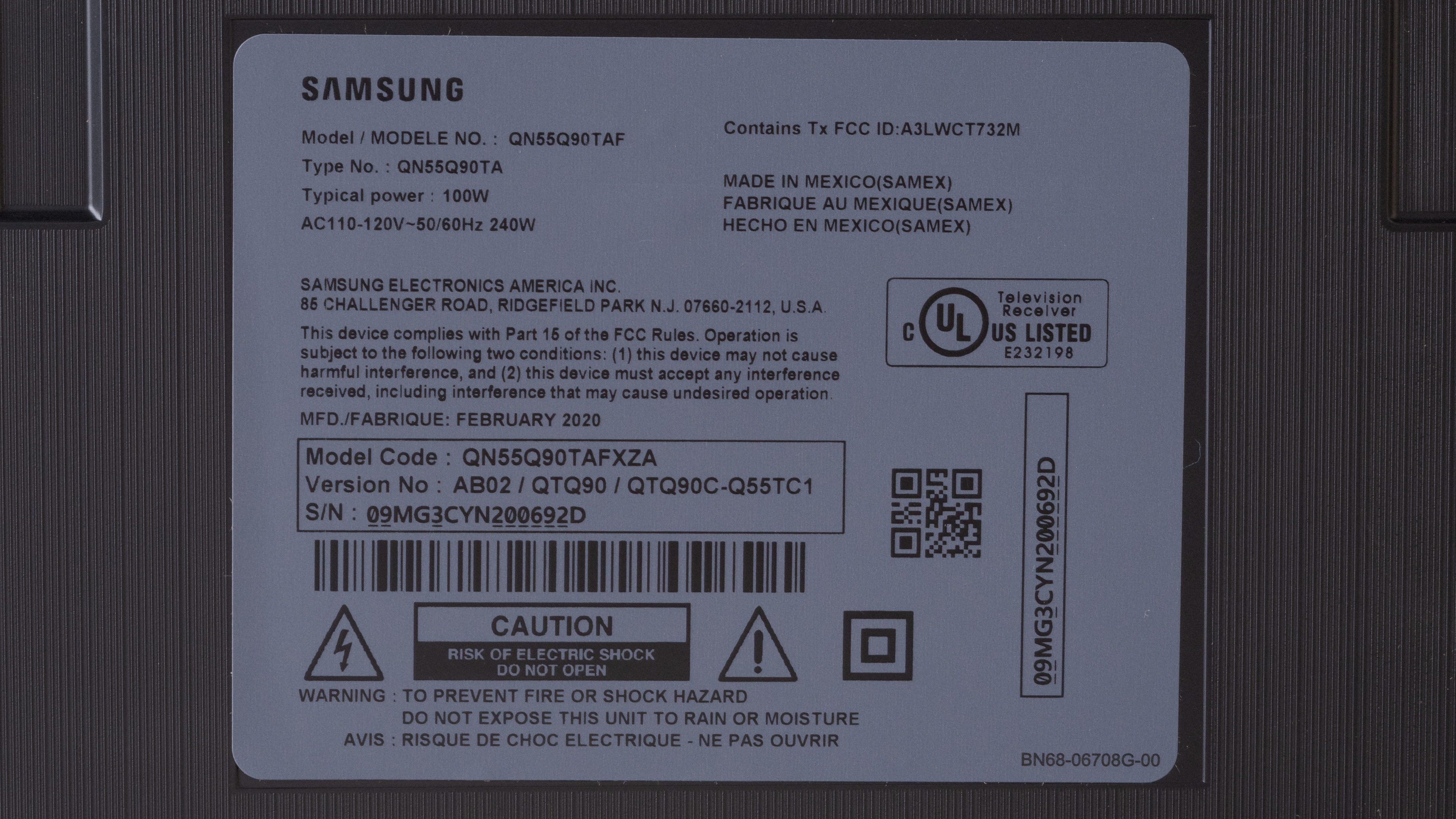
Our unit of the QN55Q90T was manufactured in February 2020; you can see the label here.
Popular TV Comparisons

The Samsung Q90T is an excellent TV suitable for every type of content. Compared to 2019's Samsung Q90/Q90R QLED, it performs almost identically, but it loses some features like the One Connect Box, and it no longer supports Samsung's no-gap wall mount. However, it's one of the best LED TVs on the market in 2020, and most people should be happy with it. For other options, check out our recommendations for the best TVs, the best 4k HDR TVs, and the best 4k gaming TVs.
The Samsung Q90/Q90T QLED and the Samsung Q80T are very much alike, as they offer identical features. The biggest difference is in terms of performance, where the Q90T performs slightly better than the Q80T. The Q90T has a higher contrast ratio and peak brightness, and it has much better gradient performance, resulting in less banding. However, the Q80T has better color accuracy and black uniformity, although these could be due to panel variance.
The Samsung Q900TS 8k QLED and the Samsung Q90/Q90T QLED are both high-end QLED TVs with a lot of great features and performance in the same ballpark. That said, the Q90T offers better value for the price. It has a higher native contrast ratio and much better viewing angles than the Q900TS. While both have fast response times and FreeSync VRR support, the Q90T is also compatible with G-SYNC. The biggest difference is that the Q90T is a 4k TV and the Q900TS is 8k, but since there's still very little 8k content, the value of 8k at this point is questionable.
The Samsung Q90/Q90T QLED is significantly better overall than the Samsung Q80A. The Q90T has a much higher contrast ratio and delivers better HDR performance because it has a better local dimming feature and gets brighter in HDR to make highlights pop. They each have many of the same gaming features and performance, but the Q90T is G-SYNC compatible, which the Q80A isn't.
The Samsung Q90/Q90T QLED and the Samsung Q80R are nearly identical in terms of feature set and overall performance, as the Q90T is a replacement of the Q80R. Other than the added eARC support, the Q90T has a higher HDR peak brightness and a significantly faster response time, resulting in less motion blur. Input lag is also lower on the Q90T, but the Q80R has better black uniformity and out-of-the-box color accuracy.

We buy and test dozens of TVs yearly, taking an objective, data-driven approach to deliver results you can trust. Our testing process is complex, with hundreds of individual tests that take over a week to complete. Most of our tests use specially designed test patterns that mimic real content, but we also use the same sources you have at home to ensure our results match the real-world experience. We use two main tools for our testing: a Colorimetry Research CR-100 colorimeter and a CR-250 spectroradiometer.
Test Results
Older Test Bench: We tested this product using an older TV test methodology before a major update. Some of the test results below aren't directly comparable with other TVs. Learn more
for pictures & test results

The Samsung Q90T has an exceptional design. It's clean, modern, and simple. The bezels are thin on all sides, and the stand is center-mounted, similar to the Samsung Q90/Q90R QLED. The biggest change is the loss of the One Connect Box, as this TV is more of a replacement for the Samsung Q80/Q80R QLED. There's a Q95T model that still has the One Connect Box, but it seems to be available only in Europe at this time.
If you're in North America and you want a TV that has the One Connect Box and supports the no-gap wall-mount, check out the Samsung The Frame 2020.
for pictures & test results

The stand is a heavy piece of metal that feels solid. There's a bit of wobble, mainly due to the stand being center-mounted.
Footprint of the 55 inch stand: 11.9" x 9.3"
for pictures & test results

The back of the TV is plastic, and it has a fine texture etched into it horizontally, giving it a brushed look. The inputs are side-facing, making it easy to access when wall-mounted, and some grooves guide all the cables towards the stand, where there are also grooves that serve as cable management.
for pictures & test results

The bezels on the Samsung Q90T are very thin and shouldn't be distracting.
for pictures & test results

The TV has a slightly boxier profile than the Samsung Q90/Q90R QLED, but it's still very thin and shouldn't stick out much when wall-mounted. Sadly, it isn't compatible with Samsung's no-gap wall mount.
for pictures & test results

The build quality is outstanding. The TV feels very well-built, and although there's a bit of wobble, it's mainly due to the stand being center-mounted. It's not as good as the Samsung Q90/Q90R QLED, as the right side of the back panel has some flex, and the plastic used for cable management feels cheap.
for pictures & test results

Like most VA panels, the Samsung Q90T has an excellent native contrast ratio, and it improves significantly with local dimming enabled, allowing it to produce deep blacks. Note that the contrast ratio can vary between units.
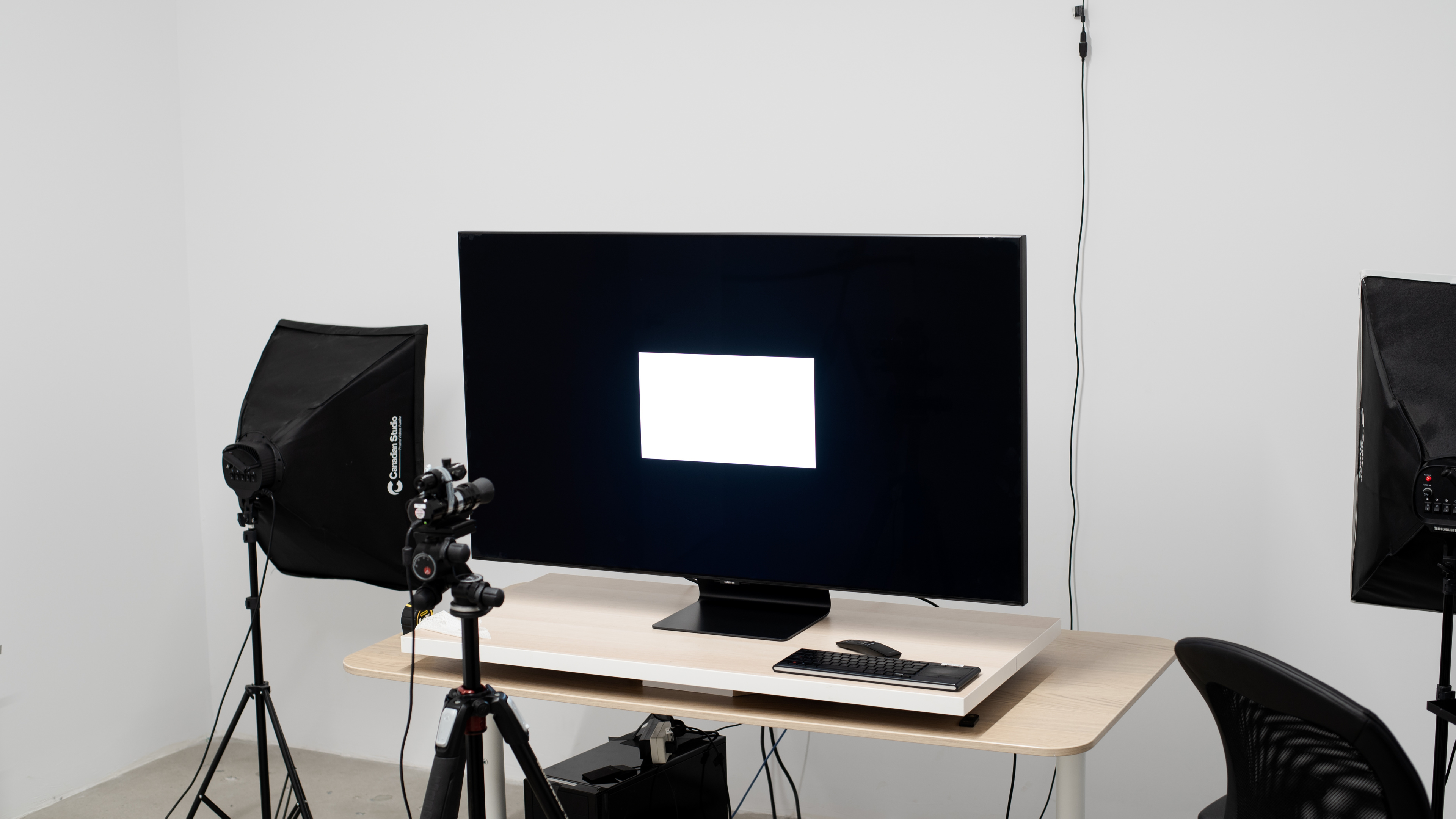
The Samsung Q90T has an excellent SDR peak brightness. It's good enough to overcome glare even in very bright rooms; however, brightness varies quite a bit when displaying different content, with the 100% window being the dimmest. If you want a TV that gets brighter for outdoor use, check out the Samsung The Terrace.
We measured the SDR peak brightness after calibration in the 'Movie' Picture Mode, with Backlight set to maximum, Color Temperature set to 'Warm 2', and Local Dimming set to 'High.'
If you don't mind losing a bit of image accuracy, you can get a brighter image by setting the Picture Mode to 'Dynamic' and Local Dimming to 'High'. These settings allow us to reach 1652 cd/m² in the 10% window.
for videos & test results

for videos & test results

for videos & test results

Update 07/16/2021: We've added two new videos demonstrating the local dimming feature with real content.
The Samsung Q90T has a great local dimming feature. Samsung's new algorithm seems to activate the backlight in more zones around bright objects. This makes blooming less intense but has the side effect of making a larger section of the screen look a bit grayish. There's still blooming in some content, and highlights can appear dimmer; however, it's difficult to tell whether it's due to the implementation of the local dimming or the mastering of the content itself. Subtitles are handled well, as they're not as blinding in dark scenes and cause less blooming when compared to the Samsung Q90/Q90R QLED.
for videos & test results

for videos & test results

for videos & test results

Update 07/16/2021: We've added two new videos demonstrating the local dimming feature with real content.
Update 07/16/2021: We retested the local dimming feature in Game Mode with the latest firmware. Local dimming performs better than it did before in Game Mode, with improved zone transitions and better subtitle handling. It doesn't raise the black level as much as before, but it's still a bit worse than out of Game Mode.
for pictures & test results

Update 09/17/2021: Multiple owners have reported a decrease in peak brightness and a strange local dimming bug since the firmware v1506 was released. We tested it on our unit with v2016, but there's no issue with our unit. Our unit has been modified a bit in the service menu, but we don't expect those changes to impact this issue.
Update 07/16/2021: We retested the peak brightness in HDR with the latest firmware and found that it's increased a bit across the board. Small highlights increased the most, with an ~100 cd/m² increase.
This TV has outstanding HDR peak brightness. The Samsung Q90T can get very bright, enough to deliver a fantastic HDR experience. However, just like in SDR, the brightness varies depending on the scene and gets dimmer as larger areas of the screen is lit.
We measured the HDR peak brightness before calibration in the 'Movie HDR' Picture Mode, with Local Dimming set to 'High', Contrast Enhancer disabled, and Brightness and Contrast set to max.
If you want a brighter image in HDR and don't mind losing image accuracy, set the Picture Mode to 'Dynamic HDR' and Local Dimming to 'High'. These settings allow us to reach 2173 cd/m² in the 10% window.
for pictures & test results
Update 07/16/2021: We retested the peak brightness in HDR in Game Mode with the latest firmware and found that the peak brightness behavior has changed significantly. Small highlights are significantly dimmer than before, as the local dimming feature seems to be dimming them unnecessarily. Larger window sizes are significantly brighter than before, though, with the 10% and 25% windows increasing by about 400 cd/m².
for pictures & test results

for pictures & test results

Gray uniformity is decent, but this can vary between individual units. The edges of the screen appear darker, and there's some dirty screen effect throughout the screen, which can be distracting when watching sports or large areas of uniform color. However, uniformity is much better in dark scenes.
for pictures & test results

for pictures & test results

Black uniformity is good; however, this can vary between units. Without local dimming, there's a bit of clouding throughout the screen, as well as some blooming around the test cross. With local dimming enabled, the clouding is less visible, but blooming around the test cross is more intense.
for videos & test results

for pictures & test results

for pictures & test results

for pictures & test results

For a VA panel, the Samsung Q90T's viewing angles are decent, suitable for a moderately large room. It has Samsung's 'Ultra Viewing Angle' layer, which greatly improves viewing angles at the expense of a lower contrast ratio.
Two separate runs were performed to take our measurements. The first run was done with local dimming disabled to measure gamma, black level, and lightness. The second was with local dimming set to 'Low', allowing us to measure color.
The TV's local dimming can't be disabled through the normal settings menu. To turn it off, you must first disable PC Mode Dimming within the TV's service menu, and then activate PC Mode.
for pictures & test results

for pictures & test results

for pictures & test results

Outstanding reflection handling. It performs exactly like the Samsung Q80/Q80T QLED, and you shouldn't have any issues using this TV in a very bright room.
for pictures & test results

for pictures & test results

for pictures & test results

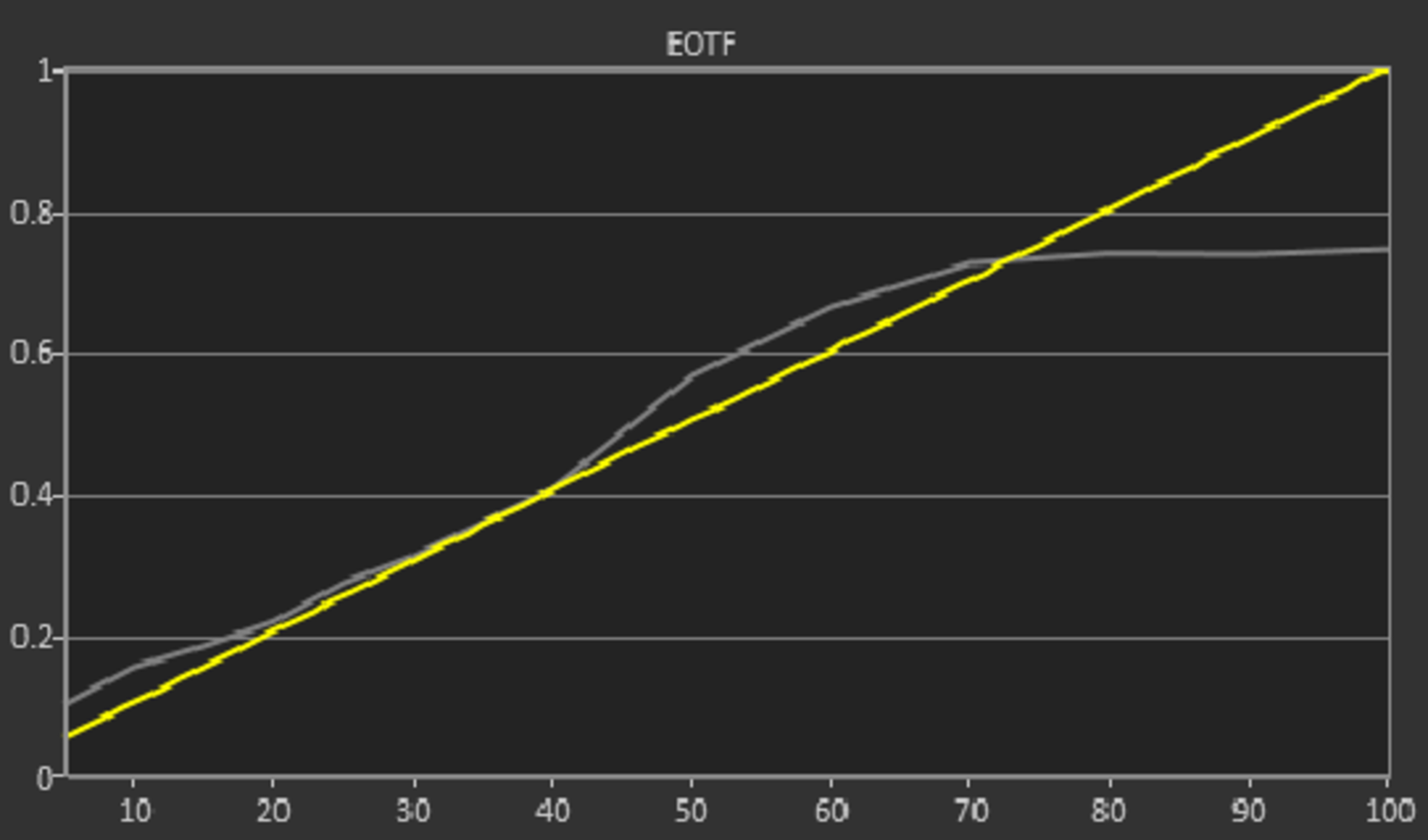
Out of the box, the Samsung Q90T has decent color accuracy. Most colors are fairly accurate, but white balance is quite off, and the preset 'Warm 2' Color Temperature is much warmer than our target of 6500K, giving the image a reddish tint. Gamma doesn't follow the target all that well, with most scenes appearing darker than they should. Note that color accuracy can vary between individual units. The replacement of this TV, the Samsung QN90A QLED, has much better out-of-the-box color accuracy.
for pictures & test results

for pictures & test results

for pictures & test results

Update 09/29/2020: We've changed the status of the Auto-Calibration function from 'Untested' to 'Undetermined', as the Samsung Q90T still isn't listed as being compatible with CalMAN.
After calibration, color accuracy is exceptional. The remaining inaccuracies shouldn't be noticeable to the naked eye, and the color temperature is close to our 6500K target, although still a bit on the warm side. Gamma follows the target well, but bright scenes look slightly darker than they should.
You can see our recommended settings here.
for pictures & test results

480p content like DVDs is upscaled without any issues.
for pictures & test results

The Samsung Q90T upscales 720p content like cable TV well and it looks almost identical to its predecessor, the Samsung Q90/Q90R QLED.
for pictures & test results

1080p content looks good and there are no signs of artifacts.
for pictures & test results

Native 4k content is displayed perfectly and looks almost identical to the Samsung Q70/Q70T QLED and Samsung Q80/Q80T QLED.
for pictures & test results

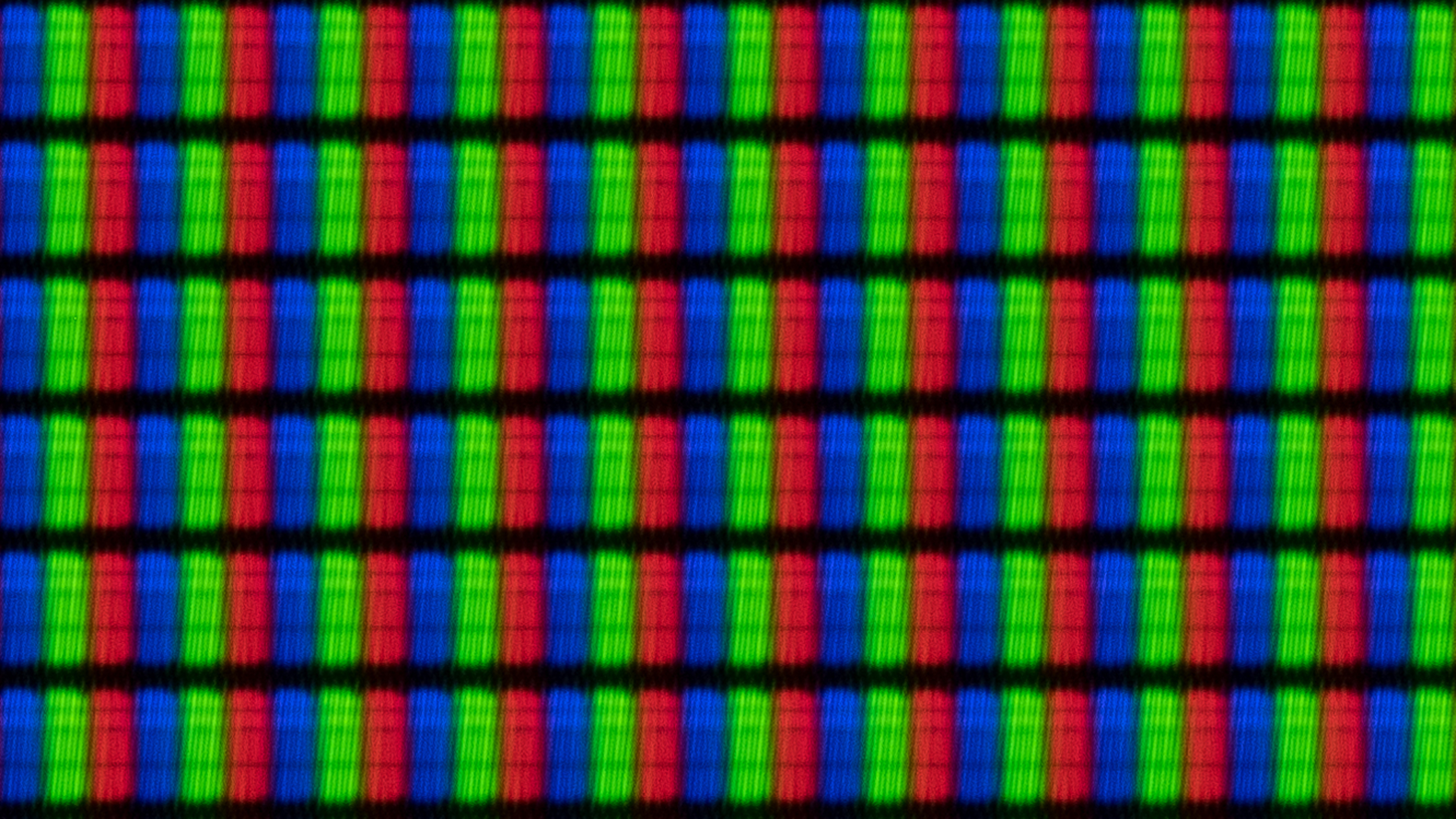
The pixels are a little blurry due to the TV's 'Ultra Viewing Angle' filter. It's a different implementation of the technology than what we had observed on the Samsung Q90/Q90R QLED, allowing us to see the pixels much more clearly. You can also see the wide viewing angle filter in this photo.
The Samsung Q90T uses a BGR sub-pixel structure. It doesn't affect picture quality, but it can affect text clarity when using the TV as a PC monitor. You can read more about it here.
for pictures & test results

for pictures & test results

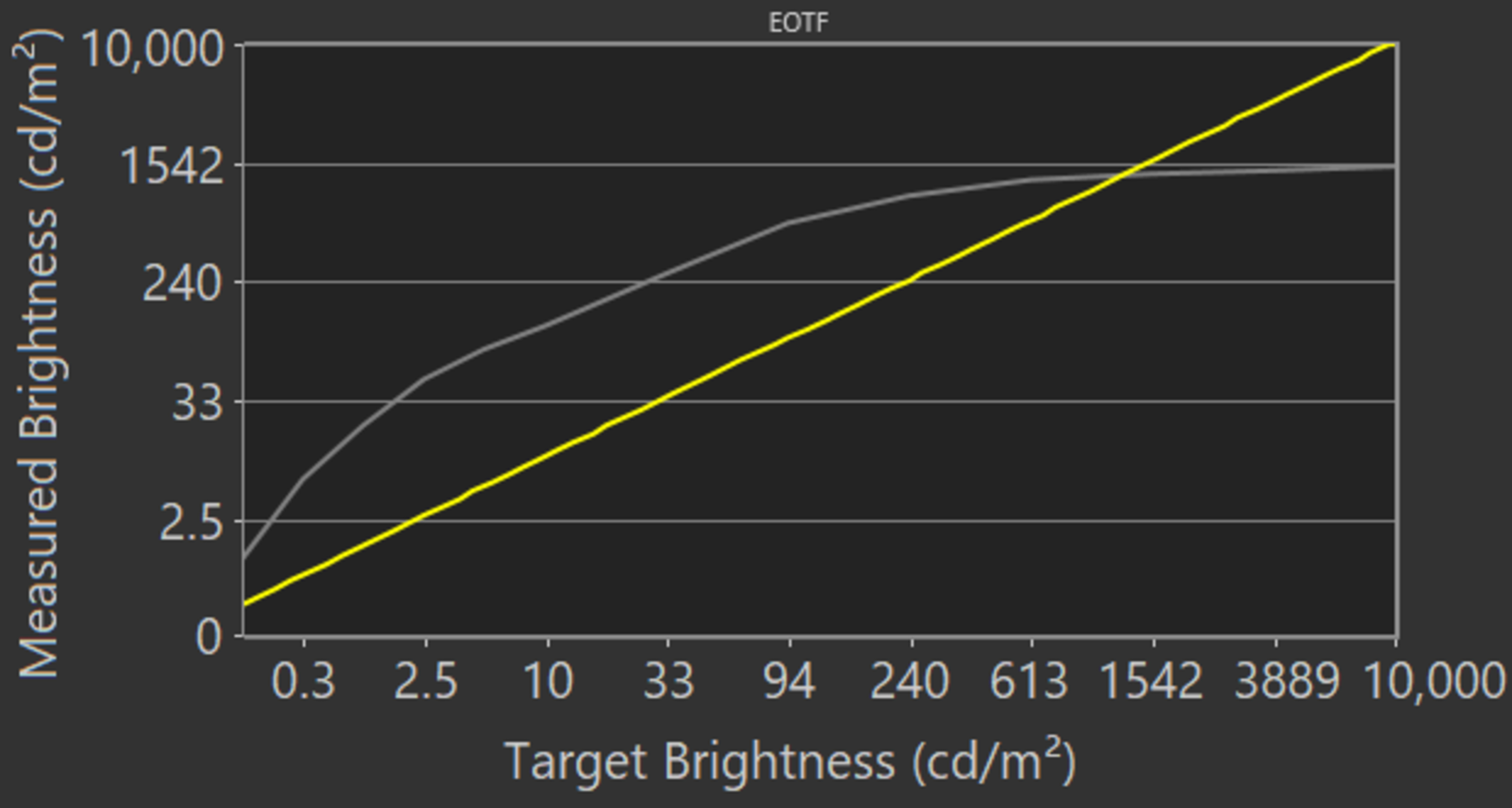
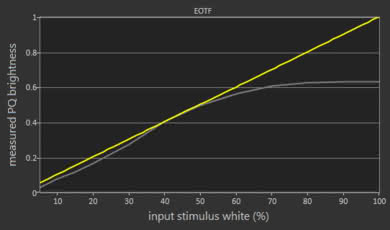
Great HDR color gamut. Coverage of the commonly-used DCI P3 is excellent, and coverage of the wider Rec. 2020 is decent. In 'Movie' mode, the EOTF is a bit brighter than the input stimulus until the roll-off.
In 'Game' mode, there's a Black Equalizer feature that is set to '2' by default, causing the EOTF to be less accurate. With it set to '0', the 'Game' mode EOTF is much closer to the target, resulting in this EOTF.
If you find HDR content too dim, you can make it brighter by setting Contrast Enhancer to 'High' and set ST.2084 to maximum. These settings result in a much brighter image, as you can see in this EOTF.
for pictures & test results

for pictures & test results

Good color volume. The TV can display dark and saturated colors well due to its high contrast ratio, but like most LED TVs, it can't reproduce bright blues all that well. This is slightly inferior to the Samsung Q90/Q90R QLED.
for pictures & test results

Excellent gradient performance. There's still some visible banding when displaying reds and greens, and a little bit in grays as well. If banding bothers you, enabling Noise Reduction can help, but it may cause the loss of fine details in some scenes.
for pictures & test results

As is the case with most VA panels, the Samsung Q90T doesn't show any signs of temporary image retention. However, image retention can vary between units.
We don't expect VA panels to experience burn-in, as the VA panel in our long-term test appears immune.
for pictures & test results

for pictures & test results

The Samsung Q90T's response time is great. There's very little blur trail in fast-moving scenes; however, there's also a significant amount of overshoot in the 0-20% transition, resulting in the appearance of some artifacts.
for pictures & test results

The backlight isn't flicker-free, but since it flickers at such a high frequency, it shouldn't be noticeable for most people. That said, the flickering drops to 120Hz when in 'Dynamic', 'Standard', 'Natural', or 'Game' mode. In addition, the flickering is also at 120Hz when Picture Clarity is enabled.
for pictures & test results

for pictures & test results

The Samsung Q90T has an optional Black Frame Insertion feature that can help improve motion clarity. To use it in 60fps content, enable LED Clear Motion in the Picture Clarity settings menu. For 120fps content, simply enable the Picture Clarity setting without adjusting any of the sliders.
for pictures & test results

for pictures & test results

The Samsung Q90T can interpolate lower frame rate content up to 120Hz, commonly known as the 'Soap Opera Effect'. Generally speaking, this feature does a fairly good job and the picture looks good. We did notice some artifacts when interpolating 60fps content up to 120fps; however, it seems to be an issue that only happens with our test pattern and is unlikely to be noticeable in real content.
To use motion interpolation, set Picture Clarity to 'Custom', and adjust the Judder Reduction slider to '10' for 30fps content, or adjust the Blur Reduction to '10' for 60fps content.
If you want to use motion interpolation when gaming, it's essentially the same steps, but within the Game Motion Plus settings menu. Start by enabling Game Motion Plus, then set the Judder Reduction slider to '10' for games that run at 30fps natively, or set the Blur Reduction slider to '10' for games that normally run at 60fps.
Due to the Samsung Q90T's fast response time, lower frame rate content can appear to stutter as each frame is held on for longer. If the stuttering bothers you, enabling Picture Clarity or LED Clear Motion can help.
The Samsung Q90T can remove judder from all sources. It plays most content without judder even when Picture Clarity is disabled, but it isn't always perfect. Enabling Picture Clarity removes any remaining judder that may occur.
Update 11/17/2020: We've retested the TV with an HDMI 2.1 source and the latest firmware (version 1402). HDMI 2.1 is only supported on the HDMI 4 port. It can display 4k @ 120Hz with VRR enabled, and it also works with NVIDIA's G-SYNC.
Update 08/19/2020: We changed HDMI Forum VRR to 'Unknown' because we currently don't have an accurate way to test for HDMI Forum VRR compatibility. Once we do, we'll test for it and update the review.
The Samsung Q90T supports FreeSync to reduce screen tearing when gaming. Like other 2020 Samsung TVs that support VRR, there's no setting for it. It now turns on automatically when a game is launched from a device that has VRR enabled. Sadly, it doesn't support G-SYNC.
Update 11/17/2020: We've retested the TV with an NVIDIA RTX 3080 graphics card and the latest firmware (version 1402). We've added the input lag for 4k @ 120Hz and updated the results for the other resolutions.
Update 09/18/2020: We updated the firmware of the TV to 1301 and remeasured input lag outside of Game mode. The measurements were roughly the same as before the firmware update and within manufacturing tolerances. We got 72.7ms at 4k and 90.1ms at 1080p.
The input lag on the Samsung Q90T is outstanding. It's slightly higher when playing games at 4k with VRR, but it shouldn't be noticeable for most people. To get low latency, you must be in 'Game' mode. For PC use, 'Game' must be used with 'PC' mode to get the lowest input lag. Without 'Game' mode enabled in 'PC' mode, the input lag with a 4k, 60Hz signal is 19.3ms.
Update 11/17/2020: We've retested the TV with an HDMI 2.1 source and firmware version 1402. We can confirm that 4k @ 120Hz works properly on the HDMI 4 port, and it can display proper chroma 4:4:4 at that resolution.
The Samsung Q90T supports most common resolutions, and it can display proper chroma 4:4:4 at all resolutions except 1440p @ 120Hz. To display chroma 4:4:4, the input in use must be labelled 'PC' and Input Signal Plus must be enabled. For full-bandwidth signals like 4k @ 60Hz + HDR, Input Signal Plus also needs to be enabled.
The TV is advertised as being able to display a 4k @ 120Hz signal; however, we couldn't do so, even when using the same computer and settings that we had used for the Samsung Q90/Q90R QLED.
If you're looking for a TV that displays 8k content, look into the Samsung Q800T QLED.
for pictures & test results

for pictures & test results

Update 04/27/2021: We retested the TV with the PS5, and it can now display 4k @ 120Hz with HDR. It appears to have been an issue with the PS5 that Sony resolved in the latest PS5 firmware update.
Update 11/17/2020: We've retested the TV with an HDMI 2.1 source and firmware version 1402. We can confirm that the HDMI 4 port supports HDMI 2.1 with full bandwidth.
If you want a similar TV that supports Dolby Vision, check out the Vizio P Series Quantum X 2020.

The Samsung Q90T supports eARC, allowing it to pass high-quality object-based audio like Dolby Atmos via TrueHD over an HDMI connection. To use it, eARC has to be set to 'Auto' and the Digital Output Audio must be set to 'Passthrough'.
for pictures & test results

The Samsung Q90T's frequency response is okay. It's reasonably well-balanced, and there's a good amount of punch in the bass. However, there's not enough bass extension to produce any rumble or thump. It gets very loud, making it suitable for large rooms and noisy environments, but there's quite a bit of compression when playing at max volume.
There's a room correction feature that tunes the sound according to your room's acoustics, and it's performed automatically when the Adaptive Sound+ setting is enabled within the Intelligent Mode Settings menu.
for pictures & test results

Decent distortion performance. At a medium volume level, it should sound fairly clean, but it does distort a fair amount when playing near max volume.
for pictures & test results

Samsung's Tizen OS is a great platform that's easy to use and runs very smoothly. We didn't notice any overscan bug like we did with other Samsung QLED TVs, likely due to the TV being set to 16:9 aspect ratio by default.
for pictures & test results

There are ads and suggested content on the home screen and within the apps store. Unfortunately, they can't be disabled.
for pictures & test results

Samsung's app store has a large number of streaming apps available and they run smoothly for the most part, albeit with the occasional hiccup here and there.
for pictures & test results

The Samsung Q90T's remote control is the same as every other QLED TV. There are shortcuts to Netflix, Prime Videos, and Samsung TV Plus, as well as an Ambient mode button that lets you display a piece of art. There's a built-in microphone for voice control through Bixby, which you can use to change some TV settings and search for content; however, the latter doesn't work in all apps. For example, we could perform a search on YouTube, but it didn't work on Netflix. You can also ask for general info like the time and current weather conditions.
for pictures & test results

The controls are located at the center of the TV below the Samsung branding. It's the only 2020 Samsung QLED TV that retains the 5-button layout, making it much easier to navigate the on-screen menu. You can also turn the TV On/Off, change the channel, change the input source, and adjust the volume.
for pictures & test results

- Remote control
- Power cable
- 2 x AAA batteries
- User guide