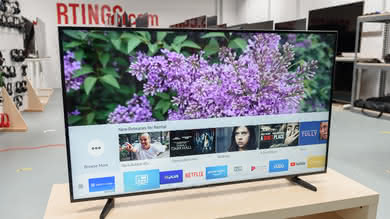
Note that the Samsung Q9FN is a different 2018 model, despite the similar name.
Our Verdict
Great TV for a mixed usage. The Q9F has great picture quality and is a versatile TV. It will work well with all usages unless they require a wide viewing angle.
- Very wide color gamut
- Low motion blur
- Gets bright
- Picture quality degrades at an angle
- Sub-par uniformity
The Q9F does well with movies. Its blacks are decently deep and its local dimming is capable of turning black letterbox bars completely off. Unfortunately, the local dimming doesn't do much to help the rest of the picture.
The Q9F does very well with TV shows. Its picture quality is great, and it gets bright enough for every normal viewing environment. It also has one of the best finishes to combat reflections.
Good TV for watching sports. The Q9F produces very little motion blur, making fast movements on screen very crisp and clear. Its viewing angle could be better though, so it's not the best for wide living rooms.
Great TV for video games. The Q9F's input lag is very low, and it produces an exceptionally low amount of motion blur for an LED TV. Games feel connected and responsive, and fast motion appears clear.
Great TV for HDR movies. The Q9F gets quite bright, and it can reproduce a very wide range of colors without issues with gradations in skies.
Great TV for HDR gaming. The Q9F's input lag remains low, regardless of the input. Combined with its excellent HDR capabilities, it makes for a great HDR gaming experience.
Decent PC monitor. While the Q9F's low input lag and motion blur are great for use with a computer, its narrow viewing angles cause it to be less suitable for use from up close.
Changelog
- Updated Mar 30, 2018: It was discovered that many 2017 Samsung TVs change their BFI frequency to 60 Hz when a lot of 60 Hz motion is detected on screen. The scores have been updated.
- Updated Mar 12, 2018: Converted to Test Bench 1.2.
- Updated Aug 10, 2017: Converted to Test Bench 1.1.
- Updated Jun 15, 2017: Review published.
Check Price
Differences Between Sizes And Variants
We tested the 65" (QN65Q9F) version AA01. For the most part, we expect our review to be valid for the 75" version (QN75Q9F).
If someone comes across a different type of panel or if their Samsung Q9 doesn't correspond to our review, let us know and we will update the review.
| Size | Model | Model Short | US | Canada | UK/Europe |
| 65" | QN65Q9F | QN65Q9 | QN65Q9FAMFXZA | QN65Q9FAMFXZC | QE65Q9F |
| 75" | QN75Q9F | QN75Q9 | QN75Q9FAMFXZA | QN75Q9FAMFXZC | QE75Q9F |
Popular TV Comparisons

The Q9F is a very well performing LED TV, but it is very difficult to justify at its price range. Better TVs can be found for cheaper, some of them at a significantly larger size.
The Samsung Q7F/Q7 QLED 2017 and Samsung Q9F/Q9 QLED 2017 offer very similar performance. The Q9F is brighter than the Q7F in SDR and HDR. The Q7F has better gray uniformity, which is good for sports fans. The Q9F uses a different edge-lighting system, with the LEDs on the side of the TV. This allows the Q9F to turn off horizontal bars, good when watching widescreen movies.
The Sony Z9D is better than the Samsung Q9F/Q9 QLED 2017. The Sony Z9D has significantly better local dimming and a bit better black uniformity, which allows it to display deeper blacks in darker rooms, and this is great when watching movies or HDR content. Also, the Sony Z9D has marginally better SDR peak brightness, which is good if you watch TV shows in a brighter room. On the other hand, the Samsung Q9F has a better response time and a bit better input lag, which makes it very responsive, and you'll enjoy it if you play video games.
The Sony X900F is better than the Samsung Q9F/Q9 QLED 2017. The X900F has a much better local dimming feature and better black uniformity, great for dark room viewing. The Samsung Q9F has a more advanced black frame insertion feature which can clear up motion at the expense of some brightness and has lower input lag for gamers or for use as a monitor.
The Samsung Q9FN/Q9/Q9F QLED 2018 is much better than the Samsung Q9F/Q9 QLED 2017. The Q9FN has significantly improved dark room performance, thanks to the much better local dimming feature and much better black uniformity. The Q9FN is brighter with all types of content and has new features geared for gamers, including a variable refresh rate and auto game mode when used with a supported console or PC.

We buy and test dozens of TVs yearly, taking an objective, data-driven approach to deliver results you can trust. Our testing process is complex, with hundreds of individual tests that take over a week to complete. Most of our tests use specially designed test patterns that mimic real content, but we also use the same sources you have at home to ensure our results match the real-world experience. We use two main tools for our testing: a Colorimetry Research CR-100 colorimeter and a CR-250 spectroradiometer.
Test Results
Older Test Bench: We tested this product using an older TV test methodology before a major update. Some of the test results below aren't directly comparable with other TVs. Learn more
for pictures & test results

The design of the Q9F is excellent. It does appear much bulkier than other Samsung TVs without thinning at the borders but also feels much sturdier and the build quality is a big improvement. From the front, the stand is small so the display really stands out. Note that two power cables are required, one for the display itself and one for the OneConnect box which contains all of the inputs.
for pictures & test results

The TV sits only 1.3" above the table, supported by two T-shaped legs. The foot of the T provides a very stable base, and the stand isn't too visible which is great.
There is an option for two alternative stand designs, the 'gravity stand' and the 'easel stand' which may be purchased separately.
Footprint of the 65" TV stand: 12.0" x 38.5"
for pictures & test results

The rear of the TV is very simple, as only the fiber-optic OneConnect cable and the power cord is plugged into the TV. As a result, inputs can be kept hidden away and the back of the TV appears very clean. As seen in this photo, it is possible to route the cables through a plastic cover at the back of the TV and down through the stand, but, unfortunately, it appears to be more of an afterthought. The plastic cover sticks onto the back of the TV with double sided tape.
for pictures & test results

The borders have an average thickness, but look quite good.
for pictures & test results

The Q9 appears a bit thicker at the sides than most other Samsung's as it doesn't taper near the edges, but is actually one of the thinnest TVs we have tested. The design also looks great from the side.
for pictures & test results
The Q9F is edge lit from both sides so its sides get a little warm to the touch, as do some places on the back. The One Connect box, on the other hand, gets quite warm to the touch, up to 46 ºC, though this isn't warm enough to cause any issues.
for pictures & test results

The build quality of the Q9F is excellent. Compared to most other Samsung TVs, it really feels like a big step up which is worthy of their flagship TV. All of the parts are well made and feel high quality.
for pictures & test results

The Q9F TV has an excellent native contrast ratio. It is not as high as the 2016 KS Series like the KS8000, but it is still a very good result. This means the TV can produce deep blacks and great dark scene performances, especially when the TV is set in a dark room.
When the local dimming is set to maximum, the contrast ratio is in the same ballpark. This is a bit disappointing from the top Samsung TV of 2017, since it is a sign that the local dimming cannot really make blacks looks deeper than what they already are.
for videos & test results

The local dimming feature of the Q9F is bad. The only real advantage over the 2016 KS Series line of TVs, is that on the Q9F, the backlight LEDs are situated on each side of the screen, which means that the local dimming can turn off the whole black bars when watching movies. Besides that, the performance is relatively the same as the 2017 Q7F or 2016 KS8000.
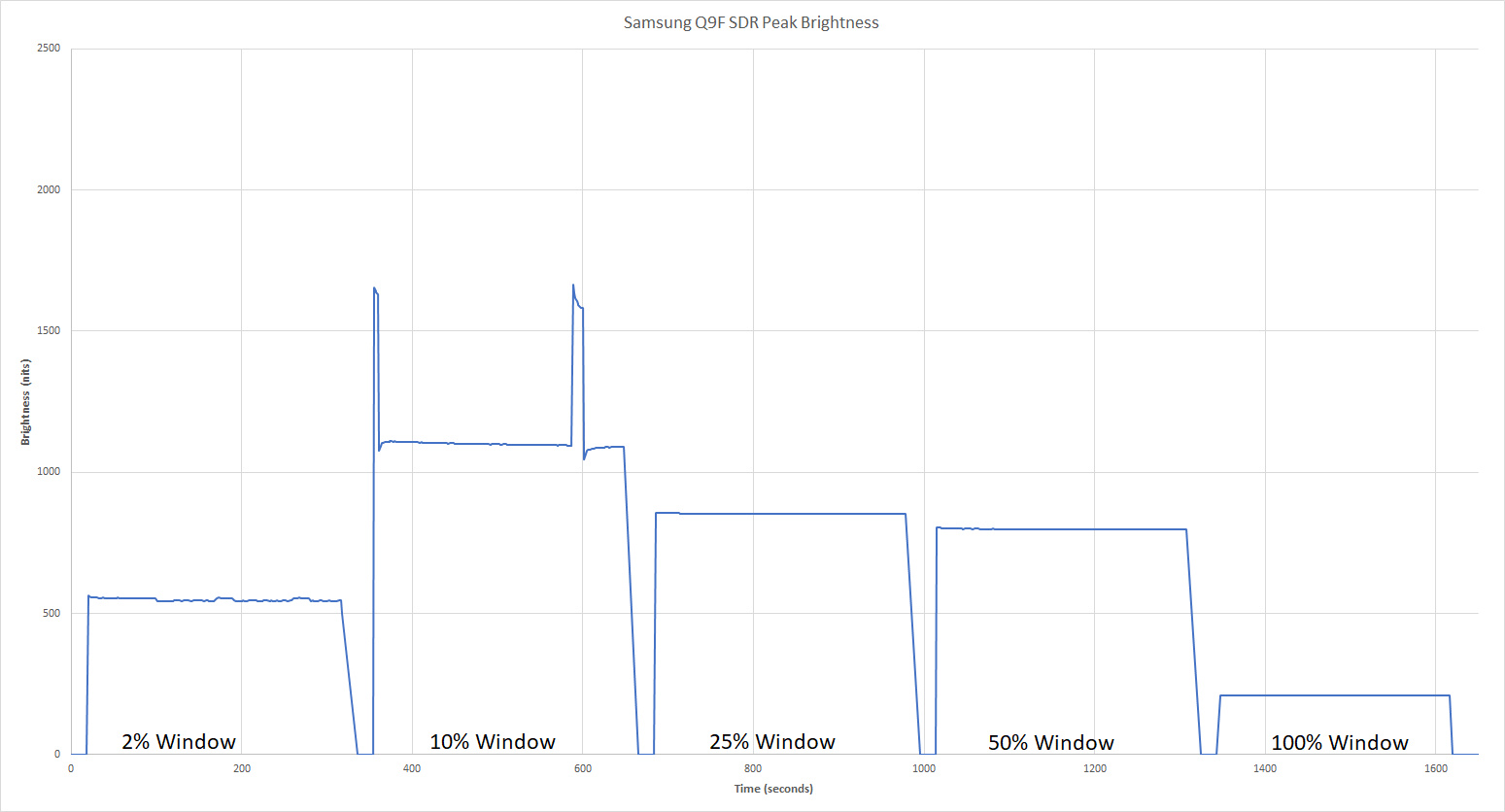
Great SDR peak brightness. Highlights in dim scenes are shown quite bright, thanks to the TV's local dimming. However bright scenes such as our real scene clip are dimmed significantly, and a pure white image is dimmed even more so, which is not good. Many other high end LED TVs such as the X930E are brighter in SDR, though OLEDs like the C7 are dimmer. A plot of brightness over time is shown here.
The Q9F is brighter in SDR than OLEDs like the LG C7, but not as bright as many other high end LED TVs like the Sony X930E, or even the X900E in real scenes.
Great HDR peak brightness. The TV's local dimming is very effective at brightening small highlights in dark scenes, and also brightens the highlights in our real scene test to well above the TV's worst case brightness. The 'Dynamic' picture mode is even brighter than the 'Movie' mode we test, as shown in this plot, but has less accurate picture quality. When shown a static image, the TV's brightness cycles, but this shouldn't be a problem when watching moving content.
Though this brightness is outstanding, and better than OLEDs like the LG C7, it isn't quite as bright as the Sony X930E, X940E and Z9D, mostly because of the larger difference between the best case brightness and the real scene brightness.
for pictures & test results

for pictures & test results

The Q9's overall gray uniformity is sub-standard. Looking at our 50% gray uniformity picture, it is very easy to see that the borders of the screen are a bit darker than the rest, which in turn is affecting the standard deviation number. This is the main reason why the gray uniformity score is so low. As for the dirty screen effect, even though the DSE number is not that high, dirty screen effect was visible when watching sports like football or hockey.
Looking at our 5% gray uniformity, the result is much better and not many uniformity issues can be noticed, which is good.
for videos & test results

for pictures & test results
for pictures & test results
for pictures & test results
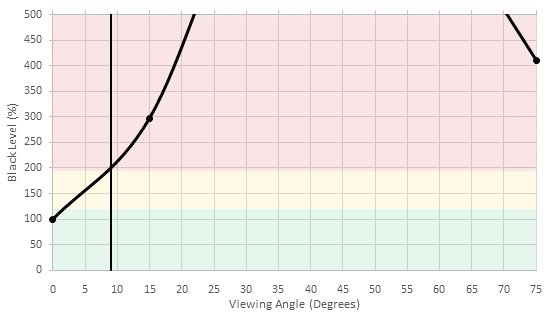
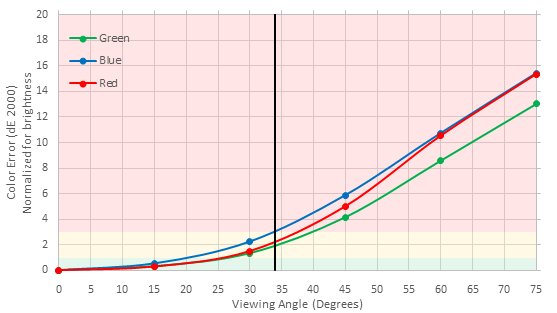
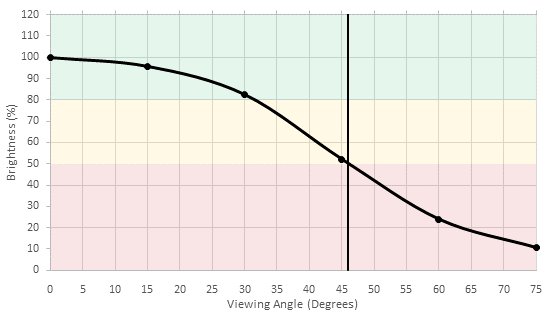
Bad viewing angle, but fairly typical for a VA panel. Blacks turn gray and colors shift when the TV is viewed from even a small angle, while brightness decreases more gradually. An OLED TV like the LG C7 and Sony A1E, or an IPS TV like the LG UH8500 will be better suited for a room where people often view the TV from the side.
for pictures & test results

for pictures & test results

The Q9 has an average overall black uniformity and it is very similar to the Q7F Uniformity. The only visible blooming on the native black uniformity test pictures is horizontal blooming at the same level as the white cross. This is due to the fact that the local dimming zones span horizontally rather than vertically. The black uniformity with local dimming is very similar to the native one.
Note that usually for the native black uniformity test, we turn off the local dimming feature to really show the true black uniformity of the panel used in the TV, but like we saw on the Q7F, the local dimming can't be completely turned off on the Q9F. Instead, you can only put the local dimming to the 'Low' setting for the native black uniformity picture and 'High' for the black uniformity with local dimming. This is one of the reasons why the native black uniformity results is about the same as the one with local dimming.
for pictures & test results

for pictures & test results

for pictures & test results

The Q9 has a slightly different screen finish to the Q7. This is still excellent at handling reflections but has much less of a purple tint. Reflections are smeared somewhat horizontally, but this isn't very distracting. Even in a bright room the performance is superb.
for pictures & test results

for pictures & test results

for pictures & test results

The out of the boxes accuracy is good for the Q9. Looking at the grayscale part of the accuracy test, we can see that the TV is a bit warmer overall. With a white balance dE of 3.91, this is a region where true enthusiasts could start to noticing some small imperfections, but for anyone else, it is still pretty accurate and should not be a problem.
Looking at the gamma, here it is a bit more problematic since the gamma is not tracking our target very closely, especially in the low end. This could cause problems like black crush in darker images.
for pictures & test results

for pictures & test results

for pictures & test results

After calibration, which is relatively easy to perform, most of the issues we had out of the box were fixed. The white balance dE was brought down to a mere 0.33 with the gamma being flattened and tracking much closely our target.
The color dE was also cut by half, which is also very good. All the colors are tracking the target pretty well. Overall, this is a great result.
You can see our recommended settings here.
for pictures & test results

Upscaling of low quality content such as DVDs is good. Some halo artifacts are visible along edges but the image isn't too soft.
for pictures & test results

720p content such as cable is upscaled well. Details are preserved well and the image is clear.
for pictures & test results

1080p sources such as Blu-rays look good once upscaled. The image remains sharp and detailed.
for pictures & test results

When viewed from up close, some minor artifacts are visible in some scenes. This is mostly noticeable with the 'Warm' color temperature for PC use and is the same result as the Q7F. It is caused by the sub-pixel dimming algorithm and occurs with images of low APL but some bright areas. This video of the sub-pixels of the Q7F showing the effect was taken by increasing the brightness of a static image.
for pictures & test results

for pictures & test results

for pictures & test results

Excellent wide color gamut, wider than its competitors, the Sony Z9D, A1E and LG C7. The deep green performance is especially notable, which is something most TVs struggle with. The accuracy of the colors is excellent too, so colors in HDR content should be well represented.
The TV's EOTF follows the PQ curve almost perfectly until it clips at its peak brightness, when in the Movie picture mode at our recommended settings. The EOTFs in Game and PC mode are also fairly accurate, with the game mode EOFT noticeably brightened, possibly to make HDR games more playable in bright rooms.
for pictures & test results

for pictures & test results

Good color volume, only really limited by the TV's color gamut and black level. The TV can show its wide color gamut throughout almost its entire brightness range, though its gamut narrows slightly for extremely dark colors.
for pictures & test results

The Q9F has an excellent result in our test gradient. No banding normally seen on 8-bit panels is visible and overall, even if there are some small imperfections in the darker shades, this is a good result. We did not notice any problematic banding looking at normal content and here one again, those results are in line with the rest of Samsung high-end TVs.
for pictures & test results

Perfect result for the Samsung Q9F on the image retention test and in line with other Samsung TVs tested recently. This is a good result, especially for gamers.
Note that the strange pattern of the vertical lines is more obvious on this test picture than what you really see in person, because of the longer 1/2 time exposure needed to correctly take this picture.
We don't expect VA panels to experience permanent image retention, as the VA panel in our long-term test appears immune.

for pictures & test results

for pictures & test results

The response time of the Samsung Q9F QLED TV is outstanding and results in only a short trail following moving objects. This is excellent for fast-paced content. The response time for this TV is very similar to the Q7F and the MU8000.
for pictures & test results

When in the 'Movie' picture mode, the backlight uses PWM dimming to limit the backlight, even at the maximum backlight setting. As a result the oscilloscope results above are using the 'PC' icon, which doesn't limit the backlight. The Q9F uses PWM at 120Hz to dim the backlight, starting at 20/20 backlight setting. Lowering the setting shortens the duty cycle, while amplitude remains constant until very low backlight settings.
Update 03/30/2018: Scaled the 'Luminosity' axis of the plots; now the Flicker-Free plots and the new BFI plot have the same 'Luminosity' axis.
for pictures & test results

for pictures & test results

Although the 'LED Clear Motion' option exists in the TV menu, it doesn't actually reduce the flicker frequency of the backlight. The backlight off time increases and the peak brightness increases to avoid reducing overall screen brightness, but the backlight continues to flicker at 120Hz. This is a similar result as the Q7F from 2017 and the KS9000 from 2016. Samsung models from 2017 that we have tested so far all exhibit this behavior, but the KS8000 from 2016 uses BFI that reduces the backlight flicker frequency, resulting in clearer motion when using the 'LED Clear Motion' option.
Update 03/30/2018: It was discovered that many 2017 Samsung TVs change their BFI frequency to 60 Hz when a lot of 60 Hz motion is detected on screen. The score, photo and plots have been updated.
for pictures & test results

for pictures & test results

The Q9F has a 120Hz panel which is able to interpolate lower frame rate content. Add the soap opera effect by setting 'Auto Motion Plus' to 'Custom' and increasing the sliders. The 'De-judder' slider works on 30fps and lower content, and the 'De-blur' slider works on 60 fps content. Note that any motion interpolation will introduce artifacts, so use a small value unless you really like the soap opera effect.
The X9F is decent at displaying 24p movies and 60p content without stutter. Due to the fast response time, the image won't appear completely smooth for long panning shots in movies though. This is because there is not much blur to smooth the transition between frames.
The Q9F can play 24p movies without judder from 24p, 60p, and 60i sources. For this, you need to set the 'Auto Motion Plus' to 'Custom' and leave the sliders at 0 for both the 'Blur Reduction' and 'Judder Reduction'. Note that when both sliders are set to 0, no soap opera effect is added.
The Q9F doesn't have the ability to adjust it's refresh rate on the fly to match the input signal.
Most common resolutions are supported. 4k @ 60 Hz @ 4:2:2 or 4:4:4 color are only supported when 'HDMI UHD color' is enabled for the port used. 4:4:4 color is only properly displayed when the input's icon is set to 'PC' (aka PC mode). HDR is played properly in PC mode.
Note that PC mode is not supported for some input refresh rates, such as 24 Hz. The input's icon may show PC, but the settings that are normally disabled in PC mode are not disabled, and 4:4:4 color is not shown properly.

Only one of Dolby Digital or DTS can be enabled at a time. The TV will not change between the two automatically.
for pictures & test results

The Q9F's frequency response is sub par. It isn't particularly flat, and it suffers from a great amount of dynamic range compression at higher volumes. Strangely, the response changes depending on the volume even up to 80dB.
for pictures & test results

Poor distortion performance. While THD is acceptable at a lower volume, it steeply rises with the levels. Fortunately, it is free of aliasing artifacts.
for pictures & test results

The TV did not show ads during our testing. However, ads on Samsung TVs are often inconsistent. It can be assumed that the TV has ads because every Samsung TV we tested since 2016 had ads. If anyone finds ads on their Q9F, please email us a photo and we'll update the review.
for pictures & test results

The TV comes pre-loaded with many popular apps like Netflix, YouTube and Amazon Video. More apps can be downloaded from the App menu. Apps run fairly smoothly with minimal lag or frame drops.
There is a Samsung Smart View app that can launch the TV's apps and act as its remote, but it's very basic compared to the sophisticated apps for the Roku and Vizio SmartCast platforms.
for pictures & test results

The remote is fairly simple but has an amazing metal build. There are very few buttons so most actions require the user to navigate the Smart Hub or use voice commands.
The voice commands are a very powerful tool and can do many things in the interface, more than on any other smart platform we've tested. Apps, settings, inputs, content and text entry can all be handled by voice.
The remote can be used as a universal remote for other devices, even if they do not support HDMI CEC, using Samsung's OneRemote feature.
for pictures & test results
for pictures & test results

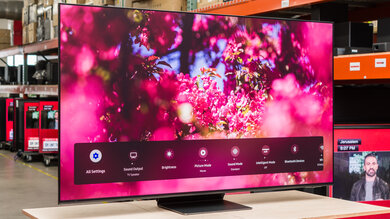
The TV has a single physical button. Pressing it brings up a menu with six options: power, input, volume up and down and channel up and down. A short click changes options and a long click selects them.
for pictures & test results

- Manual
- Batteries
- Remote
- Wall mount hole covers
- Spare screws