Our Verdict
Great TV for most usages. The Vizio P's picture quality in a dark room is some of the best available for an LED TV, and it handles sports and SDR video games very well. Unfortunately, though, its narrow viewing angle causes its picture quality to degrade when viewed at an angle.
- Great picture quality in a dark room
- Low input lag in SDR
- Brighter than average
- Color gamut could be better for HDR
- Picture quality degrades at an angle
- No TV tuner
The Vizio P Series 2017 is a great choice for movies in a dark room. It can produce very deep blacks thanks to its local dimming feature which gives a lot of depth to the image.
The Vizio P's capabilities for TV shows are about average. Its picture quality is great but isn't the best at handling reflections and it doesn't upscale low-resolution content as well as some other competitors.
Good TV for watching sports. The screen's uniformity is decent, and it gets quite bright. It has very low motion blur too, so fast moving objects remain clear and visible.
Great TV for playing video games. The Vizio P Series offers a "gaming" HDMI port that reduces the input lag providing a very responsive experience. The P series 2017 also has a flickering feature available which greatly enhances the clarity of motion which is great.
Very good TV for watching HDR movies. It can get fairly bright, which is important, but it also has a large color volume and can display 10 bits of color depth for smoother gradients. It's not the most saturated TV though, since it cannot reproduce a very wide color gamut.
Good TV for HDR gaming. The Vizio P offers a great HDR picture quality overall, but its input lag with HDR content could be a bit lower.
Very good PC monitor. The low input lag and motion blur keep mouse movements responsive. It also supports a wide variety of resolution including 4:4:4 chroma and 120hz refresh rate at 1080p.
Changelog
- Updated Mar 12, 2018: Converted to Test Bench 1.2.
- Updated Jan 23, 2018: Retested input lag with the latest firmware (3.4.8.15). HDMI port 5 is unaffected, but the input lag of HDMI port 1 is ~9 ms higher across the board when 'Game Low Latency' is enabled.
- Updated Oct 31, 2017: Retested 24p over 60Hz with the 3.4.8.5 update and judder is still present.
- Updated Sep 20, 2017: Tested 1080p @ 120 Hz input lag using our new input lag tool.
Check Price
Differences Between Sizes And Variants
We tested the 65" (P65-E1). For the most part, we expect our review to be valid for the 75" (P75-E1) variant of the Vizio P Series 2017, but the 55" (P55-E1) has a few differences:
- 55" (Vizio P55-E1): This size has an IPS panel instead of VA. It will have better color accuracy at an angle, but worse contrast and blacks from in front (in the 1000:1 ballpark).
| Size | Model | LCD Type | Effective Refresh Rate | Real Refresh Rate | Local Dimming Zones |
| 55" | P55-E1 | IPS | 240 Hz | 120 Hz | 126 |
| 65" | P65-E1 | VA | 240 Hz | 120 Hz | 128 |
| 75" | P75-E1 | VA | 240 Hz | 120 Hz | 128 |
Popular TV Comparisons

The P Series offers great picture quality at a competitive price, but it faces tough competition in its price. For a larger size though, it is a pretty good choice.
The Sony X900E is somewhat better than the Vizio P Series XLED 2017. The Sony X900E has better upscaling, which is important if you watch a lot of cable, and better gray uniformity. The Vizio P Series 2017, on the other hand, has a better input lag and a faster response time, which are important to those who play a lot of games. Finally, the Vizio P Series 2017 has better black frame insertion (BFI,) which can result in a clearer image for gamers.
The Vizio P Series XLED 2017 is significantly better than the Vizio M Series 2017. The P Series has lower input lag and lower response time, which is great if you play video games. The P Series has better local dimming and is equipped with motion interpolation for those who like the soap opera effect. Finally, the P Series is better suited for watching TV shows in brighter rooms, as it has higher brightness to fight glare and slightly better reflection handling.
The Vizio P Series XLED 2017 is slightly better than the TCL 6 Series 2018. The Vizio P Series 2017 is much better for watching movies as it has better local dimming, better black uniformity, and better motion interpolation. The TCL R617 has better input lag, which is great if you play video games or use the TV as a PC monitor. If you watch a lot of TV shows, the TCL has better upscaling and can handle reflections slightly better.
The Vizio P Series 2018 is better than the Vizio P Series XLED 2017 in almost every use. The P Series 2018 has lower input lag, which is great if you play video games or HDR games. It also has better reflection handling, so you can place it in a room with many light sources without any issue. Finally, the Vizio P Series 2018 has a faster response time, thus you will notice only a small blur trail in the image when you watch fast action sports.

We buy and test dozens of TVs yearly, taking an objective, data-driven approach to deliver results you can trust. Our testing process is complex, with hundreds of individual tests that take over a week to complete. Most of our tests use specially designed test patterns that mimic real content, but we also use the same sources you have at home to ensure our results match the real-world experience. We use two main tools for our testing: a Colorimetry Research CR-100 colorimeter and a CR-250 spectroradiometer.
Test Results
Older Test Bench: We tested this product using an older TV test methodology before a major update. Some of the test results below aren't directly comparable with other TVs. Learn more
for pictures & test results

The design of the P Series 2017 is simple, and the same as the previous year's P Series 2016. It has a wide metal stand, which supports the TV well but requires a large table. It is stable, and most of the inputs can be easily accessed if wall mounted. It looks quite good, but won't stand out as much as some other high-end TVs such as the MU9000 or SJ8500.
for pictures & test results

The stand of the TV is quite wide, but is strong and provides very good support. It feels high quality too, due to the heavy metal.
Footprint of the 65" TV stand: 11.1" x 50.0"
for pictures & test results

The rear of the TV is simple and made of plastic. Most of the inputs are easy to access even if placed next to a wall as they run parallel to the back of the TV.
for pictures & test results

The borders have an average thickness, but still look quite good with a textured metal finish.
for pictures & test results

The TV appears quite thick when viewed from the side due to the full-array backlight. It will stick out a bit if wall mounted, but the metal borders look good.
for pictures & test results
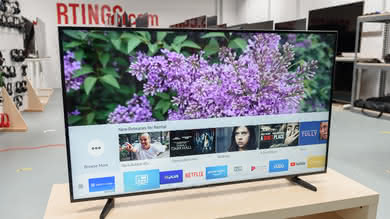
The TV gets a little warm to the touch along the top edge and in a few places on the back, but this isn't a problem. There are air vents along the top and bottom of the TV that keep it cool.
for pictures & test results

The build quality of the P Series 2017 is good. Metal is used along the frame and for the stand, so the TV feels quite rugged. The rear plastic has a bit of flex, but this isn't an issue for normal use.
for pictures & test results

Great native contrast ratio for the 2017 Vizio P TV. This high native contrast ratio means that dark scenes will be displayed really well and with really deep blacks, especially when the TV is set in a dark room.
When the local dimming is turned on, the contrast ratio nearly doubles, which is even better. This is a clear sign that the local dimming is very effective. The black level is literally cut in half, which is great for HDR content, especially HDR movies.
for videos & test results

The Vizio P 2017 has a great local dimming. In fact, it is the same as the 2016 Vizio P, since the TV is essentially the same. Overall, the local dimming does a good job limiting the blooming around our moving highlight, but similarly, as the 2016 version, it still dims the moving highlight too much, especially when transiting from one dimming zone to another. Fortunately, this is less obvious when watching movies and we recommend to turn on the local dimming feature, named 'Active LED Zones' on this Vizio TV.
Great SDR peak brightness. The TV's great ~500 cd/m² brightness is only marred by how its local dimming dims the smaller white windows. This means darker scenes will be more dim than intended.
Because of this local dimming behavior the overall brightness is less than the Sony X900E, which has similar real scene brightness. The P Series 2016 has similar brightness and behavior to the 2017; even though the 2017 is a little dimmer in every test, this is within panel variation between units of the same TV, and isn't noticeable in person.
Decent HDR peak brightness, but not as good as it could be because of the TV's local dimming behavior. Most TVs with local dimming make highlights brighter than their full screen white brightness, however the Vizio P dims highlights in even normal scenes, so its full screen white is its highest brightness. Because of this highlights in dim scenes will be much less bright than intended.
Because of this behavior the overall brightness is less than the X900E, which has a similar full screen white brightness. The P Series 2016 has similar brightness and behavior to the 2017 model; though the 2017 is a little less bright in every test, this is within unit variation for the same TV, and isn't noticeable in person.
Update 08/01/2017: In HDR the 'Backlight' setting doesn't change the peak brightness, but changes the brightness of everything else, as explained in the Color Gamut section of the review. Backlight 50 is recommended for a dark room and Backlight 100 is recommended for a bright room.
for pictures & test results

for pictures & test results

The Vizio P 2017 gray uniformity could be better. The corners and sides are all a bit darker than the center, with some faint darker vertical band also visible in the center. Luckily, the vertical bands in the center are not very visible while watching normal content since they are just a bit darker than the average of the screen. Dirty screen effect is visible very slightly and not very annoying.
Looking at our 5% gray uniformity test picture, you can see that both sides are slightly brighter, but this is only a result of the narrow viewing angle.
for videos & test results

for pictures & test results
for pictures & test results
for pictures & test results
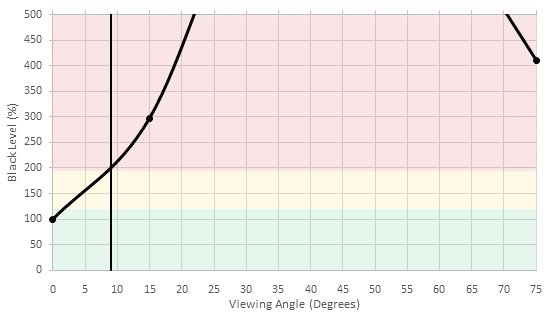
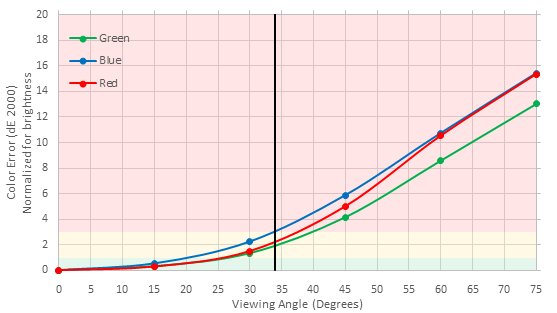
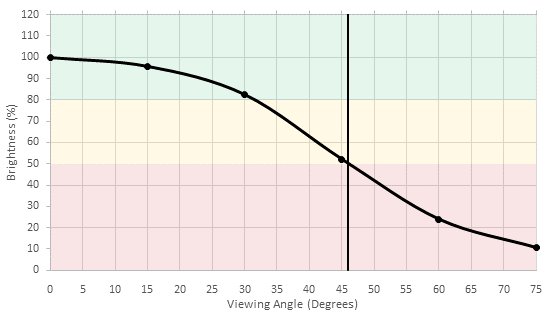
Poor viewing angle, though average for a TV with a VA panel. Blacks turn grey and colors shift when the TV is viewed from a small angle, while brightness decreases at a more moderate angle. This TV isn't well suited for a room where people often view the TV from the side.
The 55" Vizio P uses an IPS panel with a much better viewing angle, but worse picture quality when viewed from straight in front.
for pictures & test results

for pictures & test results

Outstanding black uniformity for the Vizio P Series 2017. The native black uniformity (when the local dimming is turned off) is very good and the overall screen blacks are very uniform. There is not any visible clouding or flashlighting near the corners or sides, which is very good.
When the local dimming is turned on, there is some blooming around the center white cross, but once again, it is very limited and we can clearly see that the local dimming implementation is very good on the 2017 Vizio P.
for pictures & test results

for pictures & test results

for pictures & test results

The reflection handling of the P Series 2017 is good. It has a semi-gloss finish which reduces the intensity of reflection by diffusing them across the screen, but also causes ambient glare to raise the perceived black level. This should be fine for most rooms but may be an issue in an especially bright living room.
for pictures & test results

for pictures & test results

for pictures & test results

The Vizio P 2017 has a great accuracy out of the box when the TV is set to the 'Calibrated Dark' picture mode and with the 'Normal' color temperature. It is still a bit warm on the 'Normal' color temperature, but it is far more accurate than the 2 other color temperature available ('Computer' and 'Cool'). As is, this TV could be used by almost anyone without the need to do a calibration
Overall, the white balance dE is not bad as it is just a bit over the 3.0 mark, which is where enthusiasts would begin to notice the inaccuracy. As for the gamma, it is tracking very closely our 2.2 target, which is great. Finally, the color dE is very reasonable and should not really be a problem as is, unless you are a professional who has already worked with other calibrated monitors or TVs.
for pictures & test results

for pictures & test results

for pictures & test results

After calibration, the Vizio P Series 2017 is very accurate and if not almost perfect. The white balance control works well and is accurate and precise, as each IRE control points does not affect the adjacent points. which can happen on some TV and make the whole calibration process a pain to do. The color space management ('Color Tuner') is also very effective and the whole color dE was brought down to 0.97, which at this level, any inaccuracies are almost unnoticeable. Finally, the gamma curve was flattened to track our 2.2 target almost right on.
You can find our calibration settings here.
for pictures & test results

Upscaling of low-quality content such as DVDs is a bit more blocky than other TVs, similar to the Vizio P Series 2016.
for pictures & test results

720p content such as cable looks decent when upscaled. Some minor haloing artifacts are visible and the image is slightly more soft than most other TVs.
for pictures & test results

1080p content such as Blu-rays look good. The image remains clear and sharp.
for pictures & test results

Content at the native 4k resolution of the TV looks good. No issues can be seen.
for pictures & test results

for pictures & test results

for pictures & test results

Wide HDR color gamut, though not as wide as the Sony X900E and many high end TVs. Our color gamut tests are done at a 75% stimulus brightness; at this high brightness the Vizio P sacrifices color saturation in order to make colors brighter. This is visible as terrible color accuracy in both color gamut images. The same P3 and 2020 tests done at a 50% stimulus brightness show much better color accuracy, because the TV can easily reach this brightness.
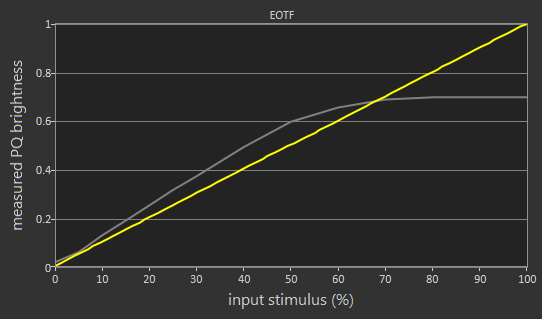
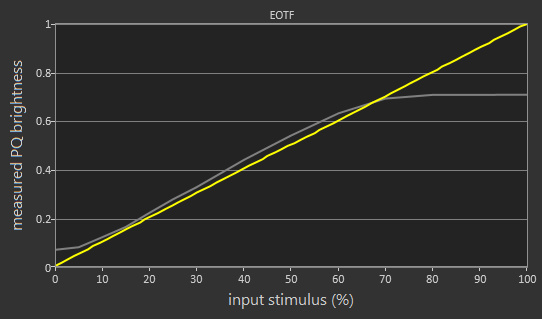
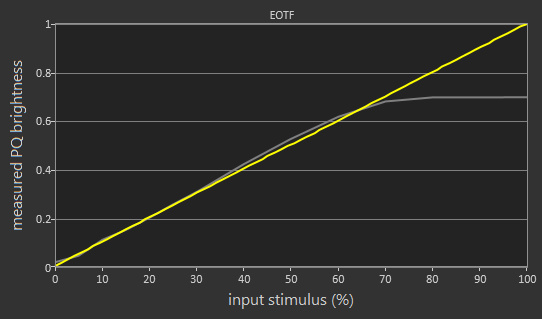
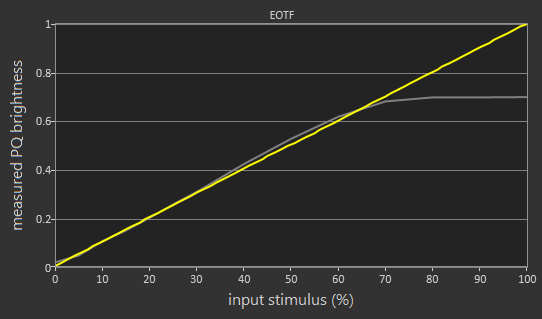
Update 08/01/2017: It was found that changing the 'Backlight' setting in HDR changes the EOTF and doesn't actually change the peak brightness. At Backlight 100 (shown here with local dimming on and off) the EOTF is much brighter than the PQ curve, which is good for bright rooms. At Backlight 50 (local dimming on, off) the EOTF follows the PQ curve very well, which is good for dark rooms. At Backlight 50 the 'Game' and 'Computer' picture mode EOTFs (local dimming on) follow the PQ curve very well.
for pictures & test results

for pictures & test results

Okay color volume, but mostly limited by the color gamut and black level. The TV's great local dimming lets it extend its wide color gamut to a large range of brightnesses. One problem though is how the DCI P3 color gamut narrows drastically at very high brightness values, as the TV sacrifices color saturation to make them brighter. This is most visible in the P3 image in our Color Gamut section. This will mean that the colors of very bright highlights will look a little washed out.
for pictures & test results

The gradient is very smooth with only some small imperfection in the darker shades of colors, but this is nothing really problematic overall. 8-bit banding is not visible since this is a 10-bit panel. The performance is almost the same as the Vizio P Series 2016.
for pictures & test results

Perfect result four our image retention test for the 2017 Vizio P. This result is in line with most LED TVs that use a VA panel.
We don't expect VA panels to experience permanent image retention, as the VA panel in our long-term test appears immune.
for pictures & test results

The pixel structure looks identical to the P Series 2016.
for pictures & test results

for pictures & test results

The response time of the P Series 2017 is very good, resulting in a short trail following moving objects. This is great when watching fast-moving content. This result is very similar to the P Series 2016.
for pictures & test results

The TV uses PWM at 120Hz to dim the backlight, starting at 99/100 backlight setting. Lowering the setting shortens the duty cycle, while amplitude remains constant. Backlight that uses PWM results in duplications following moving objects, but it does help to clear up motion slightly.
for pictures & test results

for pictures & test results

It is possible to reduce the flicker frequency to 60 Hz by enabling the 'Clear Action' setting. If you don't mind the visible flicker produced by this option, it helps to clear up fast moving content. The Vizio P 2017 increases backlight amplitude when Clear Action is enabled, which helps keep screen brightness constant even while using Black Frame Insertion.
for pictures & test results

for pictures & test results

The P Series 2017 can interpolate lower frame rate content using its 120 Hz panel. To add the soap opera effect to 60 fps content, increase the 'Reduce Motion Blur' slider. The 'Reduce Judder' slider is used to interpolate 30 fps content. Note that any motion interpolation will introduce artifacts, so use a small value unless you really like the soap opera effect.
The Vizio P Series 2017 can display 60fps content without stutter, but stutter may be visible with 24p movies - especially if they have wide panning shots. This is a result of the fast response time, which results in very little blur to smooth between frames.
The Vizio P Series 2017 can display 24p movies without judder when movies are played from 24p sources, like DVD and Blu-ray players, or from the native apps, and this without the need to turn on any related option. When 24p movies are played either from a 60p or 60i sources (like cable or satellite boxes), The TV can't remove completely judder as seen in this picture even when 'Pure Cinema' is turned on. This is a bit odd, as the 2016 Vizio P Series was able to remove judder without issues with the previous firmware. This may be a firmware issue and we will keep track of it and update the results of the test if it is fixed in the future.
Update 10/31/2017: With the latest firmware (3.4.8.5) judder is still present from 60Hz signals, even with 'Pure Cinema' enabled.
Update 01/17/2018: Judder has been retested with the latest firmware (3.4.8.15), and remains unchanged.
The Vizio P Series 2017 has a 120Hz panel without support for more advanced features such as FreeSync.
Excellent low input lag for SDR content, but only okay input lag for HDR content. HDMI port 5 is a low bandwidth port that doesn't support HDR, but has much lower input lag than the other ports, making it excellent for SDR gaming. We conducted all tests on HDMI ports 1, 2 and 5: ports 1 and 2 have identical input lag within variance, but port 5 has much lower lag for all resolutions that it can support, including 4k @ 60 Hz @ 4:2:0. These results are almost identical to last year's P Series 2016.
| Test | HDMI 1 | 2 | 5 |
| 1080p @ 60 Hz | 46.0 | 45.3 | 16.0 |
| + 4:4:4 | 50.9 | 50.6 | 15.9 |
| out of game mode | 129.3 | 128.6 | 82.6 |
| with interpolation | 125.9 | 124.3 | 77.7 |
| 4k @ 60 Hz | 44.0 | 43.3 | 15.9 |
| + HDR | 43.5 | 43.5 | N/A |
| + 4:4:4 | 43.7 | 43.2 | N/A |
| + 4:4:4 + 8 bit HDR | 43.7 | 43.2 | N/A |
| out of game mode | 127.3 | 126.5 | 82.6 |
| with interpolation | 123.9 | 122.0 | 77.7 |
Update 09/20/2017: Tested 1080p @ 120 Hz input lag using our new input lag tool on HDMI port 5. It is ~4 ms faster than the 1080p @ 60 Hz input lag, which is due to the faster scan time of a 120 Hz signal.
Update 01/23/2018: Retested input lag with the latest firmware (3.4.8.15). HDMI port 5 is unaffected, but the input lag of HDMI port 1 is ~9 ms higher across the board when 'Game Low Latency' is enabled. This was also the case with the M Series 2017 and the E Series 2017 on the same firmware.
All common resolutions are supported on HDMI ports 1-4, and most on port 5.
Port 5: 4k @ 60 Hz @ 4:4:4 or 4:2:2 color is not supported (not enough bandwidth). HDR is also not supported. 4:4:4 color is shown properly in any picture mode.
Ports 1-4: 4k @ 60 Hz @ 4:4:4 or 4:2:2 is only supported when 'Full UHD Color' is enabled for the port being used. 4:4:4 color is only shown properly in the 'Computer' picture mode.


Like the 2016 model, the Vizio P Series 2017 doesn't have a TV tuner.
HDMI port 5 does not support HDR or HDMI 2.0 full bandwidth. To passthrough DTS or Dolby Digital depending on the content, set 'Digital Audio Out' to 'Bitstream' in the sound options.
for pictures & test results

Average frequency response. Bass extension is quite poor, and the response is a bit uneven overall. At Barely 89dB SPL, it isn't a very loud TV either.
for pictures & test results

Subpar distortion levels. Across all volumes, the Vizio P Series shows more distortion than average. They skyrocket at maximum volume with a noticeable peak at 1.5KHz.
for pictures & test results

There is a side menu that can be accessed in any input, that contains all the TV's settings. It's fairly responsive and easy to use. There is also the app screen, accessed through the 'SmartCast' input, that only contains a few apps and has very choppy animations. Because the app screen is treated as another input and has no dedicated remote button, clicking through all the other input to get to it takes a bit of time.
Neither the TV's interface or the phone and tablet app have ads. The TV's main app page does have a scrolling banner for suggested content, which can be a little annoying.
for pictures & test results

The TV can play content cast from most popular apps on a smartphone or tablet. In addition SmartCast was recently updated to support built-in apps, but currently on our unit only Netflix, Amazon Video, Hulu, Crackle, iHeartRadio, Xumo, Vudu and PlutoTV are available (not YouTube). More apps are expected to be added soon. Animations in apps and when browsing the interface are very choppy or have low frame rate, but the actions themselves don't have much lag.
for pictures & test results

Instead of the tablet remote of the Vizio P 2016, the 2017 P series has a full basic remote that can navigate the TV's new on screen interface. However the remote is very basic, offering only buttons and has no smart features at all.
for pictures & test results
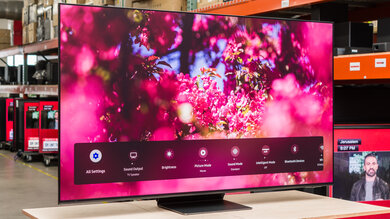
The highlight of the SmartCast platform is the amazing phone and tablet app, which can do everything the physical remote can do and more. All the TV's settings can be changed in the app itself, inputs can be switched, the phone or tablet's keyboard can be used for text entry on the TV, and the app can serve as either a touchpad remote or button remote for the TV.
for pictures & test results

The TV has four physical buttons: power, volume up/down, and input.
for pictures & test results

- Manual
- Batteries
- Remote HDMI Cable