Sceptre C325W  Monitor Review

Reviewed Oct 03, 2018 at 09:47am
Tested using Methodology v1.0 
Sceptre C325W
6.1
Mixed Usage 
6.4
Office 
6.2
Gaming 
6.1
Multimedia 
6.0
Media Creation 
4.7
HDR Gaming 
 0

The Sceptre C325W-1920R is a budget 1080p VA 32-inch LCD monitor with mediocre picture quality and decent motion handling. It has a high native contrast ratio and can get decently bright to overcome glare in an average lit room. It has good reflection handling and very good gray uniformity. Unfortunately, the input lag and the pixel response time are not good for serious gaming. Finally, the bad ergonomics might have you looking for a good VESA mount to help you place it comfortably.

How We Test Monitors

We buy and test more than 30 monitors each year, with units that we buy completely on our own, without any cherry-picked units or samples. We put a lot into each unbiased, straight-to-the-point review, and there's a whole process from purchasing to publishing, involving multiple teams and people. We do more than just use the monitor for a week; we use specialized and custom tools to measure various aspects with objective data-based results. We also consider multiple factors before making any recommendations, including the monitor's cost, its performance against the competition, and whether or not it's easy to find.

Our Verdict

6.1
Mixed Usage 

The Sceptre C325W-1920R is a mediocre monitor for most usages. The size is great but the resolution is not enough to make it stand out. The picture quality is below average but has a good contrast ratio for darker rooms. The motion blur and input lag are decent but they will not please any competitive gamer.

Pros
  • High native contrast ratio.
  • Large size.
Cons
  • Poor vertical viewing angles.
  • Disappointing motion blur.
  • Bad ergonomics.
6.4
Office 

The Sceptre C325W is only acceptable for office use. It has a large size screen but its resolution is only 1080p, and thus the usable area is limited. The picture quality is below average, but it does remain quite accurate when viewed at small angles so you can share the screen with your coworkers. Unfortunately, the stand's mobility is very restrictive, and it might be hard to position according to your preferences.

6.2
Gaming 

The Sceptre C325W is a mediocre monitor for playing video games. It only supports 60Hz and has no extra features to improve the gaming experience. Most serious gamers will be disappointed due to the input lag performance and the pixel response time, which leaves a longer than usual blur trail. Although the monitor has a nice curve, the subpar picture quality and low pixel density do not deliver an immersive gaming experience.

6.1
Multimedia 

the Sceptre C325W is a passable monitor for multimedia use. Although it has a large screen size, its FHD resolution does not allow you to put much detail on the screen and thus some high-res content will not show as intended. The ergonomics are bad and you will have a hard time positioning it to your likings.

6.0
Media Creation 

The Sceptre C325W is an unremarkable monitor for media creation. It has a large screen size but only an FHD resolution that limits the amount of detail you can display. The input lag is ok for most users but if you are creating media you might not find it satisfactory.

4.7
HDR Gaming 

The Sceptre C325W doesn't support HDR.

  • 6.1
    Mixed Usage
  • 6.4
    Office
  • 6.2
    Gaming
  • 6.1
    Multimedia
  • 6.0
    Media Creation
  • 4.7
    HDR Gaming
  • Changelog

    1.  Updated Jul 02, 2021: Changed height adjustment result from 'N/A' to '0' to match our methodology.
    2.  Updated Oct 03, 2018: Review published.
    3.  Updated Oct 01, 2018: Our testers have started testing this product.
    4.  Updated Oct 01, 2018: Early access published.

    Check Price

    Differences Between Sizes And Variants

    We tested the Sceptre C325W, however, there are a series of Sceptre monitors with differing sizes, resolutions and other features - some of these are listed below.

    If someone comes across a different type of panel or if their monitor doesn't correspond to our review, let us know and we will update the review. Note that some tests such as the gray uniformity may vary between individual units.

    Model Size Refresh Rate FreeSync Resolution Curved
    E248W-19203A 24" 75Hz Yes 1080p no
    E275W-1920 27" 60Hz No 1080p no
    C275B-144R 27" 144Hz Yes 1080p yes
    C328B-144KN 32" 144Hz Yes 1080p yes
    C325W-1920R 32" 60Hz No 1080p yes

    Popular Monitor Comparisons

    Comparison picture

    The Sceptre C325W is a very basic monitor with mediocre performance. You should be able to find better monitors out there. See our recommendations for the best monitors under $200, the best 1080p monitors, and the best gaming monitors under $200.

    HP V320

    The HP V320 is much better than the Sceptre C325W. The HP V320 has a lower input lag and a faster pixel response time that only leaves a small blur trail in fast action scenes which is great if you play games. It also has wider viewing angles because of its IPS panel, so you can show your work to your colleagues easier. On the other hand, the Sceptre C325W has better reflection handling and is suitable for a room with many light sources.

    Dell U2717D

    The Dell U2717D is much better than the Sceptre C325W. The Dell U2717D has much better ergonomics so you can position it to your liking much easier. Also due to its IPS panel, it has wider viewing angles to allow sharing your work with a colleague. The Dell U2717D also has a faster pixel response time that displays less blur trail, and a much better resolution that allows it to show more detail on the screen. The Sceptre C325W has a higher native contrast ratio which makes blacks look deep in a dim environment.

    LG 27UD58-B

    The LG 27UD58-B is significantly better than the Sceptre C325W. The LG 27UD58-B has better viewing angles due to its IPS panel. It also has a much lower input lag and a faster pixel response time and supports the FreeSync VRR implementation which is excellent if you play games. The LG 27UD58-B has a much better resolution that allows it to display more detail on the screen. The Sceptre C325W, on the other hand, has a higher native contrast ratio that delivers deep blacks, and a better reflection handling so it can be placed in a room with many small light sources.

    Dell D3218HN

    The Dell D3218HN is significantly better than the Sceptre C325W. The Dell D3218HN has wider viewing angles due to its IPS panel and a better input lag which is great if you play video games. The Dell D3218HN also has a faster pixel response time and will leave a shorter blur trail. The Sceptre C325W, on the other hand, has better reflection handling, which is great if you have a room with many small windows.

    Show more 

    Test Results

    Sort:
    RATINGS
    Category:
    All
    Design
    Style
    Size32"
    CurvedYes
    Curve radius1800R
    Weight (without stand)
    10.8 lbs (4.9 kg)
    Weight (with stand)
    11.9 lbs (5.4 kg)

    The design of the Sceptre C325W is decent. The entire casing feels sturdy and it has a clean, professional look. The stand has a unique design and supports the monitor well, while the curved profile enhances the horizontal viewing angles. The monitor, however, has very bad ergonomics. Titling is the only allowable adjustment, if you wish to raise the monitor, you will have to find something to place it on. The entire monitor-stand construction is relatively thin and you can push it pretty close to the wall.

    Stand
    Width
    11.9" (30.2 cm)
    Depth
    8.0" (20.3 cm)

    The stand of the Sceptre C325W is unique in design. It supports the monitor well, although the monitor will wobble a little if knocked.

    1.5
    Ergonomics
    Height Adjustment
    0.0" (0.0 cm)
    Switch portrait/landscapeNo
    Swivel RangeN/A
    Tilt Range-20° to 5°

    Update 07/02/2021: We previously had incorrectly listed the Height Adjustment as 'N/A' as opposed to '0'. The review has been updated to reflect this change, as the Ergonomics score has dropped slightly.

    The Sceptre C325W-1920R has bad ergonomics. The only adjustment this design allows is tilting. VESA mounting will save you a lot of trouble while trying to position it comfortably.

    Back
    Wall MountVESA 100x100

    The rear of the monitor is quite plain. All the inputs are pointed outwards and there is no cable management planning.

    Borders
    Borders
    0.5" (1.3 cm)

    The borders of the monitor are plastic and have an average thickness. When placed side-by-side in a multi-monitor setup, there will be a small gap between screens.

    Thickness
    Thickness (with stand)
    6.1" (15.5 cm)
    Thickness (without stand)
    2.9" (7.4 cm)

    The monitor looks thin when you look at it from the side. Even when attached to the stand, you will still be able to place it close to the wall.

    7.5
    Build Quality

    The Sceptre C325W is mostly made out of plastic. The entire build quality gives off a solid feel. Some small details could have been avoided, like a small gap between the lower front bezel and the screen, but this should not cause any issues.

    Picture Quality
    8.2
    Contrast
    LCD Type
    VA
    Native Contrast
    3,558 : 1
    Contrast with local dimming
    N/A

    The Sceptre C325W-1920R has a VA panel and thus a great contrast ratio. Blacks look deep in a dark room, just like the MSI Optix G27C, and this enhances the picture quality.

    0.0
    Local Dimming
    Local Dimming
    No
    Backlight
    Edge

    The Sceptre C325W-1920R does not have a local dimming feature. The video is for reference only.

    7.2
    SDR Peak Brightness
    SDR Real Scene
    258 cd/m²
    SDR Peak 2% Window
    290 cd/m²
    SDR Peak 10% Window
    290 cd/m²
    SDR Peak 25% Window
    290 cd/m²
    SDR Peak 50% Window
    290 cd/m²
    SDR Peak 100% Window
    290 cd/m²
    SDR Sustained 2% Window
    290 cd/m²
    SDR Sustained 10% Window
    290 cd/m²
    SDR Sustained 25% Window
    290 cd/m²
    SDR Sustained 50% Window
    290 cd/m²
    SDR Sustained 100% Window
    290 cd/m²
    SDR ABL
    0.000

    The Sceptre C325W-1920R can get decently bright. However, in very bright rooms, the monitor might look a little dim just like the MSI Optix G27C. For most rooms with a regular ambient light, it should be fine.

    0.0
    HDR Peak Brightness
    HDR Real Scene
    N/A
    HDR Peak 2% Window
    N/A
    HDR Peak 10% Window
    N/A
    HDR Peak 25% Window
    N/A
    HDR Peak 50% Window
    N/A
    HDR Peak 100% Window
    N/A
    HDR Sustained 2% Window
    N/A
    HDR Sustained 10% Window
    N/A
    HDR Sustained 25% Window
    N/A
    HDR Sustained 50% Window
    N/A
    HDR Sustained 100% Window
    N/A
    HDR ABL
    N/A

    HDR is not supported.

    6.2
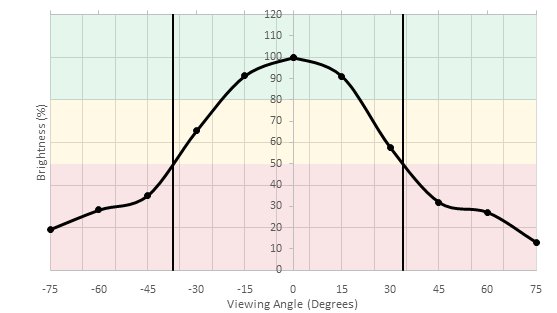
    Horizontal Viewing Angle
    Color Shift from Left
    19°
    Color Shift from Right
    18°
    Brightness from Left
    28°
    Brightness from Right
    27°
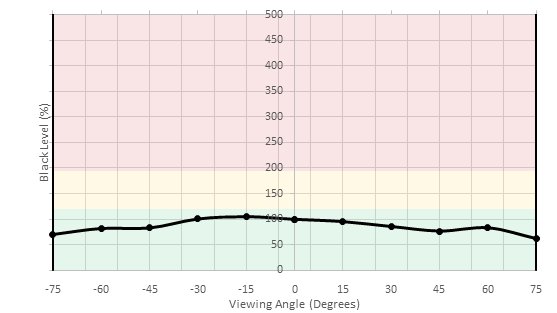
    Black Level from Left
    75°
    Black Level from Right
    75°
    Curve Radius1,800R

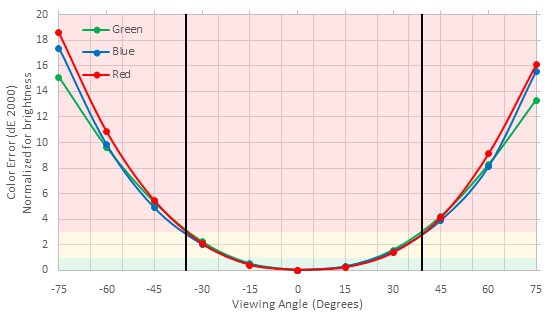
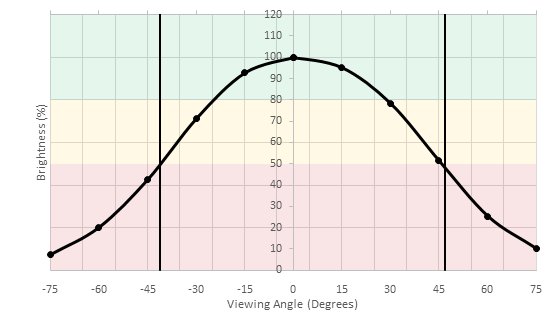
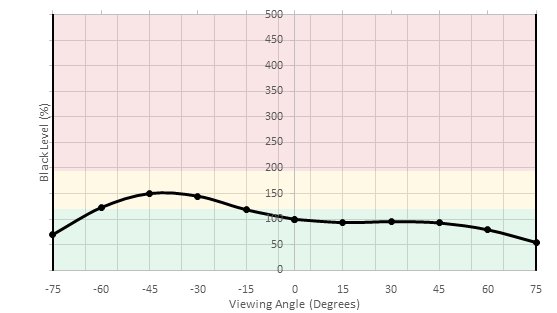
    The horizontal viewing angles of the Sceptre C325W are mediocre. This a surprising result and slightly inconsistent with other VA panels. This monitor's blacks remain at a low level throughout our entire range of horizontal viewing angle measurements, and this is great. The brightness shift and color shift, however, are the worst we have measured in VA panel monitors thus far. The overall score is boosted by the score in the blacks.

    4.0
    Vertical Viewing Angle
    Color Shift from Below
    20°
    Color Shift from Above
    20°
    Brightness from Below
    28°
    Brightness from Above
    28°
    Black Level from Below
    Black Level from Above

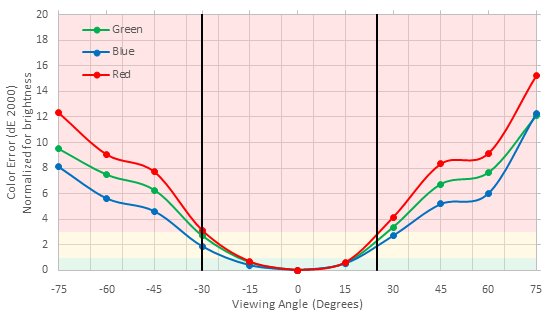
    The vertical viewing angles of the monitor are poor, worse than the MSI Optix G27C which had the worst performance up until now. Unfortunately, the angles are so bad that even the slightest movement from the vertical axis and the picture quality degrades drastically. This will create some uniformity issues when you sit close to the monitor.

    8.5
    Gray Uniformity
    50% Std. Dev.
    2.946%
    50% DSE
    0.117%
    5% Std. Dev.
    0.824%
    5% DSE
    0.094%

    The gray uniformity of this monitor is very good, especially in the darker gray levels. The only uniformity issues present are the ones caused by the poor vertical viewing angles (the corners are slightly darker). Most people will not notice any dirty screen effect when browsing the web.

    4.0
    Black Uniformity
    Native Std. Dev.
    3.343%
    Std. Dev. w/ L.D.
    N/A

    The Sceptre C325W-1920R monitor has bad black uniformity. Clouding is clearly visible all over the screen and this is not good, especially in dark scenes, in a dark room.

    7.0
    Pre Calibration
    Picture Mode
    User
    Luminance
    279 cd/m²
    Luminance Settings
    50
    Contrast Setting
    40
    RGB controls
    50-50-50
    Color Temperature
    7,246 K
    White Balance dE
    4.10
    Color dE
    2.66
    Gamma
    1.93

    The out-of-the-box color accuracy is decent. The most accurate picture mode was 'Text', but because we cannot change the backlight we are scoring with the best picture mode that allows us to do this, which was 'User'.

    The white balance dE is above our reference point of 3 which is noticeable for the enthusiasts out there, whereas the color dE is below 3 making it hard for most to spot color inaccuracies. The color temperature is cold, the gamma is below our s.RGB target and the curve is not really tracking our target curve.

    9.5
    Post Calibration
    Picture Mode
    User
    Luminance
    102 cd/m²
    Luminance Settings
    0
    Contrast Setting
    39
    RGB Controls
    62-53-46
    Color Temperature
    6,371 K
    White Balance dE
    0.87
    Color dE
    0.47
    Gamma
    2.20

    Excellent color accuracy of the monitor after calibration, which was done on the 'User' picture mode. The white balance dE and color dE were diminished to a point where it is almost impossible to notice any inaccuracies. Gamma is now tracking more closely our target s.RGB curve. Finally, we managed to correct the temperature closer to our target of 6500 K, only slightly warmer.

    You can download our ICC profile calibration here. This is provided for reference only and should not be used, as the calibration values vary per individual unit even for the same model due to manufacturing tolerances.

    8.8
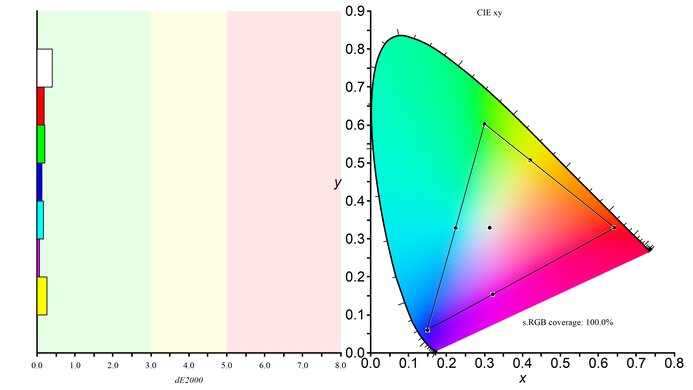
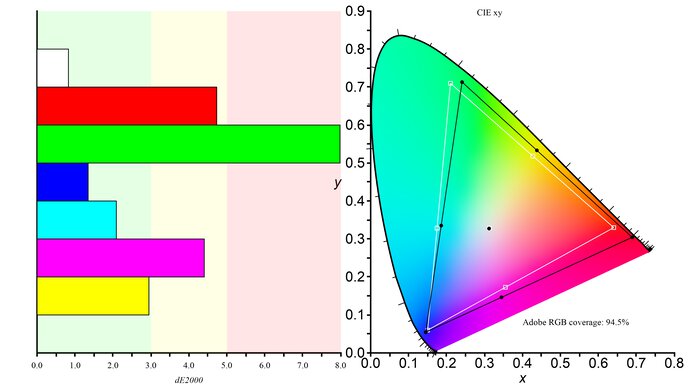
    SDR Color Gamut
    sRGB xy
    100.0%
    Adobe RGB xy
    75.7%

    s.RGB Picture Mode: User (calibrated)
    Adobe RGB Picture Mode: User

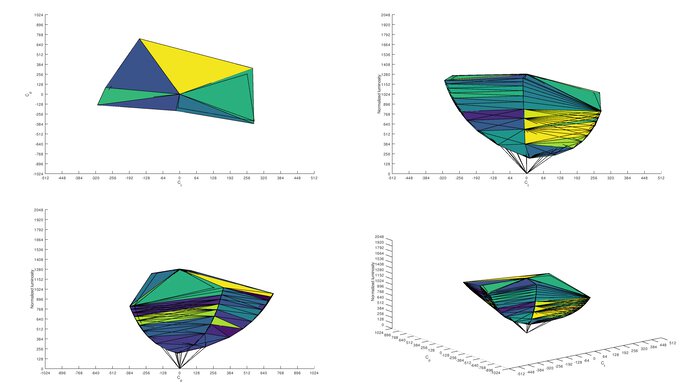
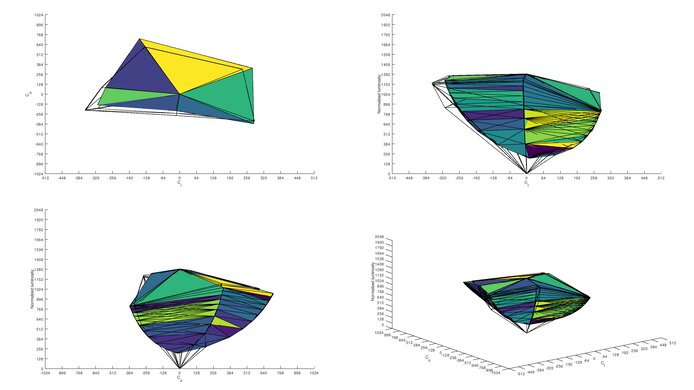
    The color gamut of this monitor is excellent. It actually covers the entire s.RGB space and for normal usage the colors are great. However, if you are a professional in the publishing industry the coverage of the wider Adobe RGB color space is not enough.

    9.1
    SDR Color Volume
    sRGB in ICtCp
    98.8%
    Adobe RGB in ICtCp
    82.9%

    s.RGB Picture Mode: User
    Adobe RGB Picture Mode: User

    Excellent color volume. The monitor can display its perfect s.RGB gamut at a large range of brightnesses. Its Adobe RGB volume suffers due to its limited gamut.

    0.0
    HDR Color Gamut
    Wide Color Gamut
    No
    DCI P3 xy
    N/A
    Rec. 2020 xy
    N/A

    HDR is not supported.

    0.0
    HDR Color Volume
    DCI-P3 in ICtCp
    N/A
    Rec. 2020 in ICtCp
    N/A

    HDR is not supported.

    10
    Image Retention
    IR after 0 min recovery
    0.00%
    IR after 2 min recovery
    0.00%
    IR after 4 min recovery
    0.00%
    IR after 6 min recovery
    0.00%
    IR after 8 min recovery
    0.00%
    IR after 10 min recovery
    0.00%

    There is no image retention after displaying our 10-minute high contrast scene, which is excellent.

    7.8
    Gradient
    Color Depth
    8 Bit

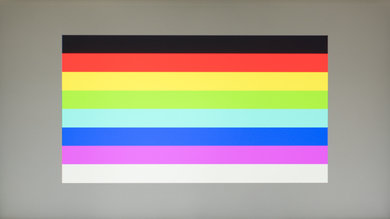
    The gradient for this monitor is very good. You can notice slight banding in the darker shades of green and gray.

    10
    Color Bleed
    Pixel row error
    0.000%
    Pixel column error
    0.000%

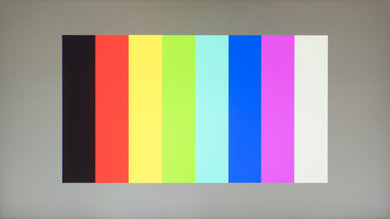
    The Sceptre C325W's screen uniformity isn't affected by large areas of uniform color, and this is great.

    8.0
    Reflections

    The monitor diffuses direct reflections across the screen but unfortunately, it can not significantly reduce their intensity. This can sometimes be bothersome if there is only one light source but the entire screen reflects that light.

    Motion
    5.0
    Motion Blur
    80% Response Time
    14.1 ms
    100% Response Time
    27.5 ms
    Best Overdrive Setting
    N/A

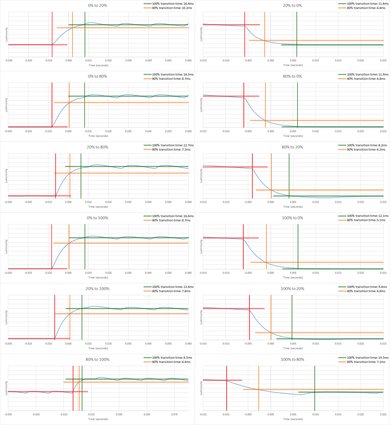
    The Sceptre C325W-1920R has a bad pixel response time. As a result, a long blur trail follows the fast-moving objects on the screen. This is far worse than all the other monitors we have tested so far. Furthermore, there is no overdrive setting that could help improve the results.

    7.5
    Image Flicker
    Flicker-freeYes
    PWM Dimming Frequency
    0 Hz
    Black Frame Insertion (BFI)
    No
    BFI Maximum Frequency
    N/A
    BFI Minimum Frequency
    N/A

    This monitor does not use PWM Dimming to lower the backlight and this is good as flicker can bother some people. At the same time, there is no option to insert flicker to make the image crisper.

    6.7
    Refresh Rate
    Variable Refresh Rate
    No
    Native Refresh Rate
    60 Hz
    Factory Overclock
    N/A
    Variable Refresh Rate
    No
    G-SYNC Compatible
    No
    VRR Maximum
    N/A
    VRR Minimum
    N/A
    VRR Maximum With OC
    N/A
    VRR Supported ConnectorsN/A

    This monitor has the very basic refresh rate of 60Hz. There are no advanced features like overclocking or VRR.

    Inputs
    6.8
    Input Lag
    Native Resolution
    27.1 ms
    Non-Native Res @ Native Refresh
    27.6 ms
    Native Resolution @ 60 Hz
    27.1 ms
    Variable Refresh Rate
    N/A
    10 bit HDR
    N/A
    Black Frame Insertion (BFI)
    N/A

    The input lag of this monitor is okay, but not good enough for hardcore gamers. For most people though this is ok.

    7.4
    Resolution and Size
    Native Resolution1920 x 1080
    Aspect Ratio16:9
    Megapixels2.1 MP
    Pixel Density70 PPI
    Screen Diagonal31.5"
    Screen Area424 in²

    This large screen monitor supports only FHD resolution. This is a disappointment as you can not display much detail or multitask easily.

    Inputs
    Total Inputs
    DisplayPort1 (DP 1.2)
    Mini DisplayPortNo
    HDMI1 (HDMI 1.4)
    DVINo
    VGA1
    DisplayPort OutNo
    USBNo
    USB CNo
    Analog Audio Out 3.5mm1
    Microphone In 3.5mm1
    Digital Optical Audio OutNo
    Analog Audio Out RCANo
    Power SupplyExternal Brick
    Features
    Additional Features
    Speakers
    No
    HDR10No
    Multiple input display
    No

    The monitor does not have any additional features

    On-Screen Display (OSD)

    The OSD is plain, intuitive and easy to use.

    Controls

    The controls are easy to use and well-placed, making them easy to reach.

    In The Box

    • User Manual
    • HDMI cable
    • VGA cable
    • AC adapter
    • Small screwdriver