
The LG CX OLED is an excellent high-end TV. It's part of LG's popular OLED lineup, sitting behind the LG GX OLED, and it delivers the same exceptional picture quality as other options. It can turn individual pixels off, which results in a near-infinite contrast ratio for perfect blacks, and there's no blooming around bright objects. It's packed with gaming features like variable refresh rate (VRR) support, HDMI 2.1 inputs, and a 120Hz panel with a near-instantaneous response time. It also performs well in bright environments as it has fantastic reflection handling, but its SDR brightness is just decent. Sadly, OLEDs have the risk of permanent burn-in, which can be caused by constant exposure to static elements, but we don't expect this to be an issue for most people. We also tested the 48 inch as a monitor, which you can read about here.
Our Verdict
The LG CX is excellent overall. It's fantastic for dark room viewing because it has a near-infinite contrast ratio and perfect black uniformity. Gaming is incredible thanks to the 120Hz panel, HDMI 2.1 inputs, and VRR supports. It has wide viewing angles, making it a great choice for watching TV shows and excellent for sports with a large group of people. It's also excellent for watching HDR content as it displays a wide color gamut, but it may not get bright enough to make highlights really pop.
- Near-infinite contrast ratio.
- Wide viewing angles.
- VRR support.
- Displays wide color gamut.
- Risk of permanent burn-in.
- Only decent HDR peak brightness.
The LG CX OLED is fantastic for watching movies in a dark room. With its OLED screen, it can produce perfect blacks, which is amazing for watching movies in the dark. It upscales 1080p content well, it can remove judder from 24p sources like Blu-ray players, and has a near-instantaneous response time, but unfortunately, that makes some content appear to stutter.
- Near-infinite contrast ratio.
- Perfect black uniformity.
- Removes 24p judder from any source.
- Lower-frame rate content stutters.
The LG CX is great for watching TV shows in bright rooms. It has fantastic reflection handling, but it doesn't get bright enough to combat a ton of glare in well-lit rooms. It has wide viewing angles for when you want to watch your favorite show with the entire family. Also, it upscales 720p content without any issues. Unfortunately, like all OLED TVs, it has the risk of burn-in, which could be a problem with constant exposure to static logos.
- Wide viewing angles.
- Fantastic reflection handling.
- Upscales lower-resolution content well.
- Doesn't get bright enough to combat glare.
The LG CX OLED is excellent for sports in well-lit rooms. It has fantastic reflection handling, but its peak brightness is just decent. It also has wide viewing angles, great for watching the game with a group of friends. It has a near-instantaneous response time that makes fast-moving content look smooth, and there's no dirty screen effect in the center.
- Wide viewing angles.
- Fantastic reflection handling.
- Upscales lower-resolution content well.
- Near-instantaneous response time.
- Doesn't get bright enough to combat glare.
The LG CX OLED is incredible for playing video games. The input lag is very low in Game Mode, it has a near-instantaneous response time, and it supports G-SYNC, FreeSync, and HDMI Forum VRR to reduce screen tearing. Unfortunately, static menus in video games could be a problem for an OLED TV, as it has a risk of permanent burn-in. Luckily, it's a great choice for dark room gaming since it can produce perfect blacks.
- Near-infinite contrast ratio.
- Near-instantaneous response time.
- Low input lag.
- VRR support.
- Risk of permanent burn-in.
The LG CX is excellent for HDR movies. The LG CX OLED covers nearly all of the DCI P3 color space used in most HDR content and has good coverage of the wider Rec. 2020 color space. It can produce perfect blacks, remove judder from all sources, and has a near-instantaneous response time. Unfortunately, its HDR peak brightness is just decent, and some highlights may not pop as intended.
- Near-infinite contrast ratio.
- Perfect black uniformity.
- Displays wide color gamut.
- Only decent HDR peak brightness.
The LG CX OLED is fantastic for HDR gaming. It has a ton of gaming features like a low input lag, VRR support, and a very quick response time. Also, it displays a very wide color gamut in HDR and has a near-infinite contrast ratio. Unfortunately, its HDR peak brightness in Game Mode is only okay, and it can't display very bright colors either.
- Near-infinite contrast ratio.
- Low input lag.
- VRR support.
- Displays wide color gamut.
- Risk of permanent burn-in.
- Only decent HDR peak brightness.
The LG CX is excellent to use as a PC monitor. It has low input lag and a quick response time for a smooth and responsive desktop experience. Even though it doesn't get extremely bright, visibility shouldn't be an issue due to the fantastic reflection handling. Unfortunately, OLEDs have the risk of permanent burn-in, which can be caused by constant exposure to static elements.
- Wide viewing angles.
- Fantastic reflection handling.
- Near-instantaneous response time.
- Low input lag.
- Doesn't get bright enough to combat glare.
- Risk of permanent burn-in.
Changelog
- Updated Sep 26, 2025: We uploaded the latest brightness measurements and uniformity photos for the Accelerated Longevity Test.
- Updated Jul 08, 2025: We uploaded the latest brightness measurements and uniformity photos for the Accelerated Longevity Test.
- Updated Apr 17, 2025: We uploaded the latest brightness measurements and uniformity photos for the Accelerated Longevity Test.
- Updated Feb 11, 2025: We uploaded the latest brightness measurements and uniformity photos for the Accelerated Longevity Test.
Check Price
Differences Between Sizes And Variants
We tested the 55 inch CX (OLED55CXPUA) and we expect our results to be valid for the 65 inch (OLED65CXPUA), and 77 inch (OLED77CXPUA) models too.
We've also tested the 48CX (OLED48CXPUB) as a monitor. Note that as there are some significant differences between our TV and Monitor test methodology and scoring, many of the results aren't directly comparable between the two.
| Size | Short Model Code | US Model | EU Model | Notes |
| 48" | OLED48CX | OLED48CXPUB | OLED48CX6LB | |
| 55" | OLED55CX | OLED55CXPUA | OLED55CX6LA | |
| 65" | OLED65CX | OLED65CXPUA | OLED65CX6LA | |
| 77" | OLED77CX | OLED77CXPUA | OLED77CX6LA |
If someone comes across a different type of panel or if their LG CX OLED doesn't correspond to our review, let us know and we'll update the review. Note that some tests like the gray uniformity may vary between individual units.
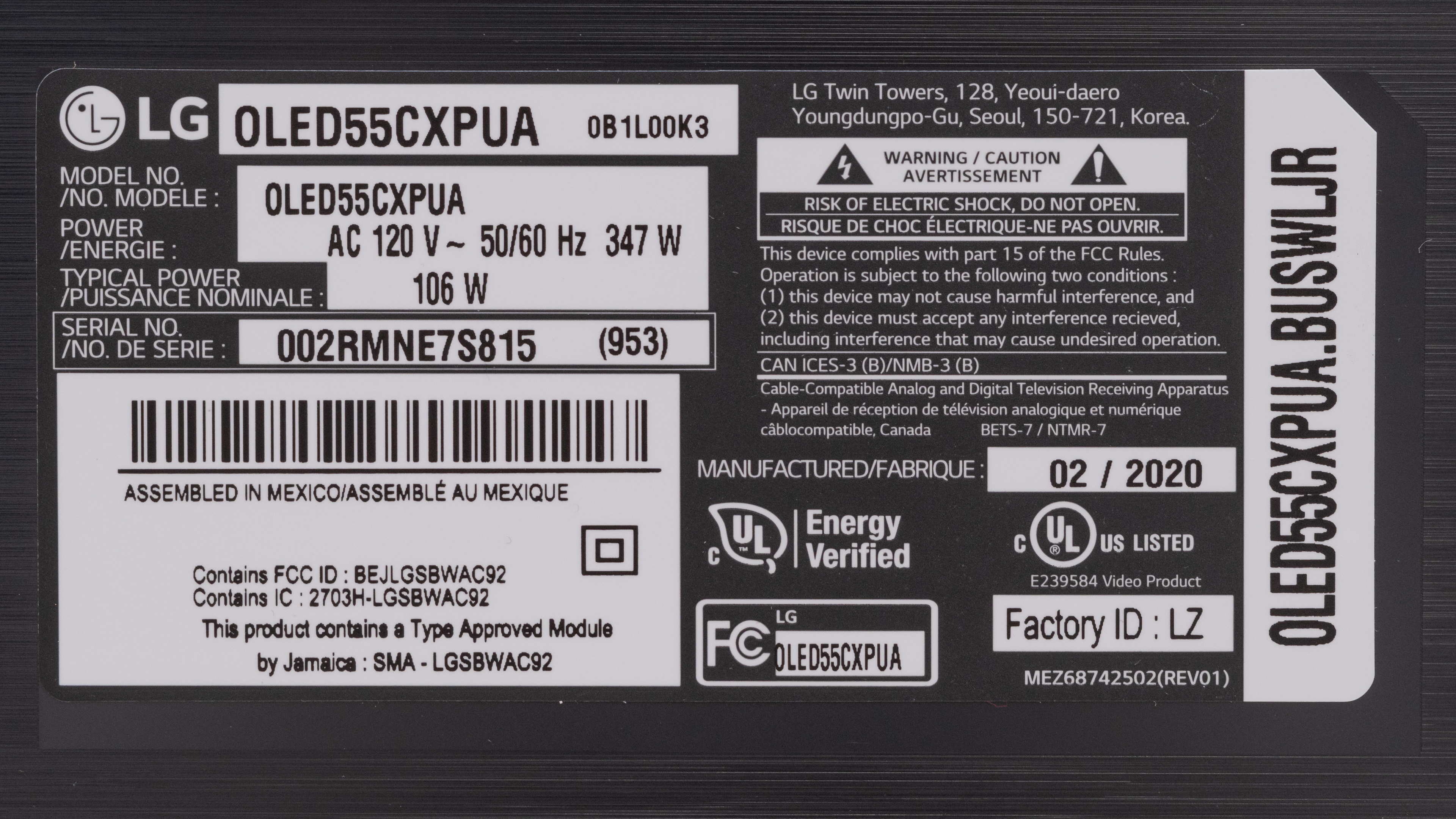
The LG CX we reviewed was manufactured in February 2020, and you can see the label here.
Popular TV Comparisons

The LG CX OLED is an excellent all-around TV and one of the best on the market. It performs similarly to any other OLED TV with good gaming features and has better dark room performance than any LED TV.
See our recommendations for the best TVs, the best OLED TVs, and the best movie TVs.
The LG C5 OLED is a huge upgrade over the older LG CX OLED. The C5 is noticeably brighter in HDR and SDR, has more vibrant colors, and is the better TV for PC gamers due to its 4k @ 144Hz support on all of its HDMI ports; the CX is limited to 4k @ 120Hz.
In terms of picture quality, the LG GX OLED and the LG CX OLED are two very similar TVs and any differences come down to panel variance. Our unit of the CX has much better color accuracy, better gradient handling, and it gets slightly brighter. However, our unit of the GX has wider viewing angles. The major difference between them is that the GX comes with a wall mount that makes it sit flush against a wall, while the CX comes with a stand.
The LG CX OLED and the LG B5 OLED deliver nearly identical picture quality, and there are no significant differences between them. Both TVs deliver the same perfect inky blacks in a dark room, with similar peak brightness and similar colors. Since it's a more modern TV, the B5 has a much more recent smart interface and better app support, and as it's part of LG's Re:New program, it'll continue to receive updates for much longer, whereas the CX only receives minor updates now.
The LG C1 OLED replaces the LG CX OLED, and overall they're very similar TVs. The biggest differences are that the C1 comes in a larger 83 inch variant, has the newest version of webOS, and includes new 'Game Optimizer' settings, including an input lag boost that reduces input lag by a few milliseconds. Our unit of the C1 has poor out-of-the-box color accuracy and lower brightness compared to the CX, but this could just be due to panel variation. All things considered, if none of the minor additions are essential to you, the CX may offer a slightly better value.

We buy and test dozens of TVs yearly, taking an objective, data-driven approach to deliver results you can trust. Our testing process is complex, with hundreds of individual tests that take over a week to complete. Most of our tests use specially designed test patterns that mimic real content, but we also use the same sources you have at home to ensure our results match the real-world experience. We use two main tools for our testing: a Colorimetry Research CR-100 colorimeter and a CR-250 spectroradiometer.
Test Results
Older Test Bench: This product has been tested using an older TV test methodology, before amajor update. Some of the test results below aren't directly comparable with other TVs. Learn more

for pictures & test results

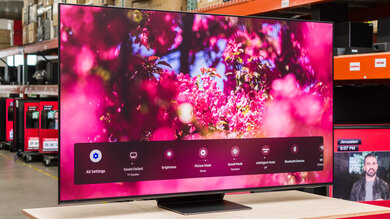
The LG CX has a sleek design with a premium feel to it, and it looks very similar to the LG C9 OLED. The silver metal on the back is a bit darker than its predecessor, but it has the same stand that allows the TV to sit close to the table.
for pictures & test results

The stand is very solid, and the TV doesn't wobble all that much. It's almost as wide as the TV, so you need a big table to place it on. Also, since the TV sits so low to the table, placing a soundbar in front of it could potentially obstruct the screen.
Footprint of the 55 inch TV stand: 36" x 9.6".
for pictures & test results

The back is identical to the LG C9 OLED. The top part that holds the panel is solid metal, and the bottom part that holds the inputs is textured plastic. There are both side-facing and back-facing inputs, and there's a plastic cover on the stand for cable management. If you plan on wall-mounting it and want a similar TV with a dedicated wall mount, check out the LG GX OLED.

for pictures & test results

The panel itself is very thin, but it gets thicker on the bottom half where the inputs are.
for pictures & test results

The LG CX has fantastic build quality. The front of the stand and the top half of the back are made out of metal, but there's a bit of flex on the top half of the TV. The back of the stand and the panel holding the inputs are made out of solid plastic that feels like metal.
for pictures & test results

Like all OLED TVs, the LG CX has a near-infinite contrast ratio since it can turn off individual pixels, resulting in perfect blacks.
Update 05/18/2021: We've retested the TV with the latest firmware (version 3.21.16). It seems like there's a way to minimize the ABL, and also limit how much the screen dims after a few minutes of displaying the image. Using a service remote, you can access a hidden menu by pressing on 'Start' and '0413'. Go to the OLED tab and disable 'TCP' and 'GSR'. This disables the dimming that happens over time when a static image is displayed. From our tests, we only saw a 5 cd/m² dip in brightness. In PC mode, leaving Game Peak Brightness disabled seems to result in less brightness variation. We measured between 243 cd/m² and 252 cd/m² in all windows, except the 100% windows, which we measure at 176 cd/m². In the 'Expert Dark' Picture Mode with Peak Brightness set to 'High', the 2% windows reach 441 cd/m², and it gets dimmer as the window size increases, with the 100% peak and sustained windows at 197 cd/m².
The LG CX has decent SDR peak brightness, but it may not be enough to combat glare from direct sunlight. It has an Automatic Brightness Limiter (ABL) that significantly dims the screen when large areas get bright, so that's why the 100% window is significantly less bright.
Like the LG C9 OLED, the LG CX has a Peak Brightness setting, which changes the way the ABL performs. With this setting turned off, most scenes are between 294 to 308 cd/m², with 166 cd/m² in the 100% window. Turning this setting to 'High', which is what we tested with, makes most scenes brighter, but large areas are less bright, so the ABL is more aggressive.
The measurements were taken post-calibration in the 'Expert (Dark Room)' Picture Mode, with OLED Light to '100' and Peak Brightness to 'High.' Before calibration, the TV was slightly less bright.
If you don't care about image accuracy and want the brightest image possible, we got 480 cd/m² in the 2% window in the 'Expert (Dark Room)' Picture Mode with Dynamic Contrast set to 'Medium', Peak Brightness on 'High', and OLED Light and Contrast at their max.
If you often watch in a bright room or take the TV outside to watch a game, the Samsung The Terrace can get much brighter to combat glare.
for videos & test results

for videos & test results

for videos & test results

Update 06/22/2021: Added the real content local dimming videos.
Since the LG CX doesn't have a backlight, it doesn't have a local dimming feature. It can dim pixels individually, so bright objects and subtitles are displayed perfectly, with no visible blooming.
for videos & test results

for videos & test results

for videos & test results

Update 06/22/2021: Added the real content local dimming videos.
Since it's an OLED that doesn't require a local dimming feature, there's perfect blacks and no blooming in Game Mode too.
for pictures & test results

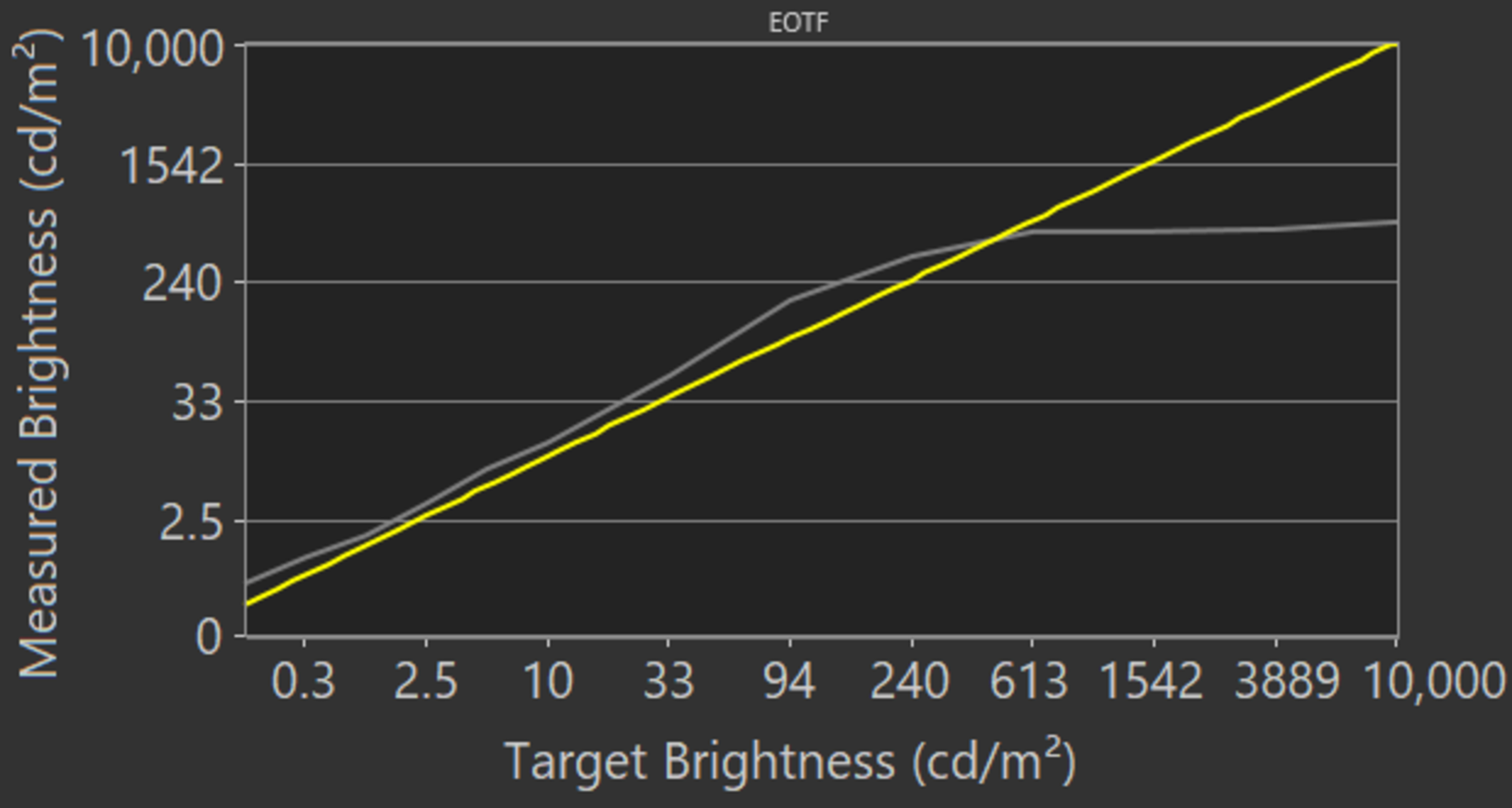
The HDR peak brightness is decent. It's not extremely bright in HDR, which is typical of OLEDs, but it's still brighter than some OLEDs like the LG BX OLED. It gets brightest with small highlights and quickly loses its brightness with larger areas due to the aggressive Automatic Brightness Limiter (ABL). EOTF follows the target curve perfectly until the sharp roll off, so it displays scenes at their correct brightness.
We measured the HDR brightness in the 'Cinema HDR' Picture Mode with OLED Light at its max, Peak Brightness on 'High', and Color Temperature set to 'Warm 2'.
If you find it too dim and want an even brighter image, then set Dynamic Tone Mapping on 'Medium', as you can see in this EOTF. Dynamic Tone Mapping can help make the image brighter, but it changes depending on the scene, so it actually lowered the brightness in our testing.
for pictures & test results
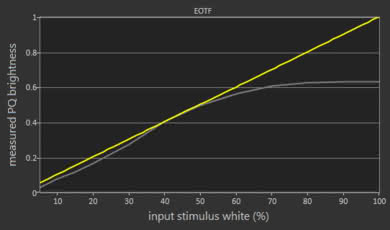
The HDR brightness in Game Mode is okay. The real scene brightness is less than outside of Game Mode, but small highlights appear to be brighter when you're watching it. Once again, it has an aggressive ABL, so large areas of bright colors are more dim than the rest. Also, the EOTF looks nearly the same as outside of Game Mode.
We measured it in the 'Game' Picture Mode with OLED Light and Contrast at their max, Color Temperature set to 'Warm 2', and everything else at their default settings; the Peak Brightness setting isn't available in Game Mode.
for pictures & test results

for pictures & test results

The LG OLED55CXPUA has impressive gray uniformity, but this may vary between units. There's very little dirty screen effect in the center, which is great for sports fans. Uniformity is improved in near-dark scenes, but like other OLED TVs, there are some faint vertical and horizontal lines that could be visible in near-dark scenes in very dark rooms.
for pictures & test results

Since this OLED TV can turn off individual pixels, the black uniformity is perfect.
for videos & test results

for pictures & test results

for pictures & test results

for pictures & test results

The LG CX has great viewing angles, and the image remains accurate when viewing from the side, which is great for a wide seating area.
for pictures & test results

for pictures & test results

for pictures & test results

Just like the LG C9 OLED, the LG CX has fantastic reflection handling. You shouldn't have any issues placing this in a bright room, but avoid placing it opposite a window with direct sunlight because sunlight can damage the OLED pixels.
for pictures & test results

for pictures & test results

for pictures & test results

Update 12/08/2020: We remeasured the accuracy after calibrating our spectroradiometer. The review has been updated.
The LG OLED55CXPUA has great out-of-the-box color accuracy, but this may vary between units. Most colors are slightly inaccurate, and the white balance is a bit off, but it's hard to notice. The color temperature is colder than the 6500K target, so colors have a blue tint to them. Overall, the gamma follows the target fairly well, but some bright scenes are too bright.
for pictures & test results

for pictures & test results

for pictures & test results

After calibration, the color accuracy is nearly perfect. Any color or white balance inaccuracies aren't visible without the aid of a colorimeter.
You can see our recommended settings here.
for pictures & test results

This TV upscales 480p content well, with no obvious upscaling artifacts.
for pictures & test results

The LG CX upscales 720p content, like from cable boxes, well with no upscaling artifacts that we noticed on past OLED TVs.
for pictures & test results

1080p content looks almost as good as native 4k content.

for pictures & test results

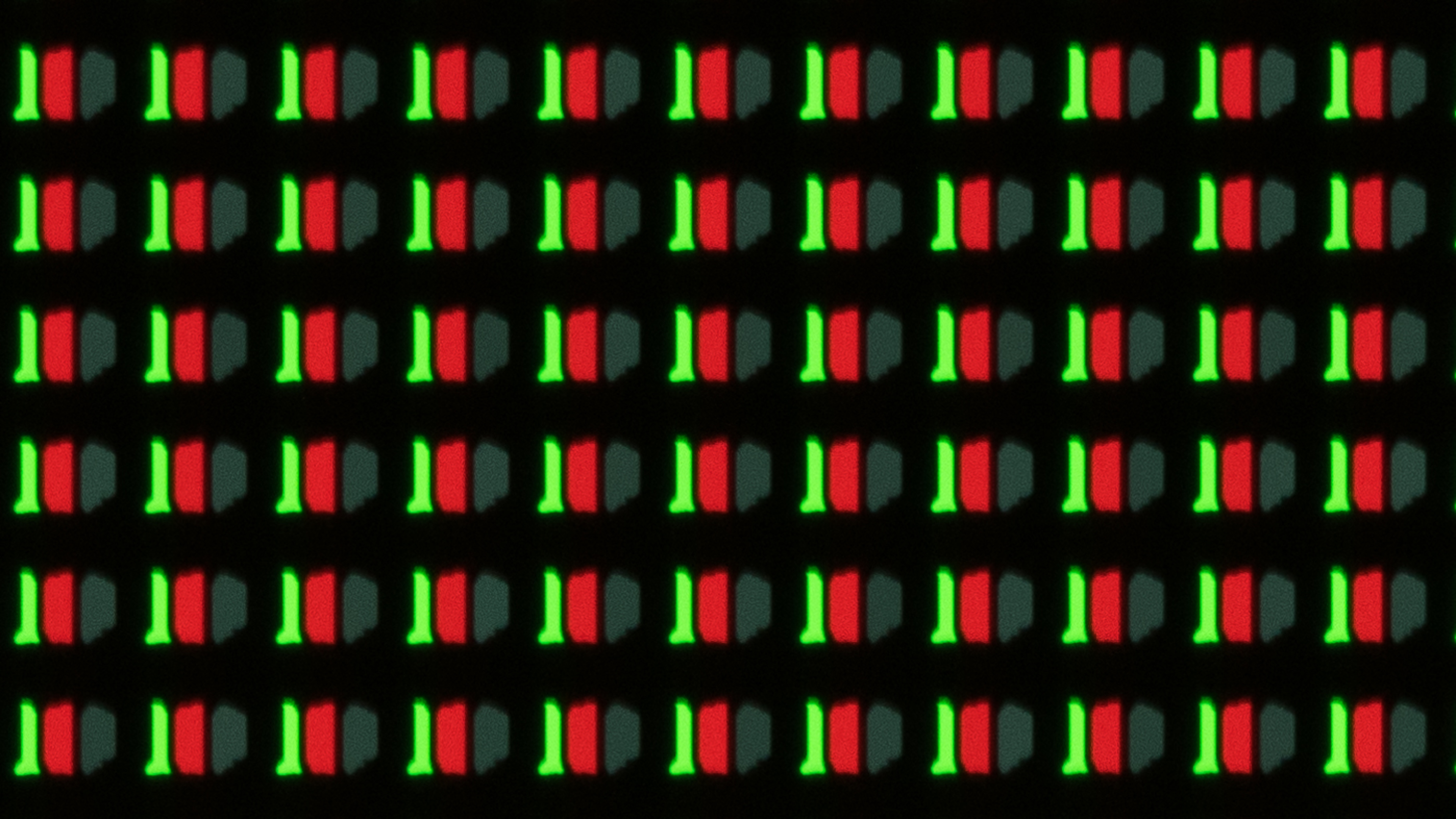
With an RGBW pixel structure, the LG OLED55CXPUA uses four sub-pixels, but all four are never used at the same time. This image shows the red, white, and blue sub-pixels. You can see the green sub-pixel in our alternative pixel photo.
for pictures & test results

for pictures & test results

The LG CX displays a wide color gamut for HDR content. It has near-perfect coverage of the commonly-used DCI P3 color space that's used in most content. It also has decent coverage of the wider Rec. 2020 color space, which is used in less content.
for pictures & test results

for pictures & test results

Despite having an excellent color gamut, the LG CX's color volume is only decent. It can't produce extremely bright colors, but with an infinite contrast ratio, it can display dark, saturated colors.
for pictures & test results

Excellent gradient handling, but there's still some banding in most colors. Enabling the Smooth Gradation feature doesn't affect the test pattern but can help reduce banding in real content. However, enabling this feature can cause some loss in details.
for pictures & test results

Update 12/20/2021: We retested the image retention on our unit after updating the firmware and warming it up properly. It no longer shows any signs of temporary image retention.
The LG CX doesn't show any signs of temporary image retention, but this may vary between individual units. This test is only indicative of short-term image retention and not the permanent burn-in that may occur with longer exposure to static images. You can read more about burn-in here.
Unfortunately, like most OLED TVs, the LG CX isn't immune to permanent burn-in. However, we don't expect people who watch varied content to have any issues, but rather it's a problem if there are constant static displays, like if it's used as a PC monitor.
This TV has three features to help burn-in risk. Enabling Screen Shift option, and setting Logo Luminance Adjustment to 'Low' may help with this. There's also an Pixel Refresher that can be run manually if needed.
You can read about our investigation into this here.
If you're concerned about burn-in and you prefer an LED TV, check out the Samsung Q90/Q90T QLED.
for pictures & test results

for pictures & test results

The LG CX has a near-instantaneous response time, but you may still notice some motion blur. With the refresh rate at 120Hz, motion blur is noticeable in most content, as you can see here.
for pictures & test results

Update 06/25/2020: We incorrectly stated that this TV was flicker-free, it's not. Although the flicker isn't at all noticeable, there is a slight dip in brightness every 8ms.
The LG CX OLED technically isn't flicker-free because there's a slight dip in brightness every 8ms, which coincides with its refresh rate, but isn't noticeable.
for pictures & test results

for pictures & test results

Update 05/26/2020: 120Hz BFI only works properly in Game Mode. Since BFI isn't available when G-SYNC is enabled, to display a 4k @ 120Hz signal with BFI, you have to disable VRR from the source and manually enter Game Mode. In any other picture mode, 4k @ 120Hz signals skip frames, causing duplications when BFI is enabled.
This TV has a black frame insertion (BFI) feature to improve the appearance of motion. However, there are some issues with 120Hz BFI, as it causes some artifacts. You can't really see them in this photo though.
for pictures & test results

for pictures & test results

The LG CX can interpolate lower-frame rate content up to 120fps, which causes the 'Soap Opera Effect'. It works well, and for some reason, 30fps content looks better than 60fps, but it's not very noticeable in real content. You'll notice any difference only if you really look for it.
Since the LG CX Series has such a fast response time, lower-frame rate content can appear to stutter as each frame is held on for longer. This can be noticeable during panning shots.
Update 06/03/2020: We retested 24p judder with different BFI settings and found that the LG CX can playback 24p content without judder, with BFI enabled, but only with certain BFI settings.
This TV can remove judder from all sources, like Blu-ray players or native apps. When watching 24p content (like movies) with BFI enabled, the LG CX can still play them without judder, but only if BFI is set to 'Low', 'Medium', or 'Auto'. 60p content can also be played with BFI, without judder, but only when BFI is set to either 'Auto', or 'Medium'.
Update 06/15/2021: We updated the TV to the latest firmware and retested VRR. Low framerate compensation is now working properly, and G-SYNC works properly even if the framerate drops below 20Hz.
Update 08/19/2020: We confirmed that it supports HDMI Forum's VRR. With the Xbox One S connected, we disabled the FreeSync setting and enabled the G-SYNC setting on the TV. The Xbox showed VRR as still working, meaning it was working with HDMI Forum VRR.
Update 07/08/2020: Support for FreeSync has been added in the latest firmware update (version 03.10.20).
The LG CX OLED has a 120Hz refresh rate, it supports HDMI Forum's VRR to reduce screen tearing, and it's G-SYNC compatible with newer NVIDIA graphics cards.
Update 06/15/2021: We retested the input lag with the latest firmware. The 4k @ 120Hz input lag is much lower, and much closer to the LG C1 OLED. We retested the other formats as well, but there were no other significant changes.
Update 11/03/2020: We retested the input lag with an HDMI 2.1 source, including 4k @ 120Hz.
Update 08/06/2020: Numbers for input lag reduced by 0.5ms to compensate for delay with the computer.
Update 05/26/2020: Input lag was retested with our "RTX 2070 Super" computer because the laptop had an issue with it. The numbers are all updated, though most haven't changed by any significant margin (0.1-0.5ms).
The LG CX Series has really low input lag in Game Mode, and it stays low with VRR enabled, which is great for gaming. It also stays low with a 4k resolution, which makes it a good choice for Xbox One X or PS4 Pro owners.
Update 11/03/2020: We retested it with an HDMI 2.1 source.
Update 09/21/2020: According to other owners, the LG CX can't display 4:4:4 properly when sent a 4k @ 120Hz signal from an RTX 3080 over HDMI 2.1. However, we were able to confirm it displays chroma 4:4:4 at that resolution.
Update 08/18/2020: 1440p @ 60Hz is only available when forced through a custom resolution; it's not natively supported.
Update 05/24/2020: 4k @ 120Hz is only displayed properly in Game Mode. Outside of Game Mode, it skips frames.
Like the LG C9 OLED, the LG CX displays all common resolutions. For it to display proper chroma 4:4:4 at 4k @ 120Hz and any resolution at 60Hz, which is important for reading text, it must be in 'PC' mode. However, 4:4:4 doesn't work on 1080p @ 120Hz. For full bandwidth signals, enable HDMI Ultra HD Deep Color.
for pictures & test results

for pictures & test results

Thanks to the HDMI 2.1 inputs, it supports 4k gaming up to 120Hz from either the Xbox Series X or PS5. It has an Auto Low Latency Mode that automatically switches the TV into Game Mode when you launch a game from a compatible device. When Dolby Vision is enabled, you're limited to 4k up to 60fps games and FreeSync doesn't work, but HDMI Forum VRR still works. However, this issue was fixed with a firmware update with the LG G1 OLED, and an update has yet to be released for the CX; we'll retest the TV once it's available.
Update 11/03/2020: We retested it with an HDMI 2.1 source. We confirmed all HDMI inputs support HDMI 2.1.
The LG CX doesn't support full-bandwidth HDMI 2.1. It only has 40Gbps ports capable of 4k @ 120Hz @ 4:4:4 10-bit instead of 48Gbps ports, which could reach 12-bit, but we don't expect this to make any noticeable difference.


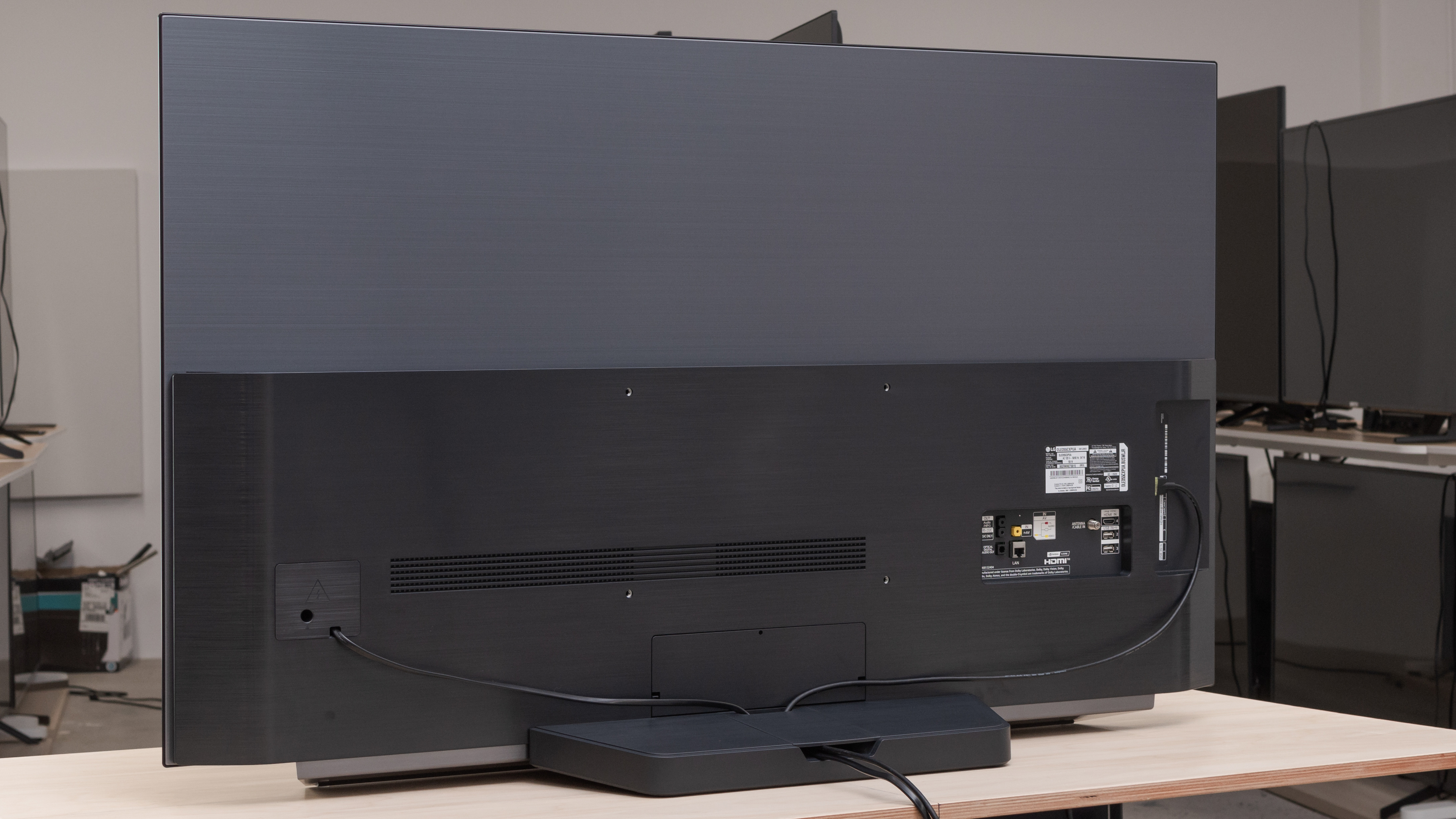


The LG CX supports eARC when connected to a compatible receiver, so it can send high-quality audio like Dolby Atmos via TrueHD to an external receiver. Unfortunately, LG has dropped DTS decoding from their 2020 TVs.
for pictures & test results

The speakers have a good frequency response. Its bass is better than the LG C9 OLED. It still can't produce any rumble or thump, but it has some punch to it. It can get fairly loud, and it's well-balanced overall, so it can produce clear dialogue.
for pictures & test results

This TV has decent distortion performance. It doesn't have much audible distortion at moderate listening levels but gets more noticeable at its max volume. However, not everyone may hear this, and it depends on the content.
for pictures & test results

The WebOS interface is smooth and easy to use. There weren't any bugs during testing, and apps didn't hang when launching as they did on the LG C9 OLED.
The TV isn't ad-free as we did occasionally see them during testing, but we couldn't take a picture. They aren't always there either.
for pictures & test results

The app store has a ton of apps available and you can cast content from your device too.
for pictures & test results

This TV uses the same LG Magic Remote as other high-end LG TVs. You can use it like a traditional remote or point and press, and the pointer is smooth. It has shortcut buttons to popular streaming platforms like Netflix and Amazon Prime Video. It has built-in voice control that allows you to change inputs, search for content, or ask for the weather. Also, you can use the remote for other devices, even if they don't support CEC.
for pictures & test results

There's a single button underneath the center of the screen. It allows you to turn the TV On/Off, change inputs, volume, and channels.
for pictures & test results

- User manual
- Remote
- Composite breakout adapter
- Batteries
- Not shown: Power cable and panel covers for cable management