The Samsung Q80/Q80T QLED is an impressive 4k TV, delivering fantastic picture quality in nearly every type of content. It has a VA panel that can produce deep blacks and a full-array local dimming to further improve black levels. It has excellent color accuracy out-of-the-box and an impressive HDR color gamut to produce a wide range of colors. Its viewing angles are decent thanks to Samsung's 'Ultra Viewing Angle' layer, so you don't lose too much image accuracy when viewed from the side. It handles reflections remarkably well and gets very bright, enough to fight glare and to deliver a good HDR experience. It has exceptionally low input lag, a 120Hz refresh rate, and support for variable refresh rate (VRR) technology to reduce screen tearing. Unfortunately, the screen has some minor uniformity issues that can be distracting for some, although this can vary between units.
Note: We received reports that the Q80T has visible stuttering and judder when watching sports. This could be most noticeable with cable sports. If you've experienced the same thing, let us know.
Our Verdict
The Samsung Q80T is an impressive all-around TV. It's great for watching movies or other content in the dark thanks to its high contrast ratio, but it also performs well in bright rooms because of its high peak brightness and incredible reflection handling. HDR content also looks good since it has a wide color gamut and gets bright enough for some highlights to pop. It has an excellent response time, so motion looks clear in fast-moving content like video games or sports, and it comes with advanced features like VRR support.
- Excellent response time.
- Great contrast ratio.
- Remarkable reflection handling.
- Corners of the screen appear darker.
The Samsung Q80T is great for watching movies. It has a high contrast ratio, although not quite as high as expected for a VA panel. It also has a full-array local dimming feature to further improve black levels. 1080p movies are upscaled well without artifacts, but lower frame rate content can stutter due to the TV's fast response time.
- Excellent out-of-the-box color accuracy.
- Great contrast ratio.
- Decent local dimming.
- Stutters when displaying lower frame rate content.
The Samsung Q80T is impressive for watching TV shows. It handles reflections remarkably well and gets very bright, so you shouldn't have issues placing it in a well-lit room. It also has decent viewing angles, making it easier to watch in a larger room or wider seating arrangements since the image doesn't look as washed out from the side. It also upscales lower resolution content, like cable TV, without issue.
Note: We received reports that the Q80T has visible stuttering and judder when watching cable TV, especially sports. If you've experienced the same thing, let us know.
- Remarkable reflection handling.
- Decent viewing angles.
- Gets bright enough to overcome glare.
- Corners of the screen appear darker.
- Reported judder issues with cable sports.
The Samsung Q80T is an impressive TV for watching sports. It has an amazing response time, so fast-moving action looks smooth. You should have no problems watching in a well-lit room, either, since it has incredible reflection handling and gets very bright. Its viewing angles are decent, so the image doesn't look too washed out from the side if you prefer watching the game with friends. Unfortunately, there's a bit of dirty screen effect that may be distracting to some during sports.
Note: We received reports that the Q80T has visible stuttering and judder when watching sports. This could be most noticeable with cable sports. If you've experienced the same thing, let us know.
- Excellent response time.
- Remarkable reflection handling.
- Decent viewing angles.
- Some dirty screen effect.
- Reported judder issues with cable sports.
The Samsung Q80T is an impressive tv for video games. It has an amazing response time, resulting in clear motion and an incredibly low input lag that makes gaming feel responsive. It also has a great contrast ratio, which is ideal for gaming in the dark. Unfortunately, though, the local dimming in 'Game' mode is disappointing, as it doesn't do much. On the upside, it supports VRR and has an HDMI 2.1 port for next-gen consoles.
- Excellent response time.
- Variable refresh rate support.
- Low input lag.
- Local dimming is ineffective in 'Game' mode.
The Samsung Q80T is very good for watching movies in HDR. It has a great contrast ratio that's enhanced by a full-array local dimming feature, allowing it to produce deep blacks. It can display a wide color gamut and gets bright enough to bring out some highlights in HDR content. It can also remove judder from any source, but lower frame rate content like movies can appear to stutter due to the TV's fast response time.
- Excellent out-of-the-box color accuracy.
- Great contrast ratio.
- Decent local dimming.
- Stutters when displaying lower frame rate content.
The Samsung Q80T is great for HDR gaming. Its input lag stays incredibly low even with 10-bit HDR, and it has an amazing response time that results in clear motion. While it has a great contrast ratio to produce deep blacks, its local dimming feature doesn't improve much in 'Game' mode. Also, HDR is a bit darker than it should be in 'Game' mode, so highlights don't pop quite as they should.
- Excellent response time.
- Variable refresh rate support.
- Low input lag.
- Local dimming is ineffective in 'Game' mode.
The Samsung Q80T is an amazing TV to use as a PC monitor. It supports all common resolutions, including chroma 4:4:4, which is important for text clarity. It also has a fast response time and a low input lag for a responsive desktop experience. The viewing angles are decent, although you may still notice the edges of the screen look washed out when sitting up close.
- Excellent response time.
- Low input lag.
- Displays proper chroma 4:4:4.
- Corners of the screen appear darker.
Changelog
- Updated Nov 02, 2021: Retested the SDR and HDR peak brightness after firmware update 2016.1.
- Updated Oct 28, 2021: We retested the response time, backlight flicker, HDR peak brightness, and local dimming after updating to firmware 2016.1.
- Updated Jun 23, 2021: We remeasured the thickness and added new local dimming videos featuring real content.
- Updated Apr 27, 2021: Retested the TV after Sony released a PS5 firmware update to confirm that HDR now works on the PS5 in 4k @ 120Hz.
Check Price
Differences Between Sizes And Variants
We tested the 55" (QN55Q80T) variant, and for the most part, we expect our review to be valid for the 49" (QN49Q80T), 50" (QN50Q80T), the 65" (QN65Q80T), the 75" (QN75Q80T), and the 85" (QN85Q80T) variants. Do note that the 49" and 50" variants have a 60Hz panel and don't support any variable refresh rate technology. Also, the 49" doesn't have Samsung's 'Ultra Viewing Angle' layer.
Note that the EU version of the Q80T is different. It doesn't have the 'Ultra Viewing Angle' layer, and local dimming may perform worse. The Q85T, which is exclusive to the EU, appears to be the closest model to the one we've tested.
| Size | US | Canada | UK | Warehouse Variant | Refresh rate | FreeSync |
|---|---|---|---|---|---|---|
| 49" | QN49Q80TAFXZA | QN50Q80TAFXZC | QE49Q80TATXXU | QN49Q8DTAFXZA | 60Hz | No |
| 50" | QN50Q80TAFXZA | QN50Q80TAFXZC | - | - | 60Hz | No |
| 55" | QN55Q80TAFXZA | QN55Q80TAFXZC | QE55Q80TATXXU | QN55Q8DTAFXZA | 120Hz | Yes |
| 65" | QN65Q80TAFXZA | QN65Q80TAFXZC | QE65Q80TATXXU | QN65Q8DTAFXZA | 120Hz | Yes |
| 75" | QN75Q80TAFXZA | QN75Q80TAFXZC | QE75Q80TATXXU | QN75Q8DTAFXZA | 120Hz | Yes |
| 85" | QN85Q80TAFXZA | QN85Q80TAFXZC | QE85Q80TATXXU | QN85Q8DTAFXZA | 120Hz | Yes |
If someone comes across a different type of panel or their Samsung Q80T doesn't correspond to our review, let us know and we'll update the review. Note that some tests, such as gray uniformity, may vary between individual units.
Update 08/31/2020: Samsung added a 50 inch model that's only sold in the United States and appears to have the same features as the 49 inch model.
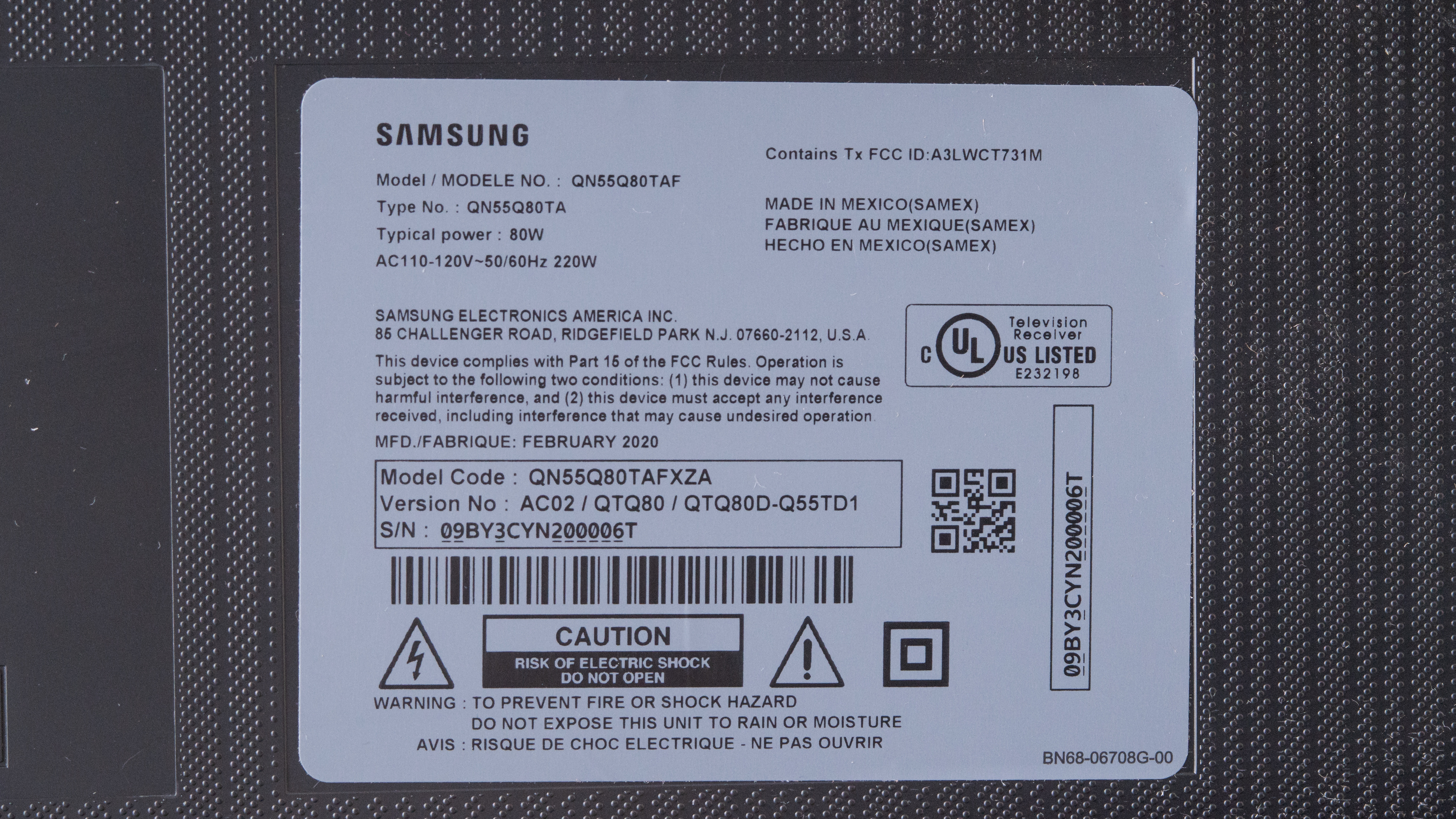
Our unit of the QN55Q80T was manufactured in February 2020, you can see the label here.
Popular TV Comparisons

The Samsung Q80T is an impressive TV for most uses. Unlike many TVs with VA panels, it has fairly wide viewing angles thanks to Samsung's 'Ultra Viewing Angle' layer, although it comes at the expense of contrast, which is a bit lower than some of the Q80T's competitors. For other options, check out our recommendations for the best TVs, the best HDR gaming TVs, and the best 4k gaming TVs.
The Samsung Q90/Q90T QLED and the Samsung Q80T are very much alike, as they offer identical features. The biggest difference is in terms of performance, where the Q90T performs slightly better than the Q80T. The Q90T has a higher contrast ratio and peak brightness, and it has much better gradient performance, resulting in less banding. However, the Q80T has better color accuracy and black uniformity, although these could be due to panel variance.
The Samsung Q80T is higher-end than the Samsung Q60T and has much better performance. The Q80T has a local dimming feature that improves its contrast, and it has Samsung 'Ultra Viewing Angle' technology that improves the viewing angles. The Q80T also has VRR support and a much quicker response time for a better gaming experience. However, because the Q60T doesn't have an 'Ultra Viewing Angle' layer, it has a much better native contrast ratio.
The Samsung Q80T is better than the Samsung Q70T for most uses. The Q80T has a full-array local dimming feature, can get brighter in HDR, and has much wider viewing angles. The Q80T also has better color accuracy and a faster response time, but due to its 'Ultra Viewing Angle' layer, its contrast ratio is much lower than the Q70T, making blacks look a bit more grayish.
The Samsung Q80T and the Samsung Q80R are very similar TVs in many respects. The Q80R can get much brighter in HDR, its local dimming performs better, and it has a higher contrast ratio. On the other hand, the Q80T has better color accuracy, a faster response time, and a lower input lag, which is good news for gamers. Both TVs have a 120Hz refresh rate and support VRR to reduce screen tearing when gaming.

We buy and test dozens of TVs yearly, taking an objective, data-driven approach to deliver results you can trust. Our testing process is complex, with hundreds of individual tests that take over a week to complete. Most of our tests use specially designed test patterns that mimic real content, but we also use the same sources you have at home to ensure our results match the real-world experience. We use two main tools for our testing: a Colorimetry Research CR-100 colorimeter and a CR-250 spectroradiometer.
Test Results
Older Test Bench: We tested this product using an older TV test methodology before a major update. Some of the test results below aren't directly comparable with other TVs. Learn more
for pictures & test results

The Samsung Q80T has a simple and minimalist design with thin bezels on all sides. It's center-mounted on a pedestal-style stand.
for pictures & test results

The stand is a mix of metal and plastic. It provides decent support for the TV, but there's still a fair amount of wobble. Luckily, it's fairly small and doesn't take up much space, making it easier to place a soundbar in front.
Footprint of the 55 inch stand: 15.4" x 10.3".
for pictures & test results

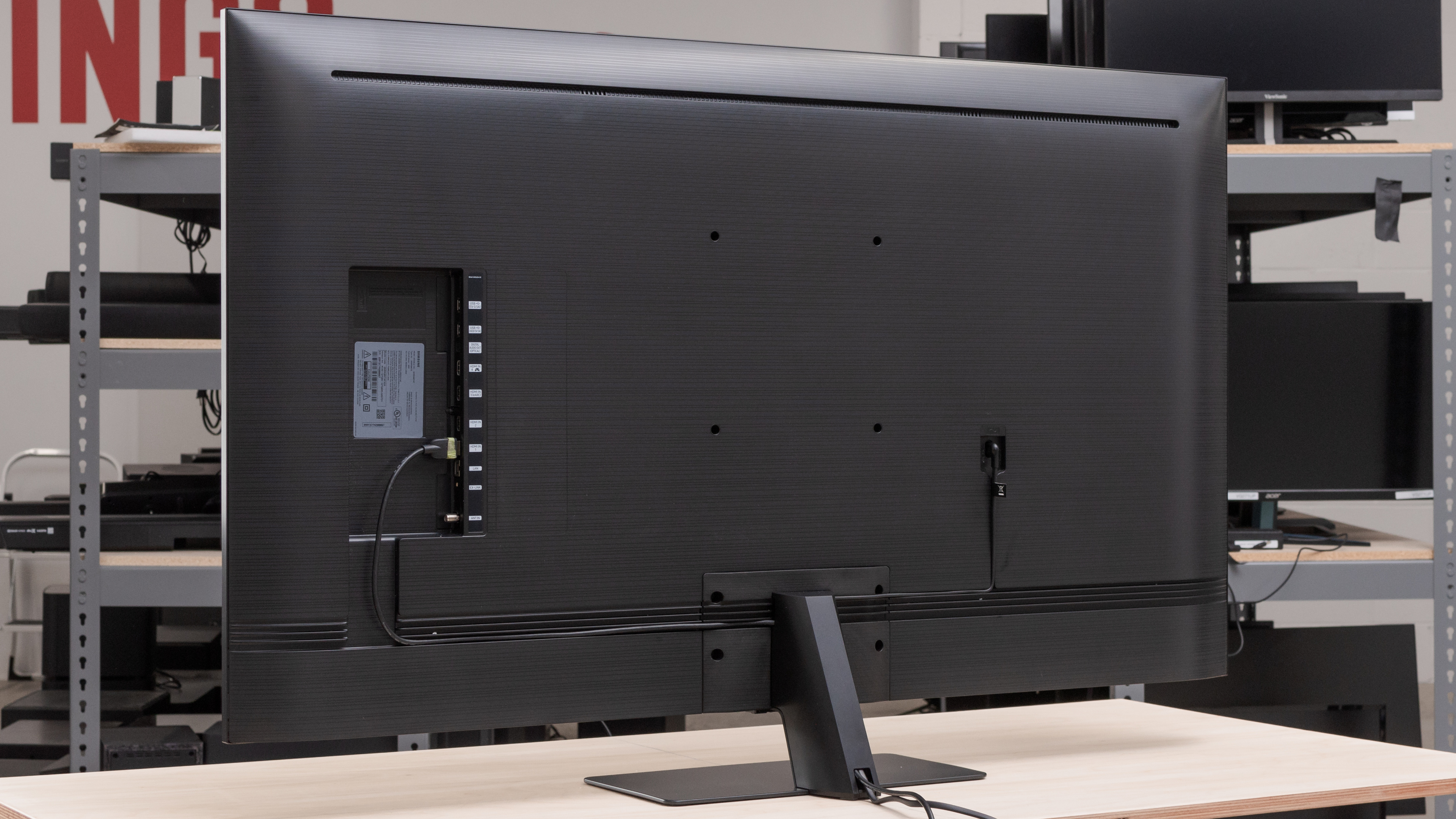
The back of the TV is plastic, and it's plain except for the fine horizontal texture etched into it. The inputs are side-facing and are easily accessible when the TV is wall-mounted, and grooves guide the cables towards the stand, which is hollow and serves as cable management.
for pictures & test results

The bezels on the Samsung Q80T are thin and aren't distracting.
for pictures & test results

Update 06/23/2021: We've updated the thickness of the TV to include the thickness of the power plug, as it sticks out a bit from the back panel of the TV.
The TV is quite thin without the stand and shouldn't stick out much when wall-mounted.
for pictures & test results

Build quality feels excellent. It's mostly plastic, but it feels well-built and sturdy overall. The TV does wobble when nudged, mostly due to the design of the stand.
for pictures & test results

The Samsung Q80T has a great native contrast ratio, but it's lower than typical for a VA panel. This is likely due to the implementation of Samsung's 'Ultra Viewing Angle' layer, which improves viewing angles at the expense of contrast ratio. The contrast does improve when local dimming is enabled, but blacks can still appear grayish in some scenes.
The 49 inch variant doesn't have the 'Ultra Viewing Angle' layer and is expected to have a higher native contrast ratio.
Update 11/02/2021: We retested the SDR peak brightness in the regular picture settings, outside of Game Mode, after firmware update 2016.1. It improves the real scene brightness by about 20 nits, which isn't a significant difference. The highlights are also slightly brighter, but they're within margin of error and not enough for us to change the results for the peak and sustained windows.
Great SDR peak brightness. It's more than enough to fight glare in bright rooms, but there's quite a bit of variation in brightness when displaying different content.
We measured the peak brightness after calibration, using the 'Movie' Picture Mode, with Brightness set to maximum, and Local Dimming set to 'High'.
If you don't mind losing a bit of image accuracy, you can get a brighter image by setting the Picture Mode to 'Dynamic', Local Dimming to 'High', and Brightness to max. We achieved a peak brightness of 761cd/m² in the 10% window with these settings.
for videos & test results

for videos & test results

for videos & test results

Update 06/23/2021: We've added two new videos demonstrating the local dimming feature with real content.
This TV has a decent full-array local dimming feature. The implementation has been tweaked to light up more zones at once, which has the effect of reducing intense blooming around bright objects but also causes a larger section of the screen to appear grayish. That said, it isn't as noticeable in real content, and subtitles are handled well. It's still a bit slow in reacting to changes and can sometimes cause the corners of the screen to flash when the whole screen is gray. The performance is very close to that of the Sony X900F.
for videos & test results

for videos & test results

for videos & test results

Update 10/28/2021: We retested the local dimming feature in 'Game' mode with firmware 2016.1. Local dimming is a bit better than before, as the TV appears to be doing a better job at averaging out bright areas across multiple zones. There's actually a bit more blooming than before, and bright objects don't stand out as much, but overall it's a bit better.
Update 06/23/2021: We've added two new videos demonstrating the local dimming feature with real content.
In 'Game' mode, the local dimming doesn't do much, especially with real content. There's very little black crush or other noticeable flaws with the local dimming, but there isn't much noticeable improvement in dark scenes. For instance, the local dimming barely reacts to subtitles. When there is a long stretch of dark content, it may dim the scene a little but not by much. Because it's less aggressive, transitions between zones are quite smooth and not very noticeable. However, sometimes the local dimming seems to behave differently, as with the moving circles where it dims the background more aggressively, and zone transitions become more visible. However, it quickly goes back to its more ineffective behavior. What all of this means is that you likely won't notice the effects of local dimming much when in 'Game' mode.
for pictures & test results

Update 11/02/2021: We retested the HDR peak brightness in the regular picture settings, outside of Game Mode, after firmware update 2016.1. It improves the real scene brightness by about 20 nits, which isn't a significant difference. The highlights are a bit dimmer, but they're within the margin of error and not enough for us to change the results for the peak and sustained windows.
Good HDR brightness. HDR content looks especially good if you're watching in a dark to moderately-lit room. Overall, scenes are a little brighter than they should be, but very bright highlights don't quite pop as intended. As with SDR, there's quite a bit of variation in brightness depending on the content.
We measured the HDR peak brightness before calibration, using the 'Movie HDR' Picture Mode, with Local Dimming set to 'High', and all other image processing disabled.
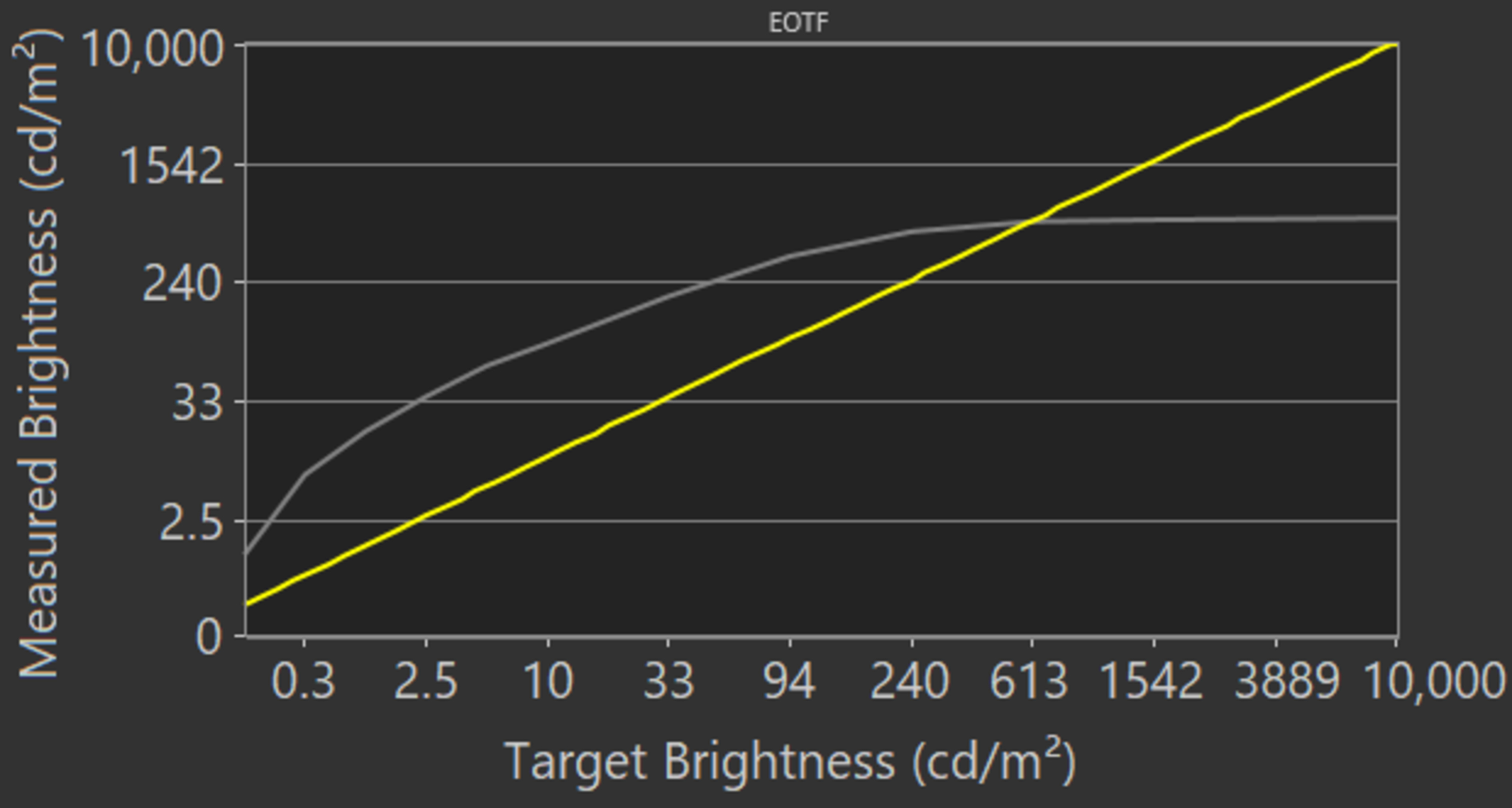
If you find HDR too dim, you can make it brighter by setting Brightness and Contrast to maximum, set ST.2084 to maximum, and set Contrast Enhancer to 'High'. Using these settings, you can make HDR appear significantly brighter, as you can see in this EOTF. If you want a TV with higher HDR peak brightness, check out the Sony X950H.
for pictures & test results
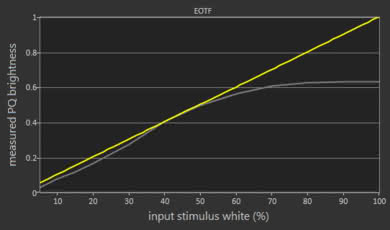
Update 10/28/2021: We retested the HDR Brightness in 'Game' mode with firmware 2016.1. It's slightly brighter overall, but the 2%, 50%, and 100% slides are a bit dimmer than before.
In 'Game' mode, the HDR brightness is okay. It's a bit more consistent across content but doesn't get as bright overall and highlights don't stand out as much. The replacement to this TV, the Samsung Q80/Q80A QLED, gets significantly brighter in 'Game' mode.
We tested the brightness in the 'Game' Picture Mode, using the 'Warm 2' Color Temperature, with Local Dimming set to 'High', Color Gamut on 'Auto', Dynamic Black Equalizer set to '2', and Sharpness set to '0'. Motion interpolation and other additional settings were disabled.
for pictures & test results

for pictures & test results

The Samsung Q80T has decent gray uniformity, although this can vary between units. The corners of the screen look darker, and there's a bit of dirty screen effect throughout the screen. Luckily, uniformity is much better in darker scenes.
for pictures & test results

for pictures & test results

The Samsung Q80T has great black uniformity, but this can vary between individual units. There's a bit of clouding throughout the screen, and the overall image looks a bit more grayish. With local dimming enabled, the clouding is less noticeable, and there's a bit less blooming around the test cross.
for videos & test results

for pictures & test results

for pictures & test results

for pictures & test results

The Samsung Q80T has decent viewing angles for a VA panel TV. It has Samsung's 'Ultra Viewing Angle' layer, which improves viewing angles at the cost of a lower contrast ratio. Gamma shift happens rather quickly once you move off-center, but black level remains fairly consistent until you reach moderate viewing angles. To take our measurements, we had to perform two runs, one with local dimming set to 'Low' to measure color, and the other with local dimming disabled to measure lightness, black level, and gamma. Overall, viewing angles are better with the local dimming disabled.
The TV's local dimming can't be disabled through the normal settings menu. To turn it off, you must first disable PC Mode Dimming within the TV's service menu, and then activate PC Mode.
The 49 inch variant of this TV doesn't have the 'Ultra Viewing Angle' layer, and we expect it to have worse viewing angles.
for pictures & test results

for pictures & test results

for pictures & test results

Superb reflection handling. The screen's anti-reflective coating performs remarkably well at reducing the intensity of reflected light, making it a great choice for fairly well-lit rooms. However, the light scatters across the screen, creating a rainbow-like effect. This can be most noticeable in rooms with a lot of light, especially when you're watching dark content here. You can see examples of it from Reddit here.
for pictures & test results

for pictures & test results

for pictures & test results

The Samsung Q80T has excellent color accuracy out-of-the-box. There are only minor inaccuracies that are very difficult to spot with the naked eye, and white balance is also fantastic. However, the color temperature is a bit on the warm side, and gamma doesn't follow the target all that well, causing most scenes to appear brighter than they should. Note that color accuracy can vary between units.
for pictures & test results

for pictures & test results

for pictures & test results

Update 09/30/2020: We've changed the status of the Auto-Calibration function from 'Untested' to 'Undetermined', as the Samsung Q80T isn't yet listed as being compatible with CalMAN.
After calibration, color accuracy is incredible. White balance, gamma, and color temperature are right on target, and any remaining inaccuracies shouldn't be noticeable without the aid of a colorimeter.
You can see our recommended settings here.
for pictures & test results

480p content like DVDs is upscaled without any obvious artifacts, and it looks very similar, if not identical, to the Samsung Q70/Q70R QLED and the Samsung Q70/Q70T QLED.
for pictures & test results

720p content such as cable TV is upscaled well, with no signs of upscaling artifacts.


for pictures & test results

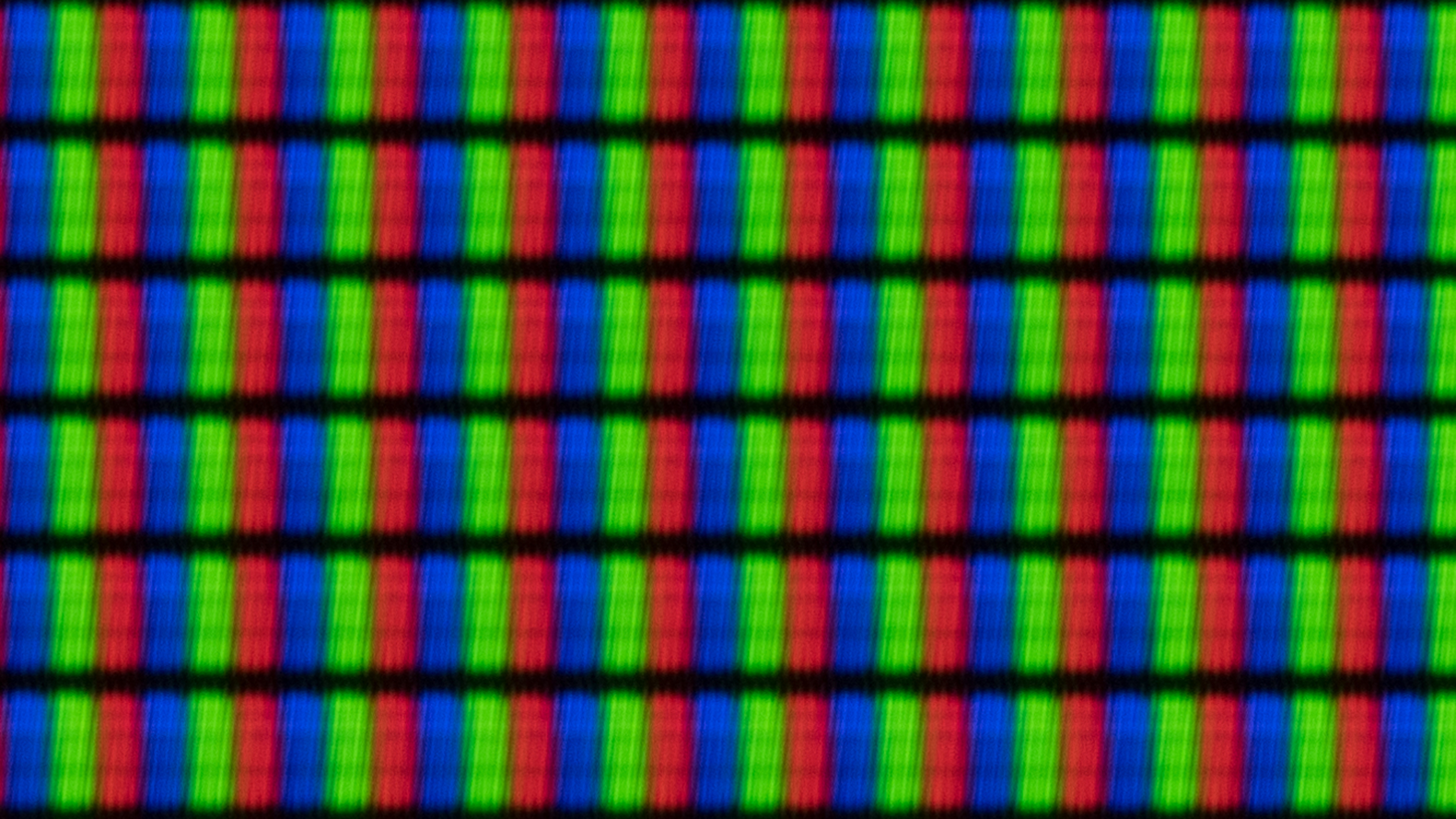
The pixels are a bit blurry due to the 'Ultra Viewing Angle' layer. It is, however, much clearer than what we had observed on the Samsung Q80/Q80R QLED. You can also see the filter in this photo.
for pictures & test results

for pictures & test results

The Samsung Q80T has a great color gamut. It has excellent coverage of the DCI P3 color space, which is used for most HDR content, and it has decent coverage of the wider Rec. 2020 color space. If you want a TV with a wider color gamut, check out the Vizio P Series Quantum X 2020.
for pictures & test results

for pictures & test results

Good color volume. It's slightly better than the Samsung Q80/Q80R QLED, but it can't reproduce dark colors as well due to its lower contrast ratio.
for pictures & test results

Very good gradient performance. The most visible banding is with the color green, but there's also some fine banding when displaying shades of gray, red, and blue. If this bothers you, enabling Noise Reduction in the Picture Clarity Settings menu can remove most of it, although it may cause the loss of some fine details.
for pictures & test results

There are no signs of temporary image retention, but this can vary between individual units.
We don't expect VA panels to experience burn-in, as the VA panel in our long-term test appears immune.
for pictures & test results

for pictures & test results

Update 10/28/2021: We retested the response time with firmware 2016.1. The 80% response time is slightly slower, but not noticeably so.
This tv has an excellent response time. There should be very little blur trail behind fast-moving objects. That said, there's significant overshoot in some transitions, which is more visible when motion interpolation is enabled. If you want an even quicker response time, check out the LG CX OLED.
for pictures & test results

Update 10/28/2021: We retested the backlight flicker with firmware 2016.1. The backlight flicker is slightly different, but still behaves about the same.
This TV uses Pulse-Width Modulation (PWM) to dim its backlight, but since it flickers at such a high frequency, it shouldn't be noticeable to most people. In 'Movie' mode, the flickering frequency drops to 120Hz when Picture Clarity is set to 'Custom' or 'Auto'. The flickering is also at 120Hz when using the 'Dynamic', 'Standard', 'Natural', or 'Game' mode.
for pictures & test results

for pictures & test results

Update 10/28/2021: We retested the BFI feature with firmware 2016.1. The backlight flicker is slightly different, but the BFI feature performs about the same as before.
This TV has an optional Black Frame Insertion feature that can help reduce motion blur, called LED Clear Motion.
Just enabling Picture Clarity lowers the flickering frequency to 120Hz, and turning on LED Clear Motion reduces the frequency further to 60Hz.
In 'Game' mode, the backlight always flickers at 120Hz, and enabling LED Clear Motion in the Game Motion Plus Settings menu lowers the flickering frequency to 60Hz.
for pictures & test results

for pictures & test results

The Samsung Q80T can interpolate lower frame rate content up to 120Hz, a feature also known as the 'Soap Opera Effect'. There are very little artifacts in regular content, even in intense scenes. To use it, set Picture Clarity to 'Custom', then set Judder Reduction to '10' for 30fps content, or Blur Reduction to '10' for 60fps content.
Update 10/28/2021: We retested the response time with firmware 2016.1, but since the 100% response time didn't change, the total amount of stutter didn't change.
Due to the TV's fast response time, lower frame rate content can appear to stutter, as each frame is held on for a longer period. If this bothers you, enabling Picture Clarity or LED Clear Motion can help.
Note: We received reports that the Q80T has visible stuttering and judder when watching sports. This could be most noticeable with cable sports. If you've experienced the same thing, let us know.
The Samsung Q80T can remove judder from all sources. To do so, set Picture Clarity to 'Custom', and leave the Blur Reduction and Judder Reduction sliders at '0'.
The 49 inch variant of this TV has a 60Hz panel and likely can't remove judder at all. If you have the 49 inch model, please let us know in the discussions below.
Note: We received reports that the Q80T has visible stuttering and judder when watching sports. This could be most noticeable with cable sports. If you've experienced the same thing, let us know.
Update 11/11/2020: We retested the VRR range with an HDMI 2.1 source and measured a wider VRR range than before.
Update 08/19/2020: We changed HDMI Forum VRR to 'Unknown' because we currently don't have an accurate way to test for HDMI Forum VRR compatibility. Once we do, we'll test for it and update the review.
This TV supports FreeSync and is G-SYNC compatible to reduce screen tearing when gaming. It has a very wide VRR range with an HDMI 2.1 source, which is great, and there isn't any screen tearing. However, there are no settings as it turns on automatically when the TV detects a game being launched from a device that has VRR enabled. Game Motion Plus can't be used when VRR is enabled.
The 49 inch variant of this TV has a 60Hz panel and doesn't support any VRR technology.
Update 11/11/2020: We retested the input lag with an HDMI 2.1 source, including the input lag at 4k @ 120Hz.
Update 06/05/2020: We've retested the input lag after updating to the latest firmware (version 1113). The input lag when playing 4k @ 60Hz + 10-bit HDR dropped by 3.4ms, 4k @ 60Hz @ 4:4:4 dropped by 4.5ms, and 1080p @ 60Hz outside of 'Game' mode dropped by 7.2ms. The rest are the same or within the margin of error.
The Samsung Q80T has exceptionally low input lag as long as you're using 'Game' mode. It's a bit higher when using VRR or Game Motion Plus, but even then, it's still excellent and should be fine for most casual gamers.
Update 11/11/2020: We retested the TV with an HDMI 2.1 source and checked to make sure it supports 4k @ 120Hz.
This TV supports most common resolutions, including 4k @ 120Hz on HDMI 4. It displays proper chroma 4:4:4 at any resolution except 1440p @ 120Hz. To display chroma 4:4:4 properly, set the icon to 'PC' for the input in use. For signals that require the full bandwidth of HDMI 2.0, enable Input Signal Plus.
for pictures & test results

for pictures & test results

Update 04/27/2021: We retested the TV with the PS5, and it can now display 4k @ 120Hz with HDR. It appears to have been an issue with the PS5 that Sony resolved in the latest PS5 firmware update.
This TV supports almost all resolutions for next-gen gaming consoles, including 4k @ 120Hz. It has an Auto Low Latency Mode (ALLM) as well, which is activated by setting Game Mode to 'Auto' and enabling CEC.
Update 11/11/2020: We retested the TV and confirmed it supports HDMI 2.1 on HDMI 4.

The Samsung Q80T supports eARC, allowing it to pass uncompressed high-quality audio like Dolby Atmos via TrueHD over an HDMI connection. To use it, set HDMI eARC to 'Auto' and Digital Output Audio to 'Passthrough'.
for pictures & test results

The Samsung Q80T has a decent frequency response. It has a digital room correction feature that can tune the sound according to your room's acoustics. It sounds fairly well-balanced, and there's a decent amount of bass, but it's not the room-shaking, rumbling kind. Dialogue sounds clear, and the TV can get quite loud, albeit with a bit of pumping at higher volume levels.
for pictures & test results

Distortion performance is decent. It sounds fairly clean at moderate listening level, but there's a good amount of distortion when playing at high levels. Distortion depends on the content, though, and not everyone may hear it.
for pictures & test results

Samsung's Tizen OS is a great platform that's easy to use and runs very smoothly. You may encounter an issue with the picture size when switching out of PC mode into something else, causing the image to appear cut off due to overscan. If so, you can resolve this issue by navigating into the Picture Size settings and by enabling 16:9 and 'Fit to Screen'.
for pictures & test results

There are ads and suggested content on the home page as well as within the app store, and they can't be disabled.
for pictures & test results

Samsung's app store has a large number of streaming services available. Most apps run pretty smoothly, and you can also cast content from a mobile device.
for pictures & test results

The remote is the same as other QLED TVs. It has a few shortcuts for popular streaming services and an Ambient mode button, which displays artwork on the TV when not in use. There's also a built-in microphone for voice control through Samsung's Bixby.
for pictures & test results

The TV's controls are located beneath the Samsung branding at the center of the TV. It consists of one button that lets you turn the TV On/Off, change channels, volume, and input.