
The TCL 8 Series 2019/Q825 QLED is a great 4k TV that performs well for most uses. It comes with Roku TV built-in, and it stands out among LED TVs thanks to its impressive HDR performance. Highlights pop as they should because of the TV's wide color gamut and high peak brightness in HDR. It also has an exceptional contrast ratio and local dimming to help produce deep inky blacks that look amazing in the dark. It gets very bright and has good reflection handling, so it can easily overcome glare in well-lit rooms. Its response time is also very good, so motion looks clear in fast-moving content. However, it doesn't support variable refresh rate (VRR) to reduce screen tearing in games, and while its input lag is decent, it may be too high for competitive gamers. Unfortunately, it also has narrow viewing angles, making content look washed out from the side.
Our Verdict
The TCL 8 Series is a great overall TV. It performs well in both bright and dark rooms thanks to its high peak brightness and outstanding contrast ratio, respectively. Motion also looks clear thanks to the fast response time, which is good for fast-moving content like sports or video games. Unfortunately, it doesn't have VRR, and its input lag is higher than some TVs, so competitive gamers may be disappointed. On the upside, HDR content looks great thanks to the high HDR brightness and wide color gamut.
- Exceptional peak brightness in SDR and HDR.
- Outstanding contrast ratio and black uniformity.
- Fast response time with minimal motion blur.
- Local dimming crushes highlights in dark scenes.
- Narrow viewing angles.
The TCL 8 Series is impressive for movies. It has an exceptionally high contrast ratio, making blacks look deep and inky in the dark. It has an okay local dimming feature, but it can crush small highlights in dark scenes. Black uniformity is fantastic, though, and the TV has no issues upscaling lower-resolution content like DVDs or Blu-rays.
- Upscales content without issue.
- Fantastic black uniformity.
- Outstanding contrast ratio.
- Local dimming crushes highlights in dark scenes.
Watching TV shows on the TCL 8 Series is a good experience. You can place the TV in a bright room as it can handle reflections well and overcomes glare with ease. It upscales lower resolution content well, but it's not the best choice if you have a wide seating arrangement because of its narrow viewing angles. On the upside, the Roku TV smart interface has many of the latest apps available to download.
- Bright enough to overcome glare.
- Upscales content without issue.
- Good reflection handling.
- Poor gray uniformity on dark scenes.
- Narrow viewing angles.
The TCL 8 Series is good for watching sports. It has a fast response time that makes fast-moving content look smooth. It also gets very bright and handles reflections well, so it easily overcomes glare in bright environments. Unfortunately, the TV has some noticeable dirty screen effect, which can be distracting while watching sports. It also has poor viewing angles, so it's not the best for watching with a large group.
- Bright enough to overcome glare.
- Fast response time with minimal motion blur.
- Good reflection handling.
- Narrow viewing angles.
- Dirty screen effect can be distracting.
The TCL 8 Series is good for playing video games. It has a decent input lag which should suit most people but may be too high for competitive gamers. The response time is fast, so it displays fast-moving content with minimal blur. It also has a high contrast ratio that produces deep blacks, which is great if you like gaming in the dark. Unfortunately, there are no advanced gaming features like VRR support.
- Outstanding contrast ratio and black uniformity.
- Decent input lag.
- Fast response time with minimal motion blur.
- Poor gray uniformity on dark scenes.
- No VRR support to reduce screen tearing.
The TCL 8 Series delivers an impressive HDR movie experience. It has an exceptional contrast ratio that produces deep uniform blacks in dark rooms, but its local dimming feature tends to crush highlights in dark scenes. On the upside, it has a wide color gamut and a high HDR peak brightness, which produces vivid colors and makes highlights pop in HDR content.
- Outstanding contrast ratio and black uniformity.
- Bright enough to bring out highlights in HDR.
- Wide color gamut.
- Local dimming crushes highlights in dark scenes.
The TCL 8 Series is good for gaming in HDR. It has a decent input lag and a fast response time, delivering a good gaming experience. Its contrast ratio is exceptional, so blacks look deep and inky. It also has a wide color gamut for HDR, and it gets bright enough to bring out highlights in HDR content.
- Bright enough to bring out highlights in HDR.
- Decent input lag.
- Fast response time with minimal motion blur.
- Local dimming crushes highlights in dark scenes.
- No VRR support to reduce screen tearing.
The TCL 8 Series is decent as a PC monitor. It supports most common resolutions and displays proper chroma 4:4:4, so text looks clear. It also has a decent input lag, making for a fairly responsive desktop experience. Unfortunately, it has poor viewing angles, so the image may look washed out at the edges if you sit up close.
- Displays chroma 4:4:4 properly.
- Decent input lag.
- Narrow viewing angles.
- No VRR support to reduce screen tearing.
Changelog
- Updated Feb 10, 2021: Updated review for accuracy and clarity.
- Updated May 21, 2020: Converted to Test Bench 1.5.
- Updated Feb 21, 2020: Converted to Test Bench 1.4.
- Updated Nov 29, 2019: We retested the Q825 on the latest firmware version (9.1.2 build 6471-88), and found that it does have a 120Hz panel, and can interpolate motion up to 120Hz.
Check Price
Differences Between Sizes And Variants
We tested the 65 inch TCL 8 Series 2019 QLED, and we expect our review to be valid for the other available size, the 75 inch 75Q825.
If someone comes across a different type of panel or if their TCL Q825 doesn't correspond to our review, let us know and we will update the review. Note that some tests like the gray uniformity may vary between individual units.
| Size | US Model |
| 65" | 65Q825 |
| 75" | 75Q825 |
You can see the label of the 65Q825 we reviewed here.
Popular TV Comparisons

The TCL 8 Series Q825 is an impressive TV that delivers great performance in most uses. It stands out in its HDR performance with one of the highest HDR peak brightness levels among TVs we've tested. See our recommendations for the best TVs, the best 4k TVs, and the best HDR gaming TVs.
The Vizio P Series Quantum X 2019 is a bit better than the TCL 8 Series 2019/Q825 QLED. The Vizio has a better local dimming feature that doesn't crush details in dark scenes. The Vizio also has better reflection handling, which is great for watching in well-lit rooms, and thanks to its faster response time, it displays fast-moving content with less motion blur.
The TCL 8 Series 2019/Q825 QLED is a marginally better TV than the Sony X900F for mixed usage, though the two perform very similarly overall. The TCL has a better contrast ratio, despite its slightly worse local dimming feature. It also can get brighter to help it combat glare, and it gets brighter for HDR content. The black uniformity on the TCL is a lot better, and it has a slightly wider color gamut. On the other hand, the Sony has less noticeable dirty screen effect, handles reflections better during dark scenes, and has significantly more accurate colors out-of-the-box, though this can vary between units.
The Samsung Q70R and the TCL 8 Series 2019/Q825 QLED are very similarly performing TVs. While the TCL is better for HDR content as it can get brighter and has a wider color gamut, the Samsung is better for sports and gaming thanks to its motion handling and lower input lag. The Samsung's colors are also significantly more accurate out of the box, but the TCL's built-in speakers are better.
The Samsung Q80R is better overall than the TCL 8 Series 2019/Q825 QLED. While the TCL has a higher contrast ratio, the Samsung offers better performance overall, with wider viewing angles and better reflection handling, as well as VRR support, a faster response time, and a lower input lag.

We buy and test dozens of TVs yearly, taking an objective, data-driven approach to deliver results you can trust. Our testing process is complex, with hundreds of individual tests that take over a week to complete. Most of our tests use specially designed test patterns that mimic real content, but we also use the same sources you have at home to ensure our results match the real-world experience. We use two main tools for our testing: a Colorimetry Research CR-100 colorimeter and a CR-250 spectroradiometer.
Test Results
Older Test Bench: We tested this product using an older TV test methodology before a major update. Some of the test results below aren't directly comparable with other TVs. Learn more
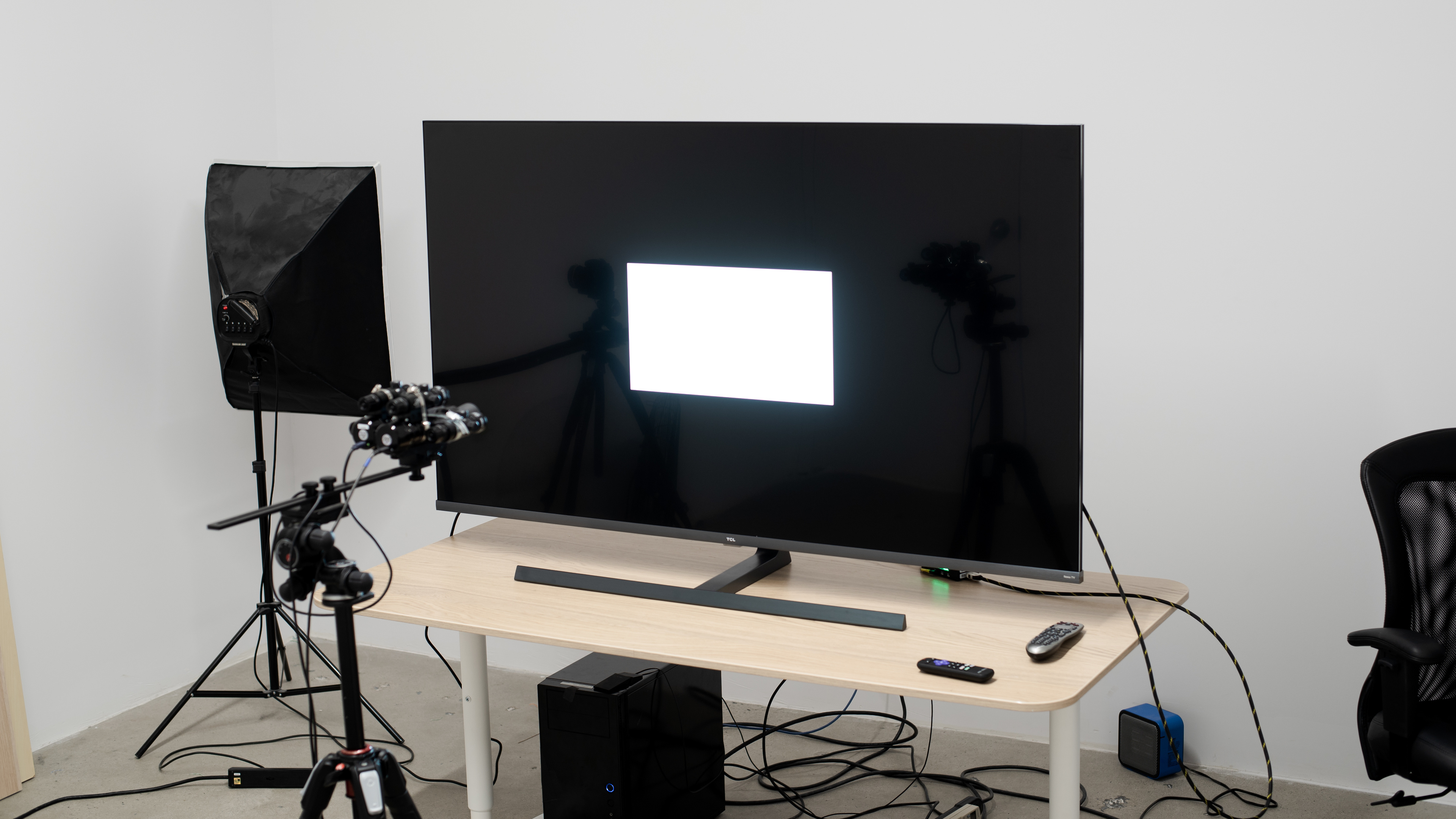
The TCL 8 Series is the flagship of TCL's 2019 lineup, right above the TCL 6 Series/R625 2019. Its main competitors are the more premium models of other brands, like the Vizio P Series Quantum X 2019, the LG SM9500, and the Samsung Q80/Q80R QLED.
for pictures & test results

The TCL 8 Series has an excellent overall design. It looks sleek and premium with thin bezels and a large, heavy stand. The back is simple with a premium-looking glossy finish over the top half.
for pictures & test results

The TV's stand is made of metal. It's very heavy, feels solid, and supports the TV well, preventing most wobble.
Footprint of the 65 inch model: 33.9"x13.8"
for pictures & test results

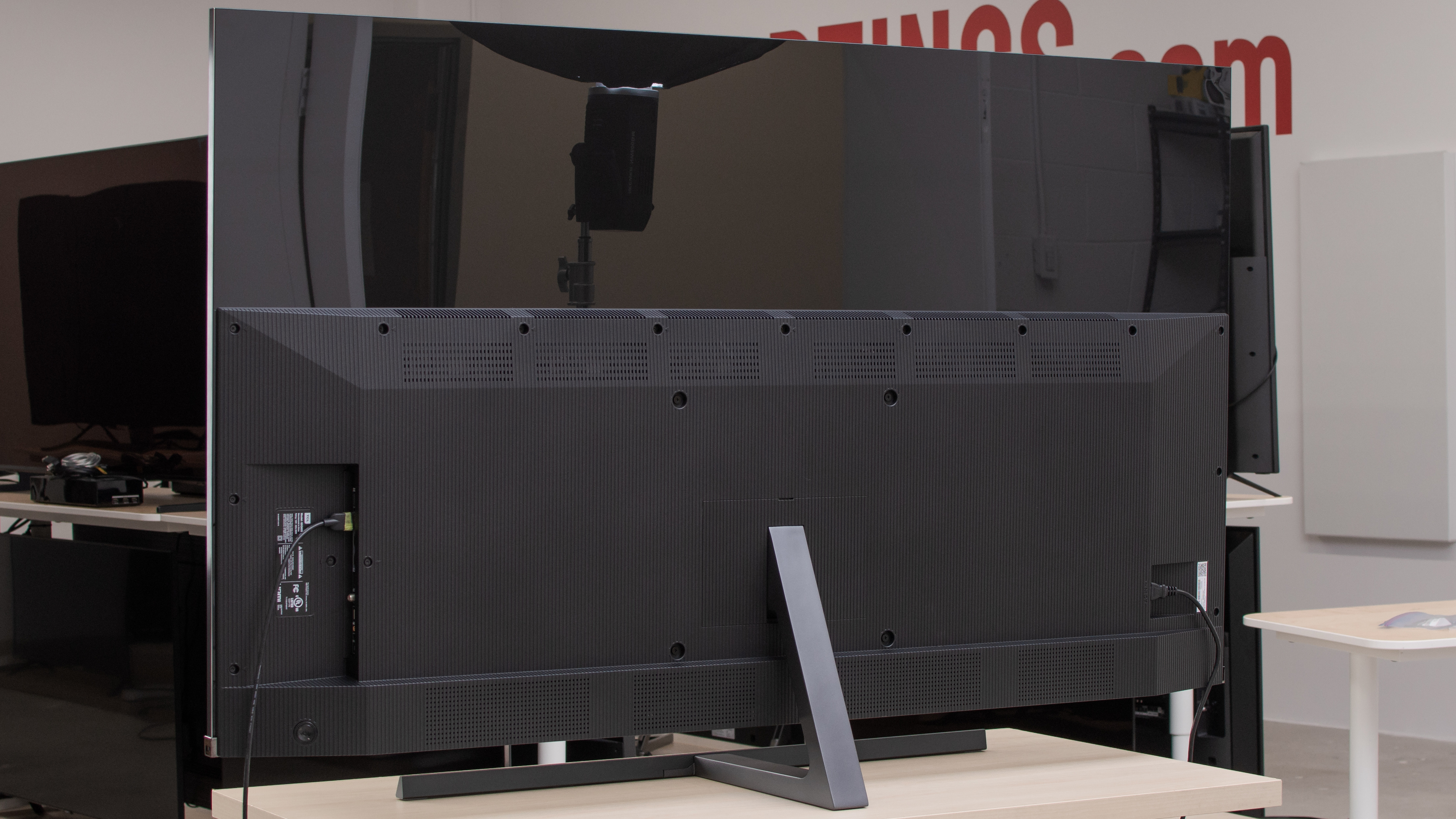
The back of the TV is plastic. It resembles the TCL 6 Series/R625 2019's back, thanks to the glossy upper half, which gives the TV a more premium look. Similar to other TCL TVs we've tested, the TCL 8 Series has no cable management.
for pictures & test results

The borders are made of metal and are fairly thin. They feel solid, which adds to the TV's premium look.
for pictures & test results

This TV is relatively thin overall. The upper half is really thin, while the bottom half is thicker as it houses the electronics. It won't stick out much if you wall-mount it.
for pictures & test results

The TCL 8 Series has very good build quality. It feels sturdy and solidly built with no obvious gaps. It's rather heavy but has a premium feel.
for pictures & test results

The TCL 8 Series has an outstanding contrast ratio, so blacks look deep in a dark room. When local dimming is enabled, this TV delivers the deepest blacks we've measured so far on an LED TV.
for videos & test results

This TV has okay local dimming. The backlight consists of a large array of Mini LEDs that create a large number of local dimming zones. This is good, as it allows the TV to minimize blooming around bright objects. At the same time, due to the large number of zones, it's very noticeable when they turn on and off, and this creates a checkered/golfball effect. To activate local dimming, you must set the Local Contrast setting to 'High' as the 'Medium' or 'Low' settings didn't seem to do much on our unit in real content.
The local dimming works well, and the image looks very good when watching medium-to-high brightness scenes. However, the local dimming algorithm is very aggressive and crushes details in very dark scenes, like the intro scene of Netflix's Our Planet, which is displayed with almost no stars. Subtitles don't have much noticeable blooming mainly because they're very bright, and your eyes can't distinguish the blooming.
Finally, the zone transitions can be distracting, depending on the scene. At about 1:06 of the above video, the small ball almost disappears as the slow zone transitions can't keep up with the speed of the fast-moving object. Another example where the transitions and the golfball effect is more visible is in this Earth video from space, shown here.
The TCL 8 Series has outstanding SDR peak brightness. The TV is suitable for very bright rooms as it can fight glare with ease.
We measured the peak brightness after calibration, with the 'Brighter' backlight setting, with the Backlight slider set to '100' (max) in the 'Movie' Picture Mode and the 'Warm' Color Temperature, as these are the most accurate settings. These are also the settings that deliver the highest peak brightness.
This TV has exceptionally high peak brightness in HDR, delivering HDR content with very bright highlights.
We measured the peak brightness in HDR before calibration, with the 'Brighter' backlight setting, and the 'Dark HDR' Picture Mode. These are the most accurate and the brightest settings.
for pictures & test results

for pictures & test results

Our TCL 8 Series has okay gray uniformity. Unfortunately, there's some noticeable dirty screen effect both in bright and in dark scenes. Furthermore, the overall uniformity in the darker scenes is one of the worst we've encountered so far. Note that gray uniformity can vary between units.
for videos & test results

for pictures & test results

for pictures & test results

for pictures & test results

The TCL 8 Series has disappointing viewing angles. The image quickly loses accuracy as you move off-center. If you want a TV with wide viewing angles, then check out an IPS TV like the LG SM9500 or an OLED TV like the LG B9 OLED.
for pictures & test results

for pictures & test results

The TCL 8 Series has fantastic black uniformity. While there's still a bit of blooming around bright objects, on the whole, blacks are very uniform with virtually no clouding. That said, we experienced a bug that raised the overall black level after displaying our test picture with Local Dimming on 'High', leaving only a row of backlights turned off at the top and bottom of the screen. You can see that here.
for pictures & test results

for pictures & test results

for pictures & test results

The TCL 8 Series has good reflection handling. The TV has a semi-gloss finish that diminishes reflections and makes them less distracting. If you place this TV in a bright room, you shouldn't have issues, thanks to its excellent peak brightness.
for pictures & test results

for pictures & test results

for pictures & test results

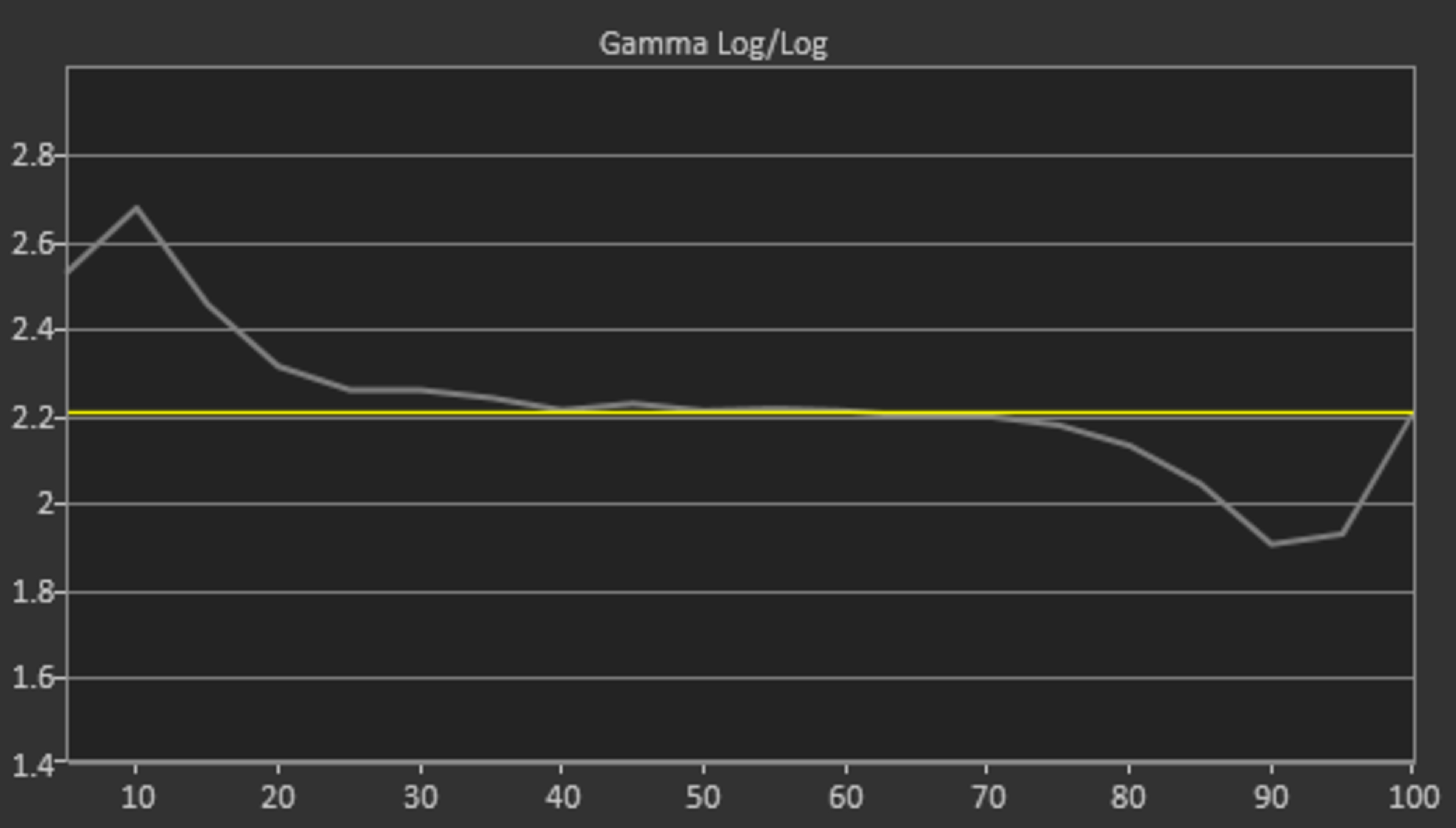
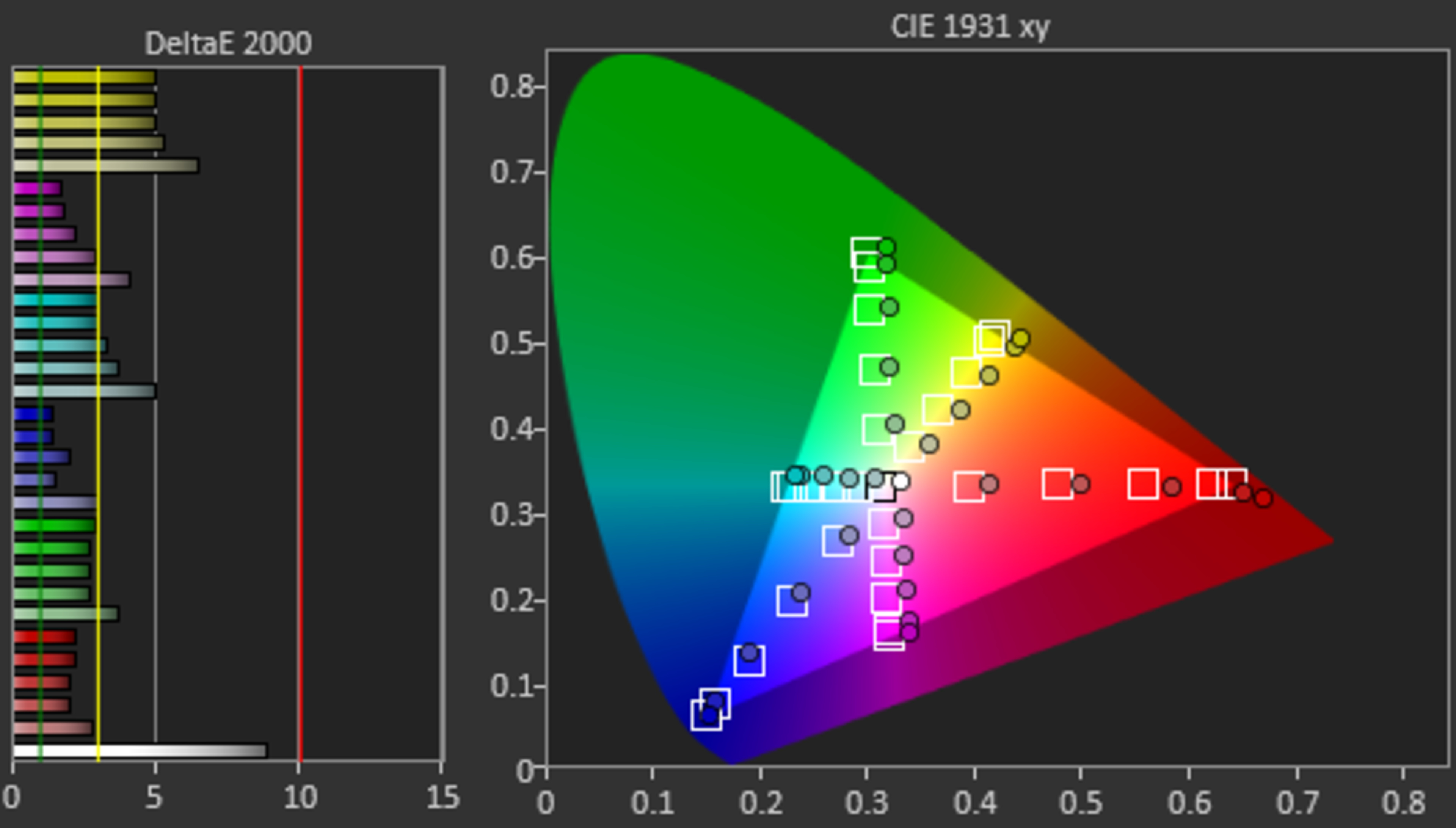
The TCL 8 Series has poor out-of-the-box accuracy. The color temperature is significantly warmer than the 6500K target, so images have a reddish/yellow tint. Colors and shades of gray are very off, and the gamma doesn't follow the target at all, making scenes appear much darker than they should be.
Changing the Gamma setting from the default '2.2' to '2.0' makes the picture more accurate overall, as you can see in the white balance, gamma curve, and color space.
for pictures & test results

for pictures & test results

for pictures & test results

The TCL 8 Series has outstanding accuracy after calibration. Any remaining inaccuracies require the use of a colorimeter to spot, and the gamma follows the target flawlessly. To achieve these results, we calibrated with Gamma set to '2.0', but we continue to recommend setting Gamma to '2.2' as this is the manufacturer's recommendation.
There's an auto-calibration function that requires the use of an app. Although the app helps improve image accuracy significantly, it's less accurate than a colorimeter.
See our recommended settings for this TV here.
for pictures & test results

480p content, like DVDs, looks great on the TCL 8 Series, with no obvious issues.
for pictures & test results

The TV upscales 720p content, like from a cable box, well.
for pictures & test results

The TCL 8 Series upscales Blu-rays and other 1080p content without issue.


for pictures & test results

for pictures & test results

for pictures & test results

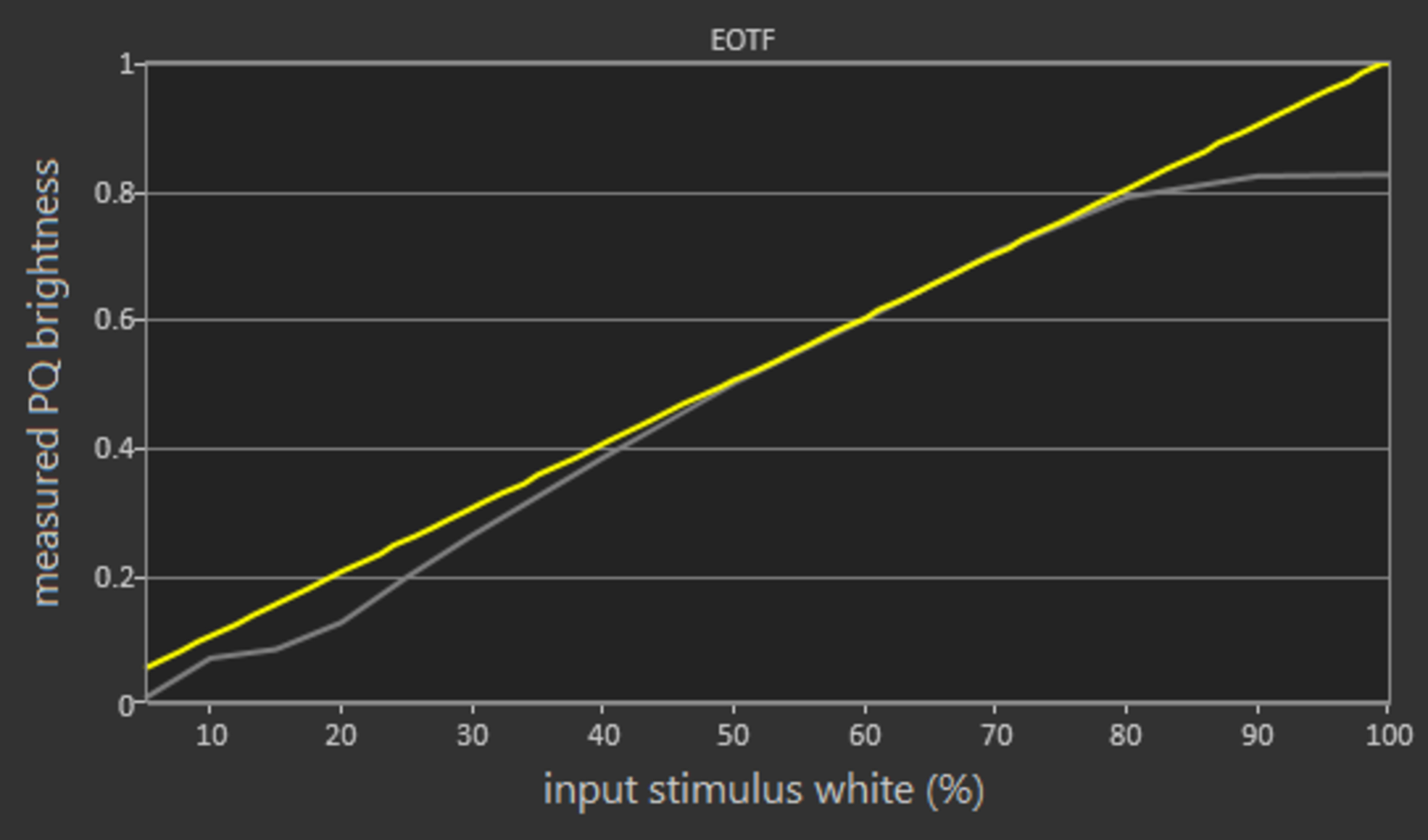
The TCL 8 Series has an impressive color gamut, considered wide enough for HDR content. It has excellent coverage of the more common DCI P3 color space and good coverage of the wider Rec. 2020 color space. Unfortunately, the EOTF doesn't follow the target curve very closely, so most scenes appear darker than they should be. 'Game' mode is nearly identical, as shown here.
Unfortunately, there isn't much you can do to make HDR brighter without messing with picture quality. Changing the Brightness setting from its default value will brighten HDR but also ruin the picture quality, so it isn't recommended.
for pictures & test results

for pictures & test results

This TV has a great color volume. It's capable of displaying its color gamut at various luminosities, delivering saturated colors thanks to its high contrast ratio.
for pictures & test results

The TCL 8 Series has decent gradient handling. Some banding is visible in most colors and unfortunately, the TV doesn't offer any gradient smoothing option.
for pictures & test results

The TCL 8 Series doesn't show any signs of temporary image retention, even immediately after displaying our high-contrast static test image for ten minutes. Note that this can vary between units.
We don't expect VA panels to experience permanent image retention, as the VA panel in our long-term test appears immune.


for pictures & test results

The TV uses Pulse Width Modulation (PWM) to dim its backlight. For the most part, the flicker frequency is very high and very hard to notice. However, in certain bright modes, and when the backlight is above 81/100, the flicker frequency drops to 120Hz. Because this is a very bright TV, we expect most people not to use it at such high brightness levels so flicker shouldn't be an issue for most.
for pictures & test results

for pictures & test results

This TV has an optional Black Frame Insertion feature to make motion look crisper. However, this creates duplications that may be distracting to some. To enable BFI, set the LED Motion Clarity to 'On'. Note that our score for BFI takes into account whether BFI is present but doesn't necessarily reflect how well it performs.
for pictures & test results

for pictures & test results

Update 11/29/2019: The firmware we initially tested only supported motion interpolation up to 60 fps. We've retested the TCL 8 Series and updated the review.
The TCL 8 Series can interpolate low fps content up to 120 fps. To enable motion interpolation, set the Action Smoothing to 'On'.
There's some stutter with this TV because of its fast response time, especially with lower frame rate content like movies. This is most noticeable in panning shots.
The TCL 8 Series can remove 24p judder from any source. This is done automatically, and there's no special setting that you must enable.
The TCL 8 Series has a native refresh rate of 120Hz and doesn't support any advanced gaming features like FreeSync.
The TCL 8 Series has a decent input lag, as long as you're in 'Game' mode. However, it's not as low as the input lag found on other TCL models and might not be suitable for competitive gaming. On the upside, the TV has an Auto Low Latency Mode, which allows it to detect when you're gaming on a compatible device and automatically switches to 'Game' mode. There are no special settings to do this.
The TCL 8 Series supports most common resolutions at 60Hz. The TV detects automatically when it's connected to a PC and displays chroma 4:4:4 properly so text looks clear. You must, however, enable 'HDMI 2.0' in the HDMI Mode menu for this to work.
Although the panel has a native refresh rate of 120Hz, when sent a 120Hz signal, it drops every other frame, so it doesn't properly support any 120Hz signal.




for pictures & test results

The TCL 8 Series has a decent frequency response. There's not too much rumble or thump in the bass, but it's still decent. The sound profile is fairly well-balanced at moderate listening levels, too, so dialogue should sound clear. It also gets quite loud, so volume shouldn't be an issue.
for pictures & test results

The TCL 8 Series has very good distortion performance. The overall amount of harmonic distortion produced is within good limits, and there's only a small increase under heavier loads. Note that distortion depends on the content, and not everyone can hear it.
for pictures & test results

The Roku TV smart interface is very smooth and easy to use.
We encountered a strange bug while testing the TV. When our Android box was connected to the TV, and we played Our Planet in Dolby Vision using the internal Netflix app, the picture displayed some weird artifacts. This seemed to be caused by the Android box, but we can't be sure.
Unfortunately, like all Roku TVs we've tested so far, there are ads and suggested content in the main interface, and you don't have the option of disabling them.
for pictures & test results

The Roku TV smart interface has a large number of apps available to download. Roku calls them streaming channels.
for pictures & test results

The remote control that is included with the TV is the same one that comes with the TCL 6 Series/R625 2019. It has built-in voice control but lacks the neat private listening feature found on the TCL P Series/P607 2017's remote.
for pictures & test results

The TV's controls are located at the back of the right side of the TV. You can control the input and power the TV on and off.
for pictures & test results

- User manual
- Remote
- Batteries
- Composite adapter
- VESA spacers