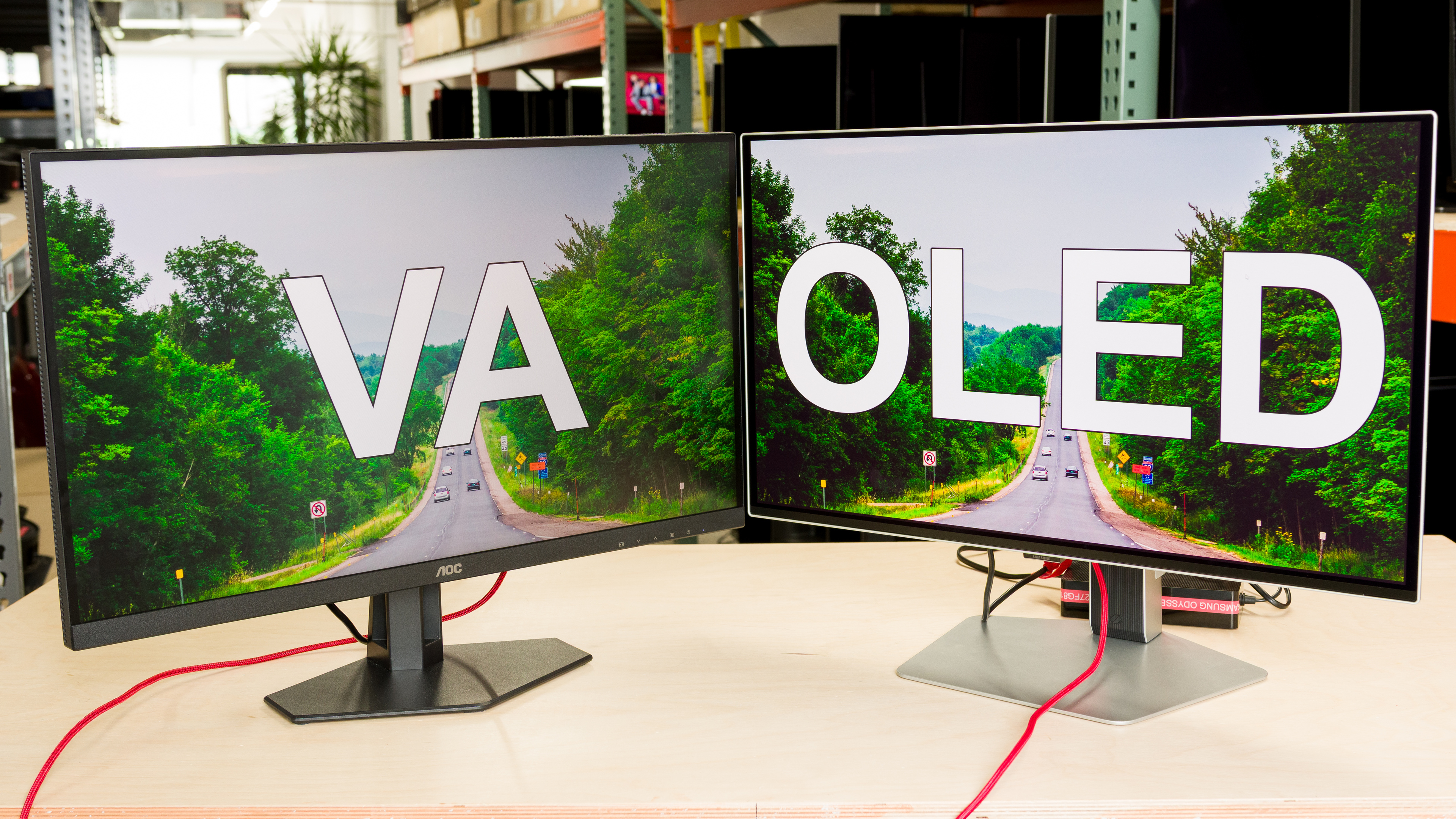
Monitors are available in different panel types, with VA and OLED being two of the most common. They each share similar strengths, like with deep blacks in dark rooms, but there are still some noticeable differences. When comparing VA vs OLED panel types, it's clear that OLED delivers the best performance, but this doesn't mean that they're the better choice for everyone. This is because VA panels typically get brighter, making them better choices for well-lit rooms, and they don't risk burn-in with constant exposure to the same static elements over time.
In this article, we'll discuss the main differences between VA vs OLED monitor panels. If you want to learn about other panel types and comparisons, you can also check out our IPS vs VA, IPS vs OLED, and LED vs OLED articles.
Technical Differences
VA and OLED panels are technically very different and don't display an image the same way. VA, which stands for vertical alignment, is a type of LCD panel that relies on LED backlights to display an image. VA panels consist of liquid crystals that tilt perpendicular to the glass substrate when excited with voltage, which creates the on-screen image. On the other hand, OLEDs, which means organic light-emitting diode, are self-emissive and don't require a backlight. Instead, each pixel in an OLED monitor produces its own light, and these pixels can turn on and off independently of each other. This isn't the case with VA monitors, as thousands of pixels rely on the same LED backlight.
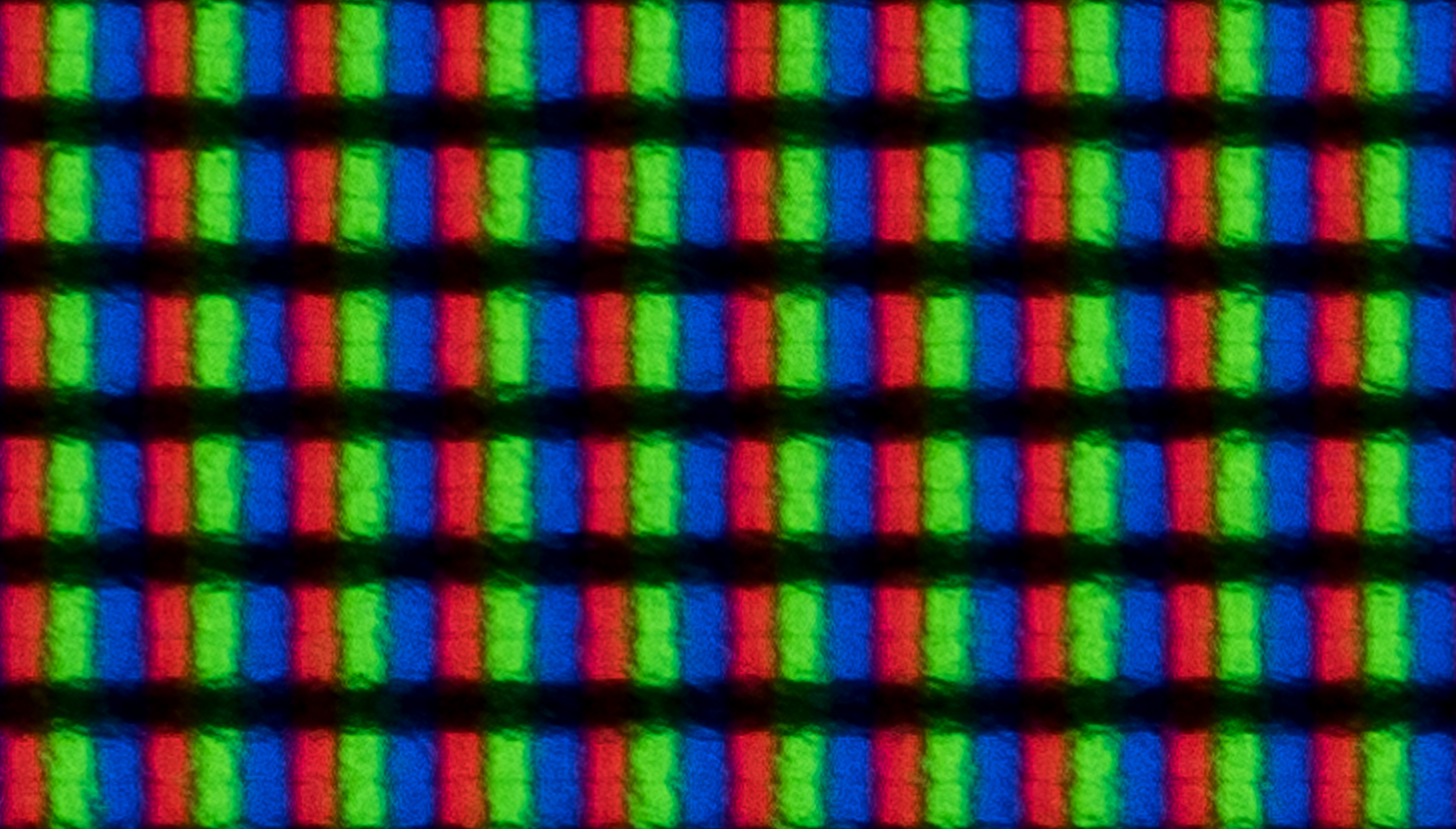
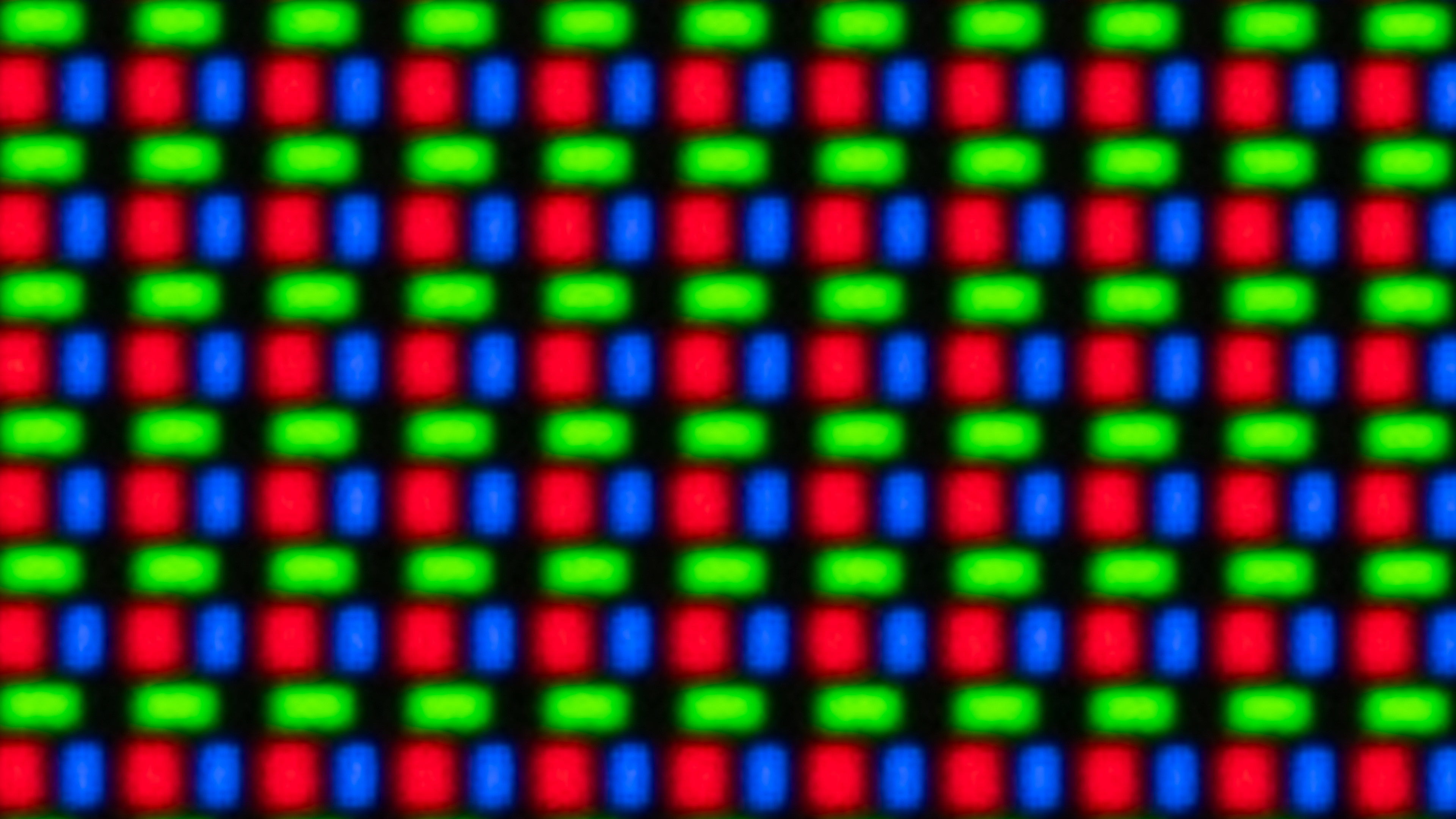
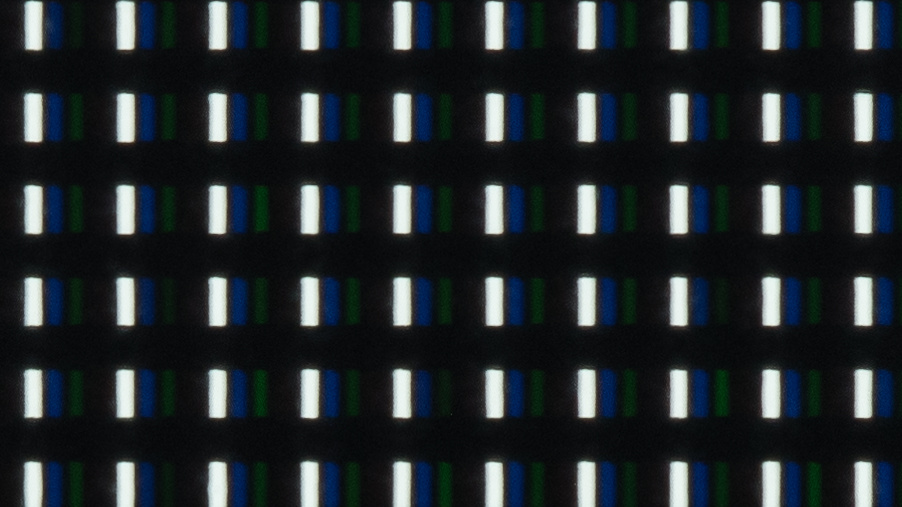
The exact subpixel structure also changes between VA and OLED monitors. Most VA panels use a traditional RGB subpixel layout, while there are two common types of OLED panels: QD-OLED and WOLED. QD-OLEDs use three subpixels (red, green, and blue) in a triangular subpixel layout. WOLEDs have four subpixels (white, red, green, and blue) either in RWBG or RGWB subpixel layouts. There are also new WOLED panels coming out using RGB Tandem technology, like the LG G5 OLED, which uses a BWRG subpixel layout. You can see these differences below, but keep in mind that WOLEDs never have all subpixels on at the same time, which is why the WOLEDs below are only using their white subpixels.
| VA | OLED | ||
|---|---|---|---|
 |
 |
 |
 |
These exact subpixel layouts may affect things like text clarity, but overall, most OLEDs share the same basic characteristics. There are still some differences in performance between WOLEDs and QD-OLEDs, though, like how QD-OLEDs have better color volume while WOLEDs maintain their black levels better in bright rooms.
What's Better? VA vs OLED
| Contrast and Black Uniformity | Brightness | Colors | Viewing Angles | Text Clarity | Burn-In | Motion Handling |
|---|---|---|---|---|---|---|
| OLED | VA | OLED | OLED | VA | VA | OLED |
OLED monitors are better than VA monitors in many ways, especially when it comes to overall picture quality and motion handling. However, VA panels still have a few advantages, like the fact that they don't risk burn-in when exposed to the same static elements over time. Combined with higher brightness and better text clarity, this makes VA panels the better choice for work-related tasks.
Contrast And Black Uniformity
Winner: OLED
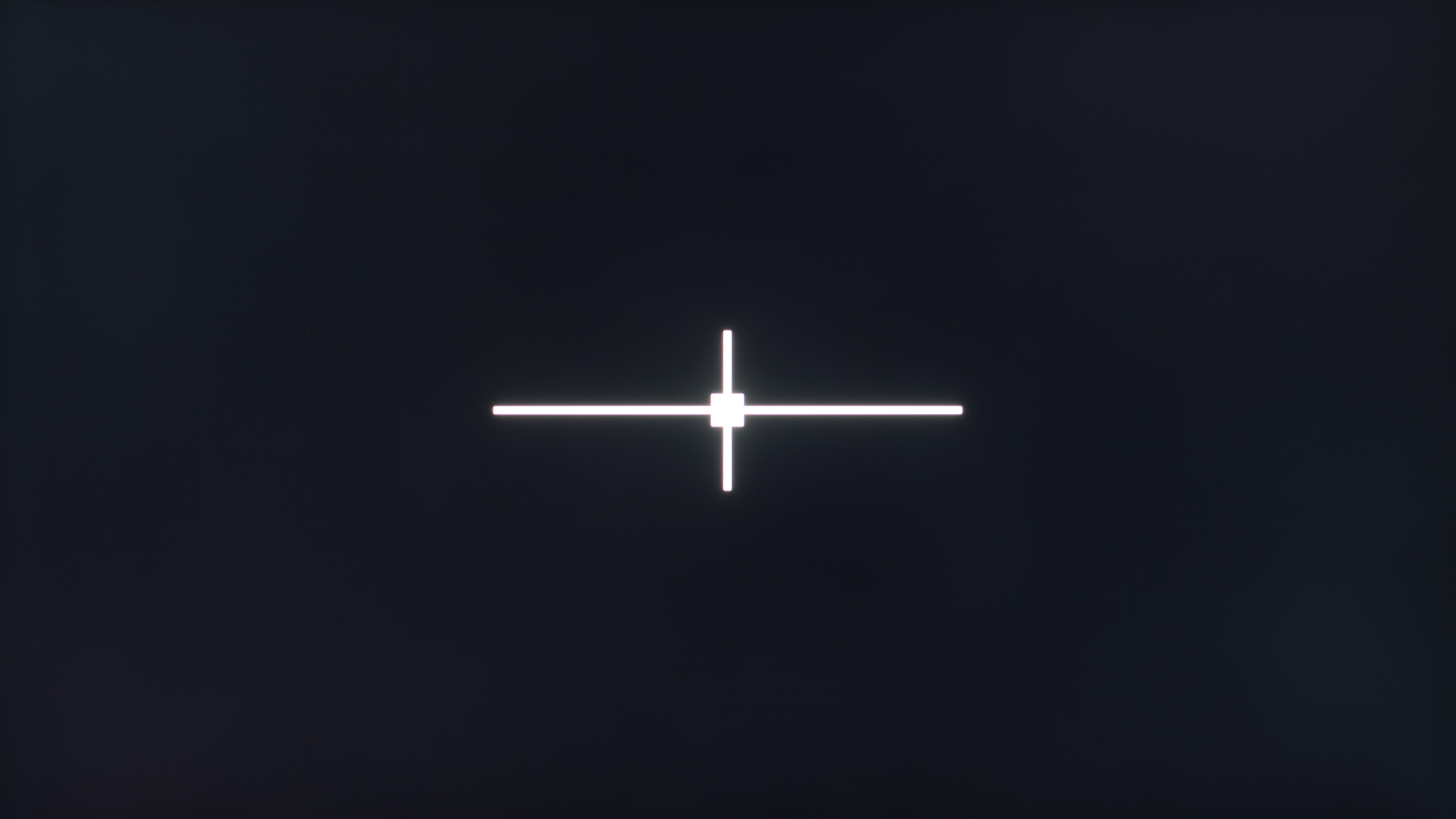
Although VA panels have high contrast ratios themselves, they're still no match for OLEDs. Blacks are deep and inky in dark rooms on OLEDs, and there isn't any haloing around bright objects, either. VA panels may have some haloing and uniformity issues, especially if they use edge-lit local dimming features. That said, VA monitors with Mini LED backlighting and effective local dimming can improve their black levels a lot, even getting close to OLEDs with how deep the blacks are, but they still have some haloing around bright objects. You can see this with different examples below.
| OLED | VA | Mini LED VA |
|---|---|---|
| Dell Alienware AW2725DF | Samsung Odyssey G51C S27CG51 | AOC Q27G3XMN |
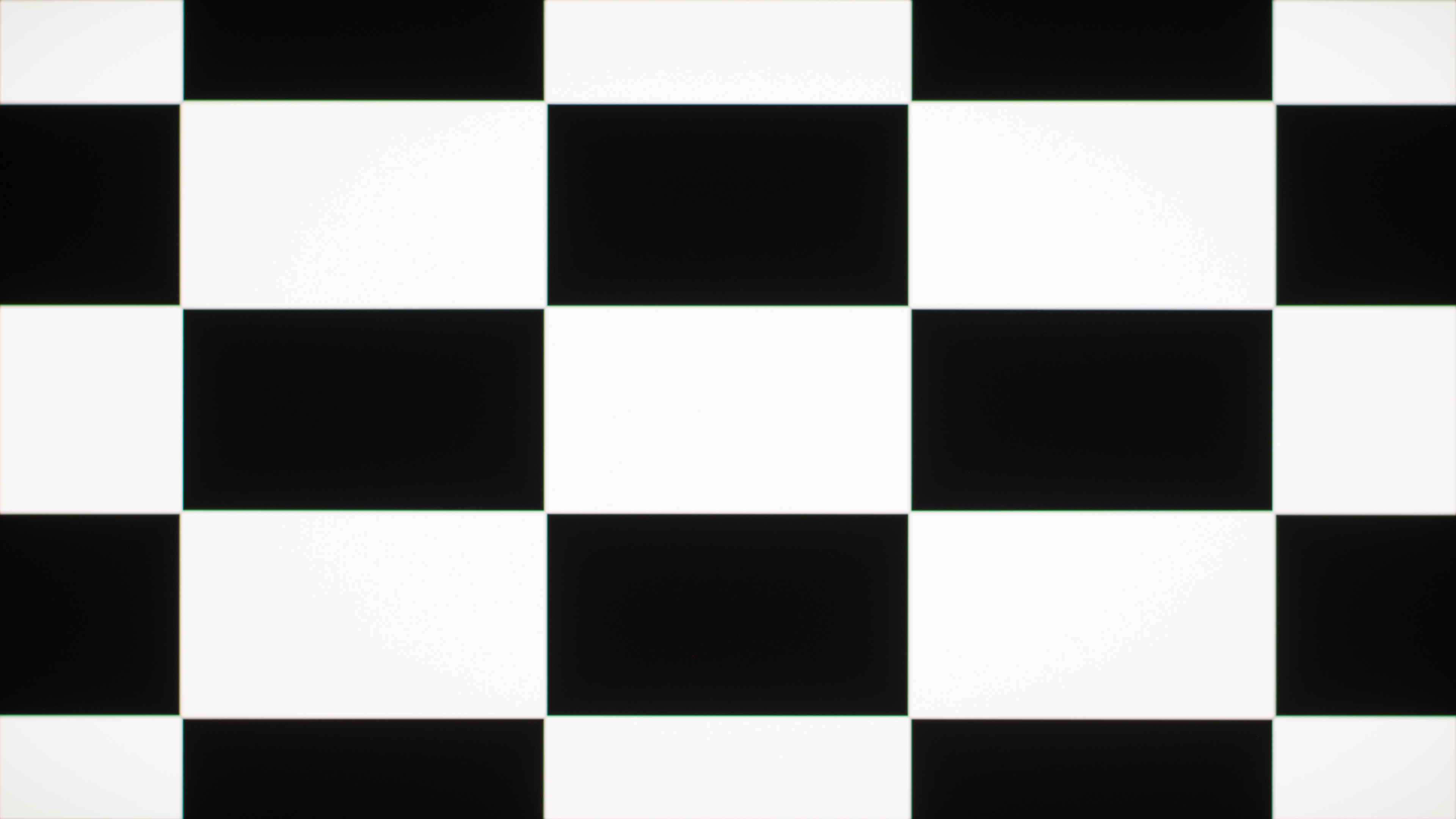 |
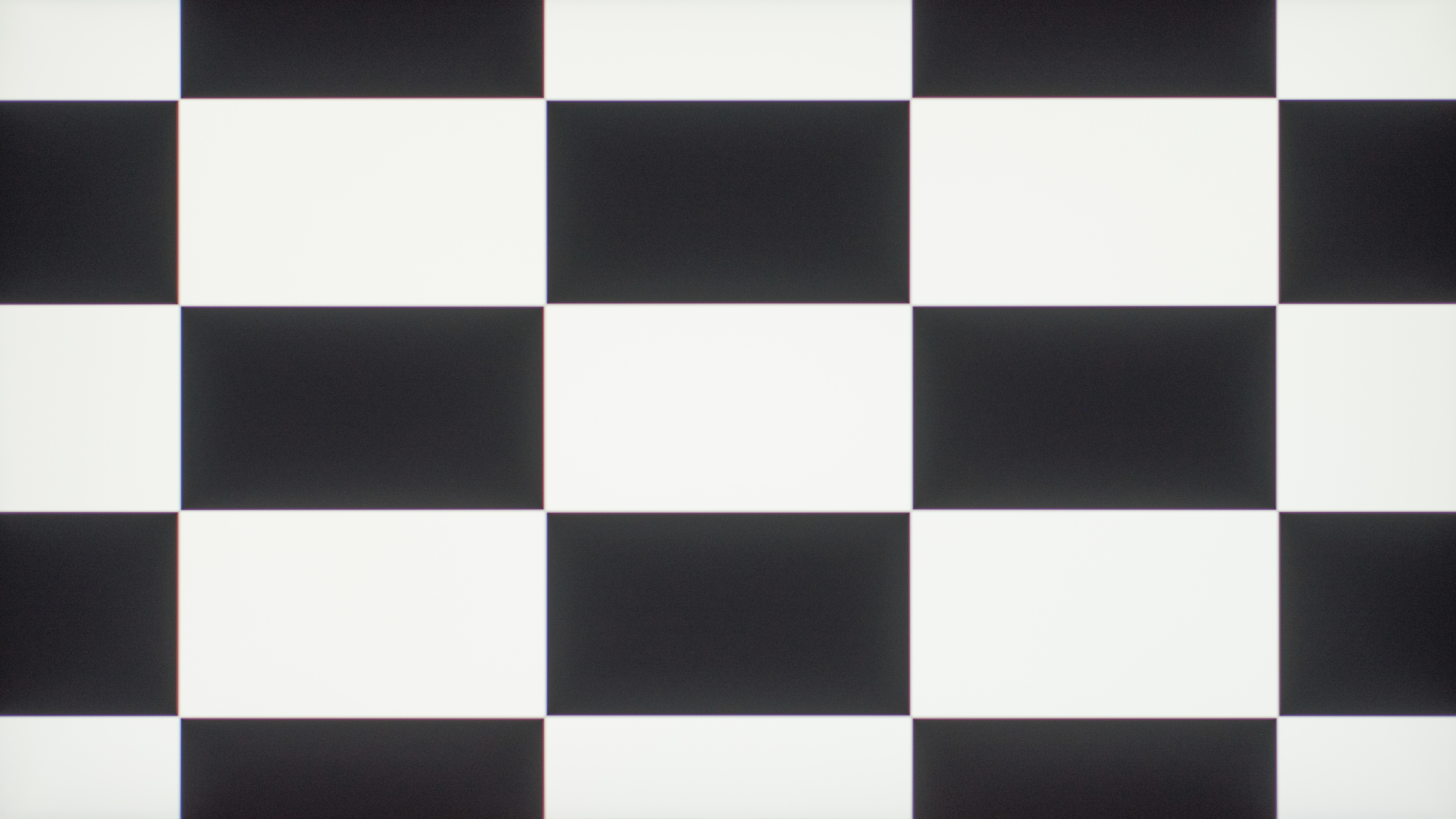 |
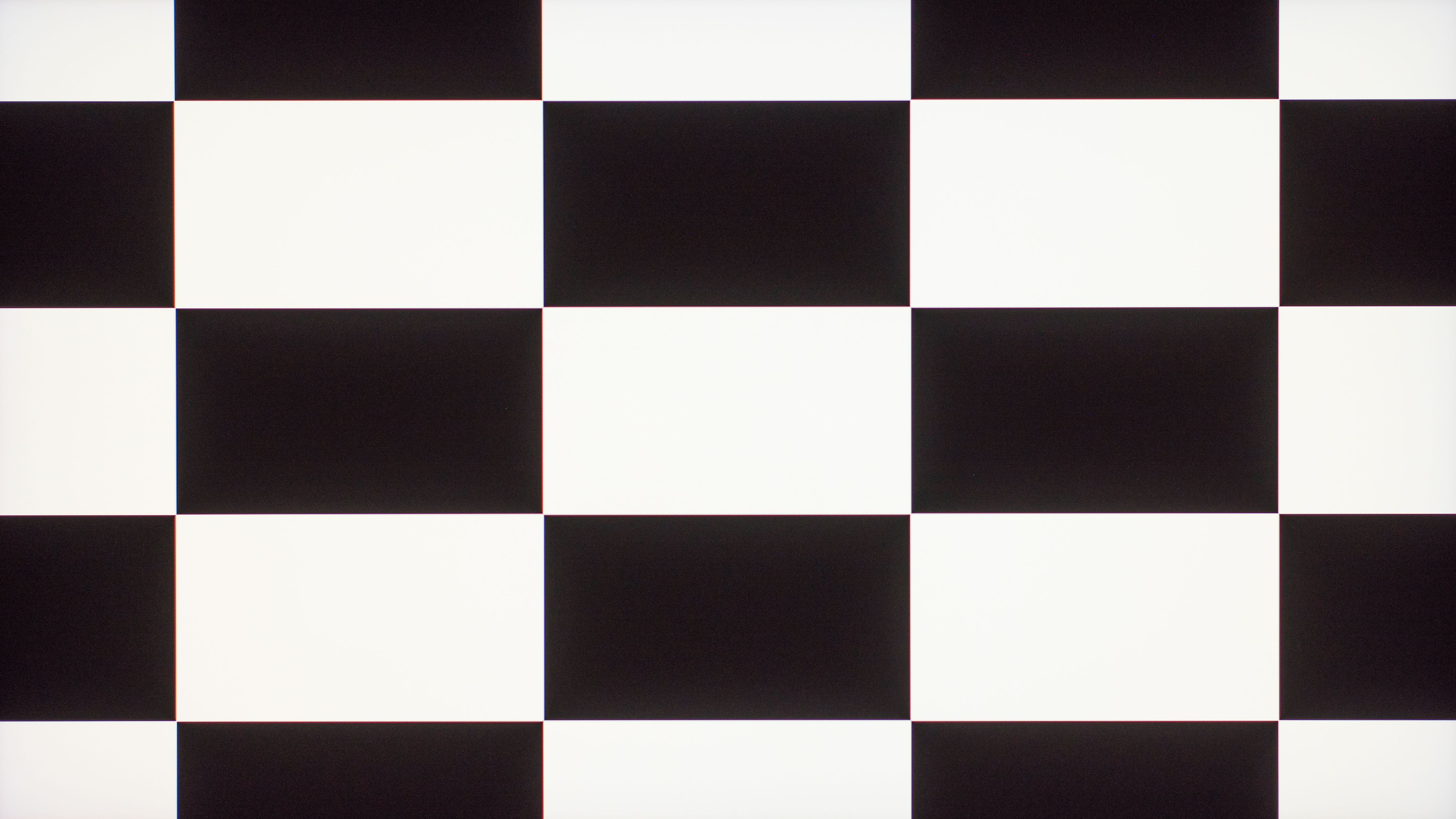 |
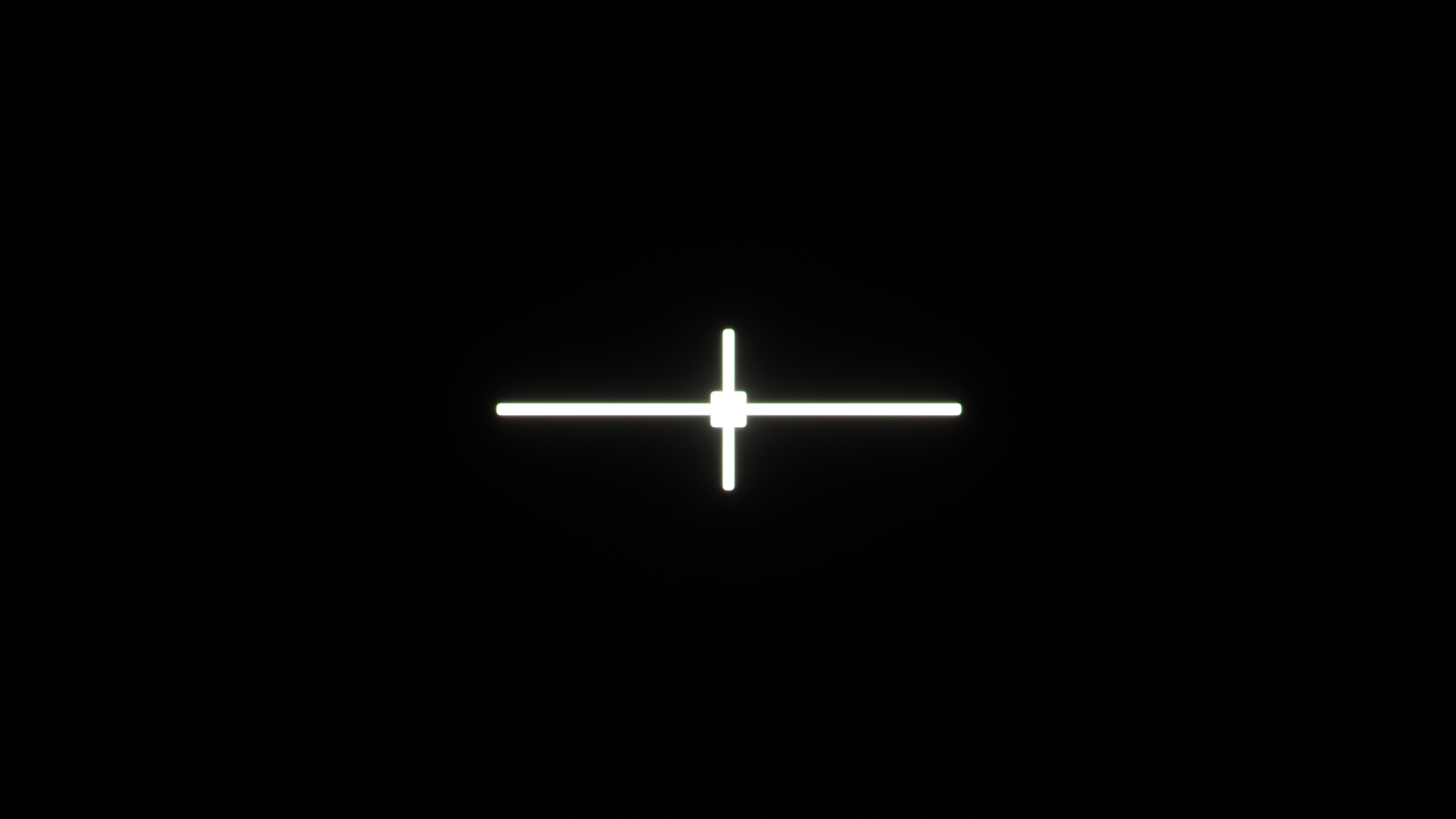 |
 |
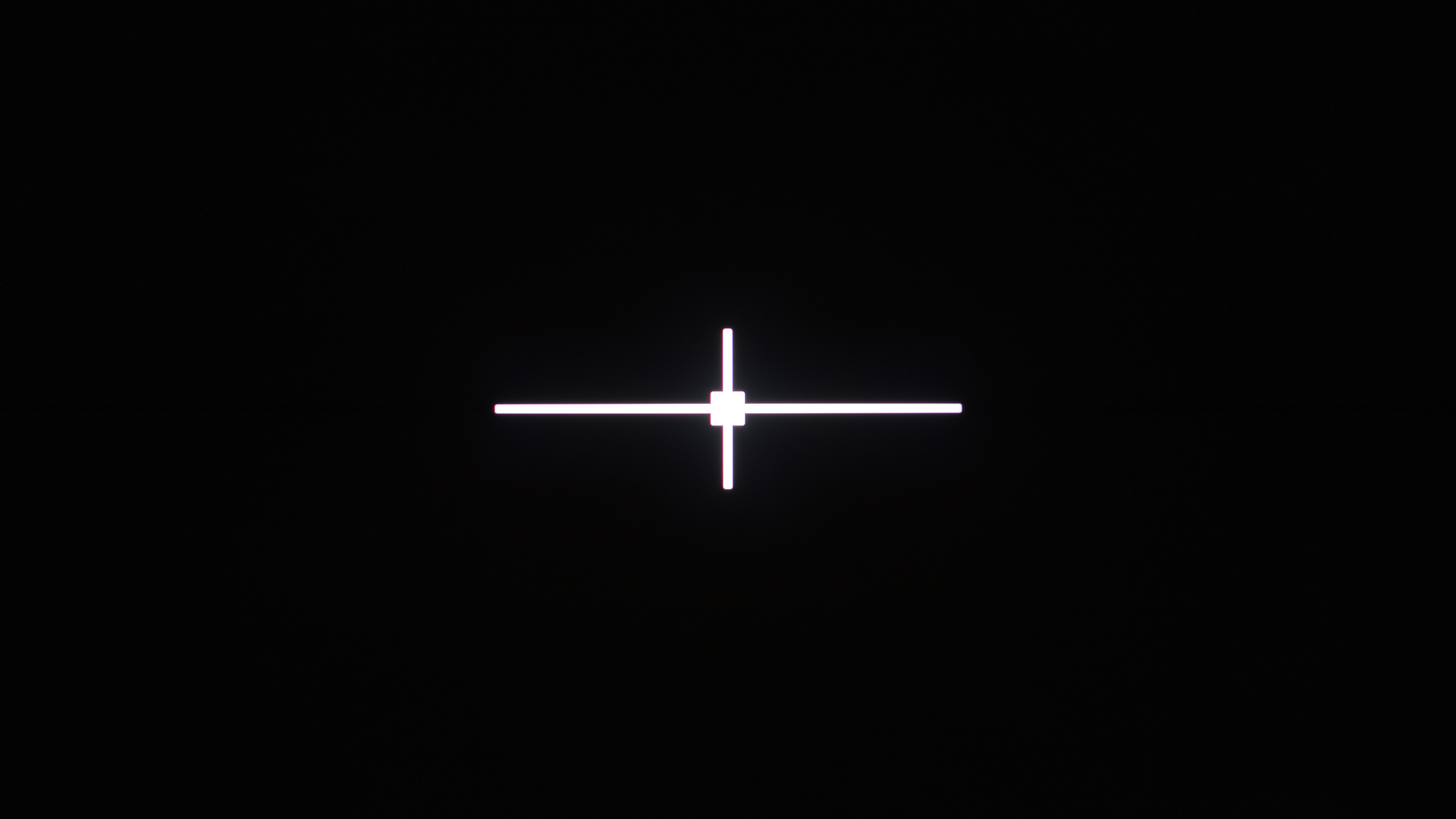 |
One thing to keep in mind is that, even though all OLEDs have a near-infinite contrast ratio, WOLEDs are better than QD-OLEDs at maintaining this low black level in bright rooms. This is because QD-OLEDs lack a polarizer, and ambient light causes blacks to look purple. So, if you're going to use your monitor in a bright room and you want the best black levels, get a WOLED.
Learn more about contrast and black uniformity.
Brightness
Winner: VA
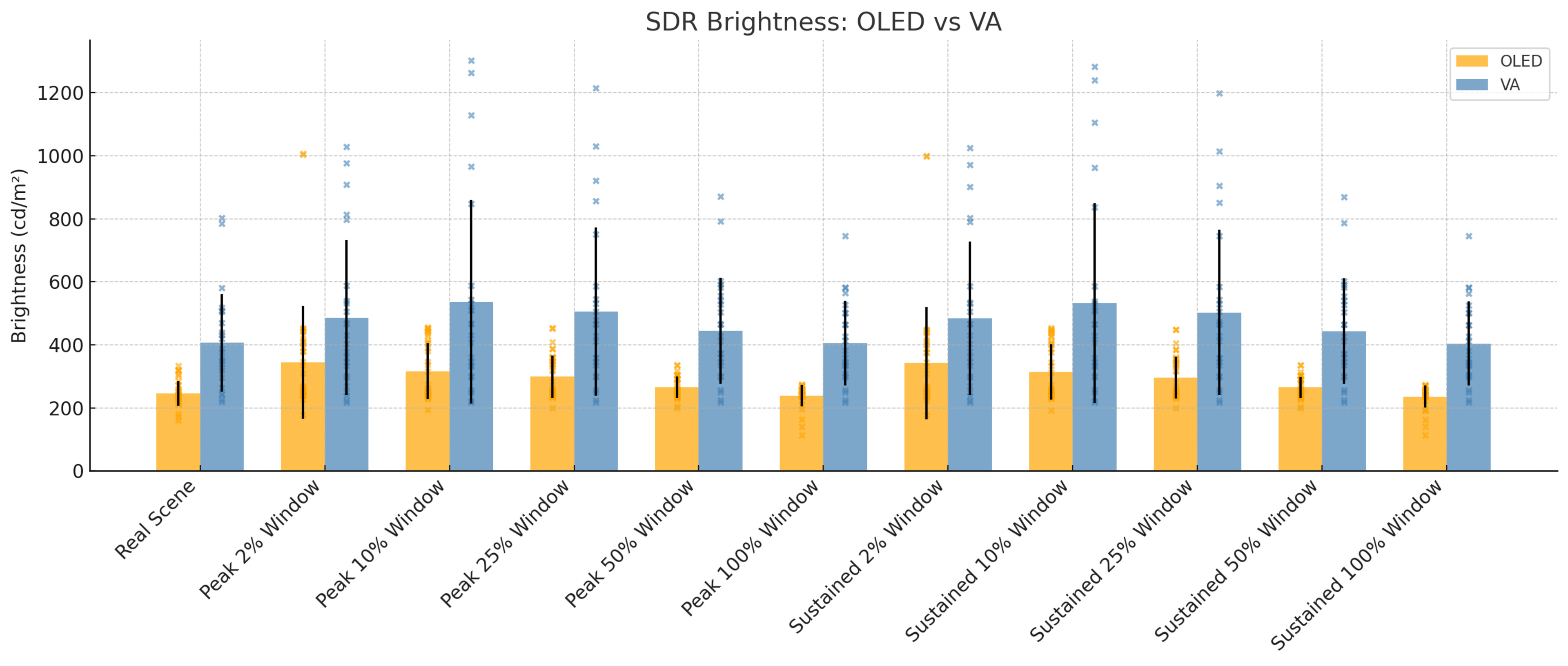
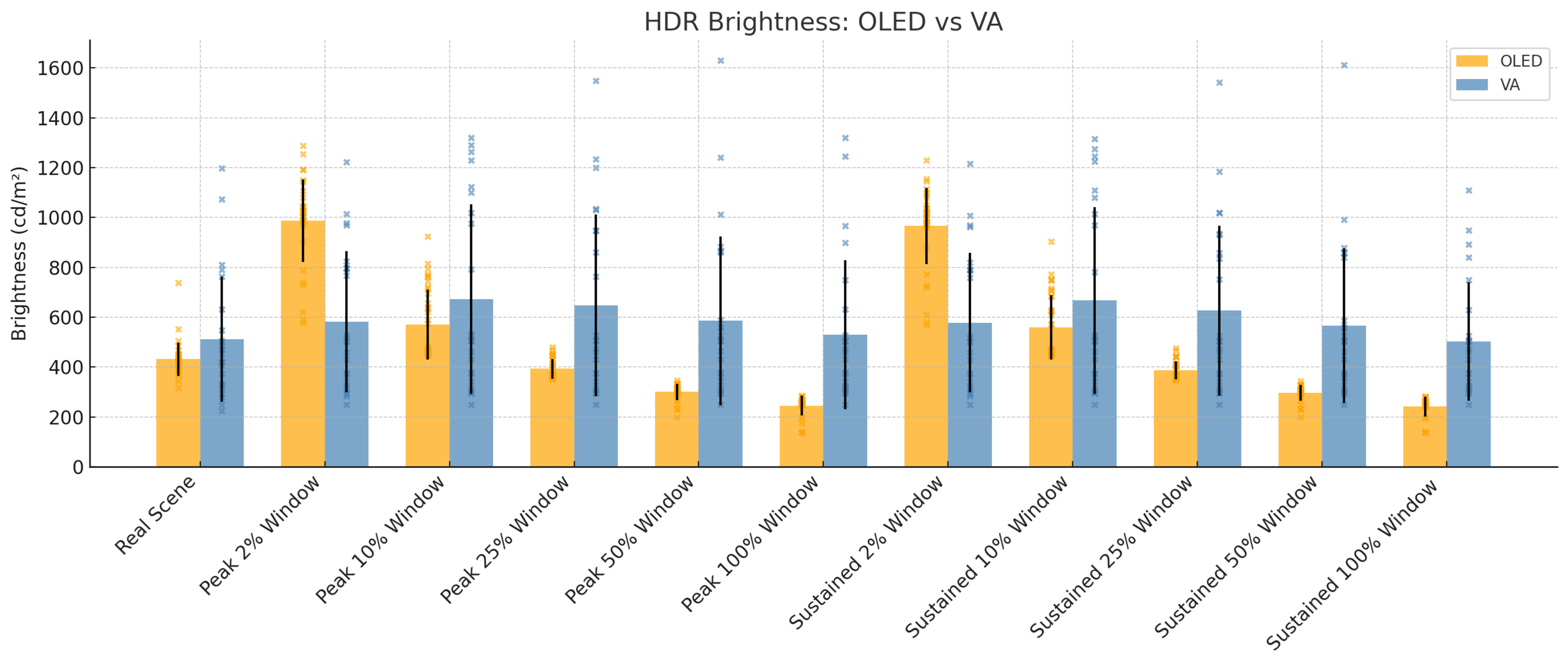
Speaking of getting a monitor to use in a bright room, VAs have the overall advantage because they typically get brighter. This is especially true in SDR, where OLEDs tend to struggle to get bright enough to fight intense glare. OLEDs are generally brighter with small highlights in HDR, making them pop against the rest of the image, but they can't maintain this high brightness with larger highlights. VA monitors are usually more consistent with different-sized highlights in HDR, which also helps if you often maximize and minimize windows, and you don't want to see distracting changes in brightness.
Using data from 24 VA and 37 OLED monitors that we've tested on Test Benches 2.0.1 and 2.1, you can see the average SDR and HDR brightness results, along with the standard deviation and spread of each panel type. There's a big spread amongst VA monitors because some use Mini LED backlighting to help them get brighter, while there are some cheap VAs that are dim. This means that getting a VA monitor doesn't mean it's bright, but generally speaking, VA panels are brighter than OLEDs.
Learn more about our brightness testing.
Colors
Winner: OLED
While VA panels get brighter, OLEDs actually display bright colors better for a more impactful HDR experience. This is especially true for QD-OLEDs, as they're the best panel type at displaying bright and vivid colors.
There are two ways to evaluate the range of colors a monitor displays: the color gamut and color volume. The color gamut defines which colors the monitor displays at a certain luminance level, while the color volume is the range of colors it displays at any luminance level. Using data from 61 monitors we've tested, the average SDR color gamut of VA monitors isn't far behind both QD-OLED and WOLED displays, but there's still a small difference. Though there's a bigger difference in the average HDR color gamut of the three panel types, as OLEDs in general display more colors than VA monitors.
However, color accuracy is something that varies between units, so neither panel type is a winner when it comes to pure accuracy.
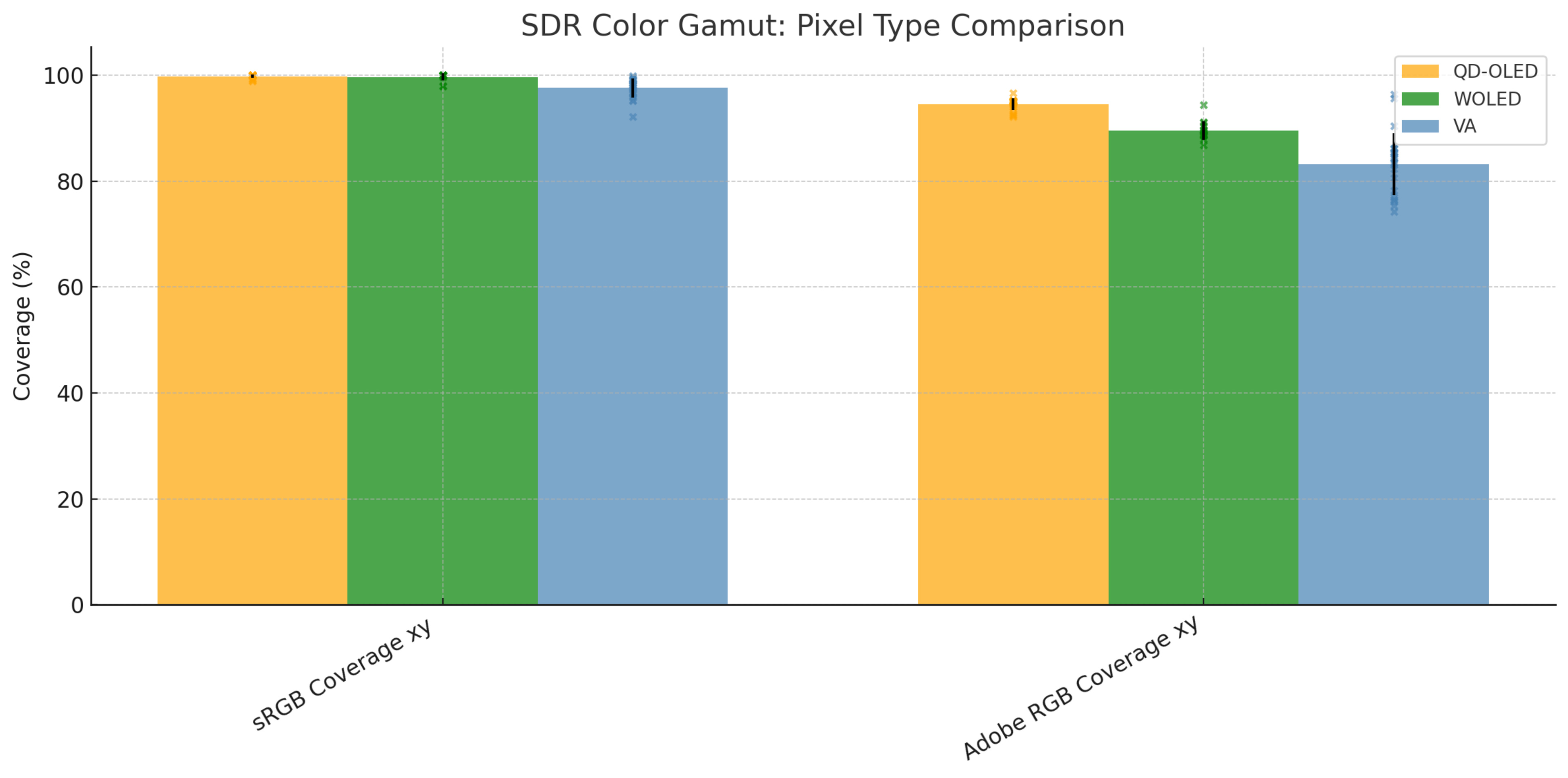
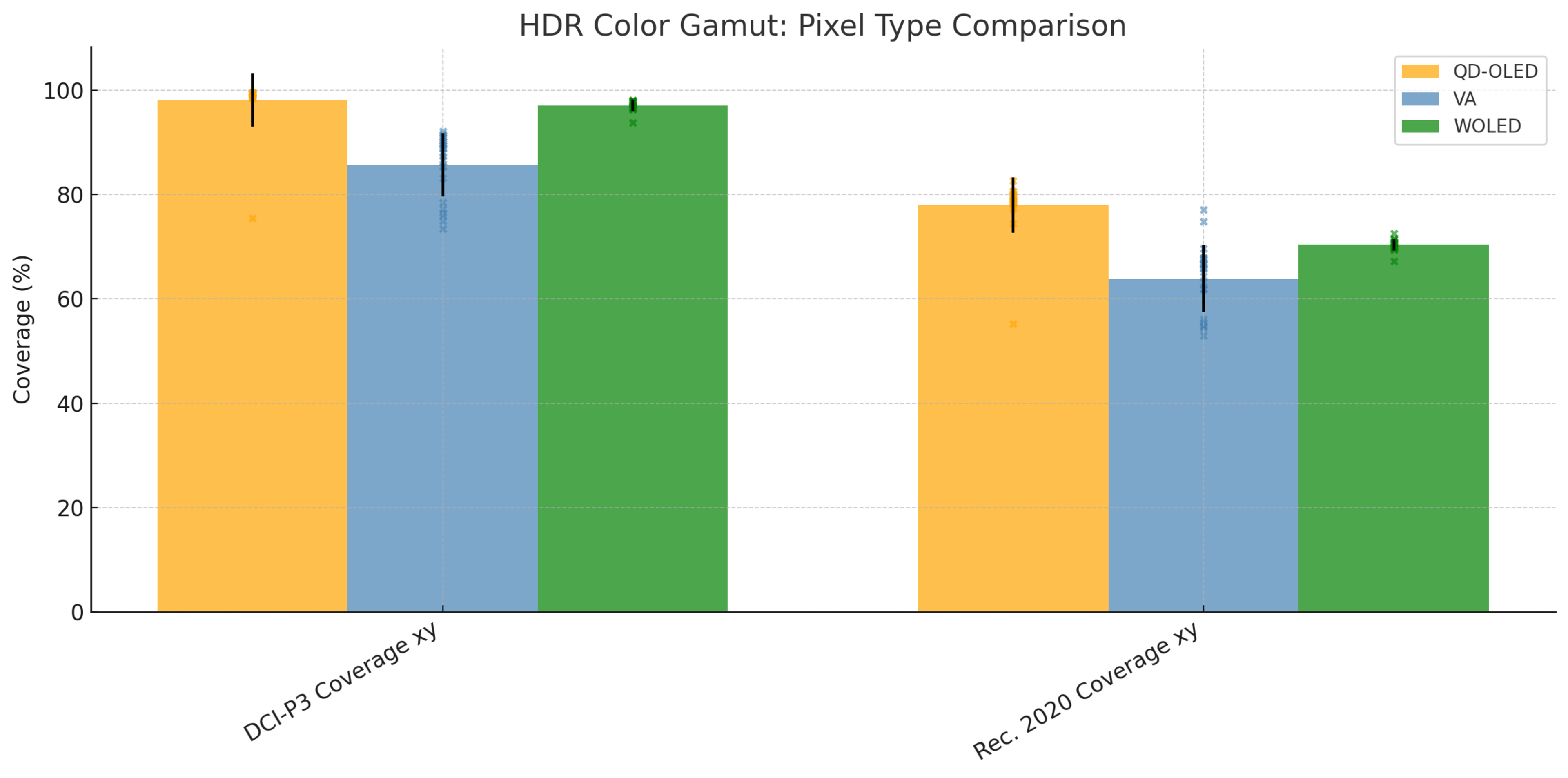
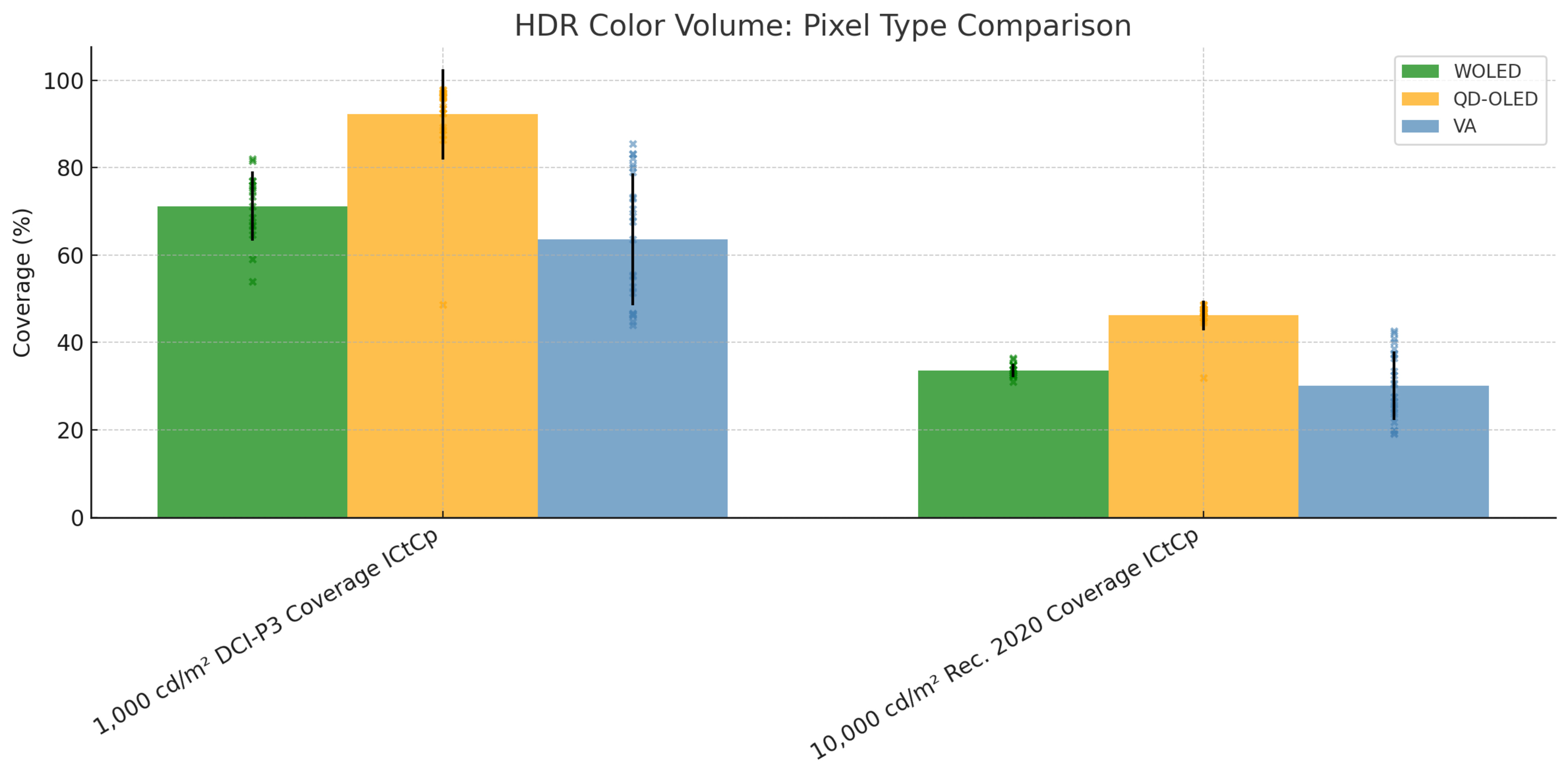
The biggest difference between the panel types is in the HDR color volume. This is because QD-OLEDs are much better at displaying bright colors, and combined with their near-infinite contrast ratios, they also display dark colors very well. As you can see in the graph below, the average color volume of QD-OLEDs is much better than WOLEDs and VAs. While there are VA monitors that display bright colors well, like those with Mini LED backlighting, they're behind either OLED panel type.
Learn more about SDR color gamut.
Viewing Angles
Winner: OLED
OLEDs maintain these colors consistently from wide viewing angles a lot better than VA monitors. The wider viewing angles on OLEDs mean that you can share the screen with someone next to you, and they'll see a consistent image from the sides. Unfortunately, this isn't the case with VA panels, as the image washes out from the sides. You need to sit directly in front of a VA monitor to get the best image, and some are curved to help bring the edges closer to your field of vision, helping you see a more consistent image across the display.
You can see this with the example videos below, comparing an OLED (MSI MPG 321URX QD-OLED) and a VA (Samsung Smart Monitor M80D S32DM80), which are both 32-inch, 4k monitors.
| OLED | VA |
|---|---|
Learn more about viewing angles.
Text Clarity
Winner: VA
Although the wider viewing angles on OLEDs help if you're sharing your screen with a coworker or client, VA monitors still have advantages in other work-related performance aspects, like text clarity. As computer programs are meant to render text with the traditional RGB subpixel layout that VA monitors have, there are some issues in text rendering with the subpixel layouts of OLEDs.
You'll notice this difference with monitors that have 1080p or 1440p resolutions, but the text clarity on 4k OLEDs is closer to what text looks like on a 4k VA monitor of the same size. There are other factors that impact the text clarity, like the screen coating, but generally speaking, letters look sharper on VA monitors than OLEDs with the same size and resolution.
You can see these differences below with two sets of monitors that have the same pixel density. There are separate examples from QD-OLED and WOLED monitors because they render text differently. It's clear that out of the 1440p monitors, the VA monitor has the sharpest text. It's the same with the 4k monitors, but the differences are harder to tell.
| Panel Type | 27-inch, 1440p 109 PPI |
32-inch, 4k 140 PPI |
|---|---|---|
| VA |  |
 |
| WOLED |  |
 |
| QD-OLED |  |
 |
Learn more about text clarity.
Burn-In
Winner: VA
The biggest advantage of VA monitors is that they don't risk burn-in, which OLEDs do. This can happen with constant exposure to the same static elements over time, especially if you have the screen at the max brightness without varying content. This is a big concern if you need a monitor only for work, as static elements like toolbars can increase the risk of burn-in. It isn't so much of an issue if you change up what you do with your monitor, like by gaming or watching videos every so often. If that concerns you, it's better to go for a VA display, as you won't be worried about the risk of burn-in.
Learn about our accelerated burn-in test with TVs.
Motion Handling
Winner: OLED
On the other hand, another big advantage of OLED monitors is how much better motion is on them. They have a near-instantaneous response time, so fast-moving objects look crisp. This is especially true at high refresh rates, as there's more persistence blur at low refresh rates. This type of blur isn't a fault of the monitor; rather, it's caused by the low refresh rate and the way we perceive motion, as it holds the frame longer than with higher refresh rates.
The biggest downside of VA monitors is that they have black smearing with fast-moving objects. This happens because they have slow response times when transitioning from dark colors to brighter ones, and vice versa, leading to dark trails behind fast-moving objects. Although some VA monitors have less black smearing than others, they all have it in some form.
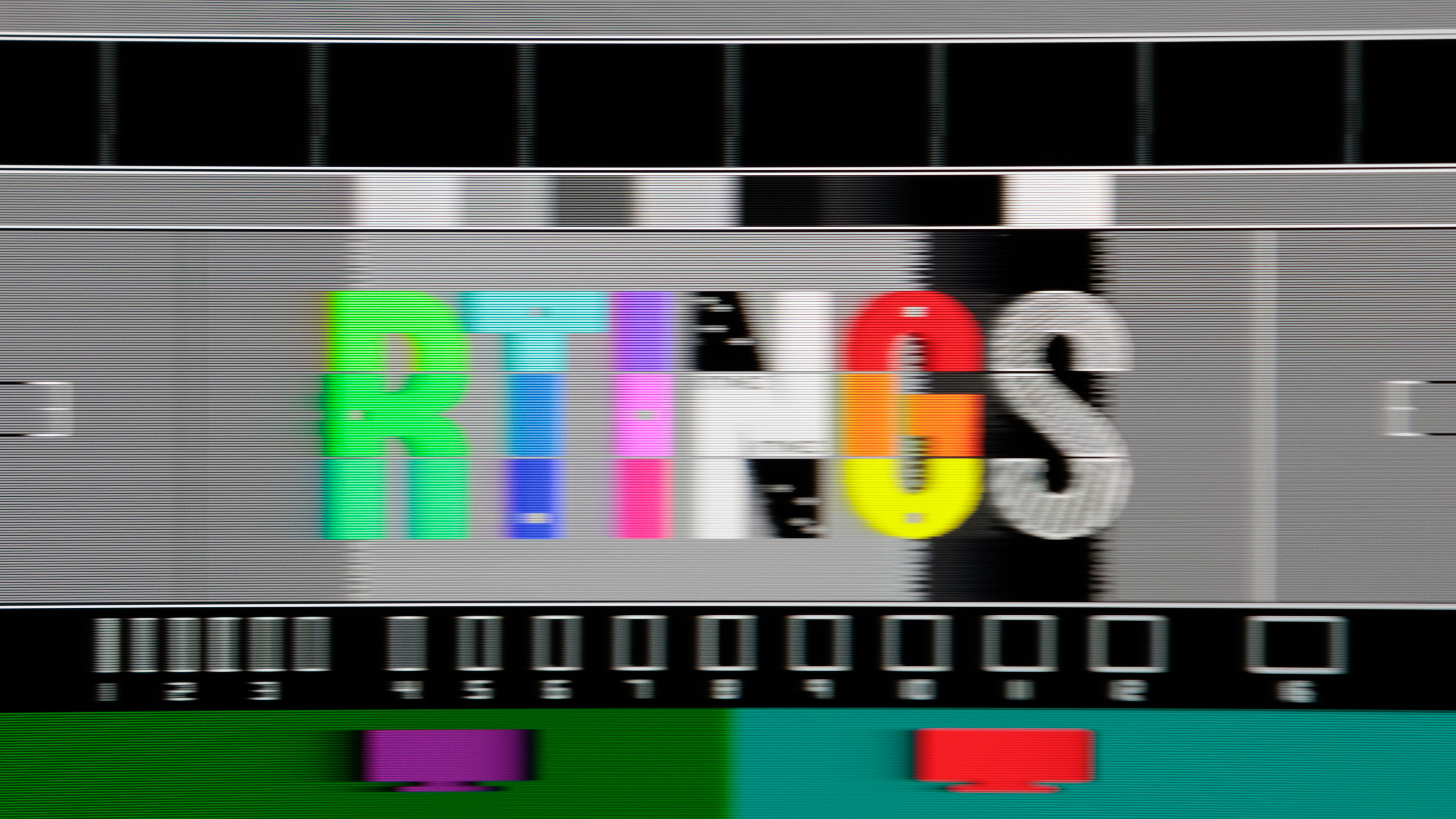
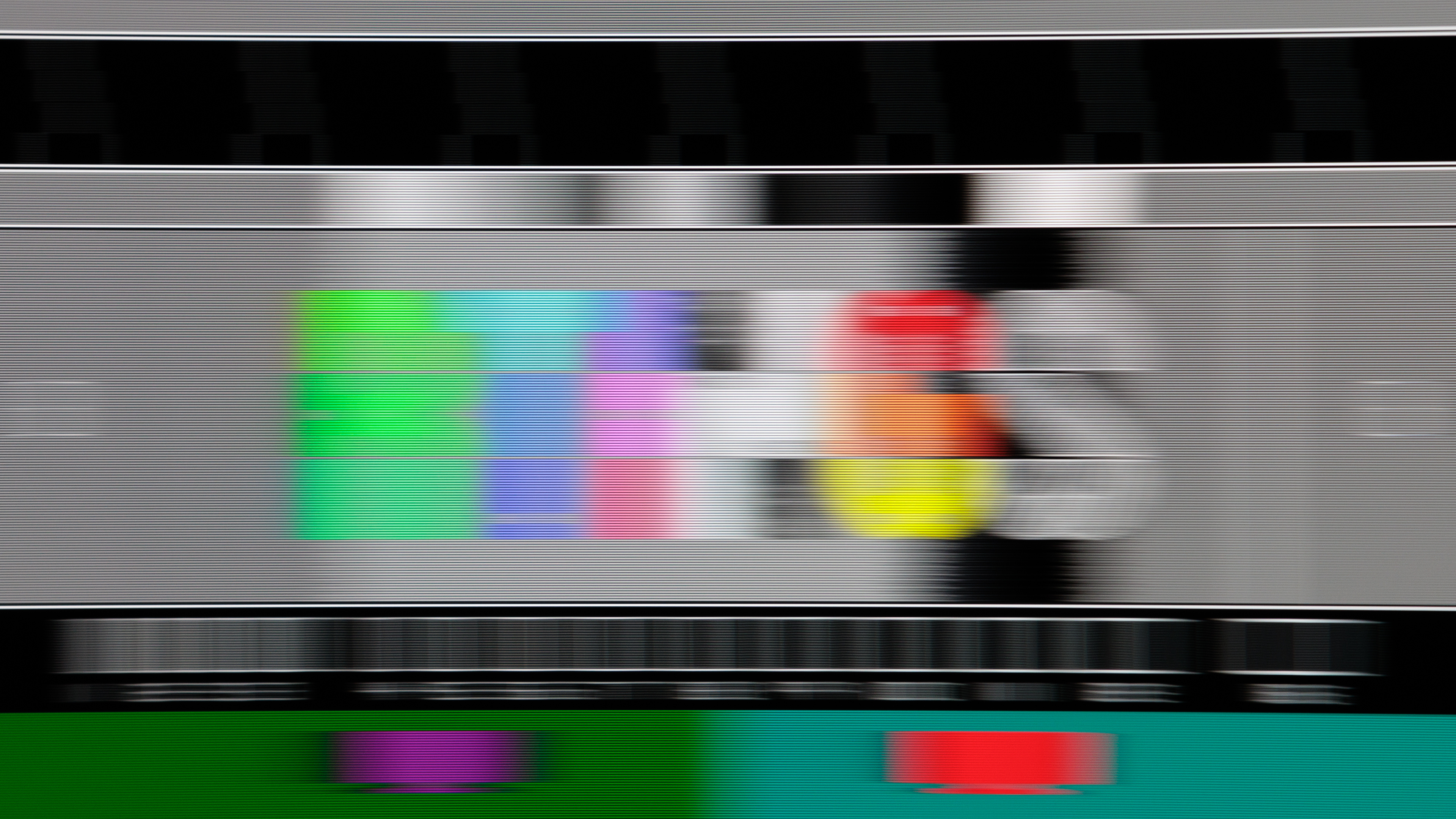
Below you can see motion of an OLED (Gigabyte AORUS FO32U2P) and a VA (Samsung Odyssey G7 C32G75T) at 240Hz and at 60Hz. It's clear that motion looks a lot better on the OLED at 240Hz, but there's less difference between them at 60Hz due to persistence blur. That said, you can still see the black smearing on the VA monitor even at 60Hz.
| Refresh Rate | OLED | VA |
|---|---|---|
| 240Hz | 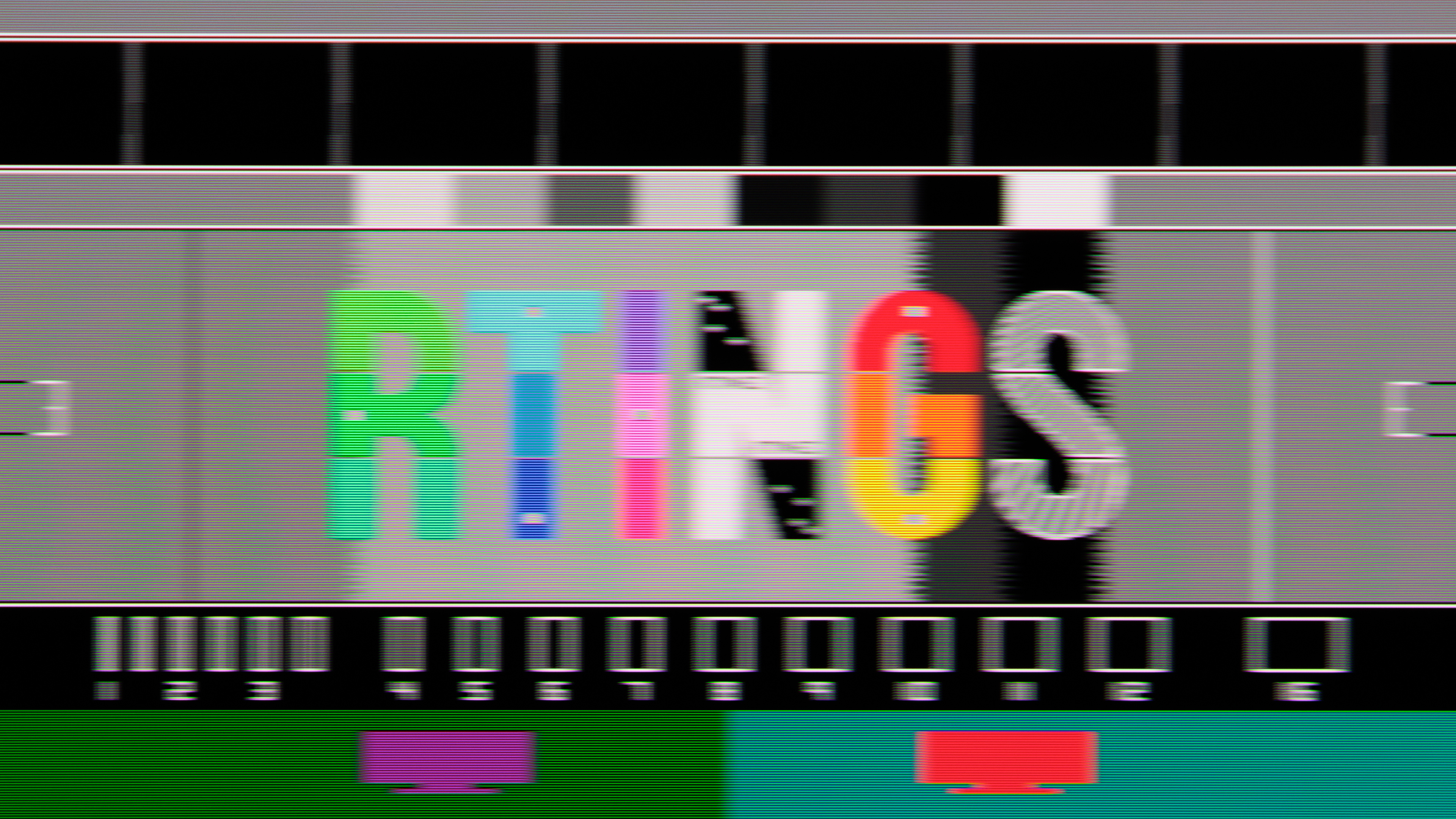 |
 |
| 60Hz | 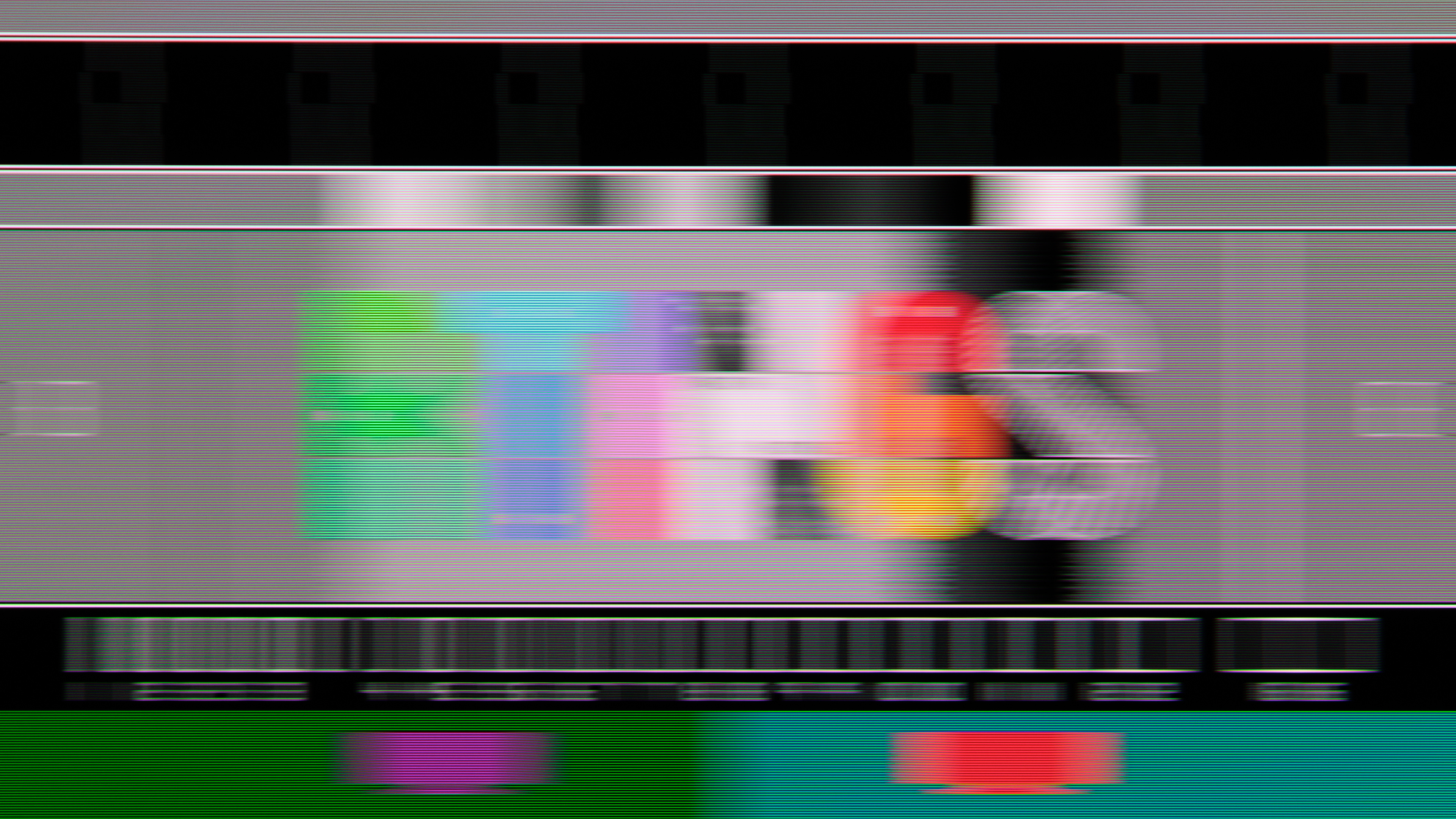 |
 |
Learn more about our motion testing.
Which Panel To Get For Your Usage
| Gaming | Productivity | Content Creation | Multimedia |
|---|---|---|---|
| OLED | VA | VA or OLED | OLED |
Although most objective measurements point to OLEDs being better than VA, choosing which panel type to get depends on your usage. If you need something only for work, then it's better to go for a VA panel as they don't risk burn-in. You may also want to consider a VA monitor for content creation because of this burn-in risk. However, you can't go wrong with choosing an OLED for content creation due to their better colors and overall picture quality, so you may want to change up what you have on the screen to reduce the risk of burn-in.
For other usages where picture quality is important, like playing HDR games or watching content, then go for an OLED. Its picture quality far outmatches most VA monitors, even those with Mini LED backlighting, mainly because of its perfect black levels in dark rooms and no haloing around bright objects. Even the more vivid colors, especially on QD-OLEDs, make HDR content look more punchy and life-like.
Besides the usages, you may also want to consider the room you're going to use the monitor in before making a buying decision. Generally speaking, OLEDs are better for dark rooms and VAs are better for bright rooms, but there are other factors you may want to consider for use in a bright room, like reflection handling.
Cost is another consideration, and most OLEDs are costly. This means you can find many more VA monitors at a budget-friendly price, but these are usually limited in overall performance. You'd still have to spend more to get a premium VA monitor with the best performance and features.
For more options, you can also check out all our monitor recommendations.
Conclusion
OLED and VA panels are two common panel types found in monitors. They're technically different as VA is a type of LCD panel that relies on an LED backlight to produce an image, while OLEDs are self-emissive and don't have backlights. Choosing between an OLED vs VA monitor ultimately depends on your needs and usage, but there are some factors to consider. OLEDs are the better choice for most usages thanks to their deeper blacks, brighter highlights without any blooming, wider viewing angles, and superior motion handling. Although there are VA monitors that use Mini LED backlighting to improve the picture quality in dark scenes, they're still behind OLEDs in terms of picture quality and performance. However, this doesn't mean that VA monitors are the worse choice for everyone. You should consider a VA monitor if you're worried about the risk of burn-in that OLEDs have, like if you need something for work, or if you want something to use in a well-lit room with high brightness to fight glare.