Our Verdict
Very good TV for mixed usage. Picture quality is good, but image loses accuracy when viewed at an angle. The TV can get bright to counteract glare in a bright room. Motion handling is great for watching sports, gaming or using it as a PC monitor. Dark scene performance is good, but the local dimming doesn't work well.
- Great motion handling
- Low input lag
- Great SDR peak brightness
- Colors appear washed out at an angle
Good for watching movies in a dark room. Picture quality is good, and colors accuracy is good out-of-the-box. The Samsung NU8000 can play most content without judder, which is great. Unfortunately, the local dimming doesn't work well to improve dark scene performance, as it reduces the brightness of small object significantly.
Very good for watching TV in a bright room. The TV can get bright across the whole screen to counteract glare, and reflection handling is good. The smart interface also works well for casual TV watching. Picture quality is good but degrades when viewed at an angle.
Good TV for sports fans. Motion handling is great, so fast-moving objects appear clear. Picture quality is good from directly in front but degrades when viewed at an angle. The TV can get bright to overcome glare in a bright room, and anti-reflection coating is good at diffusing direct lights on the screen.
Excellent TV for gamers. Picture quality is good when viewed from directly in front. Motion handling is great, so fast-moving objects remain clear. The Samsung NU8000 can also flicker the image to clear up fast motion, and input lag is very low which is excellent.
Good for watching HDR movies in a dark room. Picture quality is good and can produce more bright and vivid HDR highlights due to wide color gamut and high peak brightness. The TV can play most content without judder, which is great. Unfortunately, the local dimming doesn't work as well as some other TVs.
Great TV for HDR gaming on an Xbox One S or PS4 Pro. Picture quality is good, and motion handling is great due to the fast response time. The TV supports HDR features like a wide color gamut. The Samsung NU8000 also has a motion interpolation feature which works in game mode to produce smooth images with very little input lag which is great.
Great TV for PC use. The TV supports chroma 4:4:4 for clear text across all backgrounds. Picture quality is good but degrades when viewed at an angle so the sides of the screen can appear non-uniform from up close. Motion handling is great, and the TV feels responsive thanks to the very low input lag.
Changelog
- Updated May 21, 2020: Converted to Test Bench 1.5.
- Updated Feb 21, 2020: Converted to Test Bench 1.4.
- Updated Feb 28, 2019: Converted to Test Bench 1.3.
- Updated Jan 09, 2019: We have retested the BFI, and can confirm that the NU8000 can flicker at 120 Hz when displaying a 120 Hz signal. Scores updated.
Check Price
Differences Between Sizes And Variants
We tested the 55" (UN55NU8000) version FA01. For the most part, we expect our review to be valid for the 49" version (UN49NU8000), 65" version (UN65NU8000), 75" version (UN75NU8000) and 82" version (UN82NU8000). Note that, like the MU8000, the 49" model has a 60Hz panel instead of the 120Hz panel found on other sizes.
There is an NU8070 variant that is available in the EU only. It is available in 49", 55", and 65". We're not sure what differences there are exactly, but Samsung markets the NU8070 as having "Supreme UHD Dimming", whereas the NU8000 in the E.U. is advertised with "UHD Dimming". It is interesting to note that the NU8000 in the U.S. is marketed with "Supreme UHD Dimming".
Warehouse stores in the U.S., including Sam's Club and Costco, carry the model code NU800D. As far as we know, it is the exact same TV, but there may be some very minor cosmetic differences.
If someone comes across a different type of panel or if their Samsung NU8000 doesn't correspond to our review, let us know and we will update the review. Note that the gray uniformity does vary on a unit-by-unit basis.
| Size | Model | US | UK | AU | Warehouse | Refresh Rate |
| 49" | UN49NU8000 | UN49NU8000FXZA | UE49NU8000FXZA | UN49NU800DFXZA | 60Hz | |
| 55" | UN55NU8000 | UN55NU8000FXZA | UE55NU8000FXZA | UA55NU8000WXXY | UN55NU800DFXZA | 120Hz |
| 65" | UN65NU8000 | UN65NU8000FXZA | UE65NU8000FXZA | UA65NU8000WXXY | UN65NU800DFXZA | 120Hz |
| 75" | UN75NU8000 | UN75NU8000FXZA | UE75NU8000FXZA | UA75NU8000WXXY | UN75NU800DFXZA | 120Hz |
| 82" | UN82NU8000 | UN82NU8000FXZA | UE82NU8000FXZA | UA82NU8000WXXY | UN82NU800DFXZA | 120Hz |
Popular TV Comparisons

The Samsung NU8000 is a very good 4k TV without major flaws, but for different usages, there may be a better choice - especially considering the price premium of this 2018 model over comparable 2017 TVs. See our recommendations for the best 4k TVs, the best 65 inch TVs and the best TVs.
The Samsung NU8000 is better than the Samsung NU7300. The NU8000 is much brighter and better able to overcome glare in a bright room. The NU8000 has a faster response time and can remove judder from most sources. The NU8000 also has new gaming features, including Auto Low Latency Mode and VRR (variable refresh rate).
The Samsung NU8000 is much better than the Samsung NU7100. The NU8000 is much brighter with all types of content. Motion is smoother as it can remove 24p judder from almost all sources, and the faster response time means less motion blur. The NU8000 also has some advanced gaming features, including automatic low latency mode and support for a variable refresh rate.
The Vizio P Series 2018 is better than the Samsung NU8000. The Vizio P Series has a more advanced full-array local dimming system that produces better blacks and delivers better dark room performance, as well as helping highlights to stand out in HDR. The P Series has smoother motion, since the response time is much faster, great for gaming or fast action scenes. The Samsung NU8000 has some gaming-oriented features, including VRR and automatic game mode.
The Samsung NU8000 and the TCL 6 Series 2018 have very similar performance. The TCL has better local dimming performance, so blacks look deep in a dark room, and better HDR peak brightness that makes highlights pop in HDR content. The Samsung NU8000, on the other hand, supports FreeSync variable refresh rate, which can eliminate tearing if you play video games. Finally, the Samsung NU8000 has better gray uniformity, so the image is free from clouding or shadows in slow panning uniform-color shots like a hockey arena or a soccer field.

We buy and test dozens of TVs yearly, taking an objective, data-driven approach to deliver results you can trust. Our testing process is complex, with hundreds of individual tests that take over a week to complete. Most of our tests use specially designed test patterns that mimic real content, but we also use the same sources you have at home to ensure our results match the real-world experience. We use two main tools for our testing: a Colorimetry Research CR-100 colorimeter and a CR-250 spectroradiometer.
Test Results
Older Test Bench: We tested this product using an older TV test methodology before a major update. Some of the test results below aren't directly comparable with other TVs. Learn more
for pictures & test results

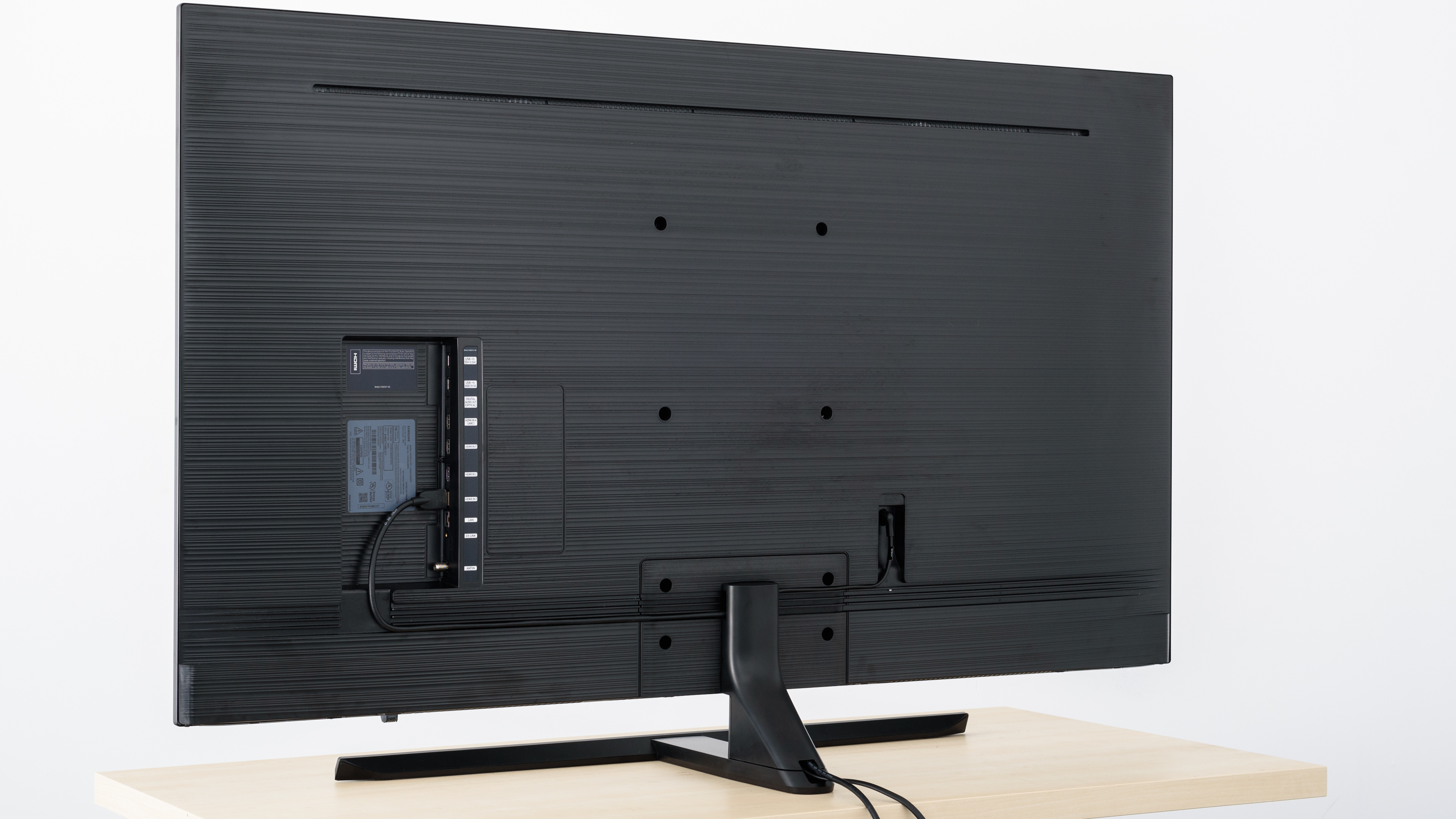
The design of the Samsung NU8000 is excellent. Compared to the MU8000, the new stand feels very solid and has a slightly smaller footprint, although if you were planning on using a soundbar in front of the TV, you might have to make some concessions. There are new cable management guides cut into the back. The TV does not include the mini OneConnect box, all of the connections are towards the side of the TV.

for pictures & test results

The back of the TV has a textured finish very similar to last year's MU8000. It has new tracks for cable management that are cut the entire width of the back of the TV. The VESA wall mount is 200x200 instead of the 400x400 found on most of last year's models .

for pictures & test results

The TV is quite thin when viewed from the side, although it is slightly thicker than last year's MU8000.
When wall mounted, the TV doesn't stick out much which is good. The lack of the OneConnect mini means you will have more work if you need to change the connections, but you don't have to worry about where to place the box.
for pictures & test results

The overall build quality is average, nearly identical to the MU8000. It is almost entirely made of plastic but feels solid. We haven't experienced any quality issues.
Update 07/31/2018: A few readers are reporting a clicking sound issue. From our investigation it seems to come from heat expansion of the back cover. We think that once the TV is warm enough it should settle down.
for pictures & test results

Excellent native contrast ratio on the Samsung NU8000, approximately 15% better than the MU8000. This high contrast ratio allows the TV to produce deep black scenes, especially when viewing in a dark room.
The local dimming feature has very little impact on the contrast ratio. This is to be expected as the local dimming on this edge-lit TV is not very effective at making blacks deeper.

Great SDR peak brightness. In dark scenes, the TV tries to keep black levels low rather than favoring brighter highlights. Brightness remains consistent, regardless of content and the TV is bright enough for most rooms.
Update 06/12/2018: Retested peak brightness on firmware update 1103, and by sending the signal with our Samsung K8500 Blu-ray player. The brightness is now significantly higher, by around 60 cd/m². The score has been updated.
Decent HDR peak brightness, slightly better than last year's MU8000 but significantly dimmer than the X900F. It is able to produce brief bright highlights especially in the 2% - 10% range. Bright enough for almost all rooms.
Update 06/12/2018: Retested peak brightness on firmware update 1103, and by sending the signal with our Samsung K8500 Blu-ray player. The brightness is now significantly higher, by around 60 cd/m². The score has been updated.
for pictures & test results

for pictures & test results

Good gray uniformity. The uniformity issues appear mainly around the edges of the screen. As such, the TV's dirty screen effect is not problematic when watching sports or playing games.
Dark scene uniformity is very good. The edges appear slightly brighter than the center but should not be noticeable.
for videos & test results

for pictures & test results

for pictures & test results

for pictures & test results

Poor viewing angle. Colors and brightness shift if you are even slightly off center. The side seats of a 3 seat couch will notice a small difference, but people sitting further off center than that will have degraded picture quality. If viewing angle is an issue, an IPS panel like in the X800E would be a better choice.
for pictures & test results

for pictures & test results

Black uniformity is very good on the NU8000. No clouding can be seen with or without local dimming. Standard deviation is much better than last year's MU8000, and this year's X900F, which results in uniform dark scenes without distracting areas.
Like the MU8000, it is impossible to completely disable local dimming on this TV. As such, it is impossible to determine the true native black uniformity performance of this TV. We ran our test with the local dimming feature set to 'Low' (the lowest setting). The test for black uniformity with local dimming was taken with local dimming set to 'High'.
for pictures & test results

for pictures & test results

for pictures & test results

The TV reflects a lot of light, but not as bad as other models we have tested like the MU8000. The semi-gloss finish diffuses reflections across most of the screen although there are no visible rainbows.
for pictures & test results

for pictures & test results

for pictures & test results

Good color accuracy out of the box, but follows our target of 6500K and 2.2 gamma much worse than last year's MU8000. White balance has too much red/green and gamma is too high across the entire curve at 2.42. The color temperature is cold at 6032K giving colors more of a yellow tint.
Update 04/12/2019: This TV was incorrectly measured with Brightness +2, instead of at 0. This only has a small impact on the results (slightly dimmer dark scenes below about 30 IRE) and so we don't plan to retest it.
for pictures & test results

for pictures & test results

for pictures & test results

White balance and color temperature are near perfect post calibration. We were unable to correct color accuracy, although it remains acceptable for most people. We obtained the best results in the 'Movie' picture mode.
You can see our recommended settings here.
for pictures & test results

There are no obvious issues or artifacts when upscaling low-quality content.

for pictures & test results

1080p content played from a Blu-ray looks good.


for pictures & test results

for pictures & test results

for pictures & test results

Good color gamut on the Samsung NU8000, slightly better than the MU8000. Colors in HDR will be fairly accurate, although the TV has difficulty displaying deep greens. Very similar results to the Sony X900E.
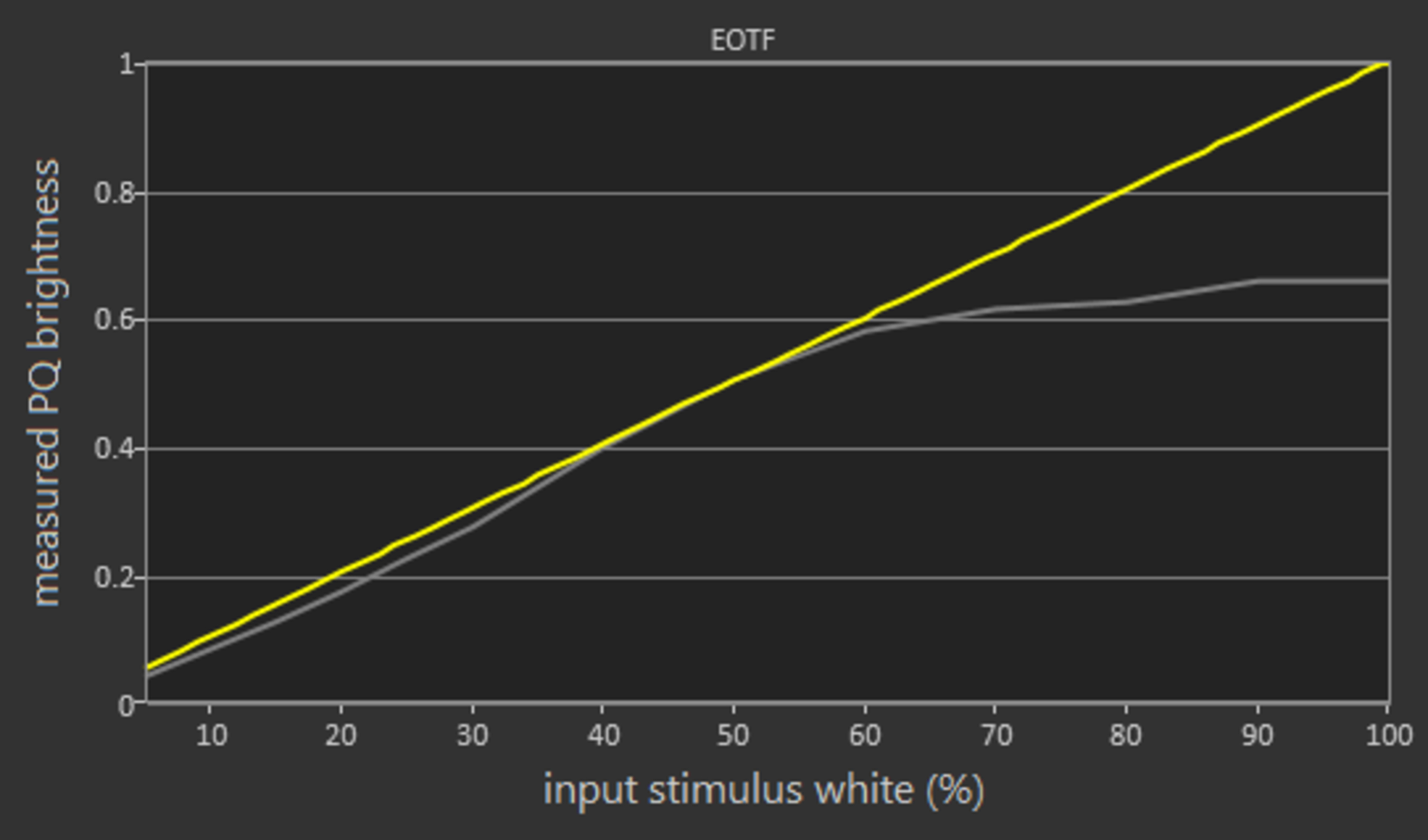
The 'Movie' picture mode's HDR EOTF follows the target PQ curve very well, up until it rolls off into its max brightness. 'Game' and 'PC' modes also have fairly accurate EOTFs. In 'PC' mode the 'Dynamic' picture mode has the best HDR EOTF, because 'Standard' mode has a bug where it sometimes gets stuck in a dim state. *Corrected, see below.
Update 05/02/2018: The color gamut was erroneously measured at a 50% stimulus. It has been remeasured at 75% stimulus to be in line with our other TVs. The results remain almost identical.
Update 11/07/2018: The bug with the PC mode EOTF mentioned earlier was a mistake, it turns out the TV's 'Eco' mode was left on in PC mode accidentally (the PC mode setting is independent of the normal one). The PC mode EOTF has been remeasured in the 'Standard' picture mode, and isn't quite as good as the 'Movie' mode EOTF (darkens dim shades a little), but is still pretty good.
for pictures & test results

for pictures & test results

Decent color volume. It does a better job than the MU8000 at displaying bright colors across its entire color gamut, but still does not display deep, dark colors very well.
for pictures & test results

The NU8000 handles color gradients very well. There is some visible banding especially in darker colors.
for pictures & test results

There is no measurable temporary image retention on the NU8000, even immediately after the burn-in scene. This is good, especially for gamers.
We don't expect VA panels to experience permanent image retention, as the VA panel in our long-term test appears immune.
for pictures & test results

for pictures & test results

Very fast pixel response time, good enough for fast-moving content like sports and video games. Most of the blur in the photo is due to backlight flicker; the ghosting trail following the moving logo is fairly short, which is good.
for pictures & test results

The TV dims its backlight by using PWM flicker at 240 Hz. This flicker is unfortunately present at all brightness levels but is less severe at high brightness. This flicker makes fast motion look a little more clear, but also introduces unwanted duplications, as visible in the photo in the Response Time box.
for pictures & test results

for pictures & test results

The Samsung NU8000 has an optional 60 Hz flicker mode, activated by enabling 'LED Clear Motion' in the 'Auto Motion Plus' menu. This 60 Hz flicker greatly clears up motion during 60 fps content, but the flicker can be bothersome to some people. This flicker can also be activated in Game mode, by using the 'Game Motion Plus' menu, which is a first for Samsung TVs.
Update 01/09/2019: We have retested the backlight flicker at 120 Hz, and can confirm that the NU8000 does flicker at 120 Hz when displaying a 120 Hz signal.
for pictures & test results

for pictures & test results

The Samsung 55NU8000 has a 120 Hz panel, and can interpolate lower frame rate content up to 120 fps. This makes motion much smoother, but can look strange to some people (the so-called 'soap opera effect'), and sometimes adds unwanted artifacts during fast motion. Interpolation is activated by setting 'Auto Motion Plus' to 'Custom'; increase the 'Judder Reduction' slider to interpolate low frame rate content, and increase the 'Blur Reduction' slider to interpolate 60 fps content.
Game mode now also has motion interpolation, 'Game Motion Plus', which doesn't look as good as 'Auto Motion Plus' but adds much less input lag, as explained in the Input Lag box.
The TV is decent at showing smooth motion in low frame rate content like movies, however, its fast response time can sometimes make motion look stuttery, such as in wide panning shots, because each frame stays unchanged for 29 ms.
The 55NU8000 can remove 24p movie judder from most sources, except 60i input such as cable boxes; this is a regression from last year's Samsung TVs, which could remove judder from all common sources. To activate judder removal, set 'Auto Motion Plus' to 'Custom', 'Judder Reduction' to 0 and 'Blur Reduction' to 0; this will remove judder without adding soap opera effect.
The NU8000 does not support FreeSync from our Radeon RX 580 GPU. We tried various combinations of game mode, PC mode, input refresh rates, etc., and FreeSync was never detected as supported.
Update 05/23/2018: Firmware version 1103 has added FreeSync support.
Update 06/08/2018: FreeSync has been tested and the score has been updated. FreeSync was supported from our Xbox One S and our Radeon RX 580 GPU, in 1080p, 1440p and 4k resolutions. FreeSync is activated by enabling the TV's Game mode and FreeSync settings; PC mode is not required. We tested in Ultimate mode because it has the widest range, and we only recommend Basic mode when you experience problems with Ultimate.
Update 10/26/2018: We have received confirmation that the 49" NU8000 does support FreeSync. Since it has a 60 Hz panel, the 1080p VRR range is limited to 60 Hz.
1440p @ 120 Hz: 9.7 ms
Excellent low input lag, good enough for even competitive console gaming. This input lag is lower than last year's Samsung TVs like the MU8000, and lower than many current Sony TVs like the X900F, but is slightly worse than many TCL TVs like the P607.
The NU8000 has a new 'Game Motion Plus' feature, which adds motion interpolation (soap opera effect) without adding too much input lag; this feature is useful when gaming on older consoles that can only output 30 fps, or for games that have frequent framerate dips. The 'Judder Reduction' slider interpolates content up to 60 fps, while the 'Blur Reduction' slider interpolates up to 120 fps. When 'Blur Reduction' is used the input lag for 4k increases from 23.8 ms to 29.3 ms, but this increase shouldn't be noticeable during gaming.
Update 04/24/2018: The NU8000 and the Samsung 2018 QLEDs added support for Auto Game Mode. When it is enabled from the input menu the TV will automatically switch to Game Mode when it detects a game being played on a console. We tested it on a PS4 and Xbox One S and it worked perfectly.
Update 06/08/2018: The input lag with VRR has been tested and added to the review.
Update 06/11/2018: 1440p @ 120 Hz performance has improved as of firmware version 1103. The 1440p @ 120 Hz input lag is now 9.7 ms, down from 24.8 ms.
Most common resolutions are supported. 4k @ 60 Hz @ 4:4:4 or 4:2:2 color is only supported when 'HDMI UHD Color' is enabled (aka HDMI 2.0 full bandwidth). New this year is 1080p @ 120 Hz @ 4:4:4 support, which is useful when using the TV as a PC monitor. 1440p @ 120 Hz is also supported, but 4:4:4 color isn't displayed properly. Oddly enough, 1440p @ 60 Hz isn't supported, not even when using a custom resolution from a PC.
4:4:4 chroma subsampling is only shown properly when the input's icon is set to 'PC' (aka PC mode). This unfortunately isn't possible for some input refresh rates such as 24 Hz; in these cases the icon changes to PC as normal but PC mode isn't applied, as evidenced by the improper 4:4:4 color resolution and some settings not being greyed out as they should be.

The NU8000 does not support DTS passthrough, unlike last year's Samsung TVs. This is not usually an issue though since most media provides both DTS and Dolby Digital sound streams.
for pictures & test results

The frequency response of the NU8000 is decent, and very similar to the 2017 model the MU8000. The LFE (low-frequency extension) is at 67Hz, which is good and lower than what most TVs are able to reach. This means that the TV should be able to produce a decent amount of bass and punch. However, due to the lack of a self-calibrating system, it wasn't able to remove the room buildup around 200Hz. The response in the mid and treble ranges are quite even and flat, ensuring a neutral sound reproduction. Additionally, the maximum loudness of the TV is above-average, but they may produce some pumping and compression artifacts under maximum load.
for pictures & test results

The harmonic distortion performance is about average. The overall amount of THD is rather elevated, but on there doesn't seem to be a dramatic rise in THD under maximum load. However, the sharp peaks around 1KHz and 2KHz, could the make the sound of those frequencies a bit harsh and brittle.
for pictures & test results

The TV's interface is well organized and easy to navigate. The Smart Hub is the center of the interface and must be passed through to access everything else, which can take more time than going directly. Animations in the interface rarely lag but are frequently choppy and full of frame drops, even worse than on last year's TVs like the Q7F.
for pictures & test results

There are ads in the home menu, and they cannot be disabled. They seem to come and go almost at random and are not present most of the time.
for pictures & test results

Samsung's app store has one of the largest app selections of any smart platform, though not quite as large as Android's Google Play Store. App themselves run fairly smoothly, even smoother than the TV's own interface.
for pictures & test results

Samsung's smart remote is fairly small and has few buttons, requiring users to either navigate through the home menu to access things, or to use Samsung's Bixby voice assistant feature. Bixby's voice recognition works very well, and it can perform many useful actions on the TV: commands like 'Change to HDMI 1', 'Set backlight to 25', 'What's the weather like tomorrow', and 'Pause video' all work well. Samsung's smart remote can also act as a universal remote for other devices, even devices that don't support HDMI CEC, using Samsung's OneRemote feature.
for pictures & test results

The TV has only a single physical button, which brings up a menu that can power the TV on and off, control the volume and channel, and change inputs.
for pictures & test results

- Manuals
- Remote
- Batteries
- VESA mount spacers
- Power cable - 61.5" (not pictured)