See the previous 1.4 changelog.
Our 1.4.1 test bench removes one test from the Multi-Key test group. We've also removed a video element that was causing confusion and didn't add meaningful value.
Removal Of Key Release Test
We've removed the Key Release test from the Multi-Key Latency test group after coming to two related conclusions:
Our Test Rig Can't Produce Reliable Key Release Measurements For Emerging Sensing Technologies
Our keyboard latency methodology is primarily designed to measure Press Latency very precisely. We attach copper tape to the keycap to detect the exact instant the solenoid plunger makes contact, which lets us remove solenoid motion from the result. For Key Release, our method is simpler: we measure the time from when the solenoid is de-energized to when our test PC receives the USB report.
This method is very effective for measuring key release latency on mechanical keyboards, including high-end gaming models. However, newer sensing technologies (Hall effect, analog optical, TMR, and inductive) have emerged since designing this test. These new technologies have higher-resolution, continuous position sensing that exposes the mechanical limits of our solenoid's release stroke. Our current release method struggles to reliably measure small differences between implementations for these newer keyboards.
Because the solenoid needs to accelerate quickly for the test to work well, the plunger is quite light. When the solenoid bottoms out a key, it vibrates for a short time. This isn't an issue for mechanical keyboards, since these vibrations are never significant enough to release a key. For more recent adjustable actuation keyboards using the most sensitive key release settings, however, the vibrations are significant enough to cause the key to bounce and creates signal noise, making reliable release measurements difficult.
In an attempt to solve this issue, our testers experimented with the placement of the solenoid. On some models, the keyboard stopped sending double inputs when the solenoid stopped at the very top of the key travel. On others, making the solenoid stop at the very bottom of the key worked better. However, this approach risks breaking comparability across tests.
Key Release Latency Isn't A Meaningful Performance Metric For Rapid Trigger-Capable Keyboards
In parallel, we evaluated Rapid Trigger implementations across adjustable actuation keyboards. Most gaming keyboards using these emerging sensing technologies support both adjustable actuation and adjustable reset (Rapid Trigger). Rapid Trigger lets you set a dynamic reset point so the key can re-actuate with very little travel, which removes classic reset travel as a bottleneck. While implementations vary slightly, our separate investigation didn't find any meaningful performance differences among Rapid Trigger keyboards.
Bottom line: If you're buying an adjustable-actuation keyboard with Rapid Trigger, Key Release latency isn't a metric you need to worry about. We cover the evidence and datasets in detail in a dedicated R&D article: A Rapid Trigger Keyboard Could Help You Win... But Any Of Them Will Do
| OLD | NEW |
|---|---|
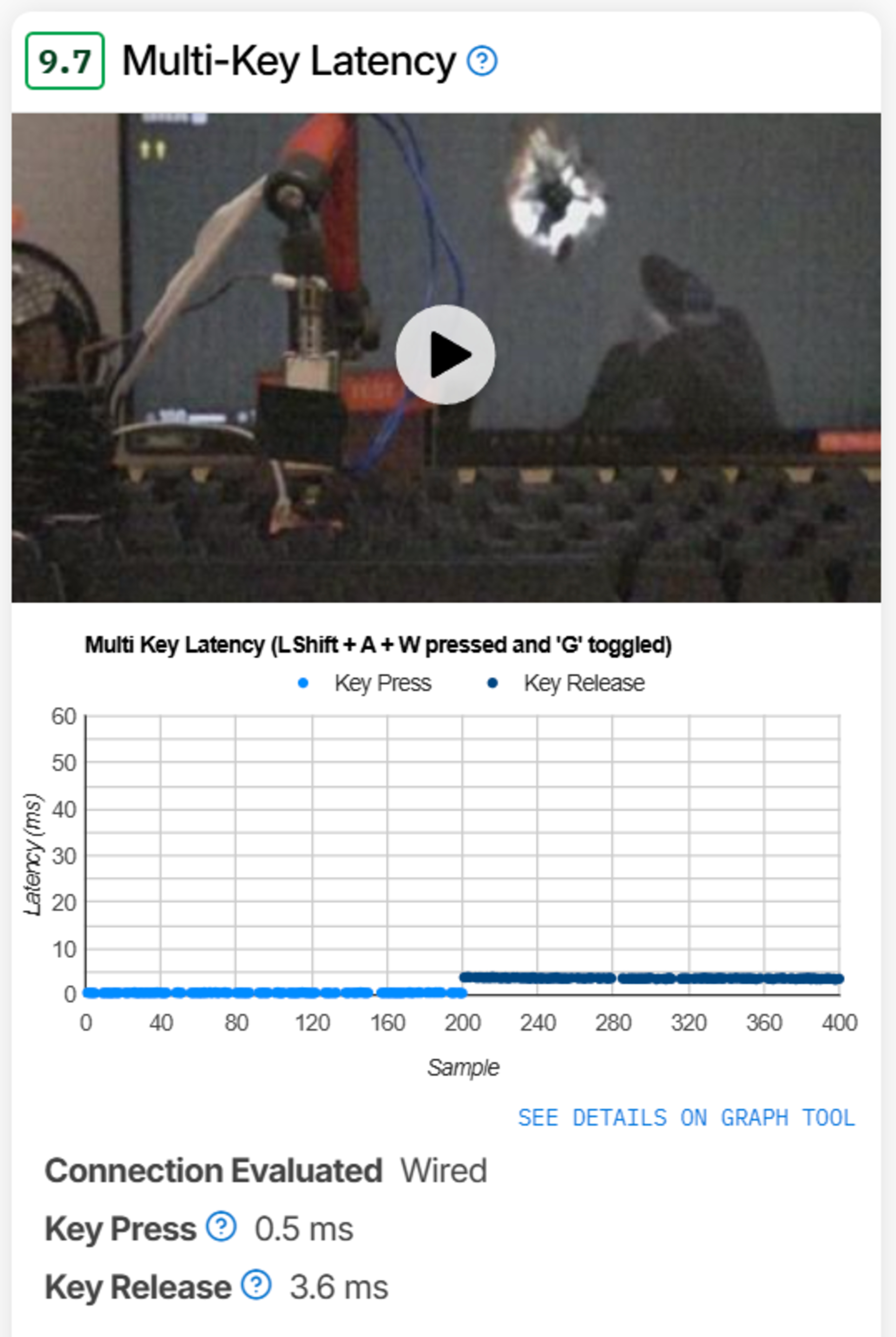 Old Multi-Key Latency results from our review of the Wooting 80HE. |
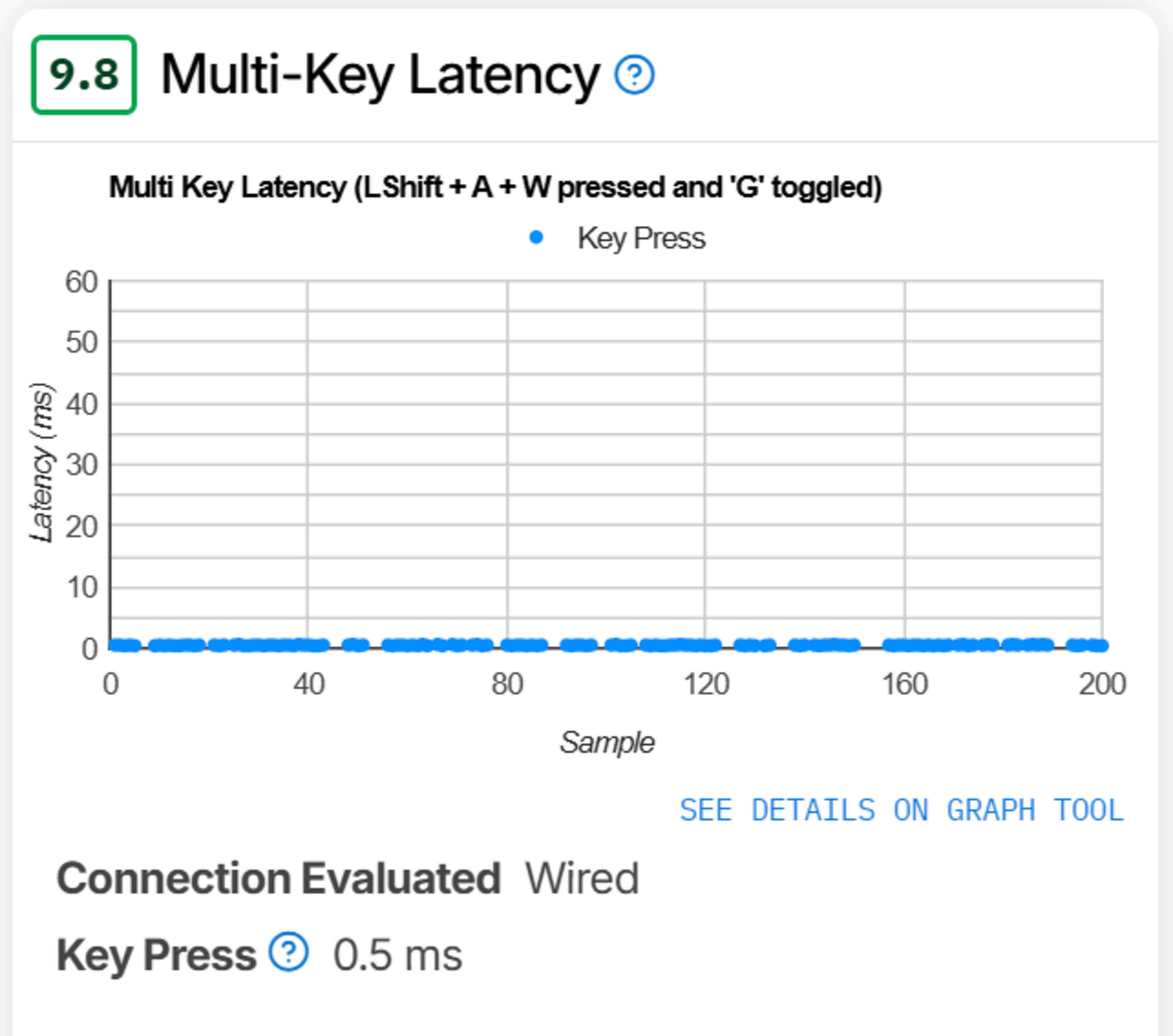 New Multi-Key Latency results from our review of the Wooting 80HE.
|
What About Mechanical Or Optical Keyboards?
Release latency can still matter for mechanical and traditional optical keyboards without adjustable actuation or Rapid Trigger. These switches have fixed hysteresis, so if you bottom out, the key has to travel back above the reset point before it can actuate again. Many gaming keyboards use switches with shorter pre-travel, which places the actuation point closer to the rest position. That increases the bottom-out distance to reset and can lengthen release latency if you bottom out. You can mitigate this by riding the actuation point and avoiding full bottom-out, but it's hard to do consistently and takes practice and fine motor control. This trade-off isn't universal, but it's common in gaming switches that shorten pre-travel to deliver faster inputs.
Conclusion
We recognize that our existing Key Release Latency test wasn't sensitive enough to continue delivering reliable results on emerging keyboard technologies. At the same time, our testing shows that keyboards using these technologies with Rapid Trigger deliver consistently strong release timing, so evaluating Key Release for those keyboards is no longer a relevant metric.
Removing the Key Release test means eliminating one evaluation element that still has potential relevance for making a buying decision. However, coupled with the realization that our test is increasingly not sensitive enough for emerging technologies, we believe the change is justified. Within the gaming market, we're observing a shift more towards adjustable actuation keyboards with Rapid Trigger, where release latency is no longer a practical performance constraint. We expect mechanical gaming keyboards to become less common for high-end competitive play in the medium term.
A positive outcome from our investigations is a renewed confidence in the accuracy of our Key Press latency testing. Press timing drives outcomes more than release in virtually all gaming scenarios, and we believe it's the best single measure of gaming performance to help you make a buying decision if you're concerned about keyboard latency.
Removal Of Video Element
We previously included a video element for the Multi-Key Latency test to illustrate our process and promote transparency. This video was intended to help you understand how we run the test and solidify trust that it was being performed correctly and consistently.
Based on community feedback and how some users were interpreting the footage, we could tell this video was causing confusion. Many assumed we were measuring full end-to-end (E2E) latency, including system-level delay, and that the visuals were part of our measurement process. We actually test using a USB protocol analyzer, which is a more accurate method that allows us to isolate device-level latency and exclude system delay. If you're interested, we have an in-depth examination in our Keyboard Latency test article. Since this video was causing confusion and wasn't providing much helpful information, we've removed it. Our methodology using the USB analyzer is unchanged, and removing the video doesn't affect how scores are calculated.
Minor Scoring Changes
With the removal of the Key Release test, the scores for the multi-key latency test group have changed. For most dedicated gaming keyboards, scores have marginally increased by one to three decimal points. The change to multi-key latency also results in equally small changes to how we calculate the Gaming and Raw Performance scores for keyboards we've tested.
That said, the boards that are most impacted by this scoring change are productivity-focused boards that aren't designed for gaming. While some of these adjustments are somewhat larger (occasionally a score difference of several decimal points), they don't change the final conclusion and have minimal impact on the final calculations of the Gaming and Raw Performance scores. A keyboard that we previously measured as unsuitable for competitive gaming still isn't suitable for competitive gaming, and vice versa; a keyboard we've indicated is outstanding for competitive gaming remains outstanding for competitive gaming.
For example, the images below are from the Logitech Wave Keys, an ergonomic productivity keyboard. With this update, it has a moderately higher multi-key latency score that brings it from being mediocre to good. However, this ultimately has only a minimal impact on the final calculated scores for each usage.
| OLD | NEW |
|---|---|
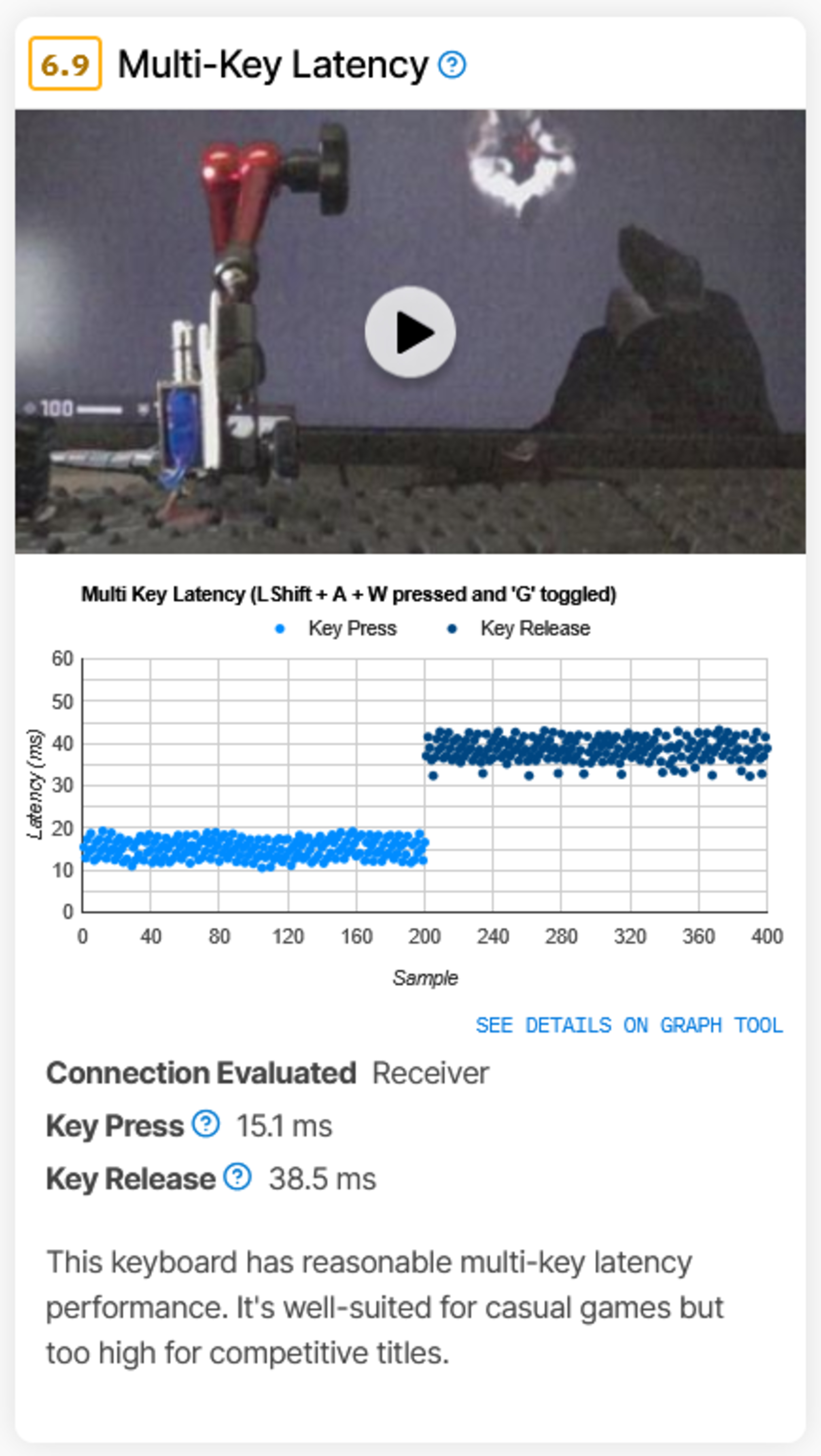 Old Multi-Key Latency results for the Logitech Wave Keys. |
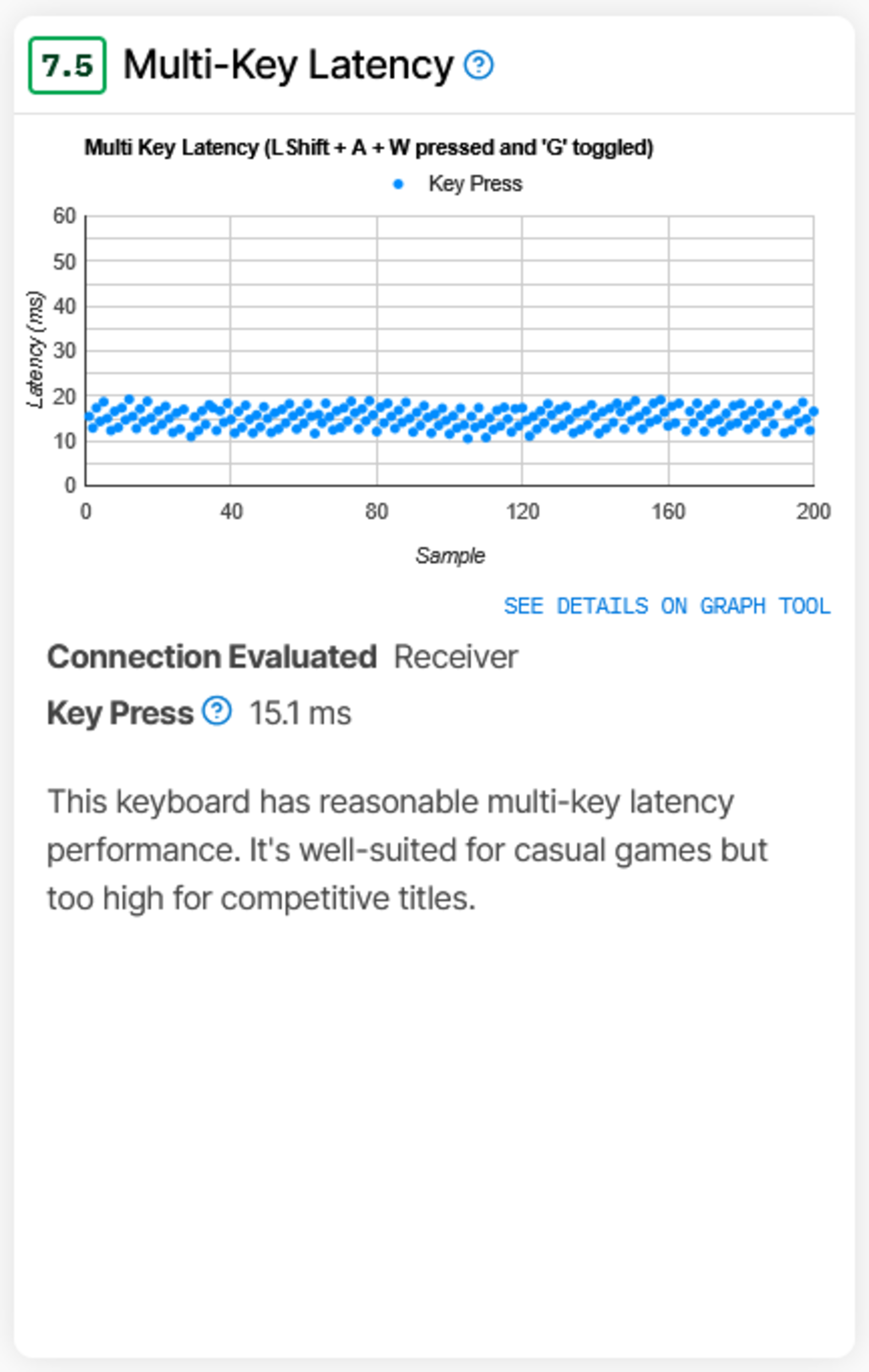 New Multi-Key Latency results for the Logitech Wave Keys. |
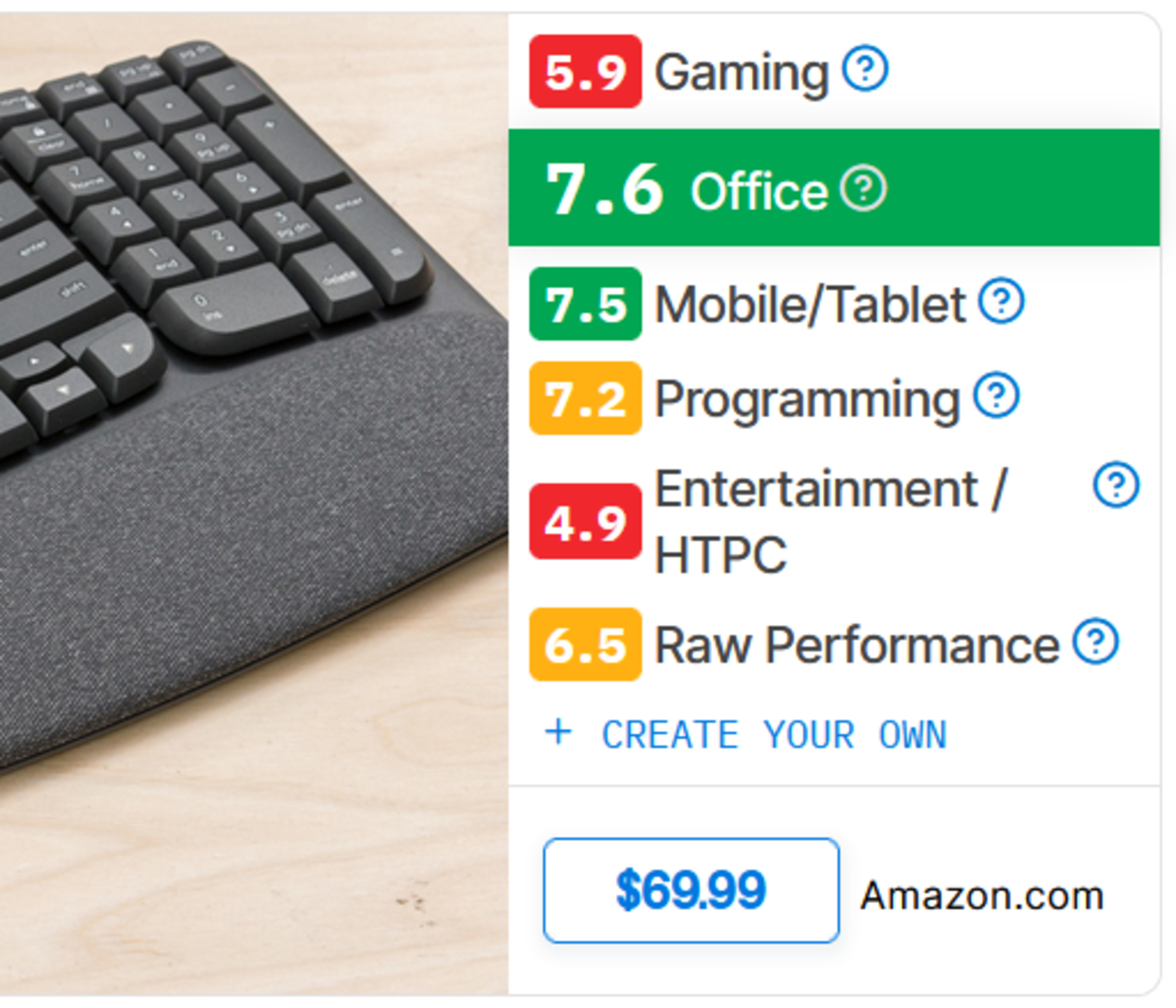 Old usage category scores for the Logitech Wave Keys. |
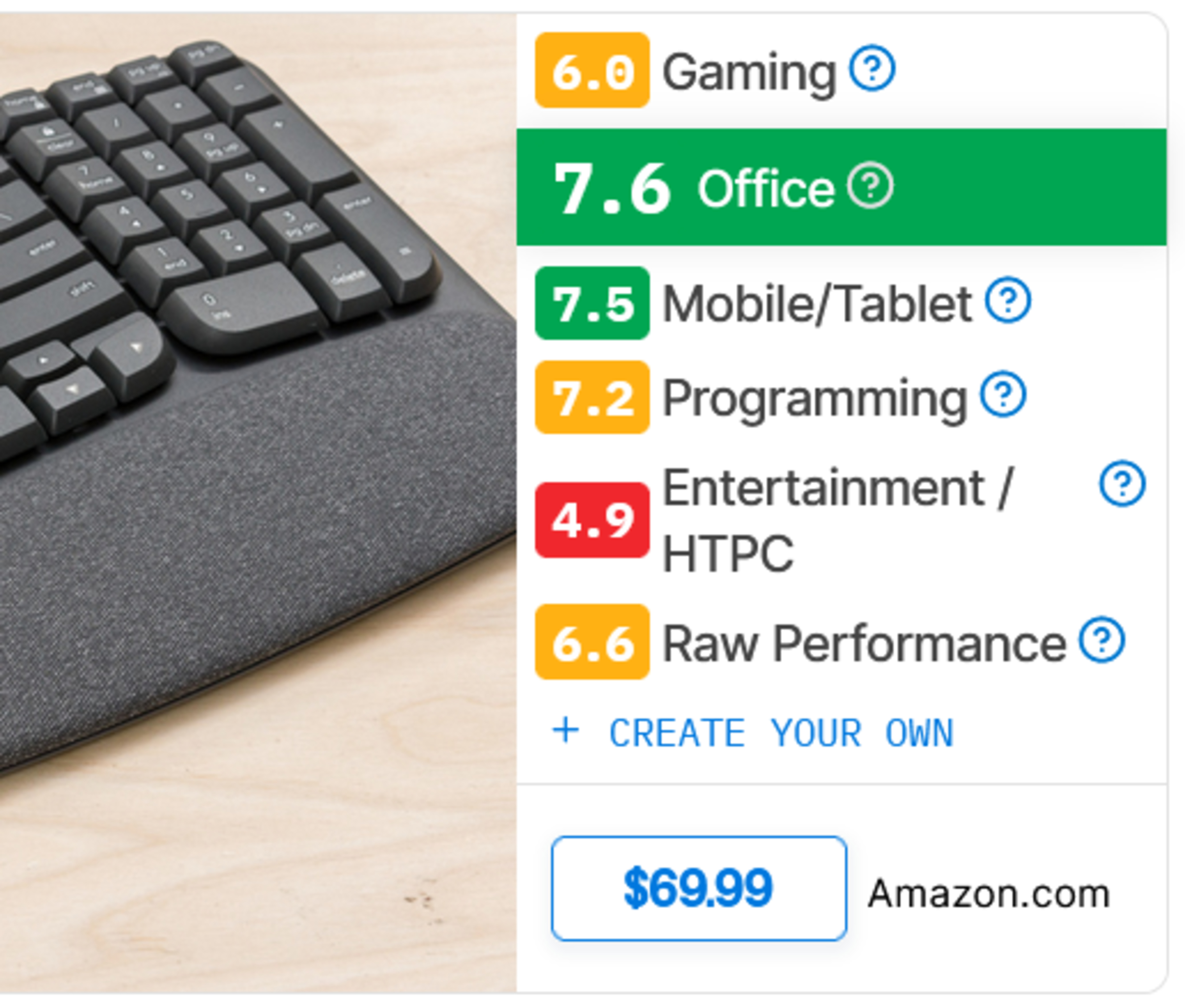 New usage category scores for the Logitech Wave Keys. Note that even with the moderate improvement to its Multi-Key Latency score, the conclusions remain very consistent. |
Does Release Latency Matter For You?
Key Release latency is relevant only in a narrow set of gaming scenarios. Most notably, it can make a difference when rapid follow-up inputs are important, such as certain movement techniques like tap strafing in FPS games, where shorter release latency allows you to chain inputs more quickly. This advantage is most pronounced when paired with SOCD (Simultaneous Opposite Cardinal Direction) handling features, although some of these more advanced implementations have been banned in certain competitive games. It can also matter in some rhythm games that include release-timed notes, but this is rare. All that to say, for most gamers and most games, Key Release latency has no meaningful impact on performance, and its practical utility is very limited. Press Latency remains the most important metric if you're concerned about latency for competitive gaming.
Let Us Know What You Think
Your feedback is instrumental in improving our testing. If you have comments, questions, or suggestions about this or any future updates, reach out to us below in the comments, on our Discord server, or email us at feedback@rtings.com.
79 Keyboards Updated
We have retested popular models. The test results for the following models have been converted to the new testing methodology. However, the text might be inconsistent with the new results.
- Aesco A67/A83
- Akko MOD007-HE PC
- Apple Magic Keyboard for iPad Pro (M4 and M5)
- Apple Magic Keyboard with Touch ID and Numeric Keypad
- ASUS ROG Azoth
- ASUS ROG Azoth Extreme
- ASUS ROG Strix Scope II 96 Wireless
- AULA F99/F75
- Corsair K100 AIR
- Corsair K100 RGB
- Corsair K65 PRO MINI
- Corsair K65 RGB MINI
- Corsair K70 CORE
- Corsair K70 MAX
- Corsair K70 PRO TKL
- Corsair K70 RGB TKL
- DrunkDeer A75
- Ducky One X
- Dygma Raise 2
- Geonworks Venom 60 HE
- GLORIOUS GMMK 3 PRO HE
- IQUNIX EZ60/EZ63
- IQUNIX EZ80/EZ75
- Keychron B1/B6 Pro
- Keychron K10
- Keychron K2 HE [K4 HE, K8 HE, etc.]
- Keychron K5 Max [K1 Max, K3 Max, etc.]
- Keychron K8 Max [K2 Max, K10 Max, etc.]
- Keychron Q1 HE [Q5 HE, Q6 HE, etc.]
- Keychron Q5 Max [Q1 Max, Q2 Max, etc.]
- Keychron V5 Max [V1 Max, V2 Max, etc.]
- Lemokey P1 HE
- Lofree Flow84/Flow100
- Logitech Combo Touch
- Logitech ERGO K860
- Logitech G PRO X TKL RAPID
- Logitech G515 LIGHTSPEED TKL
- Logitech G715
- Logitech G915 LIGHTSPEED
- Logitech G915 X
- Logitech G915 X LIGHTSPEED
- Logitech MX Keys S
- Logitech MX Mechanical
- Logitech Pebble Keys 2 K380s
- Logitech Signature K650
- Logitech Wave Keys
- MCHOSE Ace 60 Pro
- MoErgo Glove80
- MonsGeek FUN60 Ultra
- NuPhy Air60 HE
- NuPhy Air75 HE
- NuPhy Air75 V2 [Air60 V2, Air96 V2]
- NuPhy Air75 V3 [Air65 V3, Air100 V3]
- NuPhy Field75 HE
- NuPhy Gem80
- NuPhy Halo65 HE
- NuPhy Halo96/Halo75 V2
- NuPhyX BH65
- Razer BlackWidow V4
- Razer BlackWidow V4 75%
- Razer BlackWidow V4 Pro
- Razer DeathStalker V2 Pro
- Razer Huntsman Mini Analog
- Razer Huntsman V2
- Razer Huntsman V2 Analog
- Razer Huntsman V3 Pro [Mini, TKL]
- Razer Joro
- Razer Pro Type Ultra
- REALFORCE GX1
- ROYAL KLUDGE RK61
- SteelSeries Apex 3
- SteelSeries Apex Pro
- SteelSeries Apex Pro Gen 3
- SteelSeries Apex Pro Mini Wireless
- SteelSeries Apex Pro TKL (2023)
- Wooting 60HE
- Wooting 80HE
- Wooting two HE
- ZSA Moonlander