Dell S2721DGF  Monitor Review

Review updated Dec 10, 2021 at 03:11pm
Writing modified Sep 26, 2023 at 02:36pm
Tested using Methodology v1.2 
Dell S2721DGF
7.7
Mixed Usage 
8.1
Office 
8.1
Gaming 
7.1
Media Consumption 
7.8
Media Creation 
6.5
HDR 
 2

The Dell S2721DGF is a 27 inch, 1440p monitor gaming monitor with a fast refresh rate and great gaming features. The IPS panel delivers wide viewing angles, and it has excellent ergonomics. It has a remarkable response time at the max refresh rate, with very little blur behind fast-moving objects, and it has a fantastic low input lag for responsive gaming and desktop experience. It's a versatile monitor with great reflection handling and a high peak brightness in SDR, so glare isn't an issue in a bright room. It has disappointing accuracy out of the box, but it has a superb SDR color gamut and incredible gradient handling. Although this monitor supports HDR and can display a wide color gamut, it can't get very bright in HDR and has low contrast, so HDR doesn't add much. 

How We Test Monitors

We buy and test more than 30 monitors each year, with units that we buy completely on our own, without any cherry-picked units or samples. We put a lot into each unbiased, straight-to-the-point review, and there's a whole process from purchasing to publishing, involving multiple teams and people. We do more than just use the monitor for a week; we use specialized and custom tools to measure various aspects with objective data-based results. We also consider multiple factors before making any recommendations, including the monitor's cost, its performance against the competition, and whether or not it's easy to find.

Our Verdict

7.7
Mixed Usage 

The Dell S2721DGF is a great monitor for most uses. It has wide viewing angles, excellent ergonomics, and great reflection handling, making it a very good choice for office use or multimedia. Motion looks fantastic thanks to its remarkable response time at the max refresh rate, and it has low input lag, making it a great choice for gaming as well. Unfortunately, although it supports HDR, this doesn't add much due to the low peak brightness and low contrast.

Pros
  • Excellent gray uniformity.
  • Amazing horizontal viewing angle.
  • Low input lag.
Cons
  • Low contrast.
  • Terrible local dimming.
  • Disappointing accuracy out of the box.
8.1
Office 

The Dell 27 Gaming Monitor S2721DGF is a great office monitor. The 27 inch, 1440p screen is great for multitasking, and it has wide viewing angles and excellent ergonomics, so you can easily share your screen with someone else. It has great reflection handling and high peak brightness in SDR, so visibility isn't an issue in a bright room. Unfortunately, it has a low contrast ratio and poor black uniformity, so it's not ideal if you're in a dark room.

Pros
  • Excellent gray uniformity.
  • Superb SDR color gamut.
  • Amazing horizontal viewing angle.
  • Excellent ergonomics.
  • Great reflection handling.
Cons
  • Low contrast.
  • Terrible local dimming.
  • Disappointing accuracy out of the box.
8.1
Gaming 

The Dell 27 Gaming Monitor S2721DGF is great for gaming. It has a remarkable response time at the max refresh rate, resulting in clear motion with almost no noticeable blur behind fast-moving objects, whether you're gaming on a high-end PC or a console. It also has low input lag for a responsive gaming experience. Finally, it supports AMD's FreeSync variable refresh rate technology, and it's certified to work with NVIDIA's G-SYNC Compatible mode, both of which help to reduce screen tearing.

Pros
  • Remarkable response time.
  • Fast refresh rate.
  • Low input lag.
  • Great reflection handling.
Cons
  • Low contrast.
  • Terrible local dimming.
  • Disappointing accuracy out of the box.
7.1
Media Consumption 

The Dell S2721DGF monitor is very good choice for watching videos. The amazing horizontal viewing angle makes it a great choice for watching the latest trending videos with some friends. The high SDR peak brightness and great reflection handling mean you don't have to worry about glare in a bright room. Sadly, it doesn't look as good in the dark due to its sub-par contrast ratio and poor black uniformity.

Pros
  • Excellent gray uniformity.
  • Amazing horizontal viewing angle.
  • Low input lag.
  • Great reflection handling.
Cons
  • Poor black uniformity.
  • Low contrast.
  • Terrible local dimming.
  • Disappointing accuracy out of the box.
7.8
Media Creation 

The Dell S2721DGF is a great choice for media creators. The large, high-resolution screen makes it easier to see more of your work at once. It has excellent ergonomics and an amazing horizontal viewing angle, so you can easily share the screen with clients or colleagues. It has a superb SDR color gamut, with good coverage of the Adobe RGB color space. However, it has disappointing accuracy out of the box, so it might be necessary to have it professionally calibrated.

Pros
  • Excellent gray uniformity.
  • Superb SDR color gamut.
  • Amazing horizontal viewing angle.
  • Excellent ergonomics.
  • Great reflection handling.
Cons
  • Poor black uniformity.
  • Low contrast.
  • Terrible local dimming.
  • Disappointing accuracy out of the box.
6.5
HDR 

Pros
None
Cons
  • Low contrast.
  • Terrible local dimming.
  • Disappointing accuracy out of the box.
  • 7.7
    Mixed Usage
  • 8.1
    Office
  • 8.1
    Gaming
  • 7.1
    Media Consumption
  • 7.8
    Media Creation
  • 6.5
    HDR
  • Changelog

    1.  Updated Sep 26, 2023: Made a reference to the Dell G2724D, which has an even faster Response Time @ 60Hz.
    2.  Updated Apr 18, 2023: Confirmed that 1440p works on this monitor with the PS5.
    3.  Updated Feb 21, 2023: Corrected our Reflections measurements, causing the Calculated Direct Reflections to increase.
    4.  Updated Dec 22, 2022: Updated the text for clarity to match the results in Response Time.

    Check Price

    27"S2721DGF
    SEE PRICE
    Amazon.com
    27"S2721DGF
    SEE PRICE
    Walmart.com
    27"S2721DGF
    B&H
    27"S2721DGF
    BestBuy.com

    Differences Between Sizes And Variants

    We tested the Dell 27 Gaming Monitor S2721DGF, which is the only size available. There's an S2721DGFA variant that's only available in Europe but appears to be the same monitor. There are other gaming options available from Dell's 'S' series of monitors, some of which are listed below.

    Model Size Native Resolution Refresh Rate VRR Panel Notes
    S2721DGF 27" 2560x1440p 165Hz

    FreeSync 

    IPS  
    S2721DGFA 27" 2560x1440p 165Hz  FreeSync IPS EU version only
    S2421HGF 24"  1920x1080p 144Hz  FreeSync TN  
    S3220DGF 32" 2560x1440p 165Hz FreeSync VA  
    S2719DGF 27'' 2560x1440p 144Hz FreeSync TN  

    If someone comes across a different type of panel or if their Dell S2721DGF doesn't correspond to our review, let us know and we'll update the review. Note that some tests such as contrast, gray uniformity, and black uniformity may vary between individual units.

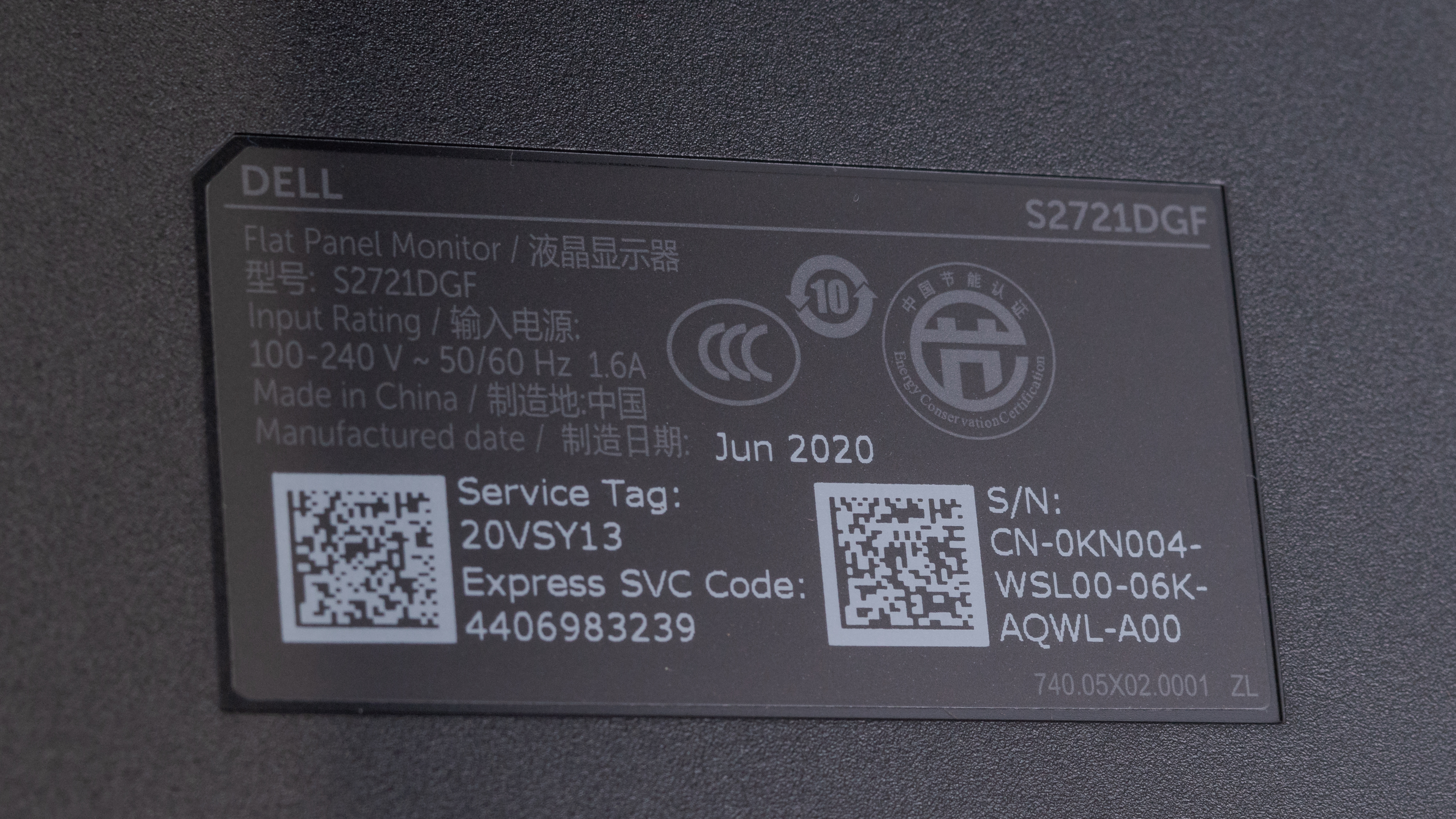
    Our unit was manufactured in June 2020, and you can see the label here.

    Popular Monitor Comparisons

    The Dell 27 Gaming Monitor S2721DGF is a great monitor. It's a great gaming monitor that also works well for office use, multimedia, or media creation.

    See our recommendations for the best gaming monitors, the best 27 inch monitors, and the best budget gaming monitors.

    Dell G2724D

    The Dell G2724D is a newer monitor than the Dell S2721DGF, and they have many of the same features. They each have a 1440p resolution and 165Hz refresh rate, but the G2724D is an improvement in most areas. This is because the G2724D has a faster response time across its entire refresh rate range, and it has better compatibility with consoles. It can downscale 4k images, which the S2721DGF can't do, and it even supports VRR with the PS5. The G2724D also offers better picture quality with higher peak brightness and improved color accuracy. On the other hand, the S2721DGF has a USB hub, which the G2724D doesn't have.

    LG 27GP850-B/27GP83B-B

    The Dell S2721DGF and the LG 27GP850-B/27GP83B-B are very similar, each with strengths and weaknesses. The LG has an optional black frame insertion feature, which can help reduce the amount of persistence blur seen on-screen. The Dell has a more versatile stand, as it can swivel and switch to portrait orientation on either side, and it feels a bit better built than the LG.

    Gigabyte M27Q (rev. 2.0)

    The Dell S2721DGF and the Gigabyte M27Q (rev. 2.0) are 1440p entry-level gaming monitors. The Gigabyte has extra features, like a USB-C port with DisplayPort Alt Mode to quickly connect a laptop. It also has a KVM switch that makes it easy to use the same devices on two sources. The Gigabyte even has much better accuracy out of the box and gets brighter, so it has the advantage in terms of overall picture quality.

    Acer Nitro XV272U KVbmiiprzx

    The Acer Nitro XV272U KVbmiiprzx and the Dell S2721DGF are both 27 inch IPS monitors with a 1440p resolution. The Acer has a slightly higher refresh rate of 170Hz next to the Dell's 165Hz, but the difference is small and shouldn't be noticeable to most people. The Acer has better response times, especially at 60Hz. Other than that, the only other big difference between them is the screen brightness.

    Dell S3220DGF

    The Dell S3220DGF and the Dell S2721DGF both have a 1440p resolution and a 165Hz refresh rate, but they have different panel types. The S3220DGF has a 32 inch curved VA panel, while the S2721DGF has a 27 inch flat IPS panel. The S2721DGF's motion handling is significantly better because it has much quicker response times. It also has better reflection handling, wider viewing angles, and gets brighter to combat glare. If you mostly game in the dark, the S3220DGF might be a better choice because it has a much higher contrast ratio to produce deeper blacks.

    Dell S2721QS

    Overall, the Dell S2721QS is marginally better than the Dell S2721DGF; however, they're intended for different uses. The S2721QS is a 4k monitor with a basic 60Hz panel while the S2721DGF is a gaming monitor with a 1440p resolution and a 165Hz refresh rate. The S2721QS delivers sharper text and has better color accuracy out of the box. The S2721DGF has better ergonomics, faster response time, and lower input lag.

    Dell Alienware AW2724DM

    The Dell Alienware AW2724DM is a newer and better gaming monitor than the Dell S2721DGF. While they each have a 1440p resolution and 165Hz refresh rate, the AW2724DM has an overclock feature to increase the refresh rate to 180Hz. The AW2724DM also features a Console Mode that makes it more compatible with gaming consoles as it downscales 4k signals, which the S2721DGF can't do. Other than that, they're similar, but the AW2724DM delivers slightly better picture quality with improved color accuracy and a bit higher brightness.

    Samsung Odyssey G7 S28AG70

    The Dell S2721DGF and the Samsung Odyssey G7 S28AG70 are both great overall monitors, but they're different in a few areas. While the Dell has a 1440p resolution with a faster 165Hz refresh rate, the Samsung has a higher 4k resolution and a 144Hz refresh rate. The Samsung has HDMI 2.1 inputs that allow you to play 4k games up to 120 fps from consoles, and it has a completely flicker-free backlight. Motion looks smooth between both, but the Samsung has more overshoot at 60Hz. The Dell also has much better reflection handling, and it gets brighter, so it's a better choice for well-lit rooms.

    Samsung Odyssey G7 C32G75T

    The Samsung Odyssey G7 C32G75T and the Dell S2721DGF are very different monitors. The Samsung has a curved VA panel and is better suited for dark rooms, while the Dell has a flat IPS panel with wider viewing angles. Gaming-wise, the Samsung performs better mainly because it has a much higher refresh rate, 240Hz compared to the Dell's 165Hz. The Dell has better response time at max refresh rate, though, especially in dark transitions. The Samsung is available in a 27-inch and 32-inch size, while the Dell is only available in a 27-inch size.

    Gigabyte G27Q

    For gaming, the Dell S2721DGF performs better than the Gigabyte G27Q. The Dell has a higher refresh rate of 165Hz, compared to the Gigabyte's 144Hz, and it has a much faster response time, resulting in a clearer image with less ghosting. The Dell also has better ergonomics and wider viewing angles, but it doesn't get as bright as the Gigabyte.

    LG 27GP950-B

    The LG 27GP950-B is slightly better than the Dell S2721DGF. The LG has a higher resolution and much better text clarity, and it supports HDMI 2.1 for next-gen console gamers. The Dell, on the other hand, has much better reflection handling and much better ergonomics.

    Samsung Odyssey G55T C27G55T

    The Dell S2721DGF is much better than the Samsung Odyssey G55T C27G55T overall. The Dell has better gaming performance due to its higher refresh rate, faster response time, and lower input lag. It also has wider viewing angles, higher peak brightness, and significantly better ergonomics. However, the Samsung's VA panel has a better contrast ratio, and it has a Black Frame Insertion feature to improve motion clarity.

    LG 34GP83A-B

    Although the Dell S2721DGF and the LG 34GP83A-B have different screen sizes and aspect ratios, they're quite similar in gaming performance. Both monitors have exceptional response times, and the Dell's 165Hz refresh rate is only marginally higher than the LG's 160Hz. The Dell has better ergonomics and wider viewing angles, making it a better choice for sharing content or playing co-op games. On the other hand, the LG's 21:9 aspect ratio feels more immersive and provides more space for multitasking.

    MSI Optix MAG274QRF-QD

    The MSI Optix MAG274QRF-QD and the Dell S2721DGF are both great monitors with similar gaming features. They're both 1440p monitors with a 165Hz refresh rate and outstanding response time. The MSI has a BFI feature, which the Dell doesn't, but it only works within a narrow frequency range. The MSI also has a USB-C input, which supports DisplayPort Alt Mode. On the other hand, the Dell is a better choice if you want to use it in a well-lit room because it has much better reflection handling. It also has a local dimming feature, but it performs terribly.

    LG 27GN850-B/27GN880-B

    The Dell S2721DGF is a bit better overall than the LG 27GN850-B/27GN880-B, but the two monitors are very similar. The Dell has a max refresh rate of 165Hz, as opposed to the LG's 144Hz, and this results in a slightly quicker response time. It also has much better ergonomics, making it a better choice for office use, and it gets brighter. On the other hand, the LG has much better out-of-the-box accuracy, so you may not need to get it calibrated.

    LG 27GN950-B

    The Dell S2721DGF is slightly better than the LG 27GN950-B for gaming. The Dell has much better ergonomics, significantly better reflection handling, a lower input lag, and a slightly quicker response time at its max refresh rate. However, the LG has a higher 4k resolution, better out-of-the-box color accuracy, a quicker response time, and a lower input lag at 60Hz.

    Samsung Odyssey G55C S27CG55

    The Dell S2721DGF and the Samsung Odyssey G55C S27CG55 are entry-level gaming monitors, but because of their different panel types, they have a few differences. The Dell has better overall motion handling, so it's better for gaming, as fast-moving objects are sharper. The Dell is also better for co-op gaming as it has wider viewing angles, and it's the superior choice if you need to use it in a well-lit room, thanks to its higher brightness and better reflection handling. However, the Samsung is better if you need to use it in a dark room as blacks appear deeper than on the Dell.

    LG 27GN800-B

    The Dell S2721DGF and the LG 27GN800-B perform very similarly gaming-wise. They mainly differ in features. The Dell has significantly better ergonomics because it allows for height and swivel adjustment, as well as rotation to portrait mode. It also has a USB hub with four USB 3.0 ports.

    HP OMEN 27i

    The HP OMEN 27i and the Dell S2721DGF are very similar. They're both 27 inch IPS monitors with a 1440p resolution and 165Hz refresh rate. The Dell has better response times to deliver clearer motion with less blur trail behind fast-moving objects. It also has significantly better ergonomics because it can swivel and rotate to portrait mode, and it supports HDR. 

    Samsung Odyssey G50D S27DG50

    The Dell S2721DGF and the Samsung Odyssey G50D S27DG50 are both budget-friendly 1440p gaming monitors. They have similar specs and features, although the Samsung has a slightly higher 180Hz refresh rate. The Samsung is also brighter and comes with more accurate colors, so it offers a more polished overall experience. That said, the Dell has four USB-A ports to which you can connect your devices, which you can't do with the Samsung.

    LG 27GL850-B/27GL83A-B

    The Dell S2721DGF is a bit better overall than the LG 27GL850-B/27GL83A-B. The Dell has much better ergonomics, better build quality, and better reflection handling. On the other hand, the LG is more accurate out of the box, and for the two units we tested, the LG has better black uniformity, but this varies between units.

    BenQ EX2780Q

    The Dell S2721DGF is better than the BenQ EX2780Q overall. The Dell has a higher refresh rate and a faster response time, which results in a smoother and more responsive gaming experience. It also has significantly better ergonomics and USB ports. 

    Dell S2719DGF

    The Dell S2721DGF is much better overall than the Dell S2719DGF. The S2721DGF has a faster refresh rate, and the IPS panel delivers much better viewing angles. The S2721DGF adds HDR support, but due to the low peak brightness and disappointing contrast, this doesn't add much.

    ASUS TUF Gaming VG27AQL1A

    The Dell S2721DGF and the ASUS TUF Gaming VG27AQL1A are two monitors that perform very similarly overall. The Dell has better ergonomics, gets brighter in SDR, and the response time is much quicker. However, the ASUS has a BFI feature, its max refresh rate is 170Hz, and it gets brighter and displays a wider color gamut in HDR.

    Dell S2721D

    Overall, the Dell S2721DGF is significantly better than the Dell S2721D. The S2721DGF is a better choice for gaming, as it has a faster response time, lower input lag, and a much higher refresh rate. It also has better ergonomics, wider viewing angles, and supports HDR. However, the S2721D has better screen uniformity and color accuracy out-of-the-box.

    Dell Alienware AW2721D

    The Dell Alienware AW2721D and the Dell S2721DGF are both great gaming monitors with similar performance. That said, the AW2721D has a higher max refresh rate and slightly better picture quality overall. They have similar response times, although the S2721DGF experiences less overshoot. The S2721DGF has much better reflection handling and better ergonomics, but the AW2721D feels better built, gets significantly brighter in SDR and HDR, and has much better accuracy out-of-the-box, although this can vary between units. The S2721DGF may represent a better value to some people.

    Samsung C27RG5

    The Dell S2721DGF is much better than the Samsung C27RG5. The Dell has a much faster response time, so motion in games looks much better, with almost no noticeable blur behind fast-moving objects. The Dell also has much better ergonomics and a higher resolution screen.

    AOC CQ27G2

    The Dell S2721DGF is much better than the AOC CQ27G2 for most users. The Dell has much better ergonomics, higher peak brightness, better reflection handling, and much better motion handling. The Dell also has wide viewing angles. On the other hand, the AOC has better contrast, so it might be a better choice for a dark room.

    ASUS TUF VG27AQ

    The ASUS TUF VG27AQ is slightly better than the Dell S2721DGF overall, but the Dell might be a better choice. The ASUS has better vertical viewing angles, and the unit we tested has better black uniformity, but this varies. On the other hand, the Dell has a faster response time, resulting in clearer motion.

    HP X27q

    The Dell S2721DGF is a bit better than the HP X27q overall. The Dell delivers a smoother gaming experience, with much less blur behind fast-moving objects. The Dell is also much more versatile, with a better stand that's easier to adjust to an ideal viewing position, and it has better connectivity, with a built-in USB hub so you can easily connect your peripherals to your PC.

    ASUS ROG Strix XG16AHPE

    The Dell S2721DGF and the ASUS ROG Strix XG16AHPE are two very different displays with different intended use cases. The Dell is a desktop monitor with a high-resolution screen and excellent ergonomics. The ASUS is a portable gaming monitor with a smaller screen and a lower native resolution. The Dell supports HDR, but it's not as accurate out of the box.

    Dell S2722QC

    The Dell S2721DGF and the Dell S2722QC are different types of monitors. The S2722QC is designed for productivity, as it has a 4k screen and more office features like a USB-C input and Picture-in-Picture and Picture-by-Picture modes, meaning you can connect two devices. The S2721DGF is designed for gaming as it has a much higher 165Hz refresh rate and much quicker response times, too. The S2721DGF also has a local dimming feature, which the S2722QC doesn't have, but it performs terribly.

    Gigabyte G27QC

    The Dell S2721DGF is much better than the Gigabyte G27QC. The Dell has significantly better ergonomics, faster response time, and its IPS panel provides much wider viewing angles. The Gigabyte's higher contrast ratio is better for dark rooms, and it has better color accuracy out-of-the-box.

    Dell S3422DWG

    The Dell S2721DGF and the Dell S3422DWG use different panel technologies, each with strengths and weaknesses. The S2721DGF uses an IPS panel, and it has much better ergonomics, better viewing angles, and a better response time. The S3422DWG has better black uniformity, better contrast, and an optional backlight strobing feature.

    Dell S2722DGM

    The Dell S2721DGF and the Dell S2722DGM use different panel technologies, each with strengths and weaknesses. The S2721DGF uses an IPS panel, and it has better ergonomics, better viewing angles, better reflection handling, and better gradient handling. The S2721DGF supports HDR, but this doesn't add that much, as it can't deliver an impactful HDR experience. The S2722DGM uses a VA panel, and it has much better contrast and better black uniformity, so it's a better choice for a dim or dark room.

    ASUS ROG Strix XG279Q

    The ASUS ROG Strix XG279Q is slightly better than the Dell S2721DGF. The ASUS has a BFI feature, a quicker response time at 60Hz, a slightly higher max refresh rate, and much better color accuracy. However, the Dell has a quicker response time at its max refresh rate and a much lower input lag at 60Hz.

    MSI Optix G272

    The Dell S2721DGF is much better than the MSI Optix G272. The Dell has much better ergonomics, better viewing angles, and a higher resolution screen. The Dell supports HDR, but this doesn't add much. On the other hand, the MSI has an optional Black Frame Insertion feature, and the unit we bought has better black uniformity, but this varies between units.

    Lepow Z1

    The Dell S2721DGF and the Lepow Z1 are completely different displays that target different uses. The Lepow is a portable monitor designed for office/productivity, while the Dell is a desktop gaming monitor. The Dell vastly outperforms the Lepow in almost every way, but the Lepow is far more portable.

    ASUS TUF Gaming VG249Q1A

    The ASUS TUF Gaming VG249Q1A and the Dell S2721DGF are great gaming monitors with a 165Hz refresh rate, but the ASUS has a 24 inch screen with a 1080p resolution, while the Dell has a 27 inch screen with a 1440p resolution. They're very similar in terms of gaming performance; the main differences are in the features. The Dell has USB ports, significantly better ergonomics, and it gets a lot brighter to combat glare. It also supports HDR and a wide color gamut.

    Lenovo Legion Y27q-20

    The Lenovo Legion Y27q-20 and the Dell S2721DGF are very similar overall. The Dell has better ergonomics, better reflection handling, and higher peak brightness in both SDR and HDR. However, the Lenovo has significantly better color accuracy out of the box.

    ASUS ROG Strix XG27AQ

    The Dell S2721DGF and the ASUS ROG Strix XG27AQ perform very similarly gaming-wise. The main difference is that the ASUS has a black frame insertion feature to improve motion clarity, and unlike most monitors, it can be used simultaneously with VRR. The ASUS doesn't get very bright, so it might be better to go with the Dell if you think glare might be an issue.

    MSI Optix G273QF

    The Dell S2721DGF and the MSI Optix G273QF are two 1440p, 165Hz monitors with IPS panels, and the Dell is better for most uses. The Dell has much better ergonomics, allowing you to place the screen how you like, and it's better for well-lit rooms as it gets brighter and has much better reflection handling. The Dell also supports HDR, which the MSI doesn't, but it doesn't deliver a true HDR experience because it has low peak brightness and a terrible local dimming feature.

    Dell S2721HGF

    Overall, the Dell S2721DGF performs better than the Dell S2721HGF. The S2721DGF has a 1440p resolution compared to the S2721HGF's 1080p and a higher 165Hz refresh rate. It also has a better response time at max refresh rate and 60Hz, resulting in clearer images in fast-moving scenes. The S2721DGF has an IPS panel with much wider viewing angles, and the stand allows for more ergonomic adjustments, making it a better choice for sharing content or playing co-op games. If you often game in the dark, the S2721HGF might be a better choice due to its higher contrast ratio.

    Gigabyte M27Q (rev. 1.0)

    The Gigabyte M27Q (rev. 1.0) and the Dell S2721DGF are very similar overall. Gaming-wise, the Dell has faster response times. Its refresh rate is just a bit lower, 165Hz compared to the Gigabyte's 170Hz; however, this is a small difference that isn't noticeable. It also has significantly better ergonomics, making it easier to position the screen the way you want. On the other hand, the Gigabyte has more features. It includes a USB-C port that supports DisplayPort Alt Mode, an integrated KVM switch, and a Picture-in-Picture/Picture-by-Picture mode that lets you display two input signals simultaneously, which can be useful for streamers running on two computers.

    Video

    Test Results

    perceptual testing image
    Sort:
    RATINGS
    Category:
    All
    Design
    Style
    Curved
    No
    Curve Radius
    Not Curved

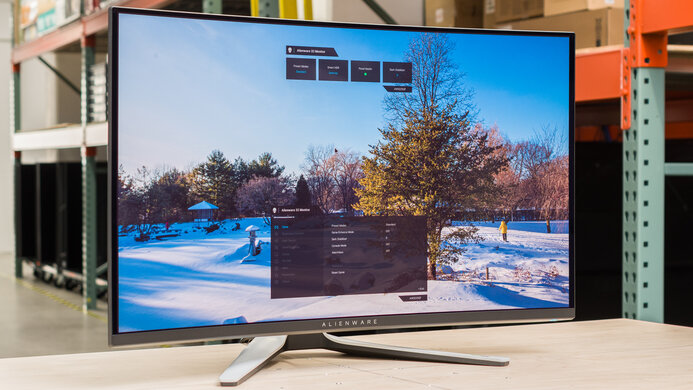
    The Dell 27 Gaming Monitor S2721DGF has a slightly different design from most Dell monitors we've tested, with a redesigned stand and a gaming-inspired design on the back. It has thin bezels on three sides, outstanding ergonomics, and a great stand. Like most Dell monitors, it's well-built, and it fits into any decor.

    Accelerated Longevity Test
    Uniformity PicturesN/A
    8.0
    Build Quality

    Like most Dell monitors, the Dell S2721DGF has great build quality, much better than the HP X27q. Although it's mainly made of plastic, the panels are sturdy and appear well-built. The hinge on the stand is solid and easy to use.

    9.2
    Ergonomics
    Height Adjustment
    5.1" (13.0 cm)
    Tilt Range
    -20° to 5°
    Rotate Portrait/Landscape
    Yes, Both Ways
    Swivel Range
    -45° to 45°
    Wall Mount
    VESA 100x100

    Typical for a Dell monitor, the stand has excellent ergonomics, making it a very versatile choice. The back has a different design than other Dell S-series monitors we've tested, like the Dell S3220DGF. Although there is a bias lighting feature, you can only turn it on or off, and it's a fixed color (blue). There's a hole in the stand for cable management, and although it's pretty basic, it works well and helps to keep your cables neat.

    Stand
    Base Width
    10.9" (27.6 cm)
    Base Depth
    7.9" (20.0 cm)
    Thickness (With Display)
    6.3" (16.0 cm)
    Weight (With Display)
    14.6 lbs (6.6 kg)

    The stand is very different from other Dells we've tested. It's very sturdy overall, and it supports the monitor well. Although it's a bit bulkier overall than most Dell monitors, you can still place small objects in front of it.

    Display
    Size
    27"
    Housing Width
    24.1" (61.2 cm)
    Housing Height
    14.2" (36.1 cm)
    Thickness (Without Stand)
    2.6" (6.5 cm)
    Weight (Without Stand)
    9.9 lbs (4.5 kg)
    Borders Size (Bezels)
    0.3" (0.7 cm)
    Controls

    Unlike the Dell S2719DGF, the controls are on the back of the display. The buttons are larger, though, and menu navigation is done via a joystick, making it a bit easier to use.

    In The Box
    Power Supply
    Internal

    • Power cable
    • DisplayPort cable
    • HDMI cable
    • USB-A to USB-B cable
    • Manual
    Picture Quality
    5.8
    Contrast
    Native Contrast
    882 : 1
    Contrast With Local Dimming
    971 : 1

    As expected for an IPS monitor, the Dell S2721DGF has sub-par contrast, so blacks look gray in a dark room. Contrast varies between individual units, and these results are at the low end of what we expect for an IPS monitor, meaning some units might look a bit better than this. The local dimming feature is only available in HDR, so unlike most monitors, the results here for contrast with local dimming were taken in HDR with the brightness at max.

    1.0
    Local Dimming
    Local Dimming
    Yes
    Backlight
    Edge

    Although not advertised to support it, the Dell S2721DGF has a local dimming feature. It's automatically enabled with HDR and can't be turned off. Unfortunately, due to the limited number of zones, it's terrible. Zone changes can be clearly seen, and there's significant blooming around bright objects in dark scenes due to the large area of each dimming zone.

    8.0
    SDR Brightness
    Real Scene
    341 cd/m²
    Peak 2% Window
    364 cd/m²
    Peak 10% Window
    367 cd/m²
    Peak 25% Window
    368 cd/m²
    Peak 50% Window
    368 cd/m²
    Peak 100% Window
    368 cd/m²
    Sustained 2% Window
    364 cd/m²
    Sustained 10% Window
    367 cd/m²
    Sustained 25% Window
    368 cd/m²
    Sustained 50% Window
    368 cd/m²
    Sustained 100% Window
    368 cd/m²
    Automatic Brightness Limiting (ABL)
    0.001
    Minimum Brightness
    35 cd/m²

    The Dell 27 Gaming Monitor S2721DGF has great peak brightness in SDR, with very little variation in peak brightness with different scenes. It can easily overcome glare in a bright room.

    We tested the peak brightness after calibration in the 'Custom Color' Picture Mode with Brightness at its max.

    6.6
    HDR Brightness
    VESA DisplayHDR Certification
    DisplayHDR 400 - 1.0/1.1
    Real Scene
    328 cd/m²
    Peak 2% Window
    481 cd/m²
    Peak 10% Window
    485 cd/m²
    Peak 25% Window
    486 cd/m²
    Peak 50% Window
    487 cd/m²
    Peak 100% Window
    487 cd/m²
    Sustained 2% Window
    480 cd/m²
    Sustained 10% Window
    484 cd/m²
    Sustained 25% Window
    484 cd/m²
    Sustained 50% Window
    486 cd/m²
    Sustained 100% Window
    486 cd/m²
    Automatic Brightness Limiting (ABL)
    0.003

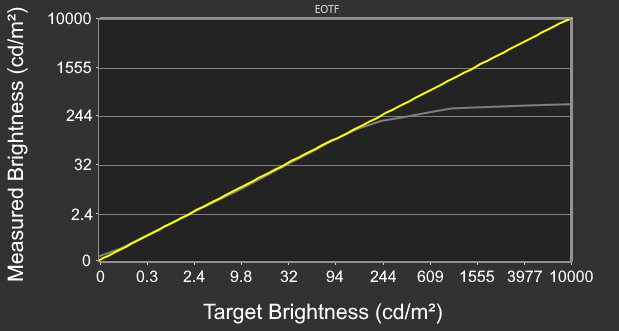
    Unfortunately, the Dell S2721DGF has just okay peak brightness in HDR. It's bright enough that small highlights in some games stand out a bit, but it's not bright enough for a true cinematic HDR experience. There's very little variation in brightness with different content, though, which is great.

    We measured the HDR peak brightness with the Smart HDR setting set to 'DisplayHDR'.

    8.5
    Horizontal Viewing Angle
    Color Washout From Left
    46°
    Color Washout From Right
    47°
    Color Shift From Left
    52°
    Color Shift From Right
    55°
    Brightness Loss From Left
    48°
    Brightness Loss From Right
    49°
    Black Level Raise From Left
    70°
    Black Level Raise From Right
    70°
    Gamma Shift From Left
    60°
    Gamma Shift From Right
    61°

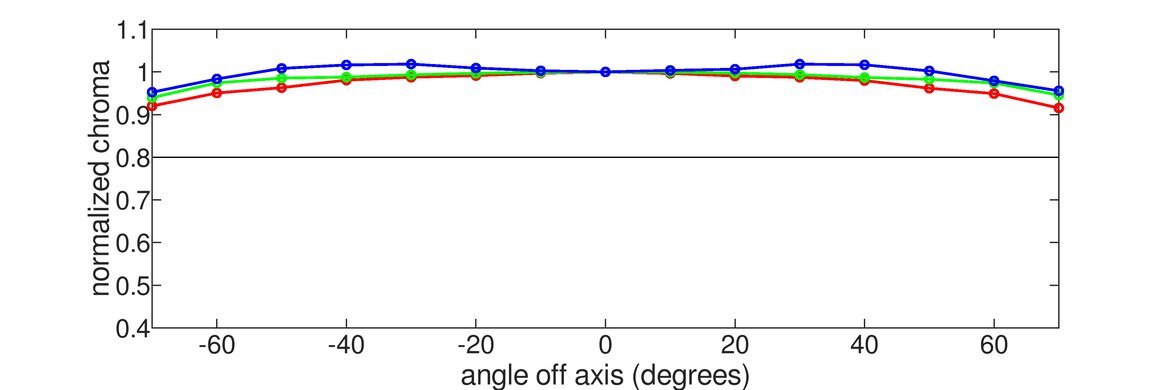
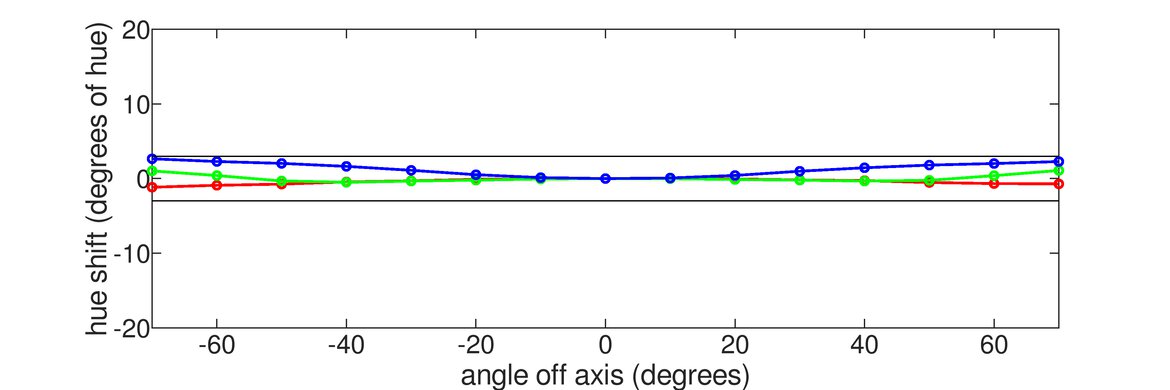
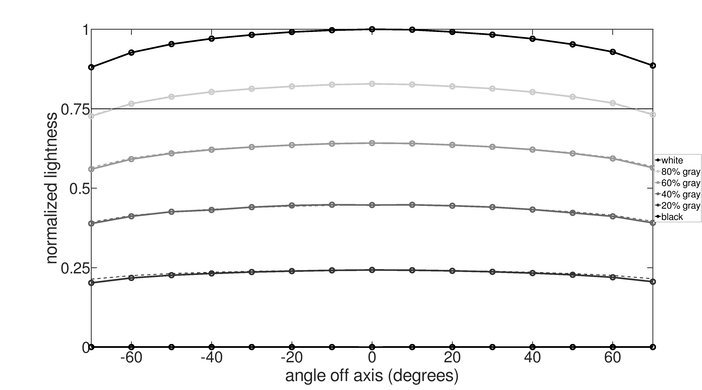
    The Dell S2721DGF has an amazing horizontal viewing angle, thanks to its IPS panel. The image remains accurate even at a wide angle, making it a great choice for co-op gaming or if you often share your screen with someone else.

    6.2
    Vertical Viewing Angle
    Color Washout From Below
    32°
    Color Washout From Above
    33°
    Color Shift From Below
    31°
    Color Shift From Above
    34°
    Brightness Loss From Below
    36°
    Brightness Loss From Above
    37°
    Black Level Raise From Below
    32°
    Black Level Raise From Above
    22°
    Gamma Shift From Below
    30°
    Gamma Shift From Above
    30°

    Strangely, the vertical viewing angle is mediocre, and it degrades much faster than the horizontal viewing angle. This is much worse than most IPS monitors we've tested, but we don't expect it to be noticeable to most users.

    8.0
    Gray Uniformity
    50% Std. Dev.
    3.975%
    50% DSE
    0.132%

    The Dell S2721DGF has excellent gray uniformity. The sides of the screen are a bit darker than the center, but this isn't very noticeable. There's very little dirty screen effect (DSE) in the center, which is especially important for sports games or browsing the web. In near-dark scenes, the uniformity is even better, with almost no noticeable issues. Uniformity can vary between individual units, but it's rarely an issue with recent monitors.

    Oddly, the gray uniformity varies depending on the refresh rate. When running this monitor at 60Hz, the overall uniformity is a bit worse, and there's a row of pixels near the bottom of the screen that is noticeably darker than the rest. Unfortunately, this issue isn't isolated to our unit, as multiple owners of this monitor have reported the same issue in the same spot.

    3.9
    Black Uniformity
    Native Std. Dev.
    2.946%
    Std. Dev. w/ L.D.
    7.261%

    Unfortunately, our Dell S2721DGF 27 has bad black uniformity, but this can vary between individual units. There's significant clouding throughout the screen, and some light bleeds in the corners (commonly called IPS glow). Local dimming makes it worse, due to the limited number of zones, causing significant clouding around the test cross.

    5.9
    Color Accuracy (Pre-Calibration)
    Picture Mode
    Standard
    sRGB Gamut Area xy
    137.7%
    White Balance dE (Avg.)
    3.43
    Color Temperature (Avg.)
    6,929 K
    Gamma (Avg.)
    2.13
    Color dE (Avg.)
    3.55
    Contrast Setting
    75
    RGB Settings
    Default
    Gamma Setting
    No Gamma Setting
    Brightness Setting
    75
    Measured Brightness
    223 cd/m²
    Brightness Locked
    No

    Unfortunately, the Dell S2721DGF has disappointing accuracy out of the box, much worse than the HP X27q. There are noticeable inaccuracies in brighter shades of gray, and most colors are terribly oversaturated and aren't displayed accurately. On the other hand, gamma follows the sRGB target curve very closely, but some darker scenes are displayed a bit darker than they should be. Note that the exact out-of-the-box calibration can vary between units. If color accuracy is important to you, check out the ASUS ROG Strix XG279Q.

    9.8
    Color Accuracy (Post-Calibration)
    Picture Mode
    Custom Color
    sRGB Gamut Area xy
    100.7%
    White Balance dE (Avg.)
    0.54
    Color Temperature (Avg.)
    6,504 K
    Gamma (Avg.)
    2.17
    Color dE (Avg.)
    0.34
    Contrast Setting
    73
    RGB Settings
    100-96-97
    Gamma Setting
    No Gamma Setting
    Brightness Setting
    30
    Measured Brightness
    99 cd/m²
    ICC Profile
    Download

    After calibration, there are no noticeable issues with any color, or with the white balance. Gamma follows the sRGB target curve almost perfectly, and the color temperature is very close to our target of 6500K.

    9.4
    SDR Color Gamut
    sRGB Coverage xy
    99.6%
    sRGB Picture Mode
    Custom Color
    Adobe RGB Coverage xy
    84.5%
    Adobe RGB Picture Mode
    Custom Color

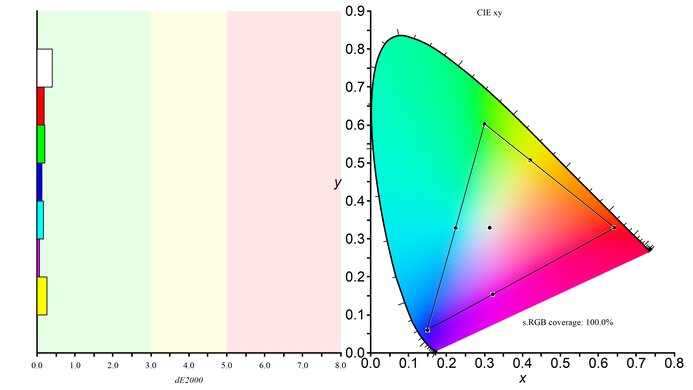
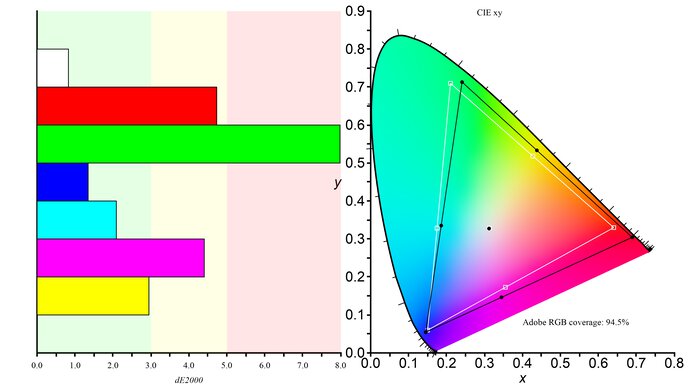
    The Dell S2721DGF has a superb SDR color gamut, with complete coverage of the sRGB color space used by most current desktop and web content, including games. It also has good coverage of the wider Adobe RGB color space.

    9.6
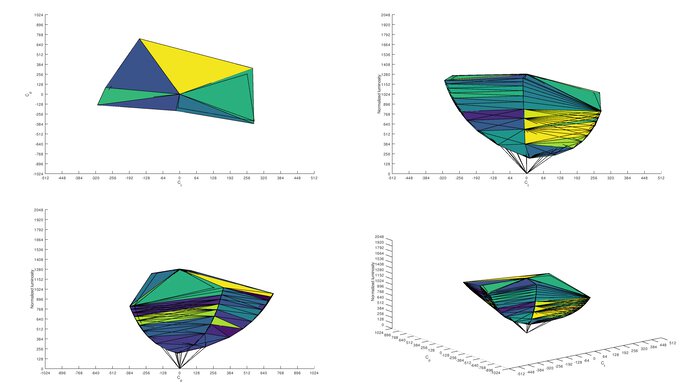
    SDR Color Volume
    sRGB In ICtCp
    97.5%
    sRGB Picture Mode
    Custom Color
    Adobe RGB In ICtCp
    89.5%
    Adobe RGB Picture Mode
    Custom Color

    The Dell S2721DGF has fantastic color volume in SDR. It can display most colors at a wide range of luminance levels. Due to the low contrast ratio, it can't display dark saturated colors very well.

    9.1
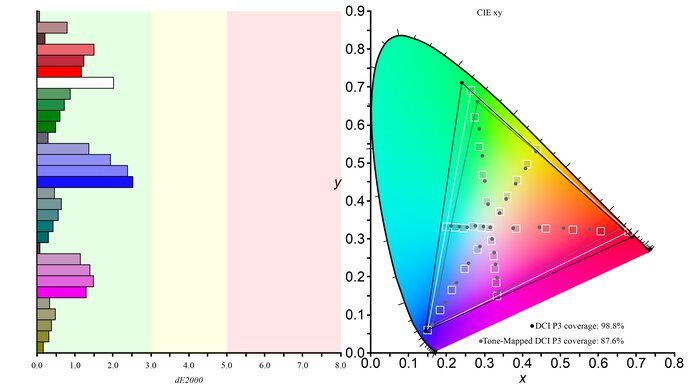
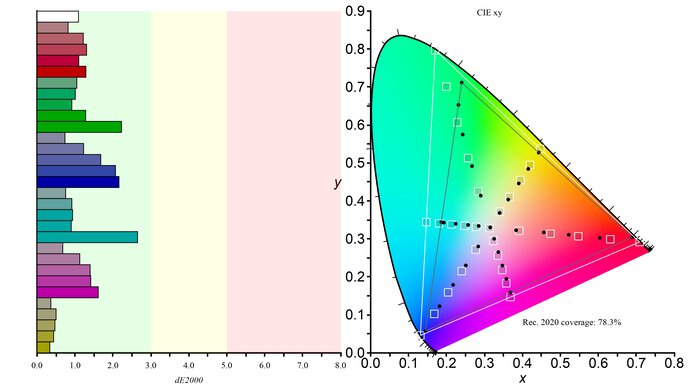
    HDR Color Gamut
    Wide Color Gamut
    Yes
    DCI-P3 Coverage xy
    97.2%
    DCI-P3 Picture Mode
    Desktop
    Rec. 2020 Coverage xy
    72.8%
    Rec. 2020 Picture Mode
    Desktop

    The Dell S2721DGF has a decent HDR color gamut. It can display a wide color gamut, and coverage of the DCI P3 color space used by most current HDR content is satisfactory.

    8.8
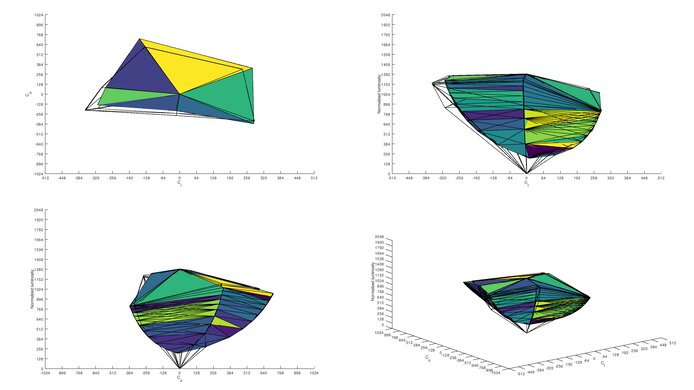
    HDR Color Volume
    DCI-P3 In ICtCp
    89.8%
    DCI-P3 Picture Mode
    Desktop
    Rec. 2020 In ICtCp
    71.0%
    Rec. 2020 Picture Mode
    Desktop

    The Dell S2721DGF 27 has just okay HDR color volume. It can't display dark saturated colors very well and can't fill out its gamut, especially in bright scenes.

    8.1
    Reflections
    Screen Finish
    Matte
    Total Reflections
    4.4%
    Indirect Reflections
    3.0%
    Calculated Direct Reflections
    1.5%

    The Dell S2721DGF has great reflection handling. Combined with its great peak brightness, it can easily overcome glare in a bright room.

    7.5
    Text Clarity
    Pixel Type
    IPS
    Subpixel Layout
    RGB

    Update 11/25/2021: We increased the text clarity score from 7.0 to 7.5 for consistency with other similar displays.

    The Dell 27 Gaming Monitor S2721DGF has good text clarity, but it's recommended to enable ClearType for the best results. This is especially noticeable in diagonal or curved lines, as seen in the top photo. When using the monitor at 60Hz, a row of pixels near the bottom dim, as you can see in this photo.

    9.7
    Gradient
    Color Depth
    10 Bit

    The Dell 27 Gaming Monitor S2721DGF has outstanding gradient handling, with almost no noticeable banding in most shades.

    Motion
    8.5
    Refresh Rate
    Native Refresh Rate
    165 Hz
    Max Refresh Rate
    165 Hz
    Max Refresh Rate Over DP
    165 Hz
    Max Refresh Rate Over HDMI
    144 Hz
    Max Refresh Rate Over DP @ 10-bit
    165 Hz
    Max Refresh Rate Over HDMI @ 10-Bit
    60 Hz
    Variable Refresh Rate (VRR)
    FreeSync
    Yes
    G-SYNC
    Compatible (NVIDIA Certified)
    VRR Maximum
    165 Hz
    VRR Minimum
    < 20 Hz
    VRR Supported Connectors
    DisplayPort, HDMI
    Variable Refresh Rate
    Yes

    The Dell S2721DGF has a very high refresh rate, great for gaming. It supports AMD's FreeSync variable refresh rate technology, and it's also certified by NVIDIA to work with their G-SYNC Compatible technology. Although FreeSync works over both HDMI and DisplayPort, G-SYNC mode only works over DisplayPort. Over HDMI, the maximum refresh rate is 144Hz.

    9.0
    Response Time @ Max Refresh Rate
    Recommended Overdrive Setting
    Extreme
    Rise / Fall Time
    3.5 ms
    Total Response Time
    6.3 ms
    Overshoot Error
    1.9%
    Worst 3 Rise / Fall Time
    4.2 ms
    Worst 3 Total Response Time
    10.6 ms
    Worst 3 Overshoot Error
    14.7%

    Overdrive Setting (VRR On) Response Time Chart Response Time Tables Motion Blur Photo
    Fast Chart Table Photo
    Super Fast Chart Table Photo
    Extreme Chart Table Photo

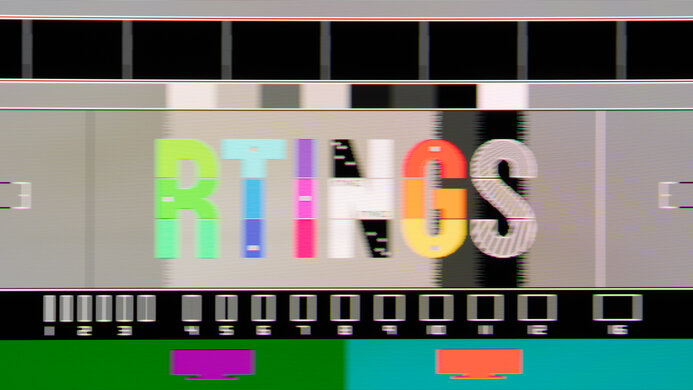
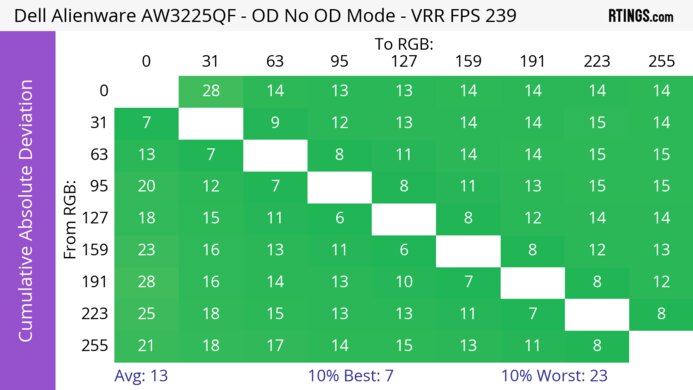
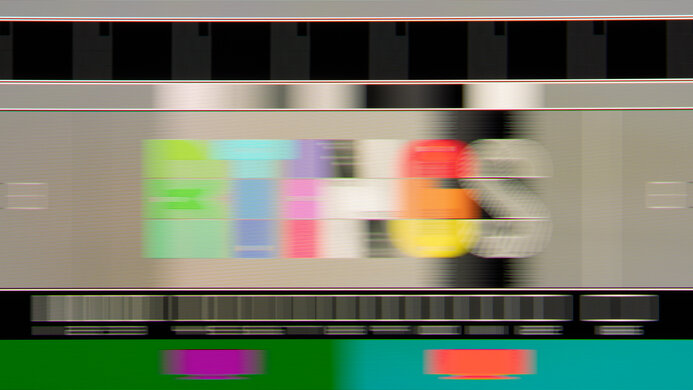
    The Dell S2721DGF has a fantastic response time at its max refresh rate of 165Hz. Motion looks smooth and the recommended overdrive setting is 'Extreme'. It has a quicker response time than 'Super Fast' and 'Fast', but there's a bit more overshoot, so if that bothers you, use 'Super Fast' instead. These results are with VRR enabled, as there's a big difference in motion handling with the VRR disabled. You can see the results below, and if you aren't using VRR, the recommended overdrive setting is 'Fast'.

    Overdrive Setting (VRR Off) Response Time Chart Response Time Tables Motion Blur Photo
    Fast Chart Table Photo
    Super Fast Chart Table Photo
    Extreme Chart Table Photo

    8.8
    Response Time @ 120Hz
    Recommended Overdrive Setting
    Super Fast
    Rise / Fall Time
    4.2 ms
    Total Response Time
    7.4 ms
    Overshoot Error
    0.6%
    Worst 3 Rise / Fall Time
    5.4 ms
    Worst 3 Total Response Time
    10.8 ms
    Worst 3 Overshoot Error
    4.8%

    Overdrive Setting (VRR On) Response Time Chart Response Time Tables Motion Blur Photo
    Fast Chart Table Photo
    Super Fast Chart Table Photo
    Extreme Chart Table Photo

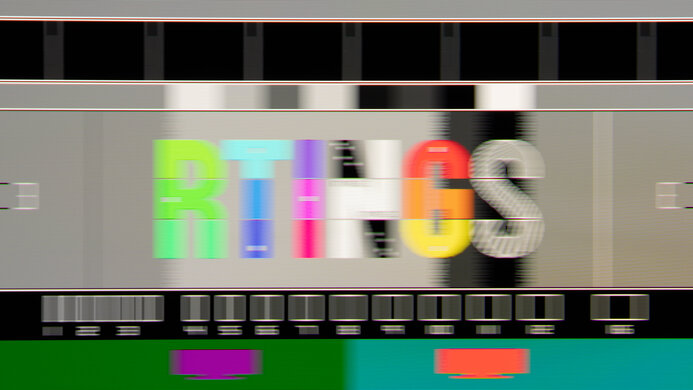
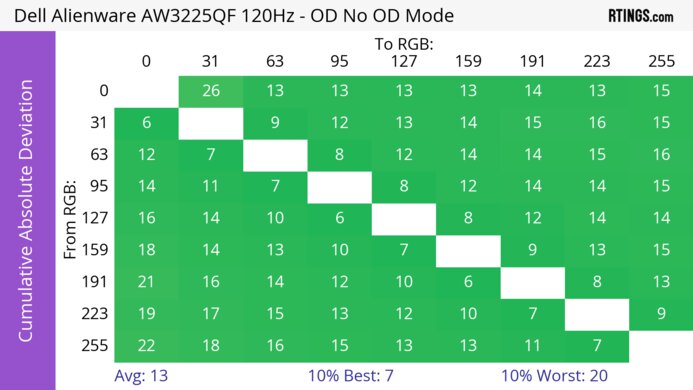
    The response time at 120Hz is excellent. Unlike at the max refresh rate, the recommended overdrive setting is 'Super Fast' because it has both a quicker response time and less overshoot than 'Extreme'. This means you might have to change the overdrive setting if the frame rate of your game drops or if you change sources. Once again, the motion handling is different with VRR disabled, and 'Fast' remains the best setting if you aren't using VRR.

    Overdrive Setting (VRR Off) Response Time Chart Response Time Tables Motion Blur Photo
    Fast Chart Table Photo
    Super Fast Chart Table Photo
    Extreme Chart Table Photo

    8.0
    Response Time @ 60Hz
    Recommended Overdrive Setting
    Fast
    Rise / Fall Time
    4.8 ms
    Total Response Time
    11.6 ms
    Overshoot Error
    1.0%
    Worst 3 Rise / Fall Time
    6.5 ms
    Worst 3 Total Response Time
    20.2 ms
    Worst 3 Overshoot Error
    5.3%

    Overdrive Setting (VRR On) Response Time Chart Response Time Tables Motion Blur Photo
    Fast Chart Table Photo
    Super Fast Chart Table Photo
    Extreme Chart Table Photo

    The Dell S2721DGF has a great response time at 60Hz. There's very little overshoot and only a very short blur trail behind fast-moving objects. The 'Fast' overdrive setting is the recommended one, as the higher settings are slower overall, with more noticeable overshoot. Unlike with faster refresh rates, the motion handling is similar even with VRR disabled, as you can see below, and 'Fast' is the best overdrive setting. However, if you want something that has an even faster response time at 60Hz, you can also consider the Dell G2724D.

    Overdrive Setting (VRR Off) Response Time Chart Response Time Tables Motion Blur Photo
    Fast Chart Table Photo
    Super Fast Chart Table Photo
    Extreme Chart Table Photo

    Backlight Strobing (BFI)
    Backlight Strobing (BFI)
    No BFI
    Maximum Frequency
    N/A
    Minimum Frequency
    N/A
    Longest Pulse Width Brightness
    N/A
    Shortest Pulse Width Brightness
    N/A
    Pulse Width Control
    No BFI
    Pulse Phase Control
    No BFI
    Pulse Amplitude Control
    No BFI
    VRR At The Same Time
    No BFI

    Unfortunately, the Dell 27 Gaming Monitor S2721DGF doesn't have an optional backlight strobing feature, commonly known as black frame insertion.

    10
    Image Flicker
    Flicker-Free
    Yes
    PWM Dimming Frequency
    >1000 Hz

    The backlight doesn't use pulse width modulation to dim the backlight, but there's a very high-frequency flicker. This is extremely unusual; we rechecked it with different equipment and confirmed that it's flickering at about 20kHz. This isn't at all noticeable in person.

    Inputs
    9.0
    Input Lag
    Native Resolution @ Max Hz
    3.7 ms
    Native Resolution @ 120Hz
    4.8 ms
    Native Resolution @ 60Hz
    11.1 ms
    Backlight Strobing (BFI)
    N/A

    The Dell 27 S2721DGF has fantastic low input lag, which is important for a responsive gaming experience. The 60Hz input lag is slightly higher than the Dell S2719DGF, but this isn't a noticeable difference.

    Note: Due to limitations with our testing equipment, the HDR input lag was measured over HDMI at 60Hz.

    8.0
    Resolution And Size
    Native Resolution
    2560 x 1440
    Aspect Ratio
    16:9
    Megapixels
    3.7 MP
    Pixel Density
    109 PPI
    Measured Screen Diagonal
    27.0"
    Screen Area
    310 in²

    The 27 inch, 1440p screen is great for multitasking and delivers a sharper image for gaming, so you can see more fine details in your games.

    5.0
    PS5 Compatibility
    4k @ 120Hz
    No
    4k @ 60Hz
    No
    1440p @ 120Hz
    Yes
    1440p @ 60Hz
    Yes
    1080p @ 120Hz
    Yes
    1080p @ 60Hz
    Yes
    HDR
    Yes
    VRR
    No
    5.8
    Xbox Series X|S Compatibility
    4k @ 120Hz
    No
    4k @ 60Hz
    No
    1440p @ 120Hz
    Yes
    1440p @ 60Hz
    Yes
    1080p @ 120Hz
    Yes
    1080p @ 60Hz
    Yes
    HDR
    No
    VRR
    Yes

    The Dell S2721DGF only supports 1440p and 1080p gaming from the Xbox Series X. It can't display a downscaled 4k resolution, which also means it doesn't support HDR from the Xbox Series X, as the Xbox only supports HDR with a 4k resolution.

    Inputs Photos
    Video And Audio Ports
    DisplayPort
    1 (DP 1.4)
    Mini DisplayPort
    No
    HDMI
    2 (HDMI 2.0)
    HDMI 2.1 Rated Speed
    No HDMI 2.1
    DVI
    No
    VGA
    No
    Daisy Chaining
    No
    3.5mm Audio Out
    2
    HDR10
    Yes
    3.5mm Audio In
    No
    3.5mm Microphone In
    No
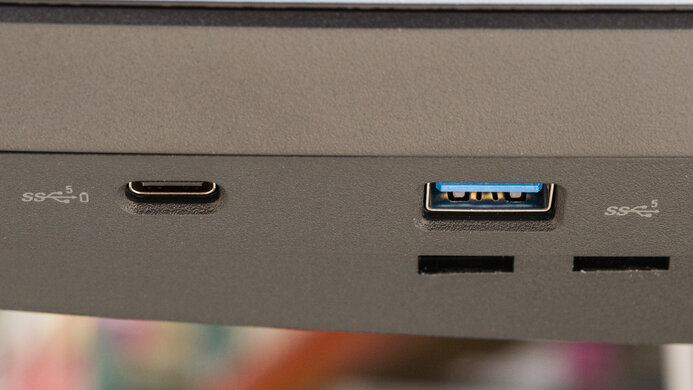
    USB
    USB-A Ports
    4
    USB-A Rated Speed
    5Gbps (USB 3.2 Gen 1)
    USB-B Upstream Port
    Yes
    USB-C Ports
    0
    USB-C Upstream
    No USB-C Ports
    USB-C Rated Speed
    No USB-C Ports
    USB-C Power Delivery
    No USB-C Ports
    USB-C DisplayPort Alt Mode
    No USB-C Ports
    Thunderbolt
    No

    If you want something for the office that has a USB-C port, then look into the Dell P3223DE.

    macOS Compatibility

    This monitor works well with MacBooks. There are no issues with sleep mode or closing the lid; it responds quickly, and windows are restored to their original position. VRR and HDR don't work very consistently, as you often have to change settings on and off again or disconnect the cable briefly for these modes to work properly.

    Features
    Additional Features
    Speakers
    No
    RGB Illumination
    Fixed (On/Off)
    Multiple Input Display
    No
    KVM Switch
    No

    There are a few additional features on the Dell S2721DGF, including the ability to display a frame counter or timer. Unlike many recent gaming monitors, there's no option to add crosshairs, which might be a bit disappointing.

    On-Screen Display (OSD)