Our Verdict
The LG E8 is an excellent TV for many different uses. It has a remarkable picture quality with perfect blacks. The image remains accurate when viewed at an angle and thus it is suitable for a large room where people will be watching from the side. It has good motion handling and good gray uniformity to please sports fans, and low input lag, good for most gamers.
- Perfect blacks
- Image remains accurate when viewed at an angle
- Instantaneous response time leaves very little motion blur
- Risk of permanent burn-in with prolonged exposure to static content
- Brightness changes with screen content (ABL)
The LG E8 is excellent for watching movies. Especially in a dark room, the perfect blacks and the wide color gamut produce excellent picture quality with bright and vivid colors. Motion handling is excellent too, so fast moving content is clear with only a small blur trail. The E8 can clear 24p judder from the most common inputs so you should not have any issues with this.
The LG E8 is excellent for watching TV shows. It has remarkable reflection handling, so you can place it in a room with many small light sources without issues. It has good viewing angles so you can enjoy your favorite show without the need to sit directly in front of the TV. It has a very good smart platform with an abundance of available apps, and you will most certainly find the app that carries your favorite TV shows.
Excellent TV for watching sports. It has excellent reflection handling, so you can place it in a room with many small windows without issue. It has a very fast response time, so there is only a small blur trail in fast-content like sports. It is unlikely that you will notice any dirty screen effect due to the good gray uniformity. Finally, it is a good choice if you plan to watch the big game with a group of friends, as it has good viewing angles and the image remains accurate for those watching from the side.
The E8 is an excellent TV for playing video games. It has very low input lag and it is very responsive to your actions. At the same time, fast content looks good with only a small blur due to the almost instantaneous response time of the TV. If you play games during the night, you will enjoy the impressive dark room performance of the TV with perfect blacks. Unfortunately, it does not support any VRR implementation to avoid tearing in very graphics intensive games.
This is an excellent TV for watching HDR movies. The OLED55E8 has perfect blacks that boost the picture quality in dark rooms where HDR movies are meant to be watched. It has a wide color gamut that produces rich colors and its good HDR brightness levels make highlights pop. It has very good motion handling with very little blur in fast action movies, and 24p judder will not be an issue.
The LG E8 has an excellent performance in HDR Gaming. It is very responsive due to the very low input lag when displaying 4k @ 60Hz + HDR. The picture quality is remarkable, with perfect blacks, vivid colors and highlights that pop. When playing a fast action game you will appreciate the fast response time that only leaves a small blur trail, and if you wish to make the image even crisper you can use the optional BFI feature.
This E8 has a remarkable performance when used as a PC monitor. It supports chroma 4:4:4 so the text is clear in all backgrounds. The image remains accurate when viewed at an angle so there are no uniformity issues at the sides of the screen. It has excellent motion handling and an instantaneous response time so you will not see much blur trail on your mouse. Unfortunately, the brightness lowers when large areas of the screen are illuminated, and this can be bothersome in PC usage. Finally, displaying a static content, like software menus, for a prolonged period may have a risk of burn-in.
Changelog
- Updated May 21, 2020: Converted to Test Bench 1.5.
- Updated Feb 21, 2020: Converted to Test Bench 1.4.
- Updated Feb 28, 2019: Converted to Test Bench 1.3.
- Updated Oct 22, 2018: Review published.
Check Price
Differences Between Sizes And Variants
We tested the 55" model (OLED55E8PUA), and we expect our review to be valid for the 65" (OLED65E8PUA).
If someone comes across a different type of panel or if their LG E8 doesn't correspond to our review, let us know and we will update the review. Note that some tests such as the gray uniformity may vary between individual units.
| Size | US Model | UK Model | Panel Type | Refresh Rate | Notes |
| 55'' | OLED55E8PUA | OLED55E8PLA | OLED | 120Hz | |
| 65'' | OLED65E8PUA | OLED65E8PLA | OLED | 120Hz |
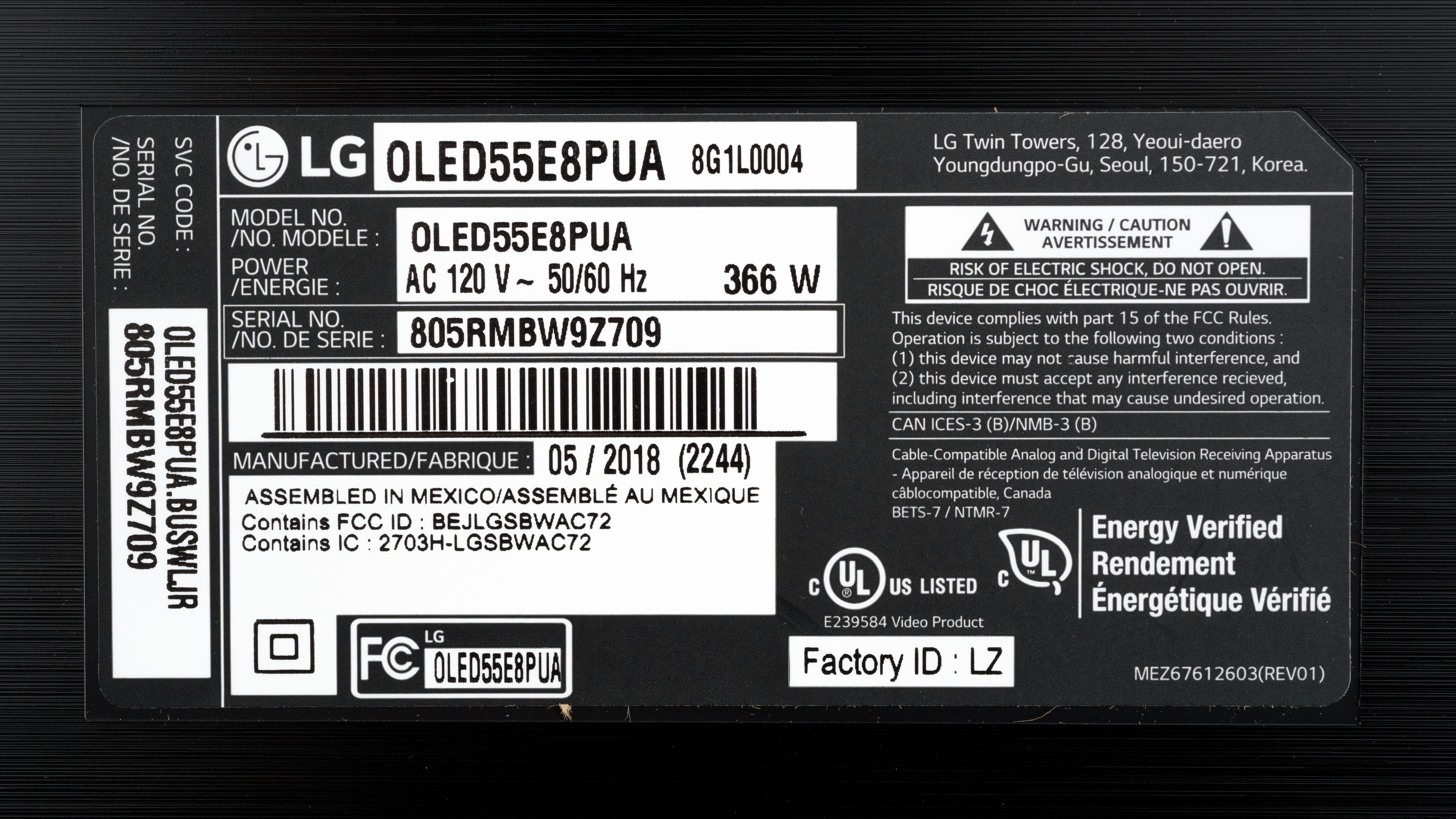
The LG E8 we reviewed was manufactured in May 2018.
Popular TV Comparisons

The LG E8 is an excellent TV with for most usages, especially when placed in a dark room. See our recommendations for the best TVs and the best OLED TVs.
The LG E8 OLED is slightly better than the LG E7 OLED. The LG E8 has an optional black frame insertion feature that helps remove motion blur and make the image look crisper. The LG E8 also has better out-of-the-box color accuracy, so that you can enjoy great picture quality in movies without the need for a professional calibration.
The LG E8 OLED and LG E9 OLED deliver very similar picture quality. The E9 is marginally better, as it has better gray uniformity and is a more future-proof model. The E9 supports HDMI 2.1 on all HDMI ports and supports a few new features, like HDMI Forum's variable refresh rate technology and eARC.
The LG E8 OLED is better than the Samsung Q9FN/Q9/Q9F QLED 2018 for most people, unless the possibility of burn-in is a concern or you have a bright room. The E8 can display perfect blacks and supports Dolby Vision, and this is great for watching movies or HDR content in a dark room. The E8 also has better viewing angles, so it's more suitable for large rooms with wide seating arrangements. The Samsung Q9FN, on the other hand, can get brighter and is suitable for brighter viewing environments, and also supports FreeSync variable refresh rate, which is great if you play video games.
The LG C8 OLED and the LG E8 OLED both have very similar performance. The LG E8 has somewhat better sound quality due to the embedded soundbar. The two TVs, however, differ significantly in design, as the E8 has a more elegant style whereas the C8 has a more classical one.

We buy and test dozens of TVs yearly, taking an objective, data-driven approach to deliver results you can trust. Our testing process is complex, with hundreds of individual tests that take over a week to complete. Most of our tests use specially designed test patterns that mimic real content, but we also use the same sources you have at home to ensure our results match the real-world experience. We use two main tools for our testing: a Colorimetry Research CR-100 colorimeter and a CR-250 spectroradiometer.
Test Results
Older Test Bench: We tested this product using an older TV test methodology before a major update. Some of the test results below aren't directly comparable with other TVs. Learn more
for pictures & test results

The design of this year's LG E8 is an advancement over last year's E7P model, which was also excellent. LG put a lot of effort to create a TV that will look good even when it's off. The results are very good as the TV has a strong premium feel, an elegant look, and excellent overall build quality. The edges of the TV are made of glass, and the embedded soundbar is hardly noticeable, as it is thinner than last year's and it is blended in the lower bezel of the screen. The glass border also acts complementary to the stand to provide extra support for the TV.
for pictures & test results

The stand of the LG OLED E8 resembles that of the B8. The TV, however, has a thick sheet of glass onto which the screen is placed. This sheet of glass also helps support the TV and also serves the illusion that the TV is floating.
Footprint of the 55" TV stand: 24.1" x 8.9"
for pictures & test results

The back of the TV is plain. The electronics compartment is at the lower half of the back. There is very basic cable management with the use of a small removable cable guide as seen here. The 3 HDMI inputs and one USB face to the side, so you will have easy access if the TV is wall mounted.
for pictures & test results

The borders are made of glass. This design is very similar to last years E7P model.
for pictures & test results

This TV is very thin when you look at it from the side. The panel is placed on a 1/4 inch thick glass that gives off a sturdy feel and a sleek look.
for pictures & test results

The build quality of the LG OLED55E8PUA is excellent. The premium feel is apparent everywhere in this TV's build. You will have no issues.
for pictures & test results

The LG E8, just like all OLEDs, has an infinite contrast ratio as it can switch off individual pixels. This produces perfect blacks and is great for watching movies in a dark room.
for videos & test results

The LG OLED55E8PUA has no need for local dimming as it can switch off each pixel individually. The video is for reference only.
Very good SDR peak brightness for the LG OLED E8. Slightly lower than the levels measured for the B8 and the C8.
The brightness level remains relatively constant regardless of the window size, except when almost the entire screen is lit, at which point the brightness level drops due to Automatic Brightness Limiter(ABL). This is not noticeable to most people during normal use.
The menu option that controls the luminance on this LG E8 is called OLED Light.
Good HDR peak brightness but still short of the 1000-4000 cd/m² HDR is mastered for. The real scene peak brightness is, however, among the highest we've measured on OLED TVs, almost identical to the C8, and certainly brighter than the Sony A9F.
As expected, brightness levels drop gradually as the illuminated window size increases. This is due to the TVs brightness protection mechanism Automatic Brightness Limiter(ABL).
for pictures & test results

for pictures & test results

The LG OLED E8 has very good gray uniformity and most people will not notice any clouding. It is a great choice for those who enjoy watching sports as it only has a minimal dirty screen effect. In the 5% gray uniformity picture the E8 displays some vertical bands that some people might spot when watching dark scenes in a dark room. This behavior is similar to other 2018 OLEDs like the B8, the C8, and the A8F. This is hardly noticeable, and only when in a dark room.
for videos & test results

for pictures & test results

for pictures & test results

for pictures & test results

Just like most OLEDs, the viewing angles of the E8 are very good. The picture quality remains good even when watching from the side. It is a good choice for a room with a wide seating arrangement. When viewed at an angle, colors do shift, but less than LCD TVs with a VA or IPS panel.
for pictures & test results

The LG OLED55E8PUA has perfect black uniformity. Just like all OLEDs, switching off individual pixels produces perfect blacks and thus perfect black uniformity.
for pictures & test results

for pictures & test results

for pictures & test results

Excellent reflection handling on the LG E8. Reflections are well defined due to the glossy filter and, at the same time, they are greatly diminished. There is a slight pink tint that is not uncommon, and it is also found on the LG C8 and the Samsung Q8FN.
for pictures & test results

for pictures & test results

for pictures & test results

Unlike the B8 or the C8, the LG E8 has excellent out of the box color accuracy. The most accurate picture mode was the 'Expert (Dark Room)'. The white balance dE and the color dE are well below the threshold of 3 where most enthusiasts would notice any inaccuracies. At the same time, the color temperature is slightly warm with an insignificant red/yellow tint. Gamma is a little higher at 2.33 and does not follow the target very well, thus shades are slightly darker.
for pictures & test results

for pictures & test results

for pictures & test results

Excellent results after calibration. The color and white balance dE were diminished below 1, making any inaccuracies impossible to spot with the naked eye. This is one of the best results we've measured until now. Gamma was also corrected and now follows the target almost perfectly. Finally, the color temperature was brought almost spot on the 6500K target.
You can see our recommended settings here.
for pictures & test results

The E8 upscales older 480p content well. The resulting image quality is not overly sharp, but all of the details are preserved well.
for pictures & test results

720p content is displayed without any obvious issues.
for pictures & test results

Full-HD content such as 1080p cable, streaming, and Blu-rays look good when upscaled. The image is clear and detailed.
for pictures & test results

Native 4k content is displayed without any issues.
for pictures & test results

With WRGB OLEDs, all four subpixels are never on at the same time. We have taken two photos to demonstrate this.
for pictures & test results

for pictures & test results

for pictures & test results

Excellent wide color gamut. The TV covers almost all of the DCI P3 space, whereas the coverage of the wider Rec 2020 is more limited. Very similar results to the B8 and the C8.
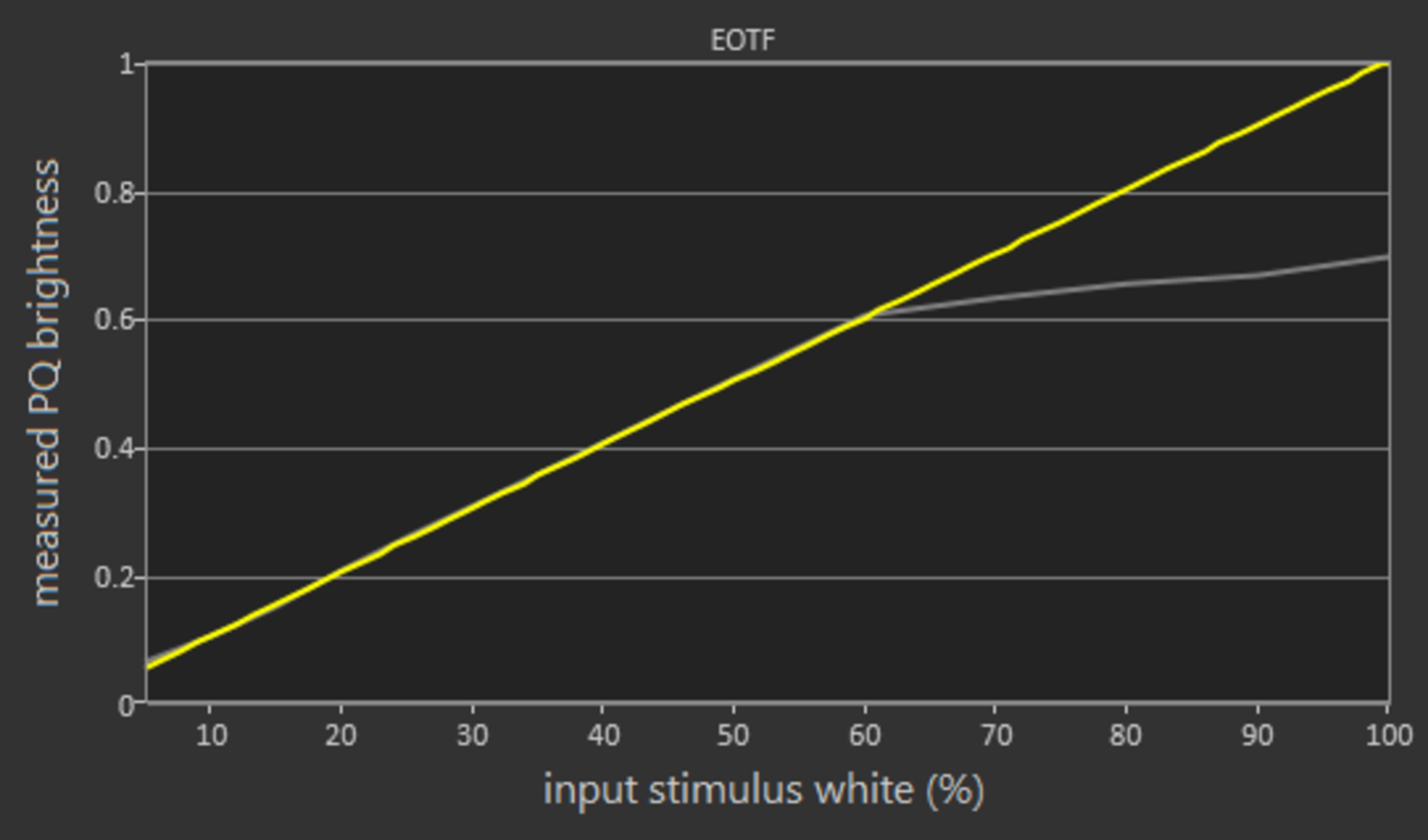
In the 'Cinema' picture mode the EOTF follows our PQ curve well until the higher luminosity levels when it starts to slowly roll off.
The EOTF in the Game picture mode and in PC picture mode are nearly identical to that of Cinema, which is good.
If you find HDR content too dim, you can set the Dynamic Contrast setting to 'High', and the Dynamic Tone mapping to 'On'. These settings will raise the EOTF and brighten most HDR scenes.
for pictures & test results

for pictures & test results

Decent color volume coverage. The TV is has a wide color gamut, but loses volume at high levels of luminance. This happens because of the presence of a white subpixel in its WRGB pixel panel. This white subpixel helps boost luminance but at the same time, its mere presence de-saturates the colors produced by the other subpixels. This is more apparent at higher luminosity levels where the white subpixel intensity is higher. This results in less bright colors on the E8, just like the B8 and the C8. However, most people will not notice it.
for pictures & test results

The gradient on this TV is excellent. Our test image is displayed smoothly with no visible banding except in the dark green and gray shades, where slight banding is visible. In certain scenes, there is some banding noticeable in large areas of similar color. You can reduce banding by enabling MPEG Noise Reduction, which activates the gradient smoothing feature of the E8. This reduces the visible banding but also results in a loss of fine detail.
for pictures & test results

The LG OLED55E8PUA shows no signs of image retention except for a minor issue at the very beginning of the recovery time and this is great.
There is, however, some panel variation to be expected. Even panels of the same model may be more or less prone to image retention. This year we've tested the LG B8, the C8 and now the E8. The LG B8 and the E8 show almost no signs of image retention whereas the C8 shows slightly more signs of image retention.
Be reminded that this test is only indicative of short-term image retention and not the permanent burn-in that may occur with prolonged exposure to static images. To further investigate the issue of permanent burn-in, we are currently running a test and you can read all about it, here.
Update 11/01/2019: Updated text to include our stance on burn-in.
Although we don't expect most people who watch varied content to have any issues, OLED TVs, such as the LG OLED E8 do have the possibility of experiencing burn in. Each manufacturer implements different technologies in an effort to decrease the risk of burn-in. The LG E8, just like the B8 and the C8, has three features to decrease the risk of burn-in.
We recommend enabling Pixel Refresher and Screen Shift, and setting Logo Luminance Adjustment to 'Low'.
We are currently running a test about this and you can see the results here.


for pictures & test results

The LG E8 does not have any visible backlight flicker and this makes motion look smoother. However, this creates some persistence blur. If you want to minimize blur, you can enable the Black Frame Insertion option available on this TV.
for pictures & test results

for pictures & test results

The E8 has an optional Black Frame Insertion mode that will insert a black frame and make the image crisper. To enable BFI you must go into the TruMotion menu, select the 'User' option, and then enable Motion Pro.
TruMotion is grayed out when displaying 120Hz content.
for pictures & test results

for pictures & test results

The LG E8 has excellent motion interpolation features. It does a very good job in slow moving shots, and when there is too much motion where the artifacts would multiply, it just stops.
The TV uses the same menu options like the B8 and the C8 to control interpolation. To interpolate low fps content to 60Hz, set TruMotion to 'User' and raise the De-Judder slider. To interpolate 60Hz content to 120Hz, raise the De-Blur slider.
Motion interpolation will create some artifacts, especially in fast-moving content. If you find the artifacts bothersome, we suggest that you lower the interpolation settings. This will make the interpolation algorithm more conservative, but it will also make motion look less smooth.
The almost instantaneous response time of the E8 makes the image look crisp with very little blur. This, however, increases the stutter that can be experienced in lower FPS content like 24p. This is why the TV scores bad in the stutter test.
If you find stutter bothersome you can remove it by using the motion interpolation features that work very well on this TV.
The TV has excellent judder handling. It can display 24p movies without judder from the most common sources. To remove judder turn the Real Cinema option to 'on'. Note that just like the B8 and the C8, there is always judder when BFI is enabled.
The LG OLED E8 has a native 120Hz panel but does not support any variable refresh rate technology like FreeSync or G-SYNC.
The input lag of the LG E8 OLED is excellent and very similar to the C8 or the B8. It is worth noting that the E8 has a lower input lag than the C8 and the B8 when displaying 1080p @ 120Hz. We do not know why and we will retest the C8 and the B8 with the new firmware to see if this remains the case.
4:4:4 Chroma is only properly displayed when the input mode (Input icon) is set to 'PC'. However, if you need low input lag while using the TV as a PC monitor, you are better off switching to game mode.
The 4:2:0 input lag bug that was noticed on the B8 has been fixed, so now 4k in HDR has the same input lag as in SDR.
The TV supports most common resolutions without any issue. Unfortunately, 1440p is not supported on this LG E8.
4k @ 60Hz @ 4:4:4 or @ 4:2:2 is only supported when HDMI ULTRA HD Deep Color is enabled.
4:4:4 Chroma is only properly displayed when the input mode (Input icon) is set to PC.
In PC Mode, Sharpness at '20' means that there is no added sharpness.
The bug that was making colors washed out in HDR when in PC mode, as seen on the B8, has now been fixed on the E8. Unfortunately, PC mode + HDR still has more banding than out of PC mode, so if you notice bad banding it may be best to change out of PC mode and into Game mode.


The LG E8, just like the other 2018 models, does not have a component input. It supports composite input using the included adapter. It has 3 USB 2.0 ports and no USB 3.0 ports, unlike last years' C7.
The TV does not have an analog audio output, so if you want to connect wireless headphones, you will need a digital to analog converter like this one.
Update 02/27/2019: While the TV doesn't support Atmos passthrough via a Dolby TrueHD carrier signal (common in Blu-ray disks), it is advertised as supporting Atmos passthrough via Dolby Digital Plus, which is the Atmos format used by some sources like Netflix; our testing confirmed this passthrough on the LG C8. We expect this to be true for the LG E8.
for pictures & test results

The frequency response is good. LFE (low-frequency extension) is at 71Hz, which is quite decent, especially for a TV. This means the bass will have a good amount of punch and body to it. However, since it lacks sub-bass, it won't produce any thump or rumble, which is common to bass-heavy music, film and video game sound effects. The response above the TV's LFE is quite even and flat, which results in clear and intelligible dialog. This TV also gets quite loud, but loses some of its punch in the bass range and clarity in the treble range when pushed to the maximum.
for pictures & test results

The distortion performance is decent. The overall amount of THD produced at 80dB SPL is above-average. This TV also performs decently at maximum volume, but could sound a little harsh and impure when pushed to the limit.
for pictures & test results

The webOS interface of the LG E8 is excellent. It has three sections: settings, inputs, and apps. The interface is easy to use, and navigating through the menus is fast thanks to the α9 processor. Some first-time users, however, might find it confusing.
We did not see any ads during testing this LG E8. However, we have found ads on other 2018 LG TVs as shown here, so we assume all 2018 LG TVs have ads.
for pictures & test results

Like the rest of LG's lineup, the LG OLED55E8PUA comes preloaded with most of the popular apps, including Netflix, Amazon Video, and YouTube. You can always download more from LGs content store, where you will find a plethora of apps.
for pictures & test results

The remote of the LG E8 is excellent. Just like the rest of the 2018 LG OLED lineup, the TV will respond to voice commands through the mix of Google Assistant and ThinQ AI.
The TV can perform several actions using voice. You can ask the TV to: 'Change to HDMI 1' or 'Open YouTube' or even 'Search Netflix for Marco Polo'. You can also ask the assistant more general questions like 'How's the weather in Montreal', and the TV will answer through the use of LG ThinQ and Google Assistant.
Unfortunately, you can not control the TV's settings with your voice, as commands like 'Change OLED Light to 10' will not work.
for pictures & test results

Like almost all LG TVs and monitors, the E8 has a single rocker joystick on the back of the TV. It works very well and allows quick access to most functions of the TV.
for pictures & test results

- Manual
- Remote
- Batteries
- Composite adapter
- Power cable: 60". (Not shown)