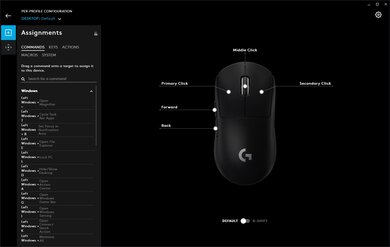
The GLORIOUS Model D is an excellent gaming mouse that's designed to be as light as possible. It's a more ergonomic version of the ambidextrous GLORIOUS Model O and performs very well. It's very comfortable to use and is better suited for palm or claw grips. Its honeycomb pattern design makes it very lightweight, the feet glide very well, and it even comes with additional skates. It features RGB lighting and can be customized with presets inside its software.
Our Verdict
The GLORIOUS Model D is an okay office mouse. It has a comfortable right-slanted design and is very well-built. The two side buttons can also help with making web browsing a bit easier. Although its cable is amazingly light, it still doesn't offer the versatility of a wireless design.
- Very lightweight.
- Comfortable to use for a wide range of hand sizes and grips.
- Amazing cable.
- Has a bit more flex than the Model O.
- Model O is a better option if you use a fingertip grip.
The GLORIOUS Model D is great for FPS games. Its click latency is very low, it's a very lightweight mouse, and its right-slanted design is comfortable to use. However, if you use a fingertip grip, you'll be better off with an ambidextrous mouse like the Model O, and smaller hands might even prefer looking at the GLORIOUS Model O-. Its feet are great, and you can even stick the included larger skates if you prefer them.
- Very lightweight.
- Comfortable to use for a wide range of hand sizes and grips.
- Amazing cable.
- Has a bit more flex than the Model O.
- Model O is a better option if you use a fingertip grip.
The GLORIOUS Model D is a decent MMO mouse. It has two side buttons which give you extra inputs, but it won't be as amazing as a dedicated MMO mouse with a plethora of side buttons.
- Very lightweight.
- Comfortable to use for a wide range of hand sizes and grips.
- Amazing cable.
- Has a bit more flex than the Model O.
- Model O is a better option if you use a fingertip grip.
Like most wired-only gaming mice, the GLORIOUS Model D isn't designed for travel. It takes a lot of space, especially with the non-detachable cable. It isn't the easiest to use in a restricted space like on a train or plane.
- Very lightweight.
- Comfortable to use for a wide range of hand sizes and grips.
- Amazing cable.
- Has a bit more flex than the Model O.
- Model O is a better option if you use a fingertip grip.
Changelog
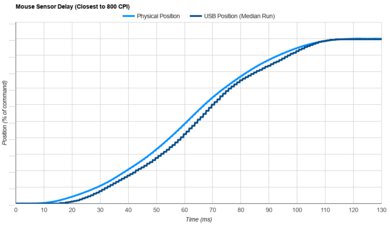
- Updated Sep 16, 2022: We've converted this review to Test Bench 1.3. This update adds a new Sensor Latency test and makes minor changes to several of our existing tests, resulting in test result changes in several sections. For more information, you can check out our full changelog here.
- Updated Aug 17, 2022: We've converted this review to Test Bench 1.2. This update simplifies our Weight test and expands on our CPI test from Test Bench 1.1, resulting in changes to test results in both sections. For more details, you can see our complete changelog here.
- Updated Aug 16, 2022: We've converted this review to Test Bench 1.1. This update revamps our Click Latency test and results in changes to test results. For more details, you can see our full changelog here.
- Updated Oct 05, 2020: Converted to Test Bench 1.0.
Check Price
Differences Between Sizes And Variants
We tested the GLORIOUS Model D. It's also available in a smaller size, called the GLORIOUS Model D-. They perform identically, but the Model D- is lighter.
Popular Mouse Comparisons
The GLORIOUS Model D is an excellent lightweight gaming mouse, although there are some lighter options like the Finalmouse Ultralight 2 - Cape Town. However, the Model D has a nice and comfortable ergo, right-slanted design that's very comfortable for a wide range of grips and hand sizes. It also has dedicated software for customization options and it feels very well-built. See our recommendations for the best gaming mice, the best wireless gaming mice, and the best mice overall.
The GLORIOUS Model O and the GLORIOUS Model D are both ultra-light gaming mice that perform very similarly. The main difference is the shape of these two mice. The Model O is an ambidextrous mouse, while the Model D has a right-slanted design. The Model D also has a higher lift-off distance and seems to have more flex than the Model O.
The GLORIOUS Model D and the Razer DeathAdder V2 are two great gaming mice with a slanted design. The GLORIOUS is lighter and feels a bit cheaper, although it still feels premium. Its cable also feels lighter and is very flexible. On the other hand, the Razer has a shorter lift-off distance and has more programmable buttons, although both mice only have two side buttons.
The GLORIOUS Model D is a much lighter mouse than the Logitech G502 HERO. The GLORIOUS might not feel as solid and well-built as the Logitech, but its cable is much more flexible and lightweight. On the other hand, the Logitech has a comfortable thumb rest and comes with multiple weights. It also has a lot more programmable buttons, and you can unlock the wheel for free scrolling. The software is also available on macOS, which isn't the case with the Model D.
The GLORIOUS Model D- is slightly better for ultra-light gaming than the GLORIOUS Model D because it's lighter. The Minus is smaller and better suited for those with small hands, while the Model D is aimed at those with larger hands. Besides that, both mice have the same performance.
Test Results




for pictures & test results




for videos & test results



for pictures & test results



for videos & test results

for pictures & test results

for pictures & test results



for pictures & test results


for pictures & test results